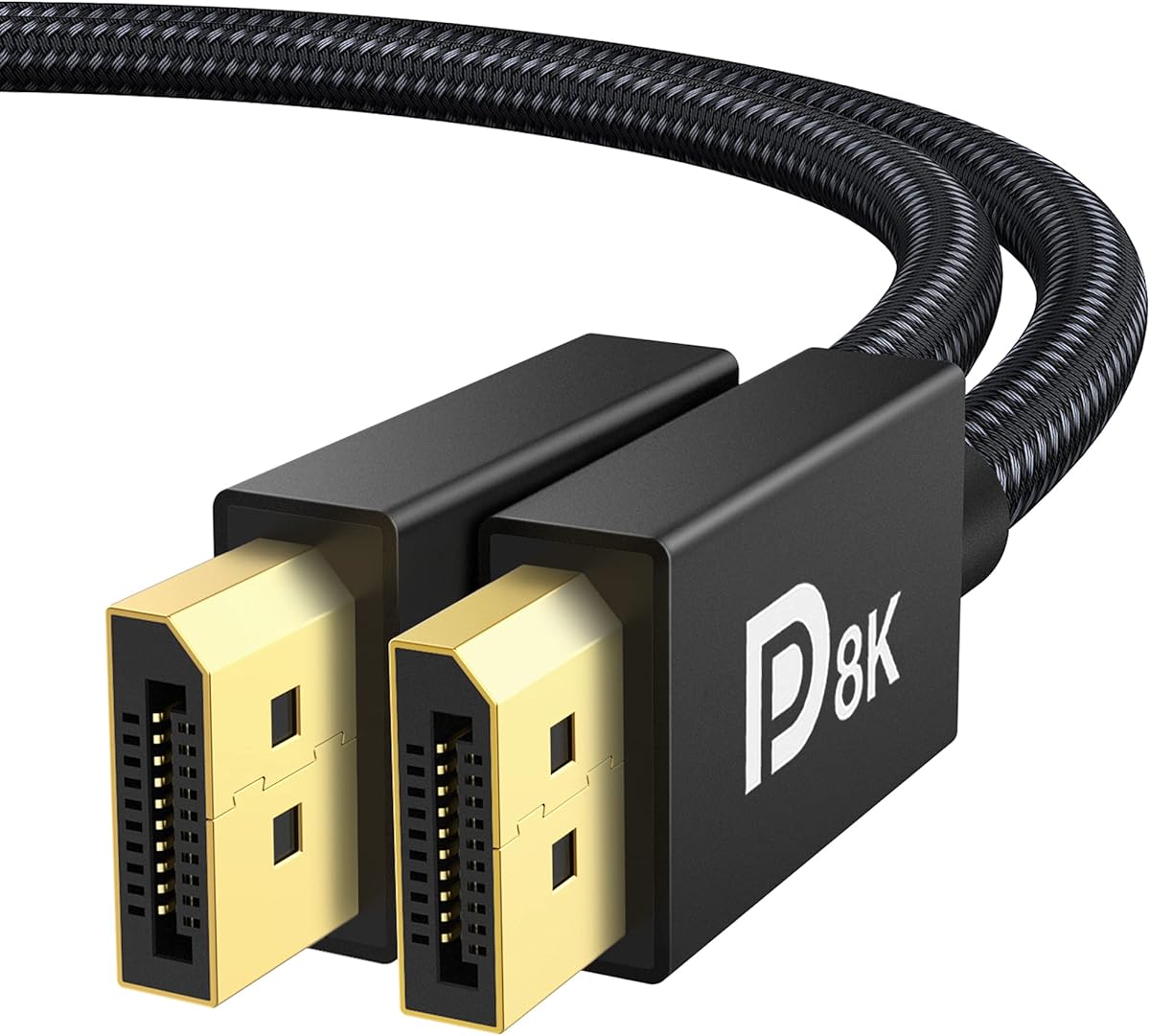
IVANKY VESA Certified 8K DisplayPort Cable 1.4
4.7Editor score
32.4 Gbps HBR3 Support
Latch-free Connector Design
Nylon Braided Durability
This guide compares the top 10 Displayport cables for 144Hz, analyzing bandwidth, VESA certification, and build quality to help you choose the right cable.
Finding the right Displayport cable for 144Hz ensures your gaming monitor performs at its peak. A high-quality cable supports high refresh rates and resolutions without signal loss or tearing.
We compared ten top-rated Displayport cables based on VESA certification, bandwidth capacity, durability, and compatibility with modern graphics cards and monitors to find the best options.
Each pick highlights specific strengths like build quality or future-proofing features. Note that prices and availability can change, so verify details before purchasing to ensure the best fit.
4.7Editor score

4.6Editor score

4.7Editor score
This comparison table outlines the key specifications of each cable to help you quickly identify the right option for your specific monitor and graphics card setup.


The Silkland 54Gbps 16K DisplayPort Cable 2.1 stands out as the top choice for gamers seeking maximum performance. With VESA certification and 54Gbps bandwidth, it supports resolutions up to 16K at 60Hz and 4K at 240Hz.
We may earn a commission when you buy through this link, at no additional cost to you.
This cable supports the latest DisplayPort 2.1 standard, offering significantly higher bandwidth than previous versions. It features Dynamic HDR, DSC 1.2a, and HDCP 2.2 for high-quality visuals and seamless audio transmission.
The build quality is robust, featuring a double nylon braided jacket and triple shielding to prevent electromagnetic interference. Gold-plated connectors ensure stable signal transmission over time, though the price reflects these premium features.
Buyers looking for a future-proof cable that supports high refresh rates and resolutions will find this model ideal. It is highly recommended for those using high-end graphics cards and monitors capable of DisplayPort 2.1.
With 54Gbps bandwidth, this cable handles next-gen resolutions and refresh rates effortlessly, ensuring longevity as display technology advances.
Triple shielding and a durable nylon jacket protect against signal loss and physical wear, providing reliable performance in demanding setups.
We may earn a commission when you buy through this link, at no additional cost to you.
The IVANKY VESA Certified 8K DisplayPort Cable 1.4 offers excellent value for users needing reliable performance without breaking the bank. It supports resolutions up to 8K at 60Hz and is certified by VESA for quality assurance.
We may earn a commission when you buy through this link, at no additional cost to you.
Despite its budget-friendly price, this cable delivers high-quality signals with support for Dynamic HDR and HDCP 2.2. It is ideal for gaming monitors requiring 4K at 240Hz or 2K at 240Hz refresh rates.
The cable features a nylon braided jacket designed to withstand over 28,000 bends, ensuring long-term durability. The latch-free design prevents accidental damage during disconnection, making it practical for frequent use.
This cable is perfect for gamers who want a reliable connection for 144Hz or higher refresh rates without investing in the latest 2.1 standard. It provides a solid balance of performance and affordability.
Offering high performance at a low price point, this cable is an excellent choice for budget-conscious users seeking quality.
The latch-free connector and durable jacket make this cable easy to use and built to last in daily gaming scenarios.
We may earn a commission when you buy through this link, at no additional cost to you.
The Silkland 80Gbps DisplayPort Cable 2.1 is the ultimate choice for enthusiasts demanding the highest performance. It supports uncompressed 4K at 240Hz and 8K at 60Hz, with potential for even higher refresh rates using DSC.
We may earn a commission when you buy through this link, at no additional cost to you.
Featuring UHBR20 and 80Gbps bandwidth, this cable is designed for the most advanced graphics cards and monitors. It supports Dynamic HDR10+ and lossless audio, delivering an immersive experience for competitive and casual gamers alike.
The build quality is exceptional, with triple shielding to minimize signal loss and interference. The gold-plated connectors ensure longevity, while the nylon exterior provides resistance to bending and wear over time.
This cable is ideal for users with high-end setups who want the best possible display performance. It is a premium investment that future-proofs your system against upcoming technological advancements in display interfaces.
With 80Gbps bandwidth, this cable pushes the limits of current display technology, ensuring no bottleneck for your high-end hardware.
Support for Dynamic HDR10+ and uncompressed audio enhances the gaming experience with richer colors and detailed sound.
We may earn a commission when you buy through this link, at no additional cost to you.
The UGREEN 16K 6.6FT DisplayPort Cable 2.1 delivers stable high-speed transmission with its 54Gbps bandwidth. It is VESA certified and supports resolutions up to 16K at 30Hz, making it suitable for high-end professional or gaming monitors.
We may earn a commission when you buy through this link, at no additional cost to you.
This cable features error correction technology and supports HDR and Dolby eARC for immersive audio-visual experiences. The aluminum alloy housing aids in heat dissipation and rust resistance, adding to its reliability in various environments.
Designed with a triple shielding system and nylon braided jacket, it ensures durable performance and reduced interference. While it lacks a latch mechanism, the overall build quality and performance make it a strong contender for next-gen setups.
Ideal for users seeking a balance between advanced features and practical build quality, this cable supports modern graphics cards and monitors. It provides a reliable connection for high refresh rate gaming and multi-screen setups.
Built-in FEC ensures stable signal transmission even over longer distances or in electrically noisy environments.
The aluminum housing helps dissipate heat effectively, maintaining consistent performance during extended gaming sessions.
We may earn a commission when you buy through this link, at no additional cost to you.
The Capshi 8K 4K DisplayPort Cable 1.4 provides a reliable connection for users needing high refresh rates without exceeding DP 1.4 limits. It supports 8K at 60Hz and 4K at 144Hz with VESA certification ensuring compatibility.
We may earn a commission when you buy through this link, at no additional cost to you.
Featuring HBR3 bandwidth of 32.4 Gbps, this cable enables smooth gaming with minimal lag. It supports DSC and multiple shielding layers to maintain signal integrity across different environments and cable lengths.
The cable is slim and flexible, making it easier to route through tight spaces behind desks. Gold-plated connectors and multi-functional support add to its versatility for various display and audio configurations.
This cable is well-suited for gamers and professionals who need stable performance for 144Hz and above. It offers a good balance of features and reliability for those not requiring the latest 2.1 standard.
Capable of handling 4K at 144Hz, this cable is suitable for competitive gaming requiring smooth and responsive visuals.
Supports mirror and extended modes with plug-and-play functionality for hassle-free setup on most systems.
We may earn a commission when you buy through this link, at no additional cost to you.
The Ubluker DisplayPort 2.1 Cable delivers high-speed transmission with 54Gbps bandwidth, supporting resolutions up to 8K at 60Hz. It is designed for high-quality multimedia transmission in gaming and professional environments.
We may earn a commission when you buy through this link, at no additional cost to you.
Featuring UHBR and 12-bit color depth, this cable ensures vibrant visuals and smooth gameplay. It supports essential gaming features like FreeSync and G-Sync, making it compatible with popular graphics cards and monitors.
The nylon braided design adds durability, while triple shielding protects against interference. Although it lacks some premium features of higher-end models, its performance metrics make it a viable option for many users.
This cable is ideal for those looking for a DP 2.1 experience at a competitive price point. It provides the necessary bandwidth for modern gaming setups while maintaining reliable signal integrity.
UHBR support enables higher bandwidth transmission, ensuring compatibility with future display standards and high-refresh monitors.
Support for adaptive sync technologies like FreeSync and G-Sync ensures smooth and tear-free gaming experiences.
We may earn a commission when you buy through this link, at no additional cost to you.
The IVANKY VESA Certified 80Gbps DisplayPort Cable 2.1 offers top-tier performance with support for resolutions up to 16K at 60Hz. It delivers ultra-high bandwidth ideal for enthusiasts pushing display technology limits.
We may earn a commission when you buy through this link, at no additional cost to you.
This cable features Dynamic HDR and supports 32-bit audio, enhancing immersion with rich colors and detailed sound. Its latch-free design and triple shielding ensure durability and reliable signal transmission over time.
Built with high-quality materials like aluminum alloy housing and nylon braided jacket, it resists rust and wear. This cable is designed to be the only display cable needed for the next decade of gaming and media.
For users with high-end GPUs and monitors, this cable ensures optimal performance and future-proofing. It is a premium choice for those seeking maximum visual fidelity and bandwidth capabilities.
With 80Gbps bandwidth, this cable supports the most demanding resolutions and refresh rates available today.
Support for HDR and high-quality audio ensures a fully immersive gaming or media consumption experience.
We may earn a commission when you buy through this link, at no additional cost to you.
The Silkland 54Gbps DisplayPort Cable 2.1 provides reliable high-speed transmission with secure connection features. It supports resolutions up to 8K at 60Hz and is certified by VESA for quality and performance.
We may earn a commission when you buy through this link, at no additional cost to you.
Designed with a secure locking latch, it prevents accidental disconnection, making it ideal for setups prone to bumps or pets. The triple shielding and 28AWG conductors ensure stable signal transmission and minimize interference.
Its nylon braided jacket is durable and resistant to wear, ensuring longevity. This cable supports advanced gaming features like VRR and ALLM, enhancing performance in competitive gaming scenarios.
Ideal for gamers prioritizing connection stability and durability, this cable offers a reliable solution for high-refresh displays. It balances advanced features with practical design elements for long-term use.
The locking latch ensures a stable connection, reducing the risk of accidental disconnection during intense gaming.
Triple shielding and high-quality conductors provide consistent performance with minimal signal loss or interference.
We may earn a commission when you buy through this link, at no additional cost to you.
Product data is currently unavailable for this listing. Please check the manufacturer or Amazon page for detailed specifications and current status.
We may earn a commission when you buy through this link, at no additional cost to you.
This entry is reserved for future updates or potential replacements. We recommend verifying current availability before considering purchase.
Until further information is provided, this product cannot be evaluated against others in this roundup guide.
Users should prioritize checking official product pages for accurate and up-to-date information regarding this item.
We aim to update this section once product details become available to ensure comprehensive and accurate information.
Always verify product availability and details through official channels before making a purchasing decision.
We may earn a commission when you buy through this link, at no additional cost to you.
Choosing the right cable depends on several factors including bandwidth, version, and build quality. Understanding these elements ensures compatibility with your monitor and graphics card.
Bandwidth determines the maximum data a cable can transmit per second. For 144Hz, ensure the cable supports at least the refresh rate and resolution you need. Higher bandwidth allows for future upgrades to 8K or 16K.
Always choose a cable with sufficient bandwidth to avoid bottlenecks that can limit your monitor's performance.
VESA certification ensures the cable meets official performance standards. Certified cables are tested for quality and reliability, reducing the risk of signal loss or incompatibility.
Look for the VESA certification mark on packaging or product descriptions when selecting a cable.
Different DisplayPort versions support different features and bandwidths. Ensure your cable version matches your monitor and graphics card requirements for optimal performance.
Newer versions like DP 2.1 support higher refresh rates and resolutions than DP 1.4.
Durable cables with shielding and braided jackets resist wear and interference. High-quality connectors and conductors ensure stable connections over time.
Invest in cables designed for longevity if you frequently reconnect or use in demanding environments.
Connector design affects ease of use and connection stability. Some cables have locking latches, while others use latch-free designs for quick disconnection.
Choose a connector type that suits your setup and usage habits to avoid accidental disconnections.
Features like HDR, DSC, and audio support enhance the multimedia experience. Check if the cable supports specific technologies you need for gaming or media consumption.
Prioritize cables that support necessary features like adaptive sync for smooth gaming.
Select a length that fits your setup without excess slack or tension. Longer cables may need higher-quality shielding to maintain signal integrity.
Measure your space carefully to choose an appropriate cable length for your monitor and PC setup.
Prices vary based on features and build quality. Balance cost with performance needs to find the best value for your budget.
Sometimes slightly higher-priced cables offer better long-term reliability and performance.
Connect the cable firmly to both the graphics card and monitor ports. Ensure the latch clicks into place if present to secure the connection.
Avoid sharp bends or pinching the cable to prevent internal damage. Route cables carefully behind desks to maintain their integrity and flexibility.
Regularly inspect the cable for signs of wear or damage. Replace the cable if you notice signal issues or physical deterioration to ensure performance.
Not always. Most modern 144Hz monitors work well with DP 1.4. However, for higher resolutions like 4K at high refresh rates, DP 2.1 offers more bandwidth and future-proofing.
DP 2.1 offers significantly higher bandwidth (54Gbps vs 32.4Gbps), supports higher resolutions like 16K, and includes advanced features like UHBR. DP 1.4 is sufficient for most current 144Hz use cases.
Look for the VESA certification logo on the product packaging or specifications. Certified cables have been tested to meet official industry standards for performance.
Yes, a poor-quality or damaged cable can cause flickering. Ensure the cable supports your monitor's refresh rate and is undamaged for stable performance.
Most high-quality cables work well up to 6 feet. Longer cables may require active signal boosting or better shielding to maintain signal integrity at high resolutions.
They are valuable for future-proofing. If you plan to upgrade to higher resolutions or refresh rates, investing in a higher bandwidth cable now saves future replacement costs.
No special settings are usually needed. Simply connect the cable and set your monitor to the desired refresh rate in your graphics settings.
Factors include connector quality, shielding, and usage. Avoid frequent bending and disconnecting to extend cable life and maintain consistent performance.
We reviewed ten top Displayport cables, highlighting performance, durability, and value. The Silkland 54Gbps and IVANKY 8K cables stand out as top choices for most users.
Consider your specific monitor resolution and refresh rate when choosing a cable. Ensure compatibility with your graphics card to avoid performance bottlenecks.
Prices and availability can change, so verify current details and specs before purchasing. Investing in a quality cable ensures stable performance for years.