
SteelSeries Apex 3 Gaming Keyboard
4.6Editor score
Whisper quiet gaming switches
Water resistant design
Dedicated multimedia controls
Discover the top Mac gaming keyboards compared for performance and compatibility. We review ten models to help you find the ideal gaming keyboard for macOS.
Finding the right gaming keyboard for your Mac setup requires careful consideration of compatibility and performance. The best options offer seamless integration with macOS while delivering the responsiveness gamers need for competitive play.
We have evaluated ten top-rated keyboards based on build quality, switch type, connectivity options, and software support. This guide ensures you can compare features side by side to make an informed decision for your specific needs.
Each selection highlights unique strengths such as wireless connectivity, mechanical switches, or compact layouts. Please note that pricing and availability change frequently, so check current listings before making your final purchase decision today.
4.6Editor score
4.3Editor score

4.2Editor score
This comparison table provides a side-by-side overview of the ten selected Mac gaming keyboards. Review the specifications to find the model that best fits your workflow and gaming preferences.




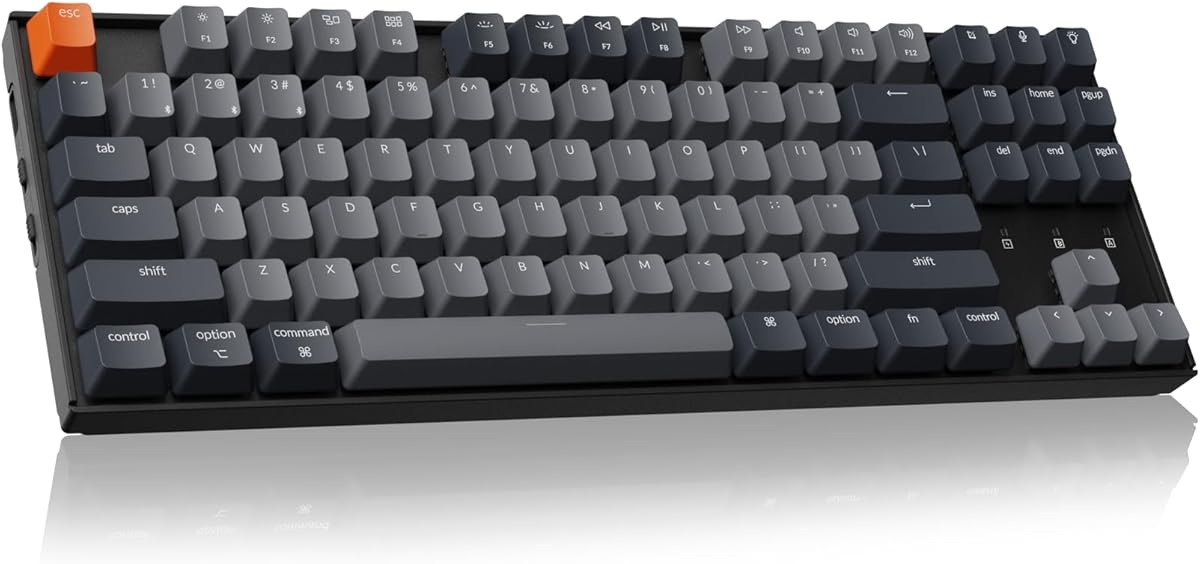
The Keychron K8 stands out as a top choice for Mac gamers seeking a reliable mechanical keyboard. It combines a sleek tenkeyless layout with robust wireless connectivity and tactile Brown switches for a satisfying typing experience.
We may earn a commission when you buy through this link, at no additional cost to you.
Its dual-mode connectivity allows seamless switching between Bluetooth and wired USB Type-C modes. The included Mac keycaps ensure perfect function key mapping without requiring additional software or configuration steps.
While it lacks full per-key RGB customization found in higher-end models, the white backlight provides clear visibility. The battery life is exceptional, lasting up to 200 hours with the backlight off.
This keyboard is ideal for Mac users who value productivity and gaming in equal measure. Its durability and ergonomic design make it a long-term investment for any serious setup.
The dedicated Mac layout ensures all system shortcuts work as expected without remapping.
Switch between up to three Bluetooth devices instantly while maintaining a stable connection.
We may earn a commission when you buy through this link, at no additional cost to you.
The SteelSeries Apex 3 offers incredible value for Mac gamers on a budget. It features a durable waterproof design and RGB zones that add style to any setup without breaking the bank.
We may earn a commission when you buy through this link, at no additional cost to you.
While it uses membrane switches rather than mechanical ones, the whisper quiet technology ensures minimal noise. The magnetic wrist rest provides excellent palm support for extended gaming sessions.
Mac users should note that some keys may require minor adjustments for function mapping. However, the core gaming functionality remains solid and responsive for most titles.
This keyboard is perfect for those prioritizing durability and style over premium switch feedback. It is an accessible entry point into dedicated gaming peripherals for Mac users.
The IP32 rating protects against accidental spills that could otherwise damage your setup.
The integrated wrist rest reduces strain during long typing or gaming periods.
We may earn a commission when you buy through this link, at no additional cost to you.
The Logitech MX Mechanical delivers a premium experience designed for professionals who game on the side. Its low-profile switches offer tactile feedback without excessive noise, suitable for office or home use.
We may earn a commission when you buy through this link, at no additional cost to you.
Smart illumination adjusts automatically to your environment, conserving battery life while ensuring visibility. The ability to pair with up to three devices allows seamless transitions between work and gaming modes.
While it lacks the speed of ultra-low latency gaming boards, its performance is sufficient for most casual to competitive play. The high-quality construction ensures it withstands daily heavy use.
This keyboard is best for users who demand top-tier build quality and ergonomics. It justifies its cost with features like recycled materials and advanced connectivity options.
Sensors detect your hands to turn on lights only when needed for efficiency.
Switch between Mac, iPad, and other devices instantly with one touch of a key.
We may earn a commission when you buy through this link, at no additional cost to you.
The EPOMAKER X Aula F75 MAX brings enthusiast-level features to a mass-market product. Its built-in TFT screen allows for unique animations and status displays that other keyboards cannot match.
We may earn a commission when you buy through this link, at no additional cost to you.
Gasket mounting ensures a bouncy and isolated typing feel that absorbs shock and improves comfort. The hot-swappable PCB lets you change switches easily to find the perfect texture for gaming.
Software customization is deep, allowing macro editing and key remapping for enhanced productivity. However, the screen and RGB features may drain the battery faster if not managed carefully.
Ideal for users who want to personalize every aspect of their keyboard, this model stands out for its innovative display and acoustic tuning. It turns a functional tool into a statement piece.
Watch GIFs or system stats on the embedded screen while you type or game.
Internal foam layers create a satisfying thocky sound with every keystroke.
We may earn a commission when you buy through this link, at no additional cost to you.
The Logitech G915 X Wired is engineered for speed and precision in competitive gaming. Its low-profile mechanical switches provide rapid actuation that helps reduce response time during intense play.
We may earn a commission when you buy through this link, at no additional cost to you.
The sand-blasted aluminum top plate offers a premium tactile experience that feels solid under fingertips. PBT keycaps resist wear and shine, ensuring the keyboard looks new even after months of heavy use.
While it requires a physical cable connection, the reliability it offers is unmatched. This is crucial for gamers who cannot tolerate any wireless latency or connection interruptions.
Best for performance-focused users who want a full-size layout with advanced features. The combination of speed, durability, and aesthetic appeal makes it a standout choice for serious setups.
The low actuation point allows faster inputs and quicker reactions in games.
Premium construction ensures long-term durability and a sleek look on any desk.
We may earn a commission when you buy through this link, at no additional cost to you.
The Logitech G413 TKL SE delivers reliable mechanical performance at an accessible price point. Its tenkeyless design frees up desk space for mouse movement while maintaining essential keys.
We may earn a commission when you buy through this link, at no additional cost to you.
The brushed aluminum-magnesium alloy case provides structural integrity without adding excessive weight. PBT keycaps ensure that the texture remains consistent even after heavy daily gaming usage.
While it lacks advanced software customization, the dedicated media keys offer essential control convenience. This simplicity often appeals to gamers who prefer plug-and-play functionality over complex configuration.
It is a practical choice for Mac users needing a durable, budget-friendly mechanical keyboard. The balance of build quality and cost makes it a solid recommendation for entry to mid-level setups.
Reinforced materials ensure the keyboard withstands vigorous daily use without flex.
The TKL layout saves desk space for low mouse movement in competitive games.
We may earn a commission when you buy through this link, at no additional cost to you.
The Redragon K742 combines a compact 98% layout with powerful software support. Its volume knob provides quick access to media controls without needing to reach for system menus.
We may earn a commission when you buy through this link, at no additional cost to you.
QMK VIA support allows deep customization for power users who want to tweak every key mapping. This flexibility makes it versatile for both gaming and productivity tasks across different operating systems.
The tri-mode connectivity ensures stable connections whether using Bluetooth, 2.4G wireless, or wired USB. The battery life is robust, supporting long sessions without frequent recharging needs.
This keyboard is ideal for those who value programmability and a streamlined footprint. It offers features often found only in more expensive enthusiast boards at a very competitive price.
Use QMK and VIA to map macros or adjust layers to fit any workflow.
Retains number pad functionality while saving valuable desk space compared to full sizes.
We may earn a commission when you buy through this link, at no additional cost to you.
The Keychron K4 offers a unique 96% layout that packs all keys into a compact form factor. This design is perfect for Mac users who need a number pad but want to save desk space.
We may earn a commission when you buy through this link, at no additional cost to you.
Bluetooth 5.1 connectivity ensures stable wireless performance for up to three paired devices. The included Mac keycaps guarantee that all necessary function keys align correctly for macOS operations.
Its battery life is impressive, lasting up to 240 hours with the backlight disabled. The tactile switches provide good feedback for typing while still being responsive for gaming scenarios.
This keyboard bridges the gap between compact designs and full functionality. It is a practical choice for users who need a numpad without sacrificing portability or battery efficiency.
The 96% design saves space while keeping the numpad intact for data entry.
With a large battery capacity, it supports weeks of use on a single charge.
We may earn a commission when you buy through this link, at no additional cost to you.
The GravaStar Mercury K1 stands out with its futuristic aluminum exoskeleton design. It looks less like a peripheral and more like a piece of modern art on your desk.
We may earn a commission when you buy through this link, at no additional cost to you.
Gasket mounting combined with sound-dampening foam ensures a comfortable and quiet typing experience. The soft thock sound reduces noise pollution during late-night gaming sessions.
Support for wired and wireless connections means you can adapt to any situation seamlessly. The RGB lighting adds a vibrant touch that complements the sleek metallic aesthetic.
Best for users who value aesthetics and build quality above all else. It offers a distinct look and feel that sets it apart from standard gaming peripherals.
An aluminum alloy frame provides durability and a unique visual presence.
Internal dampening layers create a deep, consistent sound with every keystroke.
We may earn a commission when you buy through this link, at no additional cost to you.
The Logitech G213 Prodigy is a robust entry-level gaming keyboard for Mac users. Its spill-resistant design protects against liquids that could damage electronics, offering peace of mind for daily use.
We may earn a commission when you buy through this link, at no additional cost to you.
The integrated palm rest provides comfortable support, reducing strain during extended gaming sessions. Five customizable lighting zones allow for basic personalization without complex software setup.
While the switches are membrane based rather than mechanical, the anti-ghosting matrix ensures reliable key inputs. This makes it a capable option for casual gamers who do not require high-speed actuation.
It is an excellent starting point for anyone wanting a dedicated gaming keyboard without breaking the bank. The practical features and affordability make it a sensible choice for students or home users.
Designed to repel spills and crumbs for easy cleanup and longevity.
An attached palm rest helps maintain a neutral wrist position during long use.
We may earn a commission when you buy through this link, at no additional cost to you.
Choosing the right keyboard for Mac gaming involves balancing compatibility, features, and personal preference. This guide outlines the key factors to consider for an informed decision.
Mac users must ensure the keyboard supports macOS layouts. Some gaming keyboards default to Windows keys, requiring physical replacements or software remapping. Look for models that explicitly list Mac compatibility or include extra keycaps.
Prioritize keyboards with macOS-specific function keys to avoid workflow interruptions.
Mechanical switches offer tactile feedback and durability suitable for intense gaming. Linear switches are smooth and quiet, while tactile switches provide a bump upon actuation. Rubber dome switches are cheaper but less responsive.
Choose mechanical switches for longevity and competitive performance.
Wireless keyboards provide a clutter-free desk, while wired ones ensure stable latency. Tri-mode connectivity offers the best of both worlds, allowing flexible switching. Consider battery life if choosing wireless.
Select wired or low-latency wireless for competitive gaming.
Full-size keyboards include a numpad, while TKL or compact versions save space. The layout impacts desk space available for mouse movement. Choose based on your room size and gaming style.
Compact layouts often provide better mouse clearance.
Gaming software allows macro programming and lighting effects. Ensure the software supports Mac systems. Some keyboards offer onboard memory, which is beneficial if switching computers frequently.
Check software availability before purchasing for full feature access.
Keyboards with aluminum cases and PBT keycaps last longer. Gasket mounting improves comfort by reducing harsh impacts. Durability is key for devices used daily.
Invest in high-quality materials for long-term value.
Features like adjustable feet or wrist rests enhance comfort. A keyboard at the right height prevents strain. Ergonomics are crucial for long gaming sessions.
Look for adjustable stands and comfortable key heights.
Prices vary significantly based on features. High-end models offer more customization but cost more. Set a realistic budget that balances performance needs with financial limits.
Define your budget early to narrow down options.
Proper maintenance extends the lifespan of your keyboard. Regularly clean the surface to remove dust and debris. Use compressed air to clear out particles from under keys.
Adjust the keyboard angle using adjustable feet for comfortable typing. Position the device to keep wrists neutral. Avoid eating over the keyboard to prevent spills.
For wireless models, charge the battery before it dies completely. Store cables neatly to avoid damage. If the keyboard malfunctions, try resetting it to factory settings first.
Yes, the selected keyboards are compatible with macOS. However, check if the specific model includes Mac function keys or extra keycaps. Some models may require software to remap keys correctly.
Mechanical switches are generally best for gaming due to their durability and responsiveness. Linear switches offer speed while tactile switches provide feedback. Choose based on personal preference.
Modern wireless technology with low latency is suitable for competitive gaming. Ensure the keyboard supports a fast polling rate or a dedicated dongle. Wired options remain the safest for pure performance.
Check the keyboard settings for a Mac/Windows switch. Some models require installing specific software. If issues persist, try third-party mapping tools like Karabiner Elements.
Most Bluetooth enabled keyboards support iPad connection. Ensure you connect to the iPad in pairing mode. Features like media controls usually work seamlessly across iOS devices.
TKL stands for tenkeyless and removes the number pad to save desk space. Full-size includes all keys including the numpad. Choose TKL if you have limited desk space.
We have reviewed ten distinct options ranging from budget-friendly to premium choices. The Keychron K8 stands out for Mac compatibility while the Apex 3 offers budget value.
Prioritize features like wireless connectivity and switch type based on your needs. A solid keyboard enhances both productivity and gaming performance significantly.
Remember to check current prices and availability before purchasing. Models and deals change frequently, so staying updated ensures you get the best possible value.