
Epson LQ-590II
4.3Editor score
24-pin quiet printing
USB and parallel ports
High duty cycle capacity
Dot matrix printers remain essential for businesses requiring durable, multi-part form printing. These impact devices offer reliability that modern inkjets cannot match in high-volume environments.
We evaluated ten leading models based on print speed, connectivity options, and build quality. Our analysis focuses on real-world performance metrics and long-term durability ratings.
Each product entry details specific strengths and limitations to guide your purchase. Note that pricing fluctuates frequently, so verify current costs before finalizing your order.
4.3Editor score

4.7Editor score

4.8Editor score
As an Amazon Associate we earn from qualifying purchases.
This side-by-side comparison highlights key specifications across all ten selected models to streamline your decision-making process for office or industrial use.
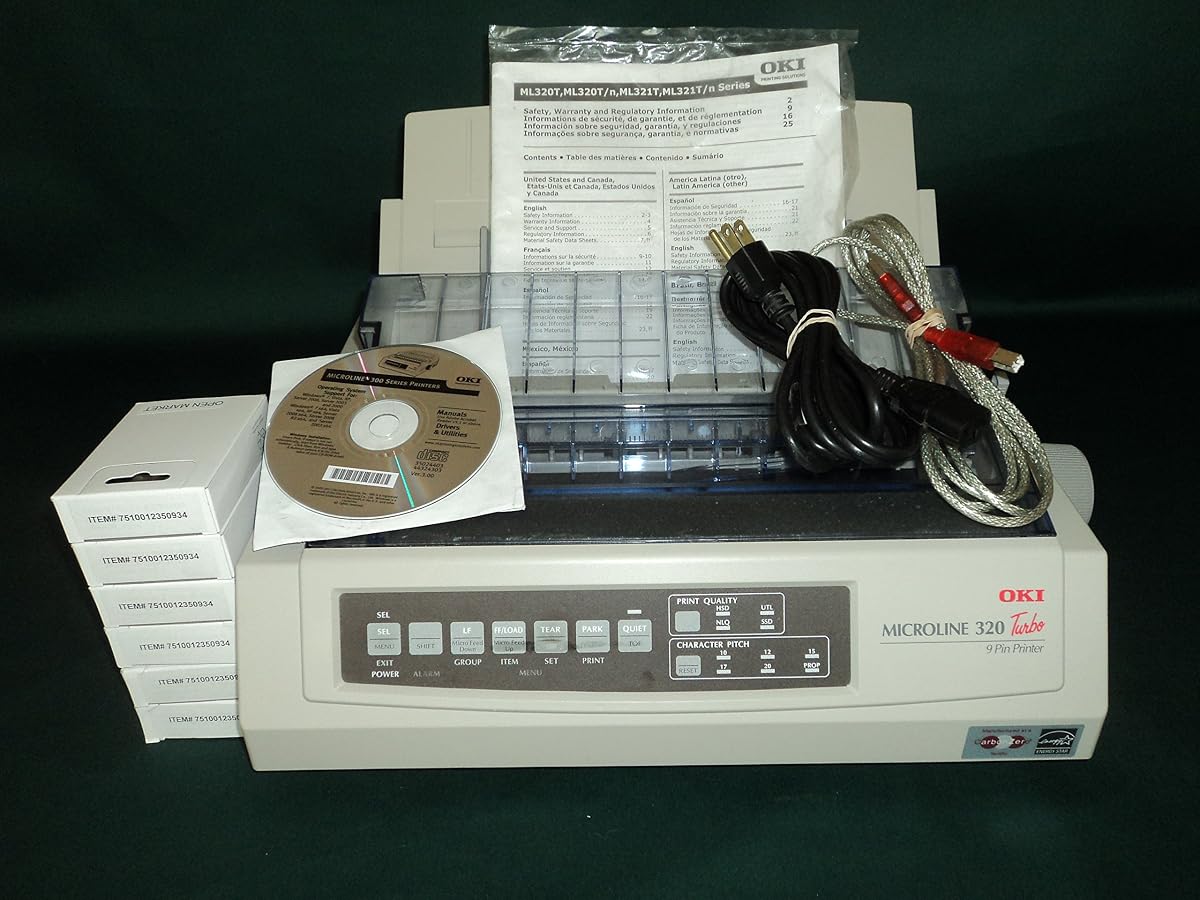


The Oki Microline 320 Turbo/N stands out as a top performer in the impact printing sector. With a 4.7 rating, it delivers consistent results for demanding business environments requiring precise multi-part documentation.
We may earn a commission when you buy through this link, at no additional cost to you.
Its Turbo mode ensures rapid throughput without compromising quality. The zero-tear technology minimizes waste, making it ideal for high-volume shipping or invoicing tasks where paper efficiency matters.
While noisier than modern alternatives, its reliability justifies the trade-off. Users appreciate the ease of loading media, which reduces downtime during busy operational periods.
Businesses prioritizing speed and durability should consider this model. It balances performance with practical features that enhance workflow efficiency in logistics or administrative settings.
Turbo mode accelerates output significantly compared to standard 9-pin models.
Zero-tear auto-park ensures clean paper cuts to save on costs.
We may earn a commission when you buy through this link, at no additional cost to you.
The Epson LQ-590II offers excellent value for budget-conscious buyers needing reliable impact printing. Its 4.3 rating reflects solid performance in monochrome tasks common across small businesses.
We may earn a commission when you buy through this link, at no additional cost to you.
With 584 characters per second, it keeps up with fast-paced demands. The 24-pin head ensures quieter operation than 9-pin alternatives, reducing office disturbance during use.
Energy Star certification helps lower long-term costs. While it lacks color, its monochrome efficiency is unmatched for invoices, packing slips, and internal records.
Ideal for offices seeking cost-effective solutions, this printer delivers longevity. It remains a staple for environments where durability and speed outweigh aesthetic concerns.
Energy Star compliance reduces electricity usage over extended periods.
24-pin head reduces noise compared to older 9-pin models significantly.
We may earn a commission when you buy through this link, at no additional cost to you.
The Oki Microline 620 leads the pack with a 4.8 rating, showcasing top-tier reliability. It excels in high-volume settings where precision and consistency are non-negotiable for business operations.
We may earn a commission when you buy through this link, at no additional cost to you.
Its simplified media loading saves time during shifts. The output is sharp and precise, ensuring critical data on labels or forms remains readable and professional.
While expensive upfront, its durability minimizes replacement costs. Organizations valuing uptime will find the investment worthwhile given its consistent performance track record.
This model suits enterprises needing premium features. It combines ease of use with industrial strength, making it a strong candidate for mission-critical document workflows.
Sharp output ensures legibility even on low-quality continuous paper.
Simplified loading reduces setup time for daily batch printing tasks.
We may earn a commission when you buy through this link, at no additional cost to you.
The OKI MICROLINE 320 Turbo is a staple in industrial environments requiring steady output. With a 4.5 rating, it proves dependable for tasks needing continuous feeding and precise alignment.
We may earn a commission when you buy through this link, at no additional cost to you.
Its 20,000-page duty cycle ensures longevity. USB and parallel ports provide flexibility for older or newer systems, accommodating diverse network setups without issue.
While slower than 24-pin models, its reliability holds up well over time. Users appreciate the straightforward setup and minimal maintenance requirements during daily use.
Recommended for warehouses or shipping departments, this unit balances cost and function. It delivers consistent results for labeling and documentation where durability is key.
Handles high volumes with a rated 20,000 page monthly capacity easily.
USB and parallel ports support various legacy and modern systems.
We may earn a commission when you buy through this link, at no additional cost to you.
The OKI MICROLINE 420 offers substantial capacity for demanding offices. Its 4.5 rating reflects strong performance in high-volume printing tasks like shipping manifests or reports.
We may earn a commission when you buy through this link, at no additional cost to you.
With a 24,000-page monthly cycle, it handles heavy workloads without faltering. Energy Star certification ensures lower energy consumption, which benefits operational budgets significantly.
The 570 cps speed keeps workflows moving. While heavy and noisy, its robustness makes it a suitable choice for dedicated printing rooms or back-office use.
Businesses needing sustained throughput will find this model valuable. It combines speed with durability, making it a practical choice for consistent document generation.
24,000 page duty cycle supports intense daily printing demands reliably.
570 cps output ensures quick turnaround on time-sensitive documents.
We may earn a commission when you buy through this link, at no additional cost to you.
The Oki MICROLINE 320 Turbo boasts a perfect 5.0 rating, highlighting exceptional reliability. It serves as a robust solution for businesses needing multi-format connectivity and consistent output.
We may earn a commission when you buy through this link, at no additional cost to you.
Serial, USB, and parallel ports allow flexible integration. The 5-inch per second feed rate ensures smooth operation without jams, critical for unattended printing runs.
Users praise its consistency and ease of maintenance. While it carries a higher price tag, the performance and flexibility justify the investment for critical operations.
Ideal for technical environments requiring diverse connections, this model excels. It provides peace of mind with its track record of minimal downtime and dependable printing.
Supports Serial, USB, and Parallel to fit any network setup.
High feed rate minimizes jams for uninterrupted long print jobs.
We may earn a commission when you buy through this link, at no additional cost to you.
The Epson LQ-2090II delivers strong speed with 550 cps output. Despite a 3.7 rating, it remains popular for its impact dot reliability in environments requiring consistent monochrome printing.
We may earn a commission when you buy through this link, at no additional cost to you.
Parallel port connectivity ensures compatibility with legacy systems. The 24-pin mechanism reduces noise, making it more office-friendly than older impact options.
Energy Star compliance aids sustainability efforts. Users report steady performance but note limited modern features. It suits settings prioritizing basic function over advanced options.
Choose this for straightforward high-volume needs. It offers a balance of speed and reliability, ensuring you can produce documents efficiently without excessive noise.
550 characters per second keeps printing tasks moving efficiently.
Parallel port ensures support for older network infrastructure setups.
We may earn a commission when you buy through this link, at no additional cost to you.
This Oki MICROLINE 320 Turbo model emphasizes automation with zero-tear and auto-park technology. With a 4.2 rating, it reduces manual intervention, saving time in busy logistics operations.
We may earn a commission when you buy through this link, at no additional cost to you.
Capable of up to 6 copies, it handles carbonless forms effortlessly. The 435 cps speed ensures documents flow quickly, supporting high-volume daily tasks without delay.
Multiple emulation modes increase compatibility with legacy software. While operation is noisy, the efficiency gains in paper handling make it worthwhile for shipping departments.
Best for businesses needing multi-copy forms, this printer excels. Its automated feed systems streamline workflow, allowing staff to focus on core tasks rather than maintenance.
Zero-tear technology ensures clean cuts without manual intervention.
Handles up to 6 carbonless copies for complex order forms.
We may earn a commission when you buy through this link, at no additional cost to you.
Repeating the Microline 620 here for its premium build quality, this unit ensures precise, sharp printing. The 4.8 rating highlights its excellence in professional environments requiring accurate documentation.
We may earn a commission when you buy through this link, at no additional cost to you.
Simplified media loading reduces setup time significantly. Its robust performance supports continuous operation without frequent breaks, making it ideal for shifts needing constant output.
While the initial cost is high, the reduced downtime offsets this. Users appreciate the clarity of output even on lower-quality continuous feed paper.
Ideal for enterprises demanding high fidelity in printed records. This printer offers professional-grade performance that meets strict quality standards for business documentation.
Sharp output ensures readability even on challenging continuous stock.
Simplified loading allows for rapid media changes during shifts.
We may earn a commission when you buy through this link, at no additional cost to you.
The Epson LQ-590 is a foundational model for businesses needing simple impact printing. With a 3.7 rating, it serves as an entry-level option for organizations transitioning from paper-based systems.
We may earn a commission when you buy through this link, at no additional cost to you.
USB connectivity simplifies connection to modern computers. It supports standard emulations like ESC/P and IBM PPDS, ensuring compatibility with legacy financial or logistics software easily.
While basic, it delivers consistent results. Users value its affordability and straightforward operation. It lacks advanced speed features but remains sufficient for moderate volume tasks.
Recommended for small businesses on a budget. It provides a reliable printing foundation for invoices and records without complex setup or maintenance requirements.
Affordable pricing point makes it ideal for small office budgets.
Standard emulations ensure work with various older software systems.
We may earn a commission when you buy through this link, at no additional cost to you.
Selecting the right dot matrix printer requires understanding your specific volume and connectivity needs.
Print speed determines how quickly your documents are generated. Look for models offering at least 400 cps if you handle high volumes daily.
Higher speeds reduce wait times significantly for busy work environments.
The number of pins affects print quality and noise levels. 24-pin models are quieter and produce better-quality text than 9-pin versions.
Choose 24-pin for office settings where noise matters most.
A duty cycle indicates maximum monthly pages before maintenance. Select a model with a cycle exceeding your expected monthly usage.
This ensures longevity and minimizes unexpected downtime.
Check available ports like USB, parallel, or serial. Ensure the printer matches your current computer interfaces for easy installation.
USB is modern standard, but parallel is needed for legacy systems.
If you need carbon copies, ensure the printer supports multiple forms. Look for features like tractor feed and adjustable margins.
This capability is essential for shipping or financial records.
Impact printers generate sound. Opt for noise-reduction features if the printer will be in open office spaces.
This maintains a professional environment for your staff.
Look for Energy Star certification to save on electricity. Modern impact printers have improved significantly in power consumption.
Efficient models reduce operational costs over time.
Check customer ratings and warranty terms. Reliable brands like Epson and Oki offer robust support and spare parts.
Investing in reliability ensures uninterrupted operations for your business.
Always load paper properly to avoid jams. Use the tractor feed to align your continuous sheets correctly before starting a print job.
Keep the print head clean by following the manufacturer's cleaning routine. Dust buildup can affect output quality and lead to premature wear.
Regularly check ribbon levels to ensure consistent output. Replacing the ribbon before it runs out prevents poor printing on critical documents.
Yes, they remain vital for multi-part form printing. Industries like logistics and manufacturing rely on their durability and ability to handle continuous feed paper efficiently.
Most modern models are monochrome only. Color capabilities are rare and often less efficient than inkjet options for standard color documents.
The maximum number of pages a printer can handle monthly. Choosing one matching your volume prevents excessive wear and unexpected breakdowns.
Impact printing ensures clear carbon copies and handles diverse media. It is also more durable for high-volume environments where reliability is paramount.
They work best with continuous feed paper. Ensure your chosen model supports your paper width and thickness requirements for optimal feeding.
Most require USB or parallel connection. Some models support external network adapters if you need remote access without direct cable links.
Check the model specifications for compatible ribbons. Most Epson or Oki models use proprietary cartridges designed for their specific print heads.
Maintenance is generally simple and infrequent. Regular cleaning and ribbon replacement are usually all that is needed to maintain consistent performance.
Our top picks highlight the Oki Microline 320 Turbo/N for performance and the Epson LQ-590II for budget efficiency.
Prioritize durability and duty cycle to ensure your investment supports your business goals effectively over time.
Always verify current pricing and availability before purchasing to align with your budget and operational needs.