
ASRock 970A-G/3.1
4.2Editor score
Supports AM3+ and AM3 CPUs
Includes M.2 slot for storage
Features USB 3.1 connectivity
This guide compares the top ten Asrock AM3 Motherboard options for performance and compatibility to help you find the ideal platform for your AMD build.
Choosing the right foundation for your PC is critical for long-term stability and performance. The Asrock AM3 Motherboard offers a robust platform for AMD processors, balancing legacy support with modern features. Whether you are upgrading an existing system or building a budget-friendly workstation, selecting the correct model matters.
We have analyzed ten distinct models from the ASRock lineup to help you navigate the available options. Each product brings unique strengths regarding chipset capabilities, expansion slots, and power delivery. Our comparison focuses on real-world utility, ensuring you understand what each board delivers beyond basic specifications.
Every pick in this list highlights specific advantages tailored to different user needs. You will see detailed breakdowns of connectivity, memory support, and form factors. Keep in mind that market availability fluctuates, so verify current stock before making your final decision to ensure a smooth upgrade path.
4.2Editor score

4.0Editor score

3.8Editor score
The following table provides a side-by-side look at every model included in this review. We highlight key specifications to help you quickly identify which board fits your specific hardware requirements and budget constraints.


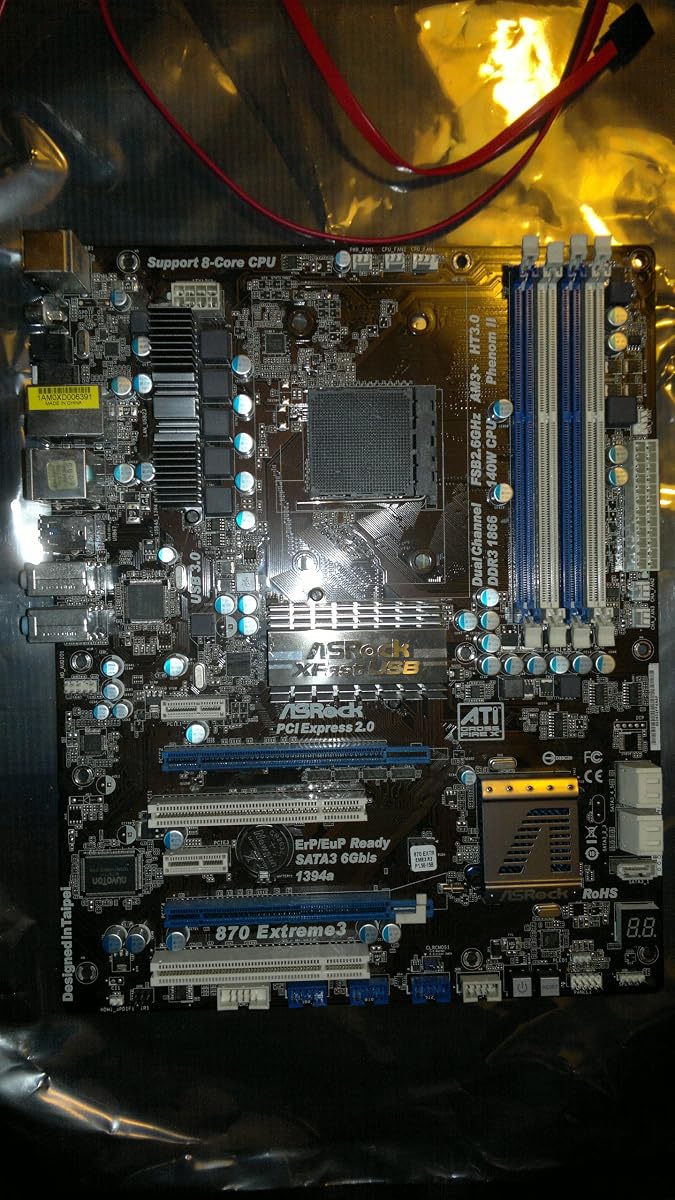


This board stands out as a reliable entry-level option for users needing a stable base. It holds a strong rating and provides essential connectivity for legacy AMD setups. The MicroATX design fits many cases while delivering core functionality without unnecessary bloat.
We may earn a commission when you buy through this link, at no additional cost to you.
The support for 8-Core processors is a major benefit for multi-threaded tasks. AMD Overdrive with ACC feature allows for careful tuning of your system performance. This ensures you can extract more value from compatible CPUs without expensive hardware upgrades.
While the lack of USB 3.0 is a trade-off, it keeps costs low for budget builds. The SATA2 limitation means slower storage speeds compared to modern boards, but it works fine for standard drives. These compromises are acceptable for basic office or retro gaming PCs.
Buyers seeking a simple, cost-effective upgrade path for older AM3 systems should consider this model. It offers a proven platform for everyday computing needs. Ensure your CPU is compatible before purchasing to maximize its potential.
Ideal for users updating older systems without breaking the bank on new components.
The MicroATX layout saves space while maintaining compatibility with standard ATX cases.
We may earn a commission when you buy through this link, at no additional cost to you.
This model offers exceptional value by including modern features like M.2 and USB 3.1. It scores high for versatility and appeals to users wanting faster storage options. The ATX design ensures plenty of room for component installation.
We may earn a commission when you buy through this link, at no additional cost to you.
The Quad CrossFireX capability allows for multi-GPU setups if needed. Memory support reaches up to 64GB, which is generous for this platform. Connectivity is enhanced with USB 3.1 ports for fast data transfer speeds.
The only real compromise is the limited bandwidth on one of the PCIe slots. This might affect high-end graphics card performance in specific configurations. However, for most users, this is a minor issue given the overall feature set.
We recommend this board for those balancing performance and affordability. It bridges the gap between older AM3 systems and newer storage standards. It is an excellent choice for enthusiasts looking to squeeze every bit of speed out of their hardware.
The M.2 slot provides a direct path to fast NVMe storage without needing adapters.
USB 3.1 ports ensure your peripherals and drives transfer data at top speeds.
We may earn a commission when you buy through this link, at no additional cost to you.
This board brings high-end features to a smaller MicroATX footprint. It is ideal for builders who need power without the bulk of a full-sized board. The rating reflects its reliability in compact system builds.
We may earn a commission when you buy through this link, at no additional cost to you.
With Quad CrossFireX support, you can link multiple graphics cards for better rendering. The inclusion of SATA3 and USB3.0 ensures your peripherals keep up with modern demands. It is a balanced choice for a wide range of gaming setups.
The smaller size means less room for extensive cooling solutions or extra expansion cards. This is a necessary trade-off for compact cases. Most users find the benefits of the small footprint outweigh the minor limitations.
Choose this board if you are building a small form factor PC that needs performance. It handles multi-GPU configurations well. Just ensure your case supports MicroATX and has adequate airflow for the system.
Perfect for enthusiasts who want high performance in a smaller, more portable case.
Despite its size, it offers all the major ports needed for modern gaming setups.
We may earn a commission when you buy through this link, at no additional cost to you.
This board targets users who need enterprise-level features like RAID and eSATA. It supports a wide range of AMD processors and offers robust power delivery. The design focuses on stability for heavy-duty tasks.
We may earn a commission when you buy through this link, at no additional cost to you.
The eSATA3 port provides a unique connection option for external storage arrays. RAID support allows for data redundancy and speed improvements without needing a separate card. This is valuable for users managing large amounts of local data.
However, the heavy reliance on USB 2.0 ports is a drawback for modern peripherals. The price point is also higher than some competitors with more current USB standards. These factors may limit its appeal to general consumers.
Recommend this board for workstation builds requiring specific legacy connectivity. It handles heavy loads well. Ensure your workflow benefits from the eSATA and RAID features before purchasing.
RAID support ensures your critical data is safe even if a drive fails.
The eSATA3 port allows for fast external drive connections.
We may earn a commission when you buy through this link, at no additional cost to you.
This board focuses on value and basic stability for everyday use. The solid capacitors suggest a longer lifespan compared to standard designs. It offers decent audio and power features for general computing.
We may earn a commission when you buy through this link, at no additional cost to you.
ASRock X-Boost and XFast 555 provide utility for faster data access and charging. This is useful for users who frequently transfer data or charge devices. The MicroATX form factor helps keep system costs down.
The lack of USB 3.0 means slower external transfers compared to other options. Audio is adequate but not audiophile-grade. These are acceptable limitations given the competitive positioning in the market.
Buy this if you need a no-nonsense board for basic tasks. It supports AM3+ processors well. Check for software updates to ensure you get the most out of the included features.
Solid capacitors provide better longevity and stable power delivery for long-term use.
Built-in tools like XFast 555 help optimize system performance without extra software.
We may earn a commission when you buy through this link, at no additional cost to you.
This model includes integrated graphics which is great for basic builds without a dedicated GPU. It supports Hybrid CrossFireX to boost performance when combined with an external card. The inclusion of USB 3.0 is a significant plus.
We may earn a commission when you buy through this link, at no additional cost to you.
Integrated ATI Radeon HD4250 allows for basic multimedia tasks and light gaming. Full HD playback is supported out of the box. This makes it a convenient option for media centers or budget systems.
The lower rating suggests potential compatibility or stability issues with some setups. It is best used with well-documented CPU pairs. Users should be prepared to troubleshoot if they encounter issues with legacy hardware.
Choose this for a low-power, integrated graphics setup. It is versatile for home entertainment. Just verify your CPU compatibility before building to avoid any potential headaches.
Integrated graphics support full HD playback making it ideal for HTPC builds.
Combine integrated and dedicated graphics for improved performance without new hardware.
We may earn a commission when you buy through this link, at no additional cost to you.
This board offers a balanced mix of gaming features and storage connectivity. The SB850 chipset ensures SATA3 performance for all connected drives. It supports multi-GPU configurations which is great for gaming enthusiasts.
We may earn a commission when you buy through this link, at no additional cost to you.
Atheros Ethernet provides stable network connectivity which is crucial for online gaming. The 5x SATA3 ports allow for multiple high-speed drives. This setup supports serious gaming rigs and productivity workstations.
However, the expansion slots are limited compared to higher-end boards. This might restrict adding multiple expansion cards. Still, it serves most users well without needing the highest cost.
We recommend this for gamers who need solid storage and network performance. It handles CrossFire setups efficiently. Verify your GPU compatibility before building for optimal results.
Quad CrossFireX support allows linking multiple graphics cards for enhanced frame rates.
Five SATA3 ports ensure your storage is not the bottleneck in your system.
We may earn a commission when you buy through this link, at no additional cost to you.
This is the ultimate AM3 platform for high-end builds needing maximum connectivity and power. It supports both Nvidia SLI and AMD CrossFireX configurations. The chipset provides extensive bandwidth for multiple GPUs.
We may earn a commission when you buy through this link, at no additional cost to you.
Advanced overclocking technology helps extract peak performance from compatible CPUs. Premium audio support like THX TruStudio Pro offers immersive sound. This board is built for serious enthusiasts and professional workloads.
The high power consumption requires a robust cooling and power supply setup. It is also one of the more expensive options in the category. These factors are acceptable for users seeking top-tier performance.
Buy this for extreme gaming or rendering tasks. It ensures your system is not bottlenecked by the motherboard. Verify power requirements before installation to ensure stability.
Quad SLI support ensures you can run multiple high-end graphics cards seamlessly.
THX TruStudio Pro delivers studio-quality audio for immersive gaming experiences.
We may earn a commission when you buy through this link, at no additional cost to you.
This board brings PCIe 3.0 support to a budget-friendly package. It supports AM3+ processors effectively for decent performance. The inclusion of USB 3.0 ensures basic modern connectivity.
We may earn a commission when you buy through this link, at no additional cost to you.
The mix of SATA2 and SATA3 ports allows for flexible storage setups. You can place high-speed drives on SATA3 and slower ones on SATA2. This helps balance costs while maintaining performance for primary drives.
Basic power design means overclocking capabilities are limited. It is best suited for stock or lightly tuned CPUs. However, for general use, it provides a reliable foundation.
We suggest this for budget builds requiring PCIe 3.0 compatibility. It is a solid entry-level choice. Just ensure you prioritize your storage connections for best results.
PCIe 3.0 support ensures newer graphics cards can operate at full speed.
Mixed SATA speeds allow for cost-effective setups with high-speed primary drives.
We may earn a commission when you buy through this link, at no additional cost to you.
This board offers top-tier connectivity with six SATA3 and four USB 3.0 ports. It supports Quad CrossFireX for multiple GPU configurations. The AMD 890FX chipset provides extensive bandwidth for serious users.
We may earn a commission when you buy through this link, at no additional cost to you.
The high number of high-speed ports means you never run out of fast connections. It is ideal for systems needing multiple external drives and peripherals. The design prioritizes utility and expandability.
However, the price is high given the age of the platform. It is best reserved for specific needs requiring this level of connectivity. Most users might find better value elsewhere.
Recommend for enthusiasts needing extensive high-speed connectivity. It handles multi-drive setups well. Ensure your CPU is compatible to avoid any performance bottlenecks.
Six SATA3 ports allow for extensive storage expansion without adapters.
Four USB 3.0 ports ensure all your high-speed devices run at full capacity.
We may earn a commission when you buy through this link, at no additional cost to you.
Selecting the right Asrock AM3 Motherboard involves evaluating key factors to ensure compatibility and performance. This section covers the most important considerations for your decision.
Ensure the board supports your specific AMD processor. Most models support AM3 and AM3+ but check for specific exceptions like certain Phenom II models. Verify the supported CPU list before purchasing.
Always match your processor to the board's socket type.
Different chipsets like 890FX or 970 offer varying levels of PCIe lanes and storage support. Higher end chipsets support more graphics cards and faster storage options. Choose based on your expansion needs.
Pick a chipset that matches your performance goals.
ATX boards offer more slots and cooling, while MicroATX saves space. Check your PC case to ensure the board fits correctly. Size affects both aesthetics and airflow management.
Select a size that fits your case and build style.
Look for SATA3 ports if you use SSDs. Some boards include eSATA or M.2 for faster storage options. More ports allow for more drives without adapters.
Prioritize boards with enough SATA3 ports for your needs.
USB 3.0 or 3.1 is essential for fast peripheral transfer. Some budget boards may only have USB 2.0. Check the rear and header counts for your specific devices.
Ensure enough high-speed USB ports for your devices.
Check maximum capacity and speed support like DDR3-1866. Some boards support up to 64GB while others cap at 16GB. This affects future upgrades and multi-tasking performance.
Choose a board with enough RAM capacity for your workloads.
High-end boards offer better audio codecs for surround sound. If you use a dedicated sound card this matters less. Check for specific audio features if using onboard audio.
Pick a board with quality audio if you skip dedicated cards.
Gigabit Ethernet is standard but some boards offer better controllers. Wake-on-LAN features help with remote management. Check if you need advanced network features.
Verify network specs if remote access is a priority.
Install the motherboard carefully into the case ensuring standoffs align correctly. Connect power and data cables securely to avoid loose connections. Secure the case cover to protect components from dust.
Update the BIOS immediately after installation to ensure CPU compatibility. Download drivers from the manufacturer site to maximize performance. Proper updates prevent system crashes.
Keep the area around your PC clean to prevent overheating. Regularly check dust filters and fans for debris. Proper maintenance ensures the board runs efficiently for years.
Most models support AMD Phenom II and Athlon II processors in AM3 and AM3+ sockets. Be aware some boards exclude specific models like Phenom II 920. Always check the manufacturer support list.
Yes boards with SATA3 ports support SSDs at full speed. Models without SATA3 can use SSDs but at slower speeds. Check your specific board model for SATA support.
Many models support CrossFireX for AMD GPUs. High-end boards like the 990FX support SLI as well. Verify your board supports your desired GPU configuration.
Not all models include USB 3.0. Budget boards might only have USB 2.0. Look for USB 3.0 in the specs if you need fast external transfer.
Capacity varies from 16GB to 64GB depending on the model. High-end boards support more capacity. Check the memory specs before purchasing.
Most boards listed support both AM3 and AM3+ sockets. Some may require a BIOS update for newer CPUs. Confirm compatibility with your specific processor.
We have reviewed ten top models to help you find the right fit. The best budget pick offers great value for basic needs while premium options deliver top performance. Each board serves a specific use case.
Prioritize features like USB 3.0 or SATA3 based on your workflow. High-end boards justify their cost with better connectivity and overclocking. Ensure you have the right case and CPU.
Prices and availability change frequently so verify details before buying. Check current stock and return policies. This guide helps you make an informed decision for your next build.