
ARCTIC Fan Controller
4.6Editor score
Ten port PWM support
Zero cable chaos design
Native driver support
This guide compares the top ten front panel fan controller units available today for optimizing cooling noise and system monitoring across various PC builds.
Finding the right cooling solution is essential for any computer enthusiast. A front panel fan controller gives you precise control over system fans ensuring optimal temperatures and reduced noise levels.
We have evaluated ten distinct models based on features build quality and user feedback. Our comparison covers LCD displays PWM support and temperature sensing capabilities to help you choose wisely.
Each pick highlights unique strengths and potential trade-offs for different setups. Remember that pricing fluctuates frequently so check current listings before making your final purchase decision today.
4.6Editor score

5.0Editor score

4.2Editor score
The following table provides a side-by-side comparison of all ten reviewed models to highlight key specifications and capabilities for informed decision making.
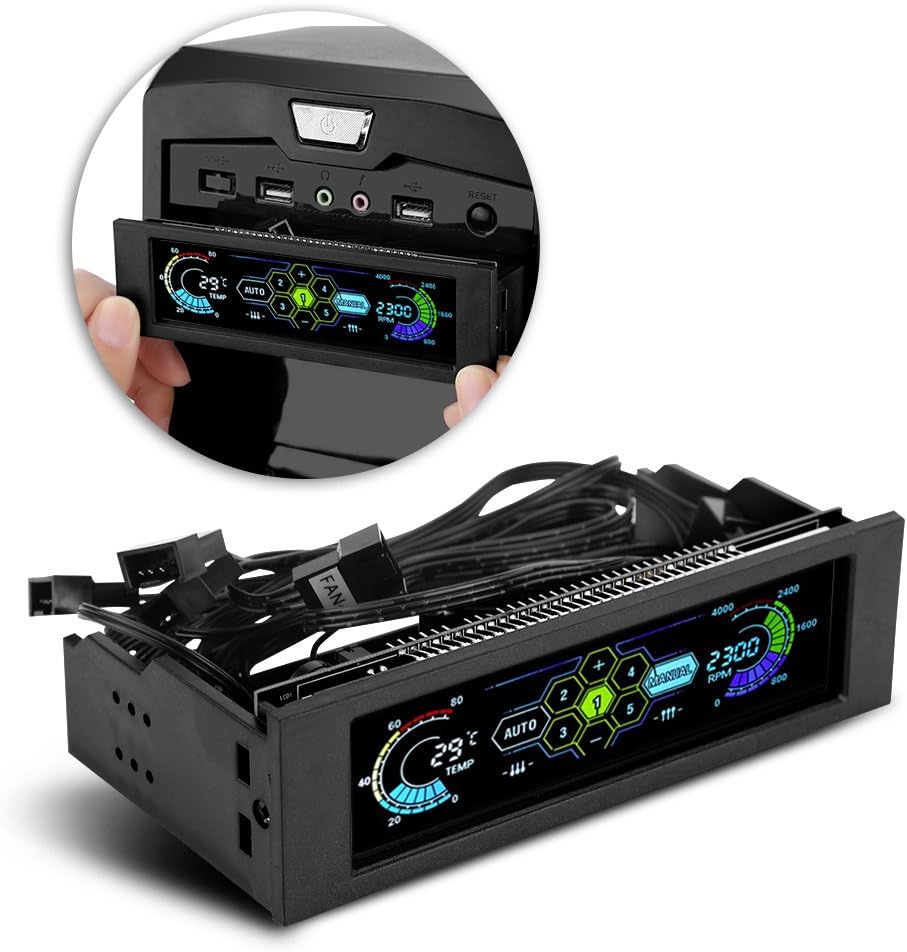


The STW‑6041 stands out as a top choice for managing PC cooling with its robust aluminum panel and clear LCD interface. Its perfect rating reflects strong user satisfaction regarding reliability and functionality. This model excels at providing real time visibility into system temperatures.
We may earn a commission when you buy through this link, at no additional cost to you.
Key strengths include the four channel control module which allows independent monitoring of fan speeds and temperatures. The over temperature alarm is a critical safety feature that protects your hardware from overheating effectively. The PWM circuit ensures smooth speed adjustments without harsh noise.
Trade-offs involve the physical requirement for a 5.25 inch optical drive bay which may be scarce in modern cases. Additionally it lacks modern RGB aesthetic features found in premium options. These are acceptable given the focus on pure cooling management.
Anyone prioritizing reliable temperature monitoring and noise reduction should consider this unit. It balances performance and build quality exceptionally well. We recommend it for those seeking a functional cooling control solution.
The built in high temperature alarm flashes and sounds when limits are exceeded providing immediate alerts for potential hazards.
Multiple matte treatments on the aluminum alloy panel ensure durability and a professional look suitable for any chassis design.
We may earn a commission when you buy through this link, at no additional cost to you.
The V BESTLIFE controller offers extensive monitoring features including hard disk state visibility alongside temperature and fan speed data. It receives high marks for its comprehensive display options. This unit is ideal for users who want deep insights into their system health.
We may earn a commission when you buy through this link, at no additional cost to you.
It supports controlling up to five fans which is generous for a front panel unit. The ability to manually set alarm temperature ranges from forty to ninety degrees adds customization. Immediate alerts ensure you are aware of cooling failures instantly.
However the interface might feel cluttered to some users compared to simpler models. Setup instructions are not always clear leading to initial confusion. These issues are minor compared to the depth of data provided.
This controller suits builders with complex cooling needs who want detailed monitoring. It is a solid choice for enthusiasts. We suggest it for those needing five channel control.
The big LCD screen displays multiple metrics simultaneously allowing you to know the working condition constantly.
Switch between automatic and manual modes easily to optimize cooling based on current load or user preference.
We may earn a commission when you buy through this link, at no additional cost to you.
The SaiDian controller provides essential features like date and time display along with temperature and fan speed monitoring. It ranks lower due to mixed user feedback on reliability. This model serves budget conscious buyers looking for basic functionality.
We may earn a commission when you buy through this link, at no additional cost to you.
It allows manual and automatic control with an alarm temperature range set between fifty and ninety degrees. The fan jam alarm sounds immediately if a fan fails preventing damage. It supports three groups of fans which is adequate for small builds.
Users report inconsistent sensor accuracy and build quality concerns. The power supply interface is standard but might require adapters. These drawbacks make it less ideal than higher rated alternatives.
Consider this only if budget is the primary constraint. It offers standard features at a low cost. We recommend upgrading to a more reliable option if possible.
The fan jam alarm ensures immediate detection of cooling failures to prevent overheating damage to your hardware.
Keep abreast of working status with a large screen that displays temperatures and fan speed clearly.
We may earn a commission when you buy through this link, at no additional cost to you.
The Thermaltake Commander F6 brings premium RGB visuals and robust hardware control to the front panel space. It targets users who value aesthetics as much as cooling performance. This model stands out with its unique RGB LCD screen.
We may earn a commission when you buy through this link, at no additional cost to you.
Six voltage control knobs allow precise manual tuning of fan speeds. Temperature sensors monitor six channels for detailed heat mapping. Short circuit protection adds a layer of safety against electrical issues. It also supports two Lumi LED strips for lighting synchronization.
The high price might not suit budget builds. Integration with software is less flexible than hub based solutions. These trade-offs are acceptable for those prioritizing physical control and looks.
This controller is perfect for showpiece builds needing visual flair. It delivers reliable cooling control with style. We recommend it for RGB focused enthusiasts.
The RGB LCD screen combines temperature display with lighting effects to enhance the look of your PC interior.
Six dedicated knobs give you exact control over fan voltage for tailored cooling performance without software.
We may earn a commission when you buy through this link, at no additional cost to you.
The Ejoyous controller offers a solid four channel LCD setup for managing case fans efficiently. While rating data is unavailable its features suggest reliability. It is designed for users needing independent fan control with safety nets.
We may earn a commission when you buy through this link, at no additional cost to you.
Four temperature sensors monitor different areas allowing demand oriented cooling. Double safety functions include temperature blinking and acoustic alerts. Quiescent PWM operation reduces annoying high frequency noises for a quieter PC experience.
Users note that the aluminum panel is robust and durable. The matte finish looks professional on any chassis. However lack of ratings makes long term reliability unclear.
This unit is a good middle ground between cost and features. It offers standard safety and control tools. We consider it for standard four fan setups.
If temperature exceeds sixty degrees the symbol blinks and alarms alert you while fan monitoring detects standstill.
PWM circuitry allows precise fan control reducing high frequency noise for a more comfortable operating environment.
We may earn a commission when you buy through this link, at no additional cost to you.
The ARCTIC Fan Controller differs by focusing on internal hub control rather than front panel display. It receives excellent ratings for its port count and driver support. This model is best for large scale fan setups needing centralized control.
We may earn a commission when you buy through this link, at no additional cost to you.
Ten ports allow you to manage many fans individually without motherboard limits. Zero cable chaos ensures a cleaner build by eliminating splitters. Driver support enables compatibility with monitoring software on Windows and Linux.
It lacks a physical screen for immediate viewing. You must rely on software for monitoring temperature. This is acceptable for users preferring a cleaner front panel look.
This hub is ideal for server cabinets or complex cases. It offers value and efficiency. We recommend it for those needing many ports.
Centralized cable management through this controller ensures a cleaner build by eliminating the need for Y splitter cables.
Native driver support enables compatibility with a wide range of fan control and monitoring software on your OS.
We may earn a commission when you buy through this link, at no additional cost to you.
The Noctua NA-FC1 is a compact manual controller known for reliability and high build quality. It supports PWM fans perfectly and offers a flexible setup. This model is excellent for quiet PC enthusiasts needing basic control.
We may earn a commission when you buy through this link, at no additional cost to you.
It works as a manual speed reducer or alongside motherboard control. No stop mode prevents fans from stopping at low speeds to avoid BIOS errors. It includes a three way splitter cable for controlling three fans.
Lack of LCD display limits visual feedback. However its simplicity is a benefit for noise focused builds. The six year warranty underscores its durability.
This controller is best for quiet builds with few fans. It offers peace of mind with its warranty. We recommend it for Noctua fan owners.
Prevents the fan from falling below 300rpm in order to avoid BIOS fan errors at low speeds.
Achieve truly quiet operation even with high-speed PWM fans by adjusting speeds manually or automatically.
We may earn a commission when you buy through this link, at no additional cost to you.
The Delinx controller offers versatile options for custom cooling solutions with auto manual dual modes. It receives high ratings for its safety features and display. This model suits DIY projects needing flexible voltage and monitoring.
We may earn a commission when you buy through this link, at no additional cost to you.
It works with USB-C chargers and offers a wide voltage range for various fans. Digital display shows real-time temperature and fan speed accurately. Power off memory saves your settings when power is cut.
The DIY nature requires some technical skill. It might be bulky for small cases. However these are manageable with proper planning.
This unit is ideal for custom cooling or specialized use. It offers flexibility and safety. We recommend it for enthusiasts.
Supports 5V to 30V wide voltage range making it compatible with various fan types for versatile applications.
Adjustable start and full-speed temperatures plus hysteresis provide precise control over thermal regulation.
We may earn a commission when you buy through this link, at no additional cost to you.
This model mirrors the STW‑6041 closely with date time and temperature displays. It has low ratings suggesting inconsistent quality. It serves as a budget alternative to similar units.
We may earn a commission when you buy through this link, at no additional cost to you.
Features include four channel control and alarm systems. High specification capacitors aim for longer service life. Noise reduction is achieved via PWM circuit.
Users report mixed experiences with reliability. Build quality varies. These concerns make it a riskier choice than better rated options.
Consider this only if funds are tight. It offers similar features at low cost. We advise checking recent reviews carefully.
Equipped with a wide LCD screen displaying four sets of fan speeds and temperatures clearly.
Safety system includes high temperature alarm and anti-seize to protect your hardware from overheating.
We may earn a commission when you buy through this link, at no additional cost to you.
This controller manages up to five groups of fans with date and time display. It has average ratings indicating decent functionality with room for improvement. It targets users needing more fan zones.
We may earn a commission when you buy through this link, at no additional cost to you.
Features allow manual alarm temperature setting from forty to ninety degrees. Hard disk state display adds utility for monitoring health. Auto manual switching provides flexibility.
Users note that setup is challenging. Build quality varies between units. These issues make it less reliable than top contenders.
Choose this if you specifically need five zones on a budget. It offers essential tools. We recommend considering more stable options.
Control the wind speed of five groups of fans to maintain computer temperature effectively.
Big LCD screen displays hard disk state to constantly know the working condition.
We may earn a commission when you buy through this link, at no additional cost to you.
Selecting the right controller requires evaluating display type port count safety features and compatibility with your case design.
Look for controllers with clear LCD screens if you want to see temperatures without opening software. RGB screens add aesthetic value but may cost more. Basic models might lack screens entirely.
Prioritize displays that show multiple temperature points for better monitoring.
Ensure the controller supports enough channels for your fan count. Some units handle three to five fans. Hub based models can support ten or more.
Match the channel count to your cooling requirements to avoid buying excess capacity.
Top models include over temperature alarms that warn before damage occurs. Fan anti-seize detection is also vital for hardware safety. Check for short circuit protection.
Safety alarms are essential for unattended operation and long term reliability.
Front panels usually require a 5.25 inch optical drive bay. Internal hubs do not use a bay and fit inside the case. Magnetic mounts are common for internal controllers.
Confirm your case has the required drive bay or space for internal mounting.
PWM control allows smooth speed adjustments which reduces noise significantly. Avoid units that only use voltage control if noise is a priority. Check for PWM circuitry.
PWM capability ensures precise and quiet fan speed regulation.
Aluminum alloy panels offer durability and heat resistance. High specification capacitors contribute to longevity. Matte finishes help prevent fingerprints.
Durable materials ensure the controller lasts the lifespan of your PC.
Ensure the power input matches your PSU capabilities. Some controllers use USB or DC adapters while others connect internally. Check voltage ranges.
Correct power supply ensures stable operation and protects connected fans.
Manufacturers offering long warranties indicate confidence in product quality. Look for at least one to six years of coverage. Check user support availability.
A strong warranty reduces risk and ensures service options if issues arise.
Install the controller in the designated optical drive bay using provided screws. Connect the power leads to your PSU and ensure the voltage matches. Secure all cables neatly.
Plug each fan into the corresponding channel ports. Turn on your PC and check the LCD screen for initial readings. If using temperature probes connect them to sensors.
Regularly clean dust from the display and sensors to maintain accuracy. Check for any loose cables annually. Keep firmware or settings updated if available.
Most controllers support standard PWM and voltage fans. Always check the voltage range and connector type such as 3-pin or 4-pin before purchasing. Compatibility lists are provided by manufacturers.
PWM adjusts speed using pulses allowing lower minimum speeds. Voltage control changes power directly. PWM is generally better for noise reduction and precision. Always check if your unit supports PWM.
Yes many controllers can manage liquid cooler pumps. Ensure the pump requires the same voltage. Some users connect pumps separately to motherboard headers.
This usually indicates high temperature or a fan failure. Check fan connections and verify sensor placement. Clear the alarm only if the cause is resolved.
Most front panel units work independently via hardware. Software is only required for advanced monitoring hubs. Always read the manual for software needs.
Typically front panels support three to five fans. Hubs may support up to ten or more. Check specific unit specs for maximum channel limits.
The STW‑6041 offers the best balance of display and safety for most users. The ARCTIC hub suits those needing many ports with less focus on the front panel.
Prioritize safety alarms and PWM support to ensure quiet reliable cooling. Choose units that fit your case drive bay requirements for smooth installation.
Always verify current prices and availability as costs may change. Check recent user feedback for the latest quality insights before purchasing.