
Echo Dot 5th Gen
4.7Editor score
Compact smart speaker design
Voice control with Alexa
Improved audio clarity
Finding the right product in a crowded market can be challenging. This guide explores five standout options to help you make an informed decision without wasting time on irrelevant choices.
We compared features, ratings, and user feedback to identify the most reliable picks. Each selection offers unique benefits tailored to different priorities and usage scenarios.
Each pick highlights key strengths and potential drawbacks. Prices and availability change frequently, so verify details on the product page before making your final purchase decision.
4.7Editor score
4.6Editor score

4.8Editor score
As an Amazon Associate we earn from qualifying purchases.
The following table provides a side-by-side overview of the five selected products. Compare key specifications and features to determine which device aligns best with your requirements.


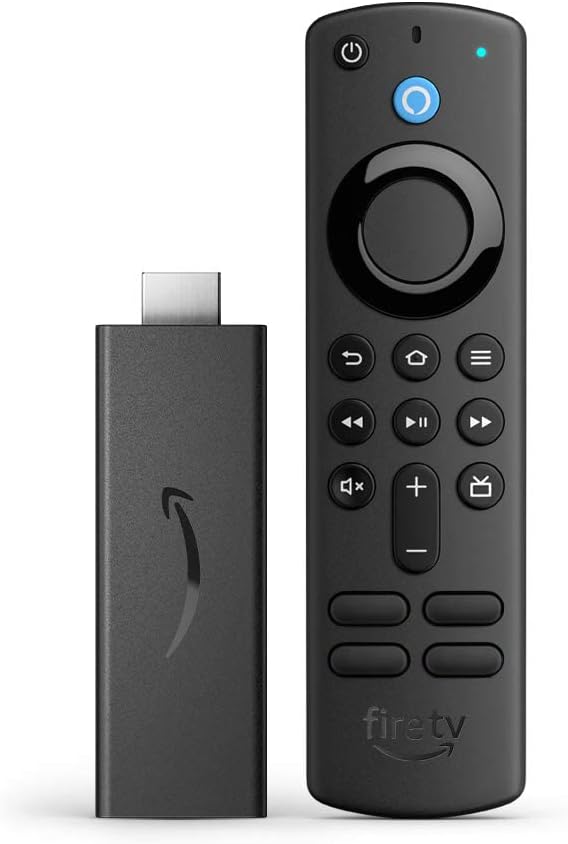
The Fire TV Stick 4K Max offers a robust streaming experience with support for 4K Ultra HD and Dolby Vision. It stands out for its fast performance and seamless integration with Alexa.
We may earn a commission when you buy through this link, at no additional cost to you.
Its WiFi 6 support ensures smooth playback even on congested networks. The remote includes dedicated buttons for popular streaming services, making navigation intuitive and quick.
While it lacks an Ethernet port, the wireless performance is generally excellent. Users should note that external storage is not supported directly on the device.
This device is ideal for households wanting high-quality streaming without a large investment. It delivers consistent performance and reliability for daily entertainment use.
Support for Dolby Vision and HDR10+ ensures vibrant colors and deeper contrasts on compatible TVs.
Alexa voice control allows you to manage compatible smart devices directly from the remote.
We may earn a commission when you buy through this link, at no additional cost to you.
The Kindle Paperwhite is a top choice for avid readers seeking a distraction-free experience. Its 6.8 inch display and warm light feature make reading comfortable in any environment.
We may earn a commission when you buy through this link, at no additional cost to you.
Battery life lasts for weeks on a single charge, which is ideal for travel. The waterproof rating allows use near water without worry.
While it does not support audiobooks directly, you can pair it with Bluetooth speakers. The screen is strictly for text and images.
This e-reader is perfect for those who prioritize reading quality and portability. It provides a focused environment for enjoying books without notifications.
The adjustable warm light reduces blue light exposure, making it easier to read before bed.
With an IPX8 rating, the device can withstand accidental splashes and brief submersion in water.
We may earn a commission when you buy through this link, at no additional cost to you.
The Echo Dot 5th Gen offers a powerful smart speaker experience at a budget-friendly price. It features improved audio drivers that deliver clearer sound than previous generations.
We may earn a commission when you buy through this link, at no additional cost to you.
Setup is straightforward, and it connects easily to other smart home devices. The spherical design fits well on any shelf or nightstand.
While it lacks deep bass, the clarity is impressive for its size. Some models include a 3.5mm audio output for external speakers.
This device is ideal for entry-level smart home users. It provides reliable voice assistance and music streaming capabilities without breaking the bank.
Built-in Zigbee hub allows you to connect compatible devices without a separate bridge.
A microphone off button gives you physical control over when the device listens.
We may earn a commission when you buy through this link, at no additional cost to you.
The Echo Show 8 combines voice control with a visual interface for enhanced interaction. The HD touchscreen allows you to see recipes, weather, and video calls clearly.
We may earn a commission when you buy through this link, at no additional cost to you.
Its camera supports HD video calling and can be covered physically for privacy. The device serves as a central hub for managing smart home cameras and lights.
While it requires more desk space than a speaker, the functionality justifies it. Users need a reliable Wi-Fi connection for optimal performance.
This display is perfect for kitchens or nightstands where visual context helps. It enhances the smart home experience with a user-friendly screen.
Recipes and step-by-step instructions are displayed visually, making cooking easier without touching the screen.
A physical camera cover and microphone off button ensure you maintain control over your privacy.
We may earn a commission when you buy through this link, at no additional cost to you.
The Fire HD 10 is a versatile tablet designed for media consumption and light productivity. Its 10.1 inch display provides an immersive experience for movies and reading.
We may earn a commission when you buy through this link, at no additional cost to you.
Battery life supports a full day of moderate use. The inclusion of hands-free Alexa makes it easy to manage tasks without touching the screen.
While it lacks full Google Play access, the Amazon Appstore offers most popular apps. Performance is adequate for media but not heavy gaming.
This tablet is best for casual users focused on entertainment. It offers great value for those already invested in the Amazon ecosystem.
The screen resolution ensures sharp images for streaming content and digital magazines.
The battery allows for long commutes or travel days without frequent recharging needs.
We may earn a commission when you buy through this link, at no additional cost to you.
Selecting the right device depends on your specific needs and budget. Consider these factors to find a product that fits your lifestyle.
Determine whether you need the device primarily for reading, streaming, or smart home control. Each product excels in different areas.
Match the device type to your most frequent activity to maximize value and utility.
For tablets and readers, screen size and resolution affect comfort. Larger screens are better for media while smaller ones suit portability.
Choose a display that balances clarity with ease of use in your preferred environment.
Check for WiFi standards and ports like USB-C. Newer models offer faster speeds and better compatibility with accessories.
Ensure the device supports the connections you need for peripherals and network stability.
Consider existing devices you own. Sticking within one ecosystem simplifies file sharing and control.
Pick a device that works seamlessly with your current apps and smart home tools.
Long battery life is crucial for travel and daily use. Check the manufacturer’s estimated hours under typical conditions.
Prioritize models with reliable endurance if you use the device throughout the day.
Look for physical shutters or microphone off buttons. Privacy features protect sensitive data during use.
Select a device that gives you clear control over data collection and listening capabilities.
Storage affects how many files or apps you can keep offline. Higher capacity is better for media libraries.
Choose a model that accommodates your expected content volume without needing cloud storage.
Set a clear spending limit before comparing options. Balance cost with essential features to avoid overspending.
Review prices regularly as sales may offer better value for higher-tier models.
Begin by charging the device fully before first use. Connect it to your home Wi-Fi network using the setup wizard.
Clean the screen with a soft microfiber cloth to avoid scratches. Avoid using harsh chemicals or water directly on ports.
Update the software regularly to access new features and security patches. Store the device in a cool place when not in use.
If you primarily read text, a dedicated reader offers better battery and screen clarity. For multimedia and apps, a tablet provides more versatility and color.
Most require an Amazon account for initial setup and app access. Some features may work with limited functionality if you skip registration.
Most devices last 2 to 3 years with regular use. Battery capacity degrades over time but remains functional for daily tasks.
Yes, most support Bluetooth keyboards for typing tasks. Check compatibility details before purchasing a third-party keyboard.
Update whenever a notification appears to ensure security and performance. Frequent updates provide bug fixes and new features.
Some models like the Kindle Paperwhite are waterproof. Always check the IP rating before exposing any device to water.
We have highlighted five strong options that cater to different priorities. The Fire TV Stick 4K Max leads in streaming while the Kindle Paperwhite excels in reading.
Focus on what you value most whether it is visual quality, smart control, or portability. The right choice depends on your daily habits.
Check current prices and availability before purchasing as offers change often. Verify details on the product page to confirm it meets your needs.