
HDMI Extender Over Ethernet 1080P 60Hz
4.4Editor score
Full HD 1080P 60Hz
164 feet transmission range
EDID copy included
This guide compares the best HDMI over Ethernet extenders for reliable long-distance video transmission across home and professional setups.
Finding the right HDMI over Ethernet solution is essential when you need to send high-definition video over long distances without signal loss. Whether you are setting up a home theater, office conference room, or digital signage system, a quality extender ensures crisp visuals and stable audio performance.
We have carefully evaluated ten top-rated products based on range, resolution support, and ease of installation. Each model offers unique features like Power over Cable, loop-out ports, and IR control to suit different needs. Our analysis helps you choose the perfect extender for your specific setup.
Every pick highlights key strengths and ideal use cases to help you make an informed decision. Please note that prices and availability may change over time, so check the latest listings before purchasing. This guide is updated regularly to reflect current market standards.
4.4Editor score

4.6Editor score
4.2Editor score
The following table provides a side-by-side comparison of all ten products to help you identify the best fit for your installation needs.


The OREI HDMI Over Ethernet Extender via CAT6 is a top-tier choice for users needing reliable 4K signal extension. With a rating of 4.6 stars, it delivers exceptional performance for home and professional installations. Its 230-foot range and HDR support make it stand out in the market.
We may earn a commission when you buy through this link, at no additional cost to you.
This model supports HDMI 2.0a and HDCP 2.2 ensuring compatibility with modern devices like consoles and media players. The Power over Cable feature simplifies setup by requiring only one adapter. The metal housing aids heat dissipation and ensures durability over time.
While the price is higher than budget options, the performance justifies the investment for critical setups. The included adapter and cables are sufficient for most uses. Some may find the lack of two-way IR a minor limitation compared to premium models.
Ideal for home theaters or conference rooms requiring high fidelity, this extender is highly recommended. It balances range and quality effectively. For those seeking the best overall experience, this unit is a reliable and robust choice.
Supports HDR10+ and Dolby Digital for vibrant visuals and immersive audio.
Plug and play design ensures setup without software or drivers.
We may earn a commission when you buy through this link, at no additional cost to you.
This HDMI Extender Over Ethernet is the go-to option for budget-conscious buyers needing Full HD performance. It achieves a 4.4 rating by delivering stable 1080P at 60Hz over long distances. Perfect for classrooms or basic office setups.
We may earn a commission when you buy through this link, at no additional cost to you.
Power over Cable technology reduces clutter by powering the receiver via the Ethernet cable. The EDID copy function ensures your display detects the correct resolution automatically. It supports uncompressed video for crisp visuals without latency.
The main trade-off is the lack of 4K support, which limits use with newer high-end devices. However, for standard Full HD needs, it is highly effective. The plug-and-play design makes it accessible for non-technical users.
Buyers looking for cost-effective solutions will find this model ideal. It works well with PCs laptops and DVD players. For basic extension tasks without breaking the bank, this is a solid pick.
Offers excellent value for standard Full HD video transmission needs.
No drivers required making it easy to install quickly.
We may earn a commission when you buy through this link, at no additional cost to you.
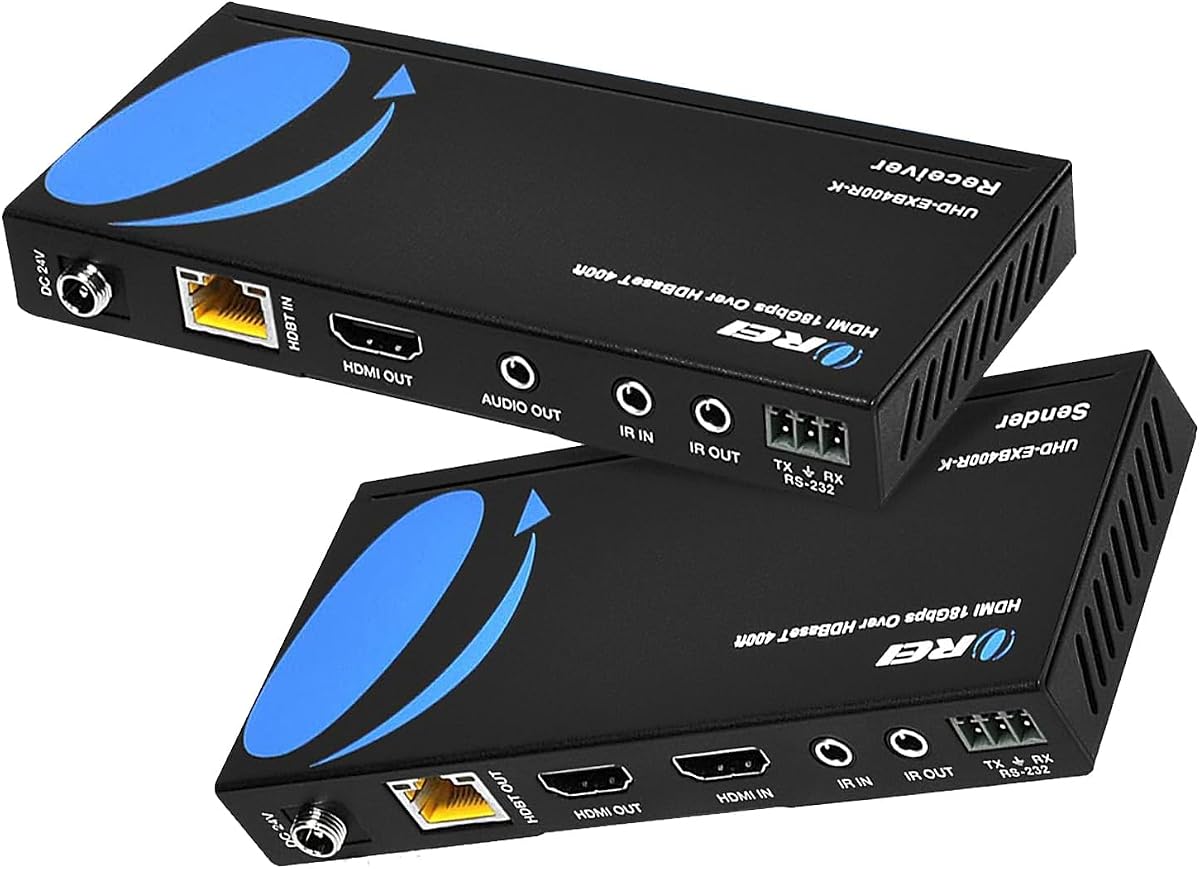
The OREI HDBaseT extender sets the benchmark for long-distance professional setups. Rated 4.2 stars, it offers unmatched range of 400 feet with lossless transmission. Ideal for large venues, churches, or corporate conference halls requiring high control.
We may earn a commission when you buy through this link, at no additional cost to you.
Features like RS-232 command control and CEC support allow for advanced system integration. Two-way IR control means you can manage devices from the source or display end. The HDBaseT standard ensures compatibility with other enterprise-grade devices.
Its high price reflects its professional capabilities which may be overkill for home users. Setup involves careful matching of transmitter and receiver units. While robust, it requires more technical knowledge than basic models.
Professional installers should prioritize this model for its reliability and control features. It delivers pristine quality even at maximum distances. For mission-critical installations, this premium unit is worth the investment.
RS-232 and two-way IR enable precise remote system management.
Pushes HDMI signals up to 400 feet with zero signal degradation.
We may earn a commission when you buy through this link, at no additional cost to you.
This splitter extender is perfect for digital signage or multi-view setups where one source feeds multiple displays. Rated 4.6 stars, it distributes 4K at 30Hz to four monitors simultaneously. The 230-foot range supports large layout installations.
We may earn a commission when you buy through this link, at no additional cost to you.
A local loop-out port lets you monitor the source directly while extending to remote screens. Power over Cable reduces cabling at the receiver locations. IR remote control allows for easy source management from a distance.
The limitation to 30Hz at 4K may impact fluid motion for gaming or video editing. However, it is ideal for static content or presentations. The single adapter requirement simplifies power management significantly.
Installers needing to drive multiple displays from a single source will find this versatile. It is a powerful tool for conference rooms or retail environments. For spreading content to many screens, this model excels.
Splits one HDMI source into four independent displays simultaneously.
Loop-out port allows local preview while sending remote signal.
We may earn a commission when you buy through this link, at no additional cost to you.
This balun extender delivers uncompressed 4K at 60Hz over 165 feet. With an 18Gbps bandwidth rating, it handles HDR and Dolby audio formats seamlessly. It is a robust choice for high-fidelity home theater systems.
We may earn a commission when you buy through this link, at no additional cost to you.
EDID management ensures source and display compatibility for smooth playback. The loop-out feature supports dual-screen setups efficiently. IR control lets you manage players from the receiver end comfortably.
While the range is shorter than 230-foot models, the speed compensates for most home uses. The cable requires careful placement to avoid signal issues. Overall it balances performance with usability well.
Audiophiles and cinephiles seeking crisp visuals should consider this model. It supports gaming consoles and Blu-ray players effectively. For rich media playback, it provides a reliable bridge.
Supports 18Gbps bandwidth for true uncompressed 4K video.
Compatible with Dolby TrueHD and DTS-HD for immersive sound.
We may earn a commission when you buy through this link, at no additional cost to you.
This extender offers a mix of 4K support and long-range capability at an accessible price. With a 4.4 rating, it extends up to 230 feet. Great for churches or classrooms requiring flexible signal paths.
We may earn a commission when you buy through this link, at no additional cost to you.
IR remote control and loop-out ports provide essential utility for daily use. EDID management helps maintain stable video output across changes. The compact design fits easily into tight AV racks.
The 30Hz refresh rate limit may impact fluid gaming visuals but works fine for movies. It is a reliable workhorse for general content distribution. Installation is straightforward with included adapters.
For budget-conscious buyers needing reliable long-range performance, this model fits well. It handles streaming players and laptops without issues. For general AV needs, it is a strong contender.
Includes IR cables for controlling source devices remotely.
Uncompressed transmission ensures synchronized audio and video output.
We may earn a commission when you buy through this link, at no additional cost to you.
This model combines HDMI extension with USB KVM control for remote desktop access. Rated 4.2 stars, it is ideal for offices needing shared PCs across rooms. It delivers 4K at 60Hz over 230 feet effectively.
We may earn a commission when you buy through this link, at no additional cost to you.
A 3.5mm audio output allows for direct speaker connections at the receiver. EDID copy-through ensures seamless resolution matching between source and display. The design supports standard HDMI formats and HDR visuals.
USB support is limited to version 1.1 which restricts mouse speed compared to modern hubs. However, for basic office tasks, it works well. The setup remains simple with plug-and-play convenience.
IT managers and professionals needing remote PC control will find this useful. It bridges video and input control efficiently. For office environments, this dual-function unit saves hardware costs.
USB KVM extension enables keyboard and mouse remote control.
3.5mm audio out provides analog sound at receiver location.
We may earn a commission when you buy through this link, at no additional cost to you.
This extender supports mounting holes for secure installation in tight spaces. It delivers 4K at 30Hz over 230 feet and works with various CAT cables. Ideal for retail or office installations needing fixed setups.
We may earn a commission when you buy through this link, at no additional cost to you.
Loop-out and IR support provide essential utility for flexible viewing. EDID cloning ensures devices match resolution quickly. The power-over-cable feature reduces clutter significantly.
Build quality is standard but the mounting holes add value for permanent installs. It is not compatible with switches or routers requiring direct connection. Overall it offers good value for specific setups.
Installers needing fixed mounting points will appreciate this design. It supports diverse environments from outdoor to indoor. For fixed setups, this model is a practical choice.
Patented mounting holes allow secure and stable installation.
Works with CAT5e CAT6 and CAT7 for broad compatibility.
We may earn a commission when you buy through this link, at no additional cost to you.
Another HDBaseT model offering unparalleled range for large installations. It delivers 4K at 60Hz with zero latency across 400 feet. Best suited for large corporate or public venue setups requiring reliability.
We may earn a commission when you buy through this link, at no additional cost to you.
CEC support allows for device control commands over HDMI. The RS-232 port adds command control for integrated systems. Loop-out provides local monitoring options for easy setup.
High cost and need for matching pairs may limit small users. However, for critical setups where failure is not an option, this is a strong choice. The build is professional grade.
Installers handling large venues will benefit from its robust performance. It simplifies cabling with advanced control features. For large-scale projects, this unit is highly effective.
RS-232 and CEC support advanced integration with control systems.
Built for commercial environments needing stable long-distance transmission.
We may earn a commission when you buy through this link, at no additional cost to you.
The PWAY extender is a cost-effective unit with solid performance for general users. Rated 4.6 stars, it reaches up to 230 feet. Perfect for home office or meeting room signal extension.
We may earn a commission when you buy through this link, at no additional cost to you.
Supports 4K at 30Hz and provides loop-out for local preview. IR remote allows easy control from the receiver end. Installation is plug-and-play with no software needed.
Refresh rates at 4K are limited but fine for static content. The build is lightweight yet functional. For general use, it is a highly rated and popular choice.
Buyers looking for reliable value will find this model effective. It works with most gaming and media devices. For general needs without premium features, it is a top contender.
Offers strong 4K capabilities at an accessible price point.
No software required for quick and easy installation.
We may earn a commission when you buy through this link, at no additional cost to you.
Selecting the right extender involves balancing range resolution and features for your needs.
Range determines how far you can extend your HDMI signal. Most extenders reach 165 to 230 feet with standard CAT cables. For larger venues HDBaseT models can reach up to 400 feet.
Choose a range that exceeds your installation distance by at least 10 percent for safety.
Resolution dictates video quality. Many budget models support 1080P at 60Hz while premium ones offer 4K at 60Hz. Ensure your source and display devices match the extender's capabilities.
Opt for 4K support if you plan to use modern gaming consoles or streaming devices.
Power over Cable allows the receiver to be powered via the Ethernet cable. This reduces clutter and simplifies installation especially for wall-mounted displays. Most models include a single adapter for this purpose.
Always check if PoC is supported to avoid needing extra outlets.
A loop-out port on the transmitter lets you connect a local monitor. This is essential for setup and troubleshooting without disturbing the remote display. It also supports multi-display workflows effectively.
Prioritize models with loop-out if you need local monitoring capabilities.
IR control cables let you operate the source device from the receiver location. Look for one-way or two-way options depending on your needs. This feature is vital for hidden equipment racks.
Ensure IR cables are included in the package before purchasing.
HDBaseT models provide lossless transmission for professional use. They often support RS-232 command control and CEC for automation. These units are pricier but offer superior stability for enterprise environments.
Use HDBaseT only if you need advanced control and maximum distance.
Durable metal housings help dissipate heat during long use. Compact designs fit better in AV racks or under desks. Avoid plastic cases if the device runs hot for extended periods.
Choose metal units for reliability and better thermal performance.
Ensure the extender works with your specific devices like PCs or consoles. Check HDCP support for protected content like 4K Blu-ray. Avoid models that do not list specific compatible devices.
Verify device lists on the product page to avoid issues.
Start by connecting your source device to the transmitter via an HDMI cable. Ensure the connection is secure to prevent signal dropouts. Next connect an Ethernet cable from the transmitter to the receiver ensuring no sharp bends or kinks.
Plug the power adapter into the transmitter only if using PoC technology. This powers both units simultaneously reducing cable clutter. Connect the receiver to your display using another HDMI cable to complete the chain.
Care for your setup by avoiding moisture and dust near units. Ensure good ventilation to prevent overheating. Check cables periodically for wear. Proper maintenance extends the life of your extender significantly.
Yes but higher quality cables like CAT6 or CAT7 provide better stability. Avoid damaged or old cables that may cause signal loss. Always check the product requirements before purchasing.
No most extenders require a direct connection between transmitter and receiver. Using a switch may break the signal. Always connect the two units directly via one Ethernet cable.
Power over Cable sends power through the Ethernet cable to the receiver. This eliminates the need for a second adapter. It simplifies installation and reduces cable clutter significantly.
Many models support 4K at 30Hz while premium ones offer 4K at 60Hz. Check the specific resolution limits before purchasing to ensure they meet your needs.
Use the included IR cables to forward commands from the receiver to the source. This allows control from the display location without accessing the source directly.
Flickering often results from poor cable quality or distance. Ensure you use high-quality CAT6 cables and replace any damaged wiring to fix the issue.
Most HDMI over Ethernet extenders do not support ARC features. Check product details to confirm ARC compatibility if audio return is required.
We have highlighted top picks including the OREI 4K Extender and budget-friendly options. Each model serves different needs from long-range to cost-effective setups.
Prioritize range and resolution based on your specific installation. Consider features like IR control and loop-out to enhance usability for your setup.
Remember to check current prices and availability before purchasing. This guide offers a reliable starting point for finding the right HDMI over Ethernet solution.