
Acer Nitro V 16S AI
4.4Editor score
32GB DDR5 RAM
180Hz WUXGA Display
RTX 5060 GPU
Finding the right gaming laptop for Baldurs Gate 3 requires balancing power, screen quality, and portability. This game demands strong graphics and smooth frame rates to render its detailed worlds without lag. A capable machine ensures you never miss a story moment or tactical turn.
We compared ten top-rated laptops based on their processors, graphics cards, and display refresh rates. Each model offers unique strengths for handling the game's complex scenes and large party management. Our analysis highlights how hardware choices impact real-world performance in this rich RPG.
Each pick in this list shows what makes the laptop suitable for Baldurs Gate 3 specifically. We detail key specs, pros, and cons to help you decide quickly. Prices change frequently, so check the current listings before making your final choice today.
4.4Editor score

4.4Editor score

4.8Editor score
As an Amazon Associate we earn from qualifying purchases.
The following table compares all ten selected laptops side-by-side. It highlights key specifications like processor type, graphics card, memory, and display features to help you see differences at a glance.





This ASUS ROG Strix G16 laptop earns the top spot for its balanced performance in Baldurs Gate 3. It features an Intel Core i7 14650HX processor and NVIDIA RTX 5060 GPU which handle the game's complex scenes with ease. The 165Hz display ensures visuals stay fluid during combat turns.
We may earn a commission when you buy through this link, at no additional cost to you.
The hardware delivers smooth gameplay without stuttering. The processor manages multiple tasks like voice chat and music. The RTX 5060 provides excellent ray tracing capabilities for better lighting in dungeons. This makes the game look more immersive and realistic on screen.
While 16GB of RAM is sufficient for most, power users might want to upgrade to 32GB for heavy multitasking. The price point is higher than entry-level options but justifies the premium cooling and display quality. These trade-offs are acceptable for the performance you receive.
Anyone seeking a reliable machine for Baldurs Gate 3 should consider this model. It offers a strong mix of speed and visuals that match the game demands. For the best experience, ensure your drivers are updated before launching the game.
The Intel Core i7 14650HX ensures that loading times are short and menus respond instantly.
The 165Hz refresh rate makes animations look natural and reduces motion blur during fast movements.
We may earn a commission when you buy through this link, at no additional cost to you.
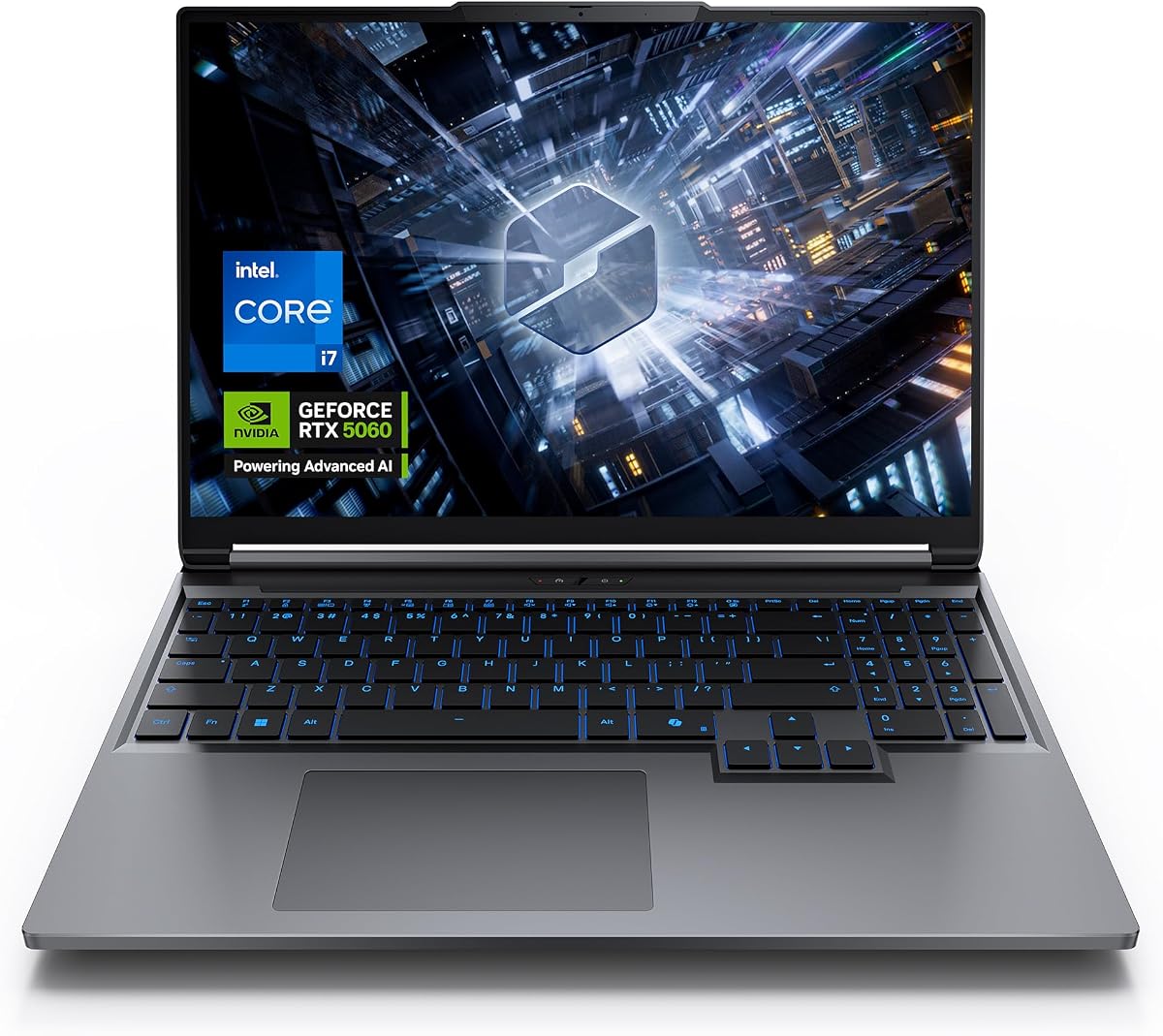
The Acer Nitro V 16S AI stands out as an affordable option for gamers on a budget. It packs a strong AMD Ryzen 7 260 processor and RTX 5060 GPU. The 32GB DDR5 RAM allows for heavy multitasking without slowdowns.
We may earn a commission when you buy through this link, at no additional cost to you.
This laptop offers incredible value for the performance provided. The 180Hz display makes gameplay feel fluid and responsive. The AI features can enhance rendering for smoother visuals in Baldurs Gate 3. It handles the game at high settings comfortably.
The main trade-off is the display quality and connectivity options compared to premium models. The screen might not match the color fidelity of expensive laptops. However, the raw performance makes up for these minor limitations in most play scenarios.
Budget conscious players will love the value here. It delivers high frame rates and memory headroom for future needs. For those who want the most performance per dollar, this is an excellent choice.
The 32GB of DDR5 RAM ensures that you can run other apps while gaming without lag.
A 180Hz screen makes moving animations smoother which helps during fast tactical encounters.
We may earn a commission when you buy through this link, at no additional cost to you.
The Dell Alienware 16 Aurora offers a premium experience for gamers who want style and power. It features a sleek design with a WQXGA display that delivers crisp visuals. The 32GB RAM ensures smooth performance in large scenes.
We may earn a commission when you buy through this link, at no additional cost to you.
This laptop provides a high-end feel with durable materials. The screen resolution makes text and character details look sharp. Windows 11 Pro adds extra features for power users. It handles Baldurs Gate 3 effortlessly with high settings.
The higher price is the main drawback compared to other options. The refresh rate is 120Hz which is solid but not the fastest on the list. These are minor compromises for the overall build quality and screen sharpness.
Users who value build quality and high resolution should choose this model. It combines aesthetics with strong performance for a top-tier experience. This is ideal for those willing to pay for a premium machine.
The aluminum chassis provides durability and a sleek look that fits any setting.
WQXGA resolution makes UI text easy to read during complex tactical planning phases.
We may earn a commission when you buy through this link, at no additional cost to you.
The msi Cyborg 17 brings a large 17.3 inch screen to a surprisingly thin chassis. It is perfect for players who want a big screen without a heavy machine. The RTX 5060 provides solid graphics performance for Baldurs Gate 3.
We may earn a commission when you buy through this link, at no additional cost to you.
The large display makes the game look impressive while maintaining portability. The Intel Core 7 processor handles multitasking well. It stays cool thanks to the shared-pipe thermal design. This makes it good for long gaming sessions.
The main trade-off is the 16GB RAM limit which might need future upgrades. Battery life is shorter when gaming compared to standard usage. However, the screen size and thinness are great benefits for mobile gamers.
Travelers who want a big screen will appreciate this laptop. It balances performance and weight effectively. If you need to carry it often, this model offers a great solution.
A 17.3 inch display gives you a wider view for exploring detailed environments.
Weighing 5.5 lbs it is easier to carry than many other large gaming laptops.
We may earn a commission when you buy through this link, at no additional cost to you.
The GIGABYTE Gaming A16 stands out for its RTX 5070 GPU. This offers higher performance than the 5060 models. It allows for better ray tracing and higher frame rates in Baldurs Gate 3.
We may earn a commission when you buy through this link, at no additional cost to you.
The laptop includes the GiMATE AI interface for smart controls. The chassis is slim at 19mm making it sleek and portable. The hinge allows a flat view for comfortable typing during story moments.
The price is higher than basic models due to the GPU upgrade. The 16GB RAM is standard but can be upgraded. This laptop is ideal for those wanting better graphics performance.
Players who want next-gen graphics should consider this model. It provides a step up in visual quality. For a balance of power and portability, this is a strong choice.
The RTX 5070 GPU delivers faster rendering for complex scenes in the game.
The thin chassis makes it easy to fit in a bag for travel.
We may earn a commission when you buy through this link, at no additional cost to you.
The HP Victus 15.6 offers great value for those wanting reliability. It includes 32GB of RAM and a capable AMD processor. The RTX 4050 GPU handles the game well at 1080p.
We may earn a commission when you buy through this link, at no additional cost to you.
This laptop has a 5.0 rating from users which is rare. It supports smooth multitasking and streaming. The keyboard is backlit for low light play. Connectivity options include multiple USB and HDMI ports.
The RTX 4050 is less powerful than 5060 models which might limit future settings. The screen is standard 1080p without higher refresh rates. But the memory and build quality are strong benefits.
Those who want a reliable machine at a fair price should look here. It delivers consistent performance for daily use. For general gaming needs this is a solid option.
A perfect 5.0 rating shows that users find this laptop reliable and consistent.
The 32GB RAM allows for running background apps without impacting game speed.
We may earn a commission when you buy through this link, at no additional cost to you.
This model offers the highest specs on the list for gaming. The 240Hz display and RTX 5070 Ti provide unmatched visuals and speed. It is ideal for those who want top performance in Baldurs Gate 3.
We may earn a commission when you buy through this link, at no additional cost to you.
The Intel Core Ultra 9 processor is very powerful for multitasking. The 32GB RAM ensures you never run out of memory. The Wi-Fi 7 feature offers fast internet speeds. This is the ultimate gaming machine.
The main trade-off is the high cost and weight of the laptop. It is not a budget choice and not portable for travel. The premium price is justified by the top-tier components.
Enthusiasts who demand the best performance should consider this model. It delivers a high-end experience. For maximum power, this is the best choice available.
The 240Hz 2.5K screen offers a premium viewing experience for gaming.
The Core Ultra 9 processor handles heavy workloads with ease.
We may earn a commission when you buy through this link, at no additional cost to you.
The Aurora 16X features a sleek metal finish with business-friendly styling. It balances performance with portability at about 5.18 lbs. The 2.5K 180Hz display provides sharp visuals for the game.
We may earn a commission when you buy through this link, at no additional cost to you.
The Intel i7 processor handles heavy multitasking well. The dual fans and heat pipes keep the system cool. The 80Wh battery allows for extended use on the go. This makes it suitable for daily productivity.
The 16GB RAM is a limitation for heavy multitasking. The GPU is mid-range which is good for current games. The build quality is a strong point for travel users.
Anyone wanting a mix of work and gaming should consider this. The metal design feels sturdy. It is a solid choice for those needing a laptop for all tasks.
The 80Wh battery supports productivity away from a power outlet for longer periods.
Multiple ports like HDMI 2.1 and USB-C allow for flexible external display setups.
We may earn a commission when you buy through this link, at no additional cost to you.
The ASUS TUF Gaming A16 is built for durability with a 4.5 rating. It features an AMD Ryzen 7 processor and RTX 4050 graphics. This laptop is a solid choice for budget gamers.
We may earn a commission when you buy through this link, at no additional cost to you.
The TUF series is known for tough build quality. The 144Hz display is smooth for gaming. The keyboard is backlit which is good for low light. The 512GB SSD is fast but small.
The storage might need an upgrade over time. The GPU is not the latest generation. However, the value and reliability are strong selling points.
Those who want a durable laptop at a lower cost should look here. It provides consistent performance. For general gaming and work this is a good option.
The TUF series is designed to withstand daily use and wear.
The 512GB SSD offers fast loading times but limited space for large libraries.
We may earn a commission when you buy through this link, at no additional cost to you.
The GIGABYTE Gaming A16 combines AMD power with RTX graphics. It offers a slim chassis with strong performance. The Ryzen 7 260 processor is efficient for multitasking.
We may earn a commission when you buy through this link, at no additional cost to you.
This model includes GiMATE AI for intuitive control. The RTX 5060 ensures smooth visuals in the game. The 19mm chassis is thin and portable. This makes it a great daily driver.
The base RAM is 16GB which might limit heavy usage. The display refresh rate is not specified in the title. However the overall value is strong for gamers.
Those who prefer AMD processors should consider this option. It balances cost and performance well. For budget-conscious buyers, this is a solid choice.
The Ryzen 7 260 handles daily tasks and gaming efficiently.
GiMATE AI helps customize your workflow and controls easily.
We may earn a commission when you buy through this link, at no additional cost to you.
Selecting the right laptop for Baldurs Gate 3 requires attention to several key factors. These elements ensure you get a smooth experience without lag or visual issues.
The GPU determines how well the game renders scenes. Look for at least an RTX 5060 for optimal performance in 2026.
Choose a GPU that supports ray tracing for better immersion.
A fast CPU helps with multitasking and quick loading. Intel Core i7 or AMD Ryzen 7 processors are recommended.
This ensures smooth gameplay even with background apps running.
Memory is crucial for running the game smoothly. Aim for 32GB if you plan to multitask or stream.
16GB is the minimum for standard play.
A high refresh rate makes movement look smoother. 120Hz or higher is preferred for this type of game.
Resolution affects text clarity during story phases.
Gaming drains battery quickly. Look for larger cells if you plan to play away from a wall.
This matters most for students or travelers.
Fast SSDs reduce load times significantly. Aim for at least 1TB for your game library.
This prevents clutter and keeps games loading fast.
Keep your laptop on a flat hard surface to ensure proper airflow. This prevents overheating during long gaming sessions.
Update your drivers regularly to maintain performance. Use the manufacturer app to check for latest updates.
Clean the keyboard and screen gently with a soft cloth. This keeps the device looking new and working well.
For smooth gameplay you should aim for at least an RTX 5060 GPU. This card handles ray tracing and high settings well. Anything lower may struggle with complex scenes.
Yes 16GB is enough for playing the game alone. However if you stream or use other apps you should upgrade to 32GB. This prevents lag when multitasking.
While it is turn based a high refresh rate helps visual fluidity. A 144Hz screen makes animations smoother. It is a nice to have not a requirement.
Yes a 1080p display works fine for this game. Many laptops use this resolution for better performance. It saves battery and allows higher settings.
No standard Wi-Fi 6 is enough for most needs. Wi-Fi 7 is newer but not essential for gameplay. A wired connection is best for stability.
Use a cooling pad or ensure vents are not blocked. Keep the software updated for best thermal management. Avoid soft surfaces like beds.
We have compared ten top laptops for Baldurs Gate 3 to help you choose. The ASUS ROG Strix G16 leads for balance while the Dell Alienware offers premium quality.
Prioritize performance and display quality for the best experience. Ensure your RAM and GPU match the game requirements.
Remember to check current prices before buying. Prices change often so verify the listing details for your final decision.