
ARCTIC Case Fan Hub
4.7Editor score
Ten PWM fan ports
Direct SATA power supply
Simple synchronous control
This guide compares the top fan control hub for PC options to help you manage cooling fans and RGB lighting efficiently in your custom computer build.
Managing multiple fans in a modern PC build can quickly become a tangle of cables and limited motherboard headers. A dedicated fan control hub solves this problem by centralizing power and signal distribution for a cleaner system.
We evaluated ten highly rated hubs based on port counts, PWM support, ARGB compatibility, and build quality. Our selection includes options from reputable brands known for reliability and innovative cooling solutions in the enthusiast market.
Each pick highlights key features like magnetic mounting or remote control to help you choose the right hub for your setup. Keep in mind that pricing and availability change frequently, so check current listings before purchasing.
4.7Editor score

4.7Editor score
4.6Editor score
The table below provides a side-by-side comparison of all ten fan control hubs we reviewed. Look for port counts, power inputs, and special features to find the best fit for your build needs.


This Thermalright hub offers an efficient way to manage up to eight groups of fans along with ARGB lighting in a standard PC case. It holds a strong 4.5 star rating for its reliability and ease of installation using magnetic or adhesive mounts.
We may earn a commission when you buy through this link, at no additional cost to you.
The standout feature is its ability to handle both PWM fan signals and 5V 3-pin ARGB signals simultaneously. This dual support ensures your fans spin smoothly while your lighting syncs perfectly without needing extra splitters or adapters.
Keep in mind this device expands interfaces but does not control speed or lighting colors directly. You must connect it to your motherboard headers for PWM speed regulation and rely on motherboard software for RGB control.
If you need a simple expansion hub for a mid-sized build with mixed fan and lighting needs, this unit provides solid performance and good value for the price point.
Direct SATA power ensures fans run efficiently without voltage loss across long cables.
Strong paste and magnetic options allow flexible placement on any steel chassis surface.
We may earn a commission when you buy through this link, at no additional cost to you.
The ARCTIC Fan Controller stands out with true individual PWM control for each of its ten ports. This high 4.7 rating reflects its ability to manage complex cooling setups with precision beyond standard hub synchronization.
We may earn a commission when you buy through this link, at no additional cost to you.
Its native driver support for Windows and Linux makes it incredibly versatile for users who run different operating systems. You can control fan speeds independently to balance noise and cooling based on specific hardware loads.
While it costs slightly more than basic hubs, the ability to tune each fan individually adds significant value to high-performance builds. The high current capacity ensures stable operation even with heavy-duty fans attached.
This is an ideal choice for enthusiasts who demand granular control over their cooling system and want a reliable, driver-supported solution.
Each port has its own PWM signal allowing fine-tuned speed adjustment for every single fan.
Kernel support ensures compatibility with most Linux distributions and Windows versions easily.
We may earn a commission when you buy through this link, at no additional cost to you.
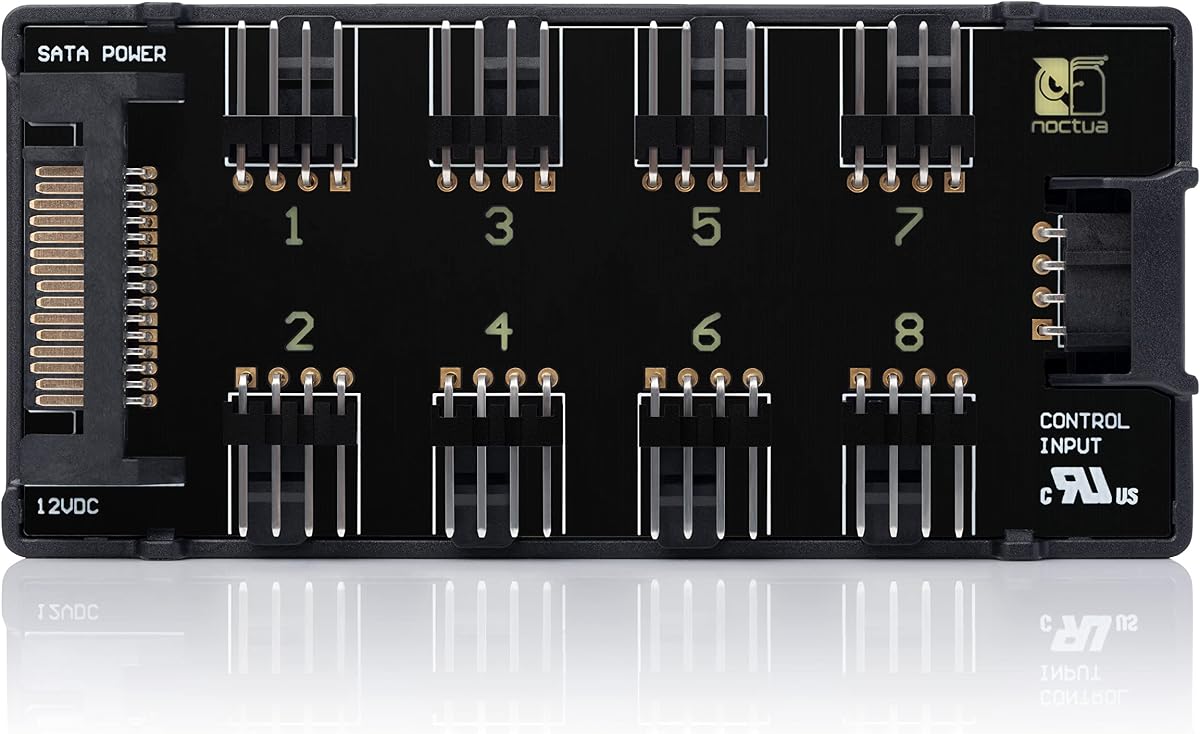
The Noctua NA-FH1 is a premium hub designed specifically for PWM fans with a focus on safety and reliability. It carries a 4.6 rating due to its robust construction and integrated safety features like short circuit protection fuses.
We may earn a commission when you buy through this link, at no additional cost to you.
It connects directly to your motherboard headers using the included NA-EC1 cable and powers fans via SATA. This setup allows for efficient power delivery while keeping cables neat inside the chassis using strong magnets.
While it lacks RGB lighting support, it is excellent for silent cooling builds where noise is the priority. The six-year warranty further emphasizes the brand's confidence in its durability and performance.
Choose this hub if you prioritize safety, premium build quality, and need a reliable solution for standard PWM fans without lighting needs.
Integrated safety fuses provide protection against overcurrent and short circuits for your hardware.
Backed by a long six-year manufacturer warranty ensuring long-term reliability for your system.
We may earn a commission when you buy through this link, at no additional cost to you.
This ARCTIC hub is a straightforward and affordable solution for expanding PWM fan headers up to ten ports. It holds a 4.7 rating for its simplicity and ability to manage multiple fans without cluttering the motherboard.
We may earn a commission when you buy through this link, at no additional cost to you.
It passes a synchronized PWM signal to all fans while reading RPM from the first slot. The SATA power connection ensures your fans run smoothly without relying on limited motherboard header power output.
Installation is simple with its compact size and plug-and-play cable management. While it lacks advanced features, it perfectly solves the common issue of not having enough fan headers.
For users looking for a cost-effective way to add more case fans efficiently, this hub is a practical and reliable choice.
One of the most affordable options available for expanding PWM fan connectivity significantly.
Direct SATA input powers fans directly to prevent voltage drops and ensure consistent performance.
We may earn a commission when you buy through this link, at no additional cost to you.
The Thermalright X12 hub is designed for large builds needing up to twelve fan groups with mixed lighting support. It has a 4.4 rating and is popular for its high port capacity and sleek white finish that matches modern cases.
We may earn a commission when you buy through this link, at no additional cost to you.
It handles both PWM fans and 5V 3-pin ARGB devices through dedicated connectors. The SATA power input ensures stable operation under high load without overloading your motherboard headers.
Note that the SATA cable must be purchased separately as it is not included in the box. Also, this hub does not control speed or color, so it acts purely as an expansion interface.
If you have many fans and lights and prefer a white build aesthetic, this high capacity hub offers a clean and organized solution.
Supports up to twelve groups of fans which is excellent for large chassis configurations.
Connects both PWM fans and ARGB lights for a complete management solution in one hub.
We may earn a commission when you buy through this link, at no additional cost to you.
The upHere hub stands out with a convenient RF remote and a front-facing RGB panel for easy access. It holds a 4.6 rating and supports up to nine PWM fans and ARGB devices in one compact black unit.
We may earn a commission when you buy through this link, at no additional cost to you.
Its magnetic mounting and included cable kit make installation quick and tidy. The SATA power design ensures high power output without voltage loss even when all devices are connected at full load.
The remote allows quick color changes without needing to access BIOS or software. This is ideal for users who want physical control over their lighting and fan speeds via a controller rather than software.
Choose this hub if you value convenience, physical controls, and a complete kit that covers both cooling and lighting needs.
Includes an RF remote to adjust colors and effects without opening your PC or using software.
Comes with all necessary cables including SATA and sync cables for a plug and play setup.
We may earn a commission when you buy through this link, at no additional cost to you.
This Thermalright hub focuses purely on fan management with ten 4-pin ports for robust PWM support. It has a 4.6 rating and is known for maintaining stable power output even under high load conditions.
We may earn a commission when you buy through this link, at no additional cost to you.
It connects via SATA power for direct transmission and includes strong double-sided stickers for mounting. Its compact body keeps cables neat and organized inside the case efficiently.
Unlike other models this unit does not support RGB lighting so it is strictly for cooling fans. You must connect the PWM header to your motherboard for speed regulation and RPM reading.
If you need a dedicated ten port fan splitter without lighting features this reliable and affordable hub fits your needs well.
Purely designed for PWM fans to keep cable management simple and focused on cooling.
Stable output ensures fans perform consistently even when all ports are used simultaneously.
We may earn a commission when you buy through this link, at no additional cost to you.
The Thermalright X8 hub is a compact option that supports both ARGB fans and PWM fans simultaneously. It has a 4.5 rating and features a sleek black finish that blends well with most PC cases.
We may earn a commission when you buy through this link, at no additional cost to you.
It connects via SATA power for stable operation and supports eight groups of fans plus eight ARGB connectors. The installation process is straightforward with included double-sided stickers for secure mounting.
Keep in mind this hub expands your connections but does not adjust speed or colors. You still rely on motherboard headers for PWM regulation and lighting software for RGB control.
If you want a small footprint hub that handles both lighting and fan connections efficiently this model is a great fit.
Small footprint ensures it fits easily into crowded cases without obstructing other components.
Handles both fan power and lighting signals for a complete cable management solution.
We may earn a commission when you buy through this link, at no additional cost to you.
This J-10 Pro hub offers RF remote and chassis key controls for convenient lighting management. It has a 4.4 rating and supports ten fan groups with magnetic suction mounting for flexible placement in the case.
We may earn a commission when you buy through this link, at no additional cost to you.
It provides SATA power input for efficient operation and keeps cabling tidy with its small size. You can synchronize ARGB effects and manage fan signals without cluttering the motherboard headers.
Note that while it supports PWM reading it does not regulate speed directly. You must connect the PWM port to your motherboard for speed control as the hub only serves to expand connections.
Choose this hub if you prefer physical remote controls and need a magnetic mounting option for your PC build.
RF remote and chassis key provide easy access to lighting controls without opening your case.
Built-in magnets allow you to stick the hub securely on any steel surface inside the chassis.
We may earn a commission when you buy through this link, at no additional cost to you.
The final pick is another reliable Thermalright hub with eight fan groups and ARGB support. It has a 4.6 rating and is valued for its stable output and compact black design that fits easily into any chassis.
We may earn a commission when you buy through this link, at no additional cost to you.
It includes double-sided stickers for mounting and uses direct SATA power for efficient operation. The red PWM port helps identify the fan speed reading interface which connects to your motherboard.
Be aware that this hub does not control fan speed or light colors. It simply expands existing motherboard connections so you must rely on the motherboard for PWM and RGB regulation.
If you need a dependable hub to clean up cables and expand fan ports without extra cost this model is a smart choice.
Direct SATA power transmission ensures all connected fans run efficiently without voltage drops.
Adhesive mounting and clear labeling make installation quick and error-free for any user.
We may earn a commission when you buy through this link, at no additional cost to you.
Choosing the right fan control hub depends on your specific needs for fan count, lighting, and control preferences. Here are key factors to consider before you buy.
Look at how many fan groups your build requires. A hub with ten ports offers more flexibility than one with eight especially if you plan to add fans later.
Ensure the hub supports the number of fans you need for adequate airflow.
Check if your fans are PWM or ARGB. Some hubs support both but some only support PWM or lighting. Verify your devices match the hub connectors.
Mismatched connectors can damage hardware so always check compatibility before purchase.
Most hubs use SATA power directly from the PSU for stable performance. This prevents voltage drops and overloads on your motherboard headers.
Ensure you have a free SATA power connector available before buying.
Hubs may come with magnetic mounts or adhesive stickers. Magnetic options allow flexible placement on steel chassis panels for easier installation.
Choose a mounting style that fits your case structure and your needs.
Some hubs offer physical remotes while others rely solely on motherboard software. Decide if you want to adjust colors or speeds manually.
Remote hubs add convenience but may cost more than basic models.
A good hub simplifies cable management by reducing the number of wires to the motherboard. Look for hubs with built-in connectors for tidy wiring.
Organized cables improve airflow and make future upgrades easier.
Brands like Noctua often offer longer warranties which reflects their confidence in product quality. A longer warranty can protect against failures.
Consider reputable brands with strong customer support for peace of mind.
Smaller hubs are easier to hide in cramped cases. Choose a black or white finish that matches your build theme.
Compact designs help maintain a clean aesthetic inside your PC.
Install the hub by connecting the SATA power cable to your PSU and the fan cables to the hub ports. Mount the hub securely on a steel surface or using included adhesive.
Connect the PWM header cable to your motherboard fan header to enable speed control. Ensure all connections are secure to prevent power loss or unstable fan speeds.
Keep your hub clean by dusting it occasionally to prevent debris buildup. Avoid bending cables excessively to maintain stable connections and long-term reliability.
No a fan hub does not replace motherboard headers entirely. It expands the single header signal to multiple fans. You still need to connect the hub to one motherboard header for PWM control.
No ARGB and standard RGB use different voltage and protocols. Using a 5V ARGB hub with 12V RGB fans can damage both the fans and the hub. Always check the connector type.
Most hubs require a direct SATA power cable to power multiple fans reliably. Check if the hub includes one or purchase it separately to ensure stable operation.
Check the product description for mention of 4-pin PWM support. Hubs designed for PWM fans usually have red headers for speed reading on the motherboard.
Many modern hubs support both PWM and ARGB separately. Look for dual connectors on the hub that allow independent fan and lighting connections.
Magnetic mounting allows you to attach the hub to steel surfaces easily without extra screws. This keeps the hub secure and saves space inside your case.
A remote is optional but useful if you prefer physical controls. Many users prefer adjusting lighting via software instead but remotes offer instant access.
Most hubs support between eight to ten fans per hub. Larger models exist but always check the current rating to prevent overloading the hub's power supply.
The top picks offer excellent options for budget and premium needs. The ARCTIC Case Fan Hub is ideal for simple setups while the ARCTIC Fan Controller offers advanced individual control.
Prioritize compatibility with your fans and motherboard. A hub that supports both PWM and ARGB adds versatility for future upgrades and cleaning your cable setup.
Always check current prices and availability before purchasing. Deals change frequently so monitor listings to get the best value for your PC build needs.