
ASRock DeskMini X300 2.5G Series
4.2Editor score
Ultra Compact 1.92L Form
AMD AM4 Socket Support
Triple Display Capability
This guide compares the top barebone PCs with AMD processors for performance, connectivity, and customization to help you choose the right mini PC.
Barebone PCs with AMD processors offer incredible flexibility for builders who want power without preinstalled bloat. These compact systems let you choose your own RAM and storage for a truly custom experience.
We evaluated ten leading models based on thermal design, port selection, CPU architecture, and expansion potential. Each unit was scored on real-world usability and value for specific workloads.
Every pick shows key specs and strengths so you can match the hardware to your needs. Remember that prices and availability change frequently on marketplaces.
4.2Editor score

4.0Editor score

3.1Editor score
This side by side comparison highlights key specifications across all ten models to help you identify the best fit for your specific workload and budget constraints.





The AOOSTAR MACO stands out with its AMD Ryzen 7 PRO 8845HS delivering top tier power in a compact chassis. It earned solid marks for its OCuLink support and dual USB4 ports making it ideal for advanced users.
We may earn a commission when you buy through this link, at no additional cost to you.
Its 8 core CPU and Radeon 780M graphics handle heavy multitasking and AAA gaming effortlessly. The cooling system uses a VC heat spreader to keep thermals stable under load. Dual 2.5G LAN ports and WiFi 6 ensure network versatility.
While it lacks preinstalled RAM and storage the upgrade path is generous. Dual DDR5 slots support up to 128GB of RAM and two M.2 PCIe 4.0 slots allow for massive storage. Users must handle OS and component installation.
Ideal for power users seeking a portable workstation with external GPU capability. The aluminum chassis and fingerprint unlock add premium touches. This unit is a strong choice for those needing maximum AMD performance.
The OCuLink port enables low latency external GPU connections essential for high frame gaming and professional rendering without internal expansion.
Dual USB4 ports support 8K displays and 40Gbps transfers while dual LAN ensures redundant networking options for enterprise use.
We may earn a commission when you buy through this link, at no additional cost to you.
AOOSTAR GEM12+ features the Ryzen 7 PRO 8845HS with 8 cores and high boost clocks. It delivers efficient multitasking and robust iGPU performance with Radeon 780M graphics. This unit supports triple 4K displays for expanded workspace setups.
We may earn a commission when you buy through this link, at no additional cost to you.
Its OCuLink port provides bandwidth efficient external GPU connectivity bypassing M.2 slot conflicts. The vapor chamber cooling system maintains performance under load while BIOS modes let users tune between silent and performance profiles.
The barebone design requires buyers to install DDR5 SO-DIMM RAM and M.2 NVMe storage separately. OCuLink does not support hot swapping so power off before plugging in external devices.
Best suited for home theater PCs and creative workstations needing multiple screens. The energy saving architecture helps reduce electricity costs. A solid choice for balanced gaming and productivity.
This advanced cooling method distributes heat evenly across the surface maintaining low temps during extended high load sessions.
Support for four screens via HDMI2.1 DP1.4 and USB4 allows for extensive multi-monitor productivity without external adapters.
We may earn a commission when you buy through this link, at no additional cost to you.
The GEM12+ PRO builds on the popular Ryzen 7 PRO 8845HS platform with added security features like fingerprint recognition. It supports OCuLink for external GPUs and offers a customizable built-in display for monitoring.
We may earn a commission when you buy through this link, at no additional cost to you.
Its vapor chamber cooling keeps the CPU stable during intensive workloads. With dual DDR5 slots and PCIe 4.0 M.2 support it is fully expandable. The OS and RAM remain excluded from the box.
OCuLink delivers high bandwidth external graphics without hogging M.2 slots but requires power cycling for connection. The system supports triple 4K displays and features energy saving VAT architecture for lower power draw.
Ideal for users wanting a secure mini PC for office or gaming. The fingerprint login streamlines access while the DIY nature allows tailored upgrades. A robust option for secure environments.
Built-in biometric login simplifies secure access removing the need for complex passwords on daily use.
A dedicated software interface lets users monitor CPU and GPU stats directly on the device for real-time insights.
We may earn a commission when you buy through this link, at no additional cost to you.
The ASRock DeskMeet X300 offers an AM4 socket allowing for flexible Ryzen CPU selection. It includes a 500W power supply and PCIe slot for expansion. Ideal for users wanting full desktop power in a mini form factor.
We may earn a commission when you buy through this link, at no additional cost to you.
With support for Ryzen 5000 and 4000 G series it handles graphics tasks well without discrete GPUs. DDR4 memory up to 128GB ensures capacity for heavy workloads. The chassis is designed for compact spaces.
Assembly requires installing CPU RAM and storage manually. The PCIe 3.0 x16 slot supports add-in cards like capture cards or network adapters. Dual M.2 slots offer fast storage options.
Perfect for hobbyists upgrading from older desktops. The inclusion of a PSU simplifies building. A reliable platform for budget friendly and powerful custom PCs.
Support for a wide range of Ryzen CPUs means users can choose performance levels from budget to high-end easily.
The 500W PSU ensures ample power for added expansion cards removing the need for external adapters.
We may earn a commission when you buy through this link, at no additional cost to you.
The MINISFORUM X1 Lite-255 uses the Ryzen 7 255 with Radeon 780M graphics delivering smooth performance for daily tasks. It supports OCuLink for external GPUs and features Wi-Fi 6e for fast connectivity.
We may earn a commission when you buy through this link, at no additional cost to you.
Triple display outputs via HDMI USB4 and DP allow for versatile setups. The chassis uses PCM phase-change material and bottom fans to keep DDR and SSDs cool. It supports DDR5 up to 128GB.
OCuLink provides high speed PCIe connectivity but requires installing an adapter plate. Buyers must install RAM and storage. This unit is a flexible option for lightweight gaming and media.
Best for users seeking modern connectivity on a budget. The full-blood USB4 port supports PD power delivery. A practical choice for home and office use.
Wi-Fi 6e and USB4 ensure high bandwidth transfers and low latency wireless performance.
The PCM material and bottom fans protect memory and storage from overheating during sustained workloads.
We may earn a commission when you buy through this link, at no additional cost to you.
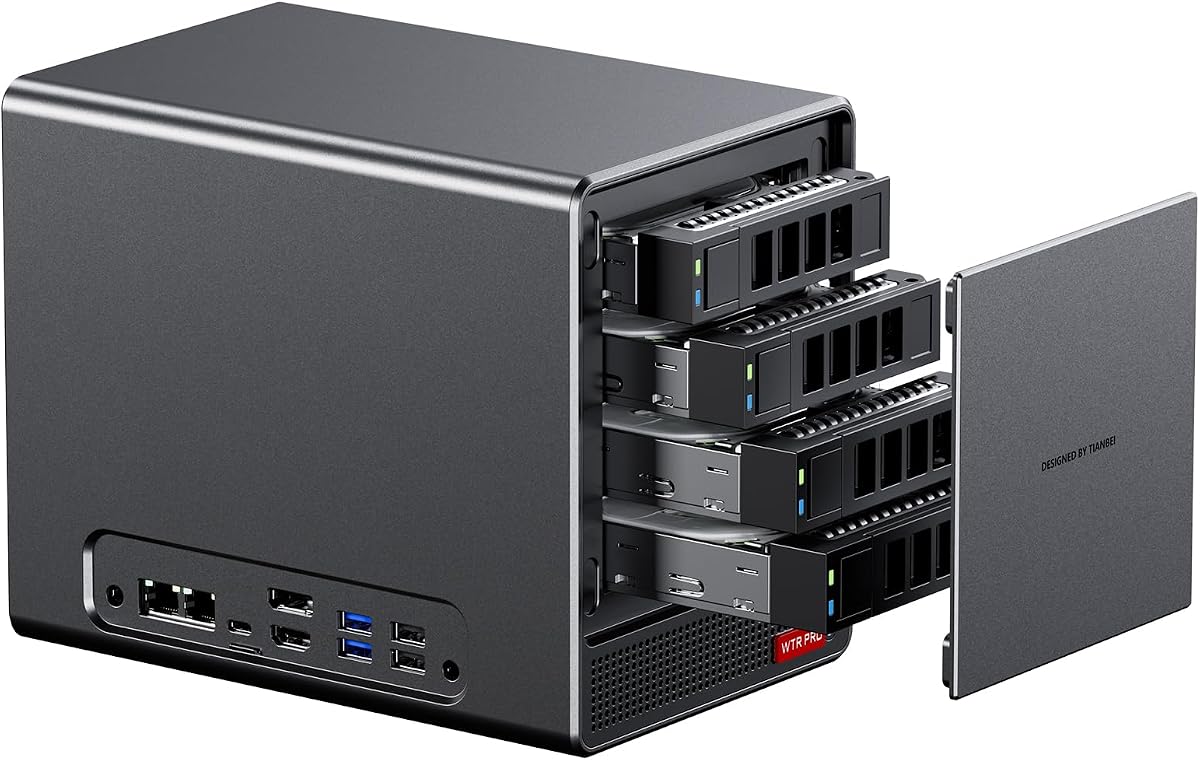
The AOOSTAR WTR PRO is designed for storage with four SATA bays and two M.2 slots. It uses the Ryzen 7 5825U processor and supports up to 96TB total storage. Ideal for NAS builds.
We may earn a commission when you buy through this link, at no additional cost to you.
Its low power consumption and 12CM fan keep noise down. Dual 2.5G LAN supports high speed file transfers. The system runs on DDR4 and supports RAID for data safety.
Assembly requires installing RAM and drives. The 4K HDMI output allows for media use. The cooling design prevents dust accumulation ensuring stability for 24/7 operation.
Best for home lab and media centers needing large storage capacity. The toolless design simplifies drive access. A reliable platform for DIY NAS systems.
Supporting up to nine 6TB drives allows massive storage for media libraries and backups.
With only 15W to 25W power draw it runs efficiently even during continuous operation.
We may earn a commission when you buy through this link, at no additional cost to you.
The ASRock DeskMini X300 2.5G series offers an ultra compact design supporting a wide range of AM4 Ryzen CPUs. Its 1.92L size saves space while supporting triple displays and fast LAN.
We may earn a commission when you buy through this link, at no additional cost to you.
DDR4 memory slots allow for substantial RAM capacity. The chassis includes M.2 slots for NVMe storage. A M.2 Key-E slot supports optional WiFi modules.
Assembly requires separate CPU RAM and storage. The Dragon RTL8125BG LAN ensures reliable network connectivity. This unit is perfect for tight desks.
Best for budget conscious users needing a small desktop. Its compatibility with older Ryzen CPUs keeps costs down. A practical choice for general productivity.
The small footprint fits easily on crowded desks making it ideal for space constrained setups.
HDMI DisplayPort and D-Sub outputs allow for extended workspaces without extra cards.
We may earn a commission when you buy through this link, at no additional cost to you.
The ASUS ExpertCenter PN54 leads in modern tech with Ryzen AI 300 Series processors and Wi-Fi 7. It offers a sleek 0.6L chassis and supports four 4K displays. Best for enterprise users.
We may earn a commission when you buy through this link, at no additional cost to you.
Its NPU delivers high TOPS for AI tasks. The tool-free design simplifies upgrades. Connectivity includes dual 2.5G LAN and dual DisplayPort.
While priced higher its features justify the cost for business use. The eco-conscious chassis ensures long-term reliability. Assembly requires RAM and storage.
Ideal for agents needing high-end AI performance in a thin form. A premium choice for modern offices.
The NPU accelerates AI workloads enhancing responsiveness for smart features.
The minimal chassis footprint allows for seamless integration into modern workspaces.
We may earn a commission when you buy through this link, at no additional cost to you.
AOOSTAR WTR PRO 4+2 offers 4 SATA and 2 M.2 slots for massive storage. It uses Ryzen 7 5825U for multitasking. Ideal for home servers and soft routers.
We may earn a commission when you buy through this link, at no additional cost to you.
Dual 2.5G LAN supports virtualization and networking. Silent cooling ensures stability. It supports Windows and Linux for flexible OS choices.
Note on Linux SATA link power management may need adjustment for full performance. Users must install RAM and drives.
Best for networking and storage enthusiasts. The toolless design helps maintenance. A robust solution for SOHO and home labs.
Dual LAN ports and virtualization support allow flexible network configurations without extra hardware.
Nine drive bays ensure massive capacity for media and backups.
We may earn a commission when you buy through this link, at no additional cost to you.
The PN54-S1 is a slim 34mm chassis supporting Ryzen 700 Series CPUs. It offers Wi-Fi 7 and tool-free upgrades. Suitable for general office work.
We may earn a commission when you buy through this link, at no additional cost to you.
Radeon 740M graphics handle basic multimedia. Connectivity includes dual 2.5G LAN and USB ports. It supports four 4K displays.
Assembly requires RAM and storage. The design emphasizes eco-conscious durability. It is a practical choice for small businesses.
Best for environments needing reliable thin PCs. The tool-free design simplifies maintenance. A strong contender for corporate use.
Tool-free access allows quick component changes without specialized tools.
The 34mm chassis ensures minimal desk intrusion.
We may earn a commission when you buy through this link, at no additional cost to you.
Selecting the right AMD barebone mini PC requires understanding key factors like CPU architecture, expansion options, and cooling capabilities.
Look for Zen 4 architectures like the Ryzen 7 PRO 8845HS for maximum performance and efficiency. These processors deliver better single and multi-threaded speeds essential for modern multitasking and creative workloads.
Higher core counts improve parallel task handling. Ensure the CPU meets your workload demands before purchase.
Check DDR5 SO-DIMM support and total capacity limits. Some models support up to 128GB RAM. Also verify M.2 slot count and PCIe generation for SSD performance.
More slots allow for RAID and caching setups. Expandable systems offer better longevity.
OCuLink provides lower latency and higher bandwidth than USB4. If you plan to run discrete graphics externally prioritize models with OCuLink ports.
This feature is critical for gamers and 3D professionals needing extra power.
Ensure the unit supports the number of monitors you need. HDMI2.1 DP1.4 and USB4 support up to 8K resolutions. Dual LAN ports add network redundancy.
Choose models with diverse ports to avoid using docks.
Advanced systems use vapor chambers or VC heat spreaders to manage heat efficiently. Proper cooling prevents throttling during prolonged workloads.
Look for noise ratings and fan control features for quiet operation.
Mini PCs range from ultra compact 1.92L to 0.6L chassis. Ensure the dimensions fit your desk or mounting space. Larger units may offer better airflow.
Consider VESA mount compatibility for behind-monitor placement.
Most barebone units exclude OS and RAM. Verify if Windows keys are included or if you prefer Linux compatibility.
Having the OS ready before setup saves time and effort.
Manufacturers offer warranties from 1 to 3 years. Check support channels and return policies before buying.
Good warranty terms ensure long-term reliability for business use.
Begin by installing compatible RAM and M.2 SSDs. Follow anti-static precautions to protect components. Insert modules firmly until they lock into place.
Connect peripherals and power supply then install your OS. Update BIOS and drivers to ensure stability. Configure BIOS performance modes based on usage.
Clean vents regularly with compressed air to maintain cooling efficiency. Keep the chassis in a well-ventilated area to prevent overheating.
A barebone PC is a system without RAM storage or OS. It includes the case motherboard CPU and cooling. You install components yourself.
They offer better customization and lower long-term upgrade costs. Prebuilts are simpler but less flexible. Choose based on your technical comfort.
OCuLink provides PCIe bandwidth with lower latency. USB4 supports data and power but with slightly higher overhead for GPUs.
Yes most modern AMD models support DDR5 SO-DIMM modules up to 128GB total. Ensure speed matches supported profiles.
Most models support mainstream Linux distributions. Check community forums for driver compatibility before installation.
Maintain airflow around the chassis. Clean dust regularly. Use vapor chamber models for silent high-load performance.
Yes several models support quad 4K output via HDMI DP and USB4. Check specific model specs before purchase.
The Ryzen 7 PRO 8845HS stands out for performance and efficiency. It balances power draw and output for most tasks.
Our top picks highlight the versatility of AMD mini PCs. The AOOSTAR MACO leads with OCuLink and USB4. The ASRock DeskMini offers budget AM4 power.
Prioritize cooling and upgrade paths to future-proof your build. Choose units matching your OS needs and workspace constraints.
Always verify current specs before buying as details may change. Check pricing and availability on official retailers.