
GIGABYTE B550 Gaming X V2
4.5Editor score
AMD AM4 Socket Support
DDR4 Memory Compatible
PCIe 4.0 Slots
This guide compares the top Gigabyte Motherboard options for AMD and Intel platforms to help you choose the right one for your build needs.
Finding the right Gigabyte Motherboard is essential for any PC builder looking for reliability and performance. Gigabyte offers a wide range of boards supporting the latest processors and memory standards.
We have evaluated ten top models based on power delivery, thermal management, connectivity options, and overall value. Each selection represents a strong choice for different budget and performance tiers.
Every pick highlights key strengths and potential trade-offs to help you make an informed decision. Please note that product availability and pricing may vary over time.
4.5Editor score

4.4Editor score

4.2Editor score
The following table provides a side by side comparison of all ten Gigabyte Motherboard models reviewed in this guide.


The GIGABYTE B650 AORUS Elite AX stands out as a top choice for AMD builders. It offers robust support for Ryzen processors and modern DDR5 memory standards.
We may earn a commission when you buy through this link, at no additional cost to you.
Its 14 plus2 plus1 phase power design ensures stable performance even under heavy loads. The thermal design includes covered heatsinks and guards to maintain optimal operating temperatures.
While it carries a premium price, the inclusion of WIFI6E and PCIe 5.0 makes it future proof. The EZ Latch features simplify the build process significantly.
This board is ideal for gamers and professionals needing reliable performance. It balances features and value effectively for most AM5 builds.
The digital VRM solution provides clean power to the CPU ensuring stability during intense tasks.
USB Type C and WIFI6E ensure you can connect modern devices and high speed networks easily.
We may earn a commission when you buy through this link, at no additional cost to you.
This model brings the latest WIFI7 and USB4 standards to the AM5 platform. It is designed for users who want the absolute latest connectivity features available.
We may earn a commission when you buy through this link, at no additional cost to you.
The power design supports high performance Ryzen CPUs effectively. Thermal management is handled well with dedicated guards for M.2 drives and VRM areas.
Users seeking future proofing will appreciate the extensive slot count and network speeds. However the cost is higher than previous generation boards.
It is a great choice for enthusiasts building high end systems. The warranty adds peace of mind for long term use.
USB4 and WIFI7 ensure compatibility with next generation peripherals and networking equipment for years to come.
Four M.2 slots allow for massive storage capacity without needing external enclosures or adapters.
We may earn a commission when you buy through this link, at no additional cost to you.
The PRO ICE variant offers a striking white look for custom builds. It shares the high performance specs of the Elite version but with enhanced styling.
We may earn a commission when you buy through this link, at no additional cost to you.
Power delivery is handled by smart stages ensuring efficiency and stability. The thermal guard covers critical areas to prevent overheating during operation.
This board appeals to builders prioritizing visual consistency in their cases. Performance remains top tier with full support for the latest AMD chips.
It is recommended for those wanting style without sacrificing speed. The extra cost is justified by the unique finish and features.
The all white PCB and heatsinks create a clean look for themed builds without compromising durability.
Under the aesthetic layers the board delivers same robust power and connectivity as the standard flagship models.
We may earn a commission when you buy through this link, at no additional cost to you.
This master tier board is built for the latest Intel Core Ultra processors. It offers extreme connectivity including Thunderbolt 4 and 10GbE networking.
We may earn a commission when you buy through this link, at no additional cost to you.
The power design uses 110A stages to handle high wattage CPUs with ease. Five M.2 slots provide ample storage for multi drive setups.
DIY friendly features like EZ Latch make assembly straightforward. The high cost reflects the premium components and niche professional features.
It is best suited for workstation users and enthusiasts. The speed and expansion options justify the investment for power users.
Thunderbolt 4 offers fast data transfer and support for multiple external displays and devices simultaneously.
The 10GbE LAN port provides ultra fast local network speeds for data heavy workflows.
We may earn a commission when you buy through this link, at no additional cost to you.
The Eagle AX brings AM5 features to a more accessible price. It covers the essentials for a modern build without unnecessary extras.
We may earn a commission when you buy through this link, at no additional cost to you.
It supports DDR5 memory and includes WIFI6E for wireless connectivity. The thermal guard on M.2 slots helps maintain SSD performance.
While it lacks some premium features it performs well for general use. The high rating reflects its value proposition for budget builders.
This is the ideal choice for first time AM5 builders. It balances cost and capability effectively for most gamers.
The board delivers reliable power and connectivity without the premium price tag of higher tier models.
Included WIFI6E means no need for a separate wireless card making setup simpler and cheaper.
We may earn a commission when you buy through this link, at no additional cost to you.
This board keeps the AM4 platform relevant with strong features. It supports Ryzen 5000 series and provides DDR4 compatibility effectively.
We may earn a commission when you buy through this link, at no additional cost to you.
The 12 plus2 power phase ensures stability for high end AM4 CPUs. Q-Flash Plus allows BIOS updates without a processor installed.
It offers a cost effective path for existing AM4 users upgrading. WIFI6 and fast LAN ensure good connectivity speeds.
Recommended for budget builds or upgraders. It maximizes the potential of older AMD CPUs with modern features.
Q-Flash Plus lets you update the firmware using only a USB drive simplifying upgrades.
WIFI6 and 2.5GbE LAN provide fast network performance for gaming and streaming needs.
We may earn a commission when you buy through this link, at no additional cost to you.
The Z790 Eagle AX supports Intel 14th gen CPUs with DDR5. It brings modern standards to a mid range price point.
We may earn a commission when you buy through this link, at no additional cost to you.
Thermal design includes MOSFET heatsinks to manage heat efficiently. EZ Latch features make installing RAM and GPUs easier.
While it has fewer storage slots than premium boards it handles daily tasks well. WIFI6E ensures good wireless performance.
It is a solid choice for general Intel builders. It offers necessary features without the highest cost.
Support for 12th through 14th gen cores gives flexibility for CPU choices over time.
EZ Latch and Q Flash simplify the physical assembly and maintenance process.
We may earn a commission when you buy through this link, at no additional cost to you.
This model upgrades the Eagle with more power phases and storage slots. It supports high end Intel CPUs with stable power delivery.
We may earn a commission when you buy through this link, at no additional cost to you.
Four M.2 slots offer ample room for fast storage drives. The thermal guard is enhanced to keep performance consistent under load.
It balances performance and features well for enthusiasts. The price is higher but justified by the added capabilities.
Ideal for gamers needing fast storage and stable power. It is a reliable choice for 13th and 14th gen builds.
Four M.2 slots allow for multiple NVMe drives without slowing down performance.
The 16 plus1 plus2 phase design ensures clean power for stable gaming and rendering.
We may earn a commission when you buy through this link, at no additional cost to you.
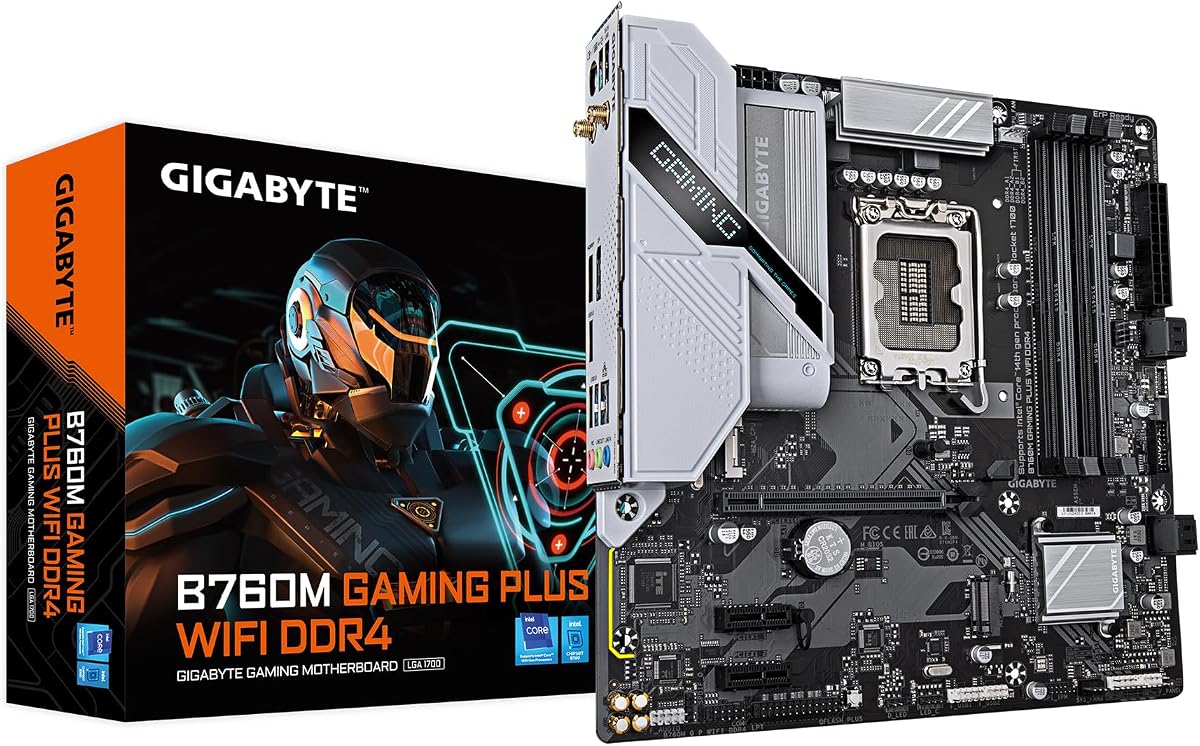
This M-ATX board fits smaller cases while keeping key features. It supports DDR4 memory which keeps system costs lower.
We may earn a commission when you buy through this link, at no additional cost to you.
USB Type-C on the front helps with cable management. WIFI allows for wireless connectivity without extra adapters.
It is perfect for compact gaming builds. Tradeoffs include fewer ports but enough for most uses.
Recommended for small form factor enthusiasts. It offers good value for space constrained builds.
The M-ATX layout saves space inside the case while maintaining ATX functionality.
DDR4 support allows using existing RAM or buying cheaper memory than DDR5.
We may earn a commission when you buy through this link, at no additional cost to you.
The Gaming X V2 is the entry point for AM5 builds. It covers basics like PCIe 4.0 and Q-Flash Plus effectively.
We may earn a commission when you buy through this link, at no additional cost to you.
It supports Ryzen 5000 series well with adequate power phases. The design is simple which reduces points of failure.
Users must add their own WIFI adapter. But for wired LAN it performs reliably at a low cost.
This is the best value for strict budgets. It gets the job done for basic gaming and work.
This board keeps build costs low while still supporting modern CPU generations.
Simple design means fewer components can fail ensuring longer life in daily use.
We may earn a commission when you buy through this link, at no additional cost to you.
Choosing the right motherboard requires considering your CPU platform and future needs. This guide outlines the key factors to evaluate before buying.
Ensure the motherboard socket matches your processor such as AM5 for AMD or LGA1700 for Intel. Mismatched sockets will prevent the CPU from fitting or working.
Always verify the specific CPU generation support listed on the product page before purchasing.
Decide between DDR4 and DDR5 memory based on your budget and CPU requirements. Newer boards support DDR5 but it is more expensive.
Check the maximum supported speed and capacity to ensure it meets your performance goals.
A stronger VRM design is needed for high end processors to maintain stable clock speeds. Look for higher phase counts if you plan to overclock.
Even for non overclocking builds good power delivery ensures reliability and longevity.
Effective heatsinks and guards are vital for preventing overheating during heavy workloads. M.2 thermal guards prevent SSD throttling.
Proper cooling extends component life and maintains peak performance under load.
Consider how many USB ports and M.2 slots you need for your peripherals. USB Type-C is becoming standard for fast transfer.
Check for specific needs like Thunderbolt or high speed LAN if your workflow requires them.
Built-in WIFI can save the cost of a separate card. WIFI6 or WIFI7 ensures modern speeds and range.
If you use a wired connection WIFI may not be a priority but it offers flexibility.
Count the PCIe slots available for GPUs and other cards. Some smaller boards have fewer physical slots.
Ensure you have enough bandwidth for your GPU and storage configuration.
Q-Flash Plus allows BIOS updates without installing a CPU which simplifies upgrades. User friendly interfaces help manage system settings easily.
Good software tools make tuning and monitoring system health simpler for all users.
Always handle the motherboard by the edges to avoid static damage. Use an anti-static wrist strap or ground yourself before installation.
Apply thermal paste correctly to the CPU before mounting the cooler. Over tightening can damage the board so follow torque guidelines.
Keep the area around the PC dust free to maintain airflow. Update the BIOS periodically to ensure compatibility with new CPUs.
Many models include built-in WIFI such as those with AX or WIFI7 in the title. Basic models like the Gaming X V2 often do not include wireless features so check the specifications carefully before buying.
No DDR4 and DDR5 memory have different physical keys and are not interchangeable. You must use the memory type supported by the specific motherboard socket and chipset.
Q-Flash Plus is a feature that allows you to update the BIOS using only a USB drive. This means you can update firmware without needing a CPU or RAM installed.
The B650 AORUS Elite AX offers a strong balance of features and price for AM5. Higher end users might prefer the X870 or X870E models for more connectivity.
No compatibility depends on the socket type. Z790 boards support LGA1700 CPUs while Z890 boards support newer LGA1851 series so verify the socket before purchasing.
Most users need at least two slots for an OS drive and storage. Enthusiasts may prefer four or more to run multiple high-speed NVMe drives without bottlenecks.
PCIe 5.0 doubles the bandwidth of PCIe 4.0 allowing faster data transfer for GPUs and SSDs. It is future proof but current hardware mostly uses PCIe 4.0 speeds.
Most Z and X series boards support overclocking for Intel and AMD respectively. B and H series boards generally lock these features for stability.
The GIGABYTE B650 AORUS Elite AX leads our list as the best all rounder for AM5. For AMD budget builders the B650 Eagle AX offers excellent value without sacrificing key features.
Prioritize power delivery and thermal design to ensure your system runs cool and stable. Connectivity features like WIFI6E and USB Type-C add convenience for modern setups.
Prices and availability change often so verify details before making your final purchase decision. Choosing the right board ensures a solid foundation for your PC build.