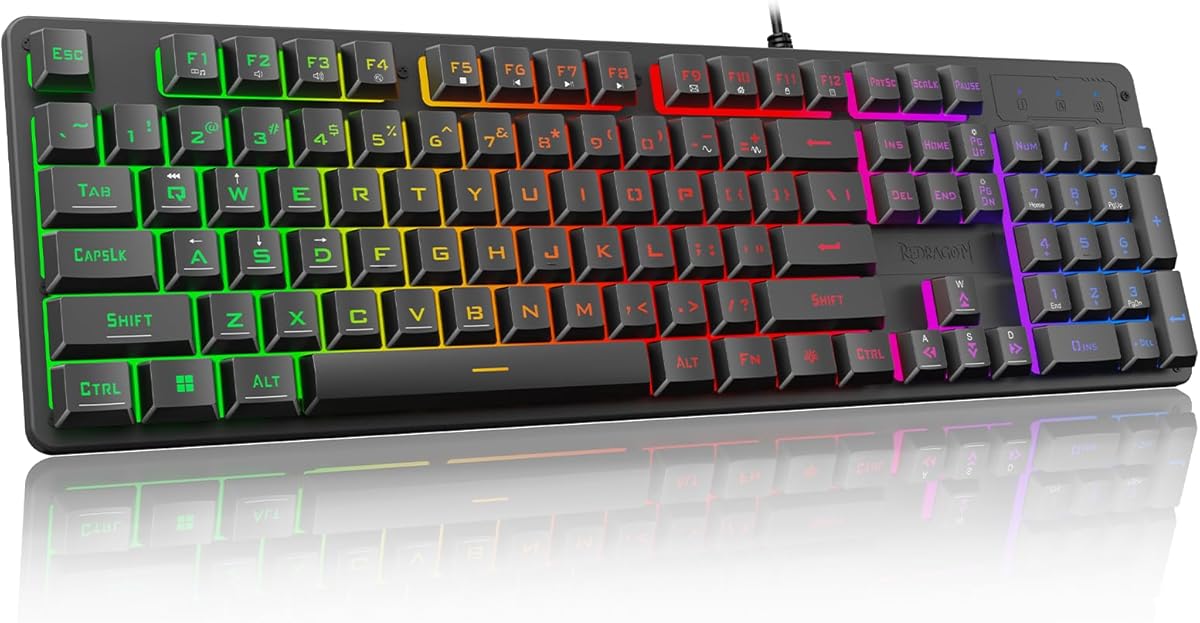
Redragon K521 Upgrade
4.4Editor score
Mechanical feeling keys
19 keys anti-ghosting
Rainbow LED backlighting
This guide compares the top 10 keyboards for Rainbow Six Siege, evaluating performance, durability, and features to help you choose the perfect input device.
Finding the right keyboard for Rainbow Six Siege is crucial for competitive play. You need responsive switches, reliable anti-ghosting, and comfort for long sessions. This guide highlights the best options available in November 2026.
We evaluated ten top-rated keyboards based on switch type, build quality, and gaming features. Each product offers unique benefits ranging from budget-friendly membrane options to premium mechanical keyboards. Our analysis ensures you find a match for your setup.
Each pick includes detailed specs, pros, cons, and real-world performance insights. Prices and availability change frequently, so verify current listings before purchasing. Use this resource to upgrade your gaming station with confidence today.
4.4Editor score

4.6Editor score

4.6Editor score
The following table provides a side-by-side comparison of all ten keyboards featured in this guide. Review the key specifications to determine which model aligns best with your gaming requirements and budget constraints.



The Logitech G413 TKL SE stands out as a top choice for Rainbow Six Siege players seeking reliability. With a 4.6 rating, it delivers consistent performance through tactile mechanical switches and robust build quality.
We may earn a commission when you buy through this link, at no additional cost to you.
Its PBT keycaps resist wear and shine, ensuring long-term usability even during intense gaming sessions. The brushed aluminum-magnesium alloy top case provides a sturdy foundation that minimizes flex during rapid keystrokes.
While it lacks RGB lighting, the white LED backlight remains functional and stylish. The fixed cable might limit setup flexibility compared to detachable options, but it ensures a stable connection during competitive matches.
This keyboard is ideal for gamers who prioritize durability and performance over flashy features. Its tenkeyless design saves desk space, allowing more room for mouse movement essential in tactical shooters like Siege.
The aluminum top case and PBT keycaps ensure the keyboard withstands daily heavy use without showing signs of wear.
Mechanical switches provide clear actuation points allowing players to execute precise moves quickly during critical game moments.
We may earn a commission when you buy through this link, at no additional cost to you.
The Redragon K521 Upgrade offers an accessible entry point for gamers on a budget. Rated 4.4, it combines mechanical-like feedback with vibrant rainbow LED lighting to enhance your gaming atmosphere.
We may earn a commission when you buy through this link, at no additional cost to you.
Its anti-ghosting technology ensures that key combinations register accurately during fast-paced gameplay. The 12 multimedia keys add convenience for controlling audio without interrupting your game session.
Though it uses membrane switches with mechanical feel, the tactile response is satisfying for the price. The all-plastic construction lacks the premium heft of metal keyboards but remains durable enough for regular use.
This model is perfect for budget-conscious players wanting style and function. It serves as a reliable upgrade from standard office keyboards without breaking the bank for new Siege enthusiasts.
The dynamic rainbow LED backlighting provides an immersive visual experience typically found in more expensive gaming peripherals.
With 19-key anti-ghosting you can trust that your inputs will register correctly even when pressing multiple keys simultaneously.
We may earn a commission when you buy through this link, at no additional cost to you.
The ASUS ROG Strix Scope II 96 represents the pinnacle of gaming keyboard technology. With a 4.6 rating, it offers wireless freedom without sacrificing performance essential for competitive Rainbow Six Siege gameplay.
We may earn a commission when you buy through this link, at no additional cost to you.
Its tri-mode connectivity allows seamless switching between Bluetooth, 2.4GHz wireless, and wired USB connections. The 96% layout retains the number pad while saving space compared to full-size alternatives.
Hot-swappable switches let you customize the typing experience without soldering. The pre-lubed ROG NX Snow switches deliver smooth linear actuation ideal for rapid input sequences during intense matches.
This premium keyboard suits gamers demanding top-tier features and aesthetics. Although pricey, the investment pays off through versatility, durability, and unmatched responsiveness in high-stakes tactical environments.
ROG SpeedNova technology ensures ultra-low latency wireless performance comparable to wired connections for lag-free competitive play.
The 96% layout cleverly integrates numpad functionality into a tenkeyless footprint maximizing desk real estate for gaming efficiency.
We may earn a commission when you buy through this link, at no additional cost to you.
The Corsair K55 RGB PRO is tailored for players who rely heavily on macros and shortcuts. Rated 4.4, it features six dedicated macro keys that can be programmed to execute complex commands instantly.
We may earn a commission when you buy through this link, at no additional cost to you.
IP42 spill resistance protects against accidental liquid damage ensuring longevity. The detachable palm rest offers ergonomic support reducing wrist fatigue during extended gaming marathons.
Software customization through iCUE allows detailed lighting and macro configuration. While membrane switches lack mechanical click, the responsiveness remains adequate for most casual to semi-competitive players.
This keyboard appeals to gamers valuing customization and durability. Its macro capabilities make it a strong contender for Siege players managing complex skill rotations and utility placement.
Dedicated macro keys simplify complex command sequences letting you execute advanced tactics with a single press.
IP42 rating guards against accidental spills protecting internal components and extending the keyboard's usable lifespan significantly.
We may earn a commission when you buy through this link, at no additional cost to you.
The SteelSeries Apex 3 prioritizes quiet operation without compromising gaming utility. With a 4.6 rating, it features whisper-quiet switches ideal for shared spaces or late-night sessions.
We may earn a commission when you buy through this link, at no additional cost to you.
IP32 water resistance adds a layer of protection against liquid spills. The premium magnetic wrist rest ensures comfort during long play sessions reducing strain on wrists and forearms.
Ten-zone RGB illumination provides visual flair while maintaining a sleek profile. Though it uses membrane switches, the consistent actuation delivers reliable performance for standard gaming needs.
This keyboard suits players needing silence and durability. Its robust construction and ergonomic design make it a practical choice for home gaming setups where noise levels matter.
Whisper quiet switches minimize audible feedback allowing for discreet gaming without disturbing others in the room.
The magnetic wrist rest combined with water resistance ensures prolonged comfort and longevity even in messy gaming environments.
We may earn a commission when you buy through this link, at no additional cost to you.
The Razer Ornata V3 offers a low-profile solution for ergonomic efficiency. Rated 4.5, it blends mechanical feedback with the comfort of membrane switches for a unique typing experience.
We may earn a commission when you buy through this link, at no additional cost to you.
UV-coated keycaps resist wear and fading ensuring lasting aesthetics. The magnetic wrist rest snaps securely to provide support during long gaming sessions reducing wrist fatigue.
Mecha-membrane switches deliver tactile feedback without the full height of traditional mechanical switches. Media controls add convenience allowing quick adjustments without interrupting gameplay flow.
This model suits players seeking comfort and style. Its low-profile layout promotes natural hand positioning making it ideal for extended use in competitive tactical shooters.
Slimmer keycaps reduce hand elevation promoting a more natural typing posture that reduces strain over long periods.
UV coatings protect legends from fading maintaining a fresh look and clear labeling throughout the keyboard's lifespan.
We may earn a commission when you buy through this link, at no additional cost to you.
The AULA F75 Pro caters to enthusiasts wanting custom features without the high price. Rated 4.6, it offers hot-swap capabilities allowing switch customization without soldering.
We may earn a commission when you buy through this link, at no additional cost to you.
Tri-mode connectivity supports seamless switching between devices. Side-printed PBT keycaps provide a unique aesthetic and durability against wear over time.
A multi-function knob allows quick adjustments for volume or lighting. The pre-lubed switches ensure smooth keystrokes ideal for rapid input sequences during intense gameplay.
This keyboard is perfect for hobbyists seeking customization. Its robust build and versatile connectivity make it a standout choice for those exploring custom mechanical setups.
Hot-swap bases let you swap switches easily to tailor the feel to your preference without technical barriers.
Side-printed legends add a unique modern look while maintaining durability against frequent typing and gaming wear.
We may earn a commission when you buy through this link, at no additional cost to you.
The ASUS ROG Strix Scope II X delivers premium performance with a full-size layout. Rated 4.5, it features hot-swappable V2 switches enabling easy customization for tailored typing.
We may earn a commission when you buy through this link, at no additional cost to you.
Sound-dampening foam reduces noise ensuring a quieter typing experience. The aluminum top plate adds durability and a sleek aesthetic to your gaming setup.
USB-C connectivity ensures reliable wired performance without latency concerns. The detachable wrist rest supports ergonomic positioning during long competitive gaming sessions.
This keyboard suits those wanting premium features in a wired format. Its full-size layout is ideal for users needing number pad access while enjoying customizable switch options.
Integrated sound-dampening foam minimizes noise creating a smoother and more pleasant typing experience for users.
Hot-swappable V2 switches allow enthusiasts to swap mechanical switches easily to personalize feel and sound.
We may earn a commission when you buy through this link, at no additional cost to you.
The Razer BlackWidow V4 X focuses on visual customization and comfort. Rated 4.5, it features per-key Chroma lighting for immersive effects and six dedicated macro keys.
We may earn a commission when you buy through this link, at no additional cost to you.
Yellow linear switches offer quiet rapid actuation ideal for gaming. The integrated media roller provides convenient control over volume and playback without interrupting gameplay.
Dual-shot ABS keycaps ensure labeling longevity though ABS may shine over time. The overall design balances functionality with striking aesthetics for immersive gaming setups.
This model suits visual enthusiasts and gamers needing macros. Its Chroma integration and quiet switches make it a strong contender for stylish and functional desktop environments.
Per-key Chroma lighting allows granular control over visual effects creating dynamic atmospheres matching game states.
Six accessible macro keys expand your command arsenal enabling efficient execution of complex in-game sequences.
We may earn a commission when you buy through this link, at no additional cost to you.
The Aula WIN60 HE redefines speed with magnetic switch technology. Rated 4.5, it offers an 8000 Hz polling rate and rapid trigger mode for unmatched responsiveness.
We may earn a commission when you buy through this link, at no additional cost to you.
The 60% layout saves massive desk space enabling larger mouse movements. Adjustable actuation allows precise control over key triggers suited for competitive FPS titles.
Web-based drivers simplify customization without bulky software. While compact, the design prioritizes performance and speed for dedicated competitive gamers.
This keyboard targets competitive players seeking an edge. Its rapid trigger and high polling rate provide the precision necessary for top-tier tactical gameplay.
Rapid trigger allows keys to reset instantly enabling faster repeated inputs and precise control during intense actions.
8000 Hz polling ensures input delay is minimized providing near-instant feedback for competitive performance.
We may earn a commission when you buy through this link, at no additional cost to you.
Selecting the right keyboard requires balancing performance, comfort, and budget. This guide breaks down critical factors to consider for optimal Rainbow Six Siege gameplay.
Switch type dictates tactile feel and sound. Mechanical switches offer distinct actuation points while membrane switches provide quieter operation. For Siege, tactile or linear mechanical switches ensure consistent responses during rapid key presses.
Choose switches matching your preference for noise and feedback. Linear switches favor speed while tactile switches offer confirmation.
Layout impacts desk space and usability. Full-size keyboards include numpads but consume space. Tenkeyless (TKL) and 60% layouts free up room for mouse movement critical in shooters.
Select a size that suits your desk and play style. Prioritize layouts preserving essential gaming keys like WASD and arrow keys.
Durable keyboards withstand heavy use. Materials like aluminum frames and PBT keycaps resist wear and flex. Spill resistance adds protection against accidents during intense sessions.
Invest in robust construction to ensure longevity. Check keycap material and frame stability for consistent performance.
Connectivity affects input lag and convenience. Wired USB offers stability while wireless provides mobility. Detachable cables aid transport and replaceability.
Choose connectivity fitting your setup. Wired is preferred for competitive play due to zero latency.
Anti-ghosting ensures multiple key presses register. High polling rates reduce input lag. Essential for fast-paced gameplay involving complex combos.
Verify 100% anti-ghosting or N-key rollover. Aim for polling rates above 1000Hz for smooth responsiveness.
RGB lighting aids visibility and aesthetics. Macro keys and software allow custom bindings. These enhance workflow and efficiency.
Look for customizable lighting and macro support. Ensure software is user-friendly for configuration.
Comfort prevents strain during long sessions. Wrist rests and adjustable tilts support neutral hand positions. Low-profile keys reduce finger travel distance.
Prioritize ergonomic features like wrist rests. Proper support reduces fatigue and improves consistency.
Budget determines feature access. Entry-level models offer basic functionality while premium models offer advanced tech. Balance needs with affordability.
Set a realistic budget. Ensure the keyboard offers the features you truly need without overspending.
Proper setup enhances performance. Place the keyboard flat and align keys comfortably. Ensure the connection is secure for stable input.
Regular cleaning maintains hygiene. Use compressed air to remove dust. Wipe keys gently to remove oils and debris.
Software customization optimizes macros. Learn hotkeys for quick adjustments. Regularly update drivers for security and features.
Linear mechanical switches are generally preferred for fast-paced shooters due to rapid actuation. However, tactile switches offer better feedback for precise aiming. Choose based on your personal preference for sound and feel.
RGB is not necessary for performance but enhances immersion. Many competitive players prefer white or simple backlighting. Focus on functionality over aesthetics if budget is a priority.
Modern wireless keyboards with 2.4GHz connectivity offer low latency comparable to wired models. Ensure battery life is sufficient for long sessions to avoid interruptions during matches.
Clean regularly to remove dust and debris. Avoid eating near the keyboard. Use a desk mat to prevent surface scratches. Handle keys gently to extend switch lifespan.
TKL keyboards save space for mouse movement which is vital for shooters. If you rarely use the number pad, a TKL layout is optimal. Full-size offers more utility for mixed use.
Macro keys automate complex commands or bind actions. In Siege, they can simplify utility use. Consider them if you frequently use specific combos or want streamlined controls.
We reviewed ten top keyboards covering diverse needs from budget to premium. The Logitech G413 TKL SE, Redragon K521 Upgrade, and ASUS ROG Strix Scope II 96 lead our picks.
Prioritize features that enhance your gameplay like durability and responsiveness. Comfort matters during long sessions so ergonomics should not be overlooked.
Always check current pricing and availability before purchasing. Prices fluctuate often and deals may impact your final decision on which model to buy.