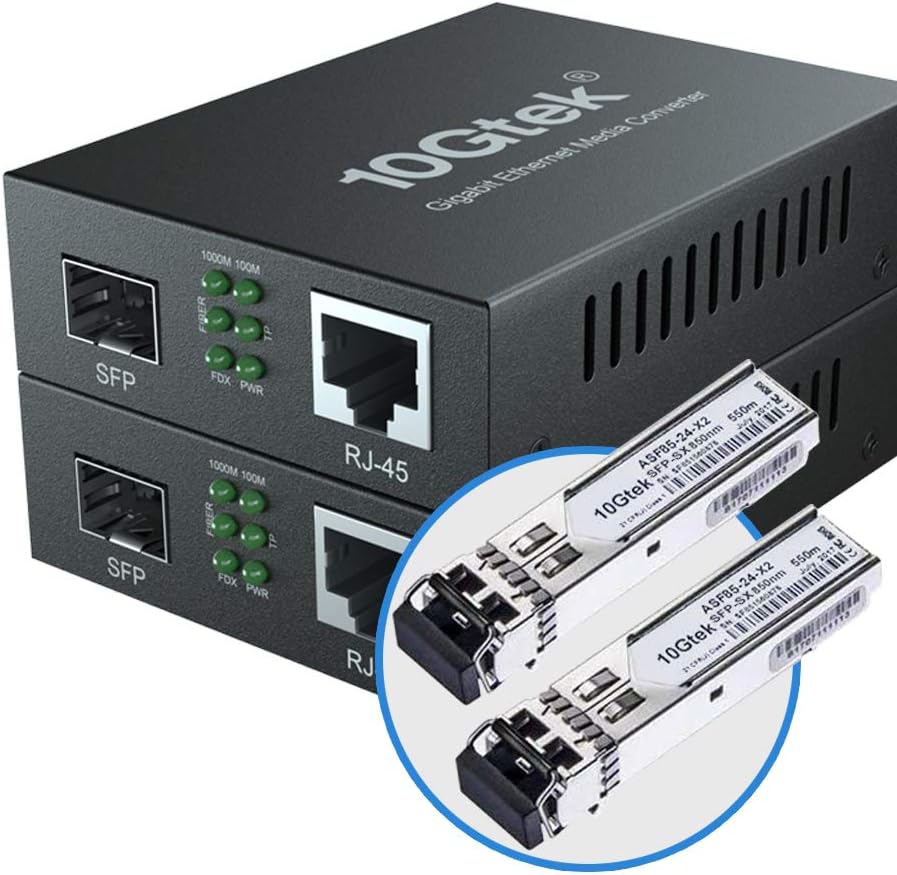
10Gtek Gigabit Ethernet Media Converter
4.7Editor score
550 meter multimode range
Dual LC fiber ports
Gigabit copper support
This guide compares the top Ethernet Fiber Media Converters for extending network ranges. We analyze speed, fiber type, and reliability to help you choose the
Ethernet Fiber Media Converters bridge the gap between copper and fiber optic cabling. They enable networks to extend beyond standard copper limits. A good converter ensures reliable data transmission over long distances with minimal signal loss.
We evaluated ten top-rated models based on performance, compatibility, and ease of use. Our analysis covers single-mode and multi-mode options. We also considered build quality and support options to ensure you get the best value.
Each pick highlights specific strengths for different networking needs. You will find budget-friendly packs and high-speed ten gigabit solutions. Please note that product prices and availability can change without prior notice.
4.7Editor score

4.5Editor score

4.6Editor score
The following table provides a side-by-side comparison of all ten selected media converters. It highlights key specifications such as fiber type, maximum distance, and port speeds to help you make an informed decision quickly.


The 10Gtek Gigabit Ethernet Media Converter offers an affordable solution for extending network reach over fiber. With a high rating of 4.7 stars, users praise its reliability and ease of setup. This pack includes two converters with pre-installed SFP modules for immediate use.
We may earn a commission when you buy through this link, at no additional cost to you.
This converter supports 10/100/1000Base-Tx to 1000Base-SX connections. The fiber port uses dual LC connectors and supports distances up to 550 meters. It features a standard RJ45 port that automatically negotiates speed and duplex settings. The UL certified power supply ensures safe operation.
While this unit is limited to multimode fiber, it covers most indoor and campus needs. You may need separate single-mode units for longer outdoor runs. The lack of chassis compatibility means these are best used as standalone units in office environments.
Buyers looking for cost-effective dual unit packs should consider this option. It is ideal for small businesses needing to connect switches across buildings without expensive cabling. The included modules save time and money on sourcing compatible transceivers separately.
Purchasing a pair of converters ensures you have both ends of the link ready. This eliminates the need to buy single units separately which often costs more per device.
The included 850-nm SFP modules are factory matched to the unit. This reduces configuration errors and ensures the optical link establishes quickly upon powering up.
We may earn a commission when you buy through this link, at no additional cost to you.
The Omada Gigabit SFP to RJ45 Media Converter is designed for flexibility in network extension. It converts fiber signals to copper Ethernet and vice versa with high performance. The device supports both single and multi-mode SFP modules for diverse deployment scenarios.
We may earn a commission when you buy through this link, at no additional cost to you.
This converter features a hot-swappable FX port allowing you to change fiber types by swapping modules. The RJ45 port supports 10/100/1000 Base-T with auto negotiation for duplex modes. It can extend single-mode fiber distances up to 12.4 miles depending on the module used.
Note that SFP modules are not included with this specific model. You will need to purchase compatible modules separately which adds to the initial cost. However the open SFP design allows you to choose the exact distance and fiber type you need.
Network administrators who need adaptable gear will find this unit valuable. It works well with existing infrastructure using various fiber standards. The plug and play nature means minimal configuration is required for basic connectivity.
The ability to swap SFP modules means you can upgrade or change fiber distances without replacing the entire converter. This future-proofs your investment significantly.
The RJ45 port handles various Ethernet speeds and duplex settings automatically. This ensures compatibility with older switches and newer devices without manual setup.
We may earn a commission when you buy through this link, at no additional cost to you.
This pair of gigabit multi-mode fiber Ethernet media converters uses BiDi technology for efficient fiber usage. It comes with two SFP BiDi LC Dual transceiver modules included for immediate deployment. The set supports speeds up to 1.25Gbps over multimode fiber.
We may earn a commission when you buy through this link, at no additional cost to you.
The converters support 10/100/1000M auto-negotiation and comply with IEEE 802.3 standards. They offer jumbo frame support to improve network performance for large data transfers. The power supply accepts wide voltages ensuring operation in various electrical environments.
BiDi modules operate in pairs and must be matched correctly at both ends. While efficient for using single strand fiber, this adds a layer of complexity for novice users. Ensure you have compatible fiber cabling for duplex or single strand depending on your needs.
For network managers looking to save on fiber strands this option is excellent. The included modules and dual pack make it a strong contender for office expansions. It balances performance and flexibility well for general enterprise use.
BiDi transceivers allow data to travel over a single fiber strand using different wavelengths. This effectively doubles the capacity of your existing fiber infrastructure.
Support for 9K byte jumbo frames reduces packet overhead. This improves throughput for server-to-server traffic and backup operations significantly.
We may earn a commission when you buy through this link, at no additional cost to you.
The 10G Ethernet Media Converter is designed for high-speed network environments requiring gigabit and beyond. It bridges copper and fiber with support for 10G SFP+ slots and 10GBase-T RJ45 ports. This device is ideal for data centers or enterprise servers needing fast throughput.
We may earn a commission when you buy through this link, at no additional cost to you.
The copper port auto-adapts to various speeds including 100M to 10G. The fiber slot accepts 10G SFP+ transceivers like SR or LR modules. LED indicators provide diagnostic status and DIP switches allow for flow control and ALS function settings.
While powerful this converter requires careful selection of compatible 10G modules. The cost of SFP+ modules can add significantly to the setup price. Additionally it lacks some advanced management features found in managed switches.
Organizations upgrading to 10G networks will find this unit essential for extending fiber links. The chassis compatibility allows for tidy installation in racks. The three-year warranty and lifetime support offer peace of mind for critical deployments.
The copper port automatically detects and adjusts to connected device speeds. This ensures compatibility with mixed network devices without manual configuration.
Support for 1U chassis slots enables professional rack mounting. This is beneficial for large installations requiring centralized cable management.
We may earn a commission when you buy through this link, at no additional cost to you.
The 10Gtek Gigabit SingleMode Fiber to Ethernet Media Converter is built for long-distance connections. It supports up to 20 kilometers over single-mode fiber. This makes it suitable for connecting buildings across large campuses or industrial sites.
We may earn a commission when you buy through this link, at no additional cost to you.
This unit uses SC fiber ports which are durable and reliable for industrial settings. The RJ45 port supports 10/100/1000Mbps with auto-negotiation for duplex settings. It is UL certified ensuring safety standards are met for continuous operation.
The included pack of two reduces the cost per unit for full link deployment. However the SC connector type is less common in modern data centers compared to LC. Ensure your existing cabling matches this connector type or plan for adapters.
Facility managers needing reliable long-range connectivity will appreciate this model. The high rating of 4.8 reflects its stability and performance over distance. It is a practical choice for extending Ethernet where copper cannot reach.
The 20km range allows connectivity across wide properties without signal degradation. This is vital for sites where fiber runs exceed standard limits.
SC connectors are robust and snap into place securely. They withstand vibration and environmental stress better than some friction-fit connectors.
We may earn a commission when you buy through this link, at no additional cost to you.
This set offers a complete solution for gigabit fiber connectivity with included SFP LC modules. It supports single-mode fiber up to 20 kilometers reliably. The high customer rating of 4.9 indicates strong satisfaction with its performance and support.
We may earn a commission when you buy through this link, at no additional cost to you.
The RJ45 port provides stable 1000Mbps connections and supports 9K-byte jumbo frames. It complies with major IEEE standards for interoperability. The U.S.-based technical support is available during business hours for assistance with setup or issues.
The included 20km modules limit flexibility if you need shorter or longer distances. However for standard campus deployments this is a convenient choice. The LC connector is widely used and matches most modern switch ports.
Users who want a ready-to-use kit without hunting for modules will like this. The high support rating suggests reliable help if needed. It is well-suited for businesses needing quick deployment of fiber links between sites.
Having the transceivers included simplifies the procurement process. You avoid compatibility issues and extra shipping costs for separate modules.
Local technical support reduces downtime when issues arise. This is valuable for companies without dedicated IT staff.
We may earn a commission when you buy through this link, at no additional cost to you.
This Single Mode LC Gigabit Fiber to Ethernet Media Converter comes with a pre-fitted SFP module. It supports distances up to 20km and is designed for desktop or wall mounting. The unit includes a patch cable and mounting ears for easy setup.
We may earn a commission when you buy through this link, at no additional cost to you.
A key feature is link fault pass-through which drops the copper link if fiber fails. This helps upstream switches detect faults quickly. The DIP switches allow configuration of speed and broadcast storm control without software.
The included module is 1310nm which is standard for single mode runs. You do not need to source a separate module for initial use. However the single module means you must buy another unit for a full link.
IT professionals valuing diagnostic features will find LFP useful for maintenance. The compact fanless design fits in small offices or closets. It is a solid choice for straightforward single-mode deployments needing simple management.
LFP ensures that fiber breaks are signaled to the network switch. This prevents stale connections and speeds up network recovery time.
The inclusion of a patch cable and wall ears adds value. It makes the package truly ready to link right out of the box.
We may earn a commission when you buy through this link, at no additional cost to you.
The StarTech Gigabit Fiber Media Converter is designed for professional IT deployments. It features an open SFP slot allowing you to select any compliant transceiver. This unit is TAA compliant making it suitable for government and enterprise procurement.
We may earn a commission when you buy through this link, at no additional cost to you.
It supports VLAN pass-through and 9K jumbo frames for efficient data handling. The unit can be used standalone or mounted in a chassis for rack installation. Lifetime technical assistance ensures support for the lifespan of the product.
Modules are not included which may increase the initial investment. However the compliance and support make it ideal for regulated environments. You can customize the fiber distance to match your specific infrastructure needs.
Organizations requiring strict compliance will value the TAA certification highly. The open SFP design provides long-term flexibility for network changes. This makes it a reliable choice for mission-critical edge and server room use.
Meeting Trade Agreements Act standards allows use in government contracts. This simplifies purchasing for public sector and large enterprise buyers.
Mounting in a chassis provides a neat solution for multiple links. This improves cable management in data centers.
We may earn a commission when you buy through this link, at no additional cost to you.
This Multimode LC Gigabit Fiber Optic to Ethernet Media Converter supports a wide range of fiber grades. It works with OM1 through OM5 multimode types. The pre-installed 1000BASE-SX module ensures immediate connectivity out of the box.
We may earn a commission when you buy through this link, at no additional cost to you.
It supports QinQ and VLAN tags intact for trunking configurations. This allows complex VLAN setups to pass through without re-writing tags. The unit includes a Cat6 patch cable and mounting hardware for convenient setup.
The rated range depends on the fiber grade with OM1 carrying less distance. Ensure you match the module to your fiber grade for best results. It is optimized for multimode environments typical of enterprise buildings.
IT staff managing mixed fiber grades will appreciate the broad compatibility. The ability to pass VLAN tags makes it useful for advanced network setups. It provides a reliable bridge for existing multimode cabling infrastructure.
Support for OM1 to OM5 means older cabling can be utilized effectively. This saves cost on fiber replacement.
VLAN tags are preserved through the converter. This supports complex multi-tenant or service provider configurations.
We may earn a commission when you buy through this link, at no additional cost to you.
The StarTech Gigabit Ethernet Fiber Media Converter offers advanced monitoring features. It supports link-loss forwarding and remote monitor status to enhance network visibility. The TAA compliance makes it eligible for government and enterprise procurement.
We may earn a commission when you buy through this link, at no additional cost to you.
It includes support for various frame lengths and full or half-duplex operation. The open SFP slot allows customization with compliant single or multi-mode SFPs. This ensures the unit adapts to your specific distance requirements.
While the price is higher, the advanced monitoring and compliance justify the cost for professionals. You must purchase SFP modules separately to start using it. This flexibility means you can choose the exact range and fiber needed.
Network teams requiring visibility into link status will value the remote monitoring. The high rating reflects its reliability and feature depth. It is a premium choice for those needing managed capabilities in a media converter.
Remote monitoring allows administrators to check link health without onsite visits. This reduces maintenance trips for remote branches.
Support for two frame lengths ensures compatibility with legacy and modern equipment. This prevents data loss during transmission.
We may earn a commission when you buy through this link, at no additional cost to you.
Selecting the right Ethernet Fiber Media Converter involves evaluating several technical and practical factors. This guide outlines the key aspects to consider for your specific network environment.
Determine whether your network uses single-mode or multi-mode fiber. Single-mode fiber typically supports longer distances up to 20km or more while multimode is suited for shorter runs within buildings. Matching the converter to the fiber type is essential for signal integrity.
Always verify that the fiber optics match the converter modules to avoid connection failures.
Common connector types include SC, LC, and ST. LC connectors are smaller and often used in modern data centers while SC connectors are common in industrial settings. Ensure the physical connector matches your existing cabling to avoid needing additional adapters.
Check your current fiber patch cables to select a compatible connector type.
Evaluate the speed needs of your network. Most standard converters support 10/100/1000Mbps Gigabit speeds. For high bandwidth applications such as data centers consider 10G SFP+ capable converters. Ensure the copper port matches your switch speed requirements.
Choose a converter that supports at least the maximum speed of your connected devices.
Fiber converters vary in maximum distance support. Multimode units often reach 550 meters while single-mode units can reach 20km or more. Select a unit that covers the physical distance between your endpoints with some margin for safety.
Review the maximum distance specification before purchasing to ensure coverage.
Some converters come with SFP modules included while others leave the slot open. Units with included modules simplify setup but limit flexibility. Open SFP slots allow you to swap modules for different distances but require purchasing them separately.
Consider your need for flexibility versus convenience when choosing module options.
Desktop units are designed for placement on a desk or shelf. Rack-mountable or chassis compatible units are better for server rooms. Check if the unit includes wall-mount ears or if you need to buy a mounting kit.
Ensure the physical design fits your intended installation location.
Look for certifications like UL for safety and TAA for government compliance. Compliance ensures the device meets regional standards and safety regulations. This is crucial for corporate and public sector procurement.
Verify certifications match your procurement requirements.
Technical support availability varies by manufacturer. Some offer lifetime support while others have limited terms. A good warranty protects against hardware failure. Check the terms before finalizing your purchase.
Prioritize brands with strong support records for critical networks.
Connect the power adapter to the converter and plug it into a power outlet. Ensure the power indicator light is on to confirm the device is receiving power. Allow the unit to initialize for a few seconds before connecting cables.
Insert the fiber optic cable into the fiber port and connect the Ethernet cable to the RJ45 port. Ensure the fiber cable is not bent beyond its minimum radius to prevent signal loss. The link LEDs should light up once a stable connection is detected.
Keep the converter in a dry and well-ventilated area to prevent overheating. Avoid exposing the fiber ports to dust by keeping protective caps on when not in use. Regularly check LED status lights to monitor link health and troubleshoot issues early.
Most modern media converters are plug and play and do not require software configuration. They automatically negotiate speed and duplex settings. However some advanced models include DIP switches for specific settings like link fault pass-through.
Single-mode fiber converters use a laser light source and support longer distances up to kilometers. Multi-mode converters use LED light sources and are suited for shorter distances within buildings. Using the wrong type results in no connection or signal loss.
Yes, media converters are commonly used to extend links between network switches over fiber. Ensure both switches support auto-negotiation or match the duplex settings. This setup is standard for connecting remote buildings to a central server room.
Mismatching SFP modules and fiber type will typically prevent the link from establishing. For example using a single-mode module with multimode fiber will cause signal loss. Always verify wavelength and core size compatibility before installation.
Both ends of the fiber link must use compatible fiber converters but they do not need to be the same brand or model. They must use matching fiber types and speeds. Ensuring interoperability is key for a stable connection.
Some media converters with open SFP slots allow hot-swapping of modules without powering down the unit. However the converter itself usually requires a power cycle if changing configurations. Check the user manual for specific hot-swap capabilities.
Slow or unlit link lights usually indicate a cable or fiber issue. Check for bent fibers, dirty connectors, or mismatched speeds. Verify that the fiber strand is correctly inserted in the TX and RX ports.
Yes, media converters can connect wireless access points to switches located far away. They enable longer Ethernet runs that exceed copper limits. This helps in placing access points in remote areas without signal loss.
We highlighted ten top converters ranging from budget-friendly dual packs to high-speed 10G solutions. The 10Gtek options offer great value for general use. The StarTech models provide compliance and advanced features for enterprises.
Prioritize fiber type and distance when selecting your unit. Ensure the connector and speed match your network requirements for seamless integration. Investing in compatible gear now saves troubleshooting time later.
Prices and availability change frequently so verify current stock before buying. Check the detailed specs and user reviews on the product pages. This will ensure you get the right converter for your specific network needs.