
MELOGAGA RGB Computer Speakers
4.2Editor score
USB powered design
RGB lighting effects
Compact desktop fit
This guide compares the best cheap PC speakers for budget buyers, evaluating sound quality, build, and features to help you choose the right desktop audio
Finding affordable audio that does not compromise on performance can be challenging for budget-conscious users seeking reliable desktop sound without overspending on premium brands.
We evaluated ten top-rated models based on user feedback, technical specifications, and real-world performance to ensure each pick delivers value for money in today's market.
Each selection highlights specific strengths like bass response or connectivity, but remember that prices fluctuate daily so verify current listings before making your final purchasing decision.
4.2Editor score

4.6Editor score

4.2Editor score
The following table provides a side-by-side comparison of all ten selected models highlighting their core specifications and unique attributes for easy reference.



The Creative Pebble 2.0 stands out as the top choice for budget buyers seeking premium sound quality without the high price tag associated with major audio brands.
We may earn a commission when you buy through this link, at no additional cost to you.
Its unique 45-degree angled drivers project sound directly toward your ears which enhances clarity and immersion during gaming or movie watching sessions.
While the power cable is non-detachable this trade-off is acceptable given the sleek minimal footprint that saves valuable desk space in smaller work areas.
We recommend this model for users who prioritize acoustic performance and design elegance over advanced connectivity features like wireless streaming capabilities.
The angled drivers ensure sound hits your ears directly rather than bouncing off the desk for a more immersive listening experience.
Its compact spherical shape takes up minimal desk space making it ideal for cluttered workstations or small dorm rooms.
We may earn a commission when you buy through this link, at no additional cost to you.
FUNLOGY brings award-winning Japanese design to the budget sector with a speaker that delivers 14W of power typically found in much more expensive units.
We may earn a commission when you buy through this link, at no additional cost to you.
The 30-degree tilt ensures sound is directed correctly while the noise-reducing design prevents static interference during system startup or shutdown.
While the physical footprint is larger than some compact options the superior build quality and audio performance justify the extra space required on your desk.
This model is perfect for audiophiles on a budget who want a professional grade solution that integrates seamlessly into modern office or home environments.
Recognized with the VGP 2024 award this speaker offers build quality and design aesthetics that exceed expectations for its price category.
Gold plated inputs and premium components ensure consistent clear sound without annoying static or signal noise during use.
We may earn a commission when you buy through this link, at no additional cost to you.
The MELOGAGA RGB speakers offer the most value for users who want a modern aesthetic setup without spending extra on expensive gaming peripherals or lighting.
We may earn a commission when you buy through this link, at no additional cost to you.
Despite the low cost the dual 3W drivers deliver balanced sound with deep bass that meets daily needs for music videos and casual gaming sessions.
Note that setting system volume to maximum may be required which is a common trade-off in ultra-budget speakers to ensure optimal loudness levels.
We suggest this for students or gamers who prioritize visual flair and affordability over high-fidelity acoustic performance in their desktop setups.
Dynamic RGB backlighting cycles through seven colors to add a stylish glow that enhances any gaming or workspace environment.
The built-in inline rotary knob allows quick precise volume adjustments without needing to access software settings or physical buttons on the speaker.
We may earn a commission when you buy through this link, at no additional cost to you.
Amazon Basics delivers a reliable entry-level option that combines essential features with a durable build quality that can withstand daily office use environments.
We may earn a commission when you buy through this link, at no additional cost to you.
The bottom radiator design provides a springy bass sound that adds depth to audio without overwhelming the mids or high frequencies during playback.
While the design is functional rather than flashy the metal finish and padded base ensure stability and protection for your desk surface over time.
This is an excellent choice for users who need a dependable no-frills speaker system that performs consistently without requiring technical adjustments.
Backed by Amazon the Basics customer service this speaker offers peace of mind regarding warranty and support if issues arise.
The scratch-free padded base protects your desk surface from scratches and prevents the speakers from sliding during active use.
We may earn a commission when you buy through this link, at no additional cost to you.
This soundbar style speaker solves space constraints by attaching directly to your monitor which keeps your desk clear for work or gaming peripherals effectively.
We may earn a commission when you buy through this link, at no additional cost to you.
The adaptive channel switching ensures left and right audio remain correctly positioned regardless of whether the speaker is clipped to the top or bottom.
While you must ensure your audio drivers are up to date the touch controls and USB-C support provide modern convenience that older models lack entirely.
Ideal for users with limited desk space or multi-monitor setups this model brings audio quality and convenience to the center of your visual field.
The patented clamp allows smooth placement on the monitor saving valuable desktop real estate for keyboards mice or other accessories.
Built-in USB-C to USB adapter support ensures compatibility with modern laptops like MacBooks that lack traditional USB-A ports.
We may earn a commission when you buy through this link, at no additional cost to you.
For travelers or students who need audio on the go these compact speakers offer enough power to fill a small room without requiring a wall outlet connection.
We may earn a commission when you buy through this link, at no additional cost to you.
The inclusion of a headphone jack allows you to connect wired headphones for private listening without unplugging the speaker unit from the USB port.
While the power output is modest at 2.2 watts the simple front volume control makes it easy to manage levels quickly during work or study sessions.
We recommend this for students or remote workers who prioritize portability and simplicity over high-volume performance in their audio needs.
The 3.5mm headphone jack allows you to plug in personal headphones for private listening without disconnecting the speakers.
No driver installation is required making it instantly usable with any computer that has a standard USB port for power.
We may earn a commission when you buy through this link, at no additional cost to you.
The Upgraded model simplifies your desktop cable management by using a single USB cable to handle both power and audio transmission efficiently.
We may earn a commission when you buy through this link, at no additional cost to you.
Built-in dual 3W high-excursion drivers paired with a passive radiator provide improved dynamic range and lower distortion compared to standard budget models.
While the design is minimal and does not offer multiple connectivity ports the compatibility with major operating systems ensures broad utility for diverse users.
This is a strong candidate for home office users who want a cleaner setup and better bass than basic USB speakers typically offer.
By combining power and audio into one cable this speaker reduces desk clutter and simplifies connection to your computer.
The passive radiator works with the drivers to deliver deeper more impactful bass that enhances music and movie soundtracks.
We may earn a commission when you buy through this link, at no additional cost to you.
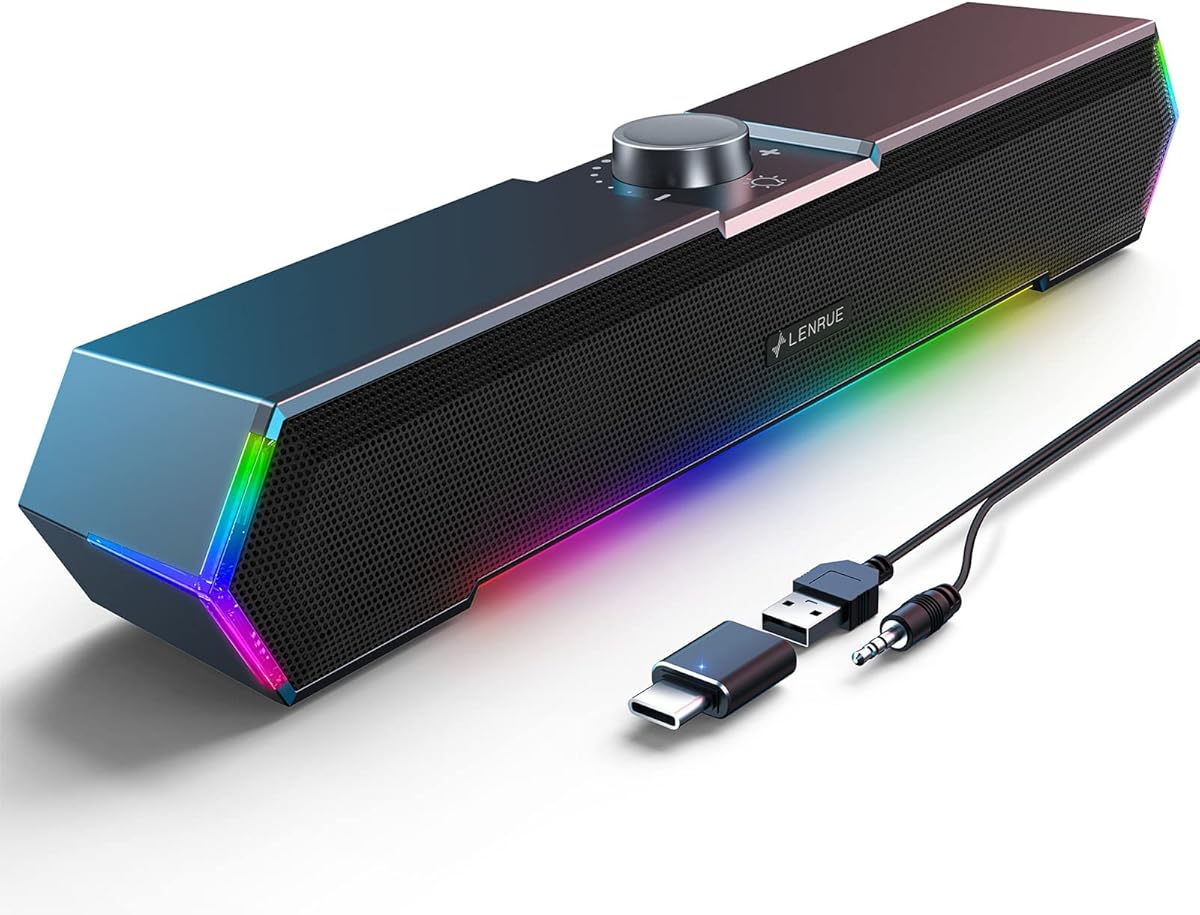
The LENRUE G11 brings gaming-oriented features to a budget price point with touch-sensitive lights that create an immersive atmosphere for your workspace.
We may earn a commission when you buy through this link, at no additional cost to you.
Surge Stereo Sound technology utilizes four amplifier IC horns to deliver distortion-free audio that remains crisp even at higher volume levels during games.
While it lacks Bluetooth and a headphone port the top-mounted volume knob offers easy access which is convenient when adjusting levels during gameplay or calls.
Gamers who want aesthetic lighting effects and clear sound without spending a premium will find this model to be an attractive option for their setup.
One touch control allows you to turn dynamic angular game lights on or off to match your mood or room lighting conditions.
Four large amplifier IC horns ensure noiseless audio delivery for an immersive cinema-like experience during videos or movies.
We may earn a commission when you buy through this link, at no additional cost to you.
This small speaker proves that size does not dictate volume as it delivers loud and crisp Hi-Fi sound suitable for various media consumption needs.
We may earn a commission when you buy through this link, at no additional cost to you.
The 31.5-inch cable length between speakers offers flexibility in placement allowing you to position them exactly where sound is needed on your desk.
While the build uses quality plastics the unique column shape and anti-slip pads ensure stability and modern aesthetics that fit well in offices.
We recommend this for users who need a versatile compact speaker that offers good placement flexibility and a solid warranty for peace of mind.
The long cable length between the two units allows you to place them further apart for better stereo separation.
An 18-month worry-free warranty and life-time support provide assurance against defects and issues after purchase.
We may earn a commission when you buy through this link, at no additional cost to you.
The Uakinat Desktop Speaker uses upgraded 2x3W technology to deliver loud and crystal clear sound that enhances your experience for movies or video games.
We may earn a commission when you buy through this link, at no additional cost to you.
To reduce desk clutter the cables are glued together in the package which prevents tangling and makes setup faster for non-technical users.
While the design is utilitarian the anti-slip foot pads and long warranty guarantee offer practical benefits that ensure reliability and satisfaction over time.
This is a practical choice for office workers who need dependable sound and a quick setup process without navigating complex installation steps.
The pre-glued cables avoid desktop clutter and make the initial setup process simpler and cleaner for all users.
A 60-day money-back guarantee and 18-month warranty reflect the manufacturer confidence in the product quality and durability.
We may earn a commission when you buy through this link, at no additional cost to you.
Selecting the right affordable speakers involves weighing several technical and practical factors to ensure you get the best value for your specific needs.
Look for wattage ratings like RMS power which indicate how loud the speakers can get without distortion as higher wattage usually means better volume potential.
For most desktop setups 3W to 14W total output is sufficient for clear audio in medium sized rooms without needing a dedicated amplifier.
Decide between USB powered models that simplify connections or 3.5mm aux inputs that offer broader device compatibility across different computers and consoles.
USB-C support is becoming essential for modern laptops so check if the speaker includes adapters or native compatibility if you use a Mac or Chromebook.
Consider the physical footprint and shape of the speaker to ensure it fits under your monitor or fits neatly on a cluttered work desk.
Clip-on or compact designs save space but ensure the mounting mechanism is sturdy enough to hold the speakers securely without falling.
Look for passive radiators or specialized driver technology that enhances bass response and clarity as these features differentiate premium budget options.
Check for gold-plated inputs or noise-reducing designs which help maintain signal purity and prevent static or interference during use.
Prioritize plug-and-play models that do not require driver installations as these ensure immediate setup and broader compatibility across different operating systems.
Physical volume controls or inline knobs are crucial for quick adjustments without needing to navigate software settings constantly.
Check for materials like metal finishes or anti-slip bases that protect your desk and ensure the speakers stay stable during heavy use.
A good warranty policy from the manufacturer provides peace of mind and indicates confidence in the product's longevity and reliability.
Some models offer RGB lighting or touch controls which add aesthetic value or convenience but ensure these do not compromise audio performance.
Assess if you need headphone jacks or specific mounting options as these add versatility to how you use the speakers daily.
Connect the USB cable to your computer and the 3.5mm audio jack to your PC or sound output device then power on the system to ensure the speakers are detected.
Adjust the physical volume knob on the speaker or inline cable to match your system volume for clear sound without distortion during media playback.
Clean the speakers regularly with a soft dry cloth to remove dust and avoid using water or harsh chemicals that could damage the electronics or finish.
Most modern USB speakers are plug-and-play and do not require manual driver installation as your operating system automatically recognizes them. However updating your system audio drivers can improve compatibility and performance.
No high quality cheap speakers are designed to draw power from the USB port safely without affecting the motherboard. Ensure the USB port is functioning properly to avoid connection issues.
Passive radiators enhance bass response without needing an extra power source allowing for deeper low frequencies in a compact design. This is ideal for small desktop speakers aiming for richer audio.
Check your playback settings to ensure the USB speakers are selected as the default device. Reboot your system or check for driver updates to resolve recognition issues with new hardware.
Yes for users with modern laptops or MacBooks that lack USB-A ports USB-C support ensures compatibility. Look for speakers with adapters if your device requires a specific connection type.
Set your system media player volume to maximum before adjusting the speaker knob. Increasing beyond 100% may cause distortion so ensure your source volume is optimized for best results.
Most clip-on speakers use adjustable clamps that fit standard monitor bezels securely. Ensure the clamp is tightened properly and monitor weight to prevent the speakers from slipping.
Many USB speakers work with consoles like PlayStation or Xbox if they support USB audio output. Check your console documentation for compatible audio output settings to ensure functionality.
We highlighted ten solid options ranging from the Creative Pebble 2.0 for sound quality to the MELOGAGA for budget aesthetics to help you find your perfect match.
Prioritize features like USB-C support or passive radiators if you need modern connectivity or deeper bass while keeping your price constraints in mind.
Remember that prices change frequently so check current listings on Amazon to verify the best deals before finalizing your purchase decision.