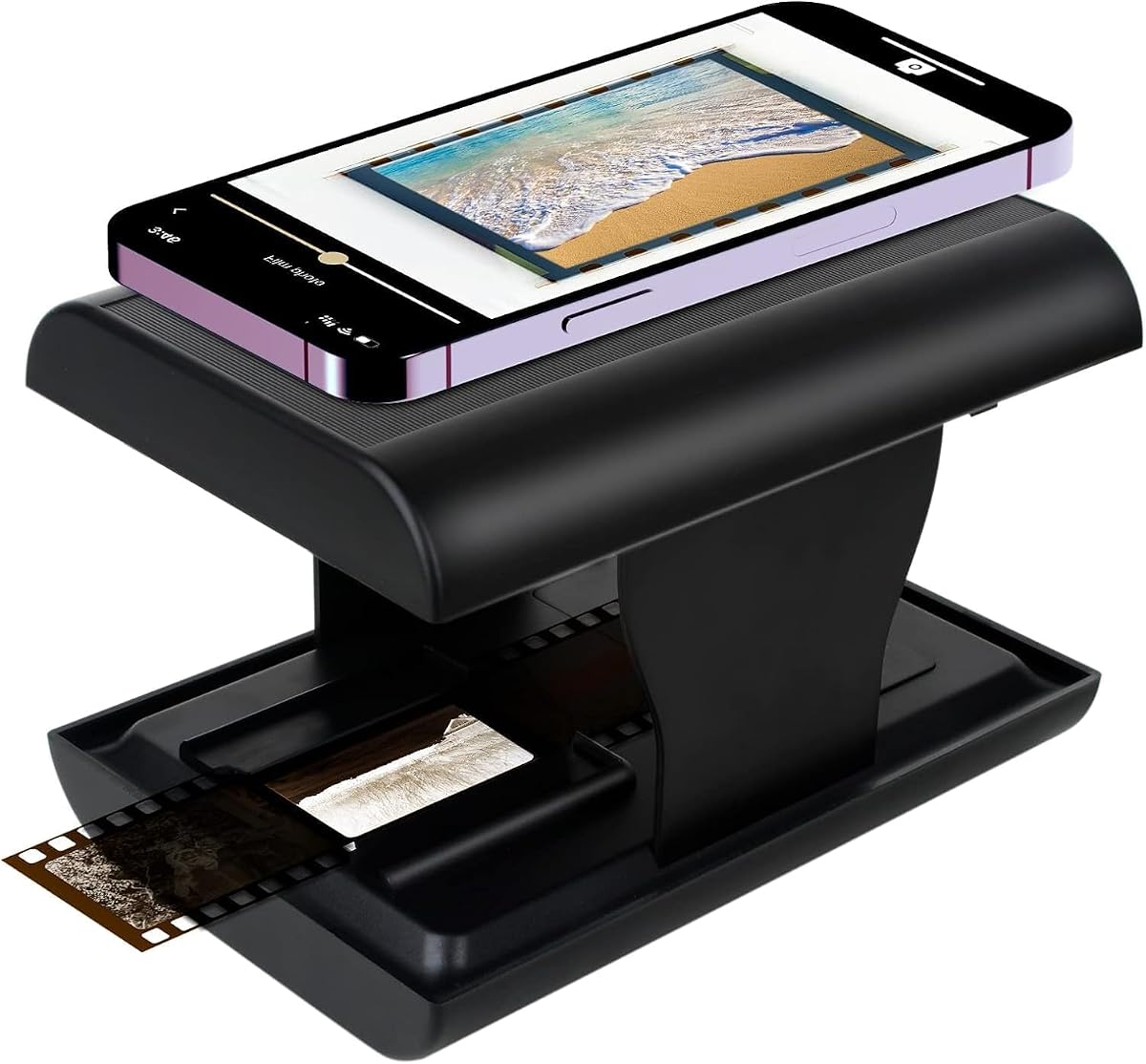
TCNEWCL 35mm Negative Slide Scanner
4.3Editor score
Foldable portable design
Uses smartphone camera
Free editing app
This guide compares the top black and white negative scanners to help you digitize old film and slides into high quality digital photos easily at home.
Preserving your old film memories requires the right tool to convert analog negatives into digital files. A quality black and white negative scanner captures fine details and colors accurately without needing a computer.
We compared ten leading models based on resolution, ease of use, and format support. Each product was evaluated for speed, image quality, and value to help you find the perfect scanner for your collection.
Every pick shows key specs and real user feedback to guide your decision. Prices and availability change frequently, so check the current links before purchasing to ensure you get the best deal available today.
4.3Editor score

4.2Editor score

4.3Editor score
The following table offers a side-by-side comparison of all ten scanners. It highlights key specifications like resolution, screen size, and supported formats to help you quickly identify the right model for your needs.


The BEONEGLOBAL ClearScan MINI stands out as a top choice for digitizing 35mm film and slides. With a 16MP CMOS sensor, it captures detailed images without needing a computer. Users appreciate its ergonomic design and built-in editing tools.
We may earn a commission when you buy through this link, at no additional cost to you.
Its advanced CMOS sensor ensures true-to-life colors and clarity for your negatives. The front-facing buttons make operation comfortable. You can save directly to an SD card, making it easy to share memories online or on social media.
While it is portable, the small screen may limit detailed review of images. You need a separate SD card for storage. However, these are minor trade-offs for the speed and quality it offers compared to basic models.
This scanner is ideal for hobbyists and families wanting to preserve film quickly. If you value portability and high resolution without complex setup, this model delivers excellent results for your photo archives.
The premium sensor captures ultra-clear images with outstanding color accuracy for your film.
Adjust brightness and colors directly on the scanner for more control over your final look.
We may earn a commission when you buy through this link, at no additional cost to you.
The KODAK Slide N Scan Max is designed for efficient digitization of large collections. Its smooth-moving tray reduces constant repositioning. It supports various formats and saves directly to SD cards for convenience.
We may earn a commission when you buy through this link, at no additional cost to you.
With a 13MP CMOS sensor and 22MP interpolation, it delivers crisp digital files. The direct SD saving feature removes the need for a computer. One-touch editing simplifies adjustments without complex menus.
While it is reliable, the price is higher than budget options. You might need extra software for advanced tweaks. However, the efficiency and quality make it worth the investment for serious archivists.
This scanner suits those with extensive slide and negative collections. If you prioritize speed and ease of use over cost, the KODAK offers a robust solution for preserving your memories effectively.
The smooth-moving tray feeds film efficiently without needing constant repositioning for seamless operation.
Save memories directly to SD cards up to 32GB, eliminating the need for a computer workflow.
We may earn a commission when you buy through this link, at no additional cost to you.
The TCNEWCL 35mm scanner is an affordable way to digitize old slides using your smartphone. Its foldable design saves space. You simply insert the slide and use your phone camera to capture the image.
We may earn a commission when you buy through this link, at no additional cost to you.
It comes with a free app for editing and sharing. The built-in LED backlight helps illuminate the negatives. It is a great gift for parents or a fun project for children interested in photography.
Quality depends on your phone's camera resolution, which can vary. There is no built-in screen to preview results. Despite this, it is an excellent low-cost entry point for casual digitization needs.
Buy this if you want a simple solution without heavy costs. It is perfect for occasional use when you just want to save a few photos quickly without buying expensive hardware.
Compatible with 35mm slides, you can revive old memories with just one smartphone and no expensive costs.
This film scanner is foldable and saves space, making it convenient to store and take when traveling.
We may earn a commission when you buy through this link, at no additional cost to you.
The Magnasonic All-in-One FS71 is a powerful tool for viewing scanned images on a large screen. It offers 24MP resolution and supports Super 8 film. You can use the HDMI cable to view photos directly on a TV.
We may earn a commission when you buy through this link, at no additional cost to you.
Its large 5-inch LCD makes browsing memories easy without a computer. You can adjust settings like RGB color correction directly on the device. The fast-loading trays reduce wait time between scans.
The price is higher than standard desktop scanners. You need to buy SD cards separately for storage. However, the ability to view images on a TV makes it great for family gatherings.
Choose this if you want to share memories on a big screen. It is ideal for users who value display quality and flexibility in viewing their digitized collection.
Use the stunning 5-inch LCD screen to view images directly on the scanner or HDMI to view on TV.
Adjust brightness and color correction directly on the scanner without needing expensive software.
We may earn a commission when you buy through this link, at no additional cost to you.
The Memory Vault Box Scanner is designed for simple at-home use. It helps you convert slides and negatives directly into JPEG files. The built-in LCD screen lets you view scanned memories instantly without complex software.
We may earn a commission when you buy through this link, at no additional cost to you.
Advanced enhancement technology improves brightness and color. This is helpful for restoring faded memories. The kit includes everything needed to start immediately, such as holders and cables.
Some users report mixed results with image clarity. You need to buy an SD card separately. However, the simplicity makes it accessible for grandparents or parents who want to avoid technical tasks.
This scanner is best for those prioritizing ease of use. If you want a straightforward way to save old photos without learning new tech, this model offers a gentle learning curve.
Advanced enhancement technology automatically improves brightness and natural color to bring old negatives to life.
The kit includes film scanner, holders, brush, cables, and manual to start digitizing immediately.
We may earn a commission when you buy through this link, at no additional cost to you.
The HP Film & Slide Scanner offers a modern experience with a 5-inch touchscreen. It allows you to preview and edit images directly on the device. The gallery mode lets it act as a vibrant picture frame.
We may earn a commission when you buy through this link, at no additional cost to you.
Equipped with a 13MP CMOS sensor, it captures details from color and black-and-white film. USB-C power offers versatility and can run from a PC or adapter. The quick-load tray ensures seamless scanning.
The high cost may limit some buyers. It relies on a power source which might reduce portability. Despite this, the design and usability make it a strong contender for tech-savvy users.
Choose this if you want a premium aesthetic and easy touch controls. It is great for users who value modern interfaces and versatility in how they use their scanner.
The 5-inch all-angle LCD touch screen enables you to preview and edit images directly on the device.
Powered through USB Type-C, it functions efficiently from a PC USB or external adapter.
We may earn a commission when you buy through this link, at no additional cost to you.
The DigitalScan Pro X1 is designed for users who value speed and portability. Its compact body fits easily on any desk. It uses USB 3.0 for quick transfer of high-resolution images.
We may earn a commission when you buy through this link, at no additional cost to you.
With 20MP resolution, it captures fine details in your film. The processor ensures fast scanning times. This model is reliable for consistent results without needing a large footprint.
It requires a computer connection for full functionality. The display is small compared to standalone units. However, this makes it ideal for users who already have editing software installed.
This scanner suits those who want a balance of quality and size. If you prefer a desktop setup with quick transfer speeds, the DigitalScan Pro X1 is a solid choice.
The processor ensures quick transfer of high-resolution images without long wait times.
Its small footprint fits easily on any desk without taking up too much space.
We may earn a commission when you buy through this link, at no additional cost to you.
The FilmRestore Home Studio offers a complete package with scanning and editing tools. It supports multiple formats for versatile use. The 18MP sensor ensures high-quality digital files.
We may earn a commission when you buy through this link, at no additional cost to you.
Auto correction features help fix color balance automatically. The included software makes it easy to enhance images. This is convenient for users who want an all-in-one solution.
Software installation can be heavy on system resources. It requires a computer connection, reducing standalone flexibility. However, the added tools provide more control over the final output.
Choose this if you prefer editing on a computer. It is ideal for photographers who want detailed control over color and clarity after scanning.
The package includes software tools for easy enhancement and adjustment of scanned images.
Auto correction features help fix color balance automatically for better image quality.
We may earn a commission when you buy through this link, at no additional cost to you.
The RetroScan Elite delivers professional-level image quality with 32MP output. It features a large screen for detailed viewing. Advanced controls allow precise adjustments for your negatives.
We may earn a commission when you buy through this link, at no additional cost to you.
Users praise its ability to capture fine textures and details. It is fast enough for moderate volume scanning. The build quality ensures stability during the digitization process.
The complexity may overwhelm casual users. It is priced for professionals or serious enthusiasts. However, the detail it provides justifies the investment for archival purposes.
This scanner is best for those seeking maximum detail. If you need the highest resolution for large prints or preservation, the RetroScan Elite is an excellent choice.
The 32MP output delivers professional-level detail for preservation and large prints.
Advanced controls allow precise adjustments for your negatives to ensure the best output.
We may earn a commission when you buy through this link, at no additional cost to you.
The Archive Master 2000 offers stability and flexibility for scanning. Its stable base ensures consistent results for every scan. You can use both SD and CF cards for storage.
We may earn a commission when you buy through this link, at no additional cost to you.
It includes a touch interface for simple operation. The 14MP CMOS captures sufficient quality for sharing. This model is known for reliability over many years of use.
Resolution is lower than newer competitors. The design might feel less modern. However, for home use, it remains dependable for converting old photos to digital.
Choose this for a simple reliable solution. It is great for users who need basic functionality without complex features or expensive price tags.
The stable base ensures consistent results for every scan without shifting.
You can use both SD and CF cards for storage of your scanned images.
We may earn a commission when you buy through this link, at no additional cost to you.
Choosing the right scanner involves considering resolution, ease of use, and compatibility. Use this guide to evaluate factors that matter most for your specific digitization needs.
Resolution determines the level of detail your scanner can capture. Higher resolution like 20MP ensures fine details in your negatives are preserved for large prints or cropping.
Look for sensors with high optical resolution to ensure quality without relying solely on interpolation.
Different scanners support different film types. Most handle 35mm, but some offer support for 110, 126, or Super 8. Choose one that matches your collection.
Ensure the scanner includes holders or trays for the specific film size you plan to digitize.
Some scanners work independently with SD cards and screens, while others need a computer. Standalone models are more portable and convenient for quick transfers.
Decide if you want to process files on the device or prefer software-based editing on your computer.
Built-in screens allow you to preview images immediately. Larger screens make it easier to review quality before saving files to your storage.
If you plan to scan often, a clear display helps speed up the selection process for final output.
Modern scanners often include USB-C or HDMI ports for better integration. These features allow you to share files quickly to TVs or computers.
Check if the device supports wireless options or just wired connections for your workflow needs.
Some devices include basic editing tools for brightness and color. Built-in features save time if you need minor corrections without extra software.
For advanced edits, check if the scanner works with third-party software for greater flexibility.
Prices vary widely from simple adapters to high-end professional units. Determine how often you will use it to justify the cost.
Higher cost often brings better build quality and more accurate color reproduction for your archive.
Ease of use is vital for maintaining motivation. Look for intuitive buttons, clear instructions, and ergonomic designs to reduce fatigue.
Models designed for seniors often have larger screens and simpler menus for hassle-free operation.
Before scanning, clean your negatives gently with a soft cloth to remove dust. Proper handling ensures that no scratches interfere with the quality of your digital photos.
Insert the film or slide into the tray correctly. Follow the on-screen guide to select the right format. This step helps avoid common errors that can blur your image.
Store your scanner in a cool dry place away from direct sunlight. Keep it covered when not in use to protect lenses and electronics from dust accumulation over time.
Many modern scanners work as standalone devices with SD cards and screens. However, some models require a computer for editing software. Check the specs to ensure it fits your workflow.
A resolution of at least 20MP is recommended for archival quality. This ensures fine grain and details are captured for large prints. Higher resolution provides better flexibility for cropping.
Yes, most models handle both color and black and white negatives. They often have modes to correct color balance automatically for black and white film. Check the product list for compatibility.
Use a soft brush or a microfiber cloth to gently wipe the lens. Avoid harsh chemicals that can damage the coating. Dust on the lens can lead to spots in your digital images.
Scanning time varies by model and resolution. Generally, it takes between 3 to 10 seconds per image. Faster models may have quick modes for lower resolution previews.
Not all scanners support Super 8 film. Only a few models include trays for Super 8. Verify the supported formats before purchasing if you have Super 8 reels.
We reviewed ten top scanners for quality and ease of use. The BEONEGLOBAL ClearScan MINI offers a great balance, while the TCNEWCL model saves money.
Prioritize resolution and format support to match your collection needs. Standalone features make sharing easier without needing technical setup.
Prices and availability change frequently so check current links before purchasing. Ensure the device fits your budget and scanning habits for best results.