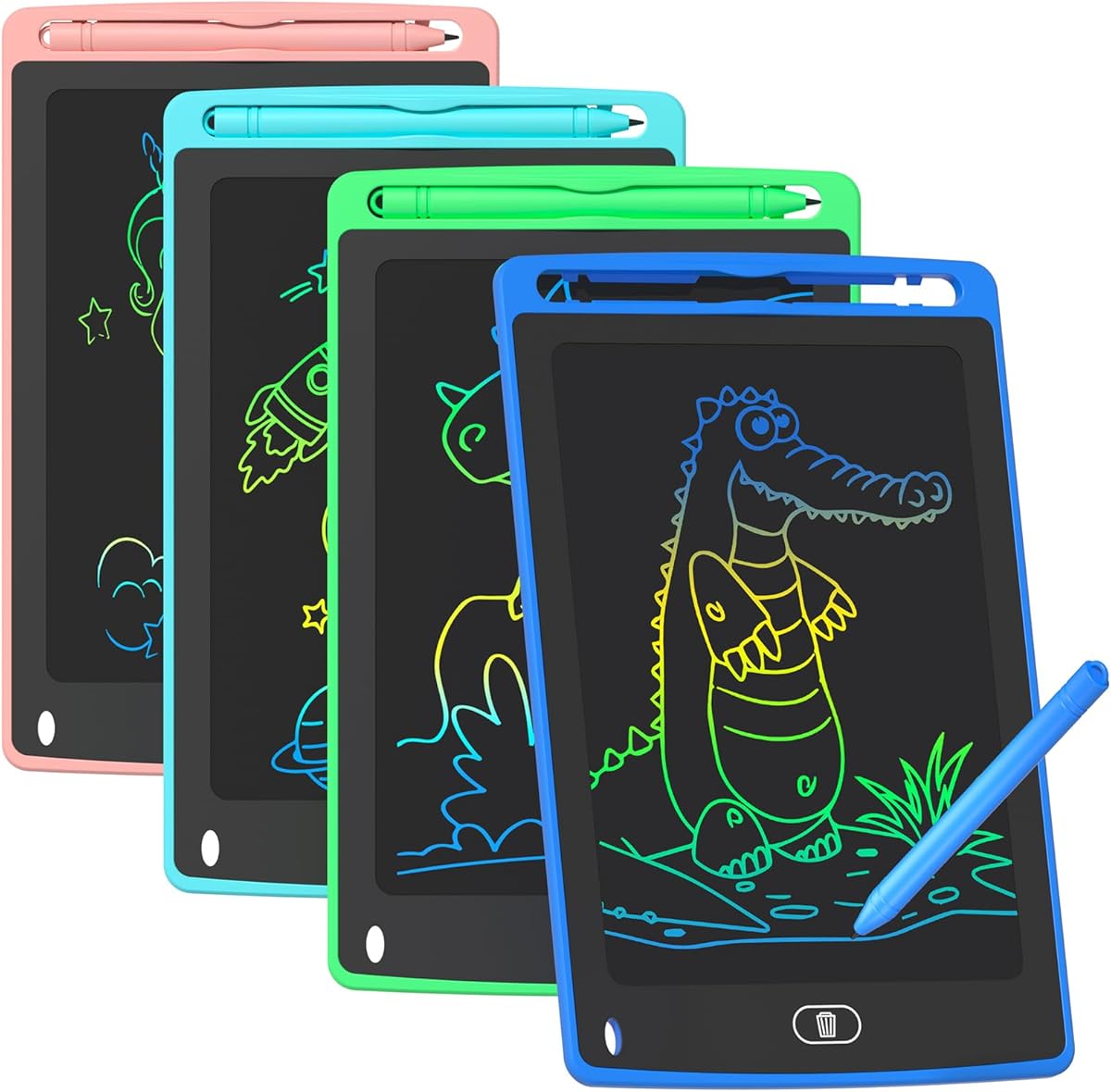
4 Pack LCD Writing Tablet for Kids
4.5Editor score
Four pack included for sharing
8.5 inch colorful screen
Pressure sensitive drawing lines
This guide compares the top 10 LCD Writing Tablet for Kids Doodle Board models for screen 2026, focusing on screen size, durability, battery life, and
Finding the right LCD Writing Tablet for Kids Doodle Board can transform screen time into creative learning. These devices offer a mess-free way for children to draw, write, and express themselves without the hassle of paper or pencils. Parents appreciate the portability and eye safety features that come with modern liquid crystal technology.
We have evaluated ten leading models available this month based on user feedback, technical specifications, and design features. Our comparison looks closely at screen dimensions, battery types, durability ratings, and included accessories to ensure you select the best option for your child's age and needs.
Each pick in this list highlights specific strengths, such as budget-friendly multi-packs, large canvas options, or rechargeable designs. Please note that product availability and pricing fluctuate regularly on retailer sites, so always verify current details before making a final purchase decision for your family.
4.5Editor score

4.5Editor score

4.5Editor score
The following table provides a side-by-side overview of all ten selected models. It highlights key specifications like screen size, battery type, and primary features to help you quickly identify which device fits your specific requirements for home or travel use.


This four-pack option provides exceptional value for families with multiple children or those who want backup boards. It features an 8.5-inch screen with pressure-sensitive technology that allows kids to draw lines of varying thickness by adjusting how hard they press.
We may earn a commission when you buy through this link, at no additional cost to you.
The colorful display is bright and clear, encouraging creativity without the glare associated with traditional screens. Each tablet includes a lock switch to save artwork and an erase button for quick clearing. The stylus fits snugly on top, reducing the risk of loss during travel.
While the screen is smaller than premium models, it remains functional for writing letters or quick doodles. The main limitation is the non-replaceable battery, which may need replacement after extended use. However, for the price point, this package delivers reliable performance for everyday play.
Families seeking a cost-effective solution for birthdays or school gifts will find this set practical. It eliminates paper waste and keeps kids engaged during meals or car rides. We recommend this for households needing multiple devices without breaking the budget.
Getting four units for a single price makes this an unbeatable deal for sibling sets or classroom use.
Different colors encourage kids to choose their favorite board, adding a personal touch to their drawing time.
We may earn a commission when you buy through this link, at no additional cost to you.
The Kayoubi model stands out for its jumbo 14.5-inch screen, giving young artists ample room to explore complex drawings. This size is ideal for kids who find smaller boards restrictive when trying to sketch larger scenes or detailed characters.
We may earn a commission when you buy through this link, at no additional cost to you.
Designed with little eyes in mind, the display offers zero harsh blue light or glare. It provides a safer alternative to digital toys, reducing eye strain during long play sessions. The single-click erase and lock mechanism ensures that masterpieces are saved safely without accidental deletion.
Though it comes in a single color, the functionality remains robust with easy-to-use controls. The lack of mess makes it perfect for cars or restaurants where cleanup is difficult. The battery is standard, so expect regular replacements if usage is heavy.
Parents looking for a balance between screen real estate and eye safety should consider this model. It supports storytelling and drawing equally well. We endorse it as a top choice for creative growth and family entertainment.
The large surface area encourages natural arm movements, helping children develop better motor skills while drawing.
With no blue light emission, this tablet is a healthier choice for daily use compared to tablets or phones.
We may earn a commission when you buy through this link, at no additional cost to you.
This 16-inch model offers a premium experience with a rechargeable lithium polymer battery that lasts up to nine months on a full charge. The screen is 60 percent brighter than many competitors, providing vivid colors that enhance the drawing experience.
We may earn a commission when you buy through this link, at no additional cost to you.
Safety features include a hidden battery compartment to prevent accidental swallowing and a stretch rope to keep the stylus attached. The ABS shell is impact-resistant, making it suitable for active play environments. The lock and erase buttons are intuitively placed for quick access.
While it is slightly heavier than smaller versions, the durability justifies the weight. The pressure-sensitive tech allows for thick or thin lines based on writing intensity. Charging via Micro-USB is convenient for parents who already have compatible cables at home.
For families prioritizing long-term use and vibrant visuals, this tablet is an excellent investment. It supports educational activities like math and spelling effectively. We highly recommend it for parents seeking a durable, high-quality creative tool.
The rechargeable design reduces waste and saves money over time compared to models requiring frequent battery swaps.
The brighter screen ensures drawings remain visible even in well-lit environments, improving the user experience.
We may earn a commission when you buy through this link, at no additional cost to you.
KOKODI focuses on environmental sustainability with this 16-inch tablet. It claims to save 1,000 sheets of paper per child. The replaceable battery is fixed with screws to ensure safety, though this might require tools for replacement.
We may earn a commission when you buy through this link, at no additional cost to you.
The screen provides a large area for focus and creativity. One-click clear allows for instant resets, while the lock feature prevents accidental deletions. The pressure sensitivity mimics paper writing, making it familiar for children accustomed to traditional drawing.
The battery life is rated for three to six months, which is reasonable for moderate use. The design is simple and functional, with no flashy features that distract from the core purpose. It is a solid choice for eco-conscious parents.
This model is well-suited for daily educational tasks and artistic play. The balance of size and price makes it accessible. We suggest it for families looking to reduce paper waste while keeping children entertained.
Using a reusable tablet reduces household paper consumption, teaching kids about sustainability through everyday play.
The large screen encourages longer drawing sessions, allowing kids to complete more complex projects without interruption.
We may earn a commission when you buy through this link, at no additional cost to you.
This rechargeable version highlights convenience with up to nine months of playtime on a single charge. It includes two styluses, inviting parents to join in creative sessions with their children. The body is child-safe and sealed to prevent access to the battery.
We may earn a commission when you buy through this link, at no additional cost to you.
The 16-inch screen gives plenty of space for fun and learning. It is designed to be lightweight and slip easily into bags, making it an ideal travel companion. The zero-mess feature saves parents from cleaning up paint or crayon stains.
The screen brightness is designed to reduce squinting. While it can show minor scratches during shipping, the erase button clears them out effectively. The design emphasizes durability and ease of use for young hands.
Families who travel often will appreciate the battery longevity and portability. It serves well as a boredom buster on planes or car trips. We recommend this for parents who value convenience and shared activities.
Two styluses allow parents and kids to draw together, turning screen time into a bonding experience.
Its lightweight build and battery life make it perfect for long journeys where access to chargers is limited.
We may earn a commission when you buy through this link, at no additional cost to you.
BUKEBU offers a 10.5-inch screen weighing only 200 grams, which is incredibly light for toddlers to carry. The screen is tested for eye protection with no radiation or glare. It offers an 18-month replacement service for added peace of mind.
We may earn a commission when you buy through this link, at no additional cost to you.
The rounded corner design enhances durability and safety. It allows for easy writing and counting anywhere. The lock key prevents accidental erasures. It is designed to be convenient and practical for young users.
The battery life is good but not replaceable. However, the build quality is high, with a premium ABS shell. It serves as a great desktop board for writing practice or painting without dust.
For parents prioritizing weight and warranty, this is a strong contender. It fits easily in small bags for school. We suggest it for younger children who need a manageable size.
A 200-gram tablet is easy for small hands to hold without fatigue during long sessions.
The 18-month service offer shows the brand's confidence in product quality and durability.
We may earn a commission when you buy through this link, at no additional cost to you.
FLUESTON provides a 10-inch board that is ultra-thin at 0.26 inches. Weighing only 6 ounces, it is easy to carry anywhere. The pressure-sensitive technology ensures lines are clear and visible without glare.
We may earn a commission when you buy through this link, at no additional cost to you.
The single button clear function makes cleanup instant. It comes with a stylus that fits well. The screen is not self-illuminating, which protects eyes. It is a safe and hygienic option for kids.
The battery is CR2025 and replaceable if needed. It is suited for office memos or teaching tasks. The thin design makes it pocketable. It is a reliable choice for quick notes or doodles.
Travelers will love the portability of this model. It fits easily in handbags. We recommend it for kids who need a lightweight tool for on-the-go fun.
The thin profile and light weight make it perfect for slipping into pockets or small bags.
With no self-illuminating screen, it offers a natural writing experience similar to paper.
We may earn a commission when you buy through this link, at no additional cost to you.
KOKODI offers a massive 20-inch screen for children who want expansive drawing areas. This size allows for detailed art and writing projects. The electronic drawing pads are reusable and erasable for continuous use.
We may earn a commission when you buy through this link, at no additional cost to you.
The colorful display supports vibrant creativity. It serves well for toddlers and young children. The design focuses on education and learning. It is a unique option for larger spaces.
Due to limited detail on specific features, it relies on the brand's reputation for quality. The size makes it less portable but great for home use. It encourages free play without limits.
Families with room at home may appreciate the generous canvas. It is suitable for older toddlers needing space. We suggest it for those prioritizing screen size above portability.
A 20-inch screen offers more room for complex projects, boosting confidence and creativity.
Its size makes it ideal for stationary play on a desk or floor table.
We may earn a commission when you buy through this link, at no additional cost to you.
ORSEN provides a 10-inch colorful screen that is easy to view. The tablet weighs 150g, making it portable for small hands. It includes a lanyard to secure the stylus, reducing loss risks.
We may earn a commission when you buy through this link, at no additional cost to you.
The anti-shock case protects the device from falls. Battery life lasts up to six months with replaceable option. It allows locking of patterns for later viewing. It is suitable for travel and school.
The case is made from durable plastic. It handles accidental drops well. The design supports color perception and hand-eye coordination. It is a reliable tool for early learning.
For those needing a lightweight and durable option, this is a good choice. It fits well in backpacks. We recommend it for parents looking for a balanced and affordable tablet.
At 150 grams, it is one of the lightest options available for toddlers.
The lanyard feature keeps the stylus attached to the board, preventing loss during play.
We may earn a commission when you buy through this link, at no additional cost to you.
KOKODI features a 12-inch screen with a dedicated lanyard to prevent losing the stylus. The tablet is made of waterproof plastic with rounded corners for safety. It supports various activities from drawing to office memos.
We may earn a commission when you buy through this link, at no additional cost to you.
It is anti-drop and anti-shock, ensuring durability. The stylus attachment is convenient for travel. It weighs 240g, fitting easily into bags. It is great for kids and teens alike.
The battery lasts three to six months and is replaceable. It saves 1,000 sheets of paper. The design is simple for clear operation. It is rated well by over 40,000 buyers.
For those worried about lost styluses, this model offers a practical solution. It is reliable for school and home. We suggest it for families needing a versatile and secure writing tool.
The integrated lanyard ensures the stylus is always close by, reducing stress for parents.
Waterproof plastic construction protects against spills, extending the device's lifespan significantly.
We may earn a commission when you buy through this link, at no additional cost to you.
Selecting the right doodle board involves weighing several factors to match your child's needs and your budget.
The size of the screen determines how much space a child has to create. Smaller sizes like 8.5 or 10 inches are great for travel, while 16 to 20-inch models provide more room for complex drawings.
Look for brighter displays to ensure visibility in different lighting conditions.
Some tablets use replaceable button batteries, while others offer rechargeable options. Rechargeable models reduce waste and costs over time, making them better for heavy usage.
Choose a battery type that fits your maintenance preferences.
Kids often drop toys, so a shock-resistant case with rounded corners is essential. Ensure the battery compartment is locked to prevent access.
Prioritize models with robust casing and secure battery storage.
Advanced models allow lines to vary in thickness based on how hard you press. This adds a more realistic drawing experience similar to paper.
Check for pressure-sensitive technology if your child enjoys detailed art.
A one-click erase button makes cleaning fast, while a lock feature saves important drawings. This prevents accidental deletion during play.
Ensure the tablet includes both clear and lock functions.
Screen technology should minimize glare and blue light to protect eyesight. Non-luminous LCD screens are generally safer than backlit screens.
Look for eye-friendly claims and non-self-illuminating screens.
Lightweight designs make it easier for children to carry the board around. Consider weight if the device will travel often.
Select lighter models for travel or school use.
Budget options may offer multi-packs, while premium ones include rechargeable batteries. Compare features against cost to find the best value.
Decide what features matter most before setting a budget.
Start by pressing the erase button to clear the screen. Use the stylus to draw or write. Vary pressure to change line thickness if the tablet supports it.
To save artwork, press the lock switch. This prevents accidental erasure. Always store the stylus in the holder to avoid loss.
Keep the device away from extreme heat or water. Replace batteries only when necessary. Use a soft cloth to clean the screen gently.
Yes, most modern tablets use non-luminous LCD screens that do not emit blue light. This makes them safer than tablets or phones for extended use. Always check for eye-protection certifications.
Battery life varies by model and usage. Replaceable batteries often last 6 to 12 months. Rechargeable versions can provide up to 9 months on a full charge depending on how frequently the device is used.
These tablets do not save images digitally. You can lock the screen to keep a drawing visible, but it will disappear once you unlock and erase. For permanent storage, take a photo of the screen.
Many models include a lanyard or holder. If lost, most brands sell replacement styluses. Keep track of small accessories to avoid interruption during play.
Yes, adults can use them for quick notes, drafting ideas, or simple memos. They are versatile tools for anyone who needs a mess-free way to write or draw quickly.
Absolutely. Reusable tablets significantly reduce paper waste. One tablet can save thousands of sheets of paper over its lifespan, making it a sustainable choice for families.
Use a dry or slightly damp soft cloth to wipe the surface. Avoid harsh chemicals or excessive moisture. This keeps the screen clear without damaging the LCD layer.
These tablets are ideal for children ages 3 to 8, but teens and adults can also enjoy them. They are suitable for toddlers learning to hold a pen as well as older kids practicing handwriting.
We have reviewed ten top options ranging from budget multi-packs to large rechargeable models. Each offers unique benefits for creativity, travel, or home use.
Prioritize screen size and battery type based on your child's needs. Ensure the device has safety features like lock switches and secure batteries.
Prices and availability change frequently, so check current details before buying. These tablets are excellent tools for encouraging creativity while keeping homes tidy.