
Dell Precision 3581 Workstation
4.5Editor score
Powerful 13th Gen Intel Core i7
32GB DDR5 RAM for multitasking
Nvidia RTX A500 graphics card
Finding the right laptop for Adobe Premiere Pro requires balancing powerful hardware with a reliable display. Creative professionals need machines that handle high resolution video editing smoothly without crashing or overheating during long sessions. We evaluated ten distinct models to help you find the perfect workstation for your editing workflow.
Our comparison process focused on core specifications like processor speed, graphics capabilities, and memory capacity. We analyzed real-world performance metrics and user feedback to ensure each recommendation meets the demanding needs of video editors. This list covers a wide range of budgets and form factors to suit different working styles and project requirements.
Each pick in this guide highlights specific strengths and potential limitations based on technical data and professional usage patterns. You will find detailed breakdowns of what makes each laptop suitable for editing tasks from basic cuts to complex color grading. Please note that prices and availability change frequently so check current listings before purchasing your next device.
4.5Editor score

4.4Editor score

4.9Editor score
As an Amazon Associate we earn from qualifying purchases.
This side-by-side comparison allows you to quickly evaluate the key specifications of all ten recommended laptops. We have distilled the essential details into a concise format so you can see how each model stacks up against the others in terms of processing power and memory capacity.


The Dell Precision 3581 stands out as a powerful option for budget conscious editors seeking professional workstation performance. Released in 2023 this laptop combines a 13th generation Intel Core i7 processor with 32GB of fast DDR5 memory to handle demanding editing tasks efficiently. The inclusion of an Nvidia GeForce RTX A500 graphics card ensures smooth playback and rendering for Adobe Premiere Pro projects.
We may earn a commission when you buy through this link, at no additional cost to you.
Its sixteen core configuration allows for exceptional multitasking which is crucial when running multiple applications alongside video editing software. The 1TB SSD provides ample space for large video files and ensures fast data transfers and system startup times. While the display is limited to Full HD the clarity is sufficient for most editing work and the anti glare coating reduces eye strain during long sessions.
As a renewed product buyers should be aware that physical condition may vary slightly though it comes with a two year warranty. The processor is optimized for power efficiency running at lower clock speeds during light tasks to extend battery life without sacrificing peak performance when needed. This balance makes it a practical choice for professionals who need reliability without the premium price tag of new flagship models.
Editors looking for an affordable entry into workstation class computing will find this model highly recommended for its robust specification sheet. It strikes a strong balance between raw processing power and cost making it ideal for freelance editors or students. The integrated webcam and modern connectivity options ensure it remains versatile for remote collaboration and daily productivity tasks.
The fourteen core processor handles complex encoding tasks and background processes with ease ensuring smooth editing workflows.
Dedicated graphics hardware accelerates video effects and color grading providing a smoother timeline experience.
We may earn a commission when you buy through this link, at no additional cost to you.
The Dell Precision 7680 represents the pinnacle of mobile workstation engineering tailored specifically for demanding creative workflows like video editing. Powered by an Intel Core i9-13950HX processor it delivers raw speed that minimizes render times and allows for real time effects processing. The 16 inch FHD+ display offers crisp visuals with higher resolution than standard FHD screens making detail work more precise.
We may earn a commission when you buy through this link, at no additional cost to you.
A standout feature is the use of CAMM RAM which overcomes traditional memory limits to provide faster data access and a thinner profile. This technology ensures seamless multitasking when working with large projects or running multiple heavy applications simultaneously. The laptop also supports up to three external monitors via Thunderbolt and HDMI ports enabling expansive multi-screen setups for complex editing tasks.
Built for professional reliability this machine undergoes MIL-STD-810H testing to withstand harsh environments making it suitable for on-site work. ISV certifications guarantee compatibility with critical software like Adobe Premiere Pro reducing the risk of crashes during important projects. The integrated AI powered Copilot in Windows 11 Pro further enhances productivity by offering intelligent assistance for complex workflows.
For professionals who need maximum performance and durability this laptop is an outstanding investment that justifies its higher price. The combination of high-end components and enterprise grade features makes it a superior choice over general purpose laptops. Its versatile connectivity and robust build ensure it remains a reliable tool for years of intensive creative work.
CAMM technology provides superior bandwidth and efficiency enabling faster processing of large video files.
Support for multiple external displays allows for efficient timeline management and reference viewing.
We may earn a commission when you buy through this link, at no additional cost to you.
The Dell Precision 7780 is a true powerhouse designed for professionals who handle the most demanding video editing and engineering workloads. It features an Intel Core i9-13950HX processor paired with an incredible 128GB of RAM allowing you to edit multiple 4K streams or run simulation software without any slowdown. The NVIDIA RTX 3500 Ada GPU provides 12GB of VRAM ensuring stable performance for advanced rendering tasks.
We may earn a commission when you buy through this link, at no additional cost to you.
This workstation is optimized for professional software applications ensuring reliable compatibility with tools like Adobe Premiere Pro. The 17.3 inch display provides a large workspace which is beneficial for managing complex timelines and multiple panels within editing software. With Windows 11 Pro and AI Copilot integrated users benefit from enhanced productivity tools and enterprise grade security features.
The extensive connectivity options including HDMI and USB-C allow for flexible integration with external storage and display devices. A generous manufacturer warranty through 2031 offers peace of mind for long term professional use and reduces the risk of unexpected repair costs. This model is built to handle heavy daily usage in offices studios and on-site environments with equal reliability.
Investing in this laptop is a decision for those who prioritize top tier performance and stability above all else. The specifications are unmatched in the mobile category making it ideal for high end content creation and data analysis. Its premium features justify the cost for businesses and professionals who cannot afford downtime or performance bottlenecks.
128GB RAM enables handling of massive datasets and complex multi-layered video projects effortlessly.
Ada generation GPU ensures stable frame rates and faster export times for intensive editing work.
We may earn a commission when you buy through this link, at no additional cost to you.
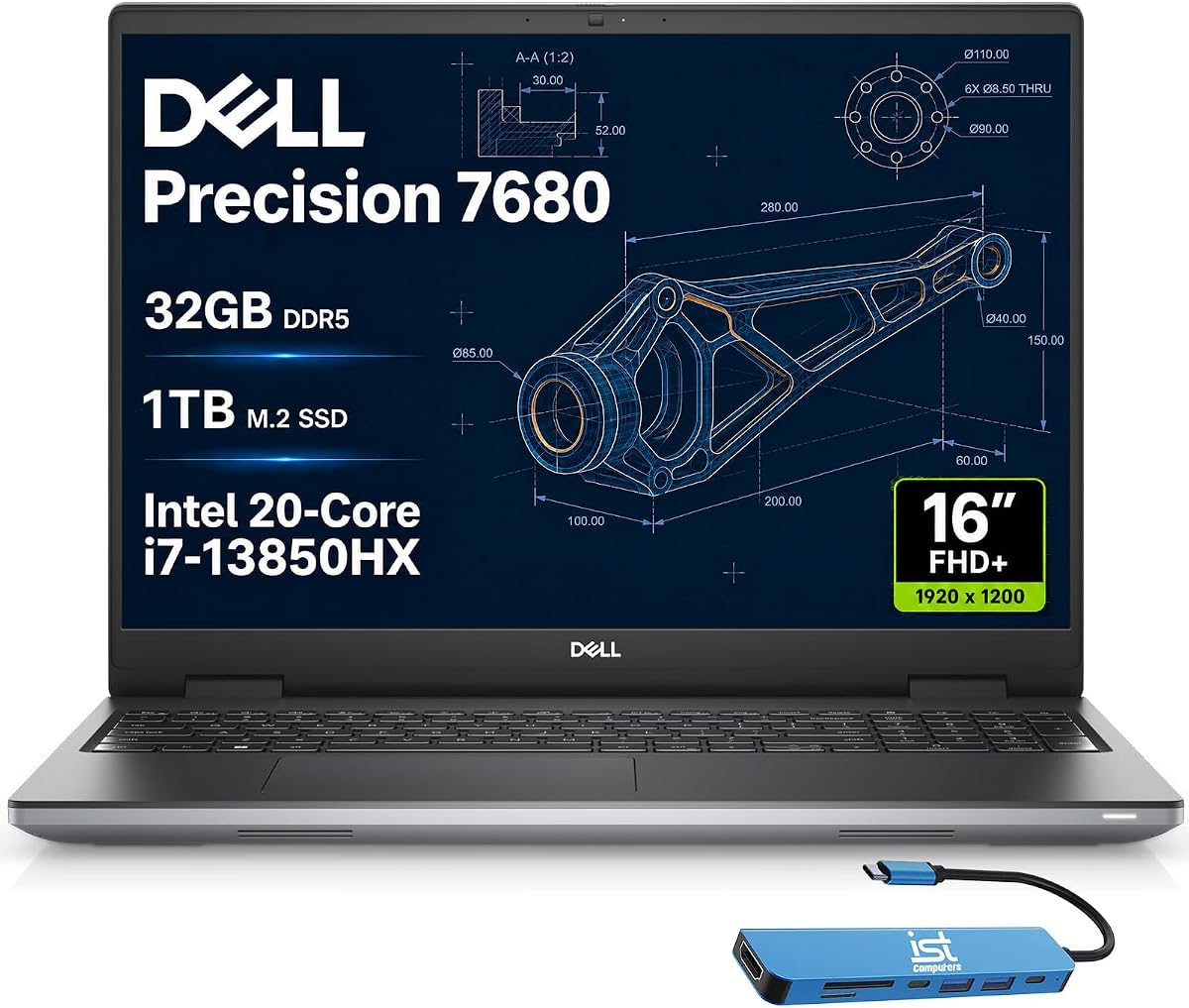
This version of the Dell Precision 7680 offers a compelling balance between performance and cost for professional video editors. It is powered by an Intel Core i7-13850HX processor which provides twenty cores for efficient multitasking and fast rendering speeds. The 32GB DDR5 CAMM memory ensures that you can switch between applications quickly without system lag during intensive editing sessions.
We may earn a commission when you buy through this link, at no additional cost to you.
The 16 inch FHD+ display provides sharp visuals ideal for detailed color correction and frame accurate editing work. Supporting up to three external monitors allows for a flexible workspace setup that can accommodate reference screens and tool palettes. Windows 11 Pro with AI Copilot adds intelligent features that streamline workflows and enhance productivity for business users.
ISV certifications guarantee that professional software like Adobe Creative Cloud runs reliably on this hardware reducing the risk of crashes. The laptop is built to withstand demanding workloads with durability tested to military standards for use in various environments. Connectivity options including Thunderbolt 4 and Wi-Fi 6E ensure fast data transfer and stable wireless connections.
Editors looking for a robust workstation that is slightly more affordable than the i9 variant will find this model highly suitable. It retains the premium build quality and expansion capabilities of the series while offering sufficient power for most professional tasks. The combination of performance and reliability makes it a smart choice for growing creative teams.
Twenty core processor delivers high throughput for rendering and encoding while maintaining energy efficiency.
ISV certification ensures stable operation with critical editing and design applications daily.
We may earn a commission when you buy through this link, at no additional cost to you.
This variant of the Dell Precision 7680 focuses on providing ample memory and storage for extensive project archives. It comes with 64GB of RAM which doubles the capacity of standard models allowing for smoother multitasking with large datasets. The 2TB NVMe SSD ensures you have plenty of space for raw footage and completed projects without needing external drives.
We may earn a commission when you buy through this link, at no additional cost to you.
NVIDIA RTX 1000 graphics card provides reliable performance for engineering and design applications though it is less powerful than higher tier GPUs. The inclusion of Dell ProSupport Plus offers enterprise level support with 24/7 access to experts and onsite technician service to minimize downtime. This warranty covers hardware repairs and priority issue resolution ensuring your system stays reliable.
ISV certifications confirm that the hardware is optimized for professional software reducing the risk of compatibility issues during critical work. Windows 11 Pro with AI Copilot enhances productivity through intelligent assistance and improved security features. Connectivity options including HDMI and USB-C support flexible peripheral setups and high speed data transfer.
Professionals who need large local storage and robust warranty coverage will appreciate this configuration for its practical benefits. The extra memory and storage make it ideal for handling large video files and maintaining a local archive efficiently. The support warranty adds significant value for businesses where system uptime is critical.
64GB RAM allows multiple large projects to be open simultaneously without memory bottlenecks.
ProSupport Plus ensures quick resolution of technical issues to keep workflow uninterrupted.
We may earn a commission when you buy through this link, at no additional cost to you.
The Dell Precision 5550 offers a budget friendly path into workstation computing with a renewed condition that reduces cost significantly. It features a Core i7-10850H processor and 32GB of RAM which provides adequate performance for standard video editing tasks. The 15.6 inch FHD display is clear and color accurate enough for professional work requiring careful color grading.
We may earn a commission when you buy through this link, at no additional cost to you.
Although it uses an older generation processor it still handles multitasking well thanks to the generous memory allocation. The 1TB SSD ensures fast access to files and applications helping to keep workflow smooth during editing sessions. Windows 11 Pro provides enhanced security and management features suitable for business environments.
As a renewed product buyers should expect some cosmetic wear but functional reliability is maintained through rigorous testing. The workstation design ensures that the build quality remains durable for daily use in office or studio settings. This model is particularly useful for small businesses or individuals looking to maximize value without sacrificing core performance.
For editors who do not need the absolute latest hardware this laptop provides a stable and cost effective solution. The combination of solid memory and storage allows for efficient handling of project files. It remains a viable choice for those who prefer a classic workstation build over the newest releases.
Renewed condition offers significant cost savings while retaining essential workstation capabilities.
High memory count ensures smooth multitasking even with older CPU architecture.
We may earn a commission when you buy through this link, at no additional cost to you.
The HP 17 Laptop provides an accessible entry point for beginners or casual editors looking for a large display. Its 17.3 inch Full HD screen offers a spacious viewing area which is helpful for managing complex timelines and reference material. Powered by an AMD Ryzen 5 processor it delivers efficient performance for basic editing and general productivity tasks.
We may earn a commission when you buy through this link, at no additional cost to you.
With 8GB of DDR5 RAM this laptop handles everyday multitasking effectively but may struggle with heavy multi-layered projects. The 256GB SSD ensures quick boot times and file access though you may need external storage for large video files. Windows 11 Pro brings enterprise grade security and features that support professional workflows when needed.
The narrow bezel design maximizes the screen area providing an immersive experience for visual work and video conferencing. Connectivity options include USB-C and HDMI which allow for connection to external monitors and peripherals easily. Battery life is sufficient for a full day of typical office work and light editing sessions.
For students or hobbyists needing a large screen at a low price this model is a practical choice. It offers essential features without unnecessary cost making it suitable for learning editing software. The included accessories like a mouse add value and make the setup ready to use out of the box.
17.3 inch screen provides ample space for timeline and tool panels simultaneously.
Ryzen 5 offers solid performance for entry level editing and general computing needs.
We may earn a commission when you buy through this link, at no additional cost to you.
The Apple 2025 MacBook Pro features the next-generation M5 chip which brings exceptional speed and power to creative workflows. Its 10-core CPU and GPU deliver mind-bending performance for demanding workloads including complex video editing and AI tasks. The Liquid Retina XDR display offers up to 1600 nits peak brightness providing incredible detail and contrast for accurate color work.
We may earn a commission when you buy through this link, at no additional cost to you.
Apple Silicon enables all-day battery life ensuring that you can work away from a power source without compromising on performance. Unified memory architecture allows the CPU and GPU to share data efficiently resulting in faster rendering and smoother multitasking. The 1TB SSD provides generous storage space for large media files and project assets.
Integration with other Apple devices makes file transfer and collaboration seamless across ecosystems. The included SDXC card slot and HDMI port reduce the need for dongles when connecting to external displays or card readers. MacOS offers a stable and secure environment that is highly favored by creative professionals worldwide.
Professionals seeking a premium portable workstation with outstanding battery and display quality will find this laptop ideal. The M5 chip ensures future readiness for emerging AI features and high resolution workflows. Its sleek design and powerful internals make it a top choice for on-the-go content creators.
M5 chip includes Neural Accelerator for faster AI-driven editing and content generation tasks.
XDR display with 1000 nits sustained brightness ensures accurate color grading anywhere.
We may earn a commission when you buy through this link, at no additional cost to you.
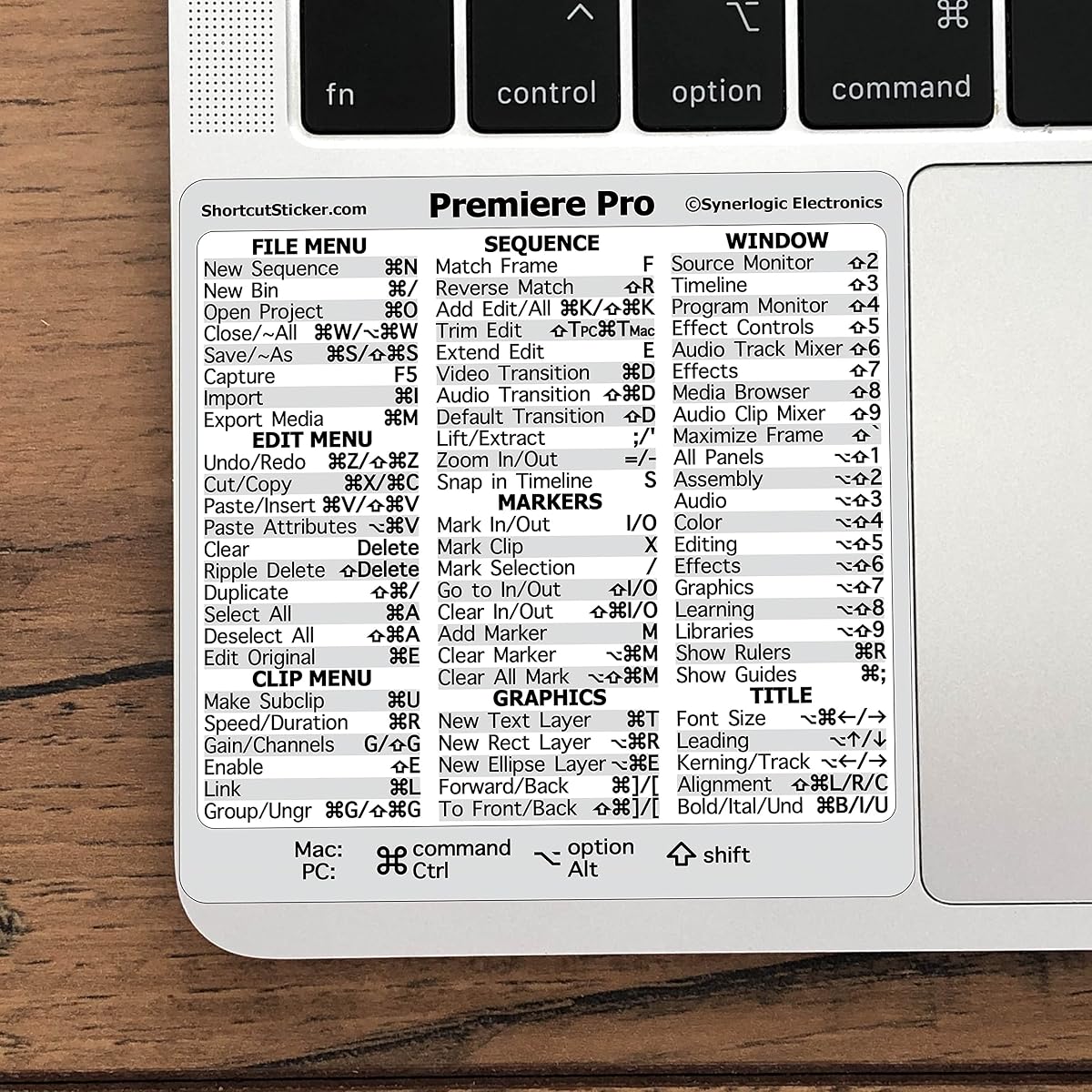
This keyboard sticker serves as an essential tool for editors looking to speed up their workflow and learn key commands. It features the most essential Premiere Pro shortcuts printed clearly for quick reference without needing to look up instructions online. The high-quality vinyl material ensures durability and a professional appearance that fits standard laptop keyboards comfortably.
We may earn a commission when you buy through this link, at no additional cost to you.
Whether you are a student learning the software or a professional needing a quick reminder this sticker helps increase productivity. It is designed to work with both Mac and PC keyboards offering versatility across different operating systems. The layout covers basic to advanced shortcuts ensuring you can expand your efficiency as you learn.
Using a sticker like this reduces reliance on menus and allows for a more intuitive editing experience. The design is made to withstand daily wear and tear maintaining readability over long periods of use. Customers appreciate the responsive customer service and the quality assurance provided by the manufacturer.
For any editor serious about improving speed and consistency this accessory is a small but valuable investment. It complements powerful hardware by enabling faster command execution during editing sessions. Integrating this tool into your setup can significantly reduce the learning curve for new users.
Quick access to commands helps users master shortcuts faster and edit more efficiently.
Compatible with both Mac and PC keyboards ensuring utility for all users.
We may earn a commission when you buy through this link, at no additional cost to you.
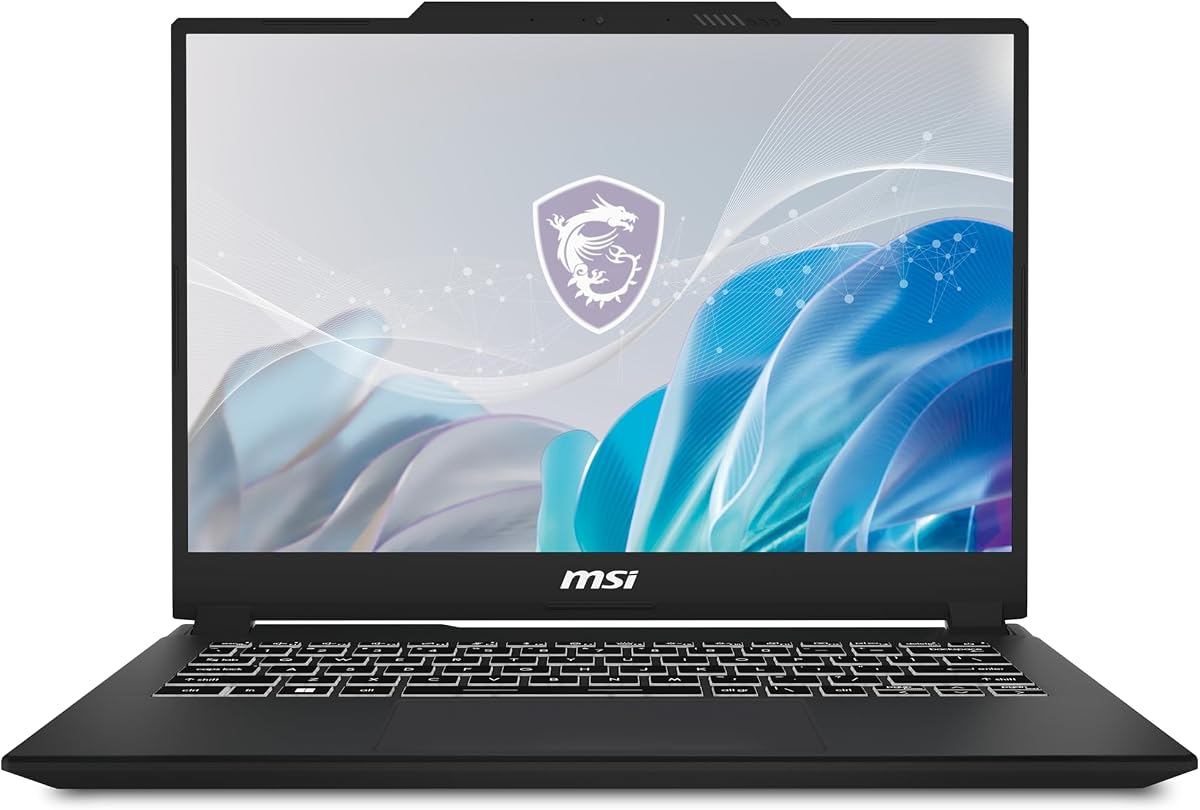
The MSI Creator M14 combines high performance with portability making it ideal for editors who work on the go. Its 14 inch 2.8K display offers rich color and sharp detail which is perfect for color grading and detailed visual work. The Intel Core i7 processor ensures smooth multitasking while the RTX 4050 GPU enables real-time ray tracing effects.
We may earn a commission when you buy through this link, at no additional cost to you.
Cooler Boost technology helps maintain performance during intensive tasks by managing heat effectively. The 16GB DDR5 RAM and 1TB NVMe SSD provide fast access to large files and sufficient space for daily projects. Windows 11 Home offers a familiar and intuitive environment for creative workflows and media management.
This laptop supports facial unlock and fingerprint access ensuring quick and secure entry to your workspace. The compact design allows for easy transport while still delivering desktop-like performance. It is a strong contender for creators who need a balance of power and mobility in a single device.
Editors looking for a high-resolution screen and powerful graphics in a slim package will find this model appealing. The display quality and GPU support make it suitable for demanding visual tasks. Its build quality and features provide a premium experience at a competitive price point.
2.8K display ensures exceptional detail and color accuracy for professional editing work.
Cooler Boost technology maintains performance during long rendering and editing sessions.
We may earn a commission when you buy through this link, at no additional cost to you.
Selecting the right laptop for Adobe Premiere Pro requires careful consideration of several technical factors. This guide outlines the key components that influence performance and usability.
The central processing unit is critical for rendering and encoding speeds. Look for multi-core processors like Intel Core i7 or i9 or AMD Ryzen equivalents to handle complex timelines smoothly.
A high core count ensures that you can edit without lag even when applying multiple effects or working with high-resolution footage.
A dedicated graphics card accelerates playback and effects in Premiere Pro. NVIDIA RTX cards are generally preferred for their CUDA support and performance in video applications.
Ensure the GPU has enough VRAM to handle your typical resolution needs especially if working with 4K or higher video files.
Random access memory allows you to keep multiple applications open without slowing down the system. 16GB is the minimum for basic editing but 32GB or more is recommended for professional workflows.
More RAM ensures smoother multitasking when running browsers and other tools alongside your editing software.
Solid State Drives provide significantly faster data access than traditional hard drives. Aim for NVMe SSDs to reduce loading times for projects and media files.
Sufficient storage capacity is also important to store raw footage locally without needing constant external drives.
A high-resolution screen with accurate colors is essential for grading and visual work. Look for displays with at least 1080p resolution and good color gamut coverage.
Anti-glare coatings help reduce eye strain during long editing sessions in bright environments.
Long battery life is valuable if you edit on the go. However, performance often drops when unplanned so consider usage patterns carefully.
Choosing a laptop with a large battery ensures you can work for extended periods without hunting for outlets.
Multiple ports like HDMI and USB-C allow for easy connection to external monitors and storage. Thunderbolt ports provide high-speed data transfer for large files.
Verify that the laptop has enough ports to support your current workflow without needing excessive dongles.
A durable chassis protects your investment and ensures reliability in various environments. Workstations often undergo military-grade testing for resilience.
Solid build quality reduces the risk of damage during transport and increases the device's lifespan.
Always keep your drivers and operating system updated to ensure compatibility with the latest version of Premiere Pro. Regular updates fix bugs and improve system stability for a smoother editing experience.
Use external drives to archive completed projects and free up space on your main SSD. This practice keeps your system running efficiently and prevents storage bottlenecks.
Avoid exposing your laptop to extreme temperatures or humidity to protect internal components. Using a cooling pad can help maintain optimal performance during long rendering sessions.
For smooth editing of high-resolution video 32GB of RAM is recommended. This amount allows you to run the software alongside other applications without performance issues. Basic editing can work with 16GB but 32GB ensures future-proofing.
Yes a dedicated graphics card is highly recommended for smooth playback and effects rendering. Integrated graphics often struggle with 4K video or complex timelines. An NVIDIA RTX card provides the best performance for video editing tasks.
MacBook Pros with Apple Silicon run Premiere Pro well and provide excellent battery life. The M series chips offer powerful performance for creative tasks. Ensure the specific model meets your storage and memory needs.
At least 512GB of SSD storage is advisable for a comfortable editing setup. Large video files fill up storage quickly so 1TB is often a safer choice. External drives can supplement storage for archived projects.
Full HD is the minimum but higher resolutions offer better precision for color grading. A high-quality panel with good color accuracy is more important than resolution alone. 4K displays are useful for detailed work.
The Dell Precision 3581 offers strong value with workstation-grade specs at a lower price point. It handles standard editing tasks well without the cost of high-end models. It is a great choice for freelancers or beginners.
Refurbished models from reputable sellers can be reliable and cost-effective. Ensure they come with a warranty to protect against hardware issues. Check the condition carefully to confirm the battery and screen are in good shape.
Processor speed directly impacts rendering and encoding times. A multi-core processor with high clock speeds will reduce wait times significantly. Prioritize CPU performance if you work with large or complex projects.
The ten laptops selected in this guide offer a diverse range of options to fit different needs and budgets. From the powerful Dell Precision 7780 to the budget friendly Precision 3581 each model brings unique strengths to your editing workflow.
When choosing a laptop prioritize components that directly impact your daily work like processor speed and RAM capacity. A high-quality display and reliable storage also play significant roles in ensuring a smooth editing experience.
Remember that prices and availability change so checking current listings before purchasing is essential. We hope this guide helps you find the perfect workstation to bring your creative visions to life in 2026.