
Logitech G F310
4.4Editor score
Broad game support
10 programmable buttons
Simple plug-and-play USB
This guide compares the top fightpads for PC to help you choose the best controller for competitive fighting games and casual play on your computer.
Finding the right fightpad for PC can transform your gaming experience. A quality controller offers precision inputs and durability needed for competitive play.
We evaluated ten top-rated controllers based on build quality, input responsiveness, and platform compatibility to ensure you get the best performance.
Each pick highlights specific strengths for different player needs. Keep in mind that product availability and pricing can change over time.
4.4Editor score

4.1Editor score

4.2Editor score
Below is a side-by-side comparison of all ten fightpads to help you quickly identify the best match for your setup and preferences.


The HORI Fighting Commander OCTA stands out as the top choice for PC fighting enthusiasts. With a rating of 4.1 stars, it delivers tournament-grade performance right out of the box.
We may earn a commission when you buy through this link, at no additional cost to you.
Its Micro Switch buttons ensure rapid actuation and durability during intense sessions. The Short Throw Analog Stick with an 8-way gate enhances execution speed significantly for precise inputs.
While the price is higher than generic alternatives, the build quality justifies the cost. Adjusting D-Pad sensitivity allows players to tailor the controller to their specific fighting style needs.
This controller is ideal for serious competitors who need reliability. It is officially licensed by Sony, ensuring compatibility across PS4, PS5, and PC platforms without extra drivers.
The Short Throw Analog Stick with 8-way gate increases accuracy and execution speed for better combo performance.
Users can adjust D-Pad sensitivity and use the companion app to fine-tune settings to their preference.
We may earn a commission when you buy through this link, at no additional cost to you.
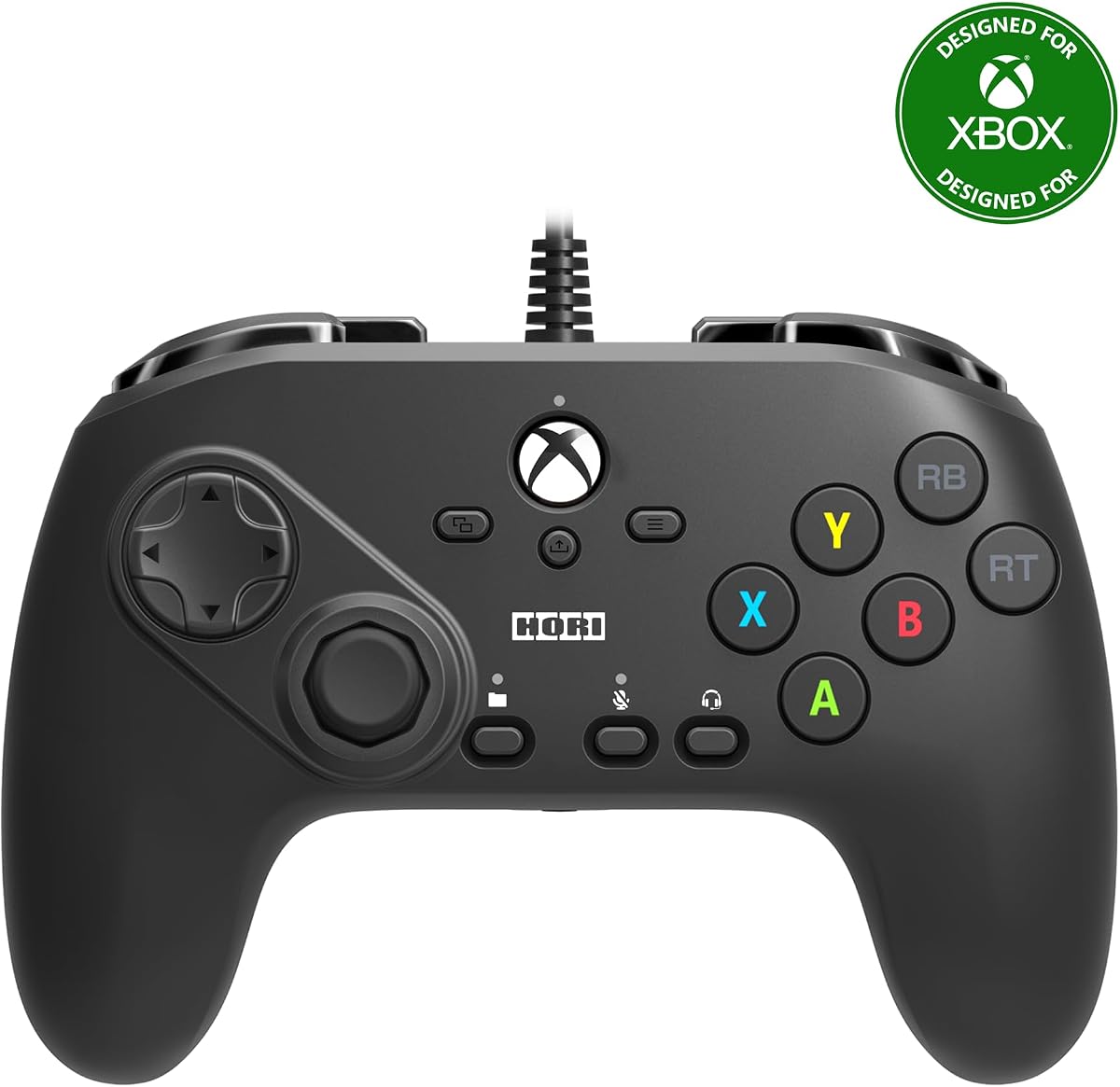
Designed specifically for Xbox Series X|S, this controller also supports PC gaming effectively. It features a six-button layout optimized for fighting games and comes with Micro Switch Buttons for quick response.
We may earn a commission when you buy through this link, at no additional cost to you.
The adjustable d-pad and short throw analog stick with 8-way Gate improve accuracy during complex moves. Users can save up to four profiles using the companion app for easy switching.
Although the rating is slightly lower than the PlayStation variant, it remains a solid option for Xbox gamers. The official Microsoft license ensures seamless integration with Xbox consoles and Windows.
This fightpad is perfect for those who prioritize Xbox compatibility. It offers similar functionality to the PS version but tailored for the Xbox ecosystem.
Save up to four profiles with the companion app and easily switch between them with the profile button.
Officially Licensed by Microsoft and compatible with Xbox Series X|S, Xbox One, and Windows 10.
We may earn a commission when you buy through this link, at no additional cost to you.
The 8Bitdo M30 Wired Controller offers a classic design with modern functionality. It is officially licensed by Xbox and works seamlessly on Windows systems for fighting games.
We may earn a commission when you buy through this link, at no additional cost to you.
Featuring a 6-Button Layout and USB-C wired connection, it provides a lag-free experience ideal for precision inputs. The custom profile switch button lets you manage up to three profiles on the fly.
Its unique retro aesthetic appeals to players who prefer traditional controls. The 3.5mm audio jack adds convenience for headsets, enhancing the overall gaming experience.
This controller is great for those who value style and simplicity. It balances nostalgic design with the performance needed for competitive PC gaming.
USB-C wired connection ensures virtually lag-free performance perfect for fighting games and other classics.
A custom profile switch button allows switching between three saved profiles instantly without software.
We may earn a commission when you buy through this link, at no additional cost to you.
The DOYOKY Leverless Controller represents a modern take on fighting inputs with its hitbox-style layout. It supports multiple platforms including PC and Switch for versatile use.
We may earn a commission when you buy through this link, at no additional cost to you.
Features like the OLED DISPLAY and HOT-SWAPPABLE SWITCHES allow deep customization without software. Users can tweak inputs directly via a browser for precise control over game mechanics.
Its robust USB-C port ensures lasting durability even with heavy daily use. The reinforced cable connects securely, so players can focus on combos without cable distractions.
This fightpad is perfect for players seeking tournament-level depth. It brings arcade-quality precision to a desktop setup with extensive modding potential.
Customize every button and macro directly in your browser without needing to install extra software.
Swap mechanical switches in seconds without soldering for a personalized tactile feel.
We may earn a commission when you buy through this link, at no additional cost to you.
The Akko FUNBOX Leverless is the premium choice for serious fighting gamers. It utilizes Hall Effect Switches that ensure zero wear and consistent performance over time.
We may earn a commission when you buy through this link, at no additional cost to you.
Its Rapid Trigger feature is fully adjustable from 0.1mm to 2.8mm for maximum control. A Full-Color LCD allows deep customization of inputs and animations via browser driver tools.
The intuitive Aluminum Multi-Function Dial makes adjusting settings effortless during play. It also includes smart SOCD management to comply with official tournament rules automatically.
This fightpad is designed for competitive players who demand the best. Its advanced features provide an edge in high-level matches without sacrificing usability.
Contactless magnetic switches eliminate physical friction and debris buildup for infinite durability.
Rapid Trigger is adjustable to let you dial in anything from feather-light taps to deliberate presses.
We may earn a commission when you buy through this link, at no additional cost to you.
This Tekken Edition of the HORI Fighting Commander OCTA brings tournament-grade quality to PC users. It is officially licensed by Bandai Namco and designed specifically for Windows PC environments.
We may earn a commission when you buy through this link, at no additional cost to you.
Top-quality microswitch buttons ensure accurate inputs and durability. The six-button layout and accurate D-Pad support fast execution and navigation in various fighting games.
While it shares core features with the PS version, its PC focus and unique branding appeal to Tekken fans. It provides the same reliability expected from the standard model.
This fightpad is best for those who prefer a classic pad with specific branding. It delivers consistent performance for both casual and competitive play sessions.
Officially Licensed by Bandai Namco ensures quality and thematic alignment for Tekken players.
Designed for fighting games and more, this wired pad is built to withstand competitive use.
We may earn a commission when you buy through this link, at no additional cost to you.
The HORI Wireless Fighting Commander OCTA Pro offers the freedom of wireless play without sacrificing tournament quality. It is officially licensed by Sony and supports Windows 11 and 10.
We may earn a commission when you buy through this link, at no additional cost to you.
It features an 8-gate analog stick and six-button Microswitch layout for precision. The included USB-C charging cable has a lock to prevent disconnects during intense sessions.
Three D-pad options allow customization to suit different grip styles. While the price is higher, the convenience of wireless adds significant value for home setups.
This fightpad is ideal for players who want flexibility. It delivers the reliability of a wired pad with the comfort of wireless connectivity.
Designed for PS5 and Windows 11/10, this pad removes cable constraints for easier setup.
Swappable D-pad with three options lets you choose the texture that feels best.
We may earn a commission when you buy through this link, at no additional cost to you.
This Renewed version of the HORI PS5 Fighting OCTA offers access to a top-tier controller at a reduced cost. It features an eight-button layout with programmable macros for flexibility.
We may earn a commission when you buy through this link, at no additional cost to you.
It is officially licensed by Sony and works across PS5, PS4, and PC. The touchpad provides easy navigation in game lobbies and menus without complex button combinations.
While it lacks a new rating, the Renewed status ensures quality checks. This makes it a cost-effective choice for those who want premium features on a budget.
This fightpad is great for cost-conscious gamers. It provides the same tournament-grade performance as new models with added economic value.
Eight-button layout with programmable macros allows for quick execution of complex sequences.
Works across PS5, PS4, and PC for broad compatibility with most fighting titles.
We may earn a commission when you buy through this link, at no additional cost to you.
The Logitech G F310 is a versatile budget option that works well for PC fighting games. It offers broad game support and a familiar layout to minimize learning curves.
We may earn a commission when you buy through this link, at no additional cost to you.
Its unique floating D-pad allows quick directional changes. The controller includes 10 programmable buttons and software support for custom configurations.
Though it is not a dedicated fightpad, its affordability makes it a great entry point. Players can set up key mappings for fighting games effectively.
This controller is perfect for beginners or casual players. It balances cost with reliable performance for everyday gaming on PC.
Works with popular new titles and old favorites, ensuring compatibility with most PC games.
Profiler software allows programming keyboard commands for games without native gamepad support.
We may earn a commission when you buy through this link, at no additional cost to you.
The HORI Fighting Stick Mini brings arcade feel to a compact form. It is officially licensed by Sony and works across PS5, PS4, and PC for broad utility.
We may earn a commission when you buy through this link, at no additional cost to you.
It features a classic 8-Button Layout and a lightweight design ideal for portability. The 8ft cable provides enough reach for comfortable desk placement.
While it uses a stick rather than buttons, it appeals to traditionalists. It is great for both arcade and fighting games requiring joystick precision.
This fightstick is best for those wanting a stick in limited space. It delivers tournament quality in a travel-friendly package.
Compact and lightweight design allows easy transport between home and tournaments.
Features HORI’s Original Joystick with V-cut Housing for reliable movement accuracy.
We may earn a commission when you buy through this link, at no additional cost to you.
Selecting the right fightpad requires considering layout, connection, and durability. Use this guide to evaluate key features before buying.
Fightpads generally come in button layouts or leverless hitbox styles. Standard pads use a D-pad and face buttons while hitboxes use individual directional keys.
Choose a layout that matches your game preferences and muscle memory.
Wired controllers offer the lowest latency ensuring consistent inputs. Wireless options provide convenience but may introduce slight lag or battery dependency.
Opt for wired if latency is a concern for competitive play.
High-quality materials such as microswitches and reinforced ports extend lifespan. Durability matters for intense long sessions where wear accumulates quickly.
Check for reinforced ports and sturdy casing to ensure longevity.
Advanced fightpads allow button remapping and profile switching. Customization helps adapt the controller to different game genres or player styles.
Prioritize models with companion apps or hot-swap switches for flexibility.
Ensure the controller supports your specific PC operating system and games. Some controllers are licensed for consoles but may have limited PC drivers.
Look for Windows compatibility and official platform licenses for reliability.
Comfortable grips and button spacing reduce hand fatigue over time. A good fightpad should fit your hand size and grip style naturally.
Test different models to find one that feels comfortable for long play.
Fightpads vary widely in cost depending on features and branding. Budget options offer basic functionality while premium models deliver advanced customization.
Set a budget that balances cost with the features you need most.
Good manufacturers offer firmware updates and clear support channels. Reliable support helps resolve issues with compatibility or hardware defects.
Check reviews for responsiveness and warranty terms before purchasing.
Connect the fightpad to your PC using a USB port and install any necessary drivers. Most controllers are plug-and-play but check for companion software for full functionality.
Adjust the controller settings via companion apps to map buttons to your preferred layout. Save profiles to switch between games or players easily.
Keep the controller clean by wiping it with a dry cloth regularly. Store it in a protective case when not in use to prevent dust and physical damage.
Wired fightpads generally offer lower latency and consistent power supply compared to wireless. This makes them better for competitive play where every millisecond matters. Wireless options are convenient for casual setups but may have slight input lag.
Many console-licensed controllers work on PC if they support Windows drivers. Some require additional software to map controls correctly. Always check compatibility before buying to avoid setup issues.
A hitbox fightpad uses individual buttons for directional inputs instead of a D-pad. This design allows faster execution of complex moves. It is popular among competitive players seeking maximum precision.
Most fightpads work with major fighting games but some may require configuration. Ensure the controller supports your game's input method before buying. Compatibility is usually listed in product details.
Use a dry microfiber cloth to wipe buttons and surfaces. Avoid using liquids or harsh chemicals that could damage internal components. Regular cleaning helps maintain input sensitivity.
A budget fightpad should offer reliable build quality and basic customization. Look for sturdy buttons and a comfortable layout without advanced features. Many budget models provide excellent value for casual players.
Firmware updates can improve compatibility and fix bugs in your controller. Manufacturers release these updates to keep devices current. Check the manufacturer's website for available firmware versions.
We explored ten top fightpads offering a range of features from budget to premium. The HORI Fighting Commander OCTA leads the list with balanced performance and build quality.
Prioritize features like input type and compatibility to match your gaming style. Consider your budget but remember that reliability matters for long-term use.
Check current prices and availability as offers change frequently. With the right controller you can elevate your PC fighting game experience significantly.