
Thibault Aluminum Laptop Stand
4.6Editor score
Sturdy aluminum alloy build
Ventilated airflow design
Minimalist aesthetic
Laptop overheating is a common issue that can slow down performance and shorten device lifespan. Finding the right cooling solution ensures your machine runs smoothly during intense tasks like gaming or video editing without unexpected shutdowns.
We have evaluated the leading cooling pads and stands based on airflow efficiency, noise levels, build quality, and ergonomic design. Our testing process focuses on how well each model maintains safe temperatures under sustained load conditions.
Each pick in this guide highlights specific strengths and ideal use cases to help you make an informed decision. Please note that product availability and pricing may change frequently, so check current listings before purchasing.
4.6Editor score

4.4Editor score
4.4Editor score
As an Amazon Associate we earn from qualifying purchases.
This side-by-side comparison highlights the key specifications and features of each cooling solution to help you quickly identify the model that fits your specific laptop size and usage needs.


The havit HV-F2056 is a standout choice for users seeking reliable cooling without sacrificing silence. With a strong rating and a design focused on stability, it handles 15.6 to 17 inch laptops effectively while maintaining a professional look.
We may earn a commission when you buy through this link, at no additional cost to you.
Its three ultra-quiet fans create a noise-free environment perfect for office settings or quiet study sessions. The metal mesh provides a stable surface for your device, and the adjustable height settings improve typing posture significantly during long work periods.
While it does not support smaller 12 inch laptops well, the trade-off is excellent performance for larger machines. The extra USB ports add convenience, though users with Type-C devices should be aware they need an adapter.
This cooling pad is ideal for professionals and gamers using larger laptops who prioritize low noise. It represents a balanced investment that protects your hardware investment without introducing distracting operational sounds.
The noise-free environment ensures that your focus remains on tasks rather than mechanical hum, making it perfect for recording or video calls.
Two adjustable height settings allow you to customize your viewing angle reducing neck strain during extended usage sessions.
We may earn a commission when you buy through this link, at no additional cost to you.
The TECKNET portable slim cooler delivers robust airflow with three powerful fans operating at 1200 RPM. This high speed ensures rapid heat dissipation during intense gaming or rendering tasks on notebooks ranging from 12 to 17 inches.
We may earn a commission when you buy through this link, at no additional cost to you.
Its ease of use is notable, with direct USB power and a dedicated on/off switch for convenience. The blue LED indicators clearly show fan status, and the lifetime support registration adds a layer of security for your purchase.
Some users might find the blue LEDs too bright for dark environments, but this is a minor issue compared to the cooling efficiency. The USB-A to USB-A cable limits power options for newer Type-C laptops without adapters.
This model is excellent for users who need powerful cooling across a wide range of laptop sizes. It is a solid choice for those who value performance and reliable support over minimalist design.
The 1200 RPM fans pull in cool air from the bottom effectively preventing overheating during extended use or gaming.
Supports various brands and sizes ensuring that it works with Apple, HP, Dell, and ASUS laptops seamlessly.
We may earn a commission when you buy through this link, at no additional cost to you.
The Kootek cooling pad features five built-in fans including one large central unit for enhanced cooling performance. Its whisper-quiet operation ensures you can focus on work or entertainment without interference from mechanical noise.
We may earn a commission when you buy through this link, at no additional cost to you.
With six adjustable height settings, you can customize the angle for optimal comfort during gaming or movie watching. The dual USB hub allows you to connect additional devices without occupying your laptop ports effectively expanding connectivity.
Some users may find the multiple switches and LEDs a bit complex compared to simpler models. However, the ability to control fan combinations allows for tailored cooling needs depending on your current thermal load.
This stand is a great gift for back-to-school season or Father's Day due to its versatile features. It suits users who need high flexibility and multiple connectivity options alongside effective cooling.
2 On/Off switches enable simultaneous control of all 5 fans letting you adjust cooling power as needed.
Built-in dual USB hub connects additional devices like keyboards and mice while keeping your laptop ports free.
We may earn a commission when you buy through this link, at no additional cost to you.
The KeiBn cooling pad is a compact solution designed for laptops up to 15.6 inches with two strong fans for efficient heat dissipation. Its metal mesh provides airflow to keep your device cool during long usage sessions.
We may earn a commission when you buy through this link, at no additional cost to you.
Five adjustable height stands allow you to put the stand up or flat, accommodating different desk setups. The phone stand on the side releases your hands by allowing you to hold your device at eye level easily.
The main limitation is its size range which excludes 17 inch machines. Users looking for a versatile option for smaller laptops or those who value a built-in phone holder will find this model particularly useful.
This pad meets the needs of home or office users using 15.6 inch laptops on a budget. It combines functionality with convenience to ensure comfortable viewing angles and reliable thermal management.
A hideable mobile phone holder releases your hand allowing convenient multitasking while using your computer.
Five adjustable heights ensure the laptop is held in a suitable position for comfortable typing and viewing.
We may earn a commission when you buy through this link, at no additional cost to you.
The Thibault aluminum stand offers a minimalist and strong solution for cooling through passive ventilation. By elevating your laptop it allows efficient airflow beneath the device keeping it cool while performing at its best.
We may earn a commission when you buy through this link, at no additional cost to you.
Crafted from robust aluminum alloy it ensures unwavering durability while maintaining an elegant design. Soft rubber pads protect your desk and laptop from scratches providing a stable typing experience that reduces vibrations.
While it lacks active fans the design ensures optimal airflow right where the exhaust fans are located. Users seeking a sleek desk upgrade that also improves posture will appreciate its thoughtful construction and ease of assembly.
This stand is ideal for users who prefer passive cooling without noise or electronic parts. It enhances your workspace efficiency and provides a comfortable height for typing and viewing screens.
Ventilated metal stand elevates laptop allowing efficient airflow beneath where exhaust fans are located for natural cooling.
Robust aluminum alloy ensures durability while elegant design fits any workspace aesthetic.
We may earn a commission when you buy through this link, at no additional cost to you.
The Hagibis cooling pad is designed for maximum portability with a small and exquisite form factor. You can easily put it into pants pockets or bags making it perfect for travel or remote work setups.
We may earn a commission when you buy through this link, at no additional cost to you.
Magnetic feet with Nd-Fe-B magnets offer strong suction to readily adsorb and hold the stand securely in place. High quality silica gel pads prevent scratching and provide skid proof stability for your laptop or iPad.
Since it relies on elevation rather than fans it does not provide active cooling but it enhances physical heat dissipation effectively. This makes it a great companion for users who need to move frequently without carrying bulky equipment.
Ideal for MacBook users and those who value minimalism this stand facilitates typing and operation with an appropriate angle. It is an effective and simple solution for reducing heat through improved air circulation.
Small and exquisite design weighs only 1.76oz fitting easily into pants pockets or bags for travel.
Strong Nd-Fe-B magnets ensure the stand adsorbs readily and holds securely without sliding on the surface.
We may earn a commission when you buy through this link, at no additional cost to you.
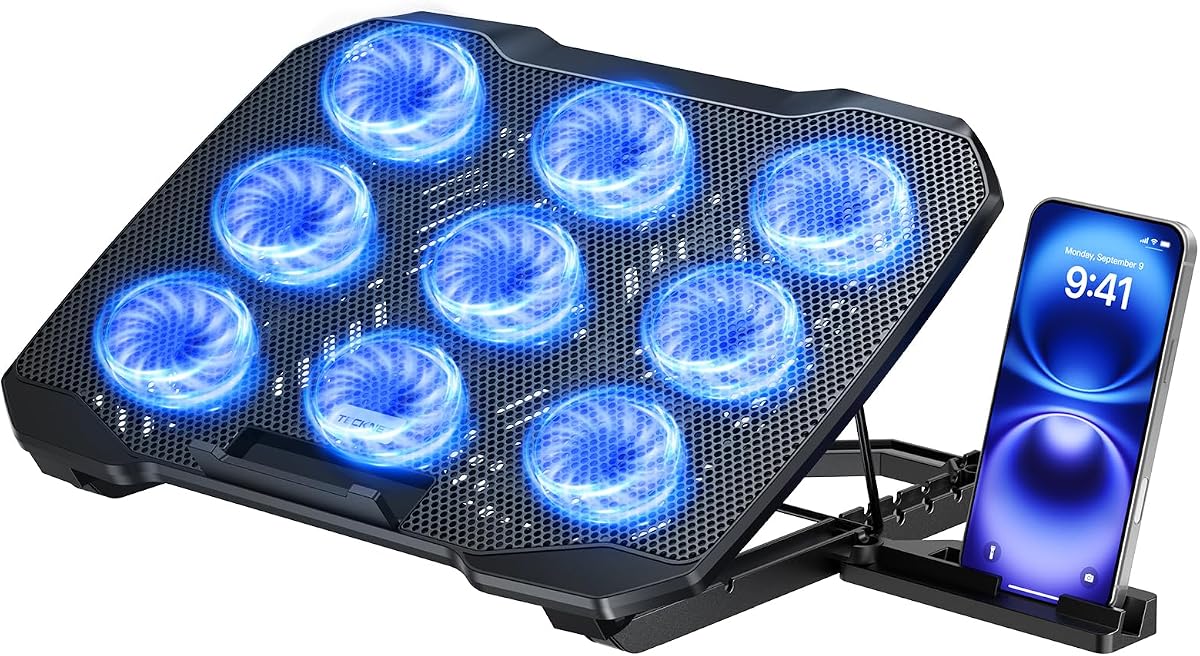
This TECKNET cooling pad features nine high-performance fans offering a powerful 360-degree surround airflow. The LED brightness automatically syncs with fan speed providing a visual indicator of cooling status at a glance.
We may earn a commission when you buy through this link, at no additional cost to you.
With five height settings and a built-in phone holder it delivers ergonomic comfort for long hours of work or gaming. The whisper-quiet technology keeps noise levels below 40 dB ensuring a peaceful environment for focused tasks.
The premium features come with a higher price tag and require more desk space than simpler models. However the stability and cooling power make it suitable for heavy users who need to avoid overheating and lag consistently.
If you prioritize maximum cooling performance and need to keep your phone within sight this model is an excellent choice. It combines advanced tech with thoughtful ergonomics for a complete workspace solution.
Surround airflow quickly dissipates heat to avoid overheating and lag keeping your laptop stable during long sessions.
Noise levels stay below 40 dB ensuring an effective cooling environment without annoying hums or distractions.
We may earn a commission when you buy through this link, at no additional cost to you.
The AIMIUZI cooler features a honeycomb style metal mesh and five quiet fans including one small and four big units. This configuration provides more airflow to keep your laptop cool down effectively during use.
We may earn a commission when you buy through this link, at no additional cost to you.
An adjustable speed wheel at the back allows you to turn fans on and off or control their intensity easily. The metal bar at the bottom provides an ergonomic design with five adjustable stand height settings for better airflow.
While the switch wheel is functional it might not be as intuitive as individual switches on some other models. However the inclusion of a 12-month warranty shows the brand stands behind the quality of this product.
This model is ideal for users who need adjustable airflow speed to balance noise and cooling. It offers reliable performance for various laptop sizes while maintaining a stable typing surface.
Honeycomb style metal mesh allows for greater air circulation to effectively reduce laptop temperature.
Switch wheel at the back lets you control fan intensity to suit different workloads and noise preferences.
We may earn a commission when you buy through this link, at no additional cost to you.
The TECKNET lap cooler features two large fans with an internal channel design that draws air from sides and bottom. This cleverly directs concentrated cool flow right to the center of your laptop where the CPU gets hottest.
We may earn a commission when you buy through this link, at no additional cost to you.
A side switch lets you freely adjust fan speed from 0 to maximum balancing efficiency with noise. The USB-C and A dual ports ensure compatibility with most laptops including MacBooks while offering extra device connectivity.
While the flat base is comfortable for lap use it might not grip as securely as models with anti-slip baffles. However the 30-day return policy and full 3-year warranty provide significant confidence in this investment.
This pad is ideal for students and office workers who want a versatile and portable cooling solution. It offers targeted thermal management that is effective for daily work or gaming sessions.
Internal channel design draws air from sides and bottom directing cool flow to the center of your laptop.
Flat base allows comfortable placement on your lap isolating heat between computer and legs for long use.
We may earn a commission when you buy through this link, at no additional cost to you.
The Targus Dual Fan Lap Chill Mat offers a comfortable ergonomic work surface with soft neoprene on the bottom. This material provides cushioned comfort while the Chill Mat is sitting on your lap during long work sessions.
We may earn a commission when you buy through this link, at no additional cost to you.
Dual fans powered by USB-A connection ensure constant cooling as airflow moves away from your laptop through the open mesh top. Four rubber stops on the face help prevent the laptop from slipping keeping it stable during use.
Its design focuses on lap use and comfort which may not suit desk-only users. However for those who work from sofas or beds this mat provides superior comfort and reliable heat dispersion for larger laptops.
This model is perfect for users needing a large surface for 17 inch laptops. It combines soft comfort with effective cooling to keep both you and your laptop cool during extended use.
Soft neoprene bottom provides cushioned comfort while resting on your lap for long periods.
Open mesh top allows airflow to quickly move away from your laptop ensuring constant cooling.
We may earn a commission when you buy through this link, at no additional cost to you.
Selecting the right cooling solution requires understanding your laptop size usage habits and preferred cooling method.
Always verify the maximum laptop size the pad supports to ensure a snug fit. Most pads range from 12 to 17 inches so measure your device before buying.
Choosing a pad that matches your laptop dimensions ensures stability and prevents the device from sliding off.
Higher fan counts and RPM values generally indicate better airflow which leads to more effective cooling.
Look for models with multiple fans if you run heavy applications like gaming or video editing.
Consider the decibel rating of the fans especially if you work in quiet environments. Some models feature whisper-quiet technology to avoid distractions.
If you work in a library or shared office prioritize silent operation over raw cooling power.
Metal mesh surfaces are preferred for durability and better heat conduction compared to plastic bases. Aluminum stands also offer passive cooling and a premium look.
A sturdy build ensures the pad remains stable and does not wear out quickly with daily use.
Adjustable height settings help improve typing posture and reduce neck strain during long sessions.
Choose a model with multiple height options to find a comfortable viewing angle that suits your desk setup.
Some pads offer USB hubs or multiple ports allowing you to connect peripherals without using laptop ports.
Check if the unit supports USB-C or USB-A cables to ensure compatibility with your current laptop connections.
If you travel frequently look for lightweight and compact designs that fit easily into a laptop bag.
Avoid bulky pads with excessive cables if you need to move your workspace often.
Review the warranty terms provided by the manufacturer to protect your purchase against defects.
Products with lifetime support or strong return policies offer better peace of mind for your investment.
Place your cooling pad on a flat and hard surface to ensure maximum airflow efficiency. Avoid using it on soft materials like blankets that might block the intake vents.
Regularly clean the fans and mesh using compressed air to remove dust and debris. Accumulated dust can restrict airflow and reduce cooling performance over time.
Adjust the height settings to match your eye level for ergonomic comfort. This not only helps with cooling but also prevents strain on your neck and back.
Yes, cooling pads work by increasing airflow under the laptop to dissipate heat more efficiently. They are particularly effective for devices with intake vents on the bottom that would otherwise be blocked by flat surfaces.
Passive stands rely on elevation for natural cooling and are quieter and more durable. Active fans provide stronger cooling for intense tasks but may introduce noise and require power.
Use compressed air to blow out dust from the fan blades and mesh regularly. A soft brush can help remove stubborn debris without damaging the plastic or metal components.
Most pads draw power from the laptop's USB port so they do not use extra battery when plugged in. However, if used on battery power only they may slightly reduce runtime.
An angle between 10 and 15 degrees is typically ideal for typing and eye alignment. Most adjustable stands allow you to find this sweet spot for comfort.
Ensure the pad explicitly supports 17 inch models to avoid instability. Most large cooling pads in this guide are designed to fit laptops up to 17 inches securely.
We reviewed ten top solutions ranging from passive stands to multi-fan pads to suit various needs. The havit HV-F2056 stands out as a balanced choice for quiet and reliable cooling.
Prioritize models that match your laptop size and your typical usage patterns whether that is gaming or office work. Features like adjustable height and USB hubs add significant convenience to daily tasks.
Prices and availability may fluctuate so always check the latest listings before finalizing your purchase. Selecting the right solution now can extend the life of your laptop and improve your overall experience.