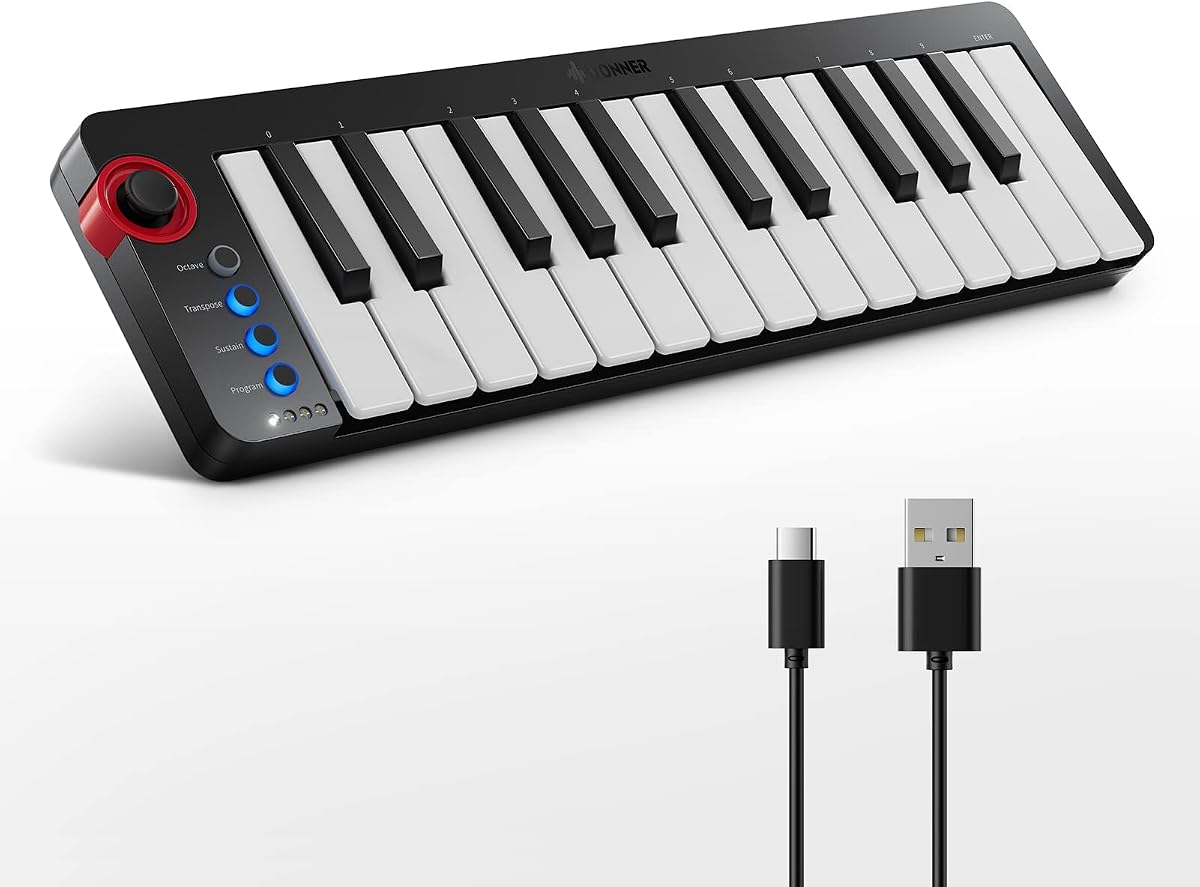
Donner Mini MIDI Keyboard N-25
4.1Editor score
Compact design
Light-up buttons
40 teaching courses
Discover the top 25 key MIDI controllers for music production in October 2026. We compare features, compatibility, and performance to help you choose.
Choosing the right 25 key MIDI controller can transform your music production workflow. These compact keyboards offer portability without sacrificing essential controls for synthesis, sampling, and live performance needs.
We evaluated each model based on build quality, key feel, software integration, and additional features like pads and knobs. Our comparison ensures you find a controller that fits your specific creative style and budget constraints.
Each pick highlights unique strengths and ideal use cases for producers at any level. Please note that pricing and availability may change, so verify details before making your final purchase decision today.
4.1Editor score

4.6Editor score

4.6Editor score
This side-by-side comparison outlines the core specifications and unique selling points of every top ranked controller to help you make an informed decision quickly.


The Akai Professional MPK Mini MK3 stands out as a leading choice for producers needing a compact yet powerful tool. With a strong 4.6 rating from users, it delivers reliable performance for both studio work and live sets.
We may earn a commission when you buy through this link, at no additional cost to you.
Its standout features include 8 backlit velocity-sensitive MPC-style beat pads that excel at drum programming and sample triggering. The innovative 4-way thumbstick provides dynamic control over pitch and modulation, enhancing expressive potential significantly.
Users note that while the mini keys are functional, they may feel less weighted than full-sized keyboards. However, the inclusion of Native Instruments NKS integration and over 1500 sounds makes the value proposition compelling for beginners.
This controller is ideal for beat makers and songwriters seeking an all-in-one solution that integrates seamlessly with major DAWs. Its balanced feature set justifies its position as the top pick in this roundup.
The 8 backlit velocity-sensitive MPC-style beat pads enable precise drum programming and sample triggering for rhythmic production.
Integration with Native Kontrol Standard allows direct control of Native Instruments software presets and sound libraries efficiently.
We may earn a commission when you buy through this link, at no additional cost to you.
The Akai Professional LPK25 offers a straightforward approach to music creation with its sleek USB Studio MIDI controller design. It holds a 4.7 rating, reflecting user satisfaction with its simplicity and ease of use.
We may earn a commission when you buy through this link, at no additional cost to you.
Focused on pure keyboard performance, it features responsive mini keys and dedicated octave buttons for transpose control. The built-in arpeggiator adds creative depth without complicating the interface, making it perfect for songwriting.
While it lacks pads or knobs for mixing, this simplicity ensures that users can focus solely on melody and composition. The universal compatibility with software like Logic and Cubase enhances its versatility across different platforms.
Ideal for beginners or travelers who need a lightweight instrument for quick ideas, this controller excels in portability. Its plug-and-play nature means you spend less time configuring and more time creating music.
Responsive keys and dedicated octave buttons allow for effortless range expansion and dynamic melodic writing.
Built-in arpeggiator and clock provide immediate creative control over sound sources for complex textures.
We may earn a commission when you buy through this link, at no additional cost to you.
The Novation Launchkey Mini 25 MK4 is an all-in-one DAW controller designed for seamless integration with major software. Rated 4.6 by users, it offers premium keybeds and extensive control options for modern production workflows.
We may earn a commission when you buy through this link, at no additional cost to you.
Its FSR drum pads support polyphonic aftertouch, serving as versatile step sequencers or clip launchers beyond simple drumming. Features like Scale Mode ensure you never hit a wrong note, making composition more intuitive for any skill level.
The inclusion of Ableton Live Lite and free Melodics lessons adds significant value for new producers. However, the advanced features may require some time to master compared to simpler controllers in the list.
This controller is best suited for producers who prioritize DAW interaction and need advanced features like chord triggers. Its robust construction and comprehensive toolset justify the premium placement in this guide.
FSR drum pads with polyphonic aftertouch function as step sequencers and chord triggers for complex performance.
Scale Mode triggers lush chords from a single key, helping users avoid wrong notes during creation.
We may earn a commission when you buy through this link, at no additional cost to you.
The Arturia MiniLab 3 focuses on adapting to your creative flow with an easy keyboard controller design. With a 4.7 rating, users appreciate how it lets you control instruments and mute tracks without relying on a mouse.
We may earn a commission when you buy through this link, at no additional cost to you.
Key features include 8 programmable drum pads and 4 faders for immediate tactile control over tracks. The premium velocity-sensitive keys ensure expressive playing, allowing you to adjust dynamics with precision.
While the white color might show wear over time, the build quality remains sturdy for daily use. Its universal connectivity supports various DAWs, making it a versatile addition to any studio setup.
Ideal for producers who value hands-on mixing alongside playing, this controller bridges the gap between performance and production. Its unique emphasis on workflow fluidity makes it a standout choice.
8 programmable drum pads and 4 faders allow instant control over instruments and track levels.
Premium velocity-sensitive keys enhance dynamic performance and musical expression significantly.
We may earn a commission when you buy through this link, at no additional cost to you.
The Donner Mini MIDI Keyboard N-25 is an excellent entry-level option for aspiring musicians on a tight budget. Rated 4.1 by users, it combines compact design with essential features like velocity-sensitive keys and light-up buttons.
We may earn a commission when you buy through this link, at no additional cost to you.
What sets it apart is the inclusion of 40 entertaining keyboard-teaching courses designed to help novices learn arrangement essentials. The light-up rockers provide visual feedback, making practice sessions more engaging and fun for students.
While the key feel may not match high-end models, the value provided through education and software compatibility is unmatched. It works seamlessly with DAWs like Cubase LE and Logic Pro, ensuring versatility.
Perfect for beginners who need a portable tool to learn music theory, this controller offers everything needed to start producing. Its educational focus makes it a unique and valuable budget pick.
40 engaging lessons cover arrangement essentials to help unleash your creativity from scratch.
Compatible with iOS devices via OTG adapter for easy smartphone music app integration.
We may earn a commission when you buy through this link, at no additional cost to you.
The Rhymo 25-key portable MIDI keyboard is slim and compact, powered directly via USB-C from your computer or tablet. With a 4.1 rating, it appeals to users needing a hassle-free setup for travel.
We may earn a commission when you buy through this link, at no additional cost to you.
It features an X-Y joystick for pitch bend and modulation, alongside a loop function and tap tempo for creative control. The velocity-sensitive keyboard delivers dynamic playing, supporting both beginners and experienced producers.
Bluetooth MIDI support allows wireless connection to iOS devices, expanding usability beyond standard USB cables. However, the layout is simple, which might limit advanced workflow customization compared to pricier alternatives.
Ideal for on-the-go producers, this controller excels in convenience and ease of setup. Its modern USB-C connectivity ensures it remains relevant with current devices and operating systems.
USB-C port and Bluetooth MIDI work with Mac, PC, and iOS for versatile connection options.
X-Y joystick provides dynamic pitch and modulation control for expressive performances.
We may earn a commission when you buy through this link, at no additional cost to you.
The M-VAVE 25 Key USB MIDI Controller features Bluetooth connectivity, allowing you to connect wirelessly to your device. Rated 4.5 by users, it supports up to 16 hours of battery life, making it truly portable.
We may earn a commission when you buy through this link, at no additional cost to you.
Equipped with 8 RGB backlit velocity-sensitive pads and 8 assignable rotary encoders, it provides extensive control for mixing and tweaking. The semi-weighted professional dynamic keybed enhances the playing feel compared to standard mini keys.
While wireless convenience is a major plus, users should be mindful of potential latency in some setups. The included music production software ensures you have everything needed to start creating immediately upon purchase.
This controller is perfect for mobile creators who need freedom from cables without sacrificing essential controls. Its balance of battery life and features makes it a strong contender for wireless workflows.
Built-in 2000 mAh battery supports about 16 hours of use for extended sessions.
8 RGB backlit pads and 8 rotary encoders offer diverse options for mixing and sound tweaking.
We may earn a commission when you buy through this link, at no additional cost to you.
The Akai Professional MPK Mini Play MK3 is a compact standalone mini keyboard with a built-in speaker and USB MIDI capabilities. With a 4.5 rating, it is perfect for beat makers who need a tool that works without a computer.
We may earn a commission when you buy through this link, at no additional cost to you.
It features 25 Gen 2 dynamic keys and an OLED display for navigating over 100 internal drum and instrument sounds. This standalone functionality means you can compose anywhere without needing a laptop connected.
While the built-in speaker is convenient for demos, external speakers may be preferred for critical listening. The included software adds value if you transition to computer-based production later on.
Ideal for travelers or classrooms, this controller excels in independence and ease of use. Its ability to function without a computer sets it apart as a versatile option.
Built-in speaker and internal sounds allow for beat making without a computer connection.
Over 100 internal drum and instrument sounds provide diverse options for creative ideas.
We may earn a commission when you buy through this link, at no additional cost to you.
The Akai Professional MPK Mini MK3 in Black offers the same robust features as the standard model with a sleek aesthetic. Rated 4.6, it maintains high quality controls like 8 backlit velocity-sensitive MPC-style beat pads.
We may earn a commission when you buy through this link, at no additional cost to you.
Its black finish complements modern studio setups and adds a professional touch to your gear collection. The NKS integration ensures compatibility with Native Instruments presets, enhancing workflow efficiency significantly.
While functionally identical to the white version, the black finish may show fingerprints more easily under studio lights. However, the overall performance remains exceptional for both beginners and experienced producers.
Perfect for those who prioritize aesthetics alongside performance, this controller delivers reliability and style. Its comprehensive toolset ensures it meets the demands of complex music production tasks.
Sleek black finish complements modern studio setups and adds a professional touch.
NKS integration allows direct control of Native Instruments software presets and sound libraries.
We may earn a commission when you buy through this link, at no additional cost to you.
The Akai Professional APC Key 25 MK2 is a total control tool with a 5×8 RGB pad matrix designed specifically for Ableton Live users. With a 4.4 rating, it offers dedicated octave buttons and 8 assignable rotary knobs for precise control.
We may earn a commission when you buy through this link, at no additional cost to you.
The bright RGB pads provide visual color feedback for launching clips, loops, and samples instantly. This deep integration allows you to control tracks and scenes directly through the device without mouse usage.
While it excels with Ableton Live, its utility may be limited for other DAWs compared to universal controllers. The included Ableton Live Lite ensures you have a powerful platform to start creating right away.
Ideal for electronic music producers focused on Ableton Live, this controller excels in clip launching and track management. Its specialized features make it the go-to for users invested in that ecosystem.
40 RGB pads trigger loops and samples with instant visual feedback for live performance.
Pre-mapped for Ableton Live 11.2.7 onwards for seamless 1-to-1 control.
We may earn a commission when you buy through this link, at no additional cost to you.
Selecting the right controller depends on your workflow, budget, and software needs. This guide outlines the key factors to consider before making a purchase.
25-key controllers are compact and portable, ideal for travelers or small studios. They are designed to save space while still offering enough range for melodies and basslines.
Consider if you need extra octaves; look for dedicated octave buttons to expand your range without increasing physical size.
Velocity-sensitive keys are essential for expressive playing, allowing dynamic control over volume and timbre. This feature is standard on most professional models but varies in response quality.
Choose a model with a responsive keybed that matches your playing style, whether you prefer light touch or semi-weighted resistance.
MPC-style pads allow for beat programming and sample triggering, which is crucial for hip-hop and electronic production. Knobs provide real-time control over filters, volume, and effects.
Ensure the number of pads and knobs meets your workflow needs; some users need more control over mixing than others.
Most controllers support major Digital Audio Workstations like Ableton Live, Logic Pro, and FL Studio. Check for specific integration features like clip launching or transport control.
Universal compatibility is ideal if you switch between software, while specialized controllers offer deeper integration with specific DAWs.
USB MIDI is the standard connection for power and data. Some models also offer Bluetooth or MIDI out ports for external hardware integration.
Prioritize USB-C or Bluetooth if you plan to use the controller with mobile devices or modern laptops for cable-free operation.
Bus-powered units draw energy from your computer, reducing the need for external adapters. This makes them ideal for mobile setups and quick sessions.
Look for a compact design that fits easily into bags if you intend to use the controller while traveling or commuting.
Many manufacturers bundle software instruments, DAWs, or sample libraries with the controller. These extras add significant value to the purchase.
Evaluate the quality and relevance of included software to ensure it supports your creative goals and avoids additional costs.
Entry-level models are affordable and suitable for beginners, while premium options offer better build quality and advanced features. Determine how much you are willing to invest initially.
Balance the cost against the features you actually need; a cheaper model might suffice if you do not require advanced mixing controls.
To begin using your 25 key MIDI controller, simply connect it to your computer via USB. Most models are class-compliant and do not require additional drivers; simply launch your DAW and ensure the device is detected in MIDI settings.
Map your MIDI controls to software functions using the included editor or your DAWs MIDI learn feature. This customization allows you to assign knobs and pads to volume, panning, or specific plugin parameters for efficient workflow.
To maintain your controller, avoid exposing it to extreme temperatures or moisture. Clean the keys gently with a dry cloth and store it in a padded case to protect against physical damage during transport.
Yes, 25 key MIDI controllers are excellent for beginners due to their affordable price and compact size. They offer essential features like velocity sensitivity and octave controls that allow new producers to focus on learning without being overwhelmed by complex layouts.
Most 25 key MIDI controllers require a computer or mobile device to function as they act as input devices. However, some models like the MPK Mini Play MK3 include built-in sounds and speakers for standalone use without a computer.
Velocity sensitivity detects how hard you press a key to determine volume, while pressure (aftertouch) detects pressure applied after the key is pressed to modify sound parameters like vibrato. Not all 25-key controllers support aftertouch.
Yes, you can connect compatible controllers to an iPad using a USB OTG adapter or Bluetooth. Ensure your MIDI controller is class-compliant and your iPad has sufficient power to support the device without external power sources.
Many controllers bundle DAWs like Ableton Live Lite or FL Studio, along with virtual instruments and sample libraries. Check the specific package details to see what educational software and sounds are included with your purchase.
Update firmware by visiting the manufacturer's website and downloading the specific utility for your model. Follow the instructions carefully to install the update while the device is connected via USB to ensure a successful process.
The Akai Professional MPK Mini MK3, Donner Mini MIDI Keyboard N-25, and Novation Launchkey Mini 25 MK4 stand out as the top choices for different user needs. Each offers unique strengths ranging from workflow efficiency to budget-friendly design.
Prioritize the controller that aligns with your primary software and performance requirements. Whether you value portability, software integration, or physical controls, there is a model on this list that fits your creative workflow.
Remember that prices and availability fluctuate often in the electronics market. Check current deals and verify the latest specifications before finalizing your order to ensure you get the best value for your investment.