
LG Smart Monitor Swing
4.1Editor score
WebOS smart platform
Wheeled rolling stand
Built-in speakers
Finding the right 32 inch touchscreen monitor can transform your workspace into an interactive hub. These large displays combine high resolution with touch input for intuitive control over your digital tasks and creative projects.
We evaluated ten leading models based on resolution, refresh rate, connectivity options, and stand ergonomics. Our analysis focuses on how each screen handles multi-touch gestures and integrates with different operating systems for seamless workflow.
Each pick highlights specific strengths like portability, color accuracy, or smart features. Prices and availability change frequently so always verify current details before making your final purchase decision for your specific needs.
4.1Editor score

5.0Editor score

4.2Editor score
As an Amazon Associate we earn from qualifying purchases.
The following table provides a side-by-side look at key specifications for all ten models we reviewed to help you quickly identify the right fit.



This monitor stands out as the top choice for professionals seeking high resolution and smooth performance. Its 4K display paired with a 144Hz refresh rate ensures crisp visuals and fluid motion for both work and creative tasks.
We may earn a commission when you buy through this link, at no additional cost to you.
The 10-point capacitive touch screen allows for intuitive gestures like pinching and swiping directly on the interface. Connectivity is robust with HDMI 2.1, DP 1.4, and a full-featured Type-C port that handles video and touch in one cable.
While macOS users face limitations on multi-touch functionality, the stand offers significant ergonomic value with height adjustment and pivot rotation. The VESA mount compatibility further enhances flexibility for wall or arm setups.
Ideal for designers and power users who need large real estate and precise touch input, this model delivers on performance and build quality. It is a strong recommendation for those prioritizing visual fidelity and interactive capability.
The 10-point touch capability transforms how you interact with design software and digital whiteboards allowing direct manipulation of elements without a mouse.
With 3840×2160 resolution every text and image appears sharply defined reducing eye strain during long sessions of detailed creative work or data analysis.
We may earn a commission when you buy through this link, at no additional cost to you.
The LG Smart Monitor Swing redefines what a monitor can do by integrating webOS for standalone streaming and productivity. Its 4K IPS touchscreen delivers vibrant colors and the rolling stand makes it easy to move between rooms.
We may earn a commission when you buy through this link, at no additional cost to you.
Three USB-C ports allow you to charge laptops and transfer data simultaneously while the built-in speakers handle audio for calls or media. The touchscreen interface provides intuitive control over smart apps without external hardware.
While the premium price reflects its advanced features the stand design is a unique selling point for flexible office layouts. It suits environments where mobility and independent operation are key requirements.
For users wanting a smart display that doubles as a PC monitor this bundle offers versatility. It is best for collaborative spaces or home offices where adaptability and connectivity are top priorities.
Powered by webOS you can access streaming services and cloud apps directly on the screen making it a complete entertainment hub without extra devices.
The wheeled base with hidden cable management lets you reposition the display effortlessly keeping your workspace organized and adaptable to different tasks.
We may earn a commission when you buy through this link, at no additional cost to you.
FYHXele offers a compelling option for those seeking a large touch display without breaking the bank. Its QHD resolution provides clear visuals while the 100Hz refresh rate ensures fluid movement across the screen.
We may earn a commission when you buy through this link, at no additional cost to you.
The 10-point capacitive touch works well for design and presentation needs. Connectivity includes USB-C and HDMI making it easy to link with modern laptops and desktops for versatile use cases.
Touch compatibility is restricted with gaming consoles and some mobile devices which may limit use for entertainment. However for office and creative work the value proposition remains strong.
This monitor is ideal for students or small businesses needing interactive screens on a budget. It balances performance and cost effectively for general productivity tasks.
You get a substantial 32-inch touchscreen experience at a price point that undercuts many competitors making it accessible for more users.
The IPS panel ensures wide viewing angles and consistent color which is essential for collaborative viewing or design adjustments from different positions.
We may earn a commission when you buy through this link, at no additional cost to you.
This model delivers solid QHD performance with a focus on usability through included accessories like a stylus and speakers. The 100Hz refresh rate supports smooth interactions for both work and casual entertainment.
We may earn a commission when you buy through this link, at no additional cost to you.
It supports multiple operating systems including Linux and Raspberry Pi which broadens its appeal for developers and industrial applications. The USB-B connection for touch ensures reliable input across different setups.
While specific compatibility notes are limited the VESA mount option allows for flexible mounting configurations. The RGB lighting adds a unique aesthetic touch to any desk environment.
Recommended for users needing a ready-to-use interactive setup with audio and stylus included. It serves well in educational or commercial presentation scenarios.
The inclusion of a stylus and speakers means you can start using the monitor immediately without buying extra peripherals for full functionality.
Compatible with Windows Linux and Android systems it adapts to various technical environments making it a flexible choice for diverse IT needs.
We may earn a commission when you buy through this link, at no additional cost to you.
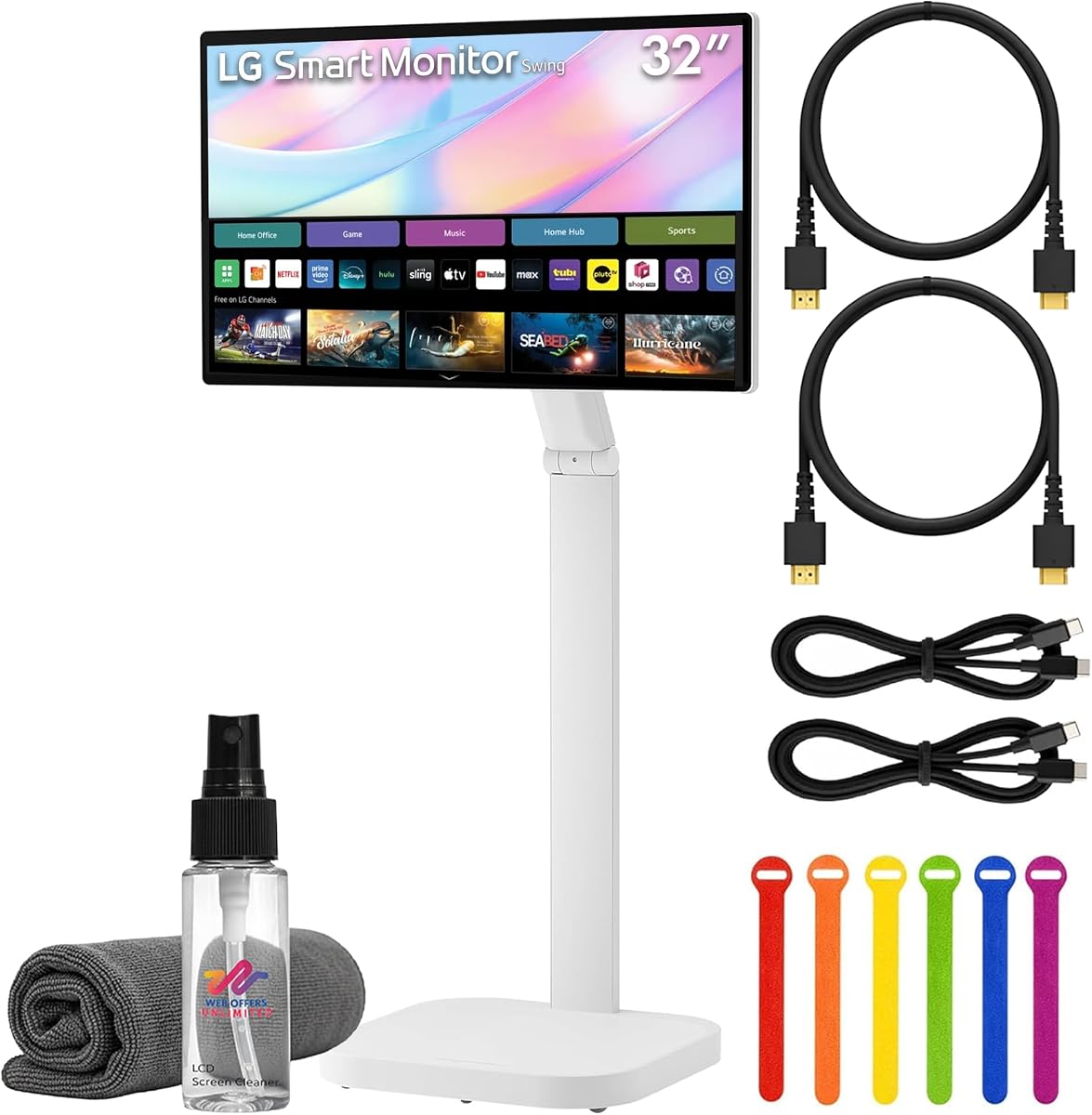
This bundle provides everything needed to set up a smart touchscreen experience right out of the box. The LG Swing monitor offers 4K clarity and webOS integration for seamless media consumption and productivity tasks.
We may earn a commission when you buy through this link, at no additional cost to you.
Accessories like HDMI cables and a screen cleaning kit add convenience for immediate use. The wheeled stand ensures you can move the display between conference rooms or workstations effortlessly.
The webOS platform allows remote PC access which is useful for home office scenarios. However the cost is higher compared to standard monitors without smart functionality.
It is best for teams or individuals wanting a mobile smart display solution. The bundle ensures you have all necessary tools to start using the device effectively.
Getting cables and cleaning tools in the box saves time and extra purchases helping you get up and running faster.
Combining a smart OS with a rolling stand creates a flexible hub that can move with your workflow needs around the office.
We may earn a commission when you buy through this link, at no additional cost to you.
The Elo 3204L is engineered for commercial signage and interactive kiosk applications. Its robust build quality supports 24/7 operation ensuring reliability in high-traffic settings like retail or hospitality.
We may earn a commission when you buy through this link, at no additional cost to you.
Compliance with UL and IK standards means it can withstand physical impact which is crucial for public deployments. The VESA mounting allows for secure installation on walls or kiosks.
While it lacks consumer-centric features like smart OS it excels in durability and industrial compatibility. It is tailored for businesses needing reliable interactive displays.
This model is the go-to for commercial installers requiring certified hardware. It supports various operating systems and integrates well with external PCs for digital signage networks.
Designed to survive constant use the hardware meets rigorous safety and impact standards suitable for public interaction zones.
Built-in IoT control and power passthrough streamline installation in complex commercial setups needing robust connectivity.
We may earn a commission when you buy through this link, at no additional cost to you.
This LG model offers a straightforward 32-inch display option with basic touch capability at a lower cost point. It serves well for general office tasks or digital signage needing simple interaction.
We may earn a commission when you buy through this link, at no additional cost to you.
The IPS panel ensures consistent viewing angles which is useful when multiple people view the screen simultaneously. It supports standard connections that integrate easily with existing systems.
Resolution is limited to Full HD which may affect text clarity for detailed work. However for basic navigation and display needs it provides a solid foundation.
Ideal for budget-conscious buyers needing a large interactive display. It works well in environments where high resolution is less critical than screen size.
Offers essential touch and display performance without complex features making it suitable for simple interactive tasks.
Getting a 32-inch panel at this price point allows for larger interface layouts in shared work areas.
We may earn a commission when you buy through this link, at no additional cost to you.
Samsung's QM32R-T provides a robust commercial solution for interactive display needs. Its 32-inch Full HD screen ensures clear visuals while the build quality supports reliable daily use in business settings.
We may earn a commission when you buy through this link, at no additional cost to you.
The unit is designed for durability and standard connectivity which simplifies integration with existing hardware. It lacks consumer smart features but focuses on core display reliability.
This model is best for environments needing a sturdy touch interface without extra smart capabilities. The black finish complements professional office aesthetics well.
Recommended for small businesses needing a reliable touch monitor. It balances quality and cost effectively for standard commercial requirements.
Designed to handle daily commercial workloads this monitor delivers consistent performance without requiring complex setups.
The black finish and standard design integrate seamlessly into office environments maintaining a polished professional look.
We may earn a commission when you buy through this link, at no additional cost to you.
This variant of the Samsung QM32R-T offers standard Full HD performance for basic interactive needs. Its 75Hz refresh rate ensures smooth visuals for navigation and media playback.
We may earn a commission when you buy through this link, at no additional cost to you.
The commercial build supports reliable operation in business environments. While it lacks advanced touch specs it provides stable performance for routine tasks.
It is suited for users needing a straightforward touch display without extra smart features. The V.37 interface ensures compatibility with various input sources.
Ideal for basic office or retail applications requiring a stable large touch interface. It delivers consistent performance for everyday commercial use.
Delivers reliable Full HD visuals and standard refresh rates suitable for general display and touch tasks.
Built for business environments ensuring consistent uptime and compatibility with existing commercial systems.
We may earn a commission when you buy through this link, at no additional cost to you.
This model combines 4K resolution with a rolling stand to offer a mobile smart display solution. The 31.5-inch size provides a large screen while maintaining a compact footprint for easy movement.
We may earn a commission when you buy through this link, at no additional cost to you.
WebOS integration allows streaming apps access without a PC. AirPlay 2 support makes it a great choice for Apple ecosystem users needing a shared display.
The USB-C port supports 65W power delivery which can charge compatible laptops. However the overall rating is lower than other premium models suggesting mixed user experiences.
Recommended for teams needing a mobile presentation screen with smart features. It bridges the gap between monitor and smart TV effectively.
The rolling stand and smart OS combine to create a portable center for media and presentation tasks around the office.
AirPlay 2 support ensures seamless streaming from iPhones and Macs making it convenient for Apple-based teams.
We may earn a commission when you buy through this link, at no additional cost to you.
Selecting the right touchscreen monitor involves evaluating several technical and practical factors to ensure it meets your specific workflow needs.
Resolution determines how sharp text and images appear on the screen. For a 32-inch display 4K UHD offers the best detail for design work while Full HD may suffice for basic tasks.
Higher resolution ensures that fine details are visible and text remains crisp at a distance which is important for interactive work.
Capacitive touch is the standard for modern monitors allowing multi-touch gestures like pinch and zoom. Ensure the monitor supports at least 10-point touch for smooth interaction.
Check compatibility with your device as some operating systems limit touch points or require specific drivers for full functionality.
The refresh rate affects how smoothly motion is displayed on the screen. A rate of 100Hz or higher provides fluid motion which reduces lag during interactive use.
For professional tasks or gaming higher refresh rates improve responsiveness and reduce eye strain during extended sessions.
Look for versatile ports like HDMI 2.1 DisplayPort 1.4 and USB-C. USB-C is particularly useful as it can carry video data and power over a single cable.
More options allow you to connect multiple devices without needing constant adapters which improves your workspace setup.
An adjustable stand allows you to set the monitor at a comfortable height angle and rotation. VESA mount compatibility is a plus for custom mounting solutions.
Ergonomic features help reduce physical strain by letting you position the screen to suit your natural viewing posture.
Some models include built-in operating systems like webOS that allow streaming and app access without a PC. This adds convenience for casual use or meetings.
Consider if you need standalone functionality or if you prefer a standard display connected to your computer.
Commercial grade monitors often have better durability for 24/7 use. Look for impact ratings if the monitor will be in a public space.
Higher build quality ensures the device lasts longer and resists wear from frequent touch interaction.
Extras like built-in speakers or stylus pens can reduce the need for extra accessories. Some models also include cleaning kits or cables in the bundle.
Assess what accessories you already have versus what is provided to determine the true value of the purchase.
Always power on the monitor before connecting video cables to avoid signal issues and potential electrical damage. This sequence is crucial for models with high power requirements.
Keep the screen clean by using a soft microfiber cloth and mild cleaning solution. Avoid direct sprays and clean the surface gently to prevent liquid from entering the bezel.
Use touch inputs as intended to avoid wear on the surface. Do not use sharp objects that can scratch the glass and limit the use of heavy force during interaction.
Many models support Mac but touch functionality may be limited. Some only allow two-point touch on macOS so check the product specs before purchasing to ensure compatibility with your workflow.
Gaming consoles typically do not support touch input and will display video only. Touch features are designed for computers or mobile devices with proper touch protocol support.
Capacitive touch uses electrical currents to detect finger input and allows multi-touch. Resistive touch uses pressure and is less common on monitors because it does not support multiple points.
Most modern monitors are plug and play for Windows but some may require specific drivers. Check the product details for any driver requirements on your specific operating system.
Many models include VESA mounting holes for wall or arm mounting. Verify the VESA dimensions in the product specs before buying a mount to ensure proper fit.
Use a microfiber cloth and a small amount of mild cleaning solution. Avoid harsh chemicals or excessive liquid that might seep into the edges and damage internal components.
The 32-inch touchscreen monitor market offers diverse options from budget-friendly models to high-end smart displays. Choosing the right one depends on your specific needs for resolution and mobility.
Prioritize features like touch points and connectivity to match your workflow. Ergonomics and build quality should also be considered for long term use.
Always check current prices and availability since product details can change. Selecting the best fit ensures you get the most value from your investment.