
ARCTIC P12 Pro A-RGB
4.7Editor score
High static pressure for dense radiators
Fluid Dynamic Bearing for long life
Optimized blade design for low noise
This guide compares the top addressable RGB fans for PC building, evaluating cooling performance, noise levels, lighting effects, and build quality to help you
Addressable RGB fans have transformed modern PC builds by combining efficient cooling with stunning visual customization. These fans allow users to sync lighting with hardware performance, creating immersive effects that enhance the overall aesthetic of any gaming or workstation setup without compromising thermal management.
We evaluated ten leading models based on cooling efficiency, noise output, lighting customization, and ease of installation. Our analysis focuses on real-world performance metrics, bearing quality, and software compatibility to ensure you find fans that deliver both reliability and vibrant illumination for your specific system needs.
Each pick highlights key strengths and potential trade-offs so you can match the right fans to your case size and airflow requirements. Note that pricing and availability fluctuate frequently, so verify current deals before purchasing to ensure you get the best value for your investment in system cooling.
4.7Editor score

4.7Editor score
4.8Editor score
The following comparison table provides a side-by-side overview of all ten selected addressable RGB fans, highlighting their core specifications, lighting capabilities, and unique features to help you quickly identify the best match for your system.




The Thermalright 5 Pack TL-C12C-S stands out as the most balanced option in our list, earning our Editor's Choice award. It delivers high performance cooling combined with a soft, pleasing ARGB lighting effect that avoids the harsh glare common in budget options. Users consistently praise its ability to maintain low noise levels even under load, making it suitable for both gaming PCs and quiet workstations.
We may earn a commission when you buy through this link, at no additional cost to you.
At the core of its performance is the S-FDB bearing design, which significantly reduces vibration and friction. This engineering choice extends the fan's lifespan while keeping operational noise below 25.6 dBA. The 120mm blades are optimized for high airflow, moving 66.17 CFM of air at 1550 RPM. Additionally, the lighting is designed to reflect through atomizing blades, creating a diffuse glow that enhances case aesthetics without overpowering other components.
While the fan caps out at 1550 RPM, which may not suit extreme overclocking scenarios, it remains sufficient for 95 percent of standard builds. The fixed lighting ring means you cannot swap the RGB components, but the variety of 17 modes covers most user preferences. PWM control ensures speeds adjust automatically based on motherboard temperature, simplifying setup for users who prefer plug-and-play efficiency.
This pack is ideal for builders who need multiple fans for a full case overhaul without breaking the bank. Whether you are populating a mid-tower or equipping a CPU liquid cooler radiator, these fans provide reliable airflow and consistent lighting. For those seeking the best blend of price, performance, and quiet operation, this Thermalright set is the clear winner.
The self-lubricating S-FDB bearing ensures smooth rotation and prevents the wobble common in cheaper sleeve bearings. This design not only extends the fan's operational life but also maintains consistent noise levels over years of use.
Unlike standard fans that emit direct point-source light, these fans use atomized blades to diffuse ARGB light. This creates a softer, more uniform glow that blends better with other case components and reduces visual harshness.
We may earn a commission when you buy through this link, at no additional cost to you.
CORSAIR brings its engineering expertise to this RS120 ARGB triple pack, offering high-speed performance and sleek cable management. The standout feature is the daisy-chain design, which allows you to connect multiple fans with a single PWM and ARGB connector. This significantly reduces cable clutter inside tight cases, making it a top choice for builders who prioritize clean interior aesthetics.
We may earn a commission when you buy through this link, at no additional cost to you.
Performance-wise, these fans push up to 2100 RPM, generating 72.8 CFM of airflow. This is higher than many standard 120mm fans and helps in situations where rapid air exchange is critical. The Magnetic Dome bearing is durable and quiet, while the AirGuide technology uses anti-vortex vanes to direct air more precisely. This focus helps push air through radiators or heatsinks more effectively than traditional designs.
However, the speed comes with a noise trade-off at maximum settings, though it remains manageable for most users. The lighting requires a compatible motherboard header to unlock full customization, which may limit use on older boards. Still, if you need high static pressure for liquid cooling or want to minimize cables, the RS120 offers robust capabilities.
This pack is best suited for enthusiasts who demand high airflow and modern connectivity. The bright lighting and solid build quality make it a premium choice for gaming rigs. For users willing to pay slightly more for daisy-chaining and superior airflow, the CORSAIR RS120 is a reliable investment for long-term cooling performance.
By linking fans with a single wire, you reduce the number of motherboard headers needed. This simplifies installation and frees up ports for other RGB devices like LED strips or light bars.
The anti-vortex vanes on the fan frame direct airflow straight through the fan rather than allowing it to spill sideways. This increases efficiency when the fan is mounted on a radiator or against a mesh panel.
We may earn a commission when you buy through this link, at no additional cost to you.
For budget-conscious builders, the ARCTIC P12 Pro A-RGB is an unbeatable value that refuses to compromise on cooling performance. Despite its low cost, it offers a massive 3000 RPM speed and high static pressure, making it a powerhouse for dense radiators and restricted airflow scenarios. It earns our Best Budget award for delivering professional-grade specs at an entry-level price point.
We may earn a commission when you buy through this link, at no additional cost to you.
The fan uses a Fluid Dynamic Bearing (FDB) that minimizes friction and noise during operation. Its manufacturing precision ensures minimal gaps between blades and the frame, reducing vibrations that often cause unwanted noise. The speed range is wide, allowing it to drop to near-silent idle speeds below 5 percent PWM duty cycle, then ramp up to full power when temperatures rise.
While the RGB lighting is functional, it is not as elaborate as premium brands. The lighting does not distract from the fan's primary job of moving air. However, the high RPM means users must set appropriate curves in BIOS to avoid excessive noise during gaming sessions. Without tuning, this fan can be louder than others at full speed.
This is the ideal pick for secondary radiators, cases with tight spaces, or users needing maximum CFM without spending much. It excels in pure performance tasks rather than aesthetic display. If you prioritize cooling efficiency and want to save money for other components, the ARCTIC P12 Pro A-RGB provides incredible value for every dollar spent.
The P12 Pro is engineered to push air through restrictive materials like thick radiator fins or fine mesh filters. This makes it superior to standard case fans when used for liquid cooling applications.
Each fan undergoes precision measurement to ensure the rotor is perfectly balanced. This reduces the noise caused by imbalanced blades, a common issue in cheaper fans that rattle at high speeds.
We may earn a commission when you buy through this link, at no additional cost to you.
Thermaltake introduces a unique selling point with the CT120 EX pack through its MagForce 2.0 magnetic connection design. This system allows fans to be daisy-chained using magnetic connectors rather than traditional plastic clips and separate cables. This innovation simplifies installation significantly, especially for users who find managing RGB wires frustrating. It is a practical solution for keeping builds tidy.
We may earn a commission when you buy through this link, at no additional cost to you.
Each fan includes nine addressable LEDs that support over 16 million colors via motherboard sync. The hydraulic bearing ensures a quiet operation over time, and the included anti-vibration mounting system helps isolate noise from the case frame. While the performance is solid for standard use, it is not designed for high-static pressure tasks like heavy liquid cooling.
The magnetic connectors, while convenient, can sometimes feel less robust than wired connections. Users should ensure the magnetic rings are aligned correctly to avoid connection drops. Despite this, the ease of setup is a major benefit for casual builders who want a clean look without spending hours routing cables.
This pack works well for standard case ventilation where airflow demands are moderate. It is particularly useful for those who want to avoid tangled wire bundles behind the motherboard tray. For a user-friendly setup experience with reliable RGB functionality, the CT120 EX offers a good balance of style and practicality.
The magnetic interlock allows fans to snap together while maintaining electrical continuity for power and data. This reduces the number of wires needed to control multiple fans in a row.
The rubber mounts absorb vibration transmitted from the fan frame to the case. This keeps the PC quieter, especially when the fans are spinning at higher speeds.
We may earn a commission when you buy through this link, at no additional cost to you.
This six-pack stands out by including two reverse blades alongside four standard forward fans. This is a strategic addition for modern cases that use side or bottom intakes where you want airflow moving out while the frame face remains visible. This eliminates the need to buy separate reverse fans, ensuring your lighting is consistent from every angle.
We may earn a commission when you buy through this link, at no additional cost to you.
Each fan features 28 ARGB LEDs, which is significantly more than the typical 8 to 12 found on rivals. This results in very bright and uniform lighting across the fan frame. The kit also includes a combined hub that controls both PWM and RGB, reducing the number of cables reaching your motherboard. This makes management easier in cases with limited headers.
The inclusion of a controller does add some cabling overhead compared to direct-motherboard fans. While the hub simplifies the wiring to the board, there is still the hub itself to route. Additionally, user reviews suggest the build quality is slightly less premium than top brands. But for the price and the unique reverse fan inclusion, it offers excellent value.
This pack is perfect for users wanting a full set of fans without worrying about compatibility. It works well for both case airflow and radiators. If you are building a system with a side intake or want maximum brightness per dollar, this six-pack provides a complete solution with versatile installation options.
Reverse fans rotate to push air in the opposite direction of standard fans. This allows side panels to act as intake without exposing the unlit motor mount of standard fans.
The extra LEDs ensure that even when viewed from an angle, the fan frame glows brightly. This avoids the dark spots often seen on fans with fewer light points.
We may earn a commission when you buy through this link, at no additional cost to you.
This is essentially the same fan as our top pick, just packaged as a trio instead of five. It retains all the advantages of the S-FDB bearing and soft lighting design. For users who only need two or three fans for specific positions, this pack avoids the extra cost of buying more units than necessary. It is the same reliable hardware in a smaller box.
We may earn a commission when you buy through this link, at no additional cost to you.
The performance metrics remain identical to the larger pack, delivering 66.17 CFM airflow at 1550 RPM. This ensures that if you mix this pack with the five-pack later, the fans will match in speed and lighting. The S-FDB bearing keeps operation whisper quiet, making it a great choice for quiet PCs or office workstations.
The only drawback is the quantity, which might leave you short for a full case if you plan to install fans everywhere. However, for replacing stock fans on CPU coolers or small form factor cases, three is often the ideal number. The consistency of the brand ensures that quality does not drop despite the smaller batch.
If you are building a smaller system or only need to refresh specific slots, this 3-pack is a smart purchase. It offers the same value proposition as the 5-pack without the waste of unused fans. It remains a top contender for those prioritizing reliability and noise control over bulk quantity.
Because it uses the exact same components as the larger pack, performance and appearance are identical. This makes it easy to upgrade later by buying the 5-pack for additional slots.
The S-FDB bearing ensures that the fan runs smoothly without grinding or rattling. This makes it ideal for users who prioritize silence over maximum speed.
We may earn a commission when you buy through this link, at no additional cost to you.
This variant offers the same five-pack value as the previous listing but often ships under a slightly different identifier. It delivers the same reliable performance with the S-FDB bearing and soft lighting. It is a safe bet for anyone wanting a full set of fans for a standard mid-tower case without paying premium prices.
We may earn a commission when you buy through this link, at no additional cost to you.
The 5V 3-pin interface allows for standard motherboard sync, and the intelligent temperature control ensures fans speed up only when necessary. This balances noise and cooling effectively. Users appreciate the consistency of the lighting across all five units, ensuring no color mismatching issues when installed side by side.
As with the other Thermalright options, the speed caps at 1550 RPM. This is sufficient for most tasks but may not satisfy extreme overclockers needing higher static pressure. However, the airflow is strong enough for standard cases. It is a reliable choice for general cooling needs across a whole system.
This pack is ideal for a complete system refresh. If you are replacing every fan in your case, buying a full five-pack is more efficient than buying individually. It ensures uniform cooling and lighting across all intake and exhaust points. For the price, it is hard to beat in terms of sheer utility.
Having five matching fans allows for balanced airflow throughout the case. This prevents hot spots and ensures consistent temperature management for all components.
All five fans use the same LED batch and diffusers. This ensures the lighting looks uniform without mismatched brightness or color shifting across fans.
We may earn a commission when you buy through this link, at no additional cost to you.
This two-pack from Thermaltake delivers a strong 2000 RPM speed, making it suitable for users who need faster airflow without spending a fortune. The 7-blade design is optimized for both pressure and flow, making it versatile for radiators or front intakes. It is a straightforward, reliable choice for basic case updates.
We may earn a commission when you buy through this link, at no additional cost to you.
The daisy-chain design helps reduce cable clutter, which is always a benefit in complex builds. While it is not a magnetic system like the EX version, the wiring is still cleaner than individual cables. The hydraulic bearing ensures the fan runs smoothly and quietly for long periods without excessive wear.
However, the package only includes two fans, which may leave you short if you need to fill multiple slots. Users will need to check if they need a 3-pack or 5-pack for full coverage. The lighting is standard but effective, with bright LEDs that sync well with motherboard software.
For those who need two high-speed fans quickly, this pack is a practical solution. It offers better RPM than the standard budget options and decent build quality. If you do not need a full suite of fans, this pair is a cost-effective way to upgrade ventilation in key areas.
At 2000 RPM, these fans move more air than standard 1550 RPM options. This helps in scenarios where rapid heat dissipation is needed for specific components.
The hydraulic bearing uses oil to reduce friction. This helps maintain performance over time and ensures quieter operation compared to sleeve bearings.
We may earn a commission when you buy through this link, at no additional cost to you.
The LE120 pack is praised for including a 3-way PWM splitter, which simplifies control for three fans using just one motherboard header. This convenience saves ports on boards with limited fan headers. The fans move 66.1 CFM of air, providing solid cooling for standard cases. The hydraulic bearing ensures long-term reliability.
We may earn a commission when you buy through this link, at no additional cost to you.
The daisy chain ARGB cables mean lighting control is easy with one data connector. This keeps the build tidy. The 1500 RPM speed is standard but effective for general cooling. It avoids the high noise of higher RPM fans while still delivering adequate airflow for most components.
The splitter is useful but can be slightly bulky. Ensure your case has room to tuck it away neatly. Otherwise, the fans perform consistently. The RGB is bright and allows for full customization through software. It is a solid choice for users who need three fans and easy wiring.
If you need a quick setup for a mid-tower case, this pack is ready to go out of the box. The included splitter removes the guesswork about wiring. For general use, the airflow and noise levels are well balanced. It is a dependable choice for standard upgrades.
The 3-way PWM splitter allows you to connect three fans to one header. This saves headers on your motherboard for other peripherals.
The 66.1 CFM rating is excellent for a 1500 RPM fan. It ensures that the fans can cool effectively without running at maximum speed.
We may earn a commission when you buy through this link, at no additional cost to you.
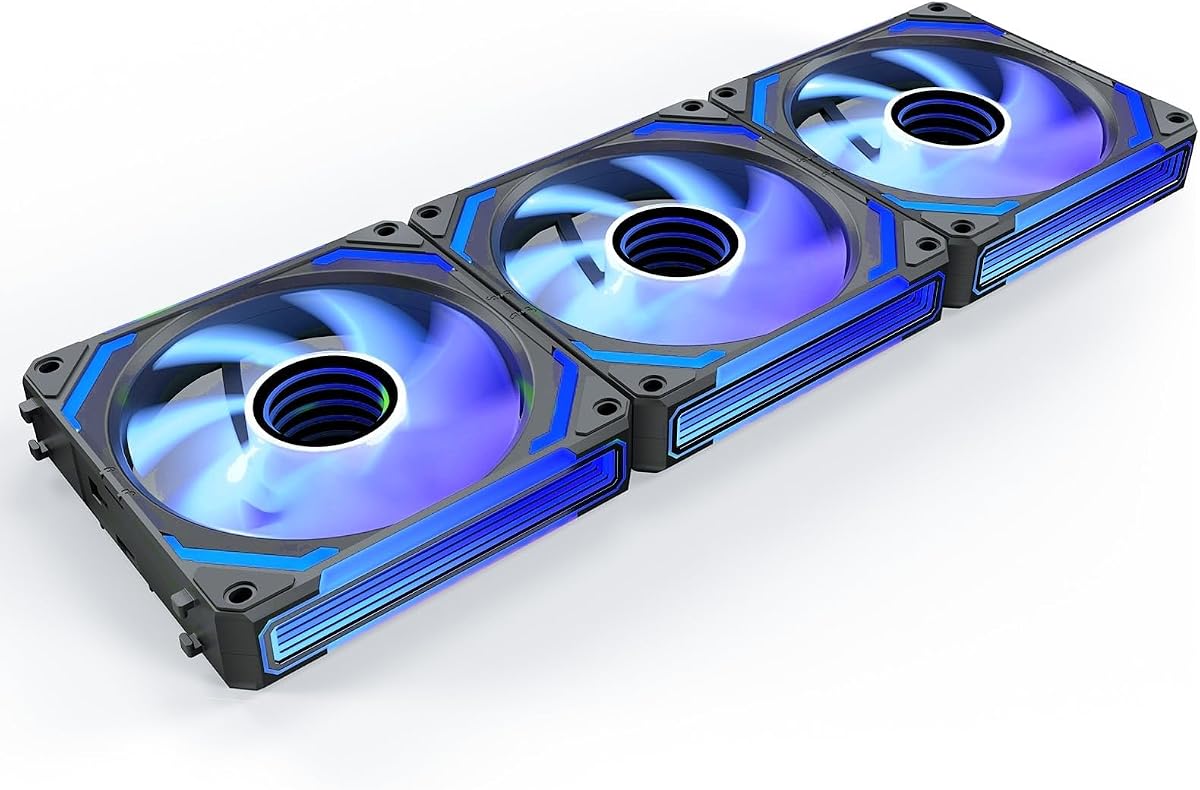
The AsiaHorse COSMIQ pack earns our Best Premium badge for its stunning infinity mirror lighting and music sync capabilities. These fans offer a high-end visual experience that goes beyond standard RGB. The lighting is layered and dynamic, creating a depth that makes the fans stand out. It is perfect for users who want their PC to be a centerpiece.
We may earn a commission when you buy through this link, at no additional cost to you.
Performance is strong with 68.5 CFM airflow and 2000 RPM. The FDB bearing ensures quiet operation even at high speeds. The inclusion of a music sync module adds a unique interactive element that changes lighting with audio. This is a rare feature in this price range and adds a fun factor for gaming setups.
However, the premium price means it costs more than average options. The music sync requires specific setup to work correctly. If you do not care about audio reactive lighting, the extra cost may not be justified. But for visual enthusiasts, the look is unmatched in the market.
This is the ideal choice for showpiece builds where aesthetics matter as much as cooling. The airflow is sufficient for radiators and case cooling. If you want the best lighting technology available, the COSMIQ fans deliver a premium experience that stands out from the rest.
This design uses a special LED arrangement to create a sense of infinite depth. It makes the fan frame look like a glowing tunnel.
The built-in microphone detects audio from your system. The fans pulse in rhythm with music or game sounds for a reactive lighting experience.
We may earn a commission when you buy through this link, at no additional cost to you.
Choosing the right fans requires balancing cooling performance, noise levels, and visual features. This guide breaks down the key factors to help you select the best fit for your build.
The bearing type determines how long the fan will last and how quiet it runs. Fluid Dynamic Bearings (FDB) and Sleeve bearings are common. FDB is generally more durable and quieter over time, while Sleeve bearings are cheaper but may wear out faster.
Look for FDB or Sleeve bearings for quiet builds. Avoid plain sleeve bearings in hot areas where heat accelerates wear.
Airflow (CFM) matters for open case areas, while Static Pressure matters for blocked spaces like radiators. If you are using fans for liquid cooling, prioritize high static pressure. For general case ventilation, airflow is the main metric.
Check the specs: high pressure fans have blades designed to push against resistance. Choose based on where you plan to mount them.
Ensure your motherboard supports 5V 3-pin ARGB headers. Some fans use 12V 4-pin RGB which is not compatible with 5V headers. Always check the voltage requirement before buying to avoid hardware issues.
Verify your motherboard manual to confirm supported headers. Match the fan connector type to your system capabilities.
Noise is measured in dBA. Lower numbers mean quieter operation. A good range is below 25 dBA for quiet setups. However, higher speeds often mean higher noise. Check the max noise rating at full RPM.
If you prefer silence, look for fans that operate quietly at idle. Speed control through BIOS is essential for noise management.
Some fans feature daisy-chaining to reduce cable clutter. Others require individual wires. Daisy-chaining saves headers and reduces tangling. Magnetic connections can simplify installation further but may be less robust.
Choose daisy-chain or magnetic options if your case is tight. This keeps your build cleaner and easier to maintain.
Budget fans may lack durability or lighting features. Premium fans offer better LEDs and bearings. Consider how many fans you need. Buying a pack often saves money than buying single units.
Calculate the cost per fan. A cheaper pack is usually better than buying single expensive units for large cases.
Standard 120mm and 140mm sizes are most common. Ensure your case supports the size you pick. Some cases only fit specific thicknesses or sizes. Check your case specs before purchasing.
120mm is the standard. Confirm your mounting points match the fan dimensions for proper installation.
Some packs include a controller hub for extra lighting control. Others rely on motherboard software. Controllers allow you to change effects even if your motherboard lacks ARGB support.
Check if a hub is included. It provides flexibility if you plan to add more lights later.
Install the fans securely using screws to prevent vibration. Align the frame properly with the case cutouts to ensure tight seals. Connect the PWM connector to the motherboard header for speed control.
Connect the ARGB header to the 5V 3-pin port. Ensure the arrow aligns with the 5V pin. Wrong connection can damage the LED strip. Test the lighting through motherboard software.
Clean fans regularly with compressed air to remove dust buildup. Dust reduces efficiency and increases noise. Check bearings periodically for wear. If noise increases, consider replacement.
RGB uses 4-pin 12V headers and colors cannot be controlled individually. ARGB uses 5V 3-pin headers and allows each LED to be set to a different color. ARGB offers more control and visual flexibility.
Not always. If your motherboard supports 5V ARGB, you can plug directly into it. Controllers are useful if you have many fans or lack headers. They help centralize management.
Yes but lighting may not sync perfectly. Colors may differ slightly. It is better to use fans from the same line. If you mix, check if software supports multiple brands.
Most cases benefit from 3 to 5 fans. Intake and exhaust balance is key. Avoid too many exhaust fans. Aim for slightly positive pressure.
Reverse blades help intake fans show the lit side. This is useful for side intakes. They improve visuals without sacrificing airflow. Good for aesthetics.
Use your motherboard's software like Armoury Crate or Mystic Light. Some brands use their own. Check compatibility. Unified software helps sync multiple devices.
We found the Thermalright TL-C12C-S to be the best overall option for its blend of performance and cost. The ARCTIC P12 Pro offers the best value for budget builds. The AsiaHorse COSMIQ leads in premium visual effects.
When choosing, prioritize bearing quality and airflow. Consider your motherboard header availability. Daisychaining simplifies the process. Don't overlook noise levels when buying.
Prices change often. Verify current deals before buying. Check stock for your region. Choose the pack that best fits your case needs.