
8Bitdo Ultimate 2C Wireless Controller
4.4Editor score
1000Hz Polling Rate
Hall Effect Sensors
Remappable Bumpers
This guide compares the top Android joystick controllers for gaming, evaluating features like Hall Effect sticks, battery life, and compatibility to help you
Mobile gaming has evolved significantly, and using a dedicated Android joystick controller transforms the experience. These devices offer tactile feedback and precise control that touchscreens simply cannot match. Finding the right controller means looking for comfort, responsiveness, and reliable connectivity.
We analyzed ten top-rated models based on build quality, feature sets, and user feedback. Our comparison focuses on critical aspects like joystick technology, battery performance, and software customization. This list covers the most versatile options available for Android users and cloud gamers.
Each pick highlights specific strengths such as ergonomic design or advanced sensor technology. We ensure every product meets high standards for performance and durability. Please note that availability and pricing may change, so verify details before purchasing your next gaming accessory.
4.4Editor score

4.4Editor score

4.3Editor score
This section provides a side-by-side comparison of all ten controllers to help you identify the best fit for your gaming needs and device compatibility.
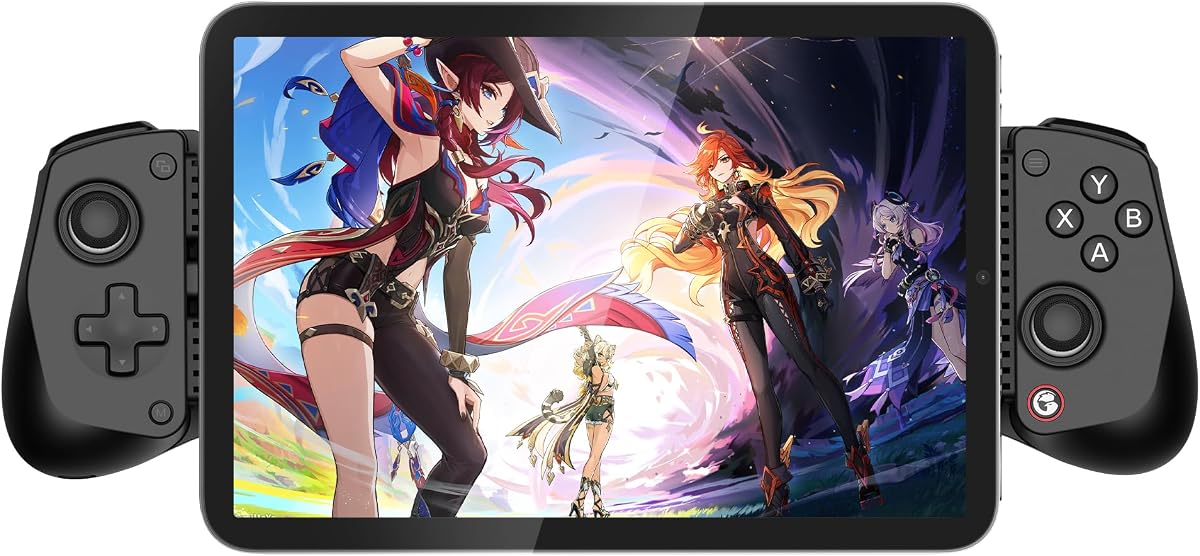


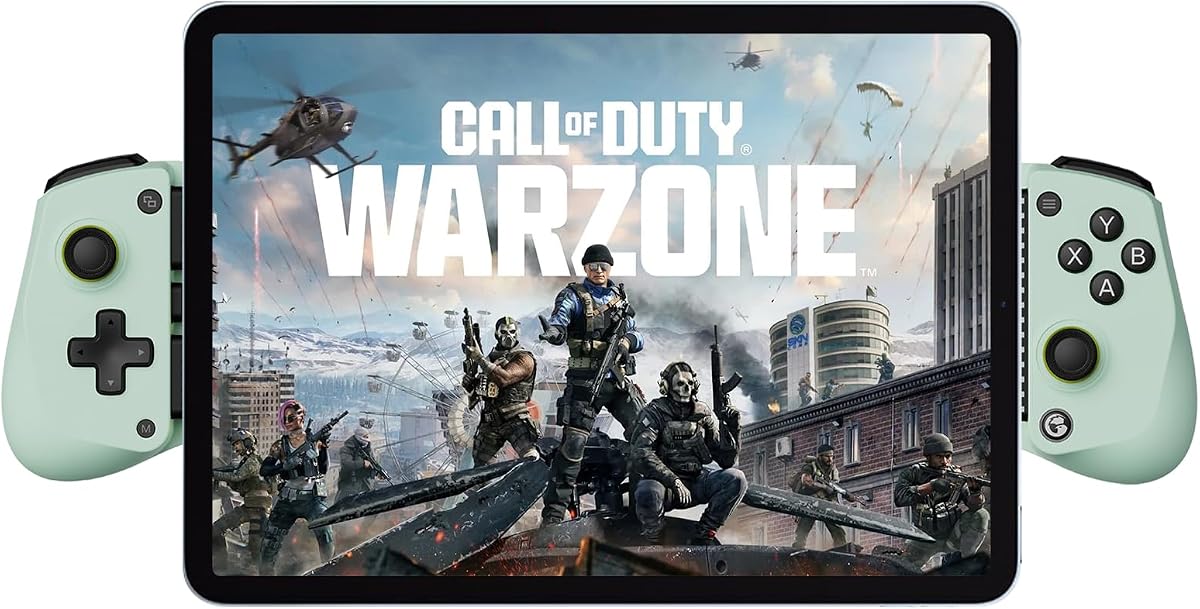

The Mocagen MC1 stands out as the top Android joystick controller this November 2026. With a 4.4 rating, it delivers precision through Hall Effect joysticks that eliminate drift and extend lifespan. Gamers will appreciate the ergonomic grip that reduces fatigue during long sessions.
We may earn a commission when you buy through this link, at no additional cost to you.
This controller features a 5M-cycle lifespan for its joysticks, which is 2.5x longer than standard carbon-film options. The 600mAh battery provides up to six hours of gameplay, ensuring you can play through entire cloud gaming sessions without interruption. Additionally, the dual vibration motors enhance immersion in compatible games.
While it offers extensive features, it only supports Xbox input protocols, meaning PS Remote Play is not available. The RGB lighting is adjustable but limited to the joystick ring, leaving other buttons static. These trade-offs are acceptable for the price and performance it offers to most mobile gamers.
This controller is ideal for users who prioritize precision and comfort. Whether you play Fortnite or Call of Duty, the MC1 provides reliable control. We recommend it for anyone seeking a durable Bluetooth controller that fits cases and offers a smooth gaming experience.
The Hall Effect technology ensures zero drift and a much longer lifespan than traditional potentiometers.
With 600mAh capacity and KeyLinker app support, you get extended playtime and customizable inputs.
We may earn a commission when you buy through this link, at no additional cost to you.
For budget-conscious gamers, the 8Bitdo Ultimate 2C offers premium features like Hall Effect joysticks and a 1000Hz polling rate. It scores 4.4 stars for its performance in Android and Windows environments. This controller brings PC-grade responsiveness to your mobile setup at an entry-level cost.
We may earn a commission when you buy through this link, at no additional cost to you.
The remappable L4 and R4 bumpers provide extra inputs without needing software, which is rare for this price point. The Hall Effect triggers and sticks ensure precision and longevity, similar to higher-end models. Its lightweight design makes it easy to carry around in a bag or pocket.
However, it lacks built-in clamps for phones, so you may need an adapter or dock to use it effectively as a mobile controller. The focus is primarily on PC and Android devices, which might limit compatibility for iOS users. Despite this, it remains a strong value proposition for Android gaming.
We recommend this controller for users who want high-performance sensors without paying premium prices. It is excellent for emulation or cloud gaming where you can pair it via Bluetooth or USB. If you need extra buttons and responsiveness, this is a top choice.
The 1000Hz polling rate ensures minimal lag during fast-paced gaming sessions.
Remappable bumpers add versatility without requiring complex software setup.
We may earn a commission when you buy through this link, at no additional cost to you.
The GameSir G8 Plus is a premium choice delivering console-quality control for Android users. With a 4.3 rating, it features Hall Effect joysticks and triggers for smooth precision. Gamers praise its ergonomic design and interchangeable components that allow for personalization.
We may earn a commission when you buy through this link, at no additional cost to you.
Its 6-axis gyroscope enables motion sensing, ideal for games that require tilt or turn controls. The 500mAh battery on each side ensures sufficient power for extended sessions. The console-sized buttons and sticks feel familiar to anyone used to traditional gamepads.
The price is higher than average, but the build quality and feature set justify it for enthusiasts. The battery configuration splits power across two sides, which is unique but may require charging both. Some users prefer a single battery unit for simplicity.
This controller is perfect for gamers who want a full console experience on mobile. Whether playing Minecraft or Genshin Impact, it offers robust performance and customization. We recommend it for those prioritizing comfort and advanced features.
Hall Effect sticks and 6-axis gyro provide accurate aiming and motion control.
Interchangeable magnetic components let you tweak the look and feel.
We may earn a commission when you buy through this link, at no additional cost to you.
The GameSir X5 Lite offers Hall Effect technology at an affordable price point. Rated 4.1 stars, it focuses on lightweight performance and pass-through charging. It connects via Type-C to keep your device charged while gaming, making it a practical choice for casual users.
We may earn a commission when you buy through this link, at no additional cost to you.
The controller weighs only 135.4g, reducing hand strain during extended play. Its laser-engraved textured grips provide a secure hold. The turbo function allows for repetitive inputs without fatigue, useful in games like Call of Duty.
It requires a wired connection, which may limit mobility compared to Bluetooth options. The rating is slightly lower than other models, indicating mixed user experiences. However, the stability of a direct connection is a plus for latency-sensitive games.
We recommend this for users needing a simple plug-and-play solution without battery concerns. The wide device compatibility up to 213mm makes it versatile. It is a solid option for those who prefer wired reliability.
Type-C wired connection ensures zero latency and continuous charging.
Lightweight design with textured grips improves comfort and stability.
We may earn a commission when you buy through this link, at no additional cost to you.
Another variation of the Mocagen MC1, this model emphasizes ergonomic comfort and low latency. With a 4.4 rating, it mirrors the features of the standard version including Hall Effect joysticks and dual vibration. It is a strong contender for Android gaming on the go.
We may earn a commission when you buy through this link, at no additional cost to you.
The ergonomic design with laser-engraved texture ensures a secure grip. It supports cloud gaming services like Xbox Game Pass and GeForce NOW. The 3-level turbo function helps with rapid inputs in action games without finger fatigue.
The controller does not support PS Remote Play, limiting some cloud gaming options. Pairing requires specific steps with the Home button, which may confuse new users. Despite this, the performance remains high for the price.
We recommend this for players who value comfort and precise controls. It fits well in travel scenarios due to its portable nature. If you need a reliable Bluetooth controller with vibration, this is a great pick.
Ergonomic shape and Hall Effect sticks ensure comfort and accuracy.
Dual vibration and turbo options enhance immersion and gameplay efficiency.
We may earn a commission when you buy through this link, at no additional cost to you.
The XPT Portable Mini is ideal for users who prioritize portability. With a 3.9 rating, it offers Bluetooth 5.0 connectivity and a turbo function. Its compact size makes it easy to slip into a pocket, perfect for travel or on-the-go gaming.
We may earn a commission when you buy through this link, at no additional cost to you.
It includes a 6-axis gyroscope and dual rumble motors for an immersive experience. The controller supports Switch, PC, iOS, and Android, offering broad compatibility. The ergonomic design with non-slip grip helps during long sessions.
The smaller size may reduce comfort for those with larger hands. The lower rating suggests potential issues with build quality or connectivity compared to larger controllers. It may be better suited for specific use cases rather than daily use.
We recommend this for travelers or casual gamers needing a backup controller. If you want a small device for occasional play, it fits the bill. However, for extended sessions, a full-size controller might be better.
Fits easily in a pocket or bag for gaming anywhere.
Multi-platform support makes it useful for various devices.
We may earn a commission when you buy through this link, at no additional cost to you.
The KICKDOT controller features TMR joysticks for 10x precision and 15 hours of battery life. Rated 4.4 stars, it offers RGB lighting and macro recording for custom combos. This makes it a powerful tool for gamers who demand high-end specs.
We may earn a commission when you buy through this link, at no additional cost to you.
The 1000mAh battery ensures playtime without frequent charging. The telescopic clamp fits most cases, though bulky ones may need removal. The programmable back paddles provide extra inputs for quick actions.
TMR sensors are new technology and may confuse users expecting standard Hall Effect. The macro setup requires app usage which adds steps to the workflow. These issues are minor compared to the performance benefits.
We recommend this for advanced gamers wanting customization and precision. The battery and TMR technology stand out. If you need a high-performance Bluetooth controller, this is a strong option.
TMR joysticks provide extreme precision and no drift.
Large battery and macro recording extend utility and playtime.
We may earn a commission when you buy through this link, at no additional cost to you.
Another X5 Lite variant, this model supports iPhone 15/16 series and Android with Type-C connectivity. Rated 4.3 stars, it offers Hall Effect sticks and pass-through charging. This ensures zero interruption while playing and charging simultaneously.
We may earn a commission when you buy through this link, at no additional cost to you.
The customizable app on Android allows for tailored settings. The lightweight design ensures comfort over long periods. Turbo functionality adds efficiency for repetitive inputs in action games.
The app customization is Android only, limiting iOS users. Wired connection restricts movement and may not suit all setups. Still, the stable connection is beneficial for competitive gaming.
We recommend this for users who want zero latency and battery-free play. The wide support makes it versatile for different devices. If you prefer wired reliability, this is a great choice.
Type-C connection provides stable data transfer and charging.
App support allows detailed control over button mappings.
We may earn a commission when you buy through this link, at no additional cost to you.
This controller excels in cloud gaming support for Xbox Game Pass and Steam Link. Rated 4.3 stars, it offers an 8-hour battery life and adjustable turbo. It is designed to make mobile cloud gaming seamless and immersive.
We may earn a commission when you buy through this link, at no additional cost to you.
The extendable design accommodates phones with cases, saving the hassle of removal. Hall joystick technology ensures drift-free performance. The dual vibration motors add realism to gameplay moments.
Users must ensure a stable network for cloud gaming as latency impacts experience. Resetting may be needed if connection issues arise. These are minor inconveniences given the feature set.
We recommend this for users heavily invested in cloud gaming services. The compatibility and battery life support extended use. If cloud play is your priority, this controller fits well.
Supports major cloud services for console gaming on mobile.
Eight hours of playtime reduces charging interruptions.
We may earn a commission when you buy through this link, at no additional cost to you.
The 8Bitdo Ultimate Mobile is officially licensed by Xbox for cloud gaming. Rated 4.3 stars, it features Hall Effect joysticks and two pro back buttons. It works seamlessly with Android, Apple devices, and Xbox Cloud Gaming.
We may earn a commission when you buy through this link, at no additional cost to you.
The robust build includes wear-resistant metal rings and durable triggers. The stretchable design fits most phones for secure gameplay. Bluetooth connection ensures wireless freedom during play.
It carries a higher price compared to generic options. Software customization on mobile may be more limited than on PC. However, the official licensing ensures compatibility with Xbox services.
We recommend this for Xbox Cloud gaming fans seeking official support. The build quality and extra buttons add value. If you want a licensed controller for mobile cloud play, this is ideal.
Licensed by Xbox for seamless cloud gaming integration.
Metal rings and stretchable grip ensure durability and comfort.
We may earn a commission when you buy through this link, at no additional cost to you.
Selecting the right Android joystick controller involves considering several key factors that impact performance and comfort. This guide outlines what to look for when making your decision.
Hall Effect and TMR sensors are the gold standards for modern controllers. They prevent stick drift and offer higher precision than traditional potentiometers. Look for models that explicitly mention these technologies to ensure longevity and accuracy.
Prioritize Hall Effect or TMR for long-term use.
Controllers come in Bluetooth and wired versions. Bluetooth offers freedom of movement but may introduce slight latency. Wired Type-C or USB connections provide zero latency and allow pass-through charging to keep your phone powered.
Choose wired for competitive play and Bluetooth for portability.
Battery capacity affects how long you can game on a single charge. Models with 600mAh to 1000mAh batteries typically last between 6 to 15 hours. Consider your typical gaming sessions to decide on the necessary capacity.
Opt for larger batteries if you game for extended periods.
Comfort is vital during long gaming sessions. Look for textured grips and ergonomic shapes that reduce hand fatigue. Some controllers offer adjustable clamps or telescopic designs to fit various phone sizes and cases.
Ensure the controller fits your hands and phone comfortably.
Features like turbo buttons, vibration motors, and back paddles add versatility. Turbo functions help with repetitive inputs while vibration enhances immersion. Back paddles provide extra inputs for complex combos in shooter games.
Evaluate if turbo and back buttons match your gaming style.
Some controllers offer mobile apps for mapping buttons and adjusting settings. This customization allows you to tailor controls for specific games. Check if the controller has an app before purchasing to avoid limitations.
Use app-supported controllers for personalized settings.
Verify that the controller supports your specific Android version and games. Some models support Xbox Cloud Gaming or Steam Link but lack PlayStation Remote Play. Ensure the protocol matches your cloud gaming needs.
Check game and cloud service compatibility before buying.
Pairing your controller is straightforward. Turn on Bluetooth on your Android device and enter pairing mode on the controller by holding the designated button until the LED flashes. Select the controller from the list and wait for the connection to confirm.
Clean your controller regularly to maintain performance. Use a soft dry cloth to wipe down the grips and buttons. Avoid harsh chemicals that could damage the materials. Store it in a protective case when not in use to prevent scratches and damage.
Keep the firmware and companion apps updated for the best experience. Updates often include bug fixes and performance improvements. If you notice connectivity issues, try resetting the controller using the reset hole on the back and re-pair it.
Hall Effect technology uses magnetic fields to detect stick movement instead of physical contacts. This eliminates stick drift and increases durability significantly compared to traditional potentiometers. It ensures precise input without wear over time.
Most controllers support services like Xbox Game Pass and Steam Link. Ensure the model explicitly states compatibility with the service you use. Some controllers support Xbox input protocols which are widely accepted by cloud platforms.
Most controllers fit phones up to a certain width like 170mm or 213mm. Check the compatibility details to confirm it supports your device size. Many also support tablets and phones with cases for convenience.
Use a needle to press the reset hole on the back of the controller if issues arise. This clears connection data and allows re-pairing. Follow the pairing steps again after resetting to establish a new link.
Turbo functions automate repeated button presses, useful for rapid inputs in games. You can typically adjust the speed to suit different actions. This reduces finger fatigue and helps in fast-paced scenarios.
Controllers with wired options or high polling rates are best for competitive gaming. They minimize latency ensuring your inputs register instantly. Look for models with low latency specifications for the best performance.
We reviewed ten top Android joystick controllers highlighting precision and comfort. The Mocagen MC1 leads with Hall Effect precision and ergonomic design. Other options like the 8Bitdo Ultimate 2C offer excellent value with advanced features.
Prioritize joystick technology and battery life based on your needs. Wired controllers reduce latency while Bluetooth offers freedom. Choose models that fit your games and devices to enhance your experience.
Verify current availability and features before purchasing as models may update. We hope this guide helps you find the perfect controller for your mobile gaming setup. Check the latest specs to ensure it matches your expectations.