
AOC 27G51Z
4.6Editor score
260Hz overclocked refresh rate
Adaptive sync support included
Slim frameless design style
Finding the right display can transform your computing experience. AOC offers a wide range of monitors designed for various needs. Whether you seek high refresh rates or crisp visuals, there is a model suited for your setup.
We evaluated ten distinct products to help you make an informed decision. Our analysis focuses on performance metrics, design features, and user feedback. This list covers everything from budget-friendly options to premium gaming displays.
Each selection highlights key strengths and potential trade-offs for clarity. Prices and availability can fluctuate over time so please verify details. Use this guide to find the perfect screen for your specific requirements.
4.6Editor score

4.6Editor score
4.4Editor score
As an Amazon Associate we earn from qualifying purchases.
This table provides a side-by-side look at the key specifications of all ten selected monitors. Compare resolution, refresh rate, and panel technology to find the best fit for your needs.


This monitor stands out as a top contender for gamers seeking high performance. It features a 27-inch QHD IPS panel that delivers sharp visuals and vibrant colors. The high refresh rate ensures smooth motion during intense gameplay sessions.
We may earn a commission when you buy through this link, at no additional cost to you.
The 240Hz refresh rate combined with a 0.3ms response time minimizes blur and motion artifacts. Adaptive Sync technology works with both AMD and NVIDIA GPUs to prevent screen tearing. This makes it ideal for competitive shooters where every millisecond counts.
While the stand offers tilt adjustment, it lacks height or pivot options which may limit ergonomic flexibility. The brightness levels are solid but may struggle in very bright environments. However, these trade-offs are acceptable given the price and performance balance.
Gamers who prioritize smooth visuals and color quality will find this model highly satisfying. It balances professional-grade panel quality with gaming-specific features effectively. We recommend it as a reliable choice for serious competitive and casual gaming alike.
The QHD resolution provides a sharp image that enhances detail in games and media. This clarity helps users spot enemies or details that might otherwise be missed on lower resolution screens.
With a 240Hz refresh rate, fast-moving objects appear smooth without stuttering or tearing. This fluidity is crucial for competitive gaming where quick reactions determine success or failure.
We may earn a commission when you buy through this link, at no additional cost to you.
For those seeking high speed without breaking the bank, this monitor offers exceptional value. It delivers a 260Hz overclocked refresh rate on a 27-inch Full HD panel. This combination provides smooth gameplay at a very accessible price point.
We may earn a commission when you buy through this link, at no additional cost to you.
Adaptive Sync support ensures tear-free visuals across different graphics cards. The flicker-free technology helps reduce eye strain during long gaming sessions. The frameless design also makes it easy to build a multi-monitor setup if desired.
The resolution is limited to Full HD which means less detail compared to QHD options. The stand is basic and only allows tilt adjustments. However, for budget-conscious gamers prioritizing refresh rate, these compromises are often worth it.
This model is perfect for esports enthusiasts or anyone on a tight budget. It proves you do not need to spend a fortune to get high refresh rates. We highly recommend it for entry-level competitive gaming setups.
The overclocked 260Hz refresh rate ensures incredibly smooth motion in fast-paced games. This helps players track moving targets with greater precision and react faster.
Eco Mode keeps power usage efficient while maintaining performance levels. This helps reduce electricity costs over time without sacrificing visual quality.
We may earn a commission when you buy through this link, at no additional cost to you.
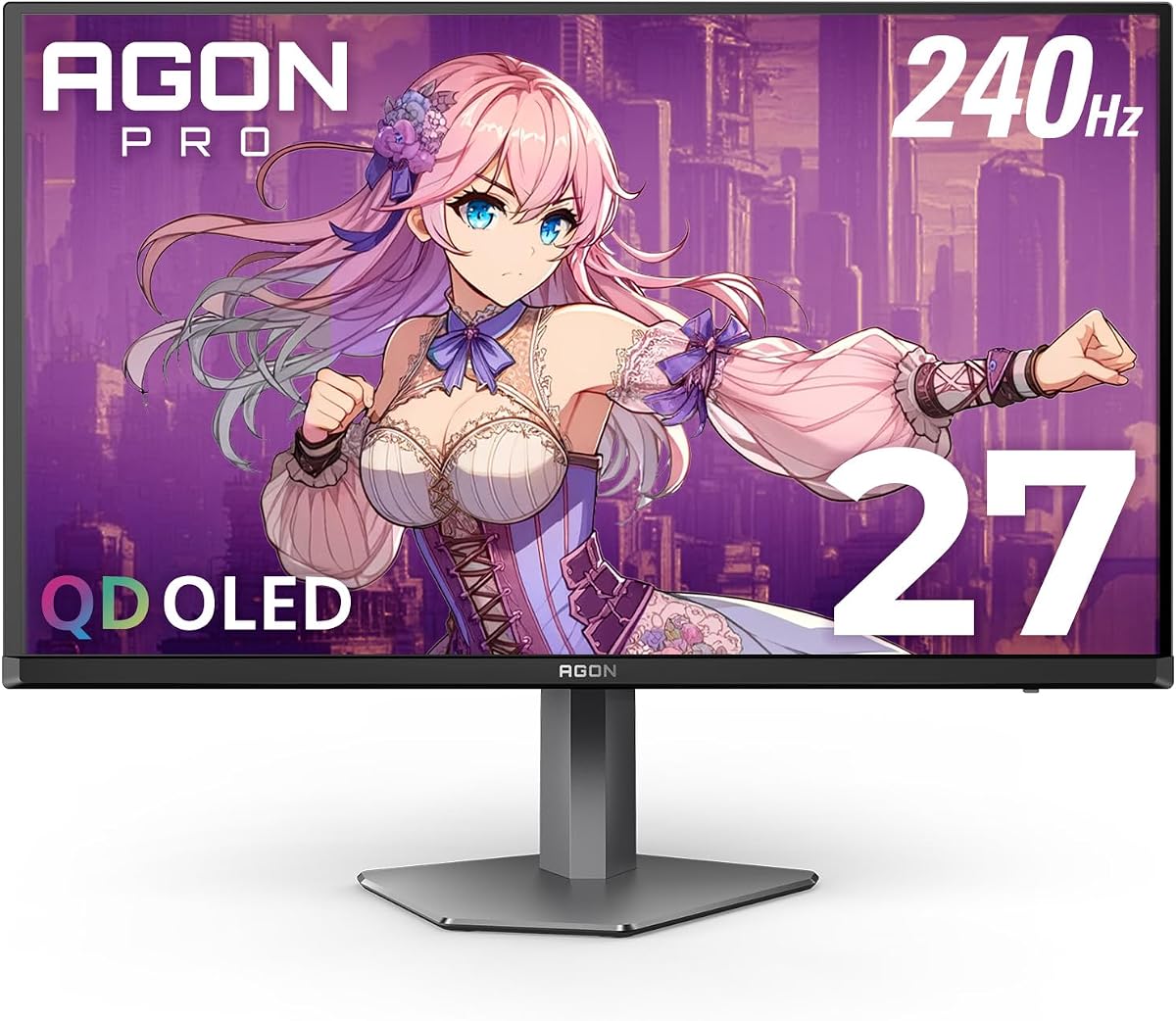
This premium monitor uses Quantum Dot OLED technology to deliver unmatched image quality. Self-luminous pixels provide perfect blacks and infinite contrast for deep immersion. The 240Hz refresh rate keeps motion buttery smooth for competitive play.
We may earn a commission when you buy through this link, at no additional cost to you.
Response times are virtually instantaneous at 0.03ms which eliminates ghosting entirely. HDR10 support adds depth to compatible content making visuals pop on screen. The lighting effects at the back add a unique touch to your setup.
The price is significantly higher than LCD alternatives which may not fit all budgets. Long static images could theoretically cause burn-in though modern features mitigate this. These factors are the main reasons to consider other options first.
Gamers with high-end systems seeking the absolute best visuals should consider this model. It offers a next-generation viewing experience that justifies the cost for enthusiasts. We recommend it for those who want peak performance regardless of price.
OLED technology allows pixels to turn off completely for pure black levels. This creates a stunning contrast ratio that makes images look incredibly realistic and deep.
The 0.03ms GTG response time is among the fastest available on any monitor. This ensures that fast action scenes remain clear without any motion blur.
We may earn a commission when you buy through this link, at no additional cost to you.
This monitor is designed for productivity and multimedia rather than competitive gaming. It offers a sharp 4K resolution on a 27-inch screen ideal for text and media. The IPS panel ensures colors remain accurate from almost any angle.
We may earn a commission when you buy through this link, at no additional cost to you.
Built-in speakers simplify your desk setup by removing the need for external audio. HDR support helps deliver more detail in bright and dark areas of content. The frameless design looks modern and fits well in any office environment.
Refresh rates are standard which makes it less suitable for fast-paced gaming. The stand lacks advanced ergonomic adjustments like height or pivot. However, for general office tasks these limitations are rarely a major issue.
Professionals needing crisp text and reliable colors will find this model highly useful. It serves well as a secondary display or primary monitor for non-gaming tasks. We recommend it for general computing and media consumption.
The 4K resolution renders text extremely sharp which reduces eye strain during work. This clarity is essential for long hours of document editing or coding.
Integrated speakers reduce cable clutter on your desk. This convenience helps keep your workspace organized and tidy.
We may earn a commission when you buy through this link, at no additional cost to you.
Curved monitors create a unique immersive experience by wrapping the screen around your vision. This model features a 1500R curve on a large 32-inch QHD display. It is well-suited for story-driven games and simulators where immersion is key.
We may earn a commission when you buy through this link, at no additional cost to you.
The 180Hz refresh rate provides smooth motion that is competitive enough for most gamers. VA panels offer deep blacks and high contrast ratios enhancing image depth. The warranty coverage includes zero-bright-dot protection and replacement options.
VA panels can have slightly slower response times than IPS which may cause ghosting. The curve might not suit everyone especially if you use multiple screens side-by-side. These factors should be considered before purchasing.
Gamers seeking a cinematic experience will love this large curved display. It offers a unique perspective that flat screens cannot match. We recommend it for immersive gaming and media viewing.
The 1500R curvature wraps the image around your field of view. This enhances the feeling of being inside the game environment.
VA technology provides a high contrast ratio for deeper blacks. This makes dark scenes in games and movies look more detailed.
We may earn a commission when you buy through this link, at no additional cost to you.
This monitor combines a large screen with a high refresh rate for a competitive edge. It features a 32-inch curved Full HD display with a 240Hz refresh rate. This setup is ideal for players prioritizing speed over pixel density.
We may earn a commission when you buy through this link, at no additional cost to you.
AMD FreeSync Premium ensures smooth synchronization with compatible graphics cards. The low input lag helps with precise aiming and quick reactions in games. The frameless bezel allows for better visibility across the screen.
Resolution is limited to Full HD which reduces detail compared to QHD options. The VA panel offers great contrast but may show ghosting on very dark backgrounds. These trade-offs are acceptable for fast-paced competitive gaming.
Players who need high speed and a large view will find this model excellent. It delivers on the core requirements of competitive gaming effectively. We recommend it for budget-friendly large-screen gaming setups.
The 240Hz refresh rate provides a significant edge in fast shooters. This allows for smoother aiming and tracking of moving targets.
Compatible with consoles like Xbox and PS5 for high frame rate gaming. This ensures your monitor adapts to your console performance.
We may earn a commission when you buy through this link, at no additional cost to you.
This OLED monitor brings premium visual fidelity to your gaming setup. Quantum Dot technology delivers a wide color gamut for vivid and accurate images. The 240Hz refresh rate keeps motion smooth even in the most intense scenes.
We may earn a commission when you buy through this link, at no additional cost to you.
Response times are nearly instant which eliminates almost all motion blur. G-Sync compatibility ensures seamless performance with NVIDIA graphics cards. HDR10 support adds another layer of realism to compatible content.
The cost is high compared to standard LCD monitors which limits accessibility. There is always a slight risk with OLED panels regarding burn-in over time. These factors are important to weigh before making a purchase.
Gamers who demand the highest quality visuals will appreciate this panel. It offers a level of detail and color that few other displays can match. We recommend it for enthusiasts willing to invest in top-tier tech.
Quantum Dot tech covers more of the DCI-P3 color space. This results in more vibrant and lifelike images on screen.
G-Sync ensures the monitor matches the GPU output exactly. This prevents screen tearing and stuttering during gameplay.
We may earn a commission when you buy through this link, at no additional cost to you.
This premium OLED monitor adds extra features to enhance usability and immersion. It offers height adjustment and a USB hub for a cleaner desk setup. The OLED panel provides deep blacks and vivid colors that are hard to beat.
We may earn a commission when you buy through this link, at no additional cost to you.
Both FreeSync Premium Pro and G-Sync ensure compatibility with most GPUs. HDR400 certification adds detail to bright areas in supported content. The 240Hz rate ensures smooth motion for competitive gaming.
The price is high which may be a barrier for many users. The additional features increase the setup complexity slightly. However, these benefits add significant value for users seeking customization.
Gamers who value ergonomics and connectivity will appreciate the added features. It combines top-tier visual quality with practical design elements. We recommend it for those needing a robust and adjustable display.
The stand allows height adjustment which helps reduce neck strain. This improves comfort during long gaming or work sessions.
The built-in USB hub reduces cable clutter on your desk. This keeps your workspace organized and devices easily accessible.
We may earn a commission when you buy through this link, at no additional cost to you.
This monitor is ideal for those with limited desk space who still want speed. The 24-inch size fits easily into small setups while maintaining high performance. A 200Hz refresh rate ensures smooth motion in fast-paced games.
We may earn a commission when you buy through this link, at no additional cost to you.
The IPS panel offers a wide color gamut for rich and accurate visuals. HDR ready status adds a touch of realism to supported media. The frameless bezel makes it suitable for multi-monitor configurations.
Screen real estate is limited which may feel cramped for productivity tasks. The resolution is standard Full HD which lacks the crispness of QHD. However, for gaming-focused users these drawbacks are minimal.
Gamers with small desks will find this model perfect for their needs. It balances size and performance effectively. We recommend it for compact gaming setups.
The compact size fits easily on small desks. This helps free up space for other gear or accessories.
Designed to maximize console performance with low latency. This ensures your console games run smoothly.
We may earn a commission when you buy through this link, at no additional cost to you.
This renewed option offers a very affordable entry into gaming monitors. It features a 21.5-inch screen with a 100Hz refresh rate for smooth visuals. This is a solid choice for casual gamers or those with limited funds.
We may earn a commission when you buy through this link, at no additional cost to you.
The blue light filter helps reduce eye strain during long sessions. Connectivity includes VGA and HDMI ports for flexible setup options. VESA mount support allows you to use alternative stands easily.
Refresh rate is lower than modern standards which limits competitive potential. The panel technology is older compared to newer IPS or OLED options. However, for casual use the performance is adequate.
Budget buyers looking for a basic functional screen will find this suitable. It provides reliable performance for everyday tasks and casual play. We recommend it for entry-level gaming needs.
This model offers a low cost way to upgrade your display. It is a great option for those starting their setup.
The blue light filter reduces strain for comfortable viewing. This helps maintain comfort during long work or play sessions.
We may earn a commission when you buy through this link, at no additional cost to you.
Choosing the right monitor depends on your specific needs and budget. This guide breaks down the key factors to consider before making a purchase.
The panel type determines color accuracy and viewing angles. IPS panels offer the best color and wide angles ideal for work and gaming. VA panels provide deep blacks and high contrast great for media. OLED panels deliver perfect blacks and instant response but cost more.
Choose IPS for balanced quality, VA for contrast, or OLED for premium performance.
Refresh rate measures how many times the screen updates per second. Higher rates like 144Hz or 240Hz provide smoother motion and reduce blur. This is critical for competitive gaming where smooth visuals give an edge. For general use 60Hz to 120Hz is usually sufficient.
Prioritize higher refresh rates if you play fast-paced games.
Resolution defines the level of detail on the screen. Full HD offers basic clarity while QHD provides sharper text and images. 4K delivers extreme detail but requires more GPU power. Consider your content and budget when choosing resolution.
Select QHD or 4K for detail work and Full HD for budget gaming.
Response time indicates how fast a pixel changes color. Lower times reduce ghosting and motion blur in fast action. A response time under 5ms is standard for gaming. Look for 1ms or lower if you play competitive titles.
Aim for low response times to ensure clear motion.
Adjustable stands improve comfort and reduce physical strain. Look for height tilt pivot and swivel adjustments. VESA mount compatibility allows you to use third-party stands. Good ergonomics help during long work or gaming sessions.
Choose monitors with adjustable stands for better health.
Check ports to ensure they match your devices. HDMI and DisplayPort are standard for modern setups. USB hubs and audio jacks add convenience for peripherals. Ensure the monitor supports the version you need for your graphics card.
Verify port types and versions before buying to avoid issues.
Extra features like Adaptive Sync and HDR enhance the experience. Adaptive Sync prevents screen tearing without lag. HDR improves dynamic range for better contrast. Check what extras fit your workflow.
Prioritize features that match your specific use case.
Budget determines which features are accessible. Entry-level monitors offer basic performance while premium ones include advanced tech. Balance cost against needed features to avoid overspending. Consider refurbished units for savings without sacrificing quality.
Set a budget and compare models within that range.
To set up your monitor securely follow the instructions in the manual. Place the monitor on a stable surface and connect the appropriate cables to your computer. Ensure power and video connections are secure before turning on the device.
Use the on-screen display menu to adjust brightness and color settings. Select game modes or picture presets that match your content type. Calibrate your monitor regularly to maintain color accuracy and optimal viewing quality.
Clean the screen with a soft dry cloth to avoid scratching. Do not use harsh chemicals or spray water directly on the surface. Proper care extends the lifespan and keeps your visuals crisp.
For competitive gaming aim for at least 144Hz. Higher rates like 240Hz provide even smoother motion. Casual gamers may find 60Hz to 120Hz sufficient for most titles.
Yes AOC offers a wide range of gaming monitors. They provide high refresh rates and adaptive sync technologies. Their prices are often competitive with good performance.
Most AOC monitors come with a standard three year warranty. This includes coverage for defects and sometimes advance replacement. Check the specific product page for details.
IPS panels offer better color accuracy and viewing angles. VA panels provide deeper blacks and higher contrast. IPS is better for color work while VA is great for movies.
OLED monitors offer perfect blacks and fast response times. They are ideal for media and high-end gaming. The price is higher so consider your needs carefully.
Yes a powerful graphics card is needed to drive high refresh rates. Ensure your GPU can output enough frames per second. Otherwise you won't utilize the monitor fully.
We reviewed ten excellent models from AOC that cover various needs and budgets. Each selection offers distinct strengths whether you want speed visuals or value. Consider your priorities to narrow down the right choice.
Prioritize features like refresh rate or resolution based on your main use. A higher budget opens up options like OLED panels and advanced features. Balance cost against performance to find the best value.
Prices and availability change so check current deals before buying. Verify details like ports and warranty coverage on the product page. Make sure your choice fits your specific requirements.