
ASUS Vivobook Go 15.6” FHD Slim Laptop
4.3Editor score
AMD Ryzen 3 7320U Processor
8GB DDR5 RAM
128GB SSD Storage
15.6-inch FHD Display
ASUS Vivobook laptops offer a compelling mix of performance and affordability for modern users. They feature diverse processors, screens, and storage options to fit various workflows. Finding the right one requires understanding your specific needs and budget constraints.
We evaluated ten distinct models based on processor power, memory capacity, display quality, and build durability. Our analysis considers real-world usability, thermal performance, and connectivity options. This list highlights the strengths of each unit to simplify your decision.
Each entry details key specifications, pros, and cons to give you a clear picture. Prices and availability shift frequently so verify current listings before purchasing. Use this guide to match a Vivobook to your daily tasks and long-term goals.
4.3Editor score

4.5Editor score

4.2Editor score
As an Amazon Associate we earn from qualifying purchases.
This table compares the key specifications of all ten models side by side. Look at processor type, memory, storage, and screen size to identify which laptop fits your requirements best.






The ASUS Vivobook 15 Laptop earns a 4.5-star rating for its robust AI-ready design. It features an Intel Core i9-13900H processor optimized for Next Gen workloads and seamless multitasking. The bundle includes a PCO Cooler to mitigate thermal issues common in high-performance units.
We may earn a commission when you buy through this link, at no additional cost to you.
Its standout qualities include a 14-core i9 processor that delivers elite-level performance for complex simulations and creative software. The 32GB DDR4 RAM and massive 1TB PCIe M.2 SSD provide immense speed and storage space. Integrated security features like a Fingerprint Reader and Physical Webcam Shield protect your data.
While the performance is elite, users should note that thermal management is critical without the included cooler. The non-touch 15.6-inch FHD display offers glare-free visuals but lacks premium color accuracy. However, the extensive connectivity and backlit keyboard make it a solid professional tool.
This laptop is best for professionals who need maximum processing power and storage in a portable chassis. The upgraded RAM and SSD come with a 3-year warranty from PCOnline US. With the PCO Bundle included, you get a complete solution for demanding mobile productivity tasks.
The included PCO Cooler complements the internal cooling system to maintain peak processor frequency.
Features USB Type-C, USB-A 3.0, HDMI, and a 3.5mm Audio Port to eliminate the need for extra dongles.
We may earn a commission when you buy through this link, at no additional cost to you.
The ASUS Vivobook 16 Laptop delivers a 4.4-star rating with its Qualcomm Snapdragon X chip and 60Hz WUXGA display. Designed for AI, it features a Hexagon NPU for unparalleled power efficiency and seamless communication tools. The integrated Adreno GPU offers generational performance improvements for visuals.
We may earn a commission when you buy through this link, at no additional cost to you.
Its 16-inch WUXGA display provides a 1920 x 1200 resolution with 300-nit brightness and life-like colors. The 16GB memory and 512GB SSD allow for lightning-fast performance and multitasking. Users can store vast data while relying on the ultrafast chipset for daily tasks and browsing.
While it excels in efficiency, the Snapdragon architecture may face some legacy software limitations compared to Intel or AMD. The Adreno GPU is efficient but not intended for heavy gaming. However, for productivity and creative work focused on AI, it is a standout device.
This laptop is ideal for those seeking multi-day battery life and efficient AI features without sacrificing display quality. The sleek Quiet Blue design fits modern professional needs. With its advanced communication power and extensive storage, it serves daily backups and server tasks well.
This 8 Core SE chipset evolves the way you create with a Hexagon NPU and optimized power consumption.
The 300-nit sustained brightness and 60Hz refresh rate ensure smooth performance for daily workflows.
We may earn a commission when you buy through this link, at no additional cost to you.
This Vivobook 16 model scores a 4.5-star rating with its Intel Core i7-1355U processor and 16GB RAM. It offers a lightweight portable design that balances performance with ease of transport. The 16-inch WUXGA display provides vibrant colors and sharp visuals for work and media.
We may earn a commission when you buy through this link, at no additional cost to you.
Its Intel Iris Xe Integrated Graphics deliver smooth everyday visuals suitable for casual content consumption and light editing. Connectivity is versatile with Wi-Fi 6, Bluetooth 5.1, USB-C, HDMI, and a microSD card reader. Windows 11 ensures secure and business-ready computing out of the box.
While the i7 is capable, it is not meant for heavy gaming or complex 3D rendering tasks. The lack of a dedicated GPU means high-end graphics work should be handled by external tools. However, for general productivity and portable use, it is a solid choice.
This laptop is best for professionals and students who prioritize a compact form factor without sacrificing screen size. The ample storage and fast SSD support quick boot times and file access. With its secure OS and robust connectivity, it fits most daily business needs.
The 16GB RAM and 512GB SSD ensure fast performance and ample storage for multitasking and data.
Wi-Fi 6 and Bluetooth 5.1 allow fast wireless connections while ports like HDMI and USB-C cover wired needs.
We may earn a commission when you buy through this link, at no additional cost to you.
The ASUS Vivobook 17 Laptop features a 4.0-star rating with its large 17.3-inch FHD NanoEdge display and reliable Core 7 150U CPU. It supports everyday life and play with 16GB RAM, 1TB SSD, and fast WiFi 6. The design includes a lay-flat hinge for effortless collaboration.
We may earn a commission when you buy through this link, at no additional cost to you.
Its display offers bright, sharp visuals with wide viewing angles and eye-care certification to reduce strain during long sessions. The ErgoSense keyboard with built-in numeric keys is ideal for data entry and typing comfortably. Audio is enhanced by SonicMaster tuning for clear, full sound.
While the screen size is immersive, the laptop is less portable than smaller models due to its physical footprint. The battery is fast charging but still requires a charger for long sessions away from power. However, its military-grade durability gives confidence for daily use.
This laptop is best for users who need a large workspace for spreadsheets and media without an external monitor. The user-friendly design includes a slide webcam cover for privacy and versatile connectivity. With fast charging and military-grade build, it is ready for home and work.
Enjoy bright visuals with TÜV Rheinland certification that reduces eye strain for long working hours.
Vivobook 17 supports fast charging, allowing you to reach 60% battery in as little as 49 minutes.
We may earn a commission when you buy through this link, at no additional cost to you.
This Vivobook Go 15 model scores a 4.3-star rating with its AMD Ryzen 5 7520U processor and 512GB SSD. It offers incredible performance for an ultrafast smooth experience. The laptop includes fast charging technology to recharge up to 50% in just 30 minutes.
We may earn a commission when you buy through this link, at no additional cost to you.
Its durability is ensured by US military-grade standards and ASUS IceCool thermal technology to keep it cool in all situations. The ErgoSense keyboard reduces strain on hands and wrists for effortless typing. AI Noise-Canceling Technology isolates unwanted noise for smooth video calls.
While the Ryzen 5 is capable, the 8GB RAM may limit heavy multitasking or complex workflows. The Mixed Black design is functional but lacks premium aesthetics. However, for everyday computing and stable connectivity, it provides excellent value.
This laptop is best for users seeking a reliable device for home and light work tasks. The Wi-Fi 6E and Bluetooth 5 ensure stable connectivity with multiple ports including USB-A, USB-C, and HDMI. With generous screen size and fast charging, it meets daily needs effectively.
ASUS fast-charge technology allows you to quickly top up to 50% in 30 minutes without interrupting workflow.
US military-grade standards ensure longevity and sustainability for everyday use in various environments.
We may earn a commission when you buy through this link, at no additional cost to you.
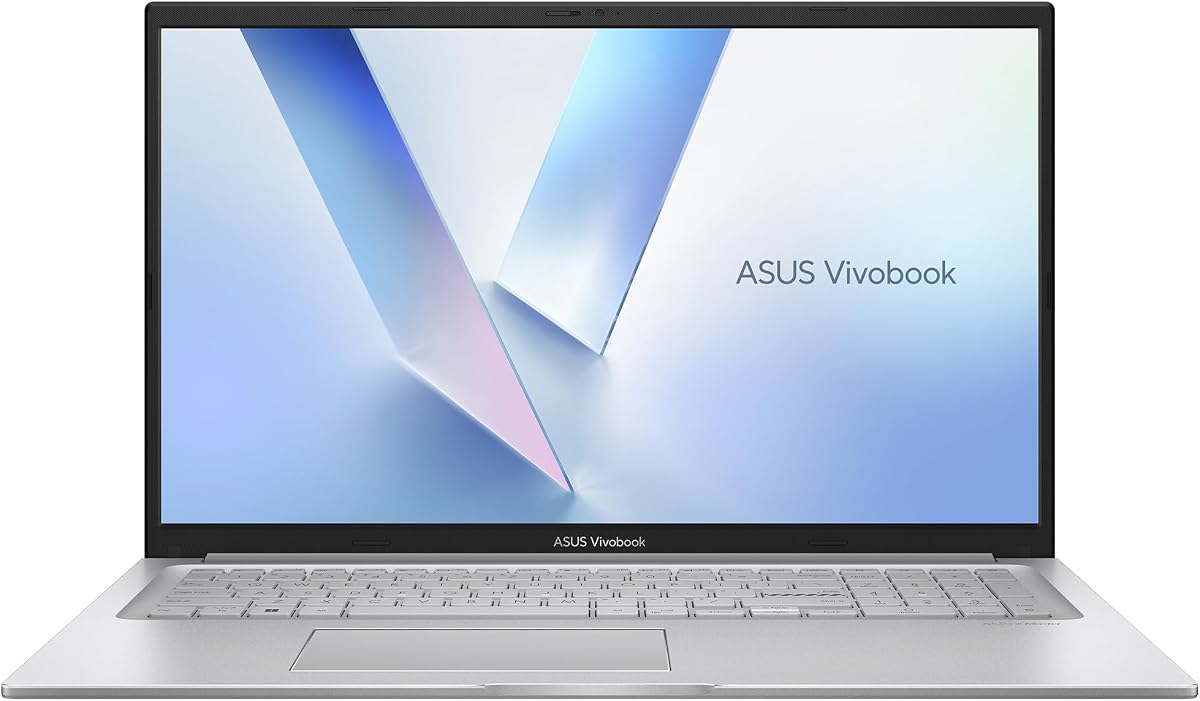
The ASUS Vivobook Go 15.6” FHD Slim Laptop earns a 4.3-star rating for its budget-friendly design. It features an AMD Ryzen 3 7320U processor and 8GB DDR5 RAM for smooth multitasking. The NanoEdge display offers vibrant colors and a 250-nit brightness for clear visuals.
We may earn a commission when you buy through this link, at no additional cost to you.
Its 128GB SSD provides faster memory to run multiple applications at once though storage is limited. The laptop includes military-grade durability and a privacy shutter for security. Sound is crisp with SonicMaster tuning and an array microphone for calls.
While it is great for basic browsing and documents, the limited storage may require cloud solutions or external drives. The integrated graphics are sufficient for video but not for gaming. However, the compact design and fast charging make it ideal for on-the-go use.
This laptop is best for students or home users needing a simple device for essential tasks. The 180° hinge and ErgoSense keyboard improve usability. With comprehensive ports and Wi-Fi 5, it connects easily to devices and displays.
Weighing just 3.59 lbs with a 0.70-inch profile it is easy to carry anywhere.
Crisp multi-dimensional sound is delivered by built-in speakers and an array microphone for calls.
We may earn a commission when you buy through this link, at no additional cost to you.
This Vivobook i9 model is a perfect 5.0-star rating for its PCONLINE Customized upgrades. It features an Intel Core i9-13900H processor optimized for Next Gen AI workloads. The customization allows for up to 48GB RAM and 2TB SSD for ultimate storage capacity.
We may earn a commission when you buy through this link, at no additional cost to you.
Its standout qualities include a 14-core powerhouse that delivers elite-level performance for complex simulations. The Physical Webcam Shield and Fingerprint Reader provide strong security. The versatile connectivity hub includes USB Type-C and Type-A ports to eliminate extra dongles.
While the performance is top-notch, the upgrades are handled by PCOnline US and may vary by unit. The backlit keyboard is great for low-light environments. However, users should verify the specific configuration before purchase.
This laptop is best for power users who need maximum flexibility and processing power. The Windows 11 Pro and 3-year coverage on upgrades offer peace of mind. With up to 2TB storage, you have space for your entire digital life.
The i9-13900H delivers elite-level performance that leaves standard laptops behind in complex tasks.
Features a comprehensive I/O suite with USB-C, HDMI, and Type-A ports for flexible setups.
We may earn a commission when you buy through this link, at no additional cost to you.
This Vivobook model rates a 4.1 with 24GB RAM and 1TB SSD. It offers high-bandwidth RAM to smoothly run multiple applications and browser tabs. The 14-inch FHD IPS-level display provides anti-glare visuals for work.
We may earn a commission when you buy through this link, at no additional cost to you.
Its 1TB PCIe NVMe SSD allows for fast bootup and data transfer. The i3-1215U Processor supports basic tasks with up to 4.4 GHz turbo frequency. Windows 11 Home offers a beautiful new design and improved features.
While it is powerful for memory and storage, the i3 processor is not meant for heavy gaming. The compact 14-inch size makes it portable. However, it excels in basic productivity and browsing.
This laptop is best for users needing extensive RAM and storage on a compact chassis. The 3.2 Gen 1 Type-C port ensures versatile connectivity. With stable Wi-Fi 6, it serves daily needs and Android app compatibility well.
24GB high-bandwidth RAM ensures smooth multitasking and browser tab management.
1TB SSD allows for fast bootup and massive data storage.
We may earn a commission when you buy through this link, at no additional cost to you.
This Vivobook 14 scores a 4.8-star rating with Snapdragon X and Copilot+ PC capabilities. It features a 14-inch FHD+ screen for crisp visuals. The 16GB RAM and 512GB SSD ensure smooth multitasking and fast file access.
We may earn a commission when you buy through this link, at no additional cost to you.
Its Qualcomm Adreno GPU ensures efficient computing for AI tools. The Windows 11 Home OS offers the latest features and security. A 1-year warranty covers parts and labor for peace of mind.
While the display is clear, the 14-inch size is small for complex workflows. The Snapdragon chip may face app compatibility limits. However, it is great for portable use.
This laptop is best for those seeking Copilot+ features in a small device. With ample storage and warranty, it serves everyday needs. Its design fits quiet Blue aesthetics.
14-inch FHD+ screen delivers crisp, clear visuals for work and entertainment.
512GB SSD provides fast boot times and generous space.
We may earn a commission when you buy through this link, at no additional cost to you.
This Vivobook 14 Laptop scores a 4.2-star rating with AMD Ryzen AI 7 350 and Copilot+ PC capabilities. It features a stunning WUXGA display with 1920 x 1200 resolution. The AMD Radeon Graphics offer discrete level performance for gaming.
We may earn a commission when you buy through this link, at no additional cost to you.
Its Ryzen AI 7 350 unleashes performance with XDNA NPU and up to 50 TOPS. The 16GB RAM and 512GB SSD allow for multitasking. Windows tools make tasks easier with fast Charge technology.
While the display is immersive, the AI features may require updates to roll out fully. The gaming capabilities are strong but require modern titles. However, it serves content creation well.
This laptop is best for users seeking premium AI and graphics in a 14-inch chassis. With Backlit keyboard and 12 hours of battery life, it is ready for work. The Platinum Gold finish adds a premium touch.
AMD Ryzen AI 7 350 with XDNA NPU delivers up to 50 TOPS for AI processing efficiency.
300-nit sustained brightness and 60Hz refresh rate ensure smooth performance.
We may earn a commission when you buy through this link, at no additional cost to you.
Selecting the right Vivobook requires assessing your specific needs in processing power, memory, and screen size. This guide covers the key factors to help you make an informed decision.
Processors range from Ryzen 3 to Core i9 and Snapdragon X chips. Higher-end models like the i9-13900H handle AI workloads and simulations while basic models suit browsing.
Choose an Intel or AMD chip for compatibility or Snapdragon for battery efficiency.
RAM starts at 8GB and goes up to 48GB on upgraded units. 16GB is the sweet spot for multitasking. Storage typically ranges from 128GB to 2TB SSDs for fast access.
Prioritize 16GB RAM and 512GB SSD for a balanced experience.
Screen sizes range from 14 to 17.3 inches. WUXGA displays offer higher resolution than standard FHD. Brightness and color accuracy vary by model with eye-care certifications on larger units.
Select a 16-inch WUXGA screen for optimal visual balance.
Weight and thickness differ across models. Slimmer units are ideal for travel while larger screens add bulk. Military-grade durability and fast charging are common features.
Look for compact designs if you travel frequently.
Copilot+ PCs and NPU chips enable AI tasks. Wi-Fi 6 and USB-C ports ensure stable connections. Some models include Privacy Shield cameras and fingerprint readers for security.
Check for Wi-Fi 6E and USB-C for modern connectivity.
Most Vivobooks run Windows 11 Home while some Pro units support enterprise features. Android app compatibility is standard. Ensure the OS supports your required software.
Windows 11 is standard for secure and modern computing.
Always use a stable surface for the laptop to maintain thermal performance. Clean the keyboard and screen with a microfiber cloth and avoid abrasive materials to prevent scratches.
Utilize the fast charging features to keep your device ready for mobile use. Regularly update the OS and drivers to ensure optimal AI and security performance.
Store the laptop in a cool, dry place to prolong battery life. Avoid extreme temperatures and physical impacts to preserve military-grade durability over time.
Copilot+ PCs offer AI-enhanced capabilities like Recall and Live Captions. They utilize NPUs to process AI tasks locally, which improves efficiency and privacy. However, features require updates and specific OS versions.
The Vivobook Go 15 offers excellent value with a Ryzen 5 processor and fast charging. It is portable and durable for schoolwork. For more power, the 16-inch WUXGA model is also suitable.
Yes, most models include HDMI ports and USB-C ports for external displays. This allows you to expand your workspace for productivity or media. Check the specific port layout for your chosen model.
Vivobooks are designed for productivity. The integrated graphics handle casual gaming but not high-end titles. For heavy gaming, a dedicated GPU model is recommended.
Battery life varies by model and usage. Premium models with Snapdragon X chips offer multi-day life while standard units last for a day. Fast charging helps quickly top up when needed.
Most models come with a standard manufacturer warranty. Upgraded units like those from PCOnline US offer extended coverage on RAM and SSD. Always check the specific warranty terms before buying.
The Vivobook lineup offers diverse options for every need from budget to premium. The 15 Laptop stands out for AI power while the Go 15 provides best value.
Consider your required RAM and storage capacity. Portability and display quality should also align with your workflow. Select the model that matches your specific use case.
Prices and availability change frequently. Always check current listings to confirm the specs you need. Use this guide to find the perfect Vivobook for your needs.