
ASUS RT-AX1800S Dual Band WiFi 6 Extendable Router
4.3Editor score
WiFi 6 support with MU-MIMO
AiProtection Classic security included
Gaming and streaming optimized
This guide compares ten top ASUS WiFi routers for 2026 evaluating speed coverage security and features to help you choose the perfect network solution for your
Finding the right wireless router is essential for a modern connected home. ASUS offers a wide range of models tailored to different needs from gaming to smart home management. We have selected ten top picks to help you navigate the options.
Our comparison focuses on real-world performance security features and ease of use. We evaluated WiFi standards supported ports and unique technologies like AiMesh and Multi-Link Operation. This ensures every recommendation fits specific connectivity demands.
Each pick highlights key strengths and potential trade-offs for informed decisions. Prices and availability can change frequently so always verify details before purchasing. We hope this guide simplifies your search for the ideal ASUS router.
4.3Editor score

4.5Editor score

4.3Editor score
The following table provides a side-by-side view of the ten selected ASUS routers. It highlights key specifications including wireless standards maximum speeds and unique features to help you compare them efficiently.
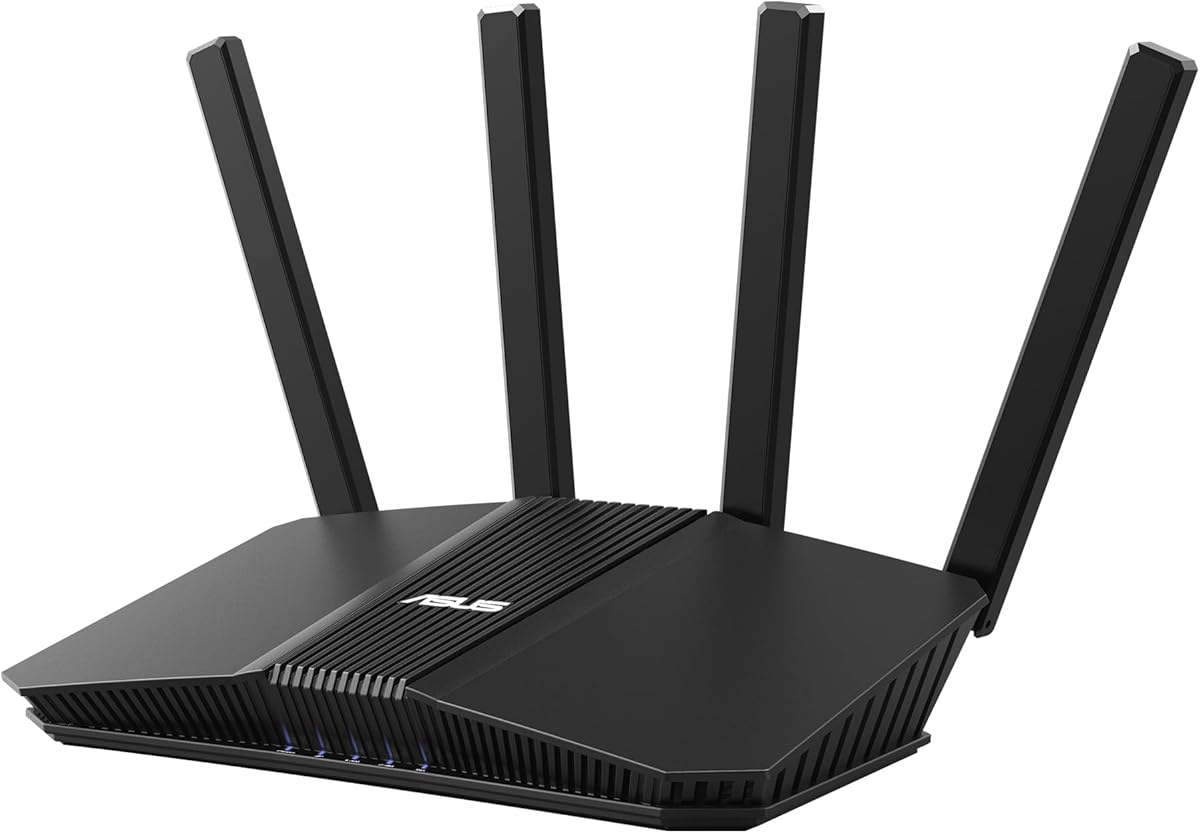

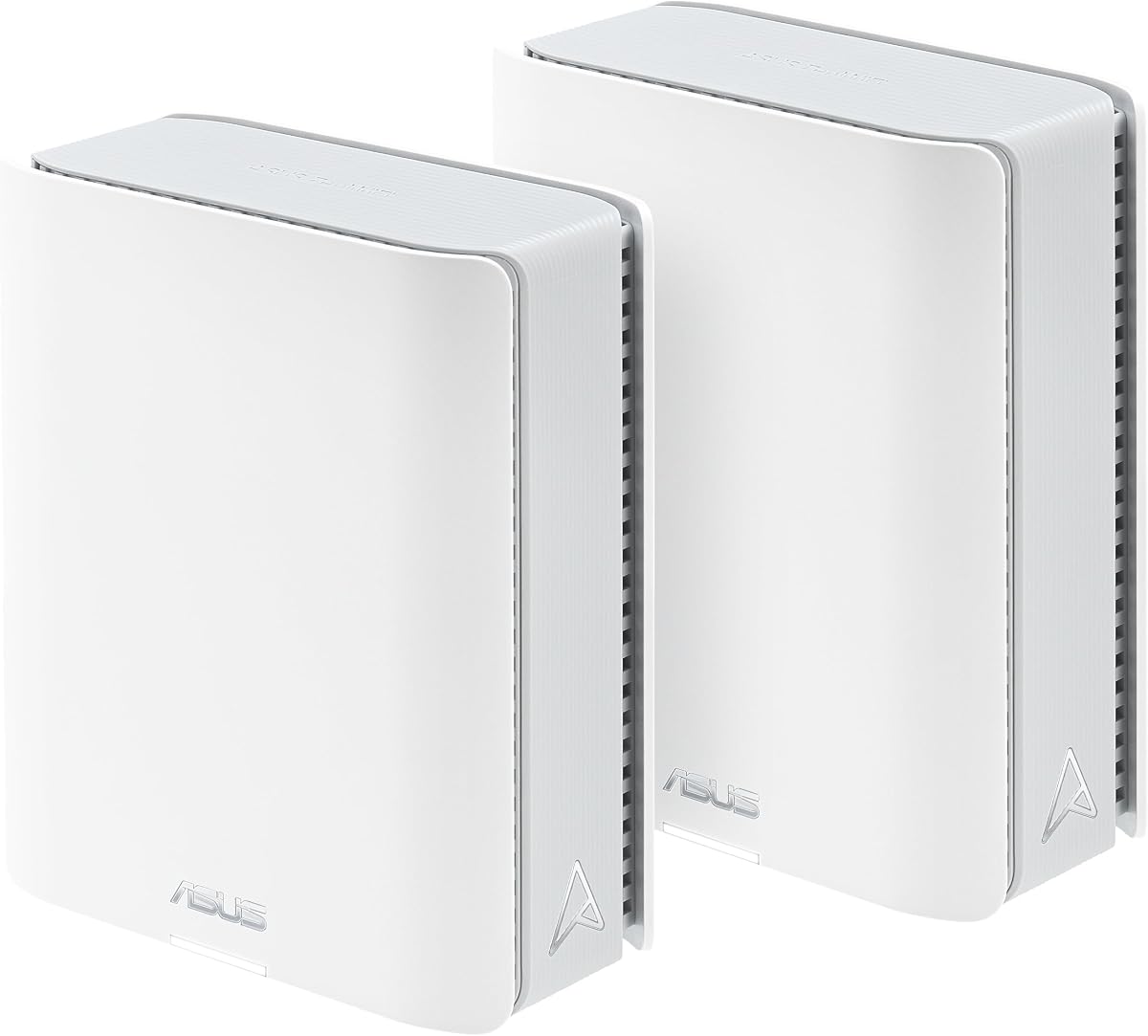



The ASUS RT-AX1800S is a solid entry point into modern networking. It supports the latest WiFi 6 standard which improves efficiency and speed. The rating reflects strong user satisfaction with its reliability and ease of use.
We may earn a commission when you buy through this link, at no additional cost to you.
Key strengths include OFDMA and MU-MIMO technology which help manage multiple devices better. It offers 1024-QAM for faster wireless connections. The built-in AiProtection Classic provides commercial-grade security without extra fees.
While it lacks high-speed ports like 2.5G it covers most home needs well. The four external antennas ensure decent coverage for smaller to medium homes. Its performance is consistent for streaming and gaming tasks.
This router is ideal for users wanting reliable WiFi without overspending. It suits households needing basic to moderate bandwidth usage. The seamless integration with other ASUS routers makes it a flexible starting point for networking.
AiProtection Classic powered by Trend Micro protects all connected devices automatically. This ensures safety without requiring technical expertise or subscriptions.
OFDMA technology allows the router to communicate with multiple devices simultaneously. This reduces congestion and improves overall network performance significantly.
We may earn a commission when you buy through this link, at no additional cost to you.
The RT-BE58U brings cutting-edge WiFi 7 technology to home networks. It delivers speeds up to 3.6 Gbps using 4096-QAM. This model is designed for users seeking future-proof connectivity and advanced features.
We may earn a commission when you buy through this link, at no additional cost to you.
Multi-Link Operation ensures stable connections by linking to multiple bands at once. It offers dual-WAN capabilities for always-on internet through flexible setups. Smart Home Master simplifies device management and setup effectively.
The router supports USB tethering for 4G LTE and 5G connections. This is useful if primary internet fails or is unavailable. The AiProtection Pro security suite adds another layer of safety for all devices.
It suits tech enthusiasts who want the latest wireless capabilities. The setup is straightforward via the intuitive web interface. While new to the market it shows promise for demanding networks.
Multi-Link Operation allows simultaneous use of multiple frequency bands. This enhances stability and throughput for critical applications.
Dual-WAN support helps maintain connectivity even if one source fails. Users can leverage mobile hotspots easily through USB.
We may earn a commission when you buy through this link, at no additional cost to you.
The GT-BE98 Pro stands as a top-tier gaming router for enthusiasts. It supports WiFi 7 with 320MHz channels in the 6 GHz band. Users report excellent performance with zero lag during intense sessions.
We may earn a commission when you buy through this link, at no additional cost to you.
Dual-feeding antennas significantly boost signal strength and coverage range. It offers dual 10G ports for maximum wired connectivity. The Triple-Level Game Acceleration optimizes traffic for PCs to game servers.
Mesh capability ensures the network scales without losing performance. The design is robust and features RGB lighting options. It is built for heavy data loads and multiple high-demand devices.
This router is perfect for competitive gamers and large households. It justifies its cost with raw power and advanced tuning. Buyers should ensure their devices support WiFi 7 to fully utilize it.
Triple-Level Game Acceleration prioritizes gaming traffic end to end. This reduces latency and improves responsiveness.
High-efficiency antennas boost signal strength across large spaces. This minimizes dead zones effectively.
We may earn a commission when you buy through this link, at no additional cost to you.
The RT-BE92U is a robust WiFi 7 option for advanced users. It offers speeds up to 9.7 Gbps with three frequency bands. Its Tri-Band design helps manage heavy traffic without congestion.
We may earn a commission when you buy through this link, at no additional cost to you.
It includes dual WAN ports and USB for mobile tethering. This ensures continuous internet connectivity even if one line drops. The Smart Home Master feature simplifies managing IoT devices efficiently.
AI-driven network detection enhances reliability and performance. The built-in VPN connections are instant and secure. Commercial-grade security is included to protect all household devices.
This router suits smart home owners needing scalable performance. It handles multiple streams and large file transfers well. Users get future-ready technology with practical features for daily use.
Smart Home Master allows easy setup of multiple SSIDs. This helps organize IoT devices securely.
Dual WAN options provide backup internet sources easily. This is vital for uninterrupted work or gaming.
We may earn a commission when you buy through this link, at no additional cost to you.
The ZenWiFi BT10 delivers exceptional coverage for large properties. Its tri-band mesh system reaches up to 6000 square feet. Users appreciate the seamless connectivity across multiple rooms.
We may earn a commission when you buy through this link, at no additional cost to you.
The system uses eight internal antennas for uniform signal distribution. Heat dissipation is optimized to maintain reliability during heavy use. It supports dual 10G WAN and LAN ports for fast wired connections.
It includes Smart Home Master to manage IoT networks efficiently. The system is designed to expand easily with other ASUS routers. Performance remains stable even with dozens of connected devices.
This mesh set is ideal for spacious homes or offices. It ensures no dead zones exist in critical areas. The high-speed ports support modern networking needs effectively.
Eight internal antennas eliminate dead zones in all directions. This ensures consistent signal throughout the property.
The mesh system supports easy expansion with other units. This allows seamless scaling as needs grow.
We may earn a commission when you buy through this link, at no additional cost to you.
The RT-AX82U is tailored for mobile and PC gamers. It provides ultrafast speeds up to 5400 Mbps with WiFi 6. The renewed status offers affordability while maintaining strong performance.
We may earn a commission when you buy through this link, at no additional cost to you.
Mobile Game Mode minimizes lag with a single tap on the app. It also features customizable Aura RGB lighting for aesthetic alignment. AiMesh support allows for flexible whole-home network setups.
Lifetime free AiProtection Pro keeps all devices safe online. Advanced parental controls help manage family internet usage. The design is compact yet powerful enough for heavy streaming.
This router suits gaming households needing fast mobile connectivity. The renewed option provides great value for budget-conscious buyers. It balances performance and style well for modern users.
Mobile Game Mode reduces latency with a simple tap. This enhances the experience for mobile gamers.
Aura RGB lighting lets users align with specific modes. This adds a unique visual touch.
We may earn a commission when you buy through this link, at no additional cost to you.
The ZenWiFi BT8 brings WiFi 7 speeds to medium homes. It covers up to 3000 square feet with one unit. The tri-band design ensures stable connections across different frequencies.
We may earn a commission when you buy through this link, at no additional cost to you.
Seven internal antennas and high-power modules eliminate dead zones. It supports 24/7 end-to-end protection automatically. IoT Network setup is easy with Smart Home Master SSIDs.
The AI-powered AiMesh helps expand coverage seamlessly. Users can easily add compatible routers as needed. The setup process is straightforward for most households.
This mesh node is great for mid-sized apartments or homes. It offers modern features without excessive complexity. It balances performance and ease of use effectively.
Seven internal antennas ensure coverage in all directions. This prevents weak signal areas effectively.
Commercial-grade security runs 24/7 automatically. This keeps devices safe without manual intervention.
We may earn a commission when you buy through this link, at no additional cost to you.
The RT-AX3000 is a reliable all-rounder for most users. It offers next-gen WiFi 6 speeds up to 3000 Mbps. Its high rating comes from consistent performance over time.
We may earn a commission when you buy through this link, at no additional cost to you.
The router supports 160MHz channels for faster data transfer. It includes AiProtection Pro to secure all connected devices. AiMesh compatibility lets you build a seamless network easily.
Adaptive QoS ensures bandwidth is used efficiently. This helps prioritize gaming or streaming needs without manual setup. The design is compact enough for any living space.
This router is perfect for families needing stable internet. It balances speed and security without complexity. Many users find it meets all their daily connectivity needs.
160MHz bandwidth allows for significantly faster data speeds. This prepares your network for upcoming standards.
AiMesh compatibility enables smooth whole-home coverage. This removes the need for separate extenders.
We may earn a commission when you buy through this link, at no additional cost to you.
The RT-AC68U remains a trusted choice for stable connectivity. It supports the AC standard with speeds up to 1900 Mbps. Users report high satisfaction with its longevity and performance.
We may earn a commission when you buy through this link, at no additional cost to you.
A 1GHz dual-core CPU helps with smart multitasking. It offers five Gigabit LAN ports for wired connections. Advanced parental controls allow precise management of family internet use.
The web-based interface is intuitive for quick setup. Monitoring via mobile apps is easy and convenient. AiProtection Pro provides multi-stage threat detection effectively.
This router is suitable for traditional home office setups. It is robust enough for basic streaming and browsing needs. It is a solid pick for those prioritizing stability over new features.
Dual-Core CPU handles multiple network tasks smoothly. This ensures stable performance under load.
Advanced parental controls manage internet usage precisely. This helps maintain healthy digital habits.
We may earn a commission when you buy through this link, at no additional cost to you.
The ExpertWiFi EBR63 is designed specifically for business environments. It offers customizable guest portals for professional branding. Users value the separation of traffic for different use cases.
We may earn a commission when you buy through this link, at no additional cost to you.
It supports up to five SSIDs to prioritize devices. Remote management via the ExpertWiFi app simplifies maintenance. The router includes VLAN support for network segmentation.
Enterprise-grade security comes with a free subscription. This protects against threats without extra costs. Backup WAN via USB ensures connectivity remains stable always.
This router suits small to medium businesses needing control. It scales easily if more access points are needed. The features are tailored for professional reliability and safety.
Custom guest portals let businesses match their brand style. This enhances customer experience.
Up to five SSIDs separate devices for scenarios. This ensures secure and prioritized usage.
We may earn a commission when you buy through this link, at no additional cost to you.
Selecting the right ASUS router involves considering several key factors to ensure optimal performance and longevity for your specific needs.
Modern routers support WiFi 6 or WiFi 7 which offer higher throughput and better device management. If you have many smart devices or stream 4K content regularly choose models with higher speeds like 3000 Mbps or more.
Look for specifications like 160MHz bandwidth or 4096-QAM to ensure faster data transfer rates.
The size of your home determines how much coverage you need. Single units cover about 3000 square feet while mesh systems can reach 6000 square feet or more. Large homes may require multiple nodes to eliminate dead zones.
Consider the number of external antennas and signal boosting technology when evaluating range capabilities.
Check the available LAN and WAN ports to connect wired devices. Most models include Gigabit Ethernet but premium gaming routers may offer 2.5G or 10G ports. USB ports are useful for file sharing or mobile tethering.
Ensure there are enough physical ports for your printers consoles or computers.
Built-in security like AiProtection Pro helps protect against threats without extra software. Look for routers that include parental controls and VPN support. These features add layers of protection for all devices on the network.
Verify if security subscriptions are included for life or require renewal.
Gamers should look for dedicated game acceleration modes and low latency settings. Tri-band routers often provide better performance for competitive gaming by dedicating a band solely to gaming traffic.
Models with RGB lighting or specific gaming optimizations cater to enthusiasts.
If you plan to expand your network later check if the router supports AiMesh. This allows you to add compatible units seamlessly without changing your network name or password.
Mesh systems are ideal for eliminating dead zones in multi-story homes.
User-friendly interfaces and mobile apps simplify the initial configuration. Most modern routers offer guided setup wizards for quick implementation.
Choose models with intuitive dashboards for ongoing management and monitoring.
Businesses may need VLAN support guest portals and remote management tools. Routers like the ExpertWiFi series offer these specialized capabilities.
Evaluate if SDN support or custom branding options are necessary for your work environment.
Start by plugging the router into a power source and connecting it to your modem. Use a computer or mobile device to access the router admin page using the default address printed on the bottom.
Follow the setup wizard to create a new admin password and WiFi network name. Enable WPA3 security if available to ensure your network is protected from unauthorized access.
Place the router in a central elevated location away from walls or metal objects to maximize signal range. Periodically update the firmware through the admin dashboard to keep performance optimal.
WiFi 6 offers faster speeds and better handling of multiple devices compared to older standards. WiFi 7 takes this further with even higher bandwidth and advanced features like Multi-Link Operation for better stability. If you want future-proofing choose a model supporting the latest standards.
Yes a mesh system is ideal for large spaces over 3000 square feet to ensure consistent coverage. Single routers often struggle with dead zones in multi-story buildings. Mesh units work together to provide seamless connectivity throughout the entire property.
AiMesh lets you combine multiple ASUS routers into one unified network easily. This allows you to expand coverage by adding units without managing separate networks. It ensures a seamless roaming experience as you move around your home.
Parental controls let you manage internet access for specific devices and users. You can set schedules block content and view usage reports easily through the app. This helps ensure safe and healthy internet habits for family members.
Yes ASUS offers specific models with features like Game Acceleration and low latency optimization. These routers prioritize gaming traffic to reduce lag. If you play competitive games online look for models with dedicated gaming ports.
Log into the router admin page and navigate to the firmware update section. You can check for updates manually or enable automatic updates for convenience. Regular updates ensure security patches and performance improvements are applied.
We reviewed ten top ASUS routers offering options from budget friendly to premium high-performance models. Each brings unique strengths whether you need gaming power business security or whole-home coverage.
Prioritize features like WiFi standards and port types based on your household size and usage patterns. A router that fits your needs today will serve you well for years to come.
Always check current availability and pricing before purchasing as offers can change quickly. We hope this guide helps you find the perfect ASUS router for your home.