
RJ45 to VGA Cable VGA 15-Pin Port Female&Male to RJ45 Female Cat5/6 Ethernet LAN Console for Multimedia Video(15CM/6Inch) 2Pack
4.3Editor score
Compact 6-inch adapter design
No external power required
Saves money on cabling
This guide compares the top Cat5 to VGA Converter options available in October 2026, evaluating performance, range, and reliability for extended video
Extending video signals over long distances often requires specialized hardware to maintain clarity and stability. A Cat5 to VGA Converter allows you to use standard network cables for video transmission, reducing costs and installation complexity significantly.
We analyzed ten highly rated products based on user feedback, technical specifications, and real-world performance metrics. Our comparison highlights key differences in range, build quality, and compatibility to help you make an informed decision for your setup.
Each selection below showcases distinct strengths whether you need budget-friendly adapters or professional-grade extenders. Prices and availability fluctuate regularly, so verify current details before purchasing to ensure you get the best value today.
4.3Editor score

4.3Editor score

4.7Editor score
The following table provides a side-by-side comparison of all ten selected products, highlighting their primary specifications and intended use cases to facilitate easier selection.



This VGA Cat5e Cat6 Extender offers a robust solution for extending video signals over long distances using standard Ethernet cables. With a strong rating of 4.3 stars, it is praised for its reliable performance in various professional environments.
We may earn a commission when you buy through this link, at no additional cost to you.
The unit features imported chips that ensure the input and output signals remain identical, preserving high-fidelity quality. Its galvanized alloy shell provides protection against lightning, dust, and static while ensuring rapid cooling during extended use.
Users should note that optimal performance depends on using pure copper Cat5e or Cat6 cables. While it supports resolutions up to 1920×1080, older VGA wireless connection limitations may affect compatibility with some modern displays.
Ideal for offices, educational institutions, and entertainment platforms, this extender helps save time and money by reducing the need for bulky video cabling. It is a solid choice for those needing reliable long-distance video transmission.
The galvanized alloy shell ensures the device is lightning-proof, dust-proof, and anti-static, which is crucial for environments with high electrical activity or dust exposure.
By using Cat5e or Cat6 cables, you can extend VGA image and audio signals simultaneously up to 100 meters or 328 feet without signal degradation.
We may earn a commission when you buy through this link, at no additional cost to you.
This VGA to RJ45 extender adapter allows you to connect two devices with VGA interfaces through Cat5e or Cat6 cables effectively. It holds a 4.2 rating for its efficient performance in extending video signals up to 60 meters.
We may earn a commission when you buy through this link, at no additional cost to you.
The built-in chip ensures high-speed point-to-point output, eliminating ghosting and noise without quality loss. The device is small in size with a high hardness metal body, ensuring a long service life in professional settings.
It is important to note that this extender does not support audio transmission, which might be a limitation for multimedia setups. Additionally, the TX transmitter and RX receiver must be used in pairs to function correctly.
Widely compatible with HDTV, set-top boxes, and projectors, this product is suitable for large conference centers or family hotels. It offers a practical solution for reducing costs by using network cables instead of super long VGA cables.
The built-in chip eliminates ghosting and noise without quality loss, ensuring that the input and output are exactly the same for clear video display.
Supports resolutions like 480i/p, 576i/p, 720p, and 1080i/p, making it versatile for various multimedia devices including DVD players and HDPCs.
We may earn a commission when you buy through this link, at no additional cost to you.
The Jaremite VGA Over Ethernet extender offers high-resolution support up to 1920 x 1440 at 60Hz, making it a strong contender for detailed displays. It uses a high-quality galvanized alloy shell for protection and cooling.
We may earn a commission when you buy through this link, at no additional cost to you.
To ensure optimal performance, the sender and receiver must be connected to charging power and shielded Ethernet cables should be used. The device supports point-to-point output using pure copper Cat5e or Cat6 cables.
While it supports audio signals, you must connect a DC3.5 audio cable separately between the sender and receiver. Users should also tighten VGA cable interfaces to prevent screen flickering during operation.
This extender supports all operating systems and can be used with monitors, projectors, or televisions in KTV or stage demo environments. Its plug-and-play design makes it easy to operate without installation programs.
High-quality imported chips ensure that the signal is high-fidelity, bringing HD picture quality and effective common mode noise suppression.
Using Low-E and environmental protection technology, this device can work for 24 hours continuously, ensuring a long life for professional applications.
We may earn a commission when you buy through this link, at no additional cost to you.
This RJ45 to VGA cable adapter set is an economical choice for users needing short-distance signal extension. With two adapters per pack, it is designed to transmit VGA signals over network cables efficiently.
We may earn a commission when you buy through this link, at no additional cost to you.
It requires no external power and is easy to use, simply connecting the VGA female to RJ45 female and VGA male to RJ45 female ends. This setup helps save money by using a CAT5 cable versus a bulky VGA cable.
Users should keep in mind that these adapters are recommended for distances between 1 and 15 meters. Beyond this range, signal integrity might degrade due to the lack of active signal boosting hardware.
Perfect for small offices or home setups where running thick VGA cables is difficult, these adapters make running cables easier due to the thinner RJ45 connectors. They are ideal for converting ports to connect computers or monitors.
The RJ45 being thinner than standard VGA cables makes running cables easier and saves space in tight areas behind desks or monitors.
By allowing the use of standard network cables for short video runs, these adapters help reduce material costs compared to purchasing long VGA cables.
We may earn a commission when you buy through this link, at no additional cost to you.
The chenyang 2 Pack RJ45 to VGA Adapter is designed to extend VGA video signals using standard network cables. It offers a simple solution for those needing to connect devices over short distances without additional power sources.
We may earn a commission when you buy through this link, at no additional cost to you.
These adapters allow you to use CAT5 CAT6 cables to extend VGA video signals up to 1-10 meters. The thin RJ45 connectors make laying cables easier in crowded environments where space is limited.
It is critical to understand that this device only uses the network cable as a transmission medium and cannot convert network signals to VGA. You need two adapters to connect the source device to the monitor effectively.
Best for basic setups requiring short-distance extension, these adapters do not require external power supply. They are suitable for monitoring systems or simple video connections where high bandwidth is not required.
The thin RJ45 connectors make laying cables easier, which is beneficial when dealing with tight spaces or multiple cable runs in a room.
Since it does not require external power supply, installation is straightforward without needing to find additional power outlets near your devices.
We may earn a commission when you buy through this link, at no additional cost to you.
The StarTech VGA Over Cat5 Extender is a premium choice designed for professional environments requiring reliable long-distance video transmission. It supports crystal-clear pictures with resolutions up to 1920×1200 at 150 feet.
We may earn a commission when you buy through this link, at no additional cost to you.
This product comes in a bundled kit with a local transmitter, remote receiver, VGA cable, and mounting brackets. This makes installation easier as you have all necessary components included in the box.
It is designed to be a purely hardware solution, allowing you to cast video over RJ45 ethernet without the need of additional software or drivers. This simplifies deployment in complex industrial or trade show settings.
Ideal for digital signage, tradeshow displays, or extending displays in harsh environments, this extender is extremely versatile. Its high performance makes it a worthwhile investment for critical visual installations.
Don't compromise on picture quality; this extender enables you to enjoy a crisp, clear picture with high resolution support even at long distances.
Project digital signage, optimize tradeshow displays, and extend your display in harsh industrial environments with this versatile VGA video extender.
We may earn a commission when you buy through this link, at no additional cost to you.
The QVS VB-C5 Extender Kit provides a robust solution for extending VGA/UXGA signals over CAT5/RJ45 connections up to 100 meters. It features a Sync-Filter for signal level adjustment and equalization.
We may earn a commission when you buy through this link, at no additional cost to you.
Supports maximum resolution of 1600 X 1200 at 60Hz for up to 50 meters and 1024 X 768 up to 100 meters. This flexibility allows it to adapt to different display requirements based on distance.
The kit includes regular RJ45 port connections for easy integration into existing network structures. It is compliant with RoHS, FCC and CE standards, ensuring safety and regulatory compliance in various markets.
Ideal for professional setups requiring stable signal transmission over 100 meters, this kit ensures high performance with minimal setup complexity. It is a reliable choice for environments where signal integrity is crucial.
Sync-Filter provides CAT5e/6 signal level adjustment to maintain consistent video quality over long cable runs.
Supports maximum resolution of 1600 X 1200 at 60Hz for up to 50 meters and 1024 X 768 up to 100 meters.
We may earn a commission when you buy through this link, at no additional cost to you.
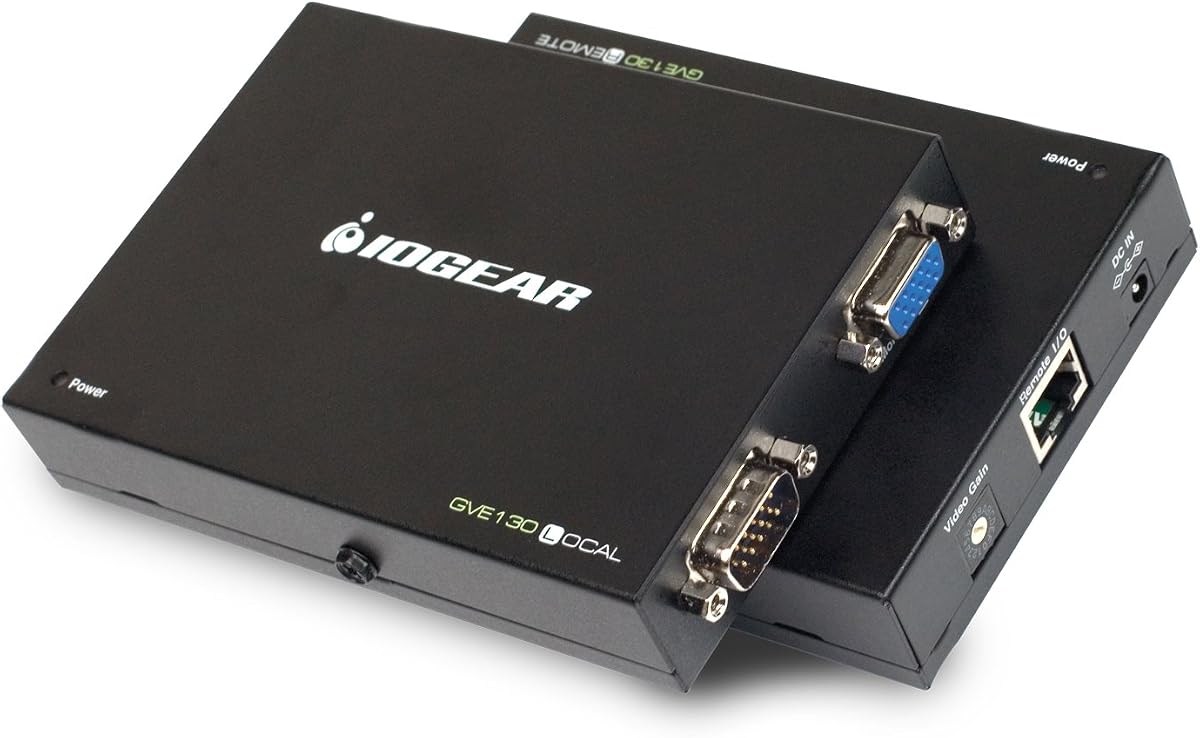
The IOGEAR VGA CAT5e/6 Extender Kit supports VGA, SVGA, XGA, SXGA and multisync monitors with high-resolution video. It works with PC, Mac, Sun, and Linux systems for broad compatibility.
We may earn a commission when you buy through this link, at no additional cost to you.
It offers video transmission up to 1280 x 1024 from 500ft away, making it suitable for large rooms or auditoriums. The 16 position adjustable video gain control allows you to optimize signal strength manually.
Supporting DDC for the local monitor ensures accurate display settings can be communicated between devices. This feature helps in maintaining consistent image quality across different setups and configurations.
Best for environments requiring multiplatform support and adjustable gain, this kit provides a reliable way to extend video signals over long distances. It is a strong choice for technical setups involving various operating systems.
Multiplatform support includes PC, Mac, Sun, and Linux systems, ensuring flexibility in diverse computing environments.
16 position adjustable video gain control allows you to fine-tune the signal strength for optimal performance over distance.
We may earn a commission when you buy through this link, at no additional cost to you.
The Halokny VGA Extender Over Ethernet Adapter allows you to transmit signals between VGA video ports over CAT5 CAT6 RJ45 network cables easily. It is ideal for computer DVR media center and game console setups.
We may earn a commission when you buy through this link, at no additional cost to you.
It transmits signals up to 100 feet, connecting personal media devices to a larger system like a monitor for better viewing. The adapter connects VGA 15 Pin Male to RJ45 Female for standard network compatibility.
Since it comes as a 2-Pack, you get the necessary adapters to link both ends of your connection. This makes it convenient for home users needing a quick solution to connect media devices to monitors.
Perfect for extending the display device without running long VGA cables, this adapter helps connect your personal media devices to larger systems. It simplifies cabling in media centers or gaming setups.
Suggested for DVR and game consoles, it helps connect personal media devices to a larger system for the ultimate viewing experience.
The adapter is VGA 15 Pin Male to RJ45 Female, allowing direct connection between your VGA ports and network cables.
We may earn a commission when you buy through this link, at no additional cost to you.
This VGA Extender Over CAT5e/6 offers extended range transmission up to 394ft without repeaters. It provides zero latency performance for uncompressed real-time transmission, suitable for gaming and live events.
We may earn a commission when you buy through this link, at no additional cost to you.
Integrated audio support allows independent audio transmission to remote displays or speakers without extra cabling. This includes built-in 3.5mm stereo audio in/out on both transmitter and receiver units.
It supports solid copper Cat6 cables for full 394ft range and warns against CCA cables beyond 200ft. The aluminum alloy housing provides heat dissipation and durability for continuous 24/7 operation.
Ideal for large control rooms security centers and auditorium projections, this kit includes transmitter receiver power adapters and manual. It is a robust solution for professional setups needing long-distance video and audio.
Uncompressed real-time transmission delivers 1080p@60Hz perfectly synchronized with the source with no perceptible delay.
Built-in 3.5mm stereo audio in/out allows independent audio transmission to remote displays or speakers without extra cabling.
We may earn a commission when you buy through this link, at no additional cost to you.
Selecting the right converter requires considering factors like range resolution and audio support to match your specific setup needs.
Consider how far you need to run the signal before purchasing. Most extenders support 100 to 300 feet but some premium models go beyond 300 feet. Always check the cable quality requirements to maintain signal integrity.
Choose a unit that matches your room size or facility layout to avoid signal degradation.
Ensure the converter supports the resolution of your source and display. Some units support up to 1920×1080 while others support 1024×768 or 1600×1200. Lower resolution support may limit your display options significantly.
Select a model that supports your target resolution at your intended distance.
Not all extenders support audio alongside video. Check if the device has built-in audio jacks or separate cables. If audio is needed, ensure you have the right ports for speakers or headphones.
Prioritize units with integrated audio if you need synchronized sound.
Verify whether the converter requires Cat5e Cat6 or solid copper cables. Some cheaper cables may cause signal loss at long distances. Using the wrong cable type can result in poor video quality.
Use solid copper cables for the best performance and reliability.
Some adapters operate without external power but others need DC adapters for long runs. Consider access to power outlets when installing the units. Plug and play devices are easier to install in remote locations.
Choose a power setup that fits your installation environment.
Look for metal or alloy shells that offer better durability and heat dissipation. Industrial environments require robust devices that can withstand continuous operation. Avoid plastic housings if you need long-term reliability.
Invest in higher quality construction for professional use.
Ensure the device supports your operating systems such as Windows Mac or Linux. Also check compatibility with projectors monitors or game consoles. Some units have drivers or software requirements.
Verify device compatibility before purchasing to avoid integration issues.
Cost varies significantly between basic adapters and full extender kits. Basic adapters are affordable but kits may include cables and power supplies. Determine if you need just the adapter or a complete solution.
Balance your needs with the available budget to find the best value.
Connect the transmitter to your video source using a VGA cable and the receiver to your monitor. Ensure both units are powered if required.
Use high-quality shielded Ethernet cables to connect the transmitter and receiver for stable signal transmission.
Keep devices in well-ventilated areas to avoid overheating and clean them regularly to maintain performance.
Some extenders support audio but others do not. Check the product specifications for audio jacks or separate cables. Integrated audio support is available on select models.
Use solid copper Cat5e or Cat6 cables for best results. Avoid copper-clad aluminum cables as they may cause signal loss at longer distances. Quality matters for consistent performance.
Some adapters operate without external power but extenders need DC adapters for long runs. Check the product details to determine if power is required for your setup.
Resolution varies by model with some supporting up to 1920×1080 or 1600×1200. Always verify the supported resolution in the product specs before purchasing to match your display needs.
Yes many extenders support real-time transmission suitable for gaming. Look for zero latency features to ensure smooth gameplay on remote displays or projectors.
Connect the transmitter to the source and receiver to the display using VGA cables. Link them with an Ethernet cable and power them on. Most kits are plug and play.
Flickering can occur if the VGA cable interface is loose or cables are not shielded. Ensure connections are tight and use high-quality shielded Ethernet cables for stability.
Most units support PC Mac and Linux systems. Always verify platform compatibility with the manufacturer to ensure it works with your specific Mac setup.
The top picks include the VGA Cat5e Cat6 Extender for overall reliability, the RJ45 to VGA Cable for budget needs, and the 394FT extender for premium range.
Prioritize range resolution and audio support based on your specific setup to ensure you select the right model for your needs.
Check current prices and availability on the linked pages before buying as offers change regularly and inventory varies.