
Thermalright Assassin X120 Refined SE
4.7Editor score
Four heat pipes with AGHP technology
Low noise operation at 25 dB
Wide socket compatibility included
This guide compares the top CPU Air Cooler Fan Heatsink models for performance, noise, and compatibility to help you choose the right cooling solution for your
Selecting the right cooling solution is critical for maintaining system stability and longevity. A high-quality CPU Air Cooler Fan Heatsink ensures your processor operates within safe temperature ranges even under heavy workloads.
We evaluated ten top-rated models based on thermal efficiency, build quality, noise levels, and socket compatibility. Each product was reviewed against industry standards to provide you with reliable and actionable purchasing information.
Each pick highlights specific strengths such as budget value, premium performance, or compact design. Please note that prices and availability can change rapidly, so verify current details before finalizing your purchase decision.
4.7Editor score

4.8Editor score

4.8Editor score
The following table provides a side-by-side comparison of all ten selected models highlighting key specifications such as heat pipe count fan type and compatibility to simplify your selection process.
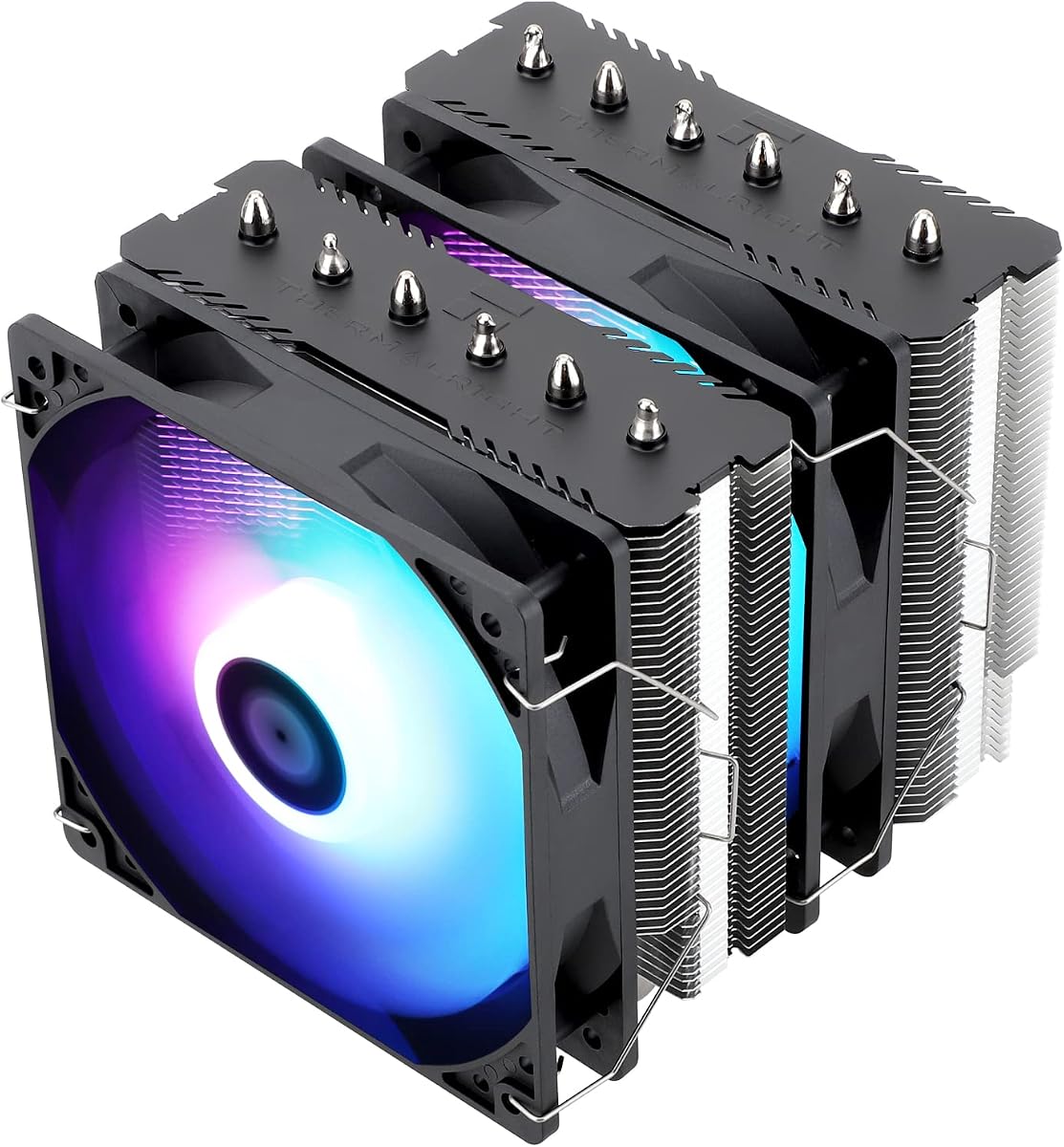


The Thermalright Assassin X120 Refined SE stands out as the top budget choice for CPU Air Cooler Fan Heatsink solutions. With a 4.7 rating it delivers reliable cooling without breaking the bank.
We may earn a commission when you buy through this link, at no additional cost to you.
It features four heat pipes using AGHP technology to ensure consistent performance regardless of orientation. The TL-C12C PWM fan operates quietly at 25 dB while maintaining efficient airflow.
The single tower design may limit maximum TDP handling compared to dual tower models but is perfectly adequate for standard gaming and productivity workloads.
This cooler is ideal for budget builders seeking quiet and efficient thermal management. We highly recommend it for those needing a no-nonsense cooling solution.
Despite its low cost this unit provides cooling performance that rivals more expensive options.
The PWM fan adjusts speed automatically to balance noise and cooling requirements.
We may earn a commission when you buy through this link, at no additional cost to you.
The Thermalright Peerless Assassin 120 SE ARGB offers premium features like dual tower cooling and ARGB lighting. Its 4.7 rating reflects strong thermal capabilities and build quality.
We may earn a commission when you buy through this link, at no additional cost to you.
Six heat pipes with AGHP technology ensure efficient heat dissipation. The dual TL-C12C-S PWM fans provide excellent airflow while keeping noise levels low.
The ARGB lighting adds visual appeal and can be synchronized with other components. This cooler handles high TDP processors effectively for demanding workloads.
Ideal for gamers and enthusiasts who want high performance and aesthetics. It delivers top-tier thermal management at a competitive price point.
The dual tower design maximizes surface area for better heat dissipation.
ARGB fans allow customization to match your system theme.
We may earn a commission when you buy through this link, at no additional cost to you.
The Noctua NH-D15 chromax.Black remains the gold standard for air cooling performance. With a 4.8 rating it combines top-tier thermal capabilities with quiet operation.
We may earn a commission when you buy through this link, at no additional cost to you.
Its dual tower design with six heat pipes rivals many liquid coolers. The NF-A15 140mm fans are renowned for efficiency and low noise levels.
Included NT-H1 thermal paste and SecuFirm2 mounting system simplify installation. The six-year warranty provides excellent peace of mind for users.
We recommend this for overclockers and silent enthusiasts. It delivers unmatched cooling performance and reliability for demanding systems.
Performance is comparable to expensive AIO liquid cooling solutions.
Fans maintain low noise even under heavy load conditions.
We may earn a commission when you buy through this link, at no additional cost to you.
The Noctua NH-U12A chromax.Black combines compact design with top performance. With a 4.8 rating it offers excellent cooling and compatibility for most cases.
We may earn a commission when you buy through this link, at no additional cost to you.
It features dual NF-A12x25 120mm fans that deliver superior airflow in a standard 120mm form factor. This design ensures efficient thermal management without excessive bulk.
The cooler fits most tower cases and avoids overhang issues for RAM or PCIe slots. It supports a wide range of modern Intel and AMD platforms.
Ideal for users needing high performance without a massive dual tower. It provides reliable cooling for standard and moderate overclocking workloads.
Delivers cooling power comparable to larger dual tower solutions.
Slim design ensures fits in most standard PC chassis.
We may earn a commission when you buy through this link, at no additional cost to you.
The Thermalright Assassin X 120R Digital ARGB stands out with its built-in digital display. With a 4.7 rating it combines unique aesthetics with reliable cooling performance.
We may earn a commission when you buy through this link, at no additional cost to you.
The digital screen displays real-time CPU temperature and usage data directly on the cooler. This provides convenient monitoring without needing software overlays.
It uses a single tower design with four heat pipes to maintain efficient cooling. The TL-P12-S PWM fan ensures quiet operation at 29.8 dB.
Ideal for users wanting a unique look with practical monitoring features. It offers good performance and visual flair for mid-range systems.
Digital display shows vital stats without needing software.
The fan is designed for low noise in gaming systems.
We may earn a commission when you buy through this link, at no additional cost to you.
The Noctua NH-D15 is a legendary choice for CPU Air Cooler Fan Heatsink solutions. With a 4.8 rating it delivers exceptional cooling for demanding users.
We may earn a commission when you buy through this link, at no additional cost to you.
Its dual tower design with six heat pipes ensures efficient thermal transfer. The NF-A15 fans provide maximum cooling while maintaining low noise levels.
It includes premium NT-H1 thermal paste and a robust mounting system. The six-year warranty underscores Noctua's confidence in build quality.
Ideal for overclockers and enthusiasts needing top performance. It remains a top recommendation for reliable thermal management.
Consistently ranks at the top of cooling performance charts.
Fans operate whisper quiet even under heavy load.
We may earn a commission when you buy through this link, at no additional cost to you.
The Noctua NH-D15S chromax.Black offers a symmetrical twist on the classic D15 model. With a 4.8 rating it delivers dual tower performance with better compatibility.
We may earn a commission when you buy through this link, at no additional cost to you.
Its asymmetrical design allows for 65mm RAM clearance without blocking PCIe slots. This makes it ideal for motherboards with limited space.
It uses one high-performance NF-A15 140mm fan for efficient cooling. The build quality matches Noctua's reputation for durability and quiet operation.
Ideal for users needing performance and compatibility. It balances cooling efficiency with the physical constraints of modern PC cases.
Asymmetrical design ensures RAM modules fit without interference.
One large fan delivers cooling power with low noise.
We may earn a commission when you buy through this link, at no additional cost to you.
The Noctua NH-D9L is designed for compact builds needing solid cooling. With a 4.7 rating it offers dual tower performance in a small package.
We may earn a commission when you buy through this link, at no additional cost to you.
At only 110mm height it fits HTPCs and ITX cases easily. The NF-A9 92mm fan ensures quiet operation while maintaining reasonable airflow.
It includes NT-H1 thermal paste and a robust mounting system. The dual tower design provides more surface area than typical single tower coolers.
Ideal for small form factor builds requiring quality cooling. It is a reliable choice for mini-ITX and micro-ATX systems.
Perfect for compact cases without sacrificing cooling performance.
Fans run quietly to keep HTPCs silent.
We may earn a commission when you buy through this link, at no additional cost to you.
The Noctua NH-U12S is a classic single tower cooler for standard systems. With a 4.8 rating it provides reliable cooling and excellent case compatibility.
We may earn a commission when you buy through this link, at no additional cost to you.
Its slim 120mm design avoids overhang on RAM and PCIe slots. The NF-F12 focused flow fan ensures efficient cooling with low noise.
It includes premium NT-H1 thermal paste and the SecuFirm2 mounting system. This ensures a secure and effective installation across supported platforms.
Ideal for users needing a balanced single tower solution. It offers Noctua quality for standard gaming and productivity workloads.
Avoids clearance issues common with large dual tower coolers.
Fan design optimizes cooling efficiency on the heatsink.
We may earn a commission when you buy through this link, at no additional cost to you.
The Thermalright Peerless Assassin 120 SE offers exceptional dual tower cooling. With a 4.8 rating it provides high performance at a competitive price.
We may earn a commission when you buy through this link, at no additional cost to you.
It features six heat pipes with AGHP technology and dual TL-C12C PWM fans. This ensures effective heat dissipation and quiet operation under load.
The asymmetrical layout improves motherboard compatibility without sacrificing performance. It supports a wide range of modern Intel and AMD sockets.
Ideal for budget-conscious users seeking dual tower performance. It delivers cooling power comparable to premium models.
Provides top-tier cooling at a budget-friendly price.
Ensures heat pipes work efficiently in any orientation.
We may earn a commission when you buy through this link, at no additional cost to you.
Choosing the right CPU Air Cooler Fan Heatsink requires balancing thermal performance case clearance and budget constraints to ensure your PC runs efficiently.
Thermal Design Power (TDP) indicates how much heat your cooler can dissipate. Select a cooler rated for your CPU's TDP plus overhead for overclocking.
Ensure the cooler supports the thermal output of your specific processor to maintain stable performance.
Verify that the cooler supports your current motherboard socket such as LGA1700 or AM5. Manufacturers often provide mounting kits for multiple socket types.
Check the product details to confirm your socket is supported before purchase.
Measure your case height and width to ensure the heatsink fits. Many coolers exceed 150mm height which may clash with side panels.
Confirm clearance to avoid installation issues or case incompatibility.
Dual tower coolers may block high-profile RAM or PCIe slots. Look for offset or asymmetrical designs that accommodate these components.
Check cooler dimensions relative to your motherboard layout.
Noise is measured in decibels (dB). Lower dB values indicate quieter operation ideal for silent builds.
Select coolers with PWM fans to adjust noise based on load.
Premium materials like copper heat pipes and aluminum fins ensure durability. A warranty reflects manufacturer confidence in build quality.
Look for reputable brands with strong warranty support.
Installers should check if mounting hardware is included. Some coolers require original motherboard backplates for certain sockets.
Review installation guides to confirm compatibility with your setup.
Prices range from under $20 to over $100. Determine your budget and compare features like fan count and heat pipe count.
Balance cost with the thermal needs of your specific system.
Before installation ensure the CPU surface is clean. Remove any old thermal paste with isopropyl alcohol for proper contact.
Apply thermal paste in a small pea-sized amount at the center of the CPU. This ensures even spread under the cooler base.
Clean dust from fans and heatsink fins regularly using compressed air. This maintains optimal airflow and prevents overheating over time.
Air coolers are generally more reliable and easier to maintain than liquid coolers. They are often sufficient for gaming and standard overclocking without the risk of leaks.
Most quality air coolers operate below 30 dB under load. This is whisper quiet in most environments but may be audible in very quiet rooms.
Thermal paste degrades over time. Reapplication is recommended every few years or if you notice rising temperatures during stress testing.
Some dual tower models may block high-profile RAM. Check product specifications for RAM clearance or look for offset mounting options.
Most modern coolers support both Intel and AMD sockets. However always confirm that your specific socket is included in the mounting kit.
Measure your case height and compare it to the cooler dimensions. Ensure the cooler fits with at least an inch of clearance for airflow.
Yes most CPU coolers include fans. Some models offer optional add-on fans for dual fan configuration for better thermal performance.
Clean your cooler every three to six months depending on environment. Dust buildup reduces efficiency and increases fan noise.
The Thermalright Assassin X120 and Noctua NH-D15 stand out for budget and premium performance. Selecting the right model depends on your specific thermal and spatial needs.
Prioritize clearance and socket compatibility to avoid installation issues. Balance your budget with the performance required for your workloads.
Prices fluctuate regularly so check current listings before buying. Ensure the cooler you choose fits your case and meets your cooling requirements.