Surface Pro 2026 Docking Station
4.2Editor score
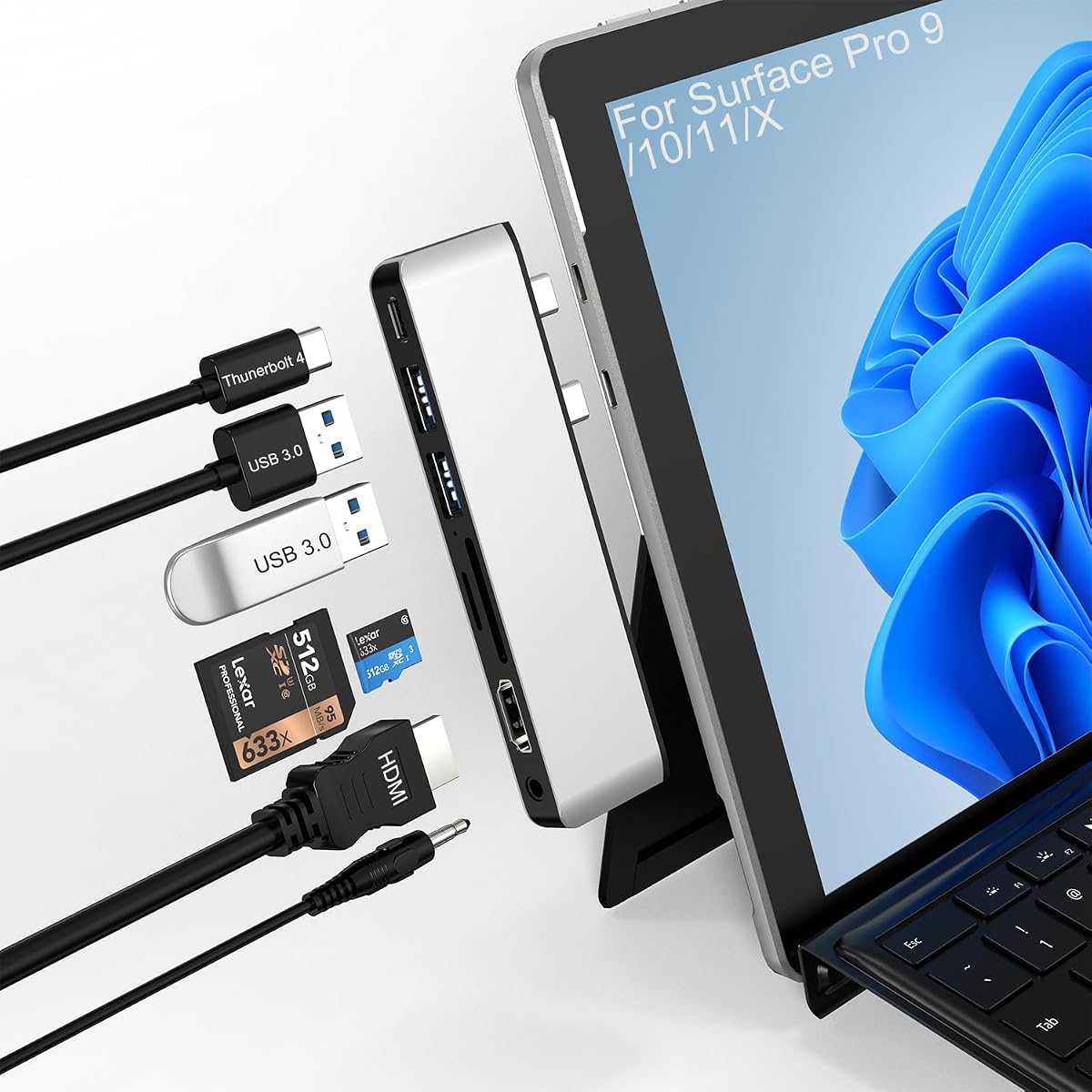
Thunderbolt 4 USB C port
Triple display mode support
Compact aluminum design
This guide compares the top 10 docking stations for Surface Pro 11 to help you choose the best hub for connectivity, charging, and display support.
Finding the right docking station for Surface Pro 11 is essential for turning your tablet into a powerful desktop workstation. A good hub provides multiple ports for monitors, storage, and peripherals while maintaining fast charging and stable connections.
We compared ten highly rated models based on port variety, display support, build quality, and compatibility. Our list covers options ranging from compact travel hubs to full-featured desktop docks with triple display capabilities.
Each pick highlights specific strengths like 4K output, fast data transfer, and reliable power delivery. Prices and availability change frequently so always check the latest offers before making your final purchase decision today.
4.2Editor score
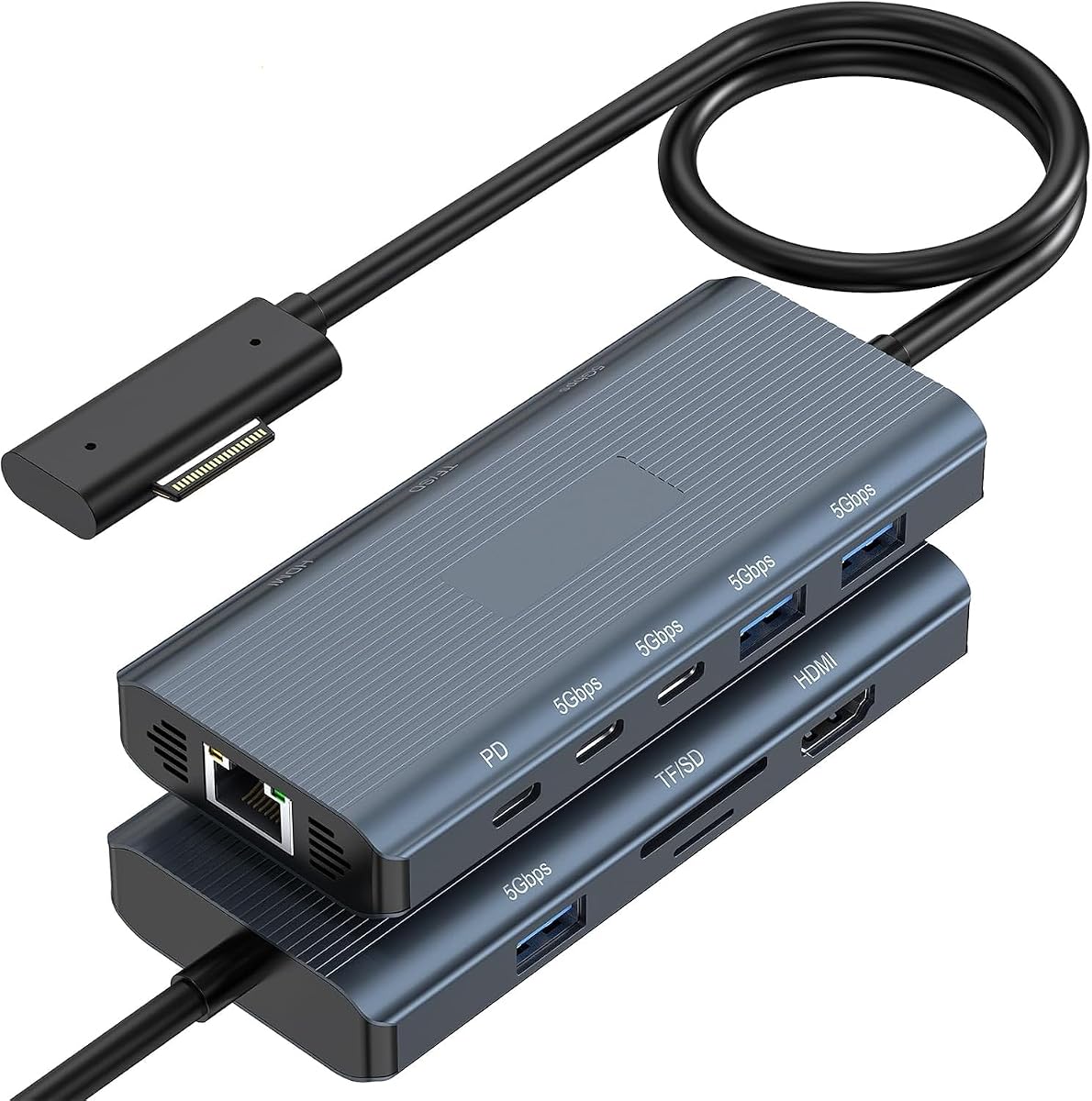
4.8Editor score

4.3Editor score
The following table provides a side-by-side comparison of all ten docking stations reviewed in this guide to help you quickly identify the best fit for your workflow.



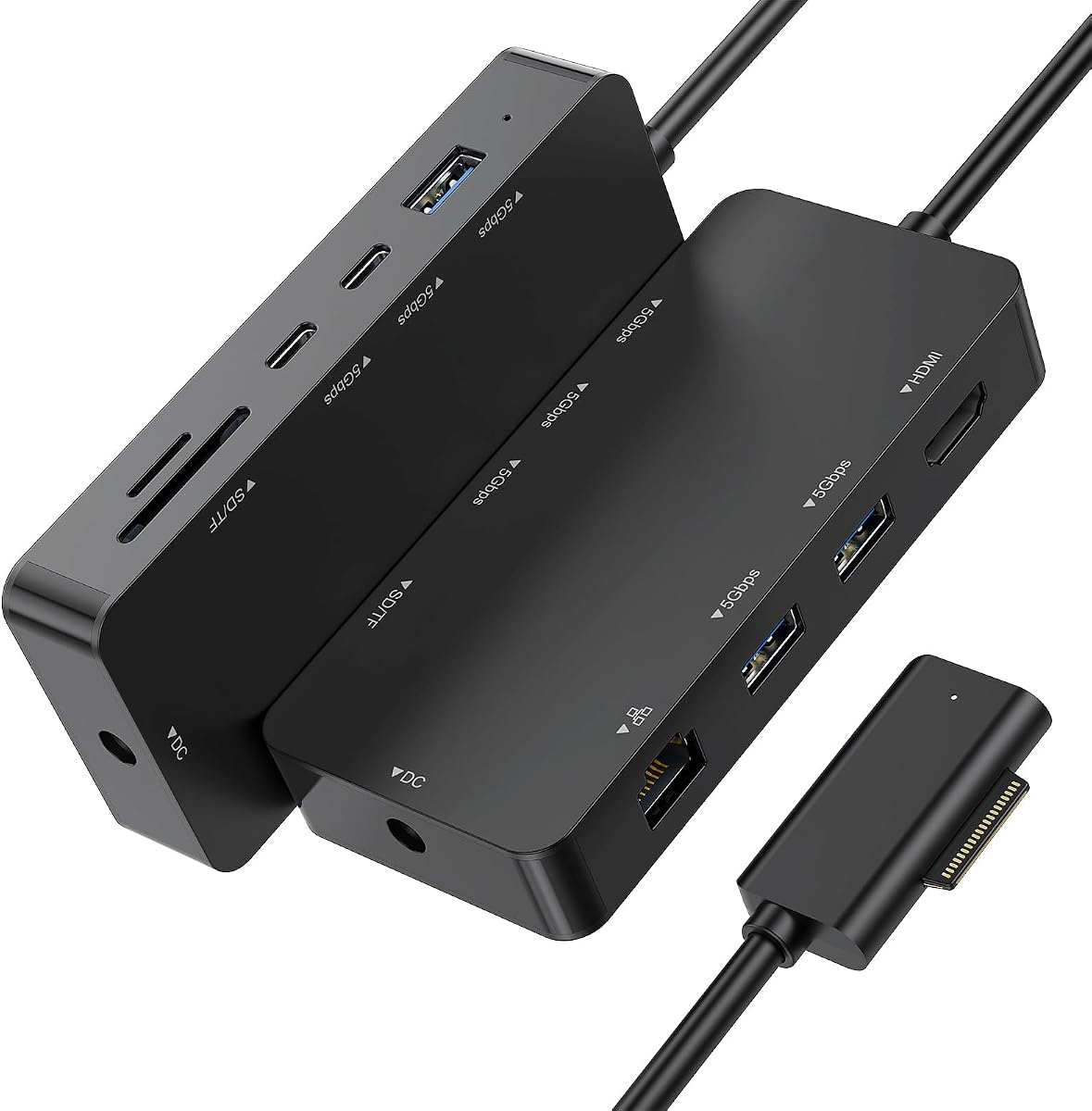
This 11-in-1 dock stands out with its 4K at 60Hz HDMI output and robust port selection. Rated highly by users, it delivers reliable performance for productivity tasks and multimedia needs.
We may earn a commission when you buy through this link, at no additional cost to you.
The inclusion of a 100W PD power input ensures your device charges while docked. You get three USB 3.0 ports and two USB C data ports for fast peripheral transfers up to 5Gbps.
Some users note the need to connect the included power adapter for full functionality. The magnetic surface connector requires careful alignment but provides a secure link to your device.
It is ideal for professionals needing multiple monitors and stable network access. This hub effectively transforms your Surface Pro into a capable desktop workstation with minimal setup.
Enjoy 4K visuals at 60Hz and fast file transfers thanks to the advanced port configuration designed for modern workflows.
With ample USB ports and a Gigabit Ethernet connection this dock supports all your peripherals without cluttering your desk.
We may earn a commission when you buy through this link, at no additional cost to you.
This docking station offers triple display output which is rare in budget friendly hubs. It supports two HDMI and one VGA port for extended workspace configurations.
We may earn a commission when you buy through this link, at no additional cost to you.
The built in SD and TF card slots make it convenient for photographers. You can transfer files quickly while connecting headphones via the 3.5mm jack.
Network speed is limited to 100Mbps which may slow large downloads. Also 4K video runs at 30Hz which is less smooth than 60Hz options.
Choose this if you need three screens on a budget. It provides essential connectivity and power for a versatile mobile office setup.
Connect up to three external displays to maximize your screen real estate for complex multitasking and productivity.
Direct access to SD and TF cards allows quick photo transfers without needing additional adapters or readers.
We may earn a commission when you buy through this link, at no additional cost to you.
This compact hub offers impressive features at a lower cost. The Thunderbolt 4 port enables high speed data and video output simultaneously.
We may earn a commission when you buy through this link, at no additional cost to you.
It supports 4K video via HDMI and a separate Thunderbolt port for a second screen. The aluminum case helps release heat during long sessions.
Using a protective case might block the connection so remove it for best fit. Only one HDMI port limits display options compared to multi HDMI docks.
Best for travelers needing power and speed without bulk. It delivers strong performance for students and professionals on a tight budget.
Utilize Thunderbolt 4 capabilities for blazing fast file transfers up to 40Gbps directly from the hub.
Its light weight and slim profile make it easy to carry in a laptop bag for work on the go.
We may earn a commission when you buy through this link, at no additional cost to you.
This dock supports three external screens to maximize productivity. It uses dual HDMI and VGA ports to create a versatile desktop environment.
We may earn a commission when you buy through this link, at no additional cost to you.
Data transfers are fast with multiple USB 3.0 and USB C ports. The included adapter ensures your device charges while connected to all peripherals.
VGA connections may limit resolution when using multiple displays. It also excludes the 12-inch Surface Pro so verify your model before buying.
Ideal for office workers needing spreadsheets and reference screens. It simplifies your setup with reliable connectivity and power management.
Simultaneous SD and TF card access allows quick transfers of photos and documents without swapping cards.
Multiple USB and video ports handle a wide range of peripherals for a fully functional workstation.
We may earn a commission when you buy through this link, at no additional cost to you.
Designed for creatives this hub handles large file transfers and multiple displays well. It offers 5Gbps speeds on USB ports for quick asset access.
We may earn a commission when you buy through this link, at no additional cost to you.
The 72W power supply keeps your device charged while driving external screens. A 3.5mm audio jack adds convenience for headphones or speakers.
Ethernet speed is limited but sufficient for most office tasks. It requires the power port connection which is standard for high performance docks.
Great for designers needing a clutter free desk setup. It supports your workflow with stable connections and ample peripheral slots.
Fast data transfer speeds ensure your design files move quickly between your device and external drives.
Integrated power and audio ports mean you can charge and listen to media without extra cables.
We may earn a commission when you buy through this link, at no additional cost to you.
This premium dock supports 4K at 60Hz on dual monitors for sharp visuals. It delivers strong performance for traders and designers needing high refresh rates.
We may earn a commission when you buy through this link, at no additional cost to you.
A dedicated 100W adapter charges your device while running multiple peripherals. The Gigabit Ethernet ensures fast stable network connections for large uploads.
It is larger than portable options so fits best on a desk. The cost reflects its high quality components and advanced video features.
Select this for a robust desktop replacement experience. It handles demanding tasks with ease and supports your most critical peripherals.
Dual 4K screens at 60Hz provide fluid motion and crisp text for professional editing work.
Fast Ethernet and powerful charging keep your system ready for intensive online work.
We may earn a commission when you buy through this link, at no additional cost to you.
This hub offers a clean 10-in-1 layout with essential ports for travel. It is compact enough for your bag yet powerful for office use.
We may earn a commission when you buy through this link, at no additional cost to you.
The 65W PD charging keeps your Surface powered during work. Gigabit Ethernet ensures quick downloads while away from home.
Only one HDMI port limits multi-monitor setups significantly. It is better suited for single screen presentations or work.
Perfect for professionals who need reliable connectivity on the road. It balances port count and size effectively for mobile users.
The included adapter ensures you stay charged anywhere without hunting for an outlet.
Plug and play setup means you spend less time configuring and more time working.
We may earn a commission when you buy through this link, at no additional cost to you.
Video editors will appreciate the triple display support for timeline and preview. It allows you to organize windows efficiently across screens.
We may earn a commission when you buy through this link, at no additional cost to you.
SD card slots enable direct offloading from cameras for quick editing. USB ports handle external drives and keyboards without bottlenecks.
Ethernet is limited to 100Mbps which is slower than Gigabit. It sits large on a desk so ensure you have enough space.
Recommended for creatives needing screen real estate and fast storage. It balances display needs with reliable data transfer.
Direct card access and multiple screens streamline the video editing process.
With enough ports to handle all your tools it turns your laptop into a desktop.
We may earn a commission when you buy through this link, at no additional cost to you.
This dock supports three 4K screens at 60Hz for extreme visual performance. It uses HDMI and DisplayPort along with Thunderbolt to achieve this.
We may earn a commission when you buy through this link, at no additional cost to you.
The 120W adapter charges your device and all connected peripherals. Ethernet ensures low latency gaming and video calls.
Setting up three screens can be complex for casual users. It is a powerful tool for advanced technical workflows.
Choose this for high end workstation needs. It pushes the limits of what a Surface Pro can display.
See every detail on three screens simultaneously for precise editing and data analysis.
120W charging handles heavy loads without draining your battery during intensive tasks.
We may earn a commission when you buy through this link, at no additional cost to you.
This hub features a magnetic Surface Connect for secure attachment. It supports 4K at 60Hz for smooth video playback.
We may earn a commission when you buy through this link, at no additional cost to you.
Gigabit Ethernet ensures stable wired internet for streaming. USB ports handle all your essential peripherals easily.
Power adapter is included but check details for specific wattage. It lacks dual HDMI for multi-screen setups.
Great for everyday office and home use. It is reliable and well rated by users for its build quality.
The magnetic cable prevents accidental disconnects and reduces wear on your device ports.
60Hz 4K output makes watching movies and editing videos more enjoyable.
We may earn a commission when you buy through this link, at no additional cost to you.
Selecting the right docking station depends on your specific needs for ports, displays, and power.
Look for docks that support 4K resolution. 60Hz ensures smooth visuals for video work and gaming while 30Hz is adequate for office tasks.
Prioritize 60Hz support if you edit video or want fluid motion on external screens.
Choose a hub with enough USB 3.0 and USB C ports for your peripherals. SD and TF slots are useful for photographers and content creators.
Ensure the dock has at least one HDMI and two USB ports for standard use.
Most docks require an external adapter. Check wattage to ensure your Surface charges while connected to monitors.
Select a dock with 65W or higher if you plan to charge your device simultaneously.
Some docks offer 100Mbps while others offer Gigabit Ethernet. Gigabit is faster for large file transfers and stable video calls.
Opt for 1000Mbps Gigabit if network speed is important for your workflow.
Dual or triple display support can boost productivity. Check if the dock supports multiple external monitors simultaneously.
Choose a model with HDMI VGA or DP ports if you need more than one external screen.
Aluminum enclosures help dissipate heat. Look for a compact design if you travel or a larger one for a permanent desk setup.
Verify the connection type matches your Surface device for stability and safety.
Ensure the dock lists compatibility with Surface Pro 11. Some older or specific models may not work with newer hubs.
Check the product details to confirm it supports your exact Surface version.
Reliable warranties indicate manufacturer confidence. Look for 12 to 24-month coverage and responsive customer support.
Choose brands with good reviews for service in case of issues.
Connect the power adapter to the dock before attaching your device to ensure stable performance.
Use the magnetic surface connector to attach your laptop and align it carefully for a secure link.
Keep the dock in a well ventilated area to prevent overheating during long use.
Most docks offer plug and play functionality with no driver installation required. However checking compatibility with your specific operating system is recommended before purchase.
Yes some docks support triple display output via HDMI and VGA. You may need to turn off the laptop screen when using three external monitors.
Docks often require a dedicated adapter to charge your Surface while connected. Ensure the wattage meets your device needs for fast charging.
Gigabit Ethernet provides faster internet speeds compared to 100Mbps. It is ideal for streaming large files and stable video conferencing.
Thick protective cases may block the surface connector. It is best to remove the case for a secure and safe connection.
Check the product specifications for 4K support. Look for HDMI ports rated at 4K to ensure high resolution display capabilities.
Many docks support a wide range of Surface devices including laptops. Verify the compatibility list to confirm it works with your specific model.
A loose connection can cause peripherals to disconnect. Ensure the magnetic connector is fully seated to maintain a stable link.
We reviewed ten top rated docking stations suitable for your Surface Pro 11. The 11-in-1 model stands out for its balance of speed and connectivity.
Consider your need for displays and power when making a decision. A hub with 4K at 60Hz and Gigabit Ethernet offers the best long term value.
Always check current availability and warranty terms before purchasing. This guide helps you find the right hub for your specific needs.