
Tablo TV 4th Gen 2-Tuner OTA DVR (Renewed)
3.8Editor score
No subscription fees
Wi-Fi connectivity included
50+ hours onboard storage
This guide compares the top DVR recorders for TV to help you choose the best device for capturing live broadcasts and streaming content.
Finding the right DVR recorder for TV can transform how you consume media by allowing you to pause live broadcasts and archive favorite shows.
We evaluated ten top-rated devices based on tuner count, recording quality, ease of use, and compatibility with various TV systems and antennas.
Each pick below highlights key strengths and weaknesses to guide your decision while noting that prices may fluctuate based on market demand.
3.8Editor score
4.0Editor score
3.2Editor score
The following table provides a side-by-side comparison of key specifications across all ten devices to help you quickly identify the right fit.


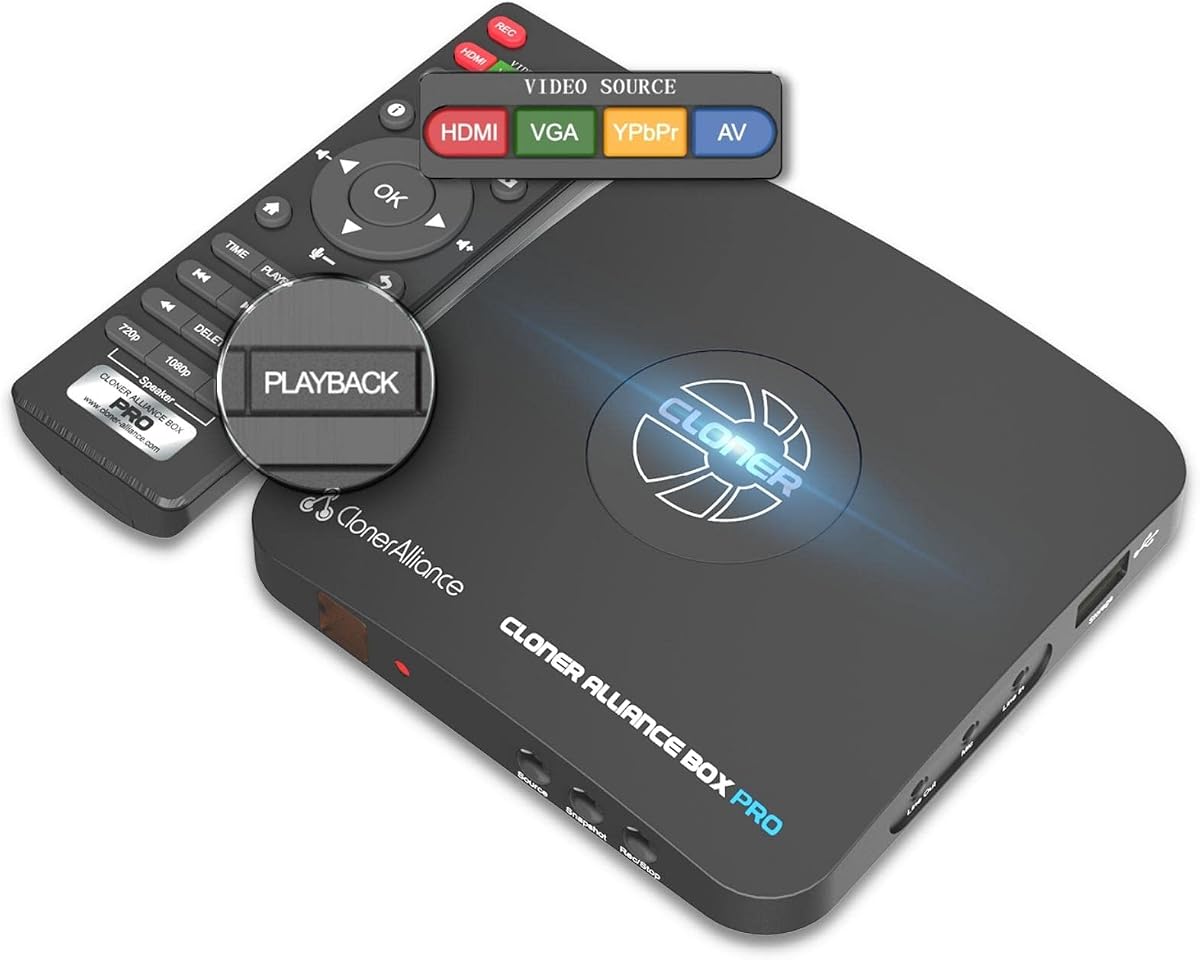
The ClonerAlliance Box Pro stands out as a versatile standalone capture device that eliminates the need for a computer entirely. It scores a solid 4.0 rating for its ability to handle multiple analog and digital inputs while recording directly to USB storage.
We may earn a commission when you buy through this link, at no additional cost to you.
Its standout quality lies in its flexibility, supporting HDMI, RCA, component, and VGA inputs which makes it ideal for archiving old tapes or capturing cable boxes. The ultra-low latency ensures you can watch content live while simultaneously recording it to your hard drive.
However, users must be aware that it does not support HDCP protected content, meaning some streaming devices will not work with it. Additionally, the included video editing software is limited to Windows systems which may inconvenience Mac users.
This device is perfect for homeowners wanting to digitize analog collections or record local broadcasts without subscription fees. We recommend it for anyone needing a reliable PC-free recorder with broad format support.
Operating without a PC reduces setup complexity and power consumption for continuous recording tasks.
Supporting VGA and component inputs allows you to capture signals from older gaming consoles or set-top boxes.
We may earn a commission when you buy through this link, at no additional cost to you.
The Tablo TV 4th Gen 4-Tuner offers impressive parallel recording capabilities allowing you to capture multiple shows simultaneously while watching another. Its integration with smart devices makes it a strong choice for modern homes.
We may earn a commission when you buy through this link, at no additional cost to you.
Key strengths include the ability to watch recorded content on phones or tablets via the home network without paying monthly fees. This makes it an attractive alternative to cable DVR services that often charge premium prices for additional tuners.
Despite these benefits user some users report inconsistent ratings likely due to variable over-the-air signal reception or app performance on specific devices. The device relies heavily on your home internet speed to stream smoothly across the house.
We recommend this for tech-savvy households who prioritize multi-room viewing and hate subscription contracts. It is a robust solution if your Wi-Fi network is reliable and strong.
Stream recorded content to multiple smartphones or tablets at once without interfering with the main TV feed.
Enjoy a one-time purchase model that eliminates monthly fees typically associated with cable DVR rentals.
We may earn a commission when you buy through this link, at no additional cost to you.
This dual-tuner version of the Tablo system provides a cost-effective way to record live TV without committing to expensive cable packages. It supports major networks and streaming channels with a simple app-based interface.
We may earn a commission when you buy through this link, at no additional cost to you.
The primary strength is its ease of use and the freedom from ongoing contracts which appeals to budget-conscious viewers. You can record one show while watching another and access your library from any connected device in the home.
However the lower rating suggests some users face limitations with channel availability or app responsiveness depending on their local signal strength. Also some free streaming channels may be disabled due to licensing restrictions.
We suggest this for single-household users who need basic recording functionality without advanced multi-room streaming requirements. It balances value and performance well for standard viewing habits.
Connect the included coaxial cable and follow the quick start guide to scan channels rapidly.
The device connects seamlessly to popular streaming players for broader access across devices.
We may earn a commission when you buy through this link, at no additional cost to you.
This bundle combines the dual-tuner DVR with an indoor antenna making it a ready-to-go solution for capturing local broadcasts. It is designed for users who want to start recording immediately without sourcing additional hardware.
We may earn a commission when you buy through this link, at no additional cost to you.
The main advantage is the inclusion of the antenna which is often a separate purchase and can be difficult to choose. With 35-mile range capabilities and Wi-Fi connectivity it offers good value for new OTA adopters.
Users should note that antenna performance depends on location and obstructions which may impact channel stability. Also the app ecosystem has some licensing limits that might reduce available streaming content.
We recommend this bundle for renters or homeowners wanting a complete OTA solution without separate trips to electronics stores. It simplifies the entry into over-the-air recording significantly.
Receive both the DVR and antenna in one package to reduce assembly time and setup confusion.
Wirelessly position the antenna for best signal while streaming content to devices anywhere in the house.
We may earn a commission when you buy through this link, at no additional cost to you.
The Mediasonic HomeWorx is a straightforward converter box that adds recording capability to analog TVs using a standard USB drive. It is a solid budget choice for keeping up with local digital broadcasts.
We may earn a commission when you buy through this link, at no additional cost to you.
Its strength lies in its ability to tune unencrypted cable channels via Clear QAM which many basic boxes miss. The metal case offers durability and the large remote control is easy to handle for older users.
However it does not support the newer ATSC 3.0 standard so future-proofing is limited. Also it recommends external hard drives over flash drives for reliability during long recording sessions.
We suggest this for households with older TVs needing a basic recording solution without high-end features. It provides good value for simple recording and playback needs.
Unscrambled cable channels can be viewed and recorded without needing a cable provider box.
The unit supports up to 2TB external drives allowing extensive storage for large video files.
We may earn a commission when you buy through this link, at no additional cost to you.
This hybrid recorder merges analog and digital recording making it ideal for families with large collections of VHS tapes. It allows you to watch and record on both VHS and DVD formats simultaneously.
We may earn a commission when you buy through this link, at no additional cost to you.
The standout feature is its ability to dub content between formats which helps preserve memories from old tapes onto more durable DVDs. It also includes a digital tuner to capture over-the-air broadcasts for later viewing.
However as an older model it lacks modern streaming apps or Wi-Fi connectivity which limits its convenience for today's users. The HDMI output does upscale resolution but it is not a high-end streaming device.
We recommend this strictly for those who need to preserve VHS tapes or want a dedicated dubbing station. It is a nostalgic solution that bridges the gap between old and new formats.
Record directly to DVD or VHS and easily transfer content between the two media types.
Capture modern digital broadcasts using the built-in ATSC tuner without extra equipment.
We may earn a commission when you buy through this link, at no additional cost to you.
This premium bundle offers the highest recording capacity with four tuners alongside an included antenna for robust signal capture. It is designed for heavy users who want to record multiple shows across different channels simultaneously.
We may earn a commission when you buy through this link, at no additional cost to you.
The main benefit is the convenience of getting both the tuner unit and antenna in one box ensuring compatibility and reducing extra costs. Four tuners allow for maximum flexibility in scheduling recordings without conflict.
Users should be aware that despite the high specs ratings remain modest likely due to software issues or signal challenges in certain areas. The price point is also higher than basic options which might not suit budget buyers.
We recommend this for households with large families or heavy TV habits needing maximum recording freedom. It is the ultimate choice for power users in the Tablo ecosystem.
Four tuners allow you to record four different channels at once while watching a fifth.
Get both the DVR and antenna together to ensure they are optimized for signal reception.
We may earn a commission when you buy through this link, at no additional cost to you.
The UHD Pro is designed for capturing high-resolution content such as 4K videos from gaming consoles or modern TVs. It stands out for supporting H.265 encoding which reduces file sizes without sacrificing quality.
We may earn a commission when you buy through this link, at no additional cost to you.
Its strengths include high bitrate options and low latency making it ideal for creators or gamers who want to archive gameplay. The ability to pause and resume recordings helps keep files organized without interruption.
However like other capture devices it does not support HDCP so it will block signals from streaming services. You also need a fast USB drive to handle the data throughput of 4K recording.
We recommend this for content creators or tech enthusiasts needing 4K capture capabilities without a computer. It is a powerful tool for archiving high-definition content.
H.265 compression allows you to store longer video footage on standard storage devices.
Capture smooth video at 60fps to ensure detailed recording for fast-paced action.
We may earn a commission when you buy through this link, at no additional cost to you.
This renewed option provides access to the Tablo ecosystem at a significantly lower cost while retaining key features like dual tuning. It is a great entry point for those new to OTA recording.
We may earn a commission when you buy through this link, at no additional cost to you.
The main advantage is the savings achieved by purchasing refurbished hardware which typically undergoes testing before sale. You still get access to the streaming app and the ability to watch locally or remotely.
The only drawback is the potential for hardware limitations compared to brand new units though most users find them reliable. Also some warranty terms may differ from original manufacturer guarantees.
We suggest this for budget-conscious buyers who want modern OTA recording features without paying full price. It is a smart choice for those comfortable with refurbished electronics.
Save money by choosing certified refurbished units that still offer full app functionality.
Enjoy the same whole-home access and free channels as new models.
We may earn a commission when you buy through this link, at no additional cost to you.
This renewed four-tuner option combines high capacity with savings making it ideal for those who need to record many shows at once. It retains all the premium features of the new version.
We may earn a commission when you buy through this link, at no additional cost to you.
Its strength lies in the ability to capture up to four channels simultaneously without the premium price tag of a new unit. You still get access to the robust app ecosystem and no contract fees.
Users should check the warranty details carefully as renewed items may have shorter support periods than brand new ones. Performance may vary slightly depending on the unit's history but functionality remains high.
We recommend this for households needing maximum tuner count on a budget. It offers the best balance of power and price for heavy users.
Get four tuners for recording at a price usually reserved for two-tuner models.
Benefit from time-shift viewing and unlimited streaming access at a reduced cost.
We may earn a commission when you buy through this link, at no additional cost to you.
Choosing the right recorder involves understanding your specific needs regarding recording capacity and connection types.
The number of tuners determines how many channels you can record at once without missing your favorite shows. More tuners are useful for families with different viewing preferences who want to record multiple programs simultaneously.
Look for at least two tuners for flexibility but opt for four if you often have overlapping shows or sports events.
Storage dictates how much content you can keep before deleting old files. While some devices offer built-in storage others rely on external hard drives which offer more flexibility.
Choose a device that supports external drives of at least 1TB to ensure you have enough space for high-definition recordings over time.
Some recorders use over-the-air signals which are free but depend on antenna quality while others use HDMI capture which allows recording from cable boxes or game consoles.
Decide whether you need to capture free broadcast TV or content from paid services which will dictate if you need an OTA tuner or HDMI inputs.
Many modern devices operate on a one-time purchase model with no monthly fees which can save money in the long run compared to cable rentals.
Ensure the device you select does not require a subscription to access basic recording features to avoid hidden costs.
An intuitive interface and simple setup process are crucial for a good user experience especially for those who are less tech-savvy.
Look for devices with clear guides and apps that are easy to navigate to minimize frustration during installation.
Modern DVRs often include apps for watching recorded content on phones or tablets which enhances flexibility for viewing away from home.
Verify that the supported devices match your ecosystem to ensure you can access your library on all your preferred screens.
Check if the device supports newer standards like ATSC 3.0 or H.265 codecs to ensure it remains useful for several years.
Investing in a model with modern codec support can help you take advantage of upcoming broadcasting improvements.
Recording resolution affects file size and clarity so consider whether you need 1080p or 4K support based on your storage and display capabilities.
Ensure your recorder matches the output quality of your source device to maintain the best viewing experience.
Start by connecting the device to your power source and either your antenna or HDMI cable depending on the input method supported. Ensure you use a high-quality cable to prevent signal loss during recording.
Configure your settings by scanning for channels or adjusting input sources to match your current setup. Use the remote or app to schedule recordings for future shows so you never miss an episode.
Regularly update the firmware to ensure you have the latest features and security patches. Keep the device in a well-ventilated area to prevent overheating which can extend its lifespan.
Most standalone devices do not require a subscription as they allow you to record free over-the-air broadcasts. Some models may have optional paid features but core recording is usually included without fees.
Yes if your device has multiple tuners such as dual or quad tuner models. This allows you to capture two or four different programs while watching a fifth channel live.
Many devices support external USB hard drives which provide ample space for recordings. Internal storage is often limited so having an external drive ensures you can keep more content.
If you want to record free local channels via over-the-air signals you will need a compatible antenna. HDMI capture devices do not need an antenna but require a signal source like a cable box.
Modern DVRs often include mobile apps that let you stream recorded shows to your smartphone. Ensure your device supports this feature if you plan to watch on the go.
With proper care and regular firmware updates these units can last for several years. Hardware failure is usually minimal but moving parts like hard drives may need eventual replacement.
Most modern units pair with smart TVs via HDMI allowing you to access the DVR menu directly on your TV screen. Some brands also offer apps that integrate with smart TV platforms.
Yes most current models support HD recording such as 1080p or even 4K depending on the input source. Check the specifications to ensure it matches the resolution of your TV.
We explored ten diverse options ranging from standalone capture boxes to smart streaming DVRs to cover various user needs.
Prioritize tuner count and ease of use when selecting a device to ensure you can capture your favorite shows without frustration.
Always check current prices and availability as deals can change frequently for these consumer electronics.