
HBN Watt Meter Plug
4.6Editor score
Backlit LCD Display
9 Display Modes
Data Storage
This guide compares the top 10 energy consumption monitors for PC to help you track usage reduce costs and optimize your setup efficiently and accurately.
Understanding your computer energy usage is crucial for efficiency and cost savings. A reliable monitor helps track power draw accurately. This guide reviews the best options available for precise tracking and smart management.
We evaluated top models based on accuracy features and ease of use. Our analysis covers plug-in meters whole home systems and smart solutions. Each pick offers unique benefits for different user needs and budgets.
Each pick highlights key strengths and ideal use cases. Prices and availability may change frequently. Check current listings for the latest deals and ensure compatibility before purchasing your chosen energy monitor today.
4.6Editor score

4.6Editor score

4.3Editor score
This side-by-side comparison highlights key specifications and features of each model. It helps you quickly identify which monitor suits your specific monitoring needs and technical requirements best.


The Emporia Vue 3 stands out as a top choice for comprehensive home and PC energy monitoring. It offers UL certification ensuring safety while providing real-time data through its dedicated app. This makes it ideal for users seeking reliable long-term tracking.
We may earn a commission when you buy through this link, at no additional cost to you.
Its standout feature is the ability to monitor up to 16 branch circuits accurately. This level of granularity helps identify which appliances or PC components draw the most power. The app provides actionable notifications to help reduce costs effectively.
While the installation requires accessing the circuit panel this ensures permanent monitoring without cluttering outlets. The need for 2.4GHz WiFi might limit placement options but ensures consistent data streaming to the cloud for detailed analysis.
For tech-savvy users wanting deep insights into their entire electrical setup this monitor is unmatched. It balances safety accuracy and smart features perfectly making it the best overall choice for serious energy management today.
UL certification ensures all components are tested to prevent overheating or fire hazards providing peace of mind during continuous operation.
With 16 branch sensors you can isolate specific loads like PCs or air conditioners to understand exact usage patterns and savings opportunities.
We may earn a commission when you buy through this link, at no additional cost to you.
This Upgraded Watt Power Meter Plug offers exceptional value for users needing quick usage checks. It tracks watts kWh volts and amps with a clear backlight display. Setup is instant requiring no wiring or app configuration making it very user-friendly.
We may earn a commission when you buy through this link, at no additional cost to you.
Its 7 display modes let you cycle through key parameters easily. The adjustable backlight ensures visibility in dark rooms while the memory function retains data even after unplugging. This is perfect for monitoring specific PCs or peripherals temporarily.
Lacking smart connectivity limits remote access but simplifies operation significantly. The backlight turning off after 10 minutes conserves energy but requires button presses to reactivate. These minor trade-offs are acceptable given the low cost and robust basic features.
For renters or anyone wanting simple appliance tracking this plug is an excellent start. It provides enough detail to spot energy hogs without overwhelming complexity or monthly fees making it the best budget option available.
Simply plug it between your PC and wall outlet to start monitoring immediately without any technical setup or network configuration required.
Seven different display modes allow you to check voltage current cost and more depending on what data you need at that moment.
We may earn a commission when you buy through this link, at no additional cost to you.
The Meross Smart Home Energy Monitor delivers premium features for advanced energy management. It integrates seamlessly with Home Assistant and tracks power usage with high accuracy. Its unique solar detection capability optimizes usage by powering devices with excess solar energy.
We may earn a commission when you buy through this link, at no additional cost to you.
Local data storage ensures privacy and removes dependency on cloud services. The two-year warranty adds long-term value and confidence in durability. This system is ideal for smart home enthusiasts seeking automation without recurring subscription costs.
Installation involves circuit panel access which may require professional help. Initial setup through the app can be complex for non-tech users. However the detailed insights and automation potential justify the effort for those invested in smart home ecosystems.
If you prioritize privacy solar integration and smart automation this monitor leads the pack. It combines reliability with advanced features making it the top premium choice for comprehensive home and PC energy optimization.
Automatically detects solar surplus and directs excess power to high-use appliances like water heaters or EV chargers reducing reliance on the grid.
All energy data stays local on your network ensuring no cloud delays or privacy concerns while maintaining full control over your consumption data.
We may earn a commission when you buy through this link, at no additional cost to you.
Designed for complex setups this monitor excels in rental homes and shared apartments. It tracks 16 circuits independently enabling fair electricity allocation based on actual usage. Custom rate templates allow landlords to bill residents accurately without extra meters.
We may earn a commission when you buy through this link, at no additional cost to you.
Privacy mode allows running without cloud apps using local MQTT servers instead. This adds flexibility for users who prefer self-hosted solutions. The system supports various panel types ensuring broad compatibility across different home electrical configurations.
Initial setup involves wiring to the panel which may deter casual users. Relying on 2.4GHz WiFi ensures stable data but limits placement. Despite these hurdles the detailed billing features make it unique for multi-tenant properties needing transparency.
For landlords or roommates needing clear usage accountability this system is ideal. Its specialized billing tools and privacy options set it apart as the best solution for shared living spaces and complex monitoring needs.
Customizable electricity rate templates enable automatic cost calculation per room or circuit helping landlords and tenants settle bills fairly and transparently.
Run entirely on your local network without cloud dependency using MQTT servers to maintain full control over your data and security settings.
We may earn a commission when you buy through this link, at no additional cost to you.
The SURAIELEC Outlet Watt Meter is designed for simplicity and long-term reliability. It features a compact design that leaves the lower outlet accessible while measuring usage. The built-in battery retains data for up to 90 days during power outages.
We may earn a commission when you buy through this link, at no additional cost to you.
With a wide voltage range it works globally without needing adapters. Its clear LCD display shows essential parameters like watts volts and cost. The cost calculator helps estimate bills based on set prices making budgeting straightforward.
Lacking smart connectivity means data must be read manually from the display. While reliable this might be inconvenient for users preferring remote tracking. However for occasional checks or specific device monitoring it performs consistently well.
This meter is ideal for users needing a simple durable tool without smart complications. Its space-saving design and long memory retention make it a practical choice for monitoring PCs and appliances efficiently.
Data retention for up to 90 days during outages ensures you never lose tracking progress even if power is interrupted unexpectedly.
Calculate estimated electricity bills instantly by setting unit prices directly on the device for accurate budgeting without spreadsheets.
We may earn a commission when you buy through this link, at no additional cost to you.
The HBN Watt Meter Plug delivers excellent value for basic energy tracking needs. Its backlit display provides clear readings in any lighting condition. The wide viewing angle ensures data is visible even from odd angles without strain.
We may earn a commission when you buy through this link, at no additional cost to you.
With 9 display modes it covers essential parameters like power frequency and cost. Data storage preserves cumulative metrics after unplugging allowing continued tracking. This makes it suitable for temporary monitoring of specific devices or circuits.
The backlight turns off automatically after 15 seconds to save energy. While this reduces visibility during extended use it aligns with conservation goals. The low cost makes it accessible for everyone needing immediate insights.
For quick and cheap usage checks this plug is a top contender. It balances functionality and affordability making it the best value choice for users needing straightforward energy data without extra costs.
A 160-degree viewing angle ensures readings are clearly visible from almost any angle without needing to stand directly in front of the device.
Nine different display modes provide access to various electrical parameters including watts volts amps and cost for thorough device analysis.
We may earn a commission when you buy through this link, at no additional cost to you.
This KETOTEK Watt Meter stands out for its robust overload protection features. It alerts users with clear LCD messages and flashing lights when power exceeds limits. This safety function protects connected devices from potential electrical damage.
We may earn a commission when you buy through this link, at no additional cost to you.
One-click switching simplifies navigation through different parameters quickly. The upgraded LCD offers clear visibility in various lighting conditions. High-precision chips ensure accurate measurements for reliable long-term usage data.
Manual operation means no app or remote access. This limits automation but enhances simplicity and privacy. For users prioritizing safety and basic tracking this meter performs reliably without complex setup requirements.
Ideal for protecting valuable electronics this meter offers peace of mind through its warning system. Its straightforward design and protective features make it a solid choice for safety-conscious users monitoring PCs.
Overload protection alerts immediately warn you when devices exceed safe power limits preventing potential damage to hardware or outlets.
One-click switching allows quick access to different parameters saving time when checking multiple metrics for various connected devices.
We may earn a commission when you buy through this link, at no additional cost to you.
This 2-pack set offers great value for monitoring multiple devices simultaneously. Made from durable ABS material it resists heat and wear effectively. The backlight helps read data in low-light conditions while the reset button allows easy recalibration.
We may earn a commission when you buy through this link, at no additional cost to you.
Eight display modes cover essential metrics like voltage cost and power usage. Data memory retains information after unplugging for continued analysis. Overload protection adds a layer of safety for connected electronics.
Manual operation restricts automation capabilities. Backlight turning off after 10 minutes may inconvenience users needing constant visibility. However for simultaneous device monitoring at a lower cost this set is highly practical.
Best for households needing to monitor multiple areas this pack provides flexibility and durability. Its multi-unit convenience makes it a smart purchase for checking various appliances without buying individual meters.
Two included units allow tracking multiple devices or areas simultaneously for a comprehensive view of household or office energy usage.
Premium ABS material ensures long-lasting use and resistance to heat making these meters reliable for continuous monitoring tasks.
We may earn a commission when you buy through this link, at no additional cost to you.
The P4400 Kill A Watt remains a trusted classic for basic usage monitoring. Its large LCD display clearly counts consumption by kilowatt-hour making readings easy to understand. The device supports inverters for versatile use with various AC appliances.
We may earn a commission when you buy through this link, at no additional cost to you.
Four settings allow tracking usage by day week month or year. This flexibility helps analyze short-term spikes or long-term trends. The straightforward design minimizes confusion for users who prefer simplicity over tech.
Its lack of modern smart features limits remote access and automation. The design feels dated compared to newer models with apps. Yet its reliability and simplicity ensure it continues to serve basic monitoring needs well.
Best for those valuing simplicity over connectivity this meter is a solid choice. Its proven track record and clear display make it effective for straightforward energy checks without unnecessary complexity.
Track energy usage by day week month or year to analyze both immediate spikes and long-term consumption trends accurately.
A trusted classic in the field it offers consistent performance and durability for years of reliable usage monitoring without tech updates.
We may earn a commission when you buy through this link, at no additional cost to you.
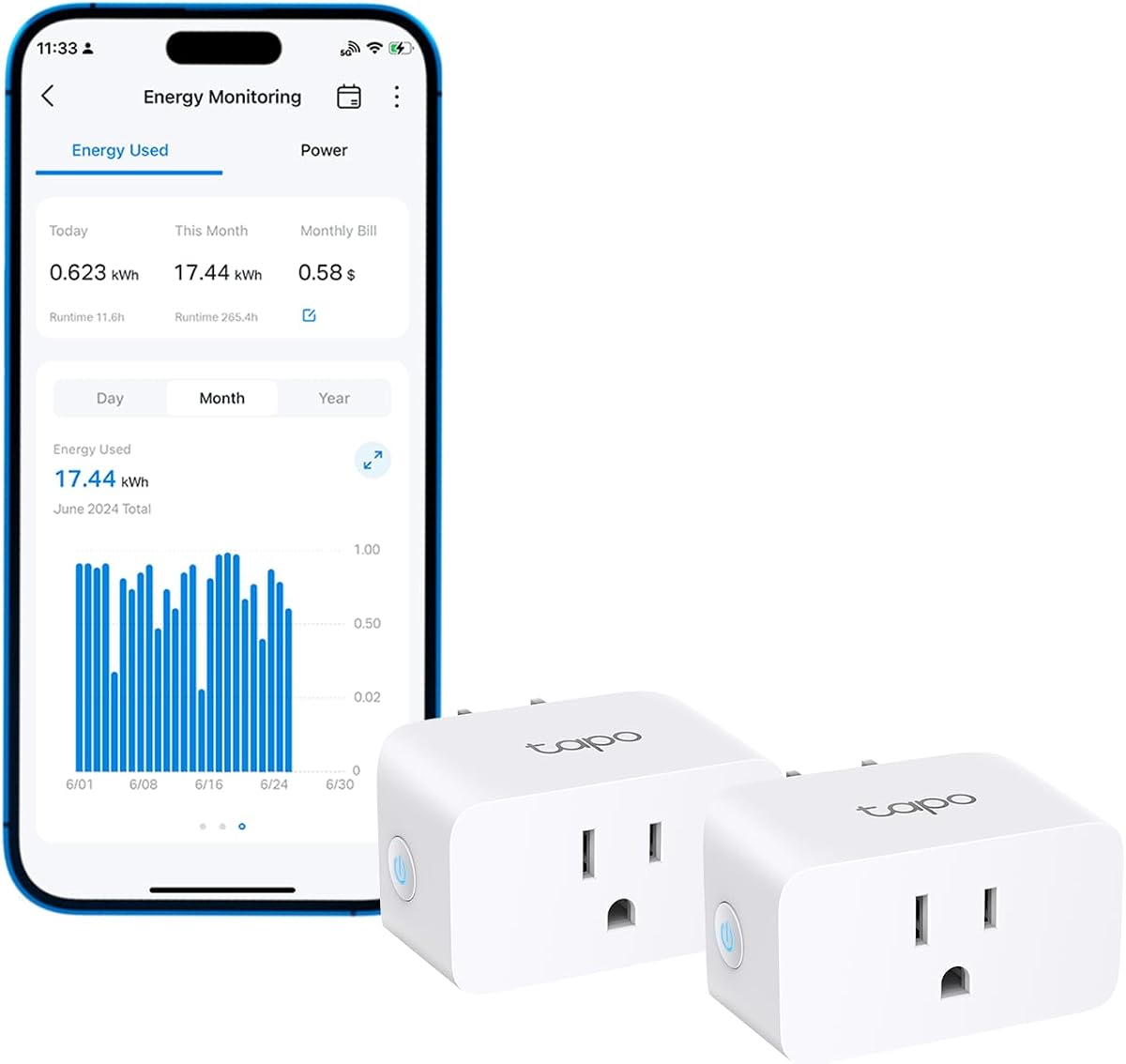
The Tapo Smart Plug combines energy monitoring with smart home automation. Its intuitive app provides clear charts tracking usage over time. Auto-shutoff features prevent overcharging devices protecting them from potential battery damage.
We may earn a commission when you buy through this link, at no additional cost to you.
Voice control via Alexa or Google Assistant allows hands-free operation. Programmable scheduling optimizes costs by running devices during off-peak hours. This makes it ideal for users seeking convenience and efficiency in daily routines.
Dependence on app and internet may limit use during outages. Max load is lower than some dedicated meters. Despite this its smart integration offers unique benefits that standalone meters cannot match easily.
For smart home enthusiasts this plug adds energy insights to automation. Its combination of tracking voice control and cost-saving features makes it the best smart plug choice for modern connected setups.
Set schedules to run devices during off-peak hours automatically reducing energy costs and improving efficiency for your home setup.
The intuitive app provides clear charts and statistics helping you understand and optimize your power usage effortlessly.
We may earn a commission when you buy through this link, at no additional cost to you.
Selecting the right monitor requires considering features connectivity and installation methods to match your specific needs.
High accuracy ensures reliable data for effective cost tracking. Look for ±2% or better ratings to trust your usage reports.
Precision matters for identifying true energy hogs and optimizing power efficiency effectively.
Wi-Fi enabled models offer remote access and automation features. Plug-in meters typically lack smart capabilities but are simpler to use.
Choose smart options for detailed insights and traditional ones for basic quick checks.
Panel installers provide permanent whole-home monitoring but require wiring expertise. Plug-in options are ideal for specific devices and renters.
Consider your technical skills and whether you need temporary or permanent solutions when deciding.
Memory functions preserve data during power outages or unplugging. Cloud storage allows historical tracking and export options.
Ensure the chosen model retains enough history to match your analysis needs.
Prices range widely from basic plugs to advanced panel systems. Set a clear budget to narrow down suitable options quickly.
Balance upfront costs with long-term savings potential for best value.
Compatibility with platforms like Home Assistant enables automation features. Voice control adds convenience for managing connected devices.
Check integrations to ensure seamless operation within your existing smart ecosystem.
Look for UL ETL or similar certifications ensuring device safety during operation. Proper testing prevents risks like overheating or fire.
Prioritize certified units for secure and reliable monitoring solutions.
Clear LCD displays with backlight aid visibility in all lighting conditions. Simple interfaces help navigate data without confusion.
Opt for readable screens to easily interpret energy usage metrics.
Begin by reading the manual to understand setup procedures specific to your model. For plug-in units insert them between the PC and wall outlet directly.
Calibrate settings by entering local electricity rates to get accurate cost estimates. Adjust display preferences to focus on metrics most relevant to your goals.
Clean the unit regularly with a dry cloth to prevent dust buildup. Keep it dry and avoid exposure to direct sunlight or moisture.
Panel monitors offer whole-home data and circuit-level insights but require professional installation. Plug-in meters focus on individual devices and are simple to use.
Yes most monitors work with standard PC power cables. Ensure voltage compatibility especially for international users or specialized hardware.
Most models claim accuracy within ±2% of actual usage. This margin is sufficient for tracking consumption trends and identifying energy hogs.
Plug-in meters function offline without internet. Smart models store data locally but may lose remote access without Wi-Fi connection.
Certified monitors are designed for continuous operation. Follow safety guidelines and overload warnings to ensure secure long-term use.
Data retention varies from a few hours to 90 days depending on model. Check specifications for memory duration to suit your tracking needs.
The Emporia Vue 3 leads overall with comprehensive whole-home features and high accuracy. It suits users seeking permanent professional monitoring solutions.
Budget options like HBN or Upgraded Watt plugs offer affordable ways to track specific devices. They balance cost and functionality well for casual users.
Always verify current pricing and compatibility before purchasing. Regularly update settings to maintain accurate and useful energy management insights.
