
22MP Film & Slide Scanner with 5 LCD LCD
4.3Editor score
Affordable entry price point
One touch scanning operation
HDMI TV output included
This guide compares the top 10 film scanner to digital converter models for 2026, evaluating resolution, ease of use, and compatibility to help you preserve
Preserving vintage photographs requires reliable hardware that bridges the gap between analog and digital formats. A quality film scanner to digital converter transforms faded negatives into crisp files for easy sharing and long-term storage without complex software.
Our team analyzed ten leading models based on resolution, screen size, film compatibility, and workflow efficiency. We prioritized standalone units that offer intuitive controls and direct SD card saving for users who prefer simplicity over computer connectivity.
Each selection below highlights specific strengths like budget-friendly pricing or premium touchscreen features. Prices fluctuate frequently, so verify current listings before purchasing to ensure you secure the best deal available for your specific archival needs today.
4.3Editor score

4.3Editor score

4.3Editor score
This side-by-side comparison outlines key specifications for each model to help you identify the right balance of performance and cost for your specific digitization requirements.




The Kodak Slide N Scan stands out as the most balanced option for general users seeking high quality digitization without professional complexity. It features a sharp 22MP sensor and a generous 5 inch display that allows immediate previewing of scanned images.
We may earn a commission when you buy through this link, at no additional cost to you.
Its continuous loading technology significantly speeds up the workflow compared to single frame models. The included adapters handle 135, 110, and 126mm films seamlessly. Users can adjust brightness and color on device before saving directly to an SD card.
While the device is efficient, the lack of an included SD card is a minor inconvenience that requires immediate additional purchase. The HDMI cable connection can sometimes require specific handling to ensure stable video output on older televisions.
This model is ideal for families wanting to preserve mixed collections of slides and negatives quickly. It offers the best mix of performance, ease of use, and price point for most home archiving projects.
The continuous feed tray allows you to load multiple films at once reducing the time spent on repetitive manual loading actions.
With adapters for 110, 126, and standard 135mm formats this scanner handles diverse archival needs without needing extra hardware purchases.
We may earn a commission when you buy through this link, at no additional cost to you.
The Magnasonic model offers the highest native resolution at 24MP which is excellent for capturing fine details in older film stock. It distinguishes itself by supporting Super 8 film in addition to standard slide and negative formats.
We may earn a commission when you buy through this link, at no additional cost to you.
The device allows saving to cards up to 128GB which provides ample space for large archival projects. Users can view scans directly on the screen or via HDMI to a TV without needing a computer connection during operation.
However the HDMI cable is not included in the box which adds to the initial cost. The on screen interface can feel slightly dense for first time users trying to access advanced color correction settings quickly.
This scanner is perfect for hobbyists who need to digitize Super 8 reels alongside standard photos. Its superior resolution makes it a top choice for those prioritizing image clarity over convenience.
Unlike many competitors this unit can digitize Super 8 film frames offering a unique solution for users with movie reels to preserve.
Support for SD cards up to 128GB means you can archive thousands of photos on a single card without transferring data constantly.
We may earn a commission when you buy through this link, at no additional cost to you.
The HP scanner brings a modern interface to traditional film digitization with its interactive touchscreen control. This allows users to navigate menus and edit photos with a feel that resembles a tablet rather than a bulky peripheral.
We may earn a commission when you buy through this link, at no additional cost to you.
It delivers 13MP native resolution with 22MP interpolation for high quality digital output. The standalone design means no drivers are needed making it a reliable choice for office or home archival projects where technical support is limited.
While the premium build quality is evident the price is higher than entry level options. Some users note that the interpolated resolution might not match native pixels from other dedicated sensors but the convenience balances this trade-off.
This model is best suited for users who value a sleek interface and quick batch scanning capabilities. It offers a sophisticated experience for those willing to invest in a polished professional tool.
The 5 inch touch display allows intuitive control over settings without navigating complex physical button menus or software on a PC.
You can complete the entire scanning and saving process without connecting to a computer streamlining the workflow for quick digitization.
We may earn a commission when you buy through this link, at no additional cost to you.
The KODAK SCANZA is designed for portability with a compact form factor that fits easily on small desks. Its 3.5 inch LCD tilts for better viewing angles which is a unique ergonomic feature in this category.
We may earn a commission when you buy through this link, at no additional cost to you.
It supports a wide range of formats including Super 8 and 8mm film which makes it versatile for mixed collections. The inclusion of an HDMI cable ensures you can view results on a TV immediately after scanning.
The smaller screen can make detailed editing challenging for those with poor eyesight. The interface feels slightly dated compared to newer touch models requiring more button presses to access specific color adjustments.
This scanner is an excellent choice for travelers or those with limited desk space. It provides robust functionality in a smaller package ideal for casual users with occasional digitization needs.
The adjustable display allows you to find a comfortable viewing angle reducing strain during long scanning sessions.
Unlike many models this unit comes with an HDMI cable included saving you from needing to source extra accessories separately.
We may earn a commission when you buy through this link, at no additional cost to you.
The KODAK REELS is specifically engineered to convert 8mm and Super 8 film into digital video files rather than still images. It processes reels frame by frame to create 1080p MP4 files that can be watched on modern devices.
We may earn a commission when you buy through this link, at no additional cost to you.
Its reel to reel mechanism handles various sizes automatically reducing manual handling. The interface includes touch buttons for alignment and exposure adjustments ensuring smooth playback of captured motion pictures.
This device does not capture audio from the original film so sound cannot be added. It is limited strictly to video formats so it cannot handle standard photo slides or negatives directly.
This is the only tool needed for preserving family movie footage on standard 8mm reels. It simplifies a complex process into a straightforward workflow for video archiving.
Specialized for motion pictures this unit outputs MP4 files directly making it easy to share digital movies with family.
Compatible with most standard reel sizes from 3 to 9 inches it accommodates diverse film libraries without extra adapters.
We may earn a commission when you buy through this link, at no additional cost to you.
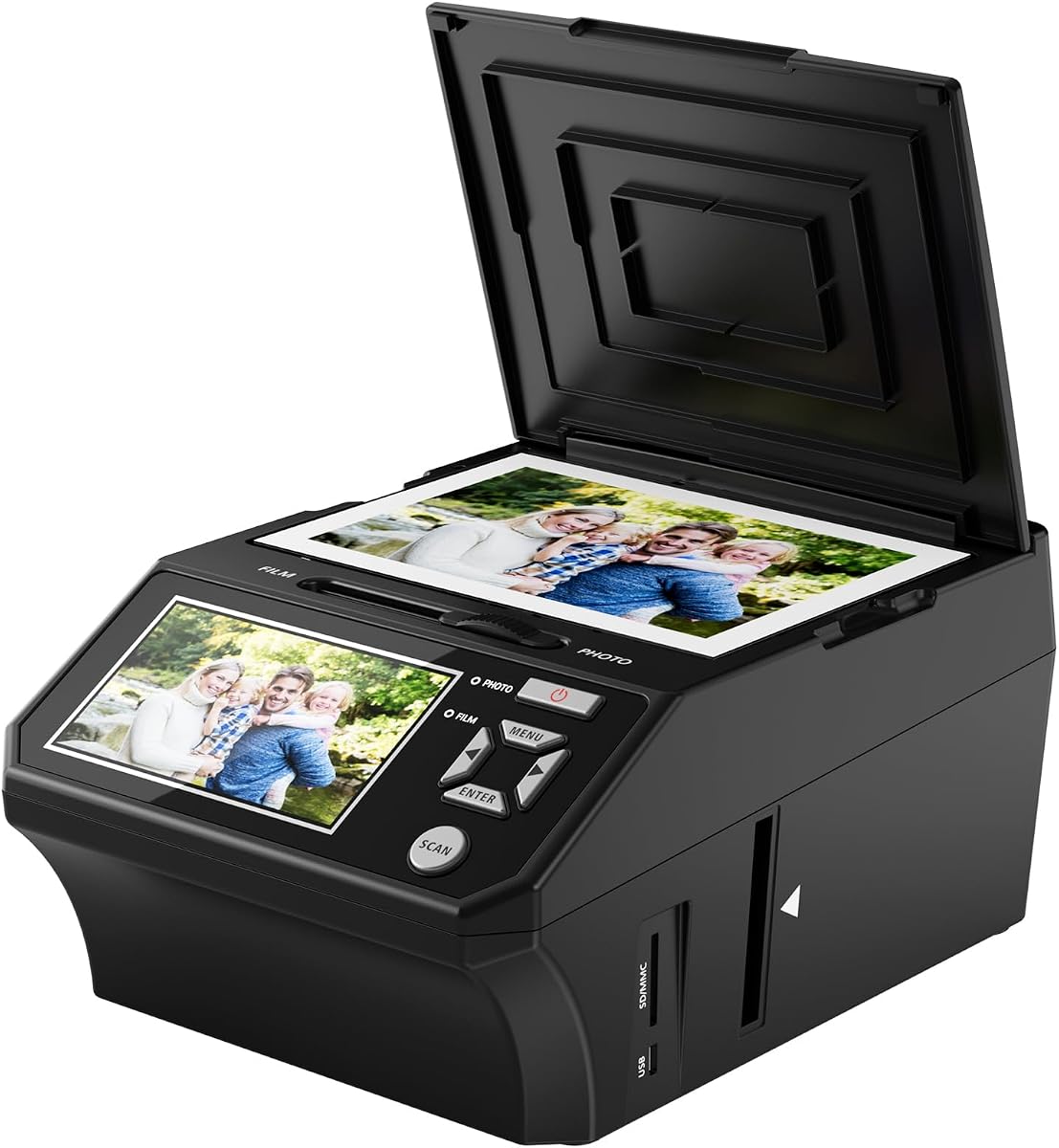
This versatile scanner stands out by including printed photos in its compatibility list alongside traditional film slides and negatives. It comes with an SD card included which saves immediate cost for new buyers.
We may earn a commission when you buy through this link, at no additional cost to you.
The 5 inch screen provides a clear view of images for quick edits. With a three year warranty and customer support it offers significant peace of mind compared to competitors with shorter coverage.
While it lacks advanced features like high end interpolation it is robust for everyday tasks. The basic interface is easy for seniors to operate without confusion or technical barriers.
This model is ideal for buyers who want a complete package ready to use out of the box. Its ability to scan prints makes it a true all-in-one photo preservation tool.
Includes an 8GB SD card and all necessary adapters so you can start scanning immediately after unboxing without extra purchases.
The ability to scan printed photos directly allows you to digitize existing prints alongside negatives for a complete archive.
We may earn a commission when you buy through this link, at no additional cost to you.
The Slide N Scan Max features a substantial 7 inch LCD which provides the most comfortable viewing experience available. This large display also functions as a digital picture frame when not actively scanning.
We may earn a commission when you buy through this link, at no additional cost to you.
It utilizes continuous feeding technology to keep scans moving without stopping for each slide. The tiltable screen allows for better ergonomics during extended use sessions in various lighting conditions.
The device is physically larger than most models requiring more desk space. The higher price point reflects the screen size and bulk design which may be unnecessary for users with limited space.
This model suits users who prioritize visibility and long term display capabilities. It is excellent for those who want to showcase their digitized images on a large screen daily.
After scanning you can use Gallery Mode to cycle through photos on the large screen turning the device into a display piece.
The feed tray allows for quick transitions between slides reducing downtime and increasing productivity for large collections.
We may earn a commission when you buy through this link, at no additional cost to you.
This model offers one of the most affordable entry points for film digitization. It includes HDMI and Type-C USB cables making it ready for immediate use without hidden accessory costs.
We may earn a commission when you buy through this link, at no additional cost to you.
It has a small built-in memory for quick previews before saving to an SD card. The interface is designed for simplicity ensuring anyone can start scanning with minimal instruction.
The physical build is primarily plastic which may feel less durable than metal models. The limited internal memory requires an SD card for any substantial amount of storage.
It is perfect for casual users who need a reliable scanner without extra features. Its low cost makes it an accessible option for budget conscious buyers.
As one of the cheapest options it allows users to test film digitization without a significant financial commitment.
The inclusion of both HDMI and Type-C cables ensures you can connect to modern and older screens easily.
We may earn a commission when you buy through this link, at no additional cost to you.
This scanner distinguishes itself with a comprehensive 36 month warranty that offers extended protection against defects. It delivers solid performance for digitizing slides and negatives with a clear 5 inch preview screen.
We may earn a commission when you buy through this link, at no additional cost to you.
The gallery mode allows you to showcase photos when not scanning which adds value beyond basic conversion. The interface is straightforward with one touch buttons for fast scanning operations.
It must remain plugged into a power source during operation limiting portability compared to battery powered devices. While reliable the feature set is basic compared to premium models with touchscreens.
This model is ideal for users prioritizing long term reliability and low risk. The warranty ensures you are covered for years making it a safe purchase for families.
A three year warranty provides exceptional peace of mind compared to the standard one year coverage offered by most competitors.
When not in use the device displays a slideshow of your digitized photos turning it into a digital picture frame.
We may earn a commission when you buy through this link, at no additional cost to you.
This HP model features a large 7 inch touchscreen that simplifies editing without a computer. It supports 13MP sensor resolution for detailed captures of slides and negatives.
We may earn a commission when you buy through this link, at no additional cost to you.
The quick feed tray makes batch scanning efficient for large collections. On device cropping and color adjustment tools allow you to refine images before exporting them.
It has a slightly lower average rating than other models likely due to its higher price point. Some users find the touch interface less responsive than expected for the cost.
This scanner is best for professionals needing a standalone high quality workstation. It provides a robust tool for those who require precise control over output.
Touchscreen controls allow you to crop and adjust colors directly on the screen without needing extra software.
Designed for high volume scanning the feed tray ensures fast transitions between slides to maximize productivity.
We may earn a commission when you buy through this link, at no additional cost to you.
Selecting the right scanner involves balancing resolution, screen size, and ease of use to match your specific archival needs.
Resolution determines how much detail you capture from old film. Look for at least 13MP to ensure your photos remain clear when printed or viewed on modern displays. Higher resolution is crucial if you plan to crop images or enlarge them significantly.
Prioritize models with high native resolution rather than relying solely on interpolation for the best long-term clarity.
A larger display makes it easier to review images and adjust settings without squinting. Models with 5 inch or larger screens improve usability especially for older users with reduced vision. Touchscreens can further simplify navigation and editing tasks.
Choose a screen size that comfortably fits your workspace while providing a clear view of your photos during scanning.
Check which film types the scanner supports before purchasing. Ensure it handles 135mm negatives, 126, and 110 formats if your collection is mixed. Some advanced models even support Super 8 and 8mm film which requires specific adapters.
Verify adapter availability to confirm the device can handle all the film formats you intend to digitize.
Standalone scanners operate without a computer which speeds up the workflow significantly. They allow you to load, scan, and save directly to an SD card. This independence is vital if you are digitizing photos in locations without easy PC access.
Select a standalone model if you prefer a simple workflow without installing drivers or software.
Look for support for high capacity SD cards to store large batches of photos. USB-C and HDMI ports are essential for transferring files to modern computers or viewing directly on a TV. Ensure the scanner includes these cables or they are easy to source.
Confirm the device supports the SD card size you intend to use to avoid storage limitations during your project.
Built-in editing tools let you adjust brightness and color before saving. This feature saves time by avoiding the need for complex photo editing software. Simple one-touch adjustments can dramatically improve the look of faded images.
Choose a model with intuitive adjustment features to enhance your photos quickly without technical expertise.
A longer warranty period indicates confidence in the product's durability. Check for customer support availability to assist with setup or troubleshooting. Reliable support ensures you can resolve issues quickly and continue your archiving work without interruption.
Prioritize brands that offer at least a one year warranty to protect your investment against defects.
Continuous feed trays allow for faster scanning of large batches of slides. This feature minimizes downtime between scans and increases overall productivity. If you have thousands of images to process, speed is a critical factor to consider.
Look for models designed for quick transitions to handle large collections efficiently.
Start by cleaning your film slides and negatives with the provided brush to remove dust. This ensures your scanned images are free from speckles and marks that could ruin the final digital file. Place the film into the correct tray adapter according to the guide included in the box.
Connect the power adapter and insert an SD card if required. Turn on the device and navigate the menu to select your film type. Press the scan button to capture the image and review it on the screen to ensure it is clear and properly aligned.
Store the scanner in a cool dry place when not in use to protect the internal sensor. Avoid touching the glass plate or light box directly to prevent smudges. Regularly check for firmware updates or maintenance instructions to keep the device functioning smoothly over time.
Most modern standalone scanners do not require a computer. They allow you to scan directly to an SD card. However you can connect to a PC later via USB to transfer files if you prefer.
Some specialized models like the Kodak Reels can digitize 8mm film into video. Standard photo scanners usually only handle slides and negatives so check the specifications carefully before buying for film reels.
This often happens if the brightness or color settings are not adjusted correctly. Use the on device editing tools to increase brightness. Also ensure the film is inserted with the correct orientation facing the sensor.
Models support different sizes typically ranging from 32GB to 128GB. Choose a card that fits your capacity needs and verify the maximum supported size in the manual to avoid compatibility issues.
Use the included USB or Type-C cable to connect the scanner to your PC. The device should appear as a storage drive. You can then copy the files directly to your computer's hard drive.
Scanning times vary by model. Advanced units can process images in seconds while others take longer. Look for continuous feed features if you need to scan large batches of photos efficiently.
We have explored ten top models ranging from budget friendly options to premium professional tools. The Kodak Slide N Scan offers the best balance of performance and ease of use for most users.
Prioritize resolution and screen size to ensure your digital files remain clear and easy to view. Select a standalone device if you prefer a workflow that does not rely on a computer for operation.
Prices change frequently so check the current listings to find the best deal available today. Investing in a reliable scanner ensures your precious memories are preserved digitally for years to come.