
MEKO Stylus Pen for Touchscreen, 3-in-1 Universal iPad Stylus Stylists
4.6Editor score
Highly sensitive disc tip
Dual-sized rubber tips included
Replaceable tips for longevity
This expert guide compares the top ten fine point stylus models for 2026 to help you choose the right digital pen for your touchscreen devices.
Finding the right fine point stylus can transform how you interact with your digital devices. Whether you are taking notes, drawing sketches, or navigating menus, a high-quality stylus offers precision that fingers simply cannot match. This guide explores the best options available to ensure your digital tasks feel natural and efficient.
We have carefully evaluated each product based on accuracy, compatibility, build quality, and user feedback. Our team reviewed specifications, tested performance across various screens, and analyzed customer experiences to rank these items. The result is a curated list that highlights value and functionality for every type of user.
Each pick in this guide provides a unique advantage tailored to specific needs and budgets. You will find detailed breakdowns of features, pros, cons, and real-world performance insights. Please note that product availability and pricing can change quickly, so verify current details before making your final purchase decision.
4.6Editor score

4.5Editor score

4.4Editor score
This table provides a side-by-side comparison of all ten stylus models included in our detailed review. You can quickly assess key specifications and features to identify which device aligns best with your specific requirements and budget constraints.



This stylus pen ranks as our top choice for its versatile 3-in-1 design and high precision performance. With a rating of 4.5 stars, it stands out for users seeking accuracy across multiple touchscreen devices. The transparent disc tip allows you to see exactly where your mark will be made.
We may earn a commission when you buy through this link, at no additional cost to you.
The key strength lies in its adaptable tip system. You can switch between two rubber tips for general tasks and the disc tip for detailed writing or drawing. This flexibility ensures that you get the right tool for any situation, from gaming to note-taking without needing multiple pens.
While it does not feature palm rejection technology, the design minimizes accidental touches effectively. Users should note that resting your hand on the screen may interfere with performance. However, for most casual and professional tasks, the precision provided by the disc tip is more than adequate.
Anyone looking for a reliable and affordable stylus should consider this model first. It is an ideal gift for students or professionals who need a consistent writing tool. The ability to replace tips easily extends its lifespan, making it a smart investment for daily use.
The transparent disc tip offers a clear view of the contact point, improving accuracy for detailed work and ensuring your marks land exactly where intended.
This stylus works seamlessly across various platforms including iPads, iPhones, and Android devices, making it a versatile choice for households with multiple devices.
We may earn a commission when you buy through this link, at no additional cost to you.
The MEKO stylus delivers exceptional value with a rating of 4.6 stars. It is designed to meet various needs in your daily life without requiring a significant investment. The upgraded design adds a transparent disc tip for better accuracy compared to standard rubber tips.
We may earn a commission when you buy through this link, at no additional cost to you.
Its high sensitivity ensures smooth transitions between writing and painting tasks. The package includes multiple replacement tips, which extends the life of the pen significantly. You get dual-sized rubber tips and disc tips to cover all your digital interaction needs effectively.
One trade-off is the lack of advanced electronic features like battery power or Bluetooth. This limits its use to passive capacitive screens only. However, for those seeking a simple and effective tool for drawing or browsing, this limitation is rarely an issue.
Budget-conscious buyers will find this product hard to beat. It is perfect for students or families needing multiple pens at a low cost. The inclusion of protective caps and extra tips makes it a thoughtful and complete package for everyday digital interaction.
The package includes a mix of disc and rubber tips in different sizes, allowing you to tailor the pen to specific tasks like gaming or detailed drawing.
Made with high-quality silicone and featuring a protective cap, this stylus is built to withstand daily use while protecting your device screens from damage.
We may earn a commission when you buy through this link, at no additional cost to you.
This model stands out for its premium features like magnetic adsorption and quick charging. With a rating of 4.4 stars, it offers a more advanced experience than basic capacitive pens. It is particularly well-suited for iPad users who want a closer experience to active styluses.
We may earn a commission when you buy through this link, at no additional cost to you.
The magnetic design ensures the pen stays attached to your device, preventing it from getting lost. You can fully charge it in just 40 minutes, providing up to 10 hours of continuous use. This convenience allows your creative juices to flow without worrying about power.
However, it works best with specific iPad Pro models and may require Bluetooth adjustments to function correctly. Users need to ensure their device is compatible before purchase. The trade-off for advanced features is a slightly narrower compatibility range compared to universal passive styluses.
Premium users who prioritize convenience and speed will appreciate this model. The magnetic attachment and long battery life make it ideal for professionals and artists. If you own a compatible iPad, this pen offers a superior digital writing experience with minimal interruptions.
The authentic magnetic design securely attaches the stylus to your iPad, ensuring it is always within reach and reducing the risk of losing it during use.
With a quick charge time of only 40 minutes, you can get hours of usage without downtime, keeping your workflow smooth and uninterrupted throughout the day.
We may earn a commission when you buy through this link, at no additional cost to you.
This active stylus is designed for those seeking a realistic drawing experience on touchscreen devices. Rated at 4.0 stars, it features a 1.5mm tip that provides precise control for artists and hobbyists. It works seamlessly with various popular tablets and smartphones without complex setup.
We may earn a commission when you buy through this link, at no additional cost to you.
The pen powers on within one second without needing a Bluetooth connection, offering convenience and speed. Its battery life extends up to 12 hours with a brief 1 to 2 hour charge time. This reliability ensures you can work on extended projects without frequent interruptions or charging delays.
While it offers precise control, it lacks pressure sensitivity, meaning all lines have the same thickness. This may limit advanced artistic techniques but works well for standard sketching. Users should keep in mind that this is a passive active pen rather than a professional-grade tool.
Drawers and note-takers looking for a reliable active pen will find this model useful. It balances performance and cost effectively for general creative tasks. For those who value consistency and quick access during creative sessions, this stylus provides a solid and functional option.
Power on within one second without USB or Bluetooth connection allows you to start drawing or writing immediately without waiting for pairing or activation processes.
With a continuous usage time of about 10 to 12 hours, you can rely on this pen for full workdays or creative sessions without needing to stop for charging.
We may earn a commission when you buy through this link, at no additional cost to you.
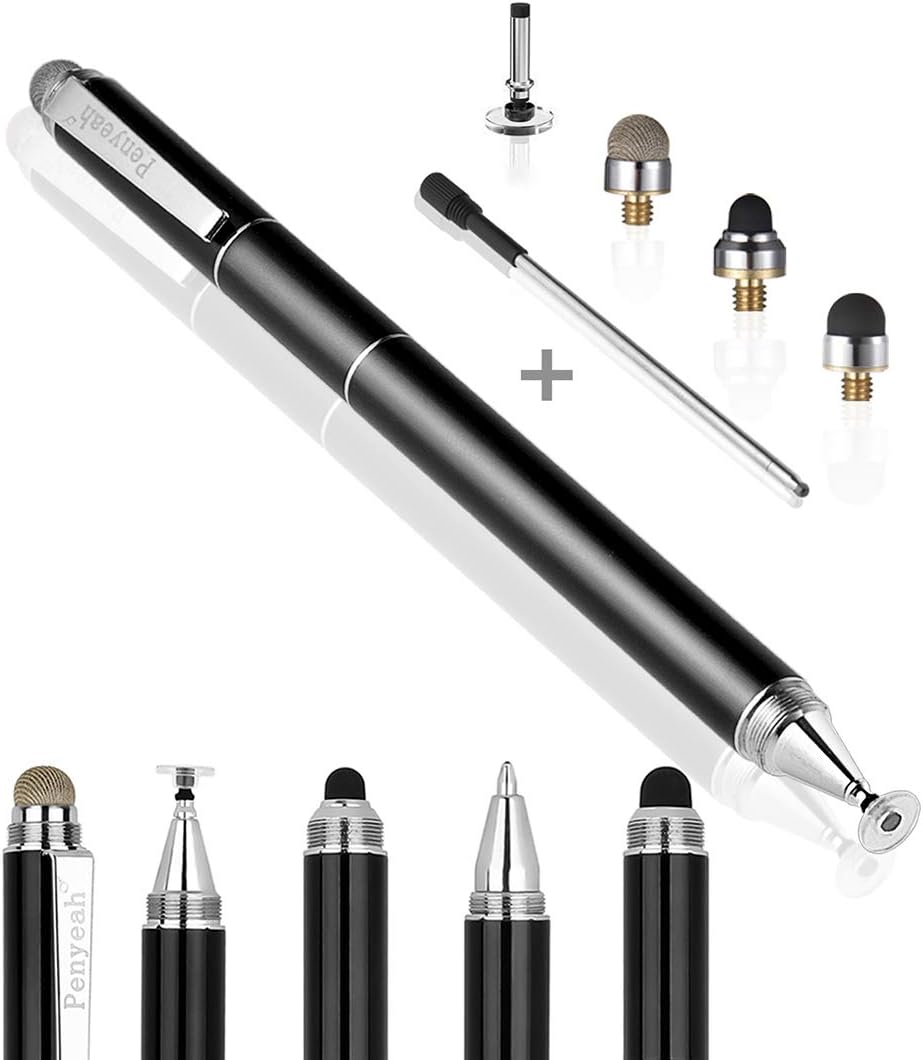
The Penyeah stylus offers a unique 4-in-1 design that combines multiple digital and traditional writing tools. With a rating of 4.4 stars, it caters to users who need versatility in a single device. You get a disc tip, mesh fiber tip, rubber tips, and even a ballpoint pen refill.
We may earn a commission when you buy through this link, at no additional cost to you.
The precision disc tip allows you to see where your mark is made, providing better flexibility and accuracy for detailed tasks. The mesh fiber tip glides easily on screens while rubber tips help select small icons. This variety makes it suitable for a wide range of digital activities.
One limitation is that it does not support palm rejection, so you must avoid resting your hand on the screen. This requires a specific writing posture that might take some adjustment. However, the sturdy metal body and comfortable grip make it a durable choice for everyday use.
Anyone needing a versatile tool for both digital and physical writing should consider this set. It is excellent for office work or study where traditional pens are also needed. The ability to customize your tips means you can adapt the pen to different tasks seamlessly.
This pen includes four different types of tips including a ballpoint refill, giving you options for digital interaction and traditional writing in one handy device.
Made from high grade metal material, the stylus is solid, durable, and corrosion resistant, ensuring it lasts through regular use and maintains a professional appearance.
We may earn a commission when you buy through this link, at no additional cost to you.
This active stylus is designed for students and professionals needing a lightweight tool for writing and drawing. With a rating of 4.2 stars, it offers features similar to high-end pens at a more economic price. It includes a 1.5mm tip for smooth writing on most touchscreen devices.
We may earn a commission when you buy through this link, at no additional cost to you.
The upgraded technology ensures compatibility with newer iPad models and other tablets. It does not require Bluetooth, making it easier to set up quickly. The built-in battery provides 8 hours of active use, which is sufficient for a typical school or work day.
Care must be taken with charging as fast chargers can damage the internal chip. Users should use standard USB inputs to maintain safety and longevity. While this adds a slight inconvenience, the trade-off for a lower price and effective performance is often worth it.
Students looking for an affordable active pen will find this model helpful. It provides good accuracy and control against tablet screens without the need for complex setup. If you need a reliable tool for journaling or note-taking, this stylus offers great value.
The upgraded technology allows this stylus to work with newer iPad series and other tablets, ensuring you get the most out of your device without compatibility issues.
A buffer unit at the tip design gives you more accuracy and control against screens, offering resistance similar to a real pen for a natural writing experience.
We may earn a commission when you buy through this link, at no additional cost to you.
This bundle includes six vibrant stylus pens designed for all touch screens. With a rating of 4.6 stars, it is ideal for households or teams needing multiple reliable tools. The durable rubber tip glides smoothly without lag, making it perfect for detailed work on any device.
We may earn a commission when you buy through this link, at no additional cost to you.
Each pen features a convenient built-in clip, making it easy to attach to a pocket or bag. This design ensures you always have a pen within reach when you need it. Since no batteries or apps are required, you can start using them immediately upon unboxing.
The trade-off is that these are basic capacitive pens without advanced digital features. They are perfect for navigation and note-taking but not for complex artistic tasks. However, for the price, you get a substantial quantity of durable tools for general everyday use.
Families looking for a cost-effective solution will appreciate this pack. You can assign different colors to different users or keep spares at work and home. It is the ultimate versatile stylus kit for anyone needing reliable pens for multiple devices.
With six pens included in the package, this set offers exceptional value for families or teams who need reliable stylus tools for various devices and users.
The convenient built-in clip allows you to easily attach the stylus to your pocket or bag, ensuring it is always within reach and reducing the risk of loss.
We may earn a commission when you buy through this link, at no additional cost to you.
This 4-pack set features an upgraded 2-in-1 design combining a transparent disc tip and a rubber tip. Rated at 4.5 stars, it offers a seamless transition from writing to sketching. The aluminum barrel adds a comfortable grip for extended use, enhancing the overall user experience.
We may earn a commission when you buy through this link, at no additional cost to you.
The package includes 12 replacement tips to meet creative needs and reduce replacement frequency. You get both disc and rubber tips to handle various digital interactions effectively. This variety ensures that you can always find the right tool for the task at hand.
While the tips are replaceable and durable, they may wear out over time with heavy use. However, the inclusion of spares mitigates this concern significantly. The satisfaction guarantee further ensures that you are protected against quality issues during the purchase period.
Anyone looking for a comprehensive set for home or office will find this appealing. The sleek design and versatility make it a great gift for artists or writers. It provides exceptional value by combining quality materials with a generous supply of replacement parts.
The set provides 12 replacement tips which are easy to install and durable, ensuring you have ample supplies for long-term use without needing additional purchases.
The small transparent disc tip flexibly fits on screens without leaving disconnected lines, providing improved accuracy for detailed writing and sketching tasks.
We may earn a commission when you buy through this link, at no additional cost to you.
This 10-pack offers exceptional cost-effectiveness for personal or bulk procurement. With a rating of 4.7 stars, each stylus features a dual rubber tip design for accurate control. The alloy metal body ensures long-lasting durability for daily use in various environments.
We may earn a commission when you buy through this link, at no additional cost to you.
The package includes 20 matching replacement rubber nibs, providing sufficient supply for long-term use. You can replace nibs quickly without any extra tools, ensuring uninterrupted workflow. The vibrant mixed colors make it easy to distinguish pens for different users or scenarios.
While these are passive styluses without electronic features, they are ready to use out of the package. They glide smoothly across screens with moderate resistance, delivering a natural writing feel. For large families or schools, this setup minimizes maintenance and replacement efforts.
Buyers seeking a bulk solution for classrooms or offices should consider this set. It provides a reliable and affordable way to equip multiple users with quality styluses. The high value and durability make it a top choice for long-term shared use.
Each package includes 10 dual-tip stylus pens plus 20 matching replacement nibs, offering exceptional cost-effectiveness for personal use as well as school or office bulk procurement.
Made with premium soft rubber material, the nibs glide smoothly across the screen with moderate resistance, delivering a natural writing and drawing feel.
We may earn a commission when you buy through this link, at no additional cost to you.
This 10-piece set offers unparalleled accuracy with dual premium silicone rubber tips. Rated at 4.6 stars, it is designed for smooth, responsive performance across all capacitive touch screens. The sleek aluminum body blends functionality and elegance for a stylish digital experience.
We may earn a commission when you buy through this link, at no additional cost to you.
The anti-scratch design safeguards your device from fingerprints and smudges. You can unleash creativity and enhance productivity with smooth, lag-free performance. The set includes replaceable accessories featuring two different-sized rubber tips for adaptable use across different tasks.
As passive styluses, they do not require Bluetooth or charging. However, care must be taken to avoid dropping them as the tips are small. Despite this, the convenience of instant setup and universal compatibility makes them excellent for everyday use.
Anyone needing a large set of reliable pens for multiple devices will appreciate this kit. It allows you to switch between devices and unleash your creativity with ease. The comprehensive set and responsive customer support ensure a hassle-free experience for every user.
Experience unparalleled accuracy with dual premium silicone rubber tips designed for smooth and responsive performance across tasks like browsing, writing, drawing, and gaming.
The stylus is designed to seamlessly work with all capacitive touch screen devices including iPhone, iPad, Nintendo Switch, and Android phones enabling effortless device switching.
We may earn a commission when you buy through this link, at no additional cost to you.
Choosing the right fine point stylus involves evaluating several factors to ensure it meets your specific needs.
Always verify that the stylus works with your specific device. Some models are optimized for Apple products while others support a wider range of Android and Windows devices. Checking the manufacturer's compatibility list ensures you avoid purchasing a pen that does not function correctly.
Ensure the stylus supports your specific device model before buying to avoid compatibility issues.
Selecting the right tip type is crucial for your workflow. Rubber tips are great for general navigation while disc tips offer better visibility for precise drawing. Some pens even feature multiple tips allowing you to switch between different tasks easily.
Choose a tip type that aligns with your primary tasks such as writing or gaming.
Active styluses require charging so consider how long the battery lasts on a single charge. If you plan to use the pen for long sessions ensure it has a battery life that matches your daily needs. Some models offer quick charging features to minimize downtime.
Prioritize models with sufficient battery life to support your usage patterns without interruption.
Look for styluses made from robust materials like metal or high-quality plastic. These materials help the pen withstand daily drops and handling. Also check if replacement tips are available to extend the lifespan of the device.
Choose a durable design that can handle regular use without breaking easily.
Comfort is key when using a stylus for extended periods. Consider the weight and grip of the pen to ensure it feels natural in your hand. A comfortable design reduces strain during long writing or drawing sessions.
Select a pen that feels comfortable in your hand to prevent fatigue.
Advanced styluses often include palm rejection features allowing you to rest your hand on the screen naturally. If you prefer a natural writing experience ensure the model supports this feature. Without it you may experience unwanted marks or interruptions.
Opt for a stylus with palm rejection if you want a natural writing feel.
Determine your budget and compare features across different price points. Sometimes a slightly more expensive pen offers features that save time or improve productivity significantly. However basic models can also meet your needs if advanced features are not required.
Balance the cost with the features you actually need for your daily tasks.
Check if the manufacturer offers reliable customer support and warranty options. Good support ensures you can get help if you encounter issues with the product. A solid warranty policy can protect your investment against defects.
Choose a brand that offers reliable customer support and warranty coverage.
To get started with your new stylus simply ensure your device screen is clean and dry. Remove any protective plastic from the tip if included and hold the pen comfortably. For active styluses charge them fully before first use to ensure optimal performance.
During use avoid pressing too hard on the screen as this can damage both the pen tip and the display. Keep your hand off the screen if your pen does not support palm rejection. This practice helps prevent accidental marks and extends the life of the device.
Store your stylus in a safe place to prevent damage to the tips. If it has replaceable tips ensure they are stored securely when not in use. Clean the tips regularly with a soft cloth to maintain smooth performance over time.
Most fine point styluses are designed to work with capacitive touchscreens found on smartphones and tablets. However compatibility varies by model so always check if it supports your specific device before purchasing.
Yes, most styluses work effectively with screen protectors. However, extremely thick protectors might reduce sensitivity slightly. Testing your specific setup ensures the best performance.
Active styluses require a battery and often offer features like pressure sensitivity. Passive styluses do not need power and work by mimicking the touch of a finger using conductive materials.
Most styluses allow you to replace the tip by unscrewing the old one and screwing in a new one. Consult the manual for specific instructions to avoid damaging the device.
If your stylus is not responding check the battery level and ensure the screen is clean. For active models verify that Bluetooth is connected if required. Passive models might need tip replacement if worn out.
Yes, many active styluses feature palm rejection technology allowing you to rest your hand on the screen naturally. Check the product specifications to confirm this feature is present before purchasing.
We hope this guide has helped you narrow down the options for the perfect fine point stylus. Each model offers unique strengths tailored to different needs whether it is for work creativity or simple navigation.
Prioritize features that matter most to your workflow such as compatibility and battery life. Investing in a quality tool can significantly enhance your digital experience and productivity.
Remember that prices and availability can change quickly so verify current details before making your final purchase decision. Happy writing and drawing with your new stylus.