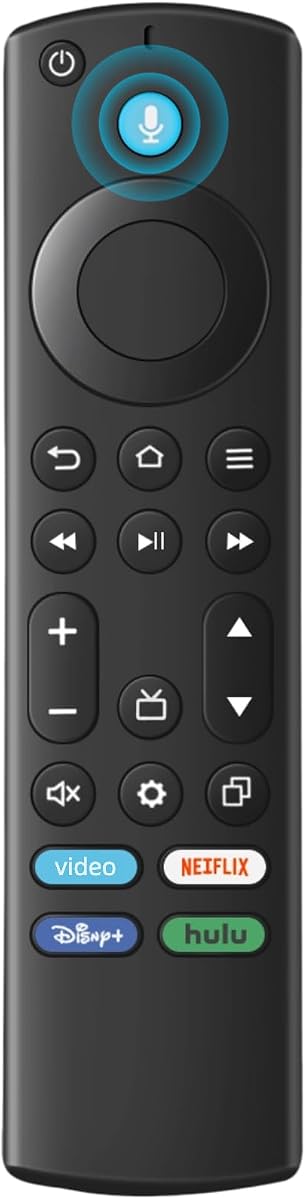
Replacement Voice Remote for Fire Stick
4.2Editor score
Wide compatibility
Voice commands
Affordable price
This guide compares the top Fire Stick Replacement Remote options available in 2026, evaluating voice control, compatibility, and features to help you choose
Finding a reliable Fire Stick Replacement Remote is essential for maintaining seamless entertainment. Whether your original remote lost or damaged, selecting the right replacement ensures you can navigate apps and control your TV effortlessly without frustration or downtime.
We evaluated ten top-rated Fire Stick Replacement Remote models based on compatibility, voice features, and user feedback. Our analysis covers official Amazon options and third-party alternatives, ensuring you find a device that matches your specific streaming needs and budget.
Each review highlights key strengths, limitations, and pairing instructions to streamline your setup process. Keep in mind that product details and pricing may shift over time, so always verify current specifications before making your final purchase decision.
4.2Editor score
4.5Editor score

4.5Editor score
The following table provides a side-by-side comparison of all ten Fire Stick Replacement Remote models, highlighting their core specifications and unique features to simplify your selection process.


This replacement remote offers a budget-friendly solution for users needing a Fire Stick Replacement Remote without breaking the bank. It supports voice commands and works with multiple Fire TV devices, including various Stick and Cube generations.
We may earn a commission when you buy through this link, at no additional cost to you.
The device allows users to find content quickly using voice commands, which enhances the viewing experience significantly. Compatibility extends to smart TVs like Insignia and Toshiba that support voice commands, making it a versatile option.
However, it does not include batteries, requiring an additional purchase. Also, it lacks direct TV controls like power and volume for non-compatible TVs, which might be a limitation for some users.
Buyers looking for a basic voice remote at a low cost should consider this option. It provides essential functionality for navigation and searching without unnecessary extras.
The built-in microphone allows for hands-free searching, making it easier to find shows without typing.
Users with supported Fire smart TVs can control their devices directly with this remote for a streamlined experience.
We may earn a commission when you buy through this link, at no additional cost to you.
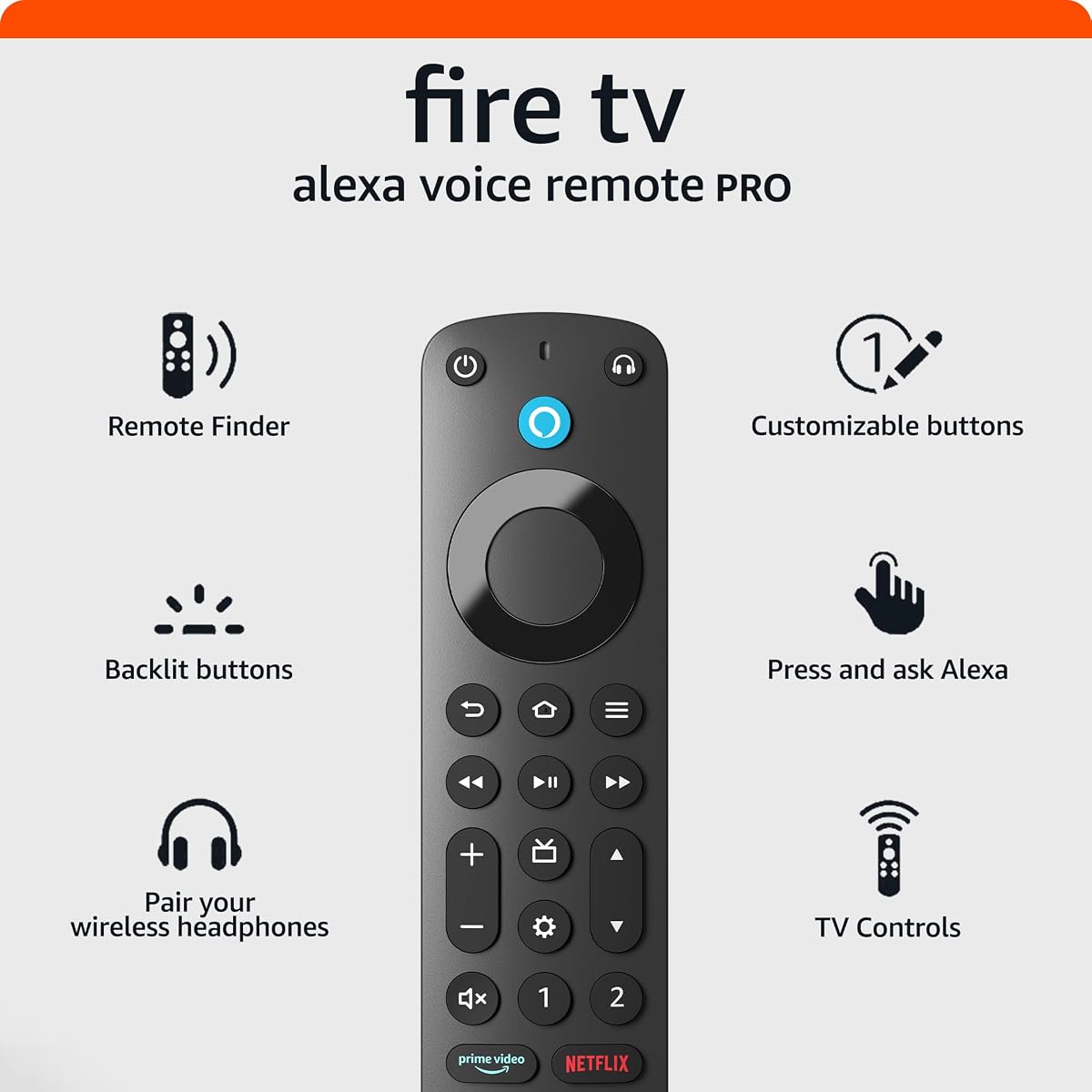
The Amazon Fire TV Alexa Voice Remote Pro stands out as a premium choice for a Fire Stick Replacement Remote. It combines voice control with practical features like a remote finder and backlit buttons, enhancing usability in dark environments.
We may earn a commission when you buy through this link, at no additional cost to you.
Key strengths include the ability to locate the remote via voice commands, which eliminates frustration during movie nights. The dedicated headphone button and customizable shortcuts further streamline access to favorite apps and settings.
The price is higher than third-party alternatives, and it is not compatible with older Fire TV generations. Additionally, users without smart home devices might not fully utilize all Alexa features.
Those seeking the best overall experience with advanced features should prioritize this remote. It offers convenience and functionality that justify the cost for many users.
Using Alexa or the app to ring the remote ensures you never lose track of it in the couch cushions.
Motion-activated lighting illuminates buttons automatically when you pick up the remote in the dark.
We may earn a commission when you buy through this link, at no additional cost to you.
This replacement remote is a strong contender for anyone seeking a versatile Fire Stick Replacement Remote. It offers extensive compatibility with various Fire TV models and includes multiple shortcut buttons for quick access to apps.
We may earn a commission when you buy through this link, at no additional cost to you.
The ability to customize buttons allows users to tailor the remote to their specific needs, such as direct access to favorite streaming services. The voice function also adds convenience for hands-free control.
However, setup requires following the manual carefully to activate voice features. Additionally, it lacks dedicated TV controls for power and volume, which might be required by some users.
Buyers who prioritize customization and compatibility over extra features will find this remote suitable. It balances cost and functionality well for many households.
Press and hold specific buttons to program them for instant access to your favorite apps or commands.
Supports multiple generations of Fire Stick and Cube devices, ensuring it fits most setups.
We may earn a commission when you buy through this link, at no additional cost to you.
Designed for compatibility with Fire Stick devices from 2020 to 2026, this remote serves as a reliable Fire Stick Replacement Remote. It offers a long range and voice control for convenience.
We may earn a commission when you buy through this link, at no additional cost to you.
The 4 shortcut buttons allow quick access to popular apps, reducing navigation time. Additionally, the manufacturer provides a 60-day satisfaction guarantee, offering peace of mind to buyers.
However, it does not include batteries, and it is not compatible with older Fire TV models. Users must ensure their device is compatible before purchasing to avoid return hassles.
Those with newer Fire TV devices seeking a dependable remote at a reasonable price will appreciate this option. The support guarantee adds extra value to the purchase.
Control your device from up to 12 meters away, providing flexibility in room layout.
A 60-day guarantee ensures you can return the product if it does not meet your expectations.
We may earn a commission when you buy through this link, at no additional cost to you.
This remote simplifies the setup process with automatic sync capabilities, making it a user-friendly Fire Stick Replacement Remote. It supports voice control and includes pre-programmed shortcut buttons for convenience.
We may earn a commission when you buy through this link, at no additional cost to you.
The device works seamlessly with smart TVs from Insignia, Toshiba, and Omni that support voice control. This integration allows users to manage both their streaming device and TV with a single remote.
However, batteries are not included, and compatibility is limited to specific smart TV models. Users should verify their TV compatibility before purchasing.
Buyers valuing ease of use and integration with smart TVs will find this remote suitable. It streamlines control without requiring complex configuration steps.
The remote pairs automatically with your streaming device upon powering on, eliminating manual setup steps.
Control compatible TVs directly, reducing the need for multiple remotes on the coffee table.
We may earn a commission when you buy through this link, at no additional cost to you.
Covering a broad range of Fire Series devices, this remote serves as a comprehensive Fire Stick Replacement Remote. It includes voice control and standard navigation buttons essential for daily use.
We may earn a commission when you buy through this link, at no additional cost to you.
The pairing process involves holding the Home button for a set time, which is straightforward. Users benefit from the ability to control content and smart home devices using voice commands.
However, it does not include TV controls, and users must refer to the manual for pairing instructions. This might be inconvenient for those unfamiliar with the process.
Those seeking a remote that fits multiple Fire TV generations will find this option reliable. It provides essential features at an accessible price point.
Supports Fire Stick, Cube, and TV models from different generations, ensuring versatility for various setups.
Use voice commands to find content, play music, or control compatible smart home devices hands-free.
We may earn a commission when you buy through this link, at no additional cost to you.
This official Amazon remote stands out as a premium Fire Stick Replacement Remote. It includes TV controls for power and volume, simplifying entertainment management with a single device.
We may earn a commission when you buy through this link, at no additional cost to you.
Features like preset app buttons and a guide button for channel listings enhance usability. Additionally, it includes two AAA batteries, ensuring immediate use upon unboxing.
However, it is not compatible with older Fire TV models, and it lacks the remote finder feature found in the Pro version. Users need to ensure their device matches compatibility requirements.
Buyers looking for an official remote with essential controls and convenience features will find this ideal. It balances functionality and ease of use effectively.
Dedicated buttons for power and volume allow direct control of your TV and soundbar without a separate remote.
Press the guide button to view live TV listings and channel apps in one place for easy navigation.
We may earn a commission when you buy through this link, at no additional cost to you.
This remote offers a solid alternative for users needing a Fire Stick Replacement Remote for newer models. It includes voice control and uses an LED indicator to simplify the pairing process.
We may earn a commission when you buy through this link, at no additional cost to you.
The LED light flashes rapidly during pairing mode, providing visual feedback. Voice commands allow for quick content search and device control, enhancing the user experience.
However, manual matching is required, and it does not support older smart TV models. Users should verify device compatibility before purchasing.
Buyers with newer Fire devices looking for a dependable remote with voice features will appreciate this option. It provides reliable performance for daily streaming.
The indicator light flashes to show when the remote is in pairing mode, making setup more transparent.
Use voice commands to control your device without pressing buttons, allowing for hands-free operation.
We may earn a commission when you buy through this link, at no additional cost to you.
This budget-friendly option provides essential features for a Fire Stick Replacement Remote. It supports a wide range of Fire devices and smart TVs from brands like Insignia and Toshiba.
We may earn a commission when you buy through this link, at no additional cost to you.
The remote includes preset app buttons for quick access to favorite apps. Voice control allows for easy content search, making navigation more intuitive for users.
However, batteries are not included, and pairing requires removing old batteries first to avoid conflicts. These steps can be slightly inconvenient but manageable.
Those seeking a cost-effective remote with voice capabilities will find this suitable. It delivers core functionality without unnecessary extras.
Preset buttons launch your favorite apps instantly, saving time navigating through menus.
Works with various Fire devices and third-party smart TVs, offering flexibility for different setups.
We may earn a commission when you buy through this link, at no additional cost to you.
This remote delivers good value for users needing a Fire Stick Replacement Remote with voice control. It supports multiple Fire Stick generations and smart TVs from various brands.
We may earn a commission when you buy through this link, at no additional cost to you.
Voice commands make searching for content easy, and shortcut buttons provide quick access to apps. The support team is available to assist with any pairing issues.
However, batteries are not included, and users must manually enter pairing mode. These are minor inconveniences considering the overall functionality offered.
Buyers seeking a reliable remote with voice features and support will find this option appealing. It balances performance and affordability well.
Speak commands to find content quickly, making navigation effortless and intuitive.
Dedicated support helps resolve pairing issues or setup questions promptly after purchase.
We may earn a commission when you buy through this link, at no additional cost to you.
Selecting the right remote requires careful consideration of compatibility, features, and budget. This guide outlines key factors to help you make an informed decision.
Ensure the remote matches your device generation. Older remotes may not pair with newer Fire Stick models, leading to frustration and returns.
Always verify device specifications before purchasing to confirm seamless integration.
Voice control is a convenient feature that allows hands-free searching and smart home control.
Check if the remote requires manual activation or setup for voice features.
Some remotes include buttons for TV power and volume, reducing the need for multiple remotes.
Verify that your TV is supported by these integrated controls before buying.
Most remotes require AAA batteries, but some include them. This can affect initial setup convenience.
Confirm whether batteries are included to avoid extra purchases.
Customizable shortcut buttons allow quick access to favorite apps, enhancing user experience.
Look for remotes with programmable buttons if you have specific apps you use daily.
Pairing methods vary between remotes. Some require holding buttons or removing batteries for sync.
Choose a model with a straightforward pairing process if you prefer simplicity.
Third-party remotes often come with limited warranties. Official Amazon remotes may offer better support.
Check seller policies to understand what happens if the remote malfunctions.
Physical durability affects longevity. Look for remotes with sturdy construction to withstand daily use.
Reading reviews about build quality can help avoid flimsy replacements.
Insert fresh batteries properly, ensuring correct polarity. Remove old batteries if pairing with a new remote to avoid interference.
Clean buttons regularly with a soft cloth to remove dust. Avoid liquid cleaners directly on the device to prevent internal damage.
Store the remote in a dry place away from heat. Replace batteries every few months to maintain consistent performance.
Most Fire Stick Replacement Remote models require two AAA batteries to operate. Some products include these in the package, while others do not. Always check the product details to know if you need to purchase batteries separately for setup.
To pair, unplug the Fire Stick from power for about ten seconds. Plug it back in and hold the Home button on the new remote until the LED light flashes. Wait for the pairing confirmation screen on your TV.
Yes, many third-party remotes work with Fire TV devices. Ensure the specific model is listed as compatible with your Fire Stick generation. Some features like TV controls may vary based on the brand.
Check if the microphone is enabled in the Fire TV settings. Re-pairing the remote or removing and reinserting batteries often resolves voice control issues. Ensure your device has an active internet connection.
Not all remotes are compatible with Fire TV Cube. Verify the product description for compatibility with Cube models before purchasing. Newer remotes generally support Cube generations better than older replacements.
Some Fire Stick replacement remotes include integrated TV controls for power and volume. Check if the remote is compatible with your specific TV model to ensure these buttons function correctly.
A typical Fire Stick remote can last several years with proper care. Battery life depends on usage frequency. Replacing batteries and storing the device properly extends its overall lifespan.
Official Amazon remotes often include exclusive features like the remote finder or customizable buttons. However, third-party options provide similar basic functionality at a lower price point for many users.
Choosing the right Fire Stick Replacement Remote depends on your specific needs and budget. The Amazon Fire TV Alexa Voice Remote Pro stands out for premium features, while budget options like the Replacement Voice Remote offer great value.
Prioritize compatibility and essential features like voice control when making your selection. Ensure the remote matches your device generation to avoid pairing issues and frustration during setup.
Prices and availability may change over time, so verify current details before purchasing. Selecting a reliable remote ensures seamless entertainment and hassle-free navigation for your streaming setup.