
Infinity 3 USB Foot Pedal Control
4.5Editor score
Durable heavy-duty micro switches
Ergonomic sloping Play pedal
Simple USB plug and play
This guide compares the top ten foot pedals for transcriptionists to help you find the perfect hands-free control solution for your daily workflow.
Transcriptionists rely on efficient tools to manage audio playback while typing. A quality foot pedal allows hands-free control, boosting speed and reducing fatigue during long sessions.
We evaluated ten top-rated models based on durability, ergonomic design, software compatibility, and user feedback. Each option offers unique features tailored to professional needs.
Each pick highlights key strengths and trade-offs to guide your decision. Prices vary by retailer and may change, so verify current availability before purchasing your next device.
4.5Editor score

4.4Editor score

4.1Editor score
This side-by-side comparison highlights key features across ten leading models to help you choose the right tool for your transcription workflow.


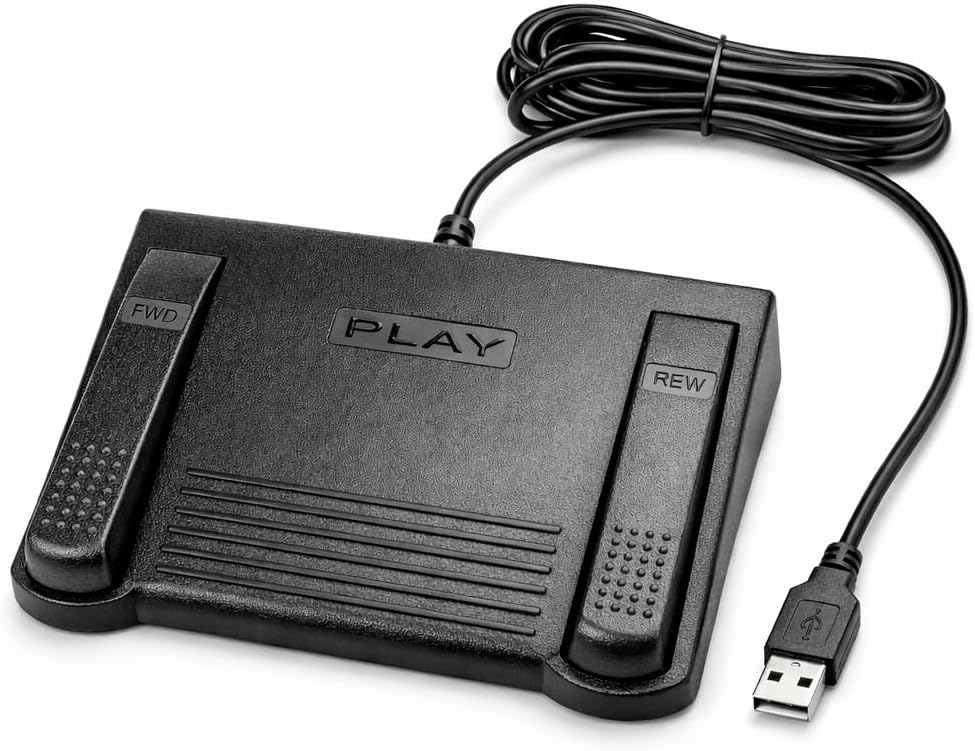


The Infinity 3 USB Foot Pedal Control offers a reliable solution for transcriptionists seeking essential hands-free functionality. With a 4.5-star rating, users appreciate its sturdy build and consistent performance over time.
We may earn a commission when you buy through this link, at no additional cost to you.
Its ergonomic design features a wide central play pedal that allows easy movement between play, fast forward, and rewind keys. The ultra-heavy-duty micro switches ensure countless hours of trouble-free performance without wear.
While it lacks advanced programmability, its straightforward functionality makes it ideal for users who prefer simplicity. The sturdy design handles daily wear, though some may find the feature set basic.
Buyers seeking a durable, no-fuss pedal for standard transcription tasks should consider this model. Its balance of comfort and reliability makes it a top choice for professionals needing consistent control.
The wide sloping play pedal enhances comfort during long sessions by allowing natural foot movement between functions.
Heavy-duty switches withstand repeated use, ensuring the pedal remains functional over years of daily transcription work.
We may earn a commission when you buy through this link, at no additional cost to you.
The VEC in-USB-2 Infinity Digital Foot Control combines affordability with advanced features like a rechargeable battery and mechanical stop prevention. Its 4.4-star rating reflects strong performance and user satisfaction.
We may earn a commission when you buy through this link, at no additional cost to you.
Designed for comfort, the sloping play pedal supports natural foot rest during dictation. The mechanical stop prevents accidental triggering when stepping on side pedals, maintaining precise control.
While the battery provides up to 1000 hours of time, users must manage charging cycles. The heavy-duty switches and wide compatibility make it versatile for various dictation products.
Ideal for budget-conscious professionals needing reliable, portable control, this pedal offers long-lasting performance. Its design prioritizes ergonomic comfort and accidental trigger prevention.
Powered by a rechargeable battery, it provides extensive usage time without needing constant plugging into a power source.
Mechanical stops ensure side pedal presses do not activate the center pedal, reducing errors during transcription.
We may earn a commission when you buy through this link, at no additional cost to you.
The Philips ACC2330 4-Pedal Foot Control is designed for professional dictation with precision toe touch controls. Its 4.1-star rating highlights users value its ergonomic design for reducing strain.
We may earn a commission when you buy through this link, at no additional cost to you.
The wider center pedal avoids unintended presses, while the swing heel design allows natural foot movement. Users report increased ease of relaxation during pauses, minimizing physical fatigue.
Though premium-priced, its specialized features suit high-volume transcriptionists needing nuanced control. The design prioritizes comfort, though some may find the layout overly complex for simple tasks.
Buyers prioritizing ergonomic support and professional-grade control should consider this model. It balances precision with comfort for demanding transcription workflows.
Toe touch controls allow quick changes in control area without lifting the foot, enhancing workflow speed.
Users can swing the foot using the heel, providing natural movement and reducing strain during long sessions.
We may earn a commission when you buy through this link, at no additional cost to you.
The DAC 3 Function Foot Pedal stands out with a perfect 5.0 rating for its clear large button design. It offers straightforward controls including Next Job, Rew/Play, and Record functions via USB.
We may earn a commission when you buy through this link, at no additional cost to you.
Its large buttons make transitions easy for users prioritizing clarity. The Next Job function supports specific workflows, though compatibility is limited to certain computer software designed for foot control.
While ideal for targeted use cases, its specialized design may not suit all transcription software. The USB connector ensures simple integration, but advanced customization is unavailable.
Buyers needing specific control features and clear labeling should consider this pedal. It excels in simplicity but requires verifying software compatibility before purchase.
Large buttons labeled clearly help users quickly identify functions, reducing errors during fast-paced transcription.
Designed for certain software, this pedal ensures reliable operation within supported environments.
We may earn a commission when you buy through this link, at no additional cost to you.
The Infinity USB Digital Foot Control (IN-USB3) features a low-profile design with enhanced non-slip surface area for stability. Its 4.5-star rating reflects user appreciation for its secure, stable operation.
We may earn a commission when you buy through this link, at no additional cost to you.
The non-slip surface ensures the pedal remains in place during use, while the low profile allows comfortable foot placement. Simple USB connectivity supports quick setup without complex configurations.
While it lacks advanced ergonomics, its focus on stability makes it suitable for users prioritizing reliability over customization. Some may prefer more angled designs for extended comfort.
Ideal for transcriptionists seeking a stable, no-fuss pedal, this model delivers consistent performance. Verify compatibility with your software for optimal results.
The larger non-slip surface area prevents movement during use, ensuring consistent control over time.
A low-profile design reduces the need to lift the foot, easing strain during long transcription sessions.
We may earn a commission when you buy through this link, at no additional cost to you.
The Express Scribe ECS-FPAE Foot Pedal is engineered exclusively for Express Scribe software, offering seamless integration and reliable playback control. With a 3.8-star rating, it suits users committed to this platform.
We may earn a commission when you buy through this link, at no additional cost to you.
Its oversized pedal layout supports easy movement between play, fast-forward, and rewind, reducing fatigue during long sessions. The plug-and-play setup requires no configuration wizard.
While designed for Express Scribe users, its exclusivity limits broader use. Some users report reliability issues, but the warranty provides assurance for professional environments.
Buyers using Express Scribe should consider this pedal for its tailored design. Others may prefer broader compatibility options.
Built with a custom internal board, it ensures precise control within Express Scribe environments.
Ready to use out of the box, it eliminates manual configuration for quick setup.
We may earn a commission when you buy through this link, at no additional cost to you.
The ECS-IN-USB-1 Foot Pedal provides hands-free control to improve transcription efficiency and reduce fatigue. Its 3.5-star rating reflects mixed user feedback, with ergonomic design praised for long sessions.
We may earn a commission when you buy through this link, at no additional cost to you.
Designed for comfort, the pedal features a contoured layout supporting natural foot positioning. It works with most major transcription software, though not all users find the response consistent.
While it offers broad compatibility and warranty support, some users report usability issues. The design aims to minimize strain, but results may vary by user.
Buyers seeking affordable ergonomic support should test compatibility with their setup. It offers standard performance for daily transcription tasks.
Contoured layout supports natural foot positioning, helping reduce strain during extended use.
Designed to work with most major platforms, it provides flexibility for diverse transcription workflows.
We may earn a commission when you buy through this link, at no additional cost to you.
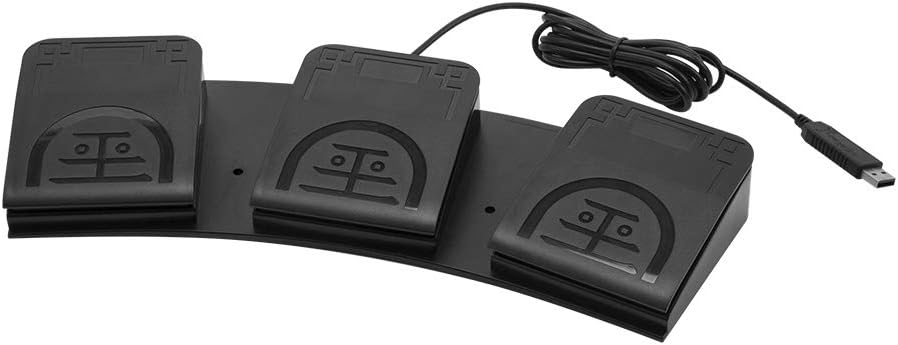
The iKKEGOL Upgraded Triple Pedal offers versatile programmability as a standard HID device. With a 4.4-star rating, users appreciate its quiet optical switches and durable construction for varied tasks.
We may earn a commission when you buy through this link, at no additional cost to you.
Its wide pedal design ensures comfort, while TPU rubber keeps it stable on hard floors. Programming software allows customization, though it lacks dedicated transcription presets.
While suitable for transcription via custom keys, it requires initial setup. Some may find the multi-purpose design less optimized for specific workflows.
Buyers seeking a customizable, multi-use pedal should consider this model. Verify software compatibility for transcription integration.
Optical switches operate quietly, reducing noise distractions during professional environments.
Customizable keys enable complex macros or simple playback controls tailored to individual needs.
We may earn a commission when you buy through this link, at no additional cost to you.
The Philips LFH-2330 USB Control features a configurable 4-pedal design allowing tailored setups via a user-friendly wizard. With a 4.2-star rating, it supports ergonomic workflows with minimal foot movement.
We may earn a commission when you buy through this link, at no additional cost to you.
Its slim design reduces strain by minimizing movement while anti-slip surfaces ensure stability. Users appreciate flexibility though configuration may require initial setup effort.
While versatile, the setup process may deter those seeking instant plug-and-play use. The ergonomic benefits suit long sessions but may be unnecessary for simple tasks.
Buyers needing customization and ergonomic support should consider this model. Verify setup requirements align with your workflow.
Users customize pedal functions to match personal preferences, enhancing workflow flexibility.
A slim profile reduces foot movement, minimizing physical strain during extended use.
We may earn a commission when you buy through this link, at no additional cost to you.
The iKKEGOL Mechanical Triple Switch leverages mechanical actuators for precise foot control with macro support. With a 4.3-star rating, it suits users needing customizable workflows across transcription and creative tasks.
We may earn a commission when you buy through this link, at no additional cost to you.
Its mechanical design ensures responsive actuation, while the ElfKey software enables complex key combinations. TPU rubber stabilizes the device during operation.
While powerful, setup requires configuration software, potentially complicating use for less technical users. The broad system support enhances compatibility but demands attention to detail.
Buyers seeking advanced programmability should consider this pedal. Ensure software setup aligns with technical comfort.
Mechanical levers provide reliable electrical circuit closure, ensuring precise foot actuation.
Executes complex macros through foot controls, speeding up workflows in transcription and other professional tasks.
We may earn a commission when you buy through this link, at no additional cost to you.
Choosing the right foot pedal involves evaluating ergonomics, compatibility, durability, and features tailored to your workflow.
An ergonomic pedal reduces foot strain and fatigue during long transcription sessions. Look for sloping play pedals, wide surfaces for natural foot rest, and slim profiles to minimize movement. Comfort directly impacts productivity and physical well-being.
Prioritize models with contoured layouts and anti-fatigue features to sustain comfort during extended use.
Ensure the pedal works seamlessly with your transcription software. Universal models support major platforms like Express Scribe or Dictation software, while some brands offer exclusive optimizations. Verify compatibility before purchase to avoid workflow disruptions.
Check product specifications for supported applications and consider universal options for flexibility.
High-quality micro switches withstand repeated presses without wear. Heavy-duty or optical switches ensure consistent performance over time. Durability is critical for daily transcription workloads requiring reliable control.
Select pedals rated for millions of activations to ensure long-term reliability.
Basic models offer three functions (play, forward, rewind), while advanced units add recording or job switching. The layout should match your needs without excess complexity. More pedals offer flexibility but may require training.
Choose a pedal count that aligns with your transcription workflow complexity.
USB connectivity is standard for plug-and-play setup without additional drivers. Ensure your system supports the required ports. Wireless options may exist but wired USB offers consistent performance.
Verify USB compatibility with your computer for seamless integration.
Stable pedals prevent accidental movement during use. Look for rubberized bottoms or TPU grips. Anti-slip surfaces ensure consistent control and safety during active transcription.
Choose pedals with rubber or grippy materials to maintain position during use.
Programmable pedals allow custom key bindings and macros, enhancing workflow efficiency. Some require software setup, while others are pre-configured. Consider your technical comfort when selecting.
Opt for customizable models if your workflow requires advanced shortcuts or macros.
A warranty protects against defects and ensures manufacturer reliability. Look for mail-in or labor coverage. Strong support networks reduce downtime if issues arise.
Verify warranty terms and support options before purchase for peace of mind.
Position the pedal directly under your dominant foot to minimize movement. Ensure the USB connection is secure before starting transcription. Adjust foot placement to match ergonomic design for comfort.
Press pedals lightly and deliberately to avoid accidental triggers. Familiarize yourself with each pedal's function before live sessions. Regularly check alignment to maintain control accuracy.
Clean the surface with a dry cloth to remove dust. Store in a dry environment to prevent moisture damage. Replace worn switches if responsiveness declines to maintain workflow efficiency.
Not all pedals support every software. Universal models work with most major platforms, while others are brand-specific. Check compatibility before purchase to avoid integration issues.
Most pedals require a USB port to function. Standalone models exist but are rare. Ensure your device has a compatible USB connection before setup.
Three functions (play, forward, rewind) suffice for basic workflows. Advanced users may benefit from recording or job switching. Choose based on your complexity needs.
Wireless options are rare compared to USB. Wired connections ensure consistent performance. Some models offer Bluetooth but may have compatibility limitations.
Adjust foot position to avoid resting on pedals unintentionally. Look for models with mechanical stops or raised edges. Practice controlled pressure during use.
Yes, hands-free control reduces hand movement, allowing focus on typing. This often increases speed and accuracy over time with consistent practice.
The Infinity 3, VEC in-USB-2, and Philips ACC2330 offer top options balancing ergonomics, durability, and compatibility. Each serves distinct workflow needs effectively.
Prioritize comfort, software support, and durability when choosing. Avoid overcomplicating setups unless advanced features are essential.
Verify current availability and pricing before purchase. Tools evolve, so ensure your choice aligns with future workflow changes.