
Bisofice POS Receipt Printer
4.0Editor score
Android 8.1 OS
58mm thermal printer
5000mAh battery
Handheld pos systems have transformed how businesses accept payments and manage transactions on the go. These portable devices combine payment processing, inventory scanning, and receipt printing into one compact unit designed for mobile workflows.
We evaluated ten leading handheld pos systems based on connectivity options, battery life, scanning capabilities, and overall performance. Our comparison covers devices suitable for restaurants, retail shops, and service providers seeking efficient mobile checkout solutions.
Each pick highlights specific strengths like offline mode, thermal printing, or advanced networking. Note that product availability and pricing may change over time, so verify details before making your final purchase decision for your business needs.
4.0Editor score

4.7Editor score

5.0Editor score
As an Amazon Associate we earn from qualifying purchases.
The following table provides a side-by-side comparison of all ten handheld pos systems evaluated in this guide. Each entry lists key specifications to help you identify the device that best fits your operational requirements and budget constraints.




The Square Handheld stands out as the top choice for mobile businesses needing reliable payment processing. With a 4.7 rating, this device excels in portability and ease of use for restaurants and retail shops.
We may earn a commission when you buy through this link, at no additional cost to you.
Its slim design fits easily in a pocket while allowing tableside orders and barcode scanning. The offline payment feature ensures sales continue even when internet connections fail, which is critical for outdoor events.
Users may need to purchase an optional case for drop protection since the device is quite light. Additionally, it works best within the Square ecosystem, limiting flexibility if you use other payment processors.
Businesses prioritizing mobility and simplicity should choose this terminal. It offers a streamlined experience for accepting major cards and managing transactions without long-term contracts or hidden fees.
The compact form factor allows staff to move freely while processing payments anywhere on the premises or outside.
Offline payment capability keeps transactions flowing during internet outages, preventing lost sales opportunities.
We may earn a commission when you buy through this link, at no additional cost to you.
The H10 Terminal delivers robust performance with Android 14 and an Octa-Core processor suitable for running various business apps. Its 4.2 rating reflects strong usability for food trucks and mobile retail.
We may earn a commission when you buy through this link, at no additional cost to you.
An integrated 58mm thermal printer and NFC reader streamline checkout without extra hardware. The 6000mAh battery supports up to 14 hours of continuous operation, reducing charging interruptions during busy shifts.
At 345 grams, the device feels heavier than ultra-light models which might fatigue hands over long periods. The camera functions as a scanner but may lack the speed of dedicated laser barcode readers.
Developers and businesses needing custom app integration will appreciate the SDK support. This terminal balances modern Android features with essential payment and printing tools for versatile mobile operations.
Android 14 ensures compatibility with the latest business applications and security updates for safer transactions.
The large battery capacity minimizes downtime, allowing staff to focus on customers rather than charging devices.
We may earn a commission when you buy through this link, at no additional cost to you.
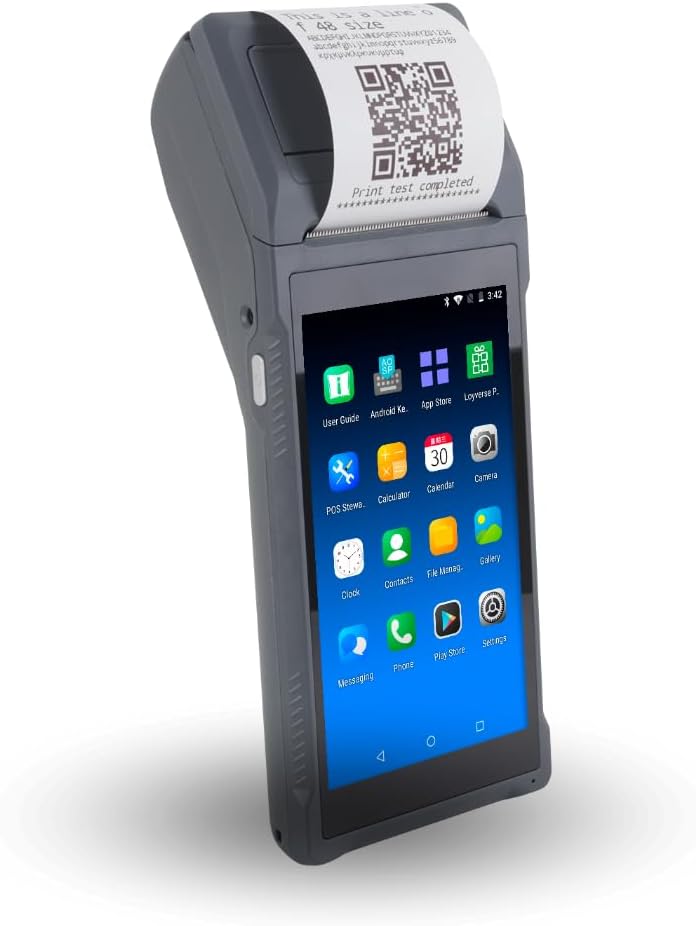
This Bisofice model offers an affordable entry into handheld pos systems with a 4.0 rating indicating solid basic functionality. It is well-suited for small cafes and boutique stores managing simple transactions.
We may earn a commission when you buy through this link, at no additional cost to you.
The 58mm printer operates quietly without needing ribbons, keeping overhead costs low. Android 8.1 provides a stable environment for essential apps while the 5000mAh battery supports endurance for regular business hours.
The older Android version may limit compatibility with newer features or apps compared to recent models. Connectivity via 3G is adequate but slower than LTE or Wi-Fi options for data-heavy tasks.
Budget-conscious owners looking for a reliable terminal for printing receipts and processing sales will find this appealing. It delivers core features without premium pricing or complex setup requirements.
Thermal printing eliminates ink costs while maintaining clear receipt quality for customer records.
Support for Wi-Fi and Bluetooth ensures connection to printers or scanners without wired hassles.
We may earn a commission when you buy through this link, at no additional cost to you.
The Bisofice 4G PDA brings full network compatibility including 4G LTE for uninterrupted work flow in remote locations. Rated 4.0, it serves logistics and warehouse teams requiring robust data transmission.
We may earn a commission when you buy through this link, at no additional cost to you.
A 5MP camera scans both 1D and 2D barcodes effectively while Android 13 ensures smooth operation. The built-in thermal printer outputs 58mm receipts and comes with paper for immediate use upon delivery.
The 3000mAh battery requires more frequent charging during heavy use compared to larger capacity models. The screen resolution is standard but not as vibrant as premium HD options for detailed menus.
Teams needing mobile connectivity without Wi-Fi zones will appreciate the 4G capability. This unit balances network versatility with essential POS functions for field-based inventory and sales tasks.
4G connectivity ensures sales can be processed even when local Wi-Fi is unavailable or congested.
Support for 1D and 2D codes allows flexible inventory tracking across various product types.
We may earn a commission when you buy through this link, at no additional cost to you.
The Square Terminal is a versatile device for ringing up sales and printing receipts without separate hardware. With a 4.5 rating, it suits retail stores needing a reliable countertop or mobile solution.
We may earn a commission when you buy through this link, at no additional cost to you.
It accepts all major debit and credit cards with fast chip processing in just two seconds. The built-in battery allows cordless use throughout the day while offering next-day fund availability.
Though portable, its footprint is larger than pocket-sized handhelds making it less ideal for tight spaces. Users should note it is designed for fixed or semi-fixed checkout points rather than roaming staff.
Businesses wanting a straightforward system to manage sales and receipts efficiently will prefer this model. It eliminates the need for multiple devices while maintaining a simple payment interface.
Combining payment acceptance with printing reduces counter clutter and speeds up customer interactions.
One low rate with no hidden fees simplifies budgeting for small business owners.
We may earn a commission when you buy through this link, at no additional cost to you.
The Q2i Terminal runs Android 11 with access to the Google Play Store for installing various POS applications. Rated 3.2, it appeals to users needing flexibility to choose software like Square or Stripe.
We may earn a commission when you buy through this link, at no additional cost to you.
Its 1D barcode scanner and 58mm printer handle basic retail tasks efficiently while keeping the device compact. The included starter kit with paper roll and cables allows immediate setup without extra purchases.
The inability to read QR codes limits its use for venues relying on QR-based menus or tickets. Users may also experience occasional glitches given the lower average user rating compared to other models.
Businesses requiring specific software compatibility will find this terminal useful for running their chosen apps. It provides essential hardware functions while maintaining flexibility in software selection.
Google Play Store access allows installation of preferred POS tools rather than proprietary locked-in systems.
Included accessories reduce initial setup costs and enable quick deployment upon arrival.
We may earn a commission when you buy through this link, at no additional cost to you.
The P1 machine boasts a perfect 5.0 rating and serves as an all-in-one countertop solution for retail stores and salons. Its robust Dejavoo hardware ensures stable transaction processing in busy environments.
We may earn a commission when you buy through this link, at no additional cost to you.
Dual Ethernet and WiFi capabilities provide reliable hybrid connectivity to prevent missed sales from dropped connections. A crisp 5-inch HD touchscreen paired with a physical keypad offers an intuitive experience for staff.
It is built for fixed checkout points rather than mobile roaming, limiting use outside a stationary counter. The lack of battery independence means it relies on a continuous power source during operation.
Businesses prioritizing connection stability and interface clarity for fixed checkout will find this model excellent. It delivers high performance with dedicated support for secure account onboarding and fast payouts.
Multiple network interfaces ensure continuous operation even if one connection type fails or slows down.
Physical keys combined with touchscreen provide flexibility for staff preferences during peak hours.
We may earn a commission when you buy through this link, at no additional cost to you.
The Alacrity Handheld POS PDA earns a 5.0 rating as a premium device delivering high-speed performance and robust features. It combines advanced connectivity with versatile printing capabilities for professional mobile use.
We may earn a commission when you buy through this link, at no additional cost to you.
Android 14 runs on an 8-core processor ensuring fast app execution while the 6400mAh battery supports extended shifts. The adjustable 80mm thermal printer accommodates wider labels and receipts for varied business needs.
Its larger 6.5-inch screen increases visibility but adds weight and bulk compared to compact handhelds. The higher price reflects premium components that may be overkill for simple receipt printing tasks.
High-volume logistics or enterprise teams needing top-tier reliability will benefit from this configuration. It balances modern OS features with industrial-grade durability and extensive connectivity options.
Adjustable print width allows flexibility for both standard receipts and wider label printing tasks.
The Octa-Core processor ensures applications run smoothly even with multiple tasks or large datasets.
We may earn a commission when you buy through this link, at no additional cost to you.
This Alacrity terminal delivers speed and large-screen visibility for managing queues and takeaway orders effectively. Its 4.2 rating reflects strong performance in high-demand environments like busy cafes or clinics.
We may earn a commission when you buy through this link, at no additional cost to you.
The 10-core CPU prevents slowdowns during peak times while the 5.9-inch display ensures precision in order entry. Ticket printing is accelerated to 80mm/s with a built-in cutter for quick customer handoffs.
It does not support encrypted card transactions natively requiring a separate PCI-certified reader for secure payments. This limitation means users must integrate an external device for credit card processing.
Operations focusing on order management and inventory scanning rather than direct card processing will find it useful. It excels in speed and screen real estate for complex mobile workflow tasks.
High-speed printing and cutting streamline order fulfillment for takeaways and ticket-based services.
The 2D scanner reads codes even when scratched or dirty reducing input errors and rework.
We may earn a commission when you buy through this link, at no additional cost to you.
The Clover GO 3rd Generation acts as a compact Bluetooth adapter turning any smartphone into a payment terminal. With a 5.0 rating it simplifies transactions for small vendors needing basic acceptance.
We may earn a commission when you buy through this link, at no additional cost to you.
It supports customizable tips and tax rates while allowing email or text receipts for eco-friendly operations. End-to-end security protects customer data throughout the transaction process without requiring complex hardware.
Businesses must sign up with SwyftPAY processing to activate the device which limits choice in payment providers. The lack of a docking station in the box may require an additional purchase for counter use.
Microbusinesses needing a pocket-sized solution to manage taxes and tips efficiently will find this practical. It offers a streamlined approach to payments without carrying a separate dedicated register.
Pairing with existing smartphones eliminates the need for bulky standalone devices in small setups.
Text and email receipts reduce paper waste while offering customers preferred delivery methods.
We may earn a commission when you buy through this link, at no additional cost to you.
Selecting the right handheld pos system depends on your specific business requirements and operational environment.
Ensure the device runs an OS compatible with your current or preferred POS software. Modern Android versions like 14 offer better app support than older versions such as 8.1.
Prioritize devices with the latest OS updates for security and software longevity in your business operations.
Look for dual-band Wi-Fi 4G LTE and Bluetooth to maintain stable connections wherever you operate. Some models offer Ethernet ports for fixed locations to prevent connectivity drops.
Verify that the device supports the network types available at your sales points to avoid transaction failures.
Battery capacity directly affects how long you can work without interruption. Devices with 6000mAh or higher ensure full shift coverage while smaller batteries may need mid-day charging.
Choose a battery life that matches your busiest operational hours to maximize productivity.
Check if the camera or scanner supports 1D, 2D, or QR codes. Dedicated scanning modules often outperform standard cameras for inventory accuracy and speed.
Select a scanner engine that reads damaged or folded codes efficiently to reduce manual entry errors.
Integrated thermal printers reduce clutter and cost compared to external units. Check print widths (58mm vs 80mm) and paper cutters to match your ticket or receipt needs.
Confirm printer speed aligns with your peak transaction volume to avoid customer wait times.
Encryption and PCI compliance are critical for handling card data securely. Some devices require external readers for secure processing while others handle it internally.
Verify that all hardware and software meet current security standards to protect customer information.
Beyond the initial device price consider ongoing fees for processing or subscriptions. Budget models may save upfront costs but lack long-term support or newer features.
Calculate total ownership costs including accessories like cases or docks to find the best value.
Devices used in busy or outdoor environments should be water and dust resistant. A slim design aids portability while rugged cases add protection against accidental drops.
Assess build quality and warranty terms to ensure longevity under your daily usage conditions.
Begin by charging the device fully before the first use and installing necessary POS applications from the app store. Connect to a secure Wi-Fi or cellular network to enable transaction processing capabilities.
Regularly update the operating system and apps to maintain security and performance. Clean the touchscreen and camera lens with a soft cloth to ensure clear visibility and accurate scanning.
Store the device in a cool dry place when not in use and avoid exposing it to direct sunlight or extreme temperatures. Use a protective case to prevent physical damage during transportation and daily operations.
Many models offer offline modes that store transaction data for later upload when connectivity returns. However real-time authorization usually requires an active internet connection via Wi-Fi or cellular data.
Some systems include free software while others require subscriptions for advanced features. Payment processing rates vary by provider and may include monthly fees or per-transaction charges.
Devices tied to specific ecosystems like Square may not support third-party processors without replacement. Check compatibility requirements before purchasing if you plan to change providers later.
Thermal printers use heat-sensitive paper that darkens when exposed to the print head. This eliminates the need for ink cartridges making them cost-effective and low maintenance for daily receipt printing.
Carry a spare battery or portable charger to prevent downtime. Most terminals include USB or USB-C ports allowing quick recharging from power banks or laptops.
Bluetooth adapters work with most modern smartphones but app requirements depend on OS versions. Check minimum system requirements for the POS software you intend to use with the device.
The top picks highlighted in this guide offer strong options across different business needs. Square Handheld leads for overall portability while Bisofice provides budget-friendly reliability and Alacrity delivers premium performance.
Focus on factors like connectivity and battery life to match your specific operational environment. Whether you need QR scanning or simple card processing ensure the device supports your workflow demands.
Review current product availability and verify features before purchasing to confirm they meet your needs. These handheld systems continue to evolve offering businesses flexible tools for efficient mobile transactions.