
Netgate 1100 pfSense+ Security Gateway
4.1Editor score
Pre-loaded pfSense+ software
Compact silent operation
Flexible 1 GbE ports
This expert guide compares the top 10 best hardware firewalls for businesses in October 2026 based on security features performance and user ratings.
Hardware firewalls provide essential network protection for businesses of all sizes by filtering traffic before it reaches internal devices. These dedicated appliances offer robust security features like intrusion prevention and deep packet inspection that software solutions often lack. Choosing the right device ensures your data remains safe from cyber threats while maintaining optimal network performance.
We evaluated ten top-rated hardware firewalls based on throughput capacity security features user management and overall reliability. Our analysis considers enterprise-grade protection capabilities alongside ease of deployment for small to mid-sized organizations. Each product listed offers distinct advantages depending on your specific network size security requirements and budget constraints.
Each review highlights key specifications pros cons and ideal use cases to help you make an informed purchasing decision. Remember that hardware prices and subscription costs can change frequently so verify current details before finalizing your order. We aim to provide transparent insights to guide you toward the most suitable firewall appliance for your needs.
4.1Editor score
4.2Editor score

5.0Editor score
The following table provides a side-by-side comparison of all ten hardware firewall products evaluated in this guide to help you quickly identify key differences.


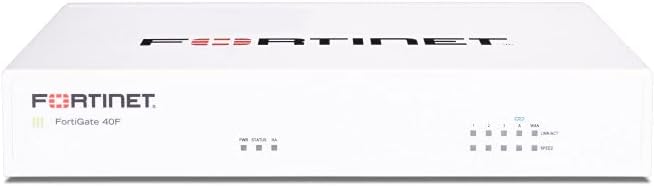
The FortiGate-40F Firewall Appliance stands out as a top choice for small businesses seeking robust network security. With a rating of 4.2 it delivers industry-leading performance through its purpose-built security processor technology. This device ensures quiet operation and minimizes space usage with its compact fanless desktop form factor.
We may earn a commission when you buy through this link, at no additional cost to you.
Its robust connectivity options include five GE RJ45 ports providing essential flexibility for various network configurations. The integrated AI-powered FortiGuard Labs offers comprehensive cybersecurity by identifying and mitigating both known and unknown threats. Simplified management and deployment features include Zero Touch Integration with Fortinet’s Security Fabric for easy setup.
While this appliance requires a separate subscription for full security services firmware updates and support it remains a powerful standalone hardware unit. The high-performance security ensures up to 1 Gbps IPS throughput which is sufficient for most small office needs. Users should be aware that activation of advanced features like SSL encrypted traffic protection needs an active service plan.
Businesses needing reliable threat protection without the overhead of enterprise-grade infrastructure will find this appliance ideal. It balances performance ease of use and scalability effectively making it a recommended pick for growing networks. We highly recommend considering this model if you prioritize security processor technology and AI-driven threat detection.
Fortinet’s AI-powered FortiGuard Labs enables the firewall to proactively identify and neutralize emerging threats before they impact your network.
The fanless desktop form factor ensures quiet operation which is essential for open office environments or shared workspaces.
We may earn a commission when you buy through this link, at no additional cost to you.
The Netgate 1100 pfSense+ Security Gateway offers exceptional value for businesses seeking a complete security solution without high costs. Rated 4.1 it comes pre-loaded with pfSense+ software ensuring you can get up and running fast upon unboxing. The package includes pfSense+ software updates for the product lifetime along with Netgate TAC Lite technical support.
We may earn a commission when you buy through this link, at no additional cost to you.
Its powerful dual core ARM Cortex-A53 1.2 GHz processor delivers near gigabit routing of common home and office traffic. The compact form factor and silent operation allow it to run unnoticed when placed on a desktop wall or rack. Three 1 GbE switched ports allow configuration of separate WAN LAN and OPT ports for flexible network segmentation.
While the throughput is around 650 Mbps it remains adequate for small to medium offices with moderate internet speeds. The requirement for an adult signature upon delivery adds a layer of security for the package but may slightly delay setup. Businesses prioritizing a complete out-of-the-box solution with long-term software support will appreciate this gateway.
This model is ideal for those wanting enterprise-level features like routing and VPN in a compact affordable unit. The free help with setup from the Technical Assistance Center ensures you can customize your secure edge networking needs efficiently. We recommend this gateway for users seeking reliable performance without the need for complex configuration.
Pre-loaded pfSense+ software and lifetime updates mean you can deploy immediately without additional licensing or configuration hassles.
Three 1 GbE switched ports give you the flexibility to set up distinct WAN LAN and OPT networks for better traffic management.
We may earn a commission when you buy through this link, at no additional cost to you.
The Zyxel USGFLEX700 ZyWALL Cyber Security Firewall delivers unparalleled performance for mid-size to large offices requiring comprehensive network security. With a perfect 5.0 rating it supports internet speeds up to 900 Mbps and offers 5400 Mbps SPI firewall throughput. The included 1-Year UTM security services provide anti-malware ransomware blocking web filtering application control and IDP security.
We may earn a commission when you buy through this link, at no additional cost to you.
Its complete security bundle ensures you have essential protection right out of the box without needing separate subscriptions initially. The appliance features 12x configurable GbE ports plus 2x SFP Gigabit fiber ports for flexible configuration and fast local network connectivity. Unparalleled management is achieved through Zyxel’s award winning Nebula Cloud Management solution.
While this firewall comes with a higher price point the included security bundle and high throughput justify the investment for growing businesses. Some users may find the advanced features require training to fully utilize the potential of the device. It is built for those who need enterprise-class protection and scalable management capabilities.
Organizations looking for a robust solution that can handle hundreds of users and high traffic volumes will find this device exceptional. The Nebula Cloud Pro management allows for easy monitoring and configuration from anywhere providing true centralized control. We recommend this model for businesses prioritizing security performance and scalability in one unit.
Included 1-Year UTM services cover essential needs like anti-malware and web filtering ensuring immediate protection without extra costs.
Twelve configurable Gigabit Ethernet ports allow extensive network segmentation and high-speed local connectivity for large office environments.
We may earn a commission when you buy through this link, at no additional cost to you.
The SonicWall TZ280 2.5 Gbps Next-Gen Firewall Appliance offers impressive performance with up to 2.5 Gbps firewall inspection capabilities. Rated 4.7 it leverages SonicWall's patented Reassembly-Free Deep Packet Inspection engine to deliver rapid and accurate threat prevention. The device supports 1 Gbps threat prevention and 1.2 Gbps IPSec VPN throughput making it suitable for busy small businesses.
We may earn a commission when you buy through this link, at no additional cost to you.
Connectivity options include eight 1GbE ports and two 1G SFP ports in a desktop form factor for flexible network expansion. You can deploy and manage the appliance via zero-touch on-box or through the cloud Network Security Manager NSM. Threat protection features include intrusion prevention gateway anti-malware and application control with SonicOS 8.
Note that this appliance is sold without a service subscription meaning security services and support must be purchased separately. This allows you to control initial costs but requires additional investment for full protection features like TLS decryption and Capture ATP sandboxing. It is best suited for those who understand the need for ongoing subscription services.
Small businesses and branch offices needing secure SD-WAN capabilities and Zero-Trust Network Access will find this device highly effective. The cloud management options simplify operations for distributed sites ensuring remote workers stay protected. We recommend this appliance for organizations valuing high throughput and cloud-based management tools.
The patented RFDPI engine enables fast and efficient inspection of traffic ensuring security does not bottleneck network performance.
Manage your firewall on-box or via the cloud for flexible control and simplified operations across distributed network environments.
We may earn a commission when you buy through this link, at no additional cost to you.
The Fortinet FortiGate-70G Firewall provides robust branch and small office security with ten Gigabit Ethernet RJ45 ports for extensive connectivity. It delivers next-generation firewall capabilities including NGFW IPS and web filtering built-in to simplify your security stack. Secure SD-WAN improvements ensure cloud and SaaS performance while maintaining consistent security policies across your organization.
We may earn a commission when you buy through this link, at no additional cost to you.
Deep visibility features allow you to inspect SSL traffic and control applications effectively identifying encrypted traffic threats that might otherwise go unnoticed. Simple deployment and centralized management are available via FortiGate Cloud or FortiManager reducing the complexity of managing distributed networks. Seamless integration with FortiSwitch and FortiAP creates a unified secure wired and wireless network.
While this device commands a higher investment the comprehensive feature set supports complex environments with high bandwidth needs. Organizations needing centralized control and seamless ecosystem integration will find the FortiGate Cloud integration particularly beneficial. It is an ideal choice for growing branch offices requiring enterprise-level features in a compact device.
We recommend this firewall for businesses prioritizing seamless ecosystem connectivity and deep visibility into encrypted traffic. The Secure SD-WAN features ensure that your cloud applications run smoothly without sacrificing security standards. Expect high reliability and performance when deploying this appliance in a modern network environment.
Improve cloud and SaaS performance while maintaining consistent security policies with built-in Secure SD-WAN capabilities.
SSL inspection and application control help you identify and govern encrypted traffic effectively ensuring no hidden threats pass through.
We may earn a commission when you buy through this link, at no additional cost to you.
The Sophos XGS 128 is a next-generation firewall appliance designed for high performance visibility and reliable operation in business networks. It features nine 2.5 GE copper ports and one SFP fiber port providing up to 19.1 Gbps firewall throughput for larger offices. The purpose-built hardware ensures it can handle enterprise demands without compromising speed or security.
We may earn a commission when you buy through this link, at no additional cost to you.
SD-WAN optimization provides resilient connectivity and intelligent traffic routing across multiple WAN connections. This ensures your business remains connected even if one link fails. VPN ready architecture supports secure site to site networking and encrypted remote employee access. This makes it ideal for companies with distributed teams or multiple office locations.
Like many enterprise firewalls this hardware requires a Sophos subscription to enable IPS web security VPN and advanced threat defense. The hardware is sold separately allowing you to customize your security services based on your needs. It is a robust choice for organizations needing high throughput and extensive port options.
We recommend this appliance for businesses prioritizing high performance and scalable connectivity. The 19.1 Gbps throughput ensures your network remains fast even under heavy traffic loads. Expect reliable operation and advanced threat protection when paired with the appropriate subscription services.
With 19.1 Gbps firewall throughput this appliance supports large office environments and high-speed data transfer requirements.
Resilient connectivity and intelligent traffic routing ensure uninterrupted business operations across multiple WAN connections.
We may earn a commission when you buy through this link, at no additional cost to you.
The Zyxel USGFLEX100H Firewall offers a balanced mix of performance and value for small businesses. With 4000 Mbps firewall throughput it supports up to 50 users and includes the Entry Defense Pack for reputation filtering and visibility. The offline-capable setup allows you to configure via Nebula portal wizard without constant internet access.
We may earn a commission when you buy through this link, at no additional cost to you.
Eight 1G RJ-45 ports are assignable as WAN or LAN allowing flexible configuration including WAN load balancing and active-backup failover. Centralized configuration policy sync and SD-VPN orchestration are managed through Nebula making remote management efficient. The compact fanless design ensures the device runs quietly while delivering up to 1500 Mbps IPS throughput.
While the Entry Defense Pack covers basic needs upgrading to the Gold Security Pack unlocks anti-malware sandboxing and full UTM capabilities. This flexibility allows you to scale security features as your business grows without replacing the hardware. It is well-suited for offices needing robust VLAN support and secure VPN connections.
We recommend this model for businesses needing reliable performance and flexible port configurations. The ability to update firmware offline ensures minimal downtime during maintenance. Consider this firewall if you want centralized management and support for up to 50 users effectively.
Configure via Nebula portal wizard and update firmware offline via FTP ensuring continuous operation even without internet access.
Assign ports as WAN or LAN with load balancing and failover support for resilient network connectivity and traffic management.
We may earn a commission when you buy through this link, at no additional cost to you.
The SonicWall TZ680 delivers high-end performance for small and medium businesses with up to 5 Gbps firewall inspection. It utilizes the Reassembly-Free Deep Packet Inspection engine to ensure rapid threat prevention and 2.5 Gbps IPSec VPN throughput. Connectivity is extensive with eight 1GbE ports two 5G SFP+ ports and two 10G SFP ports for maximum scalability.
We may earn a commission when you buy through this link, at no additional cost to you.
Zero-touch deploy and manage capabilities allow on-box or cloud Network Security Manager operations simplifying the initial setup process. Threat protection features include intrusion prevention gateway anti-malware and application control delivered through SonicOS 8. Secure SD-WAN ensures distributed sites and remote workers remain protected with Zero-Trust Network Access.
As a hardware-only unit this appliance requires separate purchase of security services firmware updates and support to activate full protection. This modular approach allows you to tailor the service level to your budget and needs. It is built for businesses requiring high throughput and extensive port variety.
We recommend this firewall for high-end SMBs needing robust connectivity and threat protection. The Cloud Secure Edge integration ensures remote teams access secure network resources safely. Expect reliable performance and advanced inspection capabilities when properly configured with the right subscription.
With 5 Gbps firewall inspection this appliance supports high-speed networks and enterprise-level traffic demands efficiently.
Keep distributed sites and remote workers protected with Zero-Trust Network Access through Cloud Secure Edge integration.
We may earn a commission when you buy through this link, at no additional cost to you.
The Fortinet FortiGate 60F comes bundled with 36 Months of FortiCare Premium and FortiGuard Unified Threat Protection. It is tailored for medium-sized businesses needing robust security without the infrastructure of larger enterprises. Advanced filtering technologies protect against sophisticated threats including anti-botnet capabilities and comprehensive web filtering.
We may earn a commission when you buy through this link, at no additional cost to you.
This bundle ensures you have hardware plus security services from day one allowing for immediate protection against online threats. FortiCare Premium guarantees high-quality support and service continuity which is vital for businesses relying on constant uptime. Effective protection is provided against both known and emerging cybersecurity risks.
While the initial price includes service costs it offers savings compared to buying hardware and subscriptions separately. This model is best for companies wanting a hassle-free setup with guaranteed support coverage. It eliminates the need to manage separate subscription renewals for security services.
We recommend this appliance for businesses prioritizing reliable customer support and comprehensive threat protection. The 36 Month bundle provides long-term security assurance and operational continuity. Choose this if you prefer an all-in-one solution with guaranteed service levels.
Secures against advanced online threats with comprehensive web filtering and anti-botnet technologies included for the full term.
FortiCare Premium ensures high-quality support and service continuity so your business remains secure without interruption.
We may earn a commission when you buy through this link, at no additional cost to you.
The Cisco ASA5525-X Security Appliance Firewall offers a cost-effective entry point for basic network protection needs. This renewed edition comes with 8 port gigabit Ethernet capabilities ensuring standard connectivity for smaller networks. It represents a classic ASA edition known for reliability in enterprise environments over many years.
We may earn a commission when you buy through this link, at no additional cost to you.
While it provides basic firewall capabilities it may lack the advanced features found in next-generation appliances. The renewed status means the unit has been inspected and tested for functionality before sale. It is suitable for organizations needing standard protection without high performance demands.
Be aware that renewed units may have different warranty terms compared to new devices so verify the specifics of your purchase. However the lower cost makes it an attractive option for budget-conscious buyers needing immediate deployment. It remains a viable choice for legacy network setups.
We recommend this appliance for businesses prioritizing budget and standard connectivity over advanced security features. It provides a reliable foundation for basic network segmentation and traffic filtering. Choose this if you need a straightforward and affordable firewall solution for immediate use.
This appliance represents a legacy model known for reliable basic firewall capabilities in various enterprise environments.
Standard 8 port gigabit Ethernet ensures compatibility with existing network infrastructure for easy integration.
We may earn a commission when you buy through this link, at no additional cost to you.
Selecting the right hardware firewall involves evaluating performance features and compatibility with your existing infrastructure.
Throughput determines how fast your firewall can process data without creating bottlenecks. Look for models that exceed your expected internet speed to ensure smooth operations.
Choose a device with enough headroom for future growth to avoid early replacement.
Comprehensive firewalls offer features like intrusion prevention deep packet inspection and web filtering. Ensure the appliance supports the threat protection mechanisms your business requires.
Prioritize models with advanced AI or sandboxing capabilities for maximum protection against emerging threats.
The number and type of ports should match your network layout including WAN LAN and fiber connections. SFP ports may be necessary for high-speed or long-distance links.
Select a firewall with flexible port assignments to adapt to changing network configurations easily.
User-friendly management consoles and cloud options simplify configuration and ongoing monitoring. Zero-touch deployment can significantly reduce setup time for distributed offices.
Ensure the management interface is intuitive for your IT staff to maintain efficiently.
Many firewalls require separate subscriptions for security services and firmware updates. Consider the total cost of ownership including these recurring fees.
Verify whether the hardware is sold with or without bundled services before purchasing.
Ensure the appliance can support more users or higher traffic as your business grows. Models with advanced features allow easier upgrades without hardware replacement.
Invest in a device with future-proof specifications to extend its useful lifespan.
The physical form factor should fit your available space and environmental conditions. Fanless units operate quietly which is beneficial for office settings.
Choose a size that allows for efficient cooling and easy access to ports and indicators.
Reliable customer support and warranty coverage protect your investment against hardware failures. Check the terms of technical assistance provided by the manufacturer.
Opt for brands with strong reputations for responsive service and long-term software updates.
Begin by connecting the appliance to your network switch and router using the designated ports. Follow the setup wizard or consult the manual for initial configuration of your network parameters.
Keep firmware updated to ensure you have the latest security patches and performance improvements. Schedule regular updates during maintenance windows to minimize any disruption to your operations.
Monitor the firewall logs and alerts regularly to identify and address potential threats quickly. Use the management console to track traffic patterns and adjust security policies as needed.
Hardware firewalls provide dedicated network protection that filters traffic before it reaches internal devices. They offer robust security features and better performance than software-only solutions which can strain individual computers.
Many hardware firewalls require separate subscriptions for advanced security services firmware updates and support. Always check if the appliance comes with bundled services or needs additional purchases for full protection.
Select a firewall based on your user count and internet speed. Small offices need basic models while larger businesses require high throughput and advanced security features.
Most hardware firewalls are designed for easy setup with wizards and cloud management options. However complex networks may require professional configuration for optimal performance.
A router directs data traffic between networks while a firewall adds security by filtering traffic based on rules. Many modern appliances combine both functions into a single device.
Renewed firewalls can offer cost savings but may come with limited support or older hardware. Ensure they meet your current performance and security requirements before purchasing.
The FortiGate-40F Netgate 1100 and Zyxel USGFLEX700 offer outstanding options depending on your budget and requirements. Each device provides unique benefits for various business sizes and security needs.
Prioritize features like throughput subscription costs and management ease to find the perfect fit for your network. Security performance and future scalability should guide your final selection process.
Remember to verify current prices and availability before ordering to ensure you get the best deal available today.