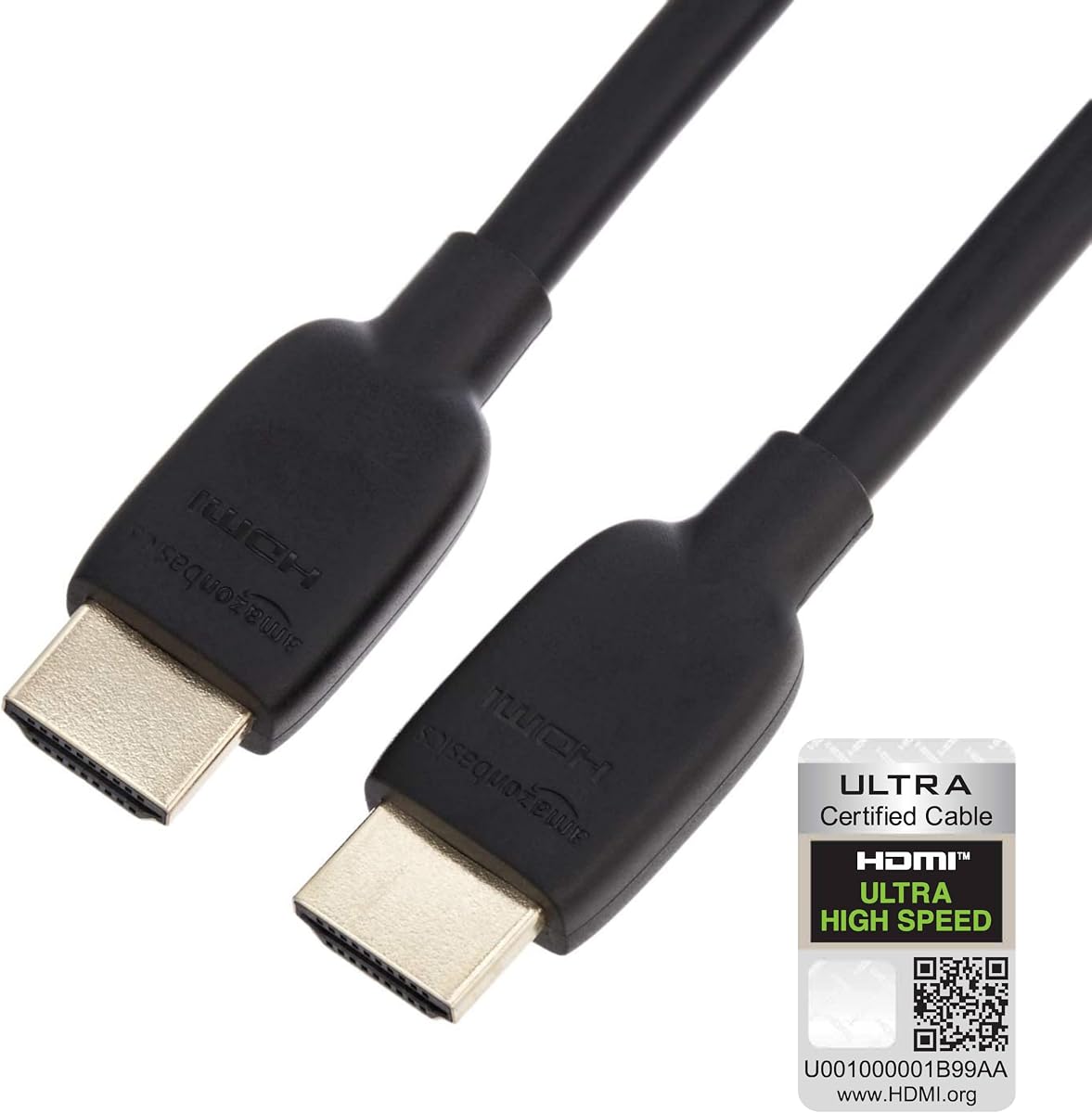
Amazon Basics HDMI 2.1 Cable
4.7Editor score
Affordable 3ft length option
Supports 48Gbps speed
Gold-plated connectors included
This guide compares the best HDMI cables for dual monitors to help you find reliable connectivity for high resolution displays and seamless productivity setups.
Finding the right HDMI cable for dual monitors is essential for anyone who wants to maximize their workspace efficiency. Whether you are a gamer, a creative professional, or a business user, having reliable connections ensures your displays work in harmony without signal loss or flickering.
We evaluated ten top-rated cables based on speed, durability, and compatibility to bring you this curated list. Our analysis covers everything from bandwidth capabilities to connector quality, ensuring you can make an informed decision that suits your specific setup requirements.
Each pick in this guide highlights key features and potential limitations to help you narrow down your choices quickly. Please note that product availability and pricing can change frequently, so checking the latest details before purchasing is always recommended.
4.7Editor score

4.8Editor score

4.6Editor score
The following comparison table provides a side-by-side look at the key specifications and features of each selected HDMI cable to help you decide which one fits your dual monitor setup best.



The UGREEN 8K HDMI 2.1 Cable stands out as a top choice for dual monitor setups due to its certified performance and robust build. With a 4.8 rating, it delivers reliable 48Gbps bandwidth ensuring your displays run smoothly without interruptions.
We may earn a commission when you buy through this link, at no additional cost to you.
Its support for Dynamic HDR and eARC means you get superior color accuracy and audio quality across your screens. The aluminum alloy case and nylon braided jacket provide extra protection against daily wear and tear, making it a long-lasting investment for your workspace.
While the price is slightly higher than budget options, the reliability and feature set justify the cost. The 6.6ft length is standard but could be restrictive for larger desks requiring longer runs between devices and monitors.
This cable is ideal for users who prioritize performance and durability in their dual monitor configuration. Whether you are working with high resolution content or gaming, this cable ensures your setup remains stable and efficient.
Certification ensures the cable meets strict industry standards for data transfer and signal integrity across high bandwidth connections.
Dynamic HDR and eARC support bring richer colors and immersive sound to your dual display experience without compromise.
We may earn a commission when you buy through this link, at no additional cost to you.
Amazon Basics offers a compelling budget-friendly option with its HDMI 2.1 Cable rated at 4.7 stars. It supports 48Gbps speeds making it suitable for high resolution dual monitor setups without breaking the bank.
We may earn a commission when you buy through this link, at no additional cost to you.
The gold-plated connectors resist corrosion and ensure a stable connection over time. Its plug and play design means you do not need to install any drivers, making it easy to set up quickly for your dual monitors.
The main limitation is the 3ft length which might not reach across larger desks or setups where devices are far from screens. Additionally, the PVC jacket is less robust than braided alternatives found in premium models.
This cable is perfect for users with tight budgets who need reliable performance for short connections. If your dual monitor setup is close together, this provides excellent value and functionality for everyday use.
You get certified HDMI 2.1 speeds at a fraction of the cost of many competitors on the market today.
The 3ft length helps reduce cable clutter under your desk making it ideal for compact dual monitor stations.
We may earn a commission when you buy through this link, at no additional cost to you.
Belkin is known for quality accessories and their Ultra HD HDMI 2.1 Cable delivers on that promise with a 4.6 rating. It features 2-layer shielding to protect against interference ensuring your dual monitors get a clean signal.
We may earn a commission when you buy through this link, at no additional cost to you.
Support for Dolby Vision enhances your viewing experience with improved contrast and brightness across your screens. It is optimized for gaming consoles so you get the best performance when playing high frame rate games on your monitors.
The higher price reflects the brand reputation and build quality but some may find it lacks unique features compared to competitors. However, the reliability and shielding make it a safe choice for professional or high-stakes setups.
This cable is best suited for users who want a trusted brand and premium construction. If you value long-term durability and proven performance for your dual monitor setup, this is a strong candidate to consider.
The 2-layer shielding minimizes electrical interference keeping your video signals stable and clear.
Dolby Vision support ensures you see content exactly as creators intended with better color and light.
We may earn a commission when you buy through this link, at no additional cost to you.
Highwings offers a practical solution with a 2-pack of 8K HDMI 2.1 cables rated at 4.7 stars. This is ideal for dual monitor setups since you get exactly what you need without buying separate items later.
We may earn a commission when you buy through this link, at no additional cost to you.
The aluminum alloy shell adds strength and the anti-bending tail design protects the cable from damage at the connection point. It supports up to 10K resolution ensuring future compatibility as displays evolve.
The cables are standard 6.6ft which works for most desks but might not be flexible enough for complex routing. Some users might find the jacket slightly bulkier than ultra-thin alternatives on the market.
This option is great for those setting up two monitors simultaneously and wanting reliable certified cables. The value of a dual pack combined with solid build quality makes it a top contender in this guide.
Getting two cables in one purchase simplifies the setup process for dual monitor configurations significantly.
Support for 10K ensures the cables will remain compatible with upcoming high resolution monitor releases.
We may earn a commission when you buy through this link, at no additional cost to you.
Silkland focuses on durability with its E-Braid technology and a 4.7 rating for reliability. The double-layer fishnet winding and nylon braiding make this cable resistant to tangles and daily wear.
We may earn a commission when you buy through this link, at no additional cost to you.
It supports 4K@144Hz and 120Hz gaming which is fantastic for gaming monitors connected in a dual setup. HDCP 2.3 compliance ensures you can stream protected content without issues on your screens.
The braided design is robust but can make the cable slightly less flexible than PVC options. However, this flexibility trade-off is often worth it for the increased lifespan and durability in busy environments.
This cable is recommended for users who need a durable solution for active workspaces or gaming rigs. The combination of high refresh rate support and strong build quality makes it a standout choice.
The unique braiding technique protects against physical damage extending the cable life significantly.
Support for 144Hz ensures smooth motion for gaming and video editing tasks on dual screens.
We may earn a commission when you buy through this link, at no additional cost to you.
Acer brings its gaming expertise to this HDMI 2.1 cable with a 4.7 rating for performance. It supports VRR which helps reduce screen tearing a common issue when using high refresh rate dual monitors.
We may earn a commission when you buy through this link, at no additional cost to you.
The ability to handle 4K@240Hz makes it suitable for competitive gaming setups. eARC support ensures you get immersive audio which is crucial when using external speakers or soundbars with your displays.
While performance is excellent, the availability might be limited to specific regions or retailers. The 6.6ft length is standard but check your desk layout to ensure it reaches your devices comfortably.
This cable is an excellent pick for gamers who need reliable high refresh rates on their monitors. If you want to minimize tearing and lag while maintaining audio quality, this is a solid investment.
VRR technology synchronizes your monitor with the GPU to prevent screen tearing during fast motion.
eARC allows full resolution audio return enhancing your listening experience across both monitors.
We may earn a commission when you buy through this link, at no additional cost to you.
UGREEN adds an Ethernet enabled feature to this HDMI 2.1 cable with a 4.7 rating for reliability. This allows devices to exchange files over the HDMI connection which can be useful in specific networked setups.
We may earn a commission when you buy through this link, at no additional cost to you.
It supports 4K@240Hz which provides high frame rates for smooth visuals. The cable has passed over 20,000 bend tests ensuring it can withstand frequent handling or movement without degrading.
The Ethernet function is rarely used for most dual monitor setups but adds future-proofing value. The cable is slightly heavier due to the shielding and connectors which might require careful cable management.
This cable is a great choice for users who want extra connectivity options. While the Ethernet feature is niche, the overall build quality and performance make it a strong general purpose pick.
Ethernet over HDMI allows networked devices to communicate without needing separate cables.
Over 20,000 bend tests prove the cable can endure heavy use without breaking internally.
We may earn a commission when you buy through this link, at no additional cost to you.
PowerBear offers a 10ft cable which is ideal for large desks where monitors are far from the source. With a 4.7 rating it uses triple tin shielding to reduce interference over longer distances.
We may earn a commission when you buy through this link, at no additional cost to you.
The CL3 rating allows it to be safely run inside walls for a clean dual monitor setup. Gold plated connectors resist corrosion ensuring stable connections over the long term.
It only supports HDMI 2.0 bandwidth at 18Gbps so it is not suitable for 8K or high refresh 4K monitors. If you have older monitors or need long runs without needing the latest speeds, this works well.
This cable is the best choice for large offices or setups requiring extra reach. It provides reliability and safety ratings that make it a practical option for longer cable paths.
The 10ft length solves space issues when your computer is far from your dual monitor desk.
CL3 rating means the cable meets fire safety standards for in-wall installations.
We may earn a commission when you buy through this link, at no additional cost to you.
AVACON provides a DisplayPort to HDMI solution with a 4.6 rating for compatibility with PCs. It allows computers with DisplayPort outputs to connect to HDMI monitors for your dual setup.
We may earn a commission when you buy through this link, at no additional cost to you.
Support for 4K@30Hz is standard for this conversion and is suitable for productivity. The uni-directional design ensures a stable signal but means you cannot use it backwards from HDMI to DP.
The 6ft length is convenient for typical desk setups. However, be aware that it does not support higher refresh rates needed for gaming monitors which may limit your options.
This cable is useful if you have older PCs with DisplayPort and need to connect to HDMI screens. It offers a cost-effective way to expand your dual monitor setup without buying new hardware.
This cable bridges the gap between modern PC graphics ports and standard HDMI monitors.
Designed only to send signal from PC to monitor ensuring a stable and reliable connection.
We may earn a commission when you buy through this link, at no additional cost to you.
This 2-Pack offers a complete solution for dual monitor setups with DisplayPort outputs. It carries a perfect 5.0 rating for reliability and value among users with compatible hardware.
We may earn a commission when you buy through this link, at no additional cost to you.
Each cable supports 4K Ultra HD resolution which is great for productivity. The multi-layer shielding helps maintain stable video transmission to both screens without interference or flicker.
Note that HDMI 1.4 limits refresh rates to 30Hz at 4K so this is not for high-speed gaming. For office work and general productivity this provides a stable and cost-effective solution for dual screens.
This pack is ideal for workstation setups needing two cables at once. If you need to connect two monitors from DisplayPort sources and want quality durability this is a top choice.
Buying two cables together saves money and ensures both monitors use identical connection specs.
Multi-layer shielding keeps the signal strong and consistent across both connected displays.
We may earn a commission when you buy through this link, at no additional cost to you.
Selecting the right HDMI cable requires understanding your monitor and graphics card requirements. This guide breaks down the key factors to consider before making a purchase.
HDMI 2.1 cables offer 48Gbps bandwidth which is essential for 4K at high refresh rates or 8K displays. HDMI 2.0 cables provide 18Gbps which supports 4K at 60Hz but may not handle higher refresh rates required for gaming.
Ensure the cable bandwidth matches your monitor specs to avoid signal loss or reduced resolution performance.
Standard lengths like 6.6ft work well for most desks but larger setups might need 10ft or more. Check the distance between your source device and monitors before buying to ensure it reaches comfortably.
Longer cables may require extra care for signal integrity so opt for high quality shielding if you need extended runs.
Braided nylon jackets and aluminum shells protect against wear and tear better than plastic or PVC coatings. Look for connectors with gold plating to resist corrosion over time in your office environment.
A durable cable will last longer and maintain signal quality even with frequent unplugging and movement.
Most monitors use standard HDMI ports but some older or professional setups might use DisplayPort. Check your hardware ports to decide if you need HDMI to HDMI or DisplayPort to HDMI cables.
Ensure both ends of the cable match the inputs and outputs of your devices to avoid compatibility issues.
Dynamic HDR and eARC support enhance visual quality and audio return capabilities across your monitors. These features are important for media consumption or professional editing where color accuracy matters.
Choose cables that explicitly support these features if you plan on streaming or editing high quality content.
HDMI 2.1 certification guarantees the cable meets industry standards for speed and signal integrity. Unlabeled cables might claim speed but fail to deliver actual performance in real world testing.
Look for official certification logos on packaging to ensure reliability and consistent performance.
Budget cables work for basic needs but premium options offer better shielding and longevity for demanding setups. Consider how heavily you use your dual monitor setup to decide where to invest.
Finding a balance between cost and features ensures you get a cable that suits your specific usage without overspending.
Check if the cable supports your graphics card and monitor brand to avoid handshake issues or flickering. Universal compatibility ensures smooth operation across different devices like PCs, consoles, and streaming boxes.
Always verify device compatibility lists before purchasing to ensure seamless integration with your existing setup.
When connecting your dual monitors plug the cable firmly into both the source and monitor ports. A loose connection can cause signal dropouts or flickering on your screens so ensure the latch clicks into place.
Avoid bending the cable sharply near the connectors as this can damage internal wiring over time. Use cable clips or ties to manage slack and keep cables organized under your desk.
Keep cables away from heat sources and direct sunlight to prevent jacket degradation. If you need to unplug frequently use the connector body to pull rather than pulling on the cable itself.
Yes HDMI 2.1 cables support high bandwidth needed for dual 4K monitors. However you typically need one cable per monitor so ensure you buy two if you need a dual setup.
Longer cables can reduce signal quality if not shielded properly. High quality braided cables with proper shielding can run up to 10ft without significant signal loss for most setups.
HDMI 2.1 supports 48Gbps bandwidth compared to 18Gbps in 2.0. This allows for higher resolutions and refresh rates such as 8K@60Hz or 4K@240Hz which 2.0 cannot support.
Yes HDMI 2.1 cables are backward compatible with HDMI 2.0 monitors. They will work perfectly and may even offer better durability and performance than older cables.
You need a DisplayPort to HDMI cable to connect DisplayPort outputs to HDMI monitors. Ensure the cable supports your desired resolution since some converters are limited to 4K@30Hz.
Most HDMI cables are universal but newer features like eARC or 8K need HDMI 2.1 cables. Check your device requirements to ensure you buy a cable that supports all desired features.
Braided jackets offer more protection against tangles and wear compared to standard plastic. This makes them ideal for setups where cables are moved or handled frequently over time.
No the color of the HDMI cable does not affect signal performance. Focus on features like bandwidth and shielding rather than color when choosing a cable for your setup.
Choosing the right HDMI cable for your dual monitors depends on your specific needs for speed durability and length. The top picks offer certified performance and strong build quality for various budgets and setups.
Prioritize bandwidth and connector types to ensure compatibility with your monitors and graphics cards. Investing in a reliable cable now prevents signal issues and upgrades later when your setup evolves.
Always check current prices and availability before purchasing since product listings may change. We hope this guide helps you make a confident decision for your dual monitor workspace.