
4 Pack HDMI Dummy Plug
4.8Editor score
Affordable four pack value
4K HDR support
Plug and play setup
This guide compares the top 10 HDMI Dummy Plug models for headless PCs, gaming, and mining, evaluating performance, compatibility, and build quality.
An HDMI Dummy Plug creates a virtual display to keep your GPU active without a physical monitor. It is essential for headless setups, remote desktop access, and optimizing server performance efficiently.
We compared ten top-rated models based on resolution support, build quality, and compatibility across Windows, Mac, and Linux systems. Our analysis focuses on real-world performance for mining, gaming, and remote work scenarios.
Each pick highlights key strengths, pros, and cons to help you choose the right fit for your specific needs. Prices and availability change frequently, so verify details before purchasing on the retailer site.
4.8Editor score
4.6Editor score

4.5Editor score
The following comparison table outlines the core specifications and features of each selected HDMI Dummy Plug. Use this to quickly identify resolution limits, pack sizes, and unique capabilities for your setup.


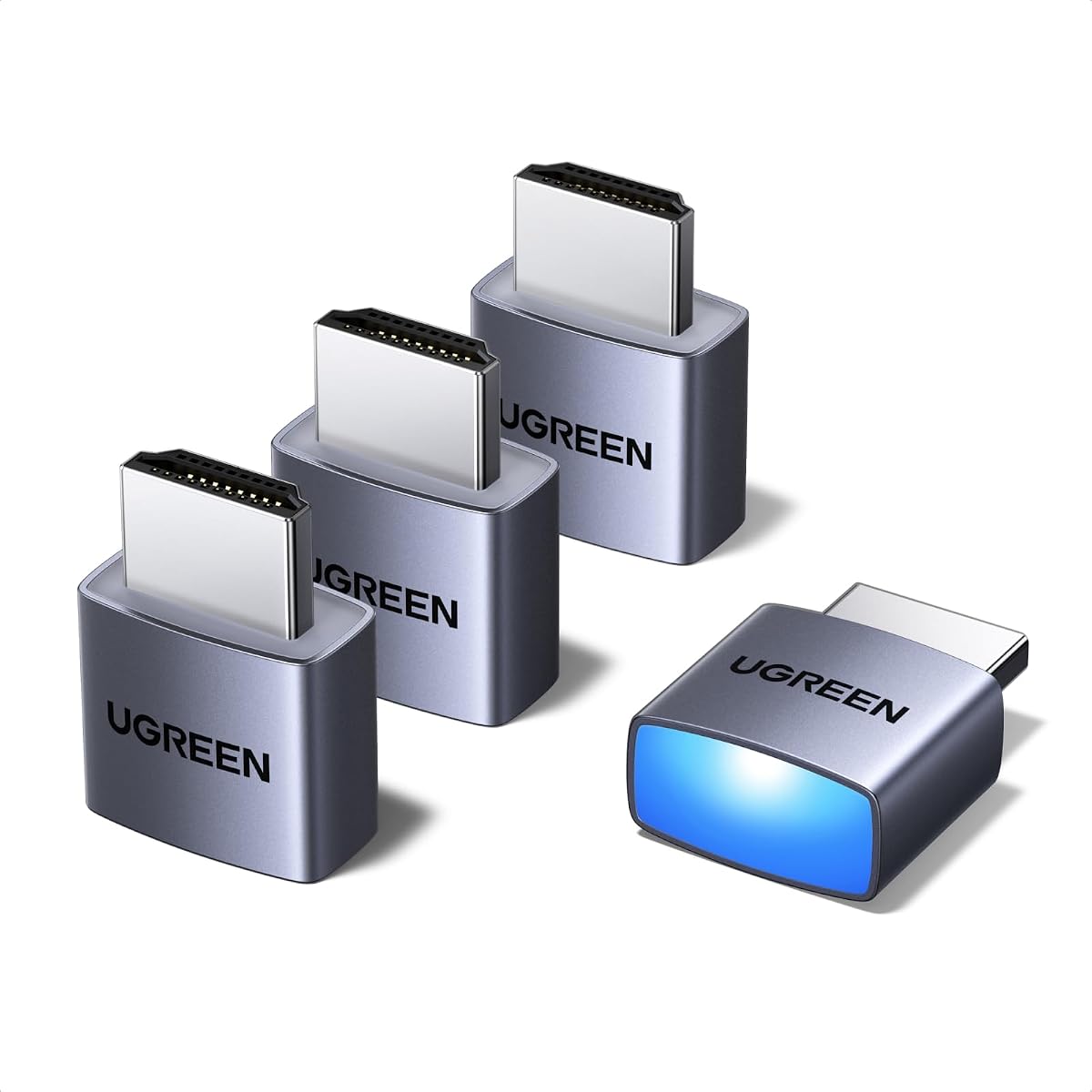
The UGREEN 4 Pack HDMI Dummy Plug stands out as a reliable choice for creating virtual displays. It boasts a 4.6 rating for consistent performance across diverse hardware setups.
We may earn a commission when you buy through this link, at no additional cost to you.
This unit supports true 4K 60Hz HDR performance, ensuring smooth remote desktop operations and video editing. Its aluminum shell provides excellent heat dissipation during intensive tasks like mining.
While the price is higher than generic options, the durability and status LED offer value. It requires no drivers and works seamlessly with Windows, Mac, and Linux systems.
Ideal for server farms and home labs, this plug ensures GPU stability without physical monitors. We recommend it for users prioritizing reliability and long-term use in professional settings.
The aluminum shell design prevents overheating during 24/7 operations, ensuring stability in server environments.
Works with discrete graphics cards, laptops, and devices with HDMI output for seamless integration.
We may earn a commission when you buy through this link, at no additional cost to you.
This 4 Pack HDMI Dummy Plug offers exceptional value with a 4.8 rating. It delivers crisp visuals and is ideal for budget-conscious users seeking reliable virtual display solutions.
We may earn a commission when you buy through this link, at no additional cost to you.
Key strengths include its 4K 60Hz support and plug-and-play simplicity. The aluminum armor resists overheating during marathon computing tasks, making it suitable for crypto mining rigs.
The trade-off is a more generic design compared to premium brands. However, for functional needs like remote management and automated trading, it performs exceptionally well.
We recommend this for small offices or home labs needing multiple units. It provides uninterrupted operation without the cost of physical displays or external power sources.
Operates instantly without software or external power, ensuring quick setup for remote desktop operations.
Heat-dissipating aluminum armor ensures resilience against thermal stress during continuous GPU workloads.
We may earn a commission when you buy through this link, at no additional cost to you.
DTech HDMI Dummy Plug 3 Pack is a strong choice for Mac users needing headless server capabilities. With a 4.6 rating, it effectively emulates high-resolution displays for GPU tasks.
We may earn a commission when you buy through this link, at no additional cost to you.
It simplifies the OSX headless display issue, allowing Mac Mini servers to run smoothly. The gold plated dongle ensures stable digital signals and unlocks graphics card potential.
While it comes in a 3-pack rather than larger quantities, it remains a cost-effective option. It is perfect for game streaming and VR setups without needing a physical screen.
Recommend this for users managing server farms or home labs with Mac OS. It balances affordability and functionality, ensuring your system remains detectable during remote operations.
Specifically designed to resolve headless display issues on OSX, ensuring reliable operation.
Gold plated connectors maintain consistent digital signals, preventing connection drops during tasks.
We may earn a commission when you buy through this link, at no additional cost to you.
This HDMI Dummy Plug Headless Ghost focuses on simplicity and compactness. Rated 4.6, it is ideal for users needing a discreet solution for GPU tasks and remote desktop.
We may earn a commission when you buy through this link, at no additional cost to you.
Its ultra-compact design ensures it fits easily without obstructing ports. It acts exactly like a real LCD monitor, guaranteeing compatibility with any graphics card featuring HDMI output.
While limited to 1080p default resolution, it performs well for standard remote work. The lack of configuration needs makes it a true set and forget device.
Best for users prioritizing space-saving designs in tight server racks. It eliminates the need for physical displays while maintaining system stability for mining or streaming.
Low profile ensures the plug remains unobtrusive in crowded server or workstation environments.
Works with any graphics card with HDMI output, ensuring no incompatibility issues arise.
We may earn a commission when you buy through this link, at no additional cost to you.
The 3 Pack HDMI Dummy Plug emphasizes customer assurance with a two-year unconditional warranty. With a 4.5 rating, it provides stable virtual displays for various GPU tasks.
We may earn a commission when you buy through this link, at no additional cost to you.
Its hot swap support allows flexible configuration without restarting your system. The gold plated interface guarantees complete signal transmission, making it suitable for video rendering and simulations.
While the pack size is smaller, the warranty adds significant value for long-term users. It is designed to save energy by eliminating the need for real displays in home labs.
We recommend this for users needing flexibility in their remote setups. It balances performance with peace of mind, ensuring stable operation for mining and screen sharing tasks.
Allows changing display configurations on the fly without system reboots or interruptions.
Gold plated connectors ensure complete signal transmission for reliable connection stability.
We may earn a commission when you buy through this link, at no additional cost to you.
This 5 Pack HDMI Dummy Plug targets high-performance users with support for refresh rates up to 240Hz. It simulates a vivid output suitable for color-sensitive applications like video preview.
We may earn a commission when you buy through this link, at no additional cost to you.
Construction uses brand new solder and thick aluminum shells for durability. This reduces electromagnetic interference and ensures long-term stability for tasks like VR and gaming.
The default resolution is 1080p, but higher settings can be configured via system utilities. It offers a premium feel with enhanced electromagnetic shielding for professional setups.
Ideal for gamers or developers needing flexible resolution options. It provides reliable headless operation for mini PCs and home labs while reducing power usage effectively.
Supports up to 240Hz on 1080p, enabling smooth output for gaming and VR setups.
Uses brand new solder and thick aluminum to ensure durability and reduce interference.
We may earn a commission when you buy through this link, at no additional cost to you.
This unit targets next-gen setups with HDMI 2.1 compatibility and 4K 120Hz support. Rated well, it enables high-refresh virtual displays crucial for advanced VR and gaming streaming.
We may earn a commission when you buy through this link, at no additional cost to you.
It requires a graphics card supporting HDMI 2.1 to achieve the full refresh rate benefits. The low power design ensures negligible heat, making it safe for 24/7 headless operation.
Windows 11 users may face resolution limits compared to Windows 10, but it remains stable. It is a top choice for streaming to devices like the Steam Deck or ROG Ally.
Recommend this for enthusiasts needing high-performance headless streaming. It unlocks GPU potential for gaming and remote desktop, ensuring smooth visual output for high-end tasks.
Supports higher bandwidth for 4K 120Hz output, essential for modern high-refresh displays.
Optimized for 120fps Steam Link and Moonlight streaming for handheld gaming devices.
We may earn a commission when you buy through this link, at no additional cost to you.
This 8 Pack offers the most units for managing multiple headless PCs simultaneously. It features a default 1440p resolution, which is beneficial for tasks requiring higher pixel density.
We may earn a commission when you buy through this link, at no additional cost to you.
The construction includes enhanced electromagnetic shielding and a thick aluminum shell. This ensures long-term durability and prevents signal interference during critical operations.
While the total cost is higher, the value per unit is competitive. It reduces power usage and eliminates physical displays, making it a space-saving solution for colocation centers.
Ideal for server farms or large-scale mining operations. It balances performance with bulk value, allowing users to deploy virtual displays efficiently without individual cable clutter.
Offers higher default resolution than standard 1080p plugs, improving visual clarity for remote tasks.
Eight units in one pack provide cost-effective solutions for managing multiple remote workstations.
We may earn a commission when you buy through this link, at no additional cost to you.
This 5 Pack stands out with a default 2160P resolution, delivering true 4K virtual output. It is designed for high-performance systems needing precise visual fidelity for editing.
We may earn a commission when you buy through this link, at no additional cost to you.
Supports up to 3840×2160 at 60Hz, ensuring vibrant and realistic display simulation. The enhanced shielding maintains signal integrity during intensive GPU tasks.
While demanding more from your GPU, it unlocks higher performance for color-sensitive work. It allows systems to run headlessly without sacrificing screen quality or refresh rate.
Recommend this for professionals working with high-resolution media. It balances power efficiency with premium performance, ensuring your GPU remains active for critical rendering tasks.
Default 2160p resolution provides higher fidelity for media editing and high-detail work.
Enhanced shielding prevents interference, ensuring reliable connection during 24/7 tasks.
We may earn a commission when you buy through this link, at no additional cost to you.
This plug is designed for the future, supporting 8K 30Hz and 4K 120Hz via HDMI 2.1. It is the top choice for users with next-gen hardware needing maximum resolution and speed.
We may earn a commission when you buy through this link, at no additional cost to you.
It ensures your GPU stays active for demanding tasks like high-fidelity game streaming and mining. The gold plated connectors maintain signal integrity for high-bandwidth operations.
Requires a graphics card interface supporting HDMI 2.1 to unlock full performance. Without this, it may default to lower resolution limits compared to its potential.
We recommend this for early adopters and power users. It future-proofs your headless setup, ensuring compatibility with upcoming monitor standards and high-refresh gaming demands.
Supports 8K and 120Hz refresh rates, ready for next-generation monitor standards.
Gold plated connectors ensure signal integrity for high-bandwidth data transmission tasks.
We may earn a commission when you buy through this link, at no additional cost to you.
Selecting the right HDMI Dummy Plug depends on your hardware, software, and operational needs. This guide breaks down key factors to consider before purchasing.
Ensure the plug supports your target resolution like 4K or 1080p and desired refresh rate like 60Hz or 120Hz. Higher rates are essential for gaming streaming, while standard rates suffice for server tasks.
Check if your GPU supports the necessary HDMI standard to utilize these features effectively.
Verify that the plug works with your OS. Some units have specific fixes for Mac OS headless issues, while others focus on Linux or Windows environments.
Universal compatibility ensures your system recognizes the virtual display without driver headaches.
Look for units with aluminum shells and gold-plated connectors. These features improve heat dissipation and signal stability during long-term use.
Avoid plastic-heavy units if you plan to run them 24/7 in server environments.
Determine how many plugs you need. Buying a pack of 4 or 5 often offers better value per unit than single plugs for multi-monitor setups.
Consider your future expansion plans to avoid needing more units later.
Some models include LED lights to show connection status. This helps quickly identify if a plug is active without checking the system settings.
Useful for troubleshooting in remote or server rack environments.
Check for warranty offers like 1 or 2 years. Good customer support ensures you can get replacements if a unit fails after extended use.
Reliable support adds peace of mind for critical operational setups.
Insert the dummy plug into an available HDMI port on your computer or graphics card. Ensure the connection is snug to maintain a stable signal.
Configure your display settings in your operating system to recognize the new virtual monitor. Set the resolution and refresh rate to match your workflow requirements.
Keep the plug clean and avoid excessive bending of the connector. Monitor for heat buildup if running 24/7, ensuring proper ventilation around your setup.
It prevents the GPU from idling or disabling certain features like hardware acceleration. By simulating a display, it keeps the GPU active for tasks like remote desktop or rendering, ensuring consistent performance.
No, most dummy plugs operate via plug-and-play functionality. They emulate a standard monitor signal, so your operating system recognizes them immediately without installing additional drivers.
Many units are specifically designed to fix Mac OS headless display issues. Always check the product description for compatibility with Mac Mini or MacBook if you are using Apple hardware.
Yes, but the unit must support high refresh rates like 144Hz or 240Hz and your graphics card must output accordingly. Ensure the HDMI standard matches the required bandwidth.
Yes, provided the unit has adequate heat dissipation features like an aluminum shell. Most models are designed for continuous operation in server or mining environments without risk.
Your system will detect the monitor as disconnected, which might disable GPU tasks. If hot swap support is available, it may be safer, but generally avoid removing it during active use.
The UGREEN 4 Pack and the Budget 4 Pack offer the best balance of reliability and value for most users. They provide essential virtual display capabilities for remote work and mining.
For power users needing 4K or 120Hz support, prioritize the HDMI 2.1 compatible models. Ensure your hardware supports these advanced features to unlock their full potential.
Prices and availability fluctuate regularly. Always verify the specific model details and current stock status before purchasing to ensure you get the right fit for your setup.