
Moread 4K DisplayPort to HDMI Adapter
4.6Editor score
Supports 4K at 30Hz
Gold plated connectors
Five year warranty
This guide compares the top HDMI Output to Input Adapter for Laptop options to help you choose the right converter for your display and connectivity needs.
Finding the right HDMI Output to Input Adapter for Laptop can be challenging with so many options available today. You need a reliable converter that ensures stable video transmission without signal loss or compatibility issues.
We have evaluated ten leading products based on build quality, resolution support, and user feedback. Our analysis focuses on adapters that deliver consistent performance across various laptop models and display setups.
Each pick highlights specific strengths and ideal use cases for different scenarios. Please note that availability and pricing may change over time, so always verify details before purchasing your chosen adapter.
4.6Editor score

4.6Editor score

4.7Editor score
The following table provides a side by side comparison of all ten products featured in this guide. Each entry includes key specifications to help you quickly identify the adapter that fits your specific laptop and monitor requirements.





The Anker USB C to HDMI Adapter stands out as a top choice for users needing reliable video output from modern laptops. With a strong rating from users, it delivers clear 4K video at 60Hz for smooth viewing experiences.
We may earn a commission when you buy through this link, at no additional cost to you.
Its construction features a lightweight aluminum casing that helps dissipate heat during extended use. The braided nylon cable is designed to resist daily wear and tear, ensuring long-term durability for frequent travelers.
While it offers excellent video quality, it does not support Power Delivery charging through the adapter itself. This means you will need a separate charging port if you plan to use the laptop while connected to a display.
This adapter is ideal for professionals who need to connect their laptop to projectors or external monitors during presentations. Its plug and play nature makes setup quick and easy without requiring additional drivers.
This adapter supports 4K resolution at 60Hz ensuring crisp visuals for both work and entertainment.
The aluminum casing and braided cable provide robust protection against physical damage and heat buildup.
We may earn a commission when you buy through this link, at no additional cost to you.
The BENFEI DisplayPort to HDMI Adapter offers a cost effective solution for connecting laptops with DisplayPort outputs to HDMI displays. Users appreciate its compact design and stable connection during presentations.
We may earn a commission when you buy through this link, at no additional cost to you.
Its latching mechanism ensures the cable stays firmly in place preventing accidental disconnections during critical moments. The gold plated connectors help maintain signal integrity over time reducing the risk of interference.
One limitation is that it supports 4K only at 30Hz which might not be ideal for high refresh rate gaming. However for office work and media consumption this resolution and refresh rate combination is usually sufficient.
This adapter is well suited for business users who need to connect to projectors or conference room displays. Its small size makes it easy to carry in a laptop bag without adding significant bulk.
The latches on the DisplayPort connector provide a stable connection that prevents the cable from coming loose.
Despite its low price point this adapter delivers reliable performance for standard business and home use.
We may earn a commission when you buy through this link, at no additional cost to you.
The Moread 4K DisplayPort to HDMI Adapter is an excellent choice for those seeking long term reliability without a high price tag. It carries a strong rating and includes a generous five year warranty.
We may earn a commission when you buy through this link, at no additional cost to you.
Its performance supports up to 4K resolution at 30Hz making it suitable for detailed graphics work and high definition video. The gold plated connectors resist corrosion ensuring consistent signal quality over many connections.
While it shares the 30Hz limitation with other DisplayPort adapters in this class its robust construction sets it apart. The reinforced housing and strain relief help it withstand repeated plugging and unplugging.
This adapter is perfect for students and remote workers who need to connect to external monitors for extended screen real estate. The warranty provides peace of mind knowing that support is available if issues arise.
The five year warranty is significantly longer than many competitors showing confidence in the product durability.
It supports uncompressed digital audio channels ensuring your presentations and videos include clear sound.
We may earn a commission when you buy through this link, at no additional cost to you.
The Highwings USB C to HDMI Adapter is designed with home office users in mind providing clear video output for productivity tasks. It supports 4K at 60Hz which ensures smooth scrolling and motion.
We may earn a commission when you buy through this link, at no additional cost to you.
Its braided nylon jacket and flexible strain relief make it durable for daily use in a desk setup. The adapter works seamlessly with many USB-C phones and tablets extending its utility beyond just laptops.
Users should verify their device supports DP Alt Mode before purchasing as not all USB-C ports support video output. Once confirmed the setup requires no drivers and works immediately upon connection.
This adapter is a solid choice for remote workers who want to extend their workspace with a second monitor. The twenty four month warranty adds value by covering potential defects for two years.
Many USB-C phones can send video through this adapter making it versatile for mobile presentations.
The braided nylon jacket and strain relief prevent cable damage from daily movement and bending.
We may earn a commission when you buy through this link, at no additional cost to you.
The Anker HDMI Switch offers a unique utility for users who need to connect multiple sources to a single display. It allows you to switch between a laptop and another device like a console with a button press.
We may earn a commission when you buy through this link, at no additional cost to you.
Its support for 4K at 60Hz ensures that you get high quality visuals regardless of which source is active. This makes it ideal for entertainment setups where gaming and work might share the same screen.
The switching mechanism is manual which means automatic signal detection is not available. You will need to press the button to change inputs but this can be precise for controlled environments.
This device is perfect for dorm rooms or small offices where space is limited but multiple devices are present. Its compact size ensures it fits easily behind a monitor or on a small desk.
You can connect two HDMI sources and switch between them instantly without unplugging cables.
The switch maintains 4K resolution at 60Hz so quality is not compromised during the switch.
We may earn a commission when you buy through this link, at no additional cost to you.
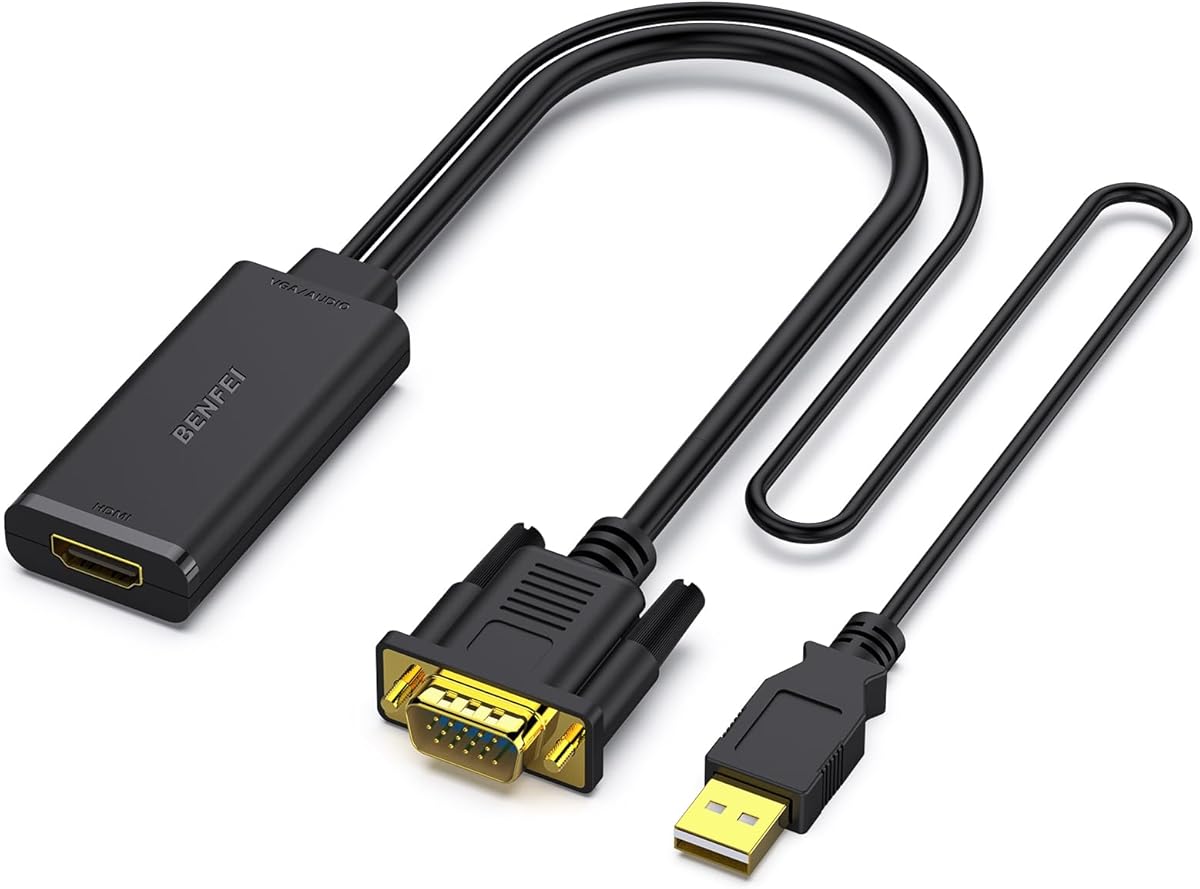
The BENFEI VGA to HDMI Adapter is essential for users who need to connect older laptops or desktops with VGA ports to modern HDMI displays. It provides a bridge between legacy analog and digital technologies.
We may earn a commission when you buy through this link, at no additional cost to you.
Since VGA does not carry audio this adapter includes a USB cable to embed audio along with the video signal. This ensures your presentation includes both visual and sound components without extra speakers.
The conversion is handled by a built-in IC chip that ensures stable transmission from the analog source to the digital output. It is uni-directional so it only works from VGA source to HDMI display.
This adapter is valuable for businesses with older equipment that still need to interface with new conferencing systems. Its compact design allows it to be stored easily for occasional use when traveling.
The included USB audio cable solves the common issue of missing sound when using VGA sources.
It extends the life of older monitors and laptops by allowing them to connect to modern displays.
We may earn a commission when you buy through this link, at no additional cost to you.
The USB C to HDMI Multiport Adapter combines video output with additional connectivity options in a single unit. It is ideal for laptops that have limited ports and need more versatility in one dongle.
We may earn a commission when you buy through this link, at no additional cost to you.
It supports 4K video output at 30Hz while also providing a USB-A port for accessories and a PD port for charging. This means you can keep your laptop charged while using the external display.
The aluminum body helps dissipate heat efficiently which is important when multiple ports are active simultaneously. This design ensures that the adapter does not overheat during prolonged use in demanding scenarios.
This device is perfect for travelers who want to minimize the number of adapters they carry in their bag. It simplifies the connection process by handling video and power needs with a single cable.
The adapter allows you to charge your laptop while connecting to a display using a single cable.
The extra USB-A port lets you connect drives or mice without needing separate hubs.
We may earn a commission when you buy through this link, at no additional cost to you.
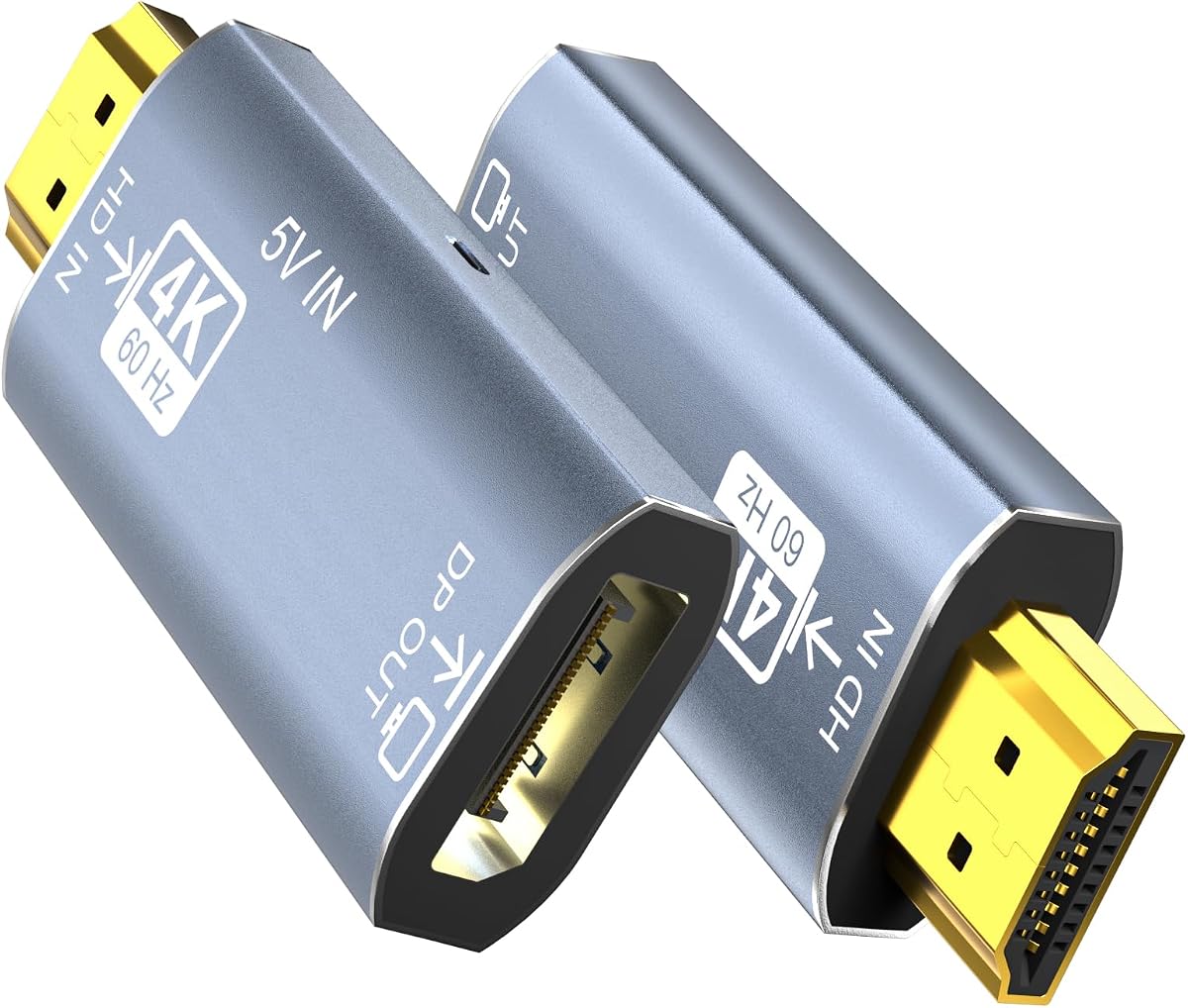
The Mini HDMI to HDMI Adapter stands out for its ability to handle extremely high resolutions and refresh rates. It supports 8K at 60Hz which makes it future proof for upcoming display technologies.
We may earn a commission when you buy through this link, at no additional cost to you.
Its construction features 24K gold plated connectors and an aluminum housing that resists corrosion and heat. This ensures that signal loss is minimized even during long gaming sessions or high bandwidth transfers.
The package includes two adapters which provides flexibility for multiple setups or backup options. This value is particularly useful for users who have more than one device with a Mini HDMI port.
This adapter is ideal for content creators and gamers who need the highest possible visual fidelity. The five year warranty reinforces the confidence in its build quality and longevity.
Support for 4K at 144Hz ensures smooth and blur free gaming experiences on compatible monitors.
The use of aluminum and gold plating ensures the adapter lasts longer under heavy use.
We may earn a commission when you buy through this link, at no additional cost to you.
The BENFEI HDMI to DisplayPort Adapter enables users to connect HDMI sources to DisplayPort monitors which is rare for active converters. It supports up to 4K at 60Hz and high refresh rates for gaming.
We may earn a commission when you buy through this link, at no additional cost to you.
Its compatibility with gaming consoles like PS5 and Xbox makes it useful for players who want to use a PC monitor with their console. The adapter includes audio support so you do not lose sound during conversion.
Because active conversion requires more power this adapter needs an external power source to function correctly. You must plug the USB power cable into a power source to ensure the chipset has enough voltage.
This solution is perfect for gamers who already own a DisplayPort monitor but want to connect an HDMI console to it. It provides a way to utilize existing hardware without buying a new monitor.
This adapter is tested to work with major gaming consoles providing a flexible display solution.
It supports up to 165Hz at 1080P ensuring competitive gaming performance on high speed screens.
We may earn a commission when you buy through this link, at no additional cost to you.
The Active HDMI to DisplayPort Adapter is engineered for users who need to connect an HDMI laptop to a DisplayPort monitor. It uses an active chipset to translate signals ensuring reliable transmission across protocols.
We may earn a commission when you buy through this link, at no additional cost to you.
It delivers 4K resolution at 60Hz with zero latency which is crucial for real time applications like trading or gaming. The aluminum housing helps dissipate heat generated by the active conversion chip during operation.
While it does not support HDR or VRR it focuses on providing clean stable video performance for standard definition needs. This makes it a practical choice for daily office work and productivity tasks.
This adapter is ideal for corporate environments where IT professionals need to ensure consistent display performance. Its driver free design simplifies deployment across multiple machines without software installation.
The active chipset allows for signal translation between HDMI and DisplayPort which is otherwise impossible.
The hardware level decoding ensures there is no lag making it suitable for time sensitive applications.
We may earn a commission when you buy through this link, at no additional cost to you.
Selecting the right adapter involves understanding your laptop's ports and display requirements. This guide covers the key factors you should consider to ensure compatibility and performance.
The first step is to identify the output port on your laptop and the input port on your display. Check if your laptop has USB-C, DisplayPort, Mini HDMI, or a standard HDMI port to match the adapter.
Ensure that the adapter you select matches the output on your laptop and the input on your display exactly to avoid connection failures.
Different adapters support different resolutions and refresh rates. If you need 4K at 60Hz, make sure the adapter specifically supports that combination as some are limited to 30Hz.
Higher refresh rates are essential for gaming and smooth motion, so always check the specs if you plan to use the adapter for dynamic content.
Some adapters, especially active ones for HDMI to DisplayPort, require external power to function correctly. Others rely solely on the power from the laptop's port.
Verify if the adapter includes a power cable or requires a separate source to prevent black screens or signal dropouts.
Look for adapters with reinforced connectors and durable materials like aluminum or braided nylon. These features help prevent breakage and ensure a stable connection over time.
Investing in a well-built adapter can save money in the long run by reducing the frequency of replacements.
Some adapters do not pass audio, such as VGA to HDMI without a dedicated USB audio line. Ensure the adapter supports audio pass-through if you need sound from the external display.
Check if the adapter includes any necessary cables for audio transmission if the video port alone does not carry sound.
A good warranty indicates the manufacturer's confidence in the product. Look for options that come with at least 18 months of coverage to protect your investment.
Friendly customer service can be crucial if you face setup issues, so check reviews regarding the brand's support responsiveness.
Most modern adapters do not require driver installation and work immediately upon connection. This feature is vital for quick setups during presentations or work.
Ensure the adapter is truly plug and play to avoid spending time installing software before using it.
Verify that the adapter is compatible with your specific operating system and device type. Some adapters may not work well with certain Mac or Windows configurations.
Check user reviews or manufacturer specifications to confirm support for your laptop brand and model.
Start by connecting one end of your HDMI cable to your display and the other end to the adapter. Ensure the connection is secure and the latches click into place if applicable.
Next, plug the adapter into the correct port on your laptop. Wait a few seconds for your system to recognize the display and adjust the screen settings if needed.
To maintain the adapter, unplug it gently using the release button rather than pulling the cable. Store it in a protective case when not in use to prevent damage to the connectors.
Most adapters are plug and play and do not require driver installation. Your operating system should detect them automatically. However, if you experience issues, check for system updates.
Only multiport adapters with Power Delivery support can charge your laptop. Simple adapters do not pass power. Check the specs to see if PD is supported before relying on it for charging.
This might be due to a power issue or incompatible resolution. Ensure any required external power cables are connected. Also, lower the resolution on your laptop to match the display's capabilities.
Yes, but choose an adapter that supports high refresh rates like 60Hz or more. Look for low latency models to ensure smooth gameplay without lag or flickering on your screen.
Passive adapters simply pass signals while active adapters convert signals using a chip. Active adapters are needed for incompatible ports like HDMI to DisplayPort and require power to function.
Most digital adapters pass audio over HDMI. However, older adapters like VGA to HDMI may need a USB audio cable. Always check the product details for audio pass-through capabilities.
With proper care, they can last several years. Avoid bending the cables sharply and unplug them carefully. The lifespan depends on build quality and frequency of use in your daily routine.
We have reviewed ten reliable options ranging from basic connectors to premium high-performance adapters. Each offers distinct benefits for different needs such as gaming, office work, or connecting legacy devices.
Prioritize compatibility and resolution support to ensure your setup meets your performance expectations. Consider factors like build quality and warranty to ensure long-term reliability for your daily tasks.
Remember to verify current availability and features before purchasing as specifications may vary. By selecting the right adapter, you can enhance your productivity and entertainment experience seamlessly.