
NZXT H5 Flow
4.7Editor score
Compact ATX mid-tower design
Perforated PSU shroud
Ultra-fine mesh panels
Discover the top high airflow PC cases for 2026. We compare build quality, cooling performance, and features to help you choose the right chassis.
Building a high-performance PC requires careful attention to thermal management. A case with excellent airflow ensures your components stay cool under load, preventing thermal throttling and extending hardware lifespan while keeping noise levels low.
We evaluated ten top-rated chassis designed specifically for maximum ventilation. Our analysis considers fan pre, mesh density, radiator support, and internal layout to identify which models deliver the best cooling potential for modern gaming and workstation builds.
Each selection highlights unique strengths ranging from budget-friendly options to premium modular designs. Prices fluctuate frequently due to market demand and seasonal sales, so verify current listings before purchasing to ensure you get the best value available today.
4.7Editor score

4.8Editor score

4.8Editor score
This side-by-side comparison highlights the key specifications and unique features of each selected chassis. Use this table to quickly identify which model aligns with your specific cooling needs and component compatibility requirements.





The MONTECH AIR 903 MAX stands out as a top contender for builders prioritizing thermal performance. With a 4.8-star rating, it delivers exceptional ventilation through its ventilated mesh front panel and four pre-installed fans.
We may earn a commission when you buy through this link, at no additional cost to you.
This case supports demanding components including E-ATX motherboards and graphics cards up to 400mm. The inclusion of three front and one rear 140mm ARGB PWM fans ensures immediate cooling readiness without additional purchases.
While the aggressive mesh design maximizes airflow it may require more frequent dust cleaning. Additionally the lack of side fan mounting limits customization compared to some modular competitors.
Ideal for enthusiasts seeking high cooling potential in a mid-tower chassis. This model balances performance value and aesthetics making it a strong choice for modern gaming rigs.
The four included 140mm fans provide immediate cooling readiness right out of the box for demanding workloads.
Supporting E-ATX boards and 400mm GPUs ensures you can upgrade components without outgrowing the chassis.
We may earn a commission when you buy through this link, at no additional cost to you.
The NZXT H5 Flow offers a compelling balance of size and cooling efficiency for budget-conscious builders. Its compact design fits smaller desks while maintaining robust thermal capabilities through perforated panels.
We may earn a commission when you buy through this link, at no additional cost to you.
Features like the perforated PSU shroud enable optimal air intake from two fans which enhances overall system stability. The ultra-fine mesh on all panels ensures maximum airflow with minimal dust intrusion.
However the limited fan count may require additions for extreme cooling needs. The compact size also restricts very large GPUs or extensive radiator configurations.
Perfect for users needing a sleek affordable case with solid thermal performance. It is a reliable choice for standard gaming builds where space is at a premium.
Designed to maximize airflow in a smaller footprint ideal for desktop setups with limited space.
Perforated shrouds and mesh panels work together to guide cool air directly to critical components.
We may earn a commission when you buy through this link, at no additional cost to you.
The Cooler Master HAF II 500 is engineered for users who demand maximum airflow capacity. Its oversized 220mm intake fans create an immense volume of air movement that surpasses standard 140mm solutions.
We may earn a commission when you buy through this link, at no additional cost to you.
The split-level cable management optimizes routing space ensuring cables do not obstruct the rear exhaust flow. This design choice enhances thermal efficiency by keeping air pathways clear and unobstructed.
While the large footprint requires a spacious desk the performance justifies the space. The premium price also reflects the high-quality materials and innovative cooling technologies included.
Ideal for enthusiasts with top-tier hardware needing relentless cooling. This case sets a new standard for high-performance chassis in the premium market segment.
Two 220mm fans deliver significantly higher airflow than standard sizes for aggressive cooling.
Split-level management keeps cables out of the way to maintain clean and efficient air paths.
We may earn a commission when you buy through this link, at no additional cost to you.
The CORSAIR 4000D RS ARGB introduces a revolutionary FRAME system allowing users to modify the chassis layout. This innovation offers near-limitless options for panel and component placement without permanent changes.
We may earn a commission when you buy through this link, at no additional cost to you.
The InfiniRail mounting system provides unmatched flexibility for front and roof fan configuration. Users can slide rails to mount fans up to 200mm ensuring targeted airflow where needed most.
Customization may add setup time for those preferring simplicity. Also ATX limits might restrict larger workstation boards compared to E-ATX options.
Best for builders who want a unique and adaptable build experience. It balances high airflow with aesthetic flexibility perfectly for modern enthusiast systems.
The FRAME system allows you to swap panels and adjust layouts to match your exact preferences.
InfiniRail mounting ensures fans can be positioned exactly where they cool best.
We may earn a commission when you buy through this link, at no additional cost to you.
The LIAN LI LANCOOL 216 RGB is engineered to handle massive graphics cards with ease. With clearance for GPUs up to 392mm it accommodates the largest high-end models comfortably.
We may earn a commission when you buy through this link, at no additional cost to you.
Two 160mm front fans deliver substantial air pressure and flow ensuring components stay cool under heavy load. The modular motherboard I/O bracket allows for height adjustments to optimize airflow paths.
The heavy-duty steel frame adds durability but also weight making transport difficult. Tempered glass panels look great but require regular cleaning to maintain a pristine appearance.
Perfect for gamers with top-tier graphics cards and large cases. It combines robust cooling with premium aesthetics for a high-end visual appeal.
Generous internal space supports even the longest NVIDIA cards without fitting issues.
Modular brackets and ample room allow you to tailor cooling layouts to your build needs.
We may earn a commission when you buy through this link, at no additional cost to you.
The Antec Flux Pro delivers full-tower power with six pre-installed PWM fans for robust cooling. Its multi-directional vent design supports up to twelve fans ensuring maximum airflow potential.
We may earn a commission when you buy through this link, at no additional cost to you.
Features like the iShift PSU mount and CPU GPU dual temperature display add unique functionality to the build process. These tools help monitor thermal performance and optimize power management.
The full-tower footprint requires ample desk space and floor area. Complexity in cable routing may challenge those new to PC assembly.
Ideal for workstation users needing massive cooling capacity. It offers professional-grade features for high-demand computing environments.
Supports up to twelve fans simultaneously for unmatched cooling flexibility and airflow volume.
Dual temperature displays provide real-time thermal insights directly on the chassis.
We may earn a commission when you buy through this link, at no additional cost to you.
The CORSAIR 3500X RS ARGB features a wraparound glass aesthetic that showcases every internal component beautifully. Despite the glass front it maintains solid cooling capacity through strategic vent placement.
We may earn a commission when you buy through this link, at no additional cost to you.
Three RS120-R ARGB fans provide high-performance cooling with unobstructed lighting. Removable tempered glass panels make it easy to build and access your system after installation.
Glass front panels may slightly restrict intake compared to mesh designs. Fingerprints may also appear easily requiring frequent cleaning to maintain appearance.
Best for users prioritizing visual impact without sacrificing too much airflow. It balances style and function for a showpiece build.
The wraparound glass design offers a stunning view of your components and lighting.
Removable panels simplify maintenance and upgrades without needing tools.
We may earn a commission when you buy through this link, at no additional cost to you.
The Lian Li V100 offers exceptional value with four pre-installed ARGB fans right out of the box. Its high rating reflects reliable thermal performance and user-friendly design features.
We may earn a commission when you buy through this link, at no additional cost to you.
Integrated RGB strips and tool-less side panels enhance the build experience with ease of access and visual customization. Support for GPUs up to 420mm ensures long-term compatibility.
The front design is less aggressive than mesh-heavy cases. This may slightly limit initial airflow potential compared to top-tier competitors.
Ideal for budget builds needing strong features immediately. It delivers high performance without requiring additional component purchases.
Four included fans mean you can start building without spending extra on cooling.
Tool-less mounting allows quick removal of side panels for maintenance and upgrades.
We may earn a commission when you buy through this link, at no additional cost to you.
The NZXT H9 Flow utilizes a dual-chamber design to separate main components from the PSU and drives. This separation improves thermal performance and cable management significantly.
We may earn a commission when you buy through this link, at no additional cost to you.
Ten-fan capacity and 420mm radiator support ensure powerful cooling for high-performance builds. Back-connect compatibility allows for a cleaner look with fewer cables visible.
Dual chambers may complicate initial layout choices. Users must plan component placement carefully to maximize the benefits.
Best for modern builds prioritizing clean aesthetics and thermal efficiency. It offers a sophisticated approach to airflow management.
Separating the PSU keeps heat away from critical components for better cooling.
Back-connect readiness helps achieve a sleek cable-free look for your build.
We may earn a commission when you buy through this link, at no additional cost to you.
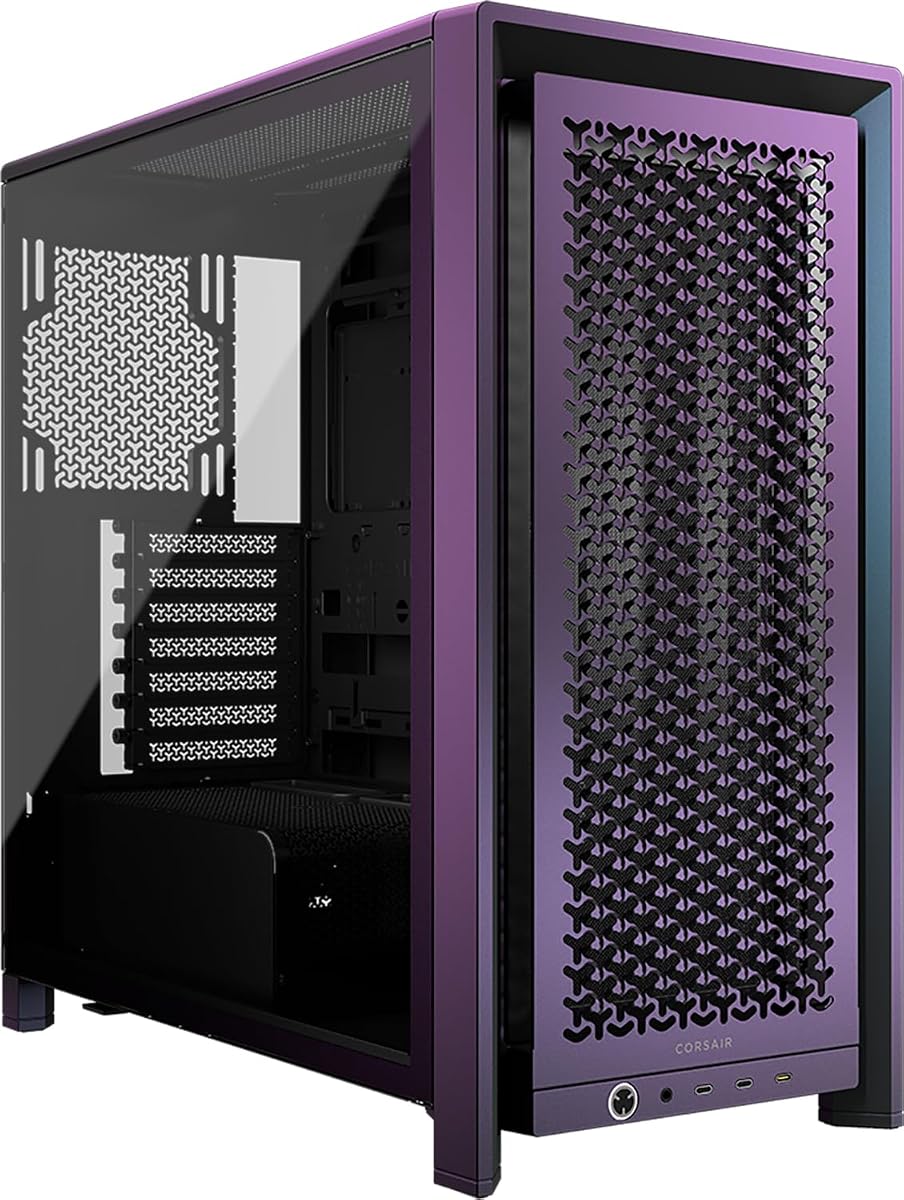
The CORSAIR Frame 4000D Vault represents a limited release with unique finishes like Galaxy. This exclusivity makes it a prized item for collectors seeking something distinct.
We may earn a commission when you buy through this link, at no additional cost to you.
It inherits the FRAME Modular System offering flexible layouts and InfiniRail mounting for targeted airflow. Support for three 360mm radiators ensures robust cooling potential.
Rarity drives up price and limits availability for general consumers. Customization requires attention to detail during assembly.
Ideal for collectors wanting a unique chassis. It offers high performance wrapped in an exclusive aesthetic package.
Strictly limited runs and unique numbering make this a standout piece for enthusiasts.
The modular system allows you to adapt the case to your specific cooling needs.
We may earn a commission when you buy through this link, at no additional cost to you.
Selecting the right case involves balancing airflow, component fit, and aesthetics. This guide breaks down the key factors to consider for optimal thermal performance.
Mesh panels allow significantly more air intake than solid tempered glass. Look for large perforations that minimize obstruction while maintaining structural integrity for cooling.
Prioritize open mesh designs to ensure your fans can pull in cool air efficiently.
Check how many fans come included and their sizes. Larger fans like 140mm or 160mm move more air at lower speeds than smaller 120mm units.
Aim for cases with pre-installed fans to save money and ensure immediate cooling upon build.
If you plan to use liquid cooling verify the supported radiator sizes. Cases should accommodate at least a 360mm radiator at the front for high-end CPU coolers.
Ensure there is enough clearance between radiators and other components like RAM or GPUs.
Match the case size to your motherboard form factor. ATX cases support standard boards while E-ATX models offer room for expanded workstations.
Confirm dimensions carefully if using larger servers or specialized workstation boards.
Proper cable routing prevents airflow blockage behind the motherboard tray. Look for wide channels and ample space for strain relief grommets.
Good management ensures cables do not obstruct the path of incoming air.
Thick steel panels provide durability and reduce unwanted vibrations from fans. Heavy-duty frames also prevent flexing during GPU installation.
Check material thickness and joint quality to ensure long-term reliability.
Consider future GPU lengths and CPU cooler heights. A case should have enough clearance for upgrades without needing replacement soon.
Prioritize models with generous dimensions to accommodate larger hardware generations.
Dust filters on intake areas protect internal components from debris. Look for washable magnetic filters that are easy to clean regularly.
Effective filtering keeps dust off heat sinks maintaining better thermal performance.
Install your case in a location with good room ventilation. Keeping sides clear of walls allows intake fans to draw in fresh cool air effectively.
Clean dust filters every few weeks using a soft brush or vacuum. This routine maintenance prevents airflow restriction caused by debris accumulation over time.
Monitor fan speeds and temperatures to optimize performance. Adjust curves in BIOS or software to balance cooling with noise levels based on your usage.
Good airflow keeps your hardware cool preventing thermal throttling which slows down performance. It also extends the lifespan of components by reducing heat stress during operation.
Yes mesh panels offer significantly less restriction than glass or plastic. This allows fans to move more air and cool components more efficiently under load.
Three to five fans are typically sufficient for standard builds. Ensure you have balanced intake and exhaust for stable airflow across all components.
Some cases combine glass sides with mesh fronts. This allows you to see components without sacrificing too much cooling capacity if designed well.
Cable routing dust buildup and component placement all matter. Poor cable management can block paths reducing the effectiveness of even high-end fans.
Both work well with airflow cases but radiators need space. Air coolers are simpler while liquid setups require mounting options for best thermal results.
The MONTECH AIR 903 MAX NZXT H5 Flow and Cooler Master HAF II 500 lead the pack for performance and value. Each offers distinct advantages for different build sizes and budgets.
Prioritize mesh panels fan capacity and component clearance when making your decision. These factors ensure your system stays cool and runs efficiently for years to come.
Always check current pricing and availability before purchasing. Specifications and stock can vary so verifying details ensures you get the exact model you need.