
NOYAFA NF-488 POE Cable Tester
4.5Editor score
RJ45 continuity and loop-back test
Backlit LCD for dark areas
Identifies standard and non-standard PoE
This comprehensive guide compares the top ten inline POE testers for network professionals, highlighting key features, testing capabilities, and reliability
Finding the right inline POE tester is crucial for network professionals who need to verify power delivery without interrupting service. These tools help identify voltage, current, and power standards to ensure connected devices operate safely and efficiently across various network setups.
We evaluated ten leading models based on their testing modes, display clarity, durability, and compatibility with IEEE standards. Our analysis focuses on real-world utility for installers and engineers who require precise diagnostics for PoE+, passive PoE, and DC power sources in the field.
Each selection highlights specific strengths like OLED displays, battery-free operation, or comprehensive cable continuity checks. Remember that availability and specific model features may vary over time, so verify current specifications before making your final purchasing decision for your toolkit.
4.5Editor score

4.1Editor score

4.1Editor score
The following table provides a side-by-side comparison of the top ten inline POE testers available today. We highlight key specifications such as testing modes, power ranges, display types, and special features to help you choose the right tool for your specific network diagnostics needs.


The TRENDnet TC-NTP1 stands out as a reliable choice for professionals needing consistent inline testing without worrying about power sources. It supports IEEE 802.3af/at/bt standards and can handle up to 100W, making it suitable for most modern PoE deployments. Its battery-free operation ensures it is always ready when you need it.
We may earn a commission when you buy through this link, at no additional cost to you.
This tool offers three distinct testing modes that cover a wide range of scenarios including standard PoE, passive PoE, and inline verification. The T-mode identifies PSE capabilities while N-mode handles non-standard devices. I-mode gives real-time voltage, amperage, and wattage readings which are crucial for troubleshooting power issues on active lines.
While it lacks the advanced color display of higher-end models, the step button allows you to lock specific metrics like wattage for monitoring. The NDAA compliance is a significant benefit for government projects. Some users might find the display basic compared to OLED options, but the reliability and ease of use make up for it.
Installers working on public sector projects or those who need a straightforward tool will find this model excellent. It balances functionality with durability without requiring frequent battery changes. We recommend this for anyone seeking a dependable inline tester that adheres to strict compliance standards.
The NDAA compliance ensures this device meets strict security standards required for government network installations in the U.S. and Canada.
Use the step button to lock onto wattage readings for continuous monitoring of power consumption without toggling through metrics repeatedly.
We may earn a commission when you buy through this link, at no additional cost to you.
The PoE-T100 distinguishes itself with a bright OLED display that makes reading real-time data easier in various lighting conditions. It is designed to be self-powered, drawing energy directly from the PoE or DC source you are testing. This feature eliminates the hassle of carrying spare batteries during long installations.
We may earn a commission when you buy through this link, at no additional cost to you.
Its testing capabilities are robust, supporting IEEE standards as well as a wide range of DC inputs from 12V to 57V. The tool offers PD mode to simulate a device, Inline mode for pass-through testing, and DC mode for pure power supply checks. This versatility is ideal for mixed network environments where non-standard power sources are common.
The OLED screen provides a clear view of voltage, current, power, and polarity all on one page which speeds up diagnostics. However, the cost is higher than simple LED testers. Additionally, OLED screens can consume power if left on too long so automatic shutoff is important to preserve the unit.
This tool is perfect for network engineers who prioritize display clarity and versatile input support. The ability to test both standard and non-standard setups without extra adapters adds significant value. We suggest it for professionals who need precise, readable data quickly.
Accommodates non-standard passive PoE and DC power supplies ranging from 12V to 57V ensuring compatibility with legacy and custom setups.
Draws power directly from the network line to operate meaning you never have to worry about charging internal batteries for field work.
We may earn a commission when you buy through this link, at no additional cost to you.
The PoE Texas Power Over Ethernet Tester is engineered for professionals who need a compact tool that can handle high power testing without external batteries. It features a unique Simulate PoE Device mode which allows you to test switches and injectors even when the device is not physically installed. This saves time during initial setup.
We may earn a commission when you buy through this link, at no additional cost to you.
Its ergonomic design is 25% smaller than previous models making it easy to carry in a pocket or tool bag. The device measures voltage and current up to 280W at 56V covering high power PoE+ standards. The LCD screen automatically cycles through readings keeping the interface simple and uncluttered.
While it lacks remote wiring features found in multi-function testers the core power diagnostics are reliable. The battery-free operation is a major plus for field technicians. Some users might miss the ability to test cable continuity directly but its focused approach on power ensures accuracy in voltage checks.
This tester is ideal for installers who frequently work with managed switches needing PD simulation. Its size and power handling make it a strong candidate for daily carry. We recommend it for those prioritizing portability and high-wattage testing capabilities.
Activate the simulate mode to check power output on managed switches without needing to connect a real endpoint device first.
Capable of measuring up to 280 watts ensuring compatibility with the latest high-power PoE standards for cameras and access points.
We may earn a commission when you buy through this link, at no additional cost to you.
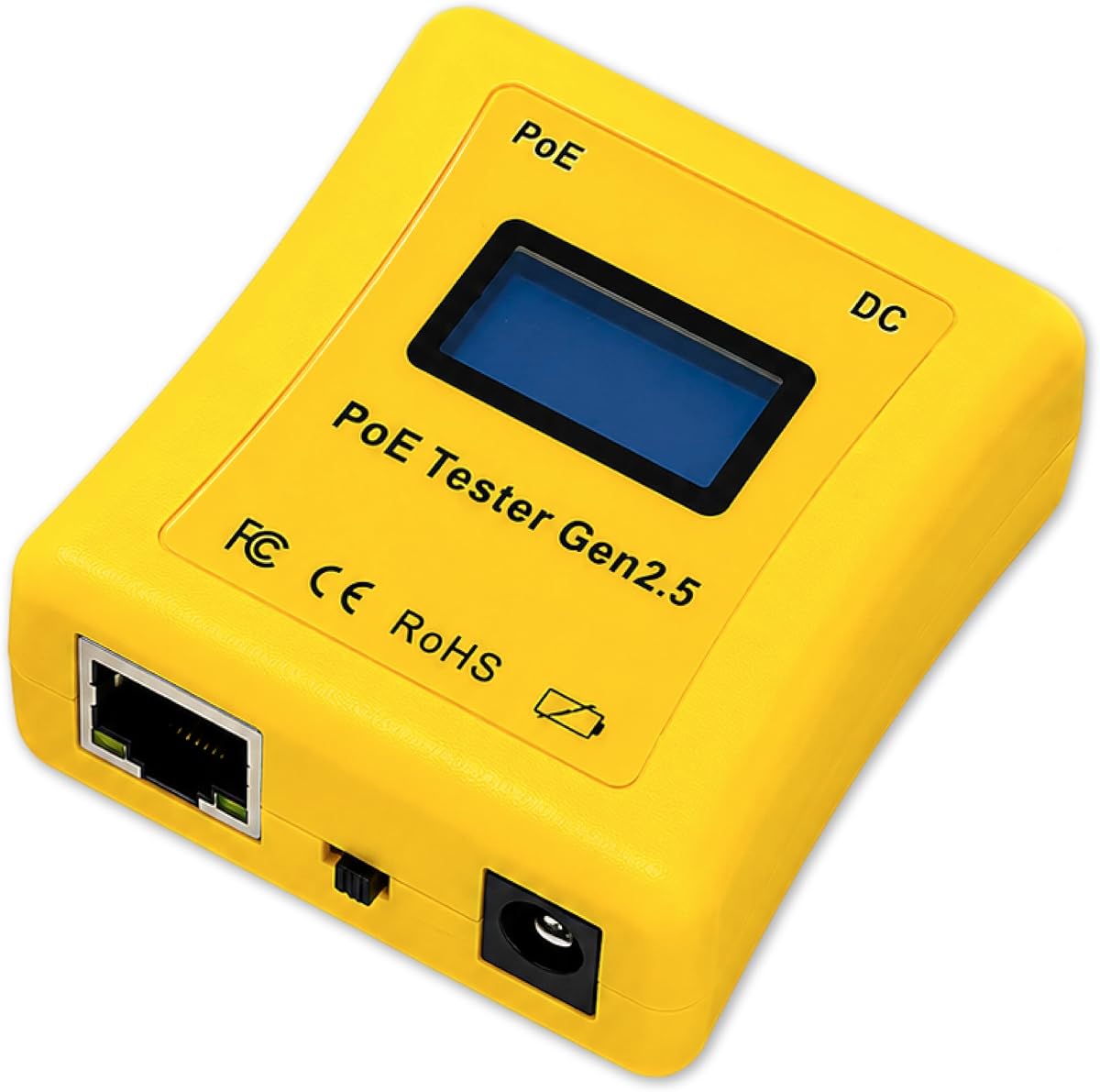
The NOYAFA NF-488 offers an affordable entry point for technicians needing both PoE and cable continuity testing. It is designed to detect POE presence and network cable faults like opens and shorts in one unit. This dual functionality reduces the need to carry multiple separate testers on a job site.
We may earn a commission when you buy through this link, at no additional cost to you.
The device identifies standard and non-standard PoE information including voltage polarity and mode. It also features a loop-back test that helps diagnose active port issues on switches. The backlit LCD ensures visibility in dark closets and racks. The anti-slip casing provides a secure grip during use.
While it does not support high-power measurements like the 100W+ models it covers standard PoE andaf/at needs well. The build quality is solid for the price range. Some advanced users may find the PoE data less detailed than dedicated power testers but it suffices for general connectivity checks.
Budget-conscious installers or small business IT staff will find this tool highly practical. It handles the basics of network and power verification efficiently. We recommend it for those needing a versatile low-cost option for general maintenance.
Combines PoE detection with network cable continuity testing saving you the cost and weight of carrying two separate tools.
The built-in backlight ensures you can read results clearly even in dimly lit server racks or ceiling panels.
We may earn a commission when you buy through this link, at no additional cost to you.
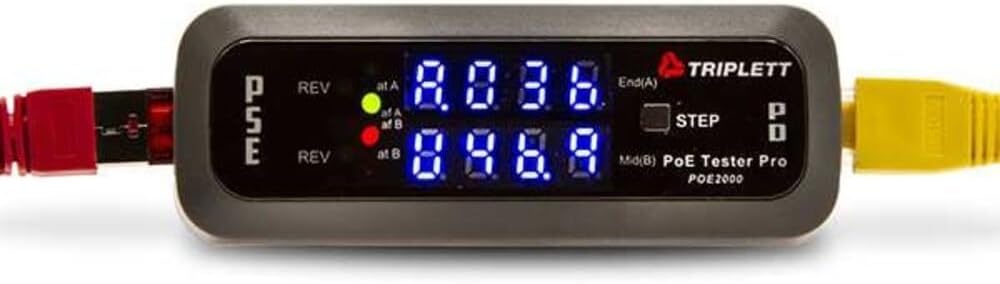
The Triplett POE2000 uses a simple LED-based display to indicate power source and status. It shows whether the source is end span or mid span using dual LEDs. Two yellow LEDs specifically warn of reversed polarity which is critical for preventing damage to devices during installation.
We may earn a commission when you buy through this link, at no additional cost to you.
When used inline the display alternates between voltage current and power. A step button allows you to select specific data to display. This tool is straightforward and does not require complex navigation. It is reliable for quick checks where detailed digital readouts are not strictly necessary.
However the interface is older compared to LCD or OLED options which can make reading specific values less intuitive. It lacks the ability to show all metrics simultaneously on a screen. Users who prefer digital precision might find this limiting but those who want simple lights will appreciate the clarity.
This model suits technicians who prefer traditional visual cues over digital screens. It is easy to interpret at a glance. We suggest it for environments where quick polarity and source checks are more important than exact wattage tracking.
Clear LED indicators immediately show if power is coming from an end span switch or midspan injector simplifying troubleshooting.
Yellow LEDs alert you to polarity issues instantly preventing potential damage to sensitive network equipment.
We may earn a commission when you buy through this link, at no additional cost to you.
The Triplett POE3000 builds on previous models with similar visual LED indicators for standard detection. It supports IEEE 802.3af or 802.3at/bt standards clearly showing compliance on the device. This helps ensure you are not connecting high-power devices to insufficient power sources.
We may earn a commission when you buy through this link, at no additional cost to you.
It determines standard or non-standard passive PoE and checks for reversed polarity. The inline monitoring alternately displays voltage current and power. A step button allows specific data selection. This provides a balance between visual cues and numeric data for better diagnostic accuracy.
While it offers more detail than the 2000 model the interface remains LED-based. There are no comprehensive reviews yet for this specific unit. It is likely an upgrade path for existing Triplett users looking for better standard support. It remains a solid choice for quick checks.
Technicians already familiar with Triplett tools will find this model comfortable to use. It improves standard detection accuracy. We recommend it for those who prefer established brands and simple visual interfaces.
Visual LEDs clearly distinguish between 802.3af and at/bt standards ensuring you match device requirements correctly.
Real-time cycling through voltage current and power helps you observe load changes without needing a separate meter.
We may earn a commission when you buy through this link, at no additional cost to you.
The Jonard Tools POE-1 offers a comprehensive solution for verifying both PoE presence and cable continuity. It allows battery-free operation when PoE is present or can use included AA batteries for unpowered cables. This flexibility is useful when dealing with passive lines that do not provide power.
We may earn a commission when you buy through this link, at no additional cost to you.
The kit includes a remote a female-female adapter and a belt clip for convenience. It measures resistance to ensure flawless data transmission across Cat5 and Cat6 cables. This makes it a robust tool for checking the physical layer of your network alongside power delivery.
The inclusion of accessories like the belt clip adds value for field workers. However it may not show detailed power metrics on a screen. It is better suited for verification tasks rather than deep diagnostics. It fits well into a larger toolkit setup.
Techs who work on cabling projects need continuity checks should consider this model. It simplifies the verification process with a complete kit. We suggest it for professionals who need to test cables and power efficiently.
Works directly from PoE lines or uses AA batteries for testing unpowered cables giving you total testing flexibility.
Measures resistance to confirm cable integrity ensuring your data connections are solid before checking power.
We may earn a commission when you buy through this link, at no additional cost to you.
This PoE Cable Tester stands out for its ability to measure cable length which is not common in standard testers. It supports IEEE standards and can verify load delivery effectively. The rechargeable battery ensures long-term use without buying disposable cells. Customer ratings reflect high satisfaction with its performance.
We may earn a commission when you buy through this link, at no additional cost to you.
It measures cable lengths for CAT5 and CAT6 ranging from 5 to 300 meters. This feature saves a separate tool when verifying long runs. The port flash detection helps locate active ports quickly. Auto-shutoff features preserve battery life during idle times.
The rechargeable aspect means you need to remember to charge it before jobs. But the high rating suggests the battery life is reliable. It combines many necessary functions into one affordable unit. The build quality seems durable for daily field work.
Installers who need to verify cable length alongside power delivery will love this tool. It offers high value for the price. We recommend it for those wanting a comprehensive tester with modern battery features.
Accurately measures cable run length up to 300 meters helping you avoid violations of distance limits.
Port flash detection allows you to identify active switch ports quickly without tracing cables manually.
We may earn a commission when you buy through this link, at no additional cost to you.
The Inline Cat5/6 Dvm is a specialized tool that combines network PoE testing with DVM capabilities. It is designed for inline monitoring of Cat5 and Cat6 connections. This unit likely offers detailed insights into both data and power lines simultaneously.
We may earn a commission when you buy through this link, at no additional cost to you.
It is built as a panel style device which may fit specific rack or mounting needs. The DVM features allow for broader electrical checks beyond just PoE. This could be useful for environments where mixed electrical testing is required alongside networking.
Limited descriptions make it hard to gauge the exact display or features. It may be an older or niche product. It is better suited for specific industrial setups where panel integration is key. General users might find more modern handheld options easier to use.
Specialized industrial installers looking for panel mounted testing might find this suitable. It combines multiple electrical functions. We suggest it only if specific mounting requirements are needed.
Designed for panel installation offering a fixed testing solution for specific network environments.
We may earn a commission when you buy through this link, at no additional cost to you.
This NF-488 Network Cable Tester is a robust tool for checking connectivity and PoE status. It identifies shorts crossovers and open circuits efficiently. The loop-back test helps diagnose switch issues. The LED lamp helps in dark spaces. Customer service is noted as lifetime friendly.
We may earn a commission when you buy through this link, at no additional cost to you.
It tests current voltage and power consumption of DC appliances with clear ranges up to 180W. This provides enough detail for most standard setups. The intuitive data display makes it easy to understand what is happening on the line. It is well received by users for its utility.
The design is practical with a focus on key functions needed by technicians. It is a reliable choice for general network maintenance. While it is similar to other models the service support adds value. It is a safe pick for daily maintenance tasks.
Technicians needing reliable service support and good basic utility will appreciate this tool. The LED lamp is a thoughtful addition. We recommend it for general network and PoE testing needs.
Lifetime friendly customer service ensures you can get help when needed improving your overall support experience.
An included LED lamp helps illuminate dark cable runs making inspection easier in confined spaces.
We may earn a commission when you buy through this link, at no additional cost to you.
Choosing the right inline POE tester involves evaluating several critical factors to ensure your tool meets your daily diagnostic needs. This section breaks down the most important aspects to consider before you buy.
Ensure the tester supports the PoE standards you work with most often such as IEEE 802.3af at and bt. Some tools also support passive PoE which is common in older CCTV systems. Having multiple modes like PD simulation or inline pass-through gives you flexibility to test switches without needing the end device.
Always check that the device covers the voltage and wattage limits of your specific network gear to avoid compatibility issues.
The display is where you read your results so clarity is essential. OLED and backlit LCD screens are easier to read in dark server closets compared to simple LED indicators. Look for displays that can show voltage current and power simultaneously or easily toggle between them.
A clear display reduces errors during quick diagnostics and helps you verify values at a glance without squinting.
Many modern inline testers are battery-free meaning they draw power directly from the line they are testing. This is convenient but ensure they work on lower voltages. If the unit requires internal batteries check the battery life and whether it supports rechargeable options to reduce long-term costs.
Battery-free operation is usually preferred for field work as it eliminates downtime for charging or replacements.
For modern networks ensure the tester supports Gigabit ports if you are testing high-speed switches. Some older models may be limited to 100Mbps which could affect data traffic during testing. Verify the connector type and whether it supports shielding if you work with STP cables.
Matching the port speed ensures your testing does not become a bottleneck during verification processes.
Field work often means dropping tools or using them in tight spaces. Look for rugged casings with anti-slip grips that can withstand daily use. Portability is key so a compact design with a belt clip or holster will make it easier to carry around.
A durable and portable device ensures your tool lasts longer and is always ready when you need it.
Some testers offer extra features like cable continuity checks length measurement or LED flash detection. These functions can replace other tools in your kit saving space and money. However ensure these features do not compromise the core PoE testing accuracy.
Evaluate which extra features are truly useful for your specific tasks before paying for them.
Government projects often require NDAA compliant devices so check if the tool meets these standards if applicable. A strong warranty and reliable technical support are also important to protect your investment. Look for brands that offer easy replacement policies for defective units.
Compliance and warranty security provide peace of mind especially for professional contractors.
To start using your inline POE tester simply plug one end into the power source such as a switch or injector and the other into the powered device or a test load. If the tool supports PD simulation use that mode when checking switch output without a connected device.
Observe the display for voltage and current readings to ensure they match the expected values for your equipment. If using a step button lock onto the specific metric you want to monitor such as wattage for continuous checks. Always verify polarity to avoid damaging devices with reversed connections.
Keep your tester clean and dry to maintain accuracy and longevity. Store it in a protective case when not in use to prevent physical damage. If your device uses batteries or rechargeable cells ensure they are properly charged or replaced to guarantee reliable operation.
An inline POE tester is a handheld device used to verify power delivery and connectivity in Power over Ethernet networks. It sits between the switch and the device to measure voltage current and power standards ensuring everything operates correctly.
Many modern testers are battery-free and draw power directly from the line they are testing. Some may require AA batteries for passive cables. Always check the power requirements of your specific model to know what you need.
Yes many models support both standard IEEE PoE and passive PoE systems. Ensure the device specifies passive compatibility and covers the voltage range of your non-standard equipment to avoid damage.
NDAA compliance indicates the device meets specific security standards required for U.S. government projects. If you work on public sector installations using a compliant tester is often a mandatory requirement for safety and security.
PD simulation allows you to test a switch or injector without a real endpoint device attached. This saves time during setup as you can verify power output without plugging in cameras or phones every time.
Inline mode measures power passing through from source to device allowing you to monitor consumption. PD mode simulates a device load on the source to test if the switch provides the correct power output.
Most testers have specific indicators like yellow LEDs that light up when polarity is reversed. This alerts you to wiring issues before they damage sensitive equipment helping you correct connections safely.
Some advanced testers also check cable continuity and faults like shorts or opens. Check the specs to see if your model includes these network testing features alongside power diagnostics for a complete solution.
We reviewed ten top options ranging from the reliable TRENDnet TC-NTP1 to the versatile PoE-T100 with its OLED display. Each tool offers unique strengths tailored to different needs such as compliance budget or display clarity. Choosing the right one depends on your specific network environment and testing requirements.
Prioritize features like battery-free operation or PD simulation if you frequently work with managed switches. Consider the display quality for dark environments and ensure the device covers all necessary standards. The best tool is one that balances accuracy with ease of use for your daily tasks.
Remember to check current specifications and availability as models may update over time. Verify compatibility with your gear before buying. With the right tester you can streamline installation and maintenance while ensuring reliable power for all your network devices.