
ASRock Intel Arc A580 Challenger 8GB OC
4.6Editor score
8GB GDDR6 VRAM
Dual fan design
DirectX 12 support
Compare the best Intel Arc GPU options for gaming, AI, and content creation. Find top models with Xe2 architecture, high VRAM, and modern connectivity.
The Intel Arc GPU lineup has matured significantly, offering compelling options for gamers and creators. Modern models feature robust Xe2 architectures with strong AI acceleration capabilities.
We evaluated ten distinct cards based on performance, memory capacity, cooling efficiency, and value. Our analysis covers budget-friendly options alongside high-end workstation solutions for diverse needs.
Each pick highlights specific strengths like AI inference power or 1440p gaming. Prices fluctuate frequently, so verify current listings before finalizing your purchase decision today.
4.6Editor score

4.7Editor score

This side-by-side comparison highlights key specifications across all ten models, helping you identify the right card for your specific workload requirements.



The ASRock Intel Arc B570 Challenger stands out as the top pick in this roundup. With a solid 4.7 rating, it balances high clock speeds and advanced AI features perfectly for modern users.
We may earn a commission when you buy through this link, at no additional cost to you.
Its Xe2-HPG architecture delivers impressive performance for both gaming and content creation tasks. The 10GB GDDR6 memory ensures smooth gameplay at 1440p without texture bottlenecks or stuttering during complex scenes.
While the price is higher than budget options, the added performance and efficiency justify the investment. The 0dB cooling technology keeps the system silent during light loads without sacrificing thermal headroom.
Gamer looking for a balanced upgrade or creators needing reliable rendering power should consider this model. It represents the current sweet spot in the Intel Arc ecosystem for 2026.
Xe Matrix Extensions provide advanced upscaling and frame generation capabilities that enhance visual fidelity significantly in supported titles and creative apps.
Dual striped axial fans manage heat effectively while maintaining quiet operation when the GPU is under low or moderate load conditions.
We may earn a commission when you buy through this link, at no additional cost to you.
The ASRock Arc A580 Challenger offers incredible value for budget-conscious buyers seeking entry-level performance. Its 4.6 rating reflects consistent reliability and decent performance across various titles.
We may earn a commission when you buy through this link, at no additional cost to you.
Powered by the Xe HPG architecture, it handles 1440p gaming well despite being a step below the B570. The factory overclocked clock speeds provide a noticeable boost over reference models right out of the box.
Users might find the power requirements slightly demanding compared to newer cards needing only one connector. However, this is a minor trade-off for the significant cost savings it provides during system building.
This GPU is ideal for casual gamers or those upgrading from older integrated graphics. It proves you do not need to spend a fortune to get a dedicated Intel Arc experience.
Even at lower prices, this card delivers smooth gameplay in popular esports titles while maintaining good frame stability under typical loads.
The metal backplate adds structural integrity preventing PCB sag while enhancing the overall aesthetic appeal of your computer build.
We may earn a commission when you buy through this link, at no additional cost to you.
The WEELIAO MAXSUN Arc Pro B60 48G Turbo is a powerhouse designed for serious AI and workstation users. It combines two Arc Pro B60 GPUs into a single card for massive memory capacity.
We may earn a commission when you buy through this link, at no additional cost to you.
With 48GB GDDR6 VRAM, it allows running large quantized models like DeepSeek-R1:70B locally. This eliminates the need for expensive cloud services or multi-card setups often required for such tasks.
The high cost is a barrier for typical consumers but essential for researchers or businesses needing local inference. The cooling system ensures stable performance during long, uninterrupted inference workloads.
Professionals needing to deploy large language models or run complex AI tasks will find this card indispensable. It represents the cutting edge of affordable local AI hardware available today.
Large VRAM capacity allows loading complex models without external dependencies enabling fully offline AI processing for privacy and speed.
Triple thermal design with vapor chamber maintains consistent temperatures even during sustained high-concurrency AI workloads and heavy usage.
We may earn a commission when you buy through this link, at no additional cost to you.
The ASRock Arc Pro B60 Creator targets professional designers and engineers needing robust rendering capabilities. Its 3.9 rating reflects specialized use cases rather than general gaming popularity.
We may earn a commission when you buy through this link, at no additional cost to you.
Featuring 24GB GDDR6 memory, it handles massive datasets and complex 3D scenes smoothly. The twin media transcoders speed up video export tasks significantly for content creation workflows.
Blower-style cooling is efficient for multi-GPU arrays but may be louder in home environments. ISV certification ensures stability for critical engineering and design applications.
Professionals needing multi-display support and certified drivers should look closely at this workstation card. It bridges the gap between gaming GPUs and expensive enterprise solutions.
Dual encode engines support AV1 and HEVC formats allowing fast export of high-resolution video for professional editing workflows.
Four DisplayPort 2.1 outputs enable expansive multi-monitor workflows crucial for trading desks and professional creative suites.
We may earn a commission when you buy through this link, at no additional cost to you.
The Sparkle Arc B580 Titan OC offers solid mid-range performance with a unique design aesthetic. Its 4.5 rating suggests reliable performance for users looking for a distinct visual style.
We may earn a commission when you buy through this link, at no additional cost to you.
With 12GB GDDR6 memory, it sits nicely between standard 10GB and higher-end cards. The 2760MHz boost clock ensures responsive gaming experiences in modern demanding titles.
The breathing light adds a customizable touch for enthusiasts who want to personalize their setup. However, users should verify compatibility with specific cases before purchasing.
Gamers wanting a blend of performance and style will appreciate this option. It remains a strong contender for 1440p gaming without breaking the budget.
Blue breathing lights add a customizable touch for users wanting to personalize their setup and match existing system lighting.
TORN Cooling 2.0 combined with axial fans ensures stable thermal performance during intense gaming sessions and heavy loads.
We may earn a commission when you buy through this link, at no additional cost to you.
The MAXSUN Arc Pro B60 Dual is tailored for high-concurrency AI workloads and complex visual computing. It leverages a dual-GPU design to deliver exceptional parallel processing power.
We may earn a commission when you buy through this link, at no additional cost to you.
The 48GB VRAM allows handling large-scale rendering tasks and massive datasets smoothly. This makes it highly suitable for professionals needing local compute power without enterprise costs.
Despite its capacity, the dual-slot design ensures it fits standard expansion spaces better than bulky server cards. The turbo fan efficiently exhausts heat even under sustained heavy loads.
Users focusing on AI inference or heavy rendering should prioritize this model. It balances raw power with a form factor suitable for standard workstation environments.
Two GPUs working in tandem provide exceptional compute power for multi-turn dialogues and complex AI tasks simultaneously.
Dual-slot design fits neatly into standard PCIe slots without monopolizing motherboard space allowing other expansion options.
We may earn a commission when you buy through this link, at no additional cost to you.
The ASRock B570 and PRO-650G bundle offers a complete solution for system builders wanting guaranteed compatibility. A 5.0 rating indicates high customer satisfaction with this bundled pairing.
We may earn a commission when you buy through this link, at no additional cost to you.
Including an 80 PLUS Gold PSU simplifies the build process and ensures stable power delivery for the GPU. This bundle saves time and reduces compatibility risks for first-time builders.
The quiet cooling on the GPU complements the PSU efficiency for a silent system overall. While customization is less than buying separate parts, the convenience is unmatched.
Anyone needing a ready-to-go gaming package should consider this option. It simplifies purchasing while delivering excellent 1440p performance out of the box.
The Gold-rated PSU ensures stable clean power delivery maximizing overall system performance and reliability during gaming sessions.
Bundling the GPU and PSU eliminates compatibility checks and reduces total system costs significantly for new builds.
We may earn a commission when you buy through this link, at no additional cost to you.
The GUNNIR Arc Pro B50 LP stands as the premier choice for small form factor builds needing professional capabilities. It delivers strong compute power in a single low-profile slot.
We may earn a commission when you buy through this link, at no additional cost to you.
With 16GB GDDR6 memory, it supports larger AI models without requiring external connectors. Its 70W draw ensures efficiency and simplicity for compact systems with limited power budgets.
Users should ensure adequate airflow in small cases since it lacks a large external cooling fan. The compact design makes it perfect for mini-towers and edge workstations.
This card is ideal for upgrading office PCs or compact workstations needing professional performance. It proves you do not need massive cards for serious compute tasks.
Slim dimensions fit perfectly into mini-towers and SFF cases where standard GPUs simply will not fit physically.
No external PCIe power connectors required simplifies cable management and reduces stress on limited power supply units.
We may earn a commission when you buy through this link, at no additional cost to you.
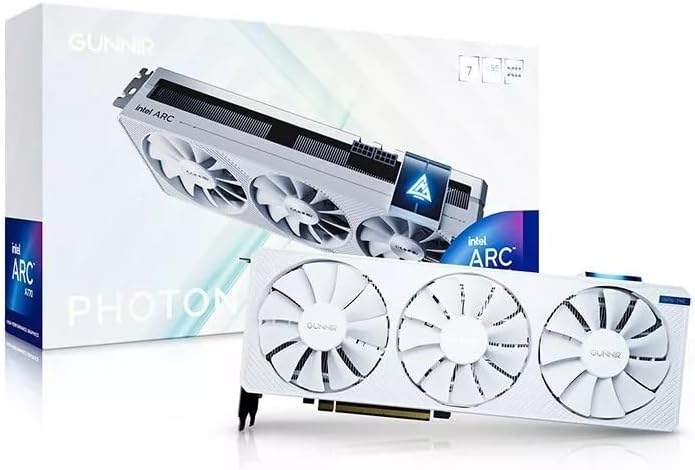
The GUNNIR Arc A770 Photon offers a stylish white design with solid 4K capabilities. Its 4.5 rating reflects reliable performance and premium build quality for enthusiasts.
We may earn a commission when you buy through this link, at no additional cost to you.
With a 2400MHz clock, it handles demanding graphics workloads efficiently. The triple fan design ensures cool operation even during long gaming sessions or rendering tasks.
While 8GB VRAM limits some ultra-high-res texture usage, it remains capable for most 4K displays. The modern connectivity ensures compatibility with the latest high-resolution monitors.
Builds prioritizing aesthetics and 4K support will love this white card. It combines performance with a clean look that matches modern high-end cases.
Optimized for 4K visual tasks providing seamless gameplay and media playback on high-resolution displays without stuttering.
Triple fan setup maintains stable temperatures during intense workloads keeping the GPU running at peak performance levels.
We may earn a commission when you buy through this link, at no additional cost to you.
The Sparkle Arc A310 Omni View is a specialized card for users needing multiple displays without heavy graphics needs. Its 4.6 rating highlights reliability in office and trading environments.
We may earn a commission when you buy through this link, at no additional cost to you.
Featuring four HDMI outputs, it supports expansive multi-monitor setups easily. The low 50W power draw means it runs efficiently even on basic power supplies without extra connectors.
While it lacks the raw power for modern gaming, it excels at productivity tasks and digital signage. The compact single-slot design ensures it fits almost any chassis space.
Office workers needing multi-monitor setups will find this card essential. It provides an affordable and simple solution for extending your workspace significantly.
Four HDMI outputs allow connecting multiple monitors simultaneously for expansive workflows ideal for data monitoring.
Low 50W consumption reduces heat and energy costs while allowing operation on modest power supply units.
We may earn a commission when you buy through this link, at no additional cost to you.
Selecting the right Intel Arc GPU involves balancing performance needs, budget, and specific workload requirements such as gaming or AI inference.
Video RAM determines how much texture and model data the GPU can store instantly. For 1440p gaming, 10GB is recommended, while AI models often need 24GB or more.
Choose higher VRAM if you run large language models or high-resolution video editing to avoid performance bottlenecks.
Newer Xe2-HPG architectures offer better efficiency and AI acceleration compared to earlier Xe HPG models. Check the generation before buying.
Prioritize Xe2 models for long-term support and better performance in modern software and games.
Higher clock speeds generally translate to better gaming and rendering performance. Look for OC editions to ensure faster out-of-the-box speeds.
Ensure your power supply and cooling can handle increased speeds without throttling.
Cooling impacts noise levels and sustained performance. Dual or triple fan designs work best for general use, while blowers suit multiple GPU setups.
Select cooling that matches your case airflow and noise tolerance for comfortable daily use.
Modern ports like DisplayPort 2.1 and HDMI 2.1a support higher refresh rates and resolutions. Ensure the card matches your monitor specs.
Verify output counts to support all your displays without needing expensive splitters.
Some cards need multiple power connectors while others run directly from the motherboard. Check your PSU wattage and available slots carefully.
Match your power supply to the card to prevent system instability and shutdowns.
Physical dimensions matter for small cases. Low-profile cards fit mini-towers while standard cards require more depth and width.
Measure your case clearance to ensure the GPU fits without interference with other components.
Driver maturity varies by model. Workstation cards often have ISV certifications for professional software, while gaming models focus on general compatibility.
Check the specific driver support page to confirm stability for your intended applications.
Always install the latest drivers from Intel's official website to ensure compatibility with new games and optimizations for AI software.
Monitor temperatures using system tools to confirm the cooling system is functioning properly under load to prevent long-term degradation.
Keep the case vents clear of dust regularly using compressed air to maintain efficient airflow around the GPU.
Intel Arc cards offer competitive AI performance per watt especially in local inference scenarios. For professional enterprise deployment NVIDIA still leads, but Intel is catching up with optimized toolsets.
The ASRock Arc B570 Challenger 10GB is currently the best choice for 1440p gaming offering strong performance and efficient cooling at a mid-range price point.
Yes models cards with high VRAM like the Pro B60 series can run quantized LLMs locally. This eliminates the need for expensive cloud inference costs.
All modern Intel Arc GPUs feature hardware-accelerated ray tracing. Performance varies by model but it is fully supported in most current titles.
Most Intel Arc cards require a PCIe 4.0 slot for full bandwidth though PCIe 3.0 is supported with slight performance loss. Check your motherboard compatibility.
Driver stability has improved significantly since launch. Most models now have mature drivers for major titles but always check release notes before major game launches.
Multi-GPU support exists but is limited to specific professional workloads like AI inference rather than standard gaming. Check system support for your specific use case.
Most reputable vendors offer standard three-year warranties. Ensure you buy from authorized sellers to validate your warranty easily if needed.
The ASRock Arc B570 Challenger leads as the top overall choice for its balance of features and performance. It sets a high standard for gaming and creative workloads.
Prioritize VRAM and architecture generation to ensure your system remains relevant for future software demands and AI capabilities.
Prices change frequently so always verify current listings before purchasing to ensure you get the best available deal.