
Beelink GTi13 Mini PC
4.6Editor score
Thunderbolt 4 Connectivity
Fingerprint Sensor Built-in
32GB DDR5 RAM
This guide compares the top Intel Core i9 Mini PC models for performance, connectivity, and value to help you choose the best desktop for your needs.
The world of compact computing has evolved significantly with the release of powerful Intel Core i9 processors in Mini PC form factors. These devices offer desktop-grade performance in a fraction of the space, making them ideal for modern offices and home setups alike.
We have evaluated ten leading models based on processor speed, memory capacity, storage options, and connectivity features. Our analysis focuses on real-world performance metrics and build quality to ensure you get a reliable system for demanding tasks.
Each pick in this list highlights unique strengths such as triple display support or enterprise networking capabilities. Please note that product availability and pricing can change frequently so verify details before purchasing your new mini computer.
4.6Editor score

4.5Editor score

4.5Editor score
The following table provides a side-by-side comparison of all ten selected models to help you quickly identify the specifications that matter most for your specific workflow.


The MINISFORUM M1-1390 stands out as the top choice for users seeking flagship performance in a tiny footprint. Its Intel Core i9-13900HX processor delivers incredible speed for multitasking and creative applications while maintaining a stable 4.5 user rating.
We may earn a commission when you buy through this link, at no additional cost to you.
This device excels in connectivity and expansion options allowing you to connect three 4K displays simultaneously for a massive workspace. The inclusion of 32GB of RAM and a fast 1TB PCIe 4.0 SSD ensures that file loading and data transfer happen without bottlenecks.
While it uses DDR4 memory rather than DDR5 the performance remains robust for most professional workflows. The only minor trade-off is fan noise under extreme load which is acceptable given the cooling efficiency required for such a powerful chip.
Anyone looking for a compact workstation that can handle video editing or heavy coding should consider this model first. It offers the best balance of raw power and practical features available in the current market.
You can connect three displays to maximize productivity and manage complex projects on multiple screens simultaneously.
The 2.5G LAN port ensures fast data transfers which is essential for large file operations over a local network.
We may earn a commission when you buy through this link, at no additional cost to you.
The Beelink GTi13 is a premium option that focuses on speed and security with its Thunderbolt 4 connectivity and DDR5 RAM. This model scores a high 4.6 rating due to its ability to handle intensive tasks with ease and its robust build quality.
We may earn a commission when you buy through this link, at no additional cost to you.
Its Thunderbolt 4 port allows for massive data throughput and supports external GPUs which extends the lifespan of the device significantly. The fingerprint sensor adds a layer of security that is rare in the mini PC category and simplifies daily login.
The main drawback is the higher cost which may not be necessary for users with basic office needs. Additionally the AI chip features are innovative but may not see widespread utility in standard software immediately.
Professional creatives and power users who need future-proof connectivity will find this device well worth the investment. It sets a high bar for what a premium mini PC should offer in terms of ports and security.
This port supports 40Gbps data speeds and charging enabling you to dock your entire setup with a single cable.
The MSC2.0 cooling system prevents overheating ensuring stable performance even during long rendering sessions.
We may earn a commission when you buy through this link, at no additional cost to you.
The MINISFORUM NAB9S offers a compelling entry point into high-end computing by featuring an Intel Core i9 processor at a lower price. With a 4.5 rating it proves that you do not need to sacrifice CPU power to save money on the chassis.
We may earn a commission when you buy through this link, at no additional cost to you.
Its dual 2.5G Ethernet ports make it a great choice for network enthusiasts who need robust connectivity without buying extra adapters. The ability to drive four screens independently adds significant value for users managing multiple data streams or monitoring systems.
Users will need to upgrade the RAM and storage for heavier workloads which adds to the initial cost. However the tool-free design makes these upgrades very easy and ensures the system remains relevant for years to come.
This model is perfect for small offices or budget-conscious users who want a powerful system for virtualization or server tasks. It provides the best value proposition for those willing to perform minor customization.
Two 2.5G LAN ports allow for load balancing or separate networks improving internet reliability and security.
Connecting four monitors gives you more workspace which is ideal for stock traders or system administrators.
We may earn a commission when you buy through this link, at no additional cost to you.
The KAMRUI Hyper H2 brings the latest 14th Gen Intel Core i9-14900HX to the table with a strong 4.5 user rating. It is designed specifically to handle gaming and heavy rendering workloads with a robust thermal system that keeps temperatures in check.
We may earn a commission when you buy through this link, at no additional cost to you.
Its dual copper heat pipes and all-copper structure boost heat dissipation by 40 percent which is crucial for sustained high performance. The VESA mount option allows you to hide the device behind your monitor for a clean desk setup that looks professional.
The unit is slightly larger than typical mini PCs which might limit where you can place it on a small desk. Additionally the fans can get loud under gaming loads but this is a reasonable trade-off for the cooling efficiency provided.
Gamers and content creators who need a compact system without sacrificing frame rates will appreciate this model. It combines raw power with practical cooling solutions that are often missing in ultra-compact designs.
The upgraded cooling system ensures the CPU maintains high clock speeds even during extended gaming sessions.
Multiple USB 3.2 Gen2 ports provide fast data transfer speeds for external drives and peripherals.
We may earn a commission when you buy through this link, at no additional cost to you.
The MINISFORUM MS-01 is designed for enterprise users needing reliable performance with vPro support and advanced networking. Its 4.5 rating reflects its stability and the utility of its unique features that are rarely found in standard mini PCs.
We may earn a commission when you buy through this link, at no additional cost to you.
Dual 10Gbps SFP+ ports allow for lightning-fast data transfers which are essential for network servers or NAS storage solutions. The included PCIe slot means you can install a dedicated graphics card or network controller to customize the machine for specific tasks.
The setup can be complex for those unfamiliar with enterprise hardware configurations and the system requires careful power planning. However the ability to run Raid arrays and support U.2 SSDs makes it a powerhouse for data centers or labs.
System administrators and developers building home labs will find this machine indispensable for its flexibility. It bridges the gap between a desktop workstation and a mini PC offering server capabilities in a small package.
vPro support allows for remote management and enhanced security features required in corporate environments.
Support for U.2 SSDs and Raid arrays ensures you can build a high-capacity and high-speed storage solution.
We may earn a commission when you buy through this link, at no additional cost to you.
The GEEKOM IT13 MAX AI is one of the first mini PCs to leverage the new Intel Core Ultra architecture with a dedicated NPU. With a 4.6 rating it stands out for users interested in local AI processing without sending data to the cloud.
We may earn a commission when you buy through this link, at no additional cost to you.
Its IceBlast 3.0 cooling system keeps the device whisper quiet which is perfect for hospitals or classrooms where noise is a concern. The system supports Linux out of the box making it a strong candidate for developers and engineers who prefer open-source systems.
The base 16GB of RAM might need an upgrade for running large local language models or heavy multitasking scenarios. While the AI features are promising they are still in early adoption phases so immediate performance gains may be modest.
Tech enthusiasts and privacy-focused users looking to run AI models locally will find this device highly relevant. It offers a future-proof platform that will likely see more software support as the ecosystem grows.
The NPU handles AI tasks locally to protect privacy and reduce latency for real-time applications.
Quiet cooling ensures the device does not disrupt sensitive environments like medical facilities or libraries.
We may earn a commission when you buy through this link, at no additional cost to you.
The MS-01 Barebone version gives you complete control over your storage and memory choices with a 4.5 rating for utility. It strips away pre-installed components to lower the cost and allows you to build a system tailored to your specific needs.
We may earn a commission when you buy through this link, at no additional cost to you.
You can install high capacity enterprise SSDs or custom DDR5 modules to reach extreme levels of performance and storage. The inclusion of 10G SFP+ ports ensures you have professional networking capabilities right out of the box without needing external hardware.
This option requires technical skills to install memory and storage drives correctly before the system will boot. You also need to provide your own operating system installation media which may be a hurdle for non-technical users.
Enthusiasts and IT professionals who want to build a specialized server or workstation will appreciate the flexibility. It allows for cost savings and custom configurations that standard pre-built units cannot offer.
Select the exact RAM and storage you need to optimize the system for your specific workload.
The PCIe slot allows you to add a dedicated graphics card for high-end rendering or AI tasks.
We may earn a commission when you buy through this link, at no additional cost to you.
The GEEKOM XT13 Pro distinguishes itself with an industry-leading three-year hardware warranty that offers peace of mind for businesses. While the rating is a modest 4.1 the comprehensive coverage and local support options make it a safe choice for professional deployments.
We may earn a commission when you buy through this link, at no additional cost to you.
It comes with 32GB of RAM and a generous 2TB SSD so you do not need to worry about immediate upgrades for storage. The Wi-Fi 6E support ensures fast wireless speeds which is critical for modern offices relying on cloud-based tools.
The price reflects the extended warranty and pre-configured setup which might be higher than barebone alternatives. Users who prioritize reliability and long-term support over initial cost savings will find this value very reasonable.
Business owners and remote workers who need a dependable machine with long-term backing should consider this model. The reduced downtime risk makes it an excellent investment for mission-critical tasks.
The three year warranty covers defects and hardware failures ensuring your investment is protected.
A 2TB SSD provides plenty of space for projects and archives without needing external drives.
We may earn a commission when you buy through this link, at no additional cost to you.
The GEEKOM GT13 MAX focuses on privacy with its ability to run lightweight local LLMs and sensitive tasks on-device. It holds a 4.4 rating due to its solid build quality and the security benefits of keeping data local rather than in the cloud.
We may earn a commission when you buy through this link, at no additional cost to you.
Its Wi-Fi 7 support future-proofs the device for high-speed wireless networks ensuring you stay ahead of the curve. The reinforced ABS housing and built-in Kensington lock slot make it a durable and secure option for public or semi-public spaces.
The 16GB of RAM is sufficient for most tasks but heavy AI workloads might benefit from an upgrade. Current software support for local LLMs is still growing so immediate performance gains depend on specific application usage.
Professionals handling sensitive documents or legal work will appreciate the privacy features and sturdy construction. It is a practical choice for enterprises concerned about data security and physical theft.
Keep sensitive data on your device to prevent leaks and maintain full control over your information.
Wi-Fi 7 prepares your network for ultra-low latency and high bandwidth applications.
We may earn a commission when you buy through this link, at no additional cost to you.
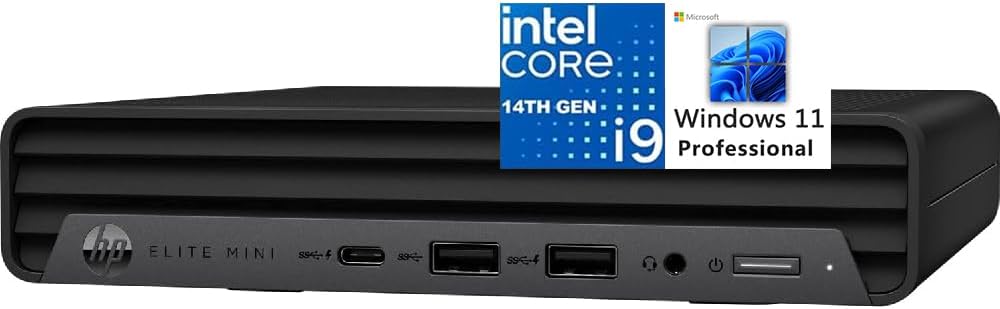
The HP Elite Mini 800 G9 represents the corporate standard with Windows 11 Pro and a quiet design suitable for open offices. With a 4.6 rating it is trusted for its reliability and seamless integration into existing enterprise IT environments.
We may earn a commission when you buy through this link, at no additional cost to you.
It comes bundled with a keyboard and mouse making it an easy plug-and-play solution for offices setting up workstations. The Intel i9-14900T processor provides exceptional speed for virtualization and multitasking without compromising on energy efficiency.
Limited internal expansion means you must configure the specs correctly at purchase to meet future needs. The proprietary power supply can also make repairs or replacements slightly more challenging than with standard components.
Corporate IT departments and office managers looking for a hassle-free deployment will find this model ideal. It offers a complete solution with professional software pre-installed and a reliable brand reputation.
Windows 11 Pro provides the security and management tools needed for business environments.
The ultra-quiet operation ensures the device does not disrupt conversations or calls in busy offices.
We may earn a commission when you buy through this link, at no additional cost to you.
Selecting the right Mini PC requires balancing performance needs with physical constraints and budget. This guide covers the key factors you should evaluate before making a purchase.
Intel Core i9 processors come in various generations with different core counts and clock speeds. Look for models with at least 14 cores and high boost speeds if you plan to do heavy video editing or virtualization.
A newer generation usually means better power efficiency and longer support life so prioritize 13th or 14th Gen chips for future-proofing.
RAM is crucial for multitasking and running virtual machines. Aim for 32GB if you want smooth performance for professional apps and consider DDR5 models for higher bandwidth.
Check if the RAM is expandable since fixed soldered RAM can limit your ability to upgrade later when software demands increase.
SSD speed affects boot times and application loading so look for PCIe 4.0 SSDs which offer faster read and write speeds. Storage capacity is also important for keeping large project files locally.
Choose a device with multiple M.2 slots or a 2.5 inch drive bay if you need to add more storage later without replacing the drive.
The number of USB and video ports determines how many peripherals you can connect simultaneously. Ensure the Mini PC has enough HDMI or DisplayPort outputs for your monitor setup.
Fast networking via 2.5G or 10G LAN is essential for transferring large files quickly and ensures you are not bottlenecked by slow internet speeds.
Mini PCs pack high performance chips into small cases so cooling is a major factor. Systems with dual fans or copper heat pipes will sustain high performance longer without throttling.
If you work in a quiet environment check reviews on fan noise to ensure the device does not disrupt your workflow during intensive tasks.
Some models come with Windows 11 Pro which includes better security and management tools for business use. Others may be barebone so you must install the OS yourself which saves cost but requires technical effort.
Verify the license type to ensure you are getting a genuine system that will receive security updates and support from Microsoft.
Hardware failures can happen so a good warranty is essential for peace of mind. Look for brands that offer at least one year of coverage with responsive customer support channels.
Extended warranties can be worth the cost if you plan to use the machine for business-critical tasks where downtime is unacceptable.
Place your Mini PC in a well-ventilated area away from walls or objects that block the intake vents to ensure proper airflow and cooling.
Keep the exterior clean by wiping it with a soft dry cloth and avoid using liquids directly on the device to prevent accidental damage to internal components.
Regularly update your operating system and drivers to maintain security and performance especially when using high-end processors that receive frequent patches.
Yes modern Mini PCs with Intel Core i9 processors can handle 4K video editing efficiently due to their high multi-core performance. The integration of fast NVMe SSDs further speeds up the rendering process. However complex effects may benefit from adding a discrete GPU if the model supports it.
Mini PCs are suitable for casual and esports gaming but heavy AAA titles usually require a dedicated graphics card. Some models offer PCIe slots or Thunderbolt ports to connect external GPUs for better performance. Always check the GPU capabilities before expecting high frame rates.
Most Mini PCs allow for RAM and storage upgrades though some budget models may have soldered memory. Always check the specifications to see if there are available slots for additional memory or hard drives. Upgrading later can extend the useful life of your device significantly.
Many come with Windows 11 Pro pre-installed but barebone versions require you to install the OS yourself. Verify the product listing to ensure you are getting a system with the software you need. This ensures you can start working immediately after setup.
Most of these Mini PCs support three to four simultaneous displays depending on the ports available. Check the specific video output configurations like HDMI or DisplayPort to ensure they match your monitors. This capability is ideal for multitasking and data monitoring.
Mini PCs generally consume less power than traditional desktops ranging from 65W to 100W under load. This makes them more energy-efficient and cost-effective for long term use in offices or homes. The lower power draw also reduces heat generation and noise.
We have reviewed ten top models ranging from the versatile MINISFORUM M1-1390 to the enterprise-ready HP Elite Mini 800 G9. Each device offers a unique combination of speed and connectivity to fit different professional requirements.
Prioritize models with DDR5 memory and fast networking if you need future-proof performance. For creative work look for triple or quad display support and ample storage options to handle large media files.
Prices and stock levels can fluctuate so review the current details on each listing before you decide. We hope this guide helps you find the perfect compact desktop for your workspace and budget.