
KPXOS OSU3X
3.4Editor score
Magnetic switches included
0.96 inch color screen
Flexible calibration setup
This guide compares ten top keyboards for Geometry Dash, focusing on rapid trigger, magnetic switches, and customization to help you find the perfect input
Finding the right keyboard for Geometry Dash can transform your gameplay experience significantly. Players need responsive keys, customizable actuation points, and reliable performance to hit complex patterns consistently during intense rhythm sessions.
We compared ten products based on switch technology, polling rates, customization options, and user feedback. Our analysis focuses on models that support rapid trigger features and magnetic switches to ensure precision and speed for competitive rhythm gamers.
Each pick highlights specific strengths like compact layouts, onboard displays, or hot swappable designs. Remember that product availability and pricing may change over time, so verify current details before making your final purchase decision.
3.4Editor score
4.7Editor score

4.2Editor score
The following table provides a side-by-side comparison of all ten keyboards evaluated in this guide. Each entry includes key specifications and direct links to the product pages so you can quickly assess which model meets your specific needs for Geometry Dash performance.







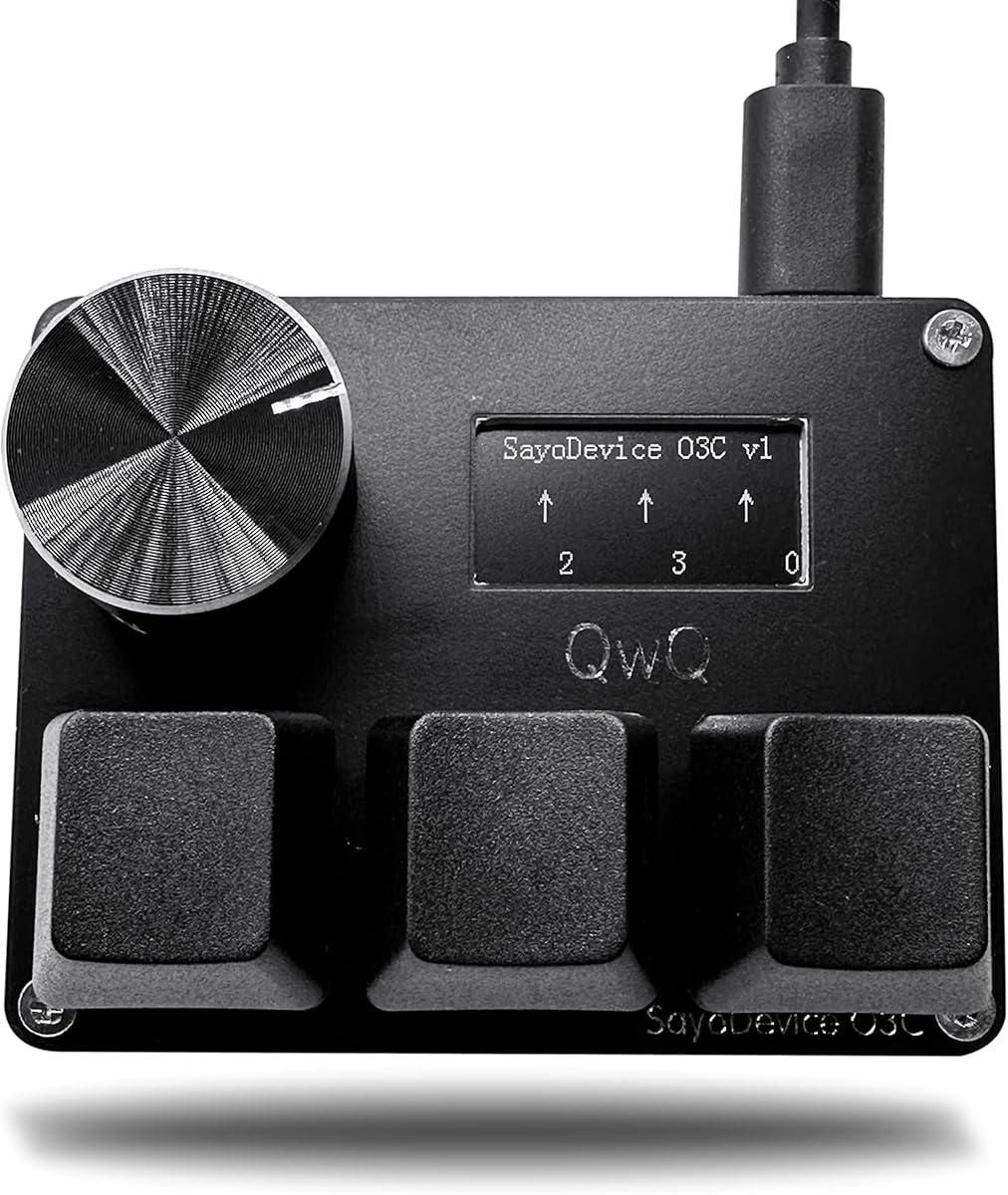
The BTXETUEL SayoDevice O3C stands out as a top choice for Geometry Dash players seeking precision. It features three Hall magnetic linear switches with an 8000Hz polling rate ensuring rapid input detection. The compact design includes a screen and knob for added utility.
We may earn a commission when you buy through this link, at no additional cost to you.
Its magnetic switches allow for independent calibration which is crucial for timing-sensitive games like Geometry Dash. The IPS color screen provides visual feedback on key travel and button counts. Customization options let you map keys to macros or song controls easily.
Users should note that initial calibration is required before first use or firmware updates. While it has fewer keys than standard keyboards, this layout focuses on essential functions for rhythm gaming. The trade-off is worth the performance gains.
This keyboard is ideal for competitive players who value speed and customization. Its reliable performance and magnetic technology make it a strong investment. Consider it if you need a specialized input device for intense practice sessions.
The Hall magnetic switches detect key presses without physical contact reducing wear and improving response consistency for fast-paced gameplay.
The 0.96-inch screen displays real-time key data helping you verify actuation points and adjust settings accurately during setup.
We may earn a commission when you buy through this link, at no additional cost to you.
The KPXOS OSU3X offers an accessible entry into magnetic switch keyboards for Geometry Dash. It includes rapid trigger capabilities and a small screen for status updates. Its budget-friendly pricing makes it attractive for casual players.
We may earn a commission when you buy through this link, at no additional cost to you.
Each key supports independent calibration with adjustable trigger distance down to 0.05mm. This feature helps match your playing style. The minimalist design includes programmable keys and a rotary knob for quick navigation.
Some users report inconsistency in calibration stability over time. It is best used for specific rhythm tasks rather than general typing. The trade-offs reflect its lower cost compared to premium models.
This option suits those wanting to try magnetic technology without a large financial commitment. Ensure you follow the calibration steps carefully. It provides solid performance for geometry Dash practice within its price range.
Despite its lower price, it incorporates magnetic switches that offer faster response times than traditional mechanical options.
The startup screen and device name can be personalized via software to display relevant info during gaming.
We may earn a commission when you buy through this link, at no additional cost to you.
The BTXETUEL SayoDevice OSU model delivers robust performance with its rapid trigger Hall switches. It maintains a 8000Hz polling rate for consistent input detection. The layout supports macros and copy paste functions useful for workflow efficiency.
We may earn a commission when you buy through this link, at no additional cost to you.
Users can customize the screen to show their ID or other text. The knob can be set to scroll song lists enhancing navigation during practice. Hot-swappable switches allow future upgrades without soldering.
The limited key count means it is not ideal for general computing. Calibration steps must be followed after firmware changes. However, for focused Geometry Dash training the specialized features shine.
This keyboard is a strong contender for players prioritizing speed and customizability. Its reliability and magnetic tech make it a trusted choice. Consider it if you want a dedicated device for rhythm gaming tasks.
Personalized screen text allows quick identification of device status which can help during long gaming sessions.
Replacing switches is simple with the hot-swap design giving you room to experiment with different magnetic options.
We may earn a commission when you buy through this link, at no additional cost to you.
The O3C Rapid Trigger Keyboard focuses on speed with its Hall magnetic switches offering 0 to 4mm custom trigger release. It features a 0.96-inch IPS color screen for animations and status. The design supports Ctrl/Alt/Shift combinations for complex inputs.
We may earn a commission when you buy through this link, at no additional cost to you.
Its professional magnetic switches ensure rapid trigger functionality which is essential for Geometry Dash patterns. The screen displays visible key range and button counting. Hot-swappable switches allow for easy maintenance or upgrades.
The small layout limits versatility for typing. Calibration is necessary initially which may confuse some users. However, the performance gains in speed justify these constraints for dedicated players.
This keyboard is well-suited for those needing precise control over actuation points. Its magnetic tech provides consistency needed for high-level play. Select it if you value trigger customization above all else.
Adjusting the release point from 0 to 4mm lets you tailor the keyboard to your specific finger speed preferences.
Custom animations on the screen provide visual cues that can help track timing during complex rhythm sequences.
We may earn a commission when you buy through this link, at no additional cost to you.
The Aula WIN60 HE offers a compact 60% layout optimized for fast response with rapid trigger mode. It features Hall Effect magnetic switches and an 8000Hz polling rate for ultra-fast input. The driver is web-based for easy customization without downloads.
We may earn a commission when you buy through this link, at no additional cost to you.
Its magnetic switches allow precise actuation down to 0.02mm which helps in tight timing situations. RGB lighting adds aesthetic appeal and the compact size saves desk space. This design benefits gamers needing room for mouse movement.
The lack of full arrow keys requires learning key combinations. Web driver support is Windows only limiting Mac users. These constraints may affect usability for general computing tasks.
This keyboard is ideal for desktop setups where space is at a premium. The rapid trigger technology supports advanced gameplay styles. Consider it if you prefer a minimalist layout with high performance specs.
The 60% layout frees up significant desk real estate allowing for wider mouse movements essential in geometry Dash.
Customizing via a web browser eliminates software installation needs simplifying the setup process for new users.
We may earn a commission when you buy through this link, at no additional cost to you.
The RedThunder K95 Wireless stands out with wireless flexibility and a large TFT screen. It supports triple mode connections including Bluetooth and 2.4G wireless. The gasket construction offers a comfortable typing experience with shock absorption.
We may earn a commission when you buy through this link, at no additional cost to you.
While primarily a full keyboard, its programmable software allows key mapping useful for macros. The battery lasts up to 48 hours with backlighting. The screen can display system info or custom GIFs.
Its size and wireless feature add bulk which might not suit all setups. The software supports Windows and may require setup time. However the flexibility it offers is unique in this category.
This keyboard is perfect for users needing multi-device switching and premium features. The screen and wireless options enhance overall utility beyond gaming. Consider it if you want a versatile high-end device.
Seamlessly switching between devices ensures you can maintain productivity and gaming across different environments.
The TFT screen allows personalization with custom images or info adding a unique touch to your setup.
We may earn a commission when you buy through this link, at no additional cost to you.
The WIN68 HE Hall Effect keyboard introduces advanced features like DKS and SOCD for precise control. It offers 0.01mm adjustable actuation which allows for extremely fine tuning. The 8000Hz polling rate ensures minimal latency during gameplay.
We may earn a commission when you buy through this link, at no additional cost to you.
Its gasket structure with sound-dampening foam provides a satisfying acoustic feel. Hot-swappable switches let you upgrade easily without soldering. The web-based driver simplifies customization without software installation.
The layout includes essential keys but lacks numeric pads. Wired-only connectivity ensures stable performance but limits movement. These factors suit dedicated gaming stations over portable setups.
This keyboard is ideal for players who demand high precision and advanced control options. Its features cater to serious rhythm gamers. Choose it if you need reliable input for competitive play.
DKS and SOCD allow simultaneous key detection which can improve reaction times in complex scenarios.
Fine-tuning actuation to 0.01mm gives you exact control over how keys respond to your input.
We may earn a commission when you buy through this link, at no additional cost to you.
The AULA WIN68 HE combines compact design with industry-leading speed and an 8000Hz polling rate. It uses Hall Effect switches for adjustable actuation points ranging from 0.02mm to 3.44mm. The web driver supports Windows systems for full customization.
We may earn a commission when you buy through this link, at no additional cost to you.
Its 16.8 million RGB colors and south-facing LEDs create a vibrant atmosphere. The compact wired design ensures stable connections essential for competitive gaming. Detachable cables make transport easier.
Mac users may find driver options restricted compared to Windows. The layout is not ideal for general typing due to missing keys. Performance though is solid for gaming focused on rhythm patterns.
This keyboard suits players wanting a balance of speed and customization without bulky software. The web driver convenience is a strong selling point. Select it for a reliable compact solution.
High-quality RGB with 14 effects lets you match lighting effects your personal style or game events.
A wired connection minimizes signal interference ensuring consistent input timing during critical gameplay moments.
We may earn a commission when you buy through this link, at no additional cost to you.
The KPXOS OSU3X White focuses on visual feedback with a color screen showing key travel and status. It supports independent calibration for each magnetic key. The design includes programmable keys and a rotary knob for utility.
We may earn a commission when you buy through this link, at no additional cost to you.
Its rapid trigger functionality supports quick input detection needed for Geometry Dash. The interface can be personalized to show device names or stats. Plug-and-play setup reduces installation effort.
Users report varying experiences with calibration consistency. It serves best as a specialized tool for rhythm tasks. The white finish offers an aesthetic alternative to black models.
This model is a fit for those wanting a visually interactive keyboard. Its features enhance the gaming experience. Consider it if visual feedback is a priority for your training.
Seeing key travel on screen helps you understand how your inputs are being registered.
The white color scheme provides a clean look that stands out from standard gaming hardware.
We may earn a commission when you buy through this link, at no additional cost to you.
The KPXOS OSU4X offers plug-and-play functionality with USB 2.0 high-speed connectivity. It features 0.05mm adjustable trigger distance and an 8000Hz polling rate for rapid response. The layout includes a screen and knob for basic navigation.
We may earn a commission when you buy through this link, at no additional cost to you.
Its customization allows setting key combos like copy paste. The interface supports multilingual input which can be useful for global players. Calibration is straightforward requiring just a button press.
Advanced features are limited compared to higher-end models. It works well for specific rhythm tasks but lacks broader utility. The price reflects its simpler design.
This keyboard suits players seeking immediate setup without complex configuration. Its polling rate supports competitive needs. Consider it if simplicity and speed are your main priorities.
Plug-and-play setup means you can start testing inputs right away without driver downloads.
Supporting multiple languages ensures compatibility with diverse regional settings and preferences.
We may earn a commission when you buy through this link, at no additional cost to you.
Selecting the right keyboard requires evaluating several technical factors that directly impact gameplay. This guide outlines key considerations to help you make an informed decision.
Rapid trigger allows keys to reset immediately after release without passing a fixed bottom-out point. This feature is crucial for rhythm games where quick key resets improve timing accuracy.
Look for keyboards explicitly supporting rapid trigger to maximize your performance potential.
Magnetic switches use magnetic fields to detect key presses allowing for adjustable actuation points. You can customize how far a key must be pressed before registering.
Choosing adjustable actuation lets you fine-tune sensitivity to match your finger strength and playstyle.
Polling rate determines how often the keyboard reports input to your computer. Higher rates like 8000Hz reduce latency ensuring inputs are processed instantly.
Prioritize high polling rates for competitive gaming to minimize input lag during critical moments.
Compact layouts like 60% save desk space and improve mouse movement. However ensure essential keys like arrows remain accessible for gameplay.
Select a layout that balances size with functionality to avoid losing key commands during play.
Look for keyboards that allow key mapping macros and software customization. Being able to assign specific actions to keys enhances efficiency.
Verify software compatibility with your operating system to avoid feature limitations after purchase.
A solid frame prevents unwanted movement during intense tapping. Gasket mounts can improve comfort and typing feel.
Check reviews for build consistency to ensure the keyboard remains stable over long sessions.
Wired connections generally offer more stable input than wireless. Ensure the cable length suits your setup to avoid reach issues.
Choose wired models for minimal latency unless wireless convenience is a higher priority.
Prices vary widely based on features and build quality. Determine your essential requirements to find the best value.
Balance cost with the performance you need without overspending on unnecessary extras.
Begin by connecting the keyboard to your PC and ensuring proper driver installation. Follow calibration steps for magnetic switches to set accurate actuation points before gameplay.
Regularly clean the keys using compressed air to remove dust and debris. Avoid liquid cleaners to protect internal components and maintain switch reliability.
Update firmware as needed to access new features or improve performance. Store the keyboard in a dry place when not in use to extend its lifespan.
Rapid trigger allows keys to reset immediately upon release enabling faster repeated inputs. This technology is vital for Geometry Dash where rapid tapping and precise timing are essential for success.
Magnetic switches offer adjustable actuation and faster reset times due to lack of physical contact. They provide greater consistency and customization which can improve rhythm game performance.
Higher polling rates reduce input latency ensuring faster transmission of keystrokes to the game engine. For competitive rhythm gaming this can mean more accurate timing and smoother input flow.
Most keyboards support both systems but driver features may vary. Check product specifications to confirm OS compatibility especially for advanced customization software.
Calibration typically involves pressing a key and allowing software to detect actuation points. Follow manufacturer instructions carefully to ensure each key registers accurately.
Compact keyboards are built to withstand heavy usage but durability varies by model. Look for reinforced frames and hot-swappable switches to enhance longevity.
Some keyboards require software to enable and configure rapid trigger settings. Others may have built-in profiles. Check product details to confirm setup requirements.
A 60% or TKL layout balances space savings with key availability. Ensure arrow keys remain accessible for game navigation.
This guide explored ten keyboards offering diverse features for Geometry Dash players. Top picks like the BTXETUEL SayoDevice O3C and Aula WIN60 HE excel in speed and customization.
Prioritize rapid trigger technology and adjustable actuation when selecting your device. These features provide the precision needed for high-level rhythm gameplay.
Check current prices and availability before purchasing to ensure you get the best value. Your perfect keyboard should match your specific performance needs and setup preferences.