
YUNZII QL108 Typewriter Style Mechanical Gaming Keyboard
4.5Editor score
Full size layout with number pad
Hot swappable mechanical switches included
Metal panel for durability
Discover the top keyboards that sound like a typewriter with this detailed guide comparing clicky switches retro designs and modern connectivity features.
Finding a keyboard that mimics the nostalgic sound of a typewriter brings joy to writers and gamers alike. These mechanical keyboards offer tactile feedback and clicky switches that replicate the classic typing rhythm while delivering modern performance for daily tasks.
We evaluated ten distinct models based on their switch type, build quality, connectivity options, and aesthetic appeal. Each product was assessed for its ability to deliver that authentic clack sound without sacrificing comfort or reliability during long typing sessions.
This guide presents detailed reviews and specifications to help you choose the right fit for your desk setup. Please note that product availability and pricing may vary over time so always check the latest listings before purchasing your new device.
4.5Editor score

4.7Editor score

4.3Editor score
The following table provides a side-by-side comparison of all ten keyboards to help you quickly identify key differences in layout connectivity and design features.




This retro mechanical gaming keyboard offers a typing experience reminiscent of a genuine typewriter with satisfying clicky blue switches. It holds a solid rating and stands out for its fluid typing capability that minimizes hand fatigue during long sessions.
We may earn a commission when you buy through this link, at no additional cost to you.
The keyboard features double-mode connectivity allowing you to switch between USB-C and Bluetooth for three devices seamlessly. Hot-swappable keycaps and switches let you personalize your setup without tools while the ergonomic design ensures comfortable typing.
While it lacks a numeric keypad which might be an issue for data entry tasks the compact design frees up valuable desk space. The lack of automatic brightness adjustment requires manual knob turning which can interrupt workflow slightly.
For writers and professionals who value style and sound this keyboard is an excellent choice. It delivers an authentic feel with modern convenience making it a top pick for those seeking a typewriter vibe in their office setup.
The blue switches provide a satisfying clicky sound and tactile feedback that mimics traditional typewriters perfectly.
Switch between Bluetooth and USB-C easily to connect multiple devices like tablets and laptops without hassle.
We may earn a commission when you buy through this link, at no additional cost to you.
The YUNZII QL75 features a unique typewriter style aesthetic with tri-mode connectivity and a built-in stand for multiple devices. Its high rating reflects its quality build and the ability to support both tactile and linear switches for customization.
We may earn a commission when you buy through this link, at no additional cost to you.
This hot swappable keyboard allows you to swap switches easily on a premium PCB board compatible with 3pin and 5pin options. QMK VIA programmability lets you create macros and customize lighting effects for a personalized gaming or typing setup.
The integrated stand holds your phone or tablet firmly saving desk space while matching your aesthetic. However the advanced features like QMK VIA might overwhelm users who just want plug and play simplicity out of the box.
Enthusiasts who love to tweak their setup will find this keyboard perfect for their needs. The combination of retro looks modern tech and deep customization makes it a standout option for power users seeking a premium experience.
Connect seamlessly via Bluetooth 2.4GHz wireless or USB-C to switch between up to five different devices effortlessly.
Unlock endless customization with deep software support allowing you to remap keys and create complex macros.
We may earn a commission when you buy through this link, at no additional cost to you.
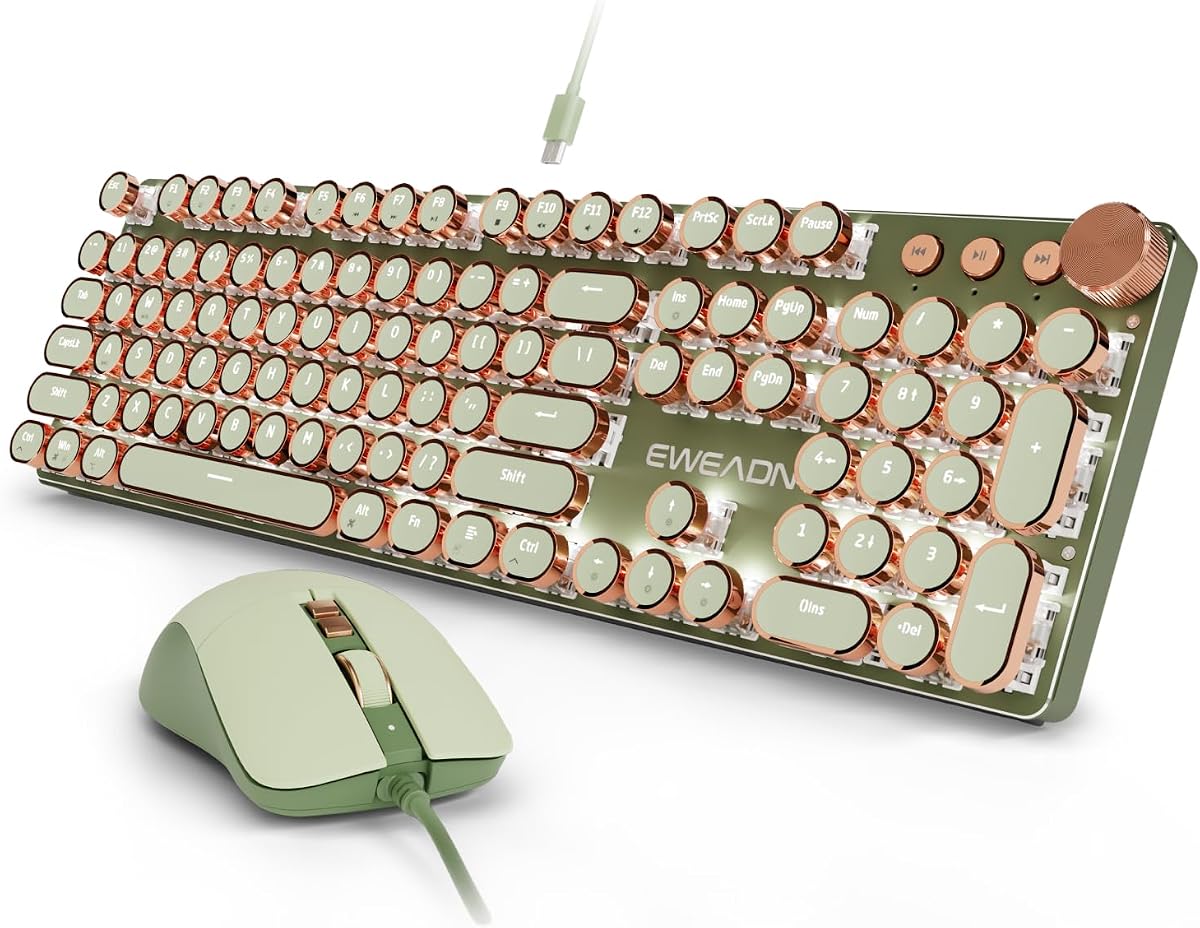
This mechanical keyboard and mouse combo merges classic vintage nostalgia with punk-inspired round chrome keycaps for a striking look. It offers a quiet typing experience with low-noise pink switches that dampen harsh clacking into a gentle pop sound.
We may earn a commission when you buy through this link, at no additional cost to you.
The integrated metal rotary knob allows effortless volume adjustment or muting while dynamic light-up effects enhance your atmosphere. An ergonomic wired mouse with adjustable DPI supports proper wrist posture during marathon sessions ensuring comfort for long office hours.
The main drawback is the wired connection which limits mobility compared to wireless options found in other models. Also the pink switches are linear rather than clicky so those seeking a loud typewriter sound might prefer blue switches instead.
Ideal for users wanting a complete upgrade without buying separately this combo delivers value. It works smoothly with Windows and macOS systems offering plug-and-play convenience and intuitive shortcuts to optimize your workflow efficiently.
Control volume and mute instantly with the metal rotary knob adding a practical touch to your typing experience.
The contoured mouse fits your hand naturally supporting posture and accurate tracking during extended use.
We may earn a commission when you buy through this link, at no additional cost to you.
YUNZII QL108 is a retro keyboard with a typewriter style design featuring unique electroplated round keycaps and a metal shell. It holds a high rating for its stability and full-size layout including a dedicated number pad for work and gaming tasks.
We may earn a commission when you buy through this link, at no additional cost to you.
The shine-through keycaps maintain the retro aesthetic while ensuring visibility in dark environments. Hot-swap capabilities support both 3-pin and 5-pin switches with pre-lubricated switches that provide a smooth creamy typing feel with a satisfying clicky sound.
The solid metal frame provides exceptional stability but the wired connection might restrict placement options for wireless users. Its larger footprint also requires more desk space compared to compact 75 percent or 60 percent keyboards available in other options.
For those needing a numeric keypad and a premium build this keyboard is highly recommended. It blends vintage elegance with modern durability making it a versatile USB keyboard for programming office work and gaming alike.
Enjoy the convenience of a number pad included in a mechanical keyboard designed for productivity and gaming.
Swap out switches effortlessly to customize your sound and tactile experience without needing any tools.
We may earn a commission when you buy through this link, at no additional cost to you.
This keyboard brings a one-of-a-kind typing experience with vintage steampunk round keycaps and rose gold rings for a classic look. It features a matte aluminum alloy panel for solid support and 19 lighting effects to customize your environment.
We may earn a commission when you buy through this link, at no additional cost to you.
All 104 keys support anti-ghosting ensuring reliable registration during intense gaming or rapid typing. The detachable USB-A cable and tactile volume knob simplify daily operation while adjustable tilt feet let you set a preferred typing angle.
While the price is attractive the switches are linear without a tactile bump which may disappoint those seeking a loud clicky sound. The rating reflects these trade-offs so you should consider your sound preference before purchasing this budget option.
Budget-conscious buyers who prioritize looks over sound feedback will find this keyboard appealing. It offers stability and visual flair with modern convenience making it a viable choice for entry-level typewriter enthusiasts.
Constructed from aluminum alloy with a matte finish this panel provides solid support for your typing tasks.
Toggle through 19 lighting effects and brightness levels to match your mood or workspace vibe easily.
We may earn a commission when you buy through this link, at no additional cost to you.
Experience the nostalgic charm of a classic typewriter combined with modern performance using clicky Blue Switches for tactile response. This wireless keyboard holds the highest rating in the list due to its reliability and long-lasting battery life.
We may earn a commission when you buy through this link, at no additional cost to you.
Tri-Mode technology lets you pair via Bluetooth 2.4GHz wireless or USB-C to switch between up to five devices effortlessly. The massive 5000mAh rechargeable battery delivers weeks of wireless convenience and the ergonomic curved layout supports long-term comfort.
The metal faceplate ensures durability but the pink color scheme may not fit every desk aesthetic. Wireless convenience comes with a small latency risk compared to wired options but for most users it remains imperceptible.
Creators and professionals who move between devices will love this versatile keyboard. It balances style and function with a premium metal build making it a gorgeous addition to any workspace seeking both nostalgia and modern utility.
Pair with up to five devices easily using Bluetooth 2.4GHz or USB-C for seamless switching.
Run for weeks on a single charge thanks to the upgraded 5000mAh rechargeable battery capacity.
We may earn a commission when you buy through this link, at no additional cost to you.
This retro look modern feel keyboard comes with a detachable wrist rest featuring soft sponge padding for gentle support. It holds a high rating and offers a stable 2.4GHz wireless connection that keeps your desk clean without extra setup.
We may earn a commission when you buy through this link, at no additional cost to you.
The magnetic wrist rest is easy to remove and wipe clean while the built-in phone holder keeps your device upright for multitasking. Both keyboard and mouse charge via USB-C and smart auto-sleep saves energy throughout your workday.
The mouse provided is functional but not fully mechanical which might be a trade-off for gamers. Also the 7 color backlight options are simpler than RGB customization found in higher-end models on this list.
Ideal for home offices and professional workspaces this kit offers comfort and style. It is a thoughtful gift for teachers coworkers or anyone upgrading their desk for a cleaner and smoother workflow experience.
The detachable magnetic rest provides gentle support for wrists during long typing sessions reducing strain.
Keep your phone in view for messages and calls without picking it up during meetings.
We may earn a commission when you buy through this link, at no additional cost to you.
This keyboard offers the rhythmic clacking sound and crisp tactile feedback needed for a complete expression of style. It holds a solid rating for its durability and steampunk round keycaps that add timeless elegance to any desktop setup.
We may earn a commission when you buy through this link, at no additional cost to you.
The metal panel construction offers durability and style while the RGB lighting modes create an immersive gaming atmosphere. Full N-key rollover ensures every keystroke is registered making it perfect for gaming scenarios where multiple keys are pressed.
The wired connection limits flexibility but ensures a stable signal without battery concerns. Basic build materials keep the price low so you might find less refinement in the switch feel compared to premium brands listed here.
Gamers and writers on a budget will appreciate this reliable option. It blends retro aesthetics with modern RGB lighting for a unique experience that prioritizes value and essential features for entry-level users.
Round keycaps reminiscent of classic typewriters add a timeless elegance to any desktop setup.
Crafted from premium aluminum alloy this keyboard offers durability and style for daily use.
We may earn a commission when you buy through this link, at no additional cost to you.
FINEDAY combines nostalgia with cutting-edge technology to create a retro typewriter keyboard that enhances typing speed and accuracy. Its unique design features solid aluminum levers and wheels for precision control of brightness and volume without touching devices.
We may earn a commission when you buy through this link, at no additional cost to you.
The high-capacity 5000mAh battery minimizes the need for frequent charging while the 9.22-degree cradling angle ensures ergonomic comfort. You can connect up to five devices using Bluetooth 2.4G and USB connections simultaneously for versatile multitasking.
The left lever acts as an Enter key reminiscent of old typewriters but may require adjustment for modern users. The price is higher than average reflecting the premium materials and advanced features but might not justify the cost for all.
Users who value specific ergonomic features and unique controls will enjoy this keyboard. It meticulously designed details to help you relive the charm of typewriting like it is 1874 in a modern context.
Crafted from solid aluminum the left lever functions as an Enter key reminiscent of old typewriters.
Adjust sound levels effortlessly without touching your device using the right solid aluminum wheel.
We may earn a commission when you buy through this link, at no additional cost to you.
Redragon Mechanical blue switches offer medium resistance audible click sound and tactile feedback for a responsive gaming environment. This keyboard holds a high rating for its dependable metal panel and anti-ghosting technology that prevents key conflicts.
We may earn a commission when you buy through this link, at no additional cost to you.
Tri-mode connection technology upgrades your experience with USB-C wired Bluetooth 3.0/5.0 and 2.4Ghz wireless modes. The FLARE PRO version uses tank-solid metal material to keep the keyboard steady and elegant while supporting 104 key anti-ghosting.
You must visit the official site to download driver software for customization which adds a small setup step. The white color looks clean but may show dust or stains more easily than darker options over time.
Gaming enthusiasts seeking reliability and connectivity will find this keyboard solid. It supports software supported macros for efficiency and offers a stable typing experience that blends classic aesthetics with modern utility.
Connect via USB-C Bluetooth 2.4Ghz wireless modes for an upgraded experience in all fields.
The FLARE PRO metal material keeps the keyboard steady and elegant on the desk for premium typing.
We may earn a commission when you buy through this link, at no additional cost to you.
Choosing the right typewriter style keyboard depends on several factors including switch type connectivity and layout that match your workflow needs.
Blue switches are the most common choice for typewriter sounds because they provide a loud clicky feedback similar to old machines. Linear switches like red or pink are quieter and smoother while tactile switches offer a bump without the noise.
Select blue switches if you prioritize the authentic clack sound and tactile response for your typing sessions.
Wireless keyboards offer freedom from cables and often support multiple devices via Bluetooth or 2.4GHz receivers. Wired models provide stable connections without battery concerns and are usually more affordable than wireless options.
Choose wireless if you need multi-device switching and prefer a clean desk setup.
Full-size keyboards include a numeric keypad essential for data entry while compact 75 percent layouts save space for more mouse room. Consider how much desk space you have and whether you need numbers frequently.
Opt for a compact layout if you want more ergonomic mouse movement space.
Metal panels provide better stability and a premium feel but may add weight to the overall design. Plastic builds are lighter and often cheaper but might feel less substantial during intense typing sessions.
Prioritize metal construction for durability and a solid typing experience.
Round keycaps are a hallmark of the typewriter style and enhance the visual nostalgia of the device. Some models use profiled keycaps while others use flat ones so check the shape if you prefer specific tactile feedback.
Look for round keycaps to achieve the authentic vintage aesthetic.
Hot-swappable keyboards allow you to change switches and keycaps without soldering giving you future flexibility. Programmable firmware supports macros and remapping for advanced users seeking control over their input.
Check if the model supports hot-swapping if you plan to customize your setup later.
Wireless models depend on battery life for uninterrupted use so look for capacities around 5000mAh for weeks of runtime. Rechargeable USB-C ports make maintenance easier than models relying on disposable batteries.
Ensure the battery capacity meets your wireless usage duration requirements.
Ergonomic design features like adjustable tilt feet or built-in wrist rests reduce strain during long sessions. Some keyboards include stands for devices which help keep your desk organized and your screen at eye level.
Select ergonomic features to maintain comfort and prevent fatigue over time.
To ensure the best typing experience plug in your device and allow any drivers or software to install properly before use. Familiarize yourself with the key mappings especially if using wireless modes to switch between devices smoothly.
Keep your keyboard clean by gently brushing away dust with a soft brush or compressed air to avoid debris buildup under keys. Avoid liquid spills near the device and wipe the surface with a dry cloth regularly.
Store your keyboard in a cool dry place when not in use and avoid placing heavy objects on top to protect the switch mechanisms. Regularly check connections and battery levels to maintain optimal performance over time.
Yes most keyboards on this list feature clicky blue switches that replicate the sound of old typewriters. While they cannot perfectly match the weight of vintage machines they provide a satisfying click and tactile feedback.
Most models support both Windows and macOS systems for seamless connectivity. Always check specific product details for Mac compatibility especially if you need specific key remapping for macOS shortcuts.
Absolutely many of these keyboards are designed for both typing and gaming with features like anti-ghosting and high polling rates. They provide reliable performance for games requiring multiple key presses.
Typical mechanical switches are rated for around 50 million keystrokes ensuring durability over years of use. Quality brands use switches that withstand heavy daily typing and gaming sessions without failure.
Wireless models support Bluetooth connectivity which allows connection to smartphones and tablets. Ensure your phone supports Bluetooth keyboard input for successful pairing and usage on the go.
Yes some keyboards use low noise pink switches or dampened mechanisms to reduce sound. If you prefer a quieter click without full silence look for low-noise pink options in the list.
Many keyboards support hot swapping or standard layouts allowing you to replace keycaps easily. Verify compatibility with your switch type before purchasing new custom keycaps to ensure proper fit.
Use compressed air to remove dust and debris from around the switches. Wipe keycaps with a slightly damp cloth and avoid harsh chemicals that could damage the retro paint or legends.
We reviewed ten keyboards that offer unique blends of nostalgia and modern functionality for writers and gamers alike. Whether you prioritize wireless freedom full-size layouts or customizability there is a model suited to your specific needs.
Focus on switch type and connectivity to ensure your choice matches your daily workflow and comfort preferences. Prioritize ergonomic features and build quality to maintain a pleasant experience over years of regular use.
Check current prices and availability for each model since deals change frequently throughout the year. Selecting the right keyboard enhances your daily work and brings a touch of timeless charm to your desk.