Discover the best KVM Switches for 2026. We compare top models for dual monitors, 4K support, and USB sharing to help you streamline your multi PC workspace.
As an Amazon Associate we earn from qualifying purchases. We may earn a commission when you buy through links on this page, at no additional cost to you. Read our affiliate disclosure.As an Amazon Associate we earn from qualifying purchases.Purchases through our links may earn us a commission, at no extra cost to you. Read our affiliate disclosure.
Finding the right KVM switch can transform how you manage multiple computers. A quality unit lets you share one keyboard, mouse, and monitor across different PCs efficiently. This guide explores top options for home offices and professional setups.
We evaluated each model based on video resolution support, USB port count, and switching methods. Our analysis covers HDMI and DisplayPort options for single or dual monitor configurations. We focused on reliability and ease of use for daily tasks.
Each product review highlights key specs and real world performance notes. You will see which switches handle high refresh rates or support three displays. Remember that prices and availability can change frequently on retailer sites.
Top 3 Picks for Best KVM Switches
Best Budget
HDMI KVM Switch 1 Monitors 2 Computers 4K@60Hz USB KVM Switches 2 Ports for 2 PC Sharing Single Monitor and Keyboard Mouse with Wired Extend Controller Plug and Play
The following table compares all ten selected KVM switches side by side. It lists core specifications to help you identify the right model for your specific monitor and computer configuration needs.
The UGREEN 8K@60Hz HDMI Displayport KVM Switch offers advanced multi-monitor support with a high rating for features. It allows two computers to share three monitors and multiple USB devices efficiently. This model stands out for its ability to handle 8K video output when supported by hardware.
Pros
Supports 8K resolution
Three monitor capability
Aluminum build quality
Desktop controller included
Supports HDR and VRR
Cons
Requires specific port setup
No keyboard shortcuts
We may earn a commission when you buy through this link, at no additional cost to you.
Its standout quality is the combination of DisplayPort 1.4 and HDMI 2.1 ports for maximum bandwidth. You can connect three monitors to one computer simultaneously if your system supports it. The included desktop controller helps keep the main workspace tidy by moving controls away.
However, users must ensure their PCs have enough DisplayPort and HDMI ports to drive all displays. The switch does not support keyboard shortcut toggling which some power users might miss. Additionally the power adapter is essential for stable performance with high-power peripherals.
This switch is ideal for professionals needing triple monitor setups without swapping cables. It works well for content creators and IT admins managing multiple systems. Check your graphics card capabilities before purchasing to ensure full functionality.
Triple Monitor Workflow
This switch supports extend mode for three distinct displays or mirror mode for identical output. Both computers must support triple monitor output to use all screens simultaneously.
High Resolution Support
Each port supports up to 8K@60Hz ensuring crisp visuals for design work. It is backward compatible with lower resolutions like 4K@240Hz for gaming setups.
Hearvo USB 3.0 HDMI KVM Switch for 2 Computers 1 Monitor, 4K@60Hz, S7232H
1 Monitor 2 Computers
4K@60Hz Output
4 USB 3.0 Ports
Includes Wired Remote
The Hearvo USB 3.0 HDMI KVM Switch is a solid choice for dual PC setups with one shared monitor. It rates well for its versatile USB 3.0 ports including a USB-C connection for modern devices. Adaptive EDID ensures the monitor recognizes settings correctly when switching.
Pros
USB-C and USB-A ports
Adaptive EDID support
No external power needed
Wired remote included
Supports multiple OS
Cons
Single monitor only
No hotkey toggles
We may earn a commission when you buy through this link, at no additional cost to you.
It features four USB 3.0 ports allowing you to share printers and drives easily. The package includes a wired remote switch for convenient access without reaching behind the desk. It is plug and play requiring no drivers for Windows or Linux systems.
This model is compact and does not require an external power supply for basic use. The switch automatically detects connected devices for stable performance across sessions. However it is limited to a single monitor output which restricts multi-display workflows.
Buy this if you need a reliable HDMI switch for basic office or home use. It handles 4K@60Hz well for standard productivity tasks. Ensure your devices support the required resolutions for best results.
USB Versatility
It includes three USB-A ports and one USB-C port for broader device compatibility. This setup supports keyboards mice scanners and other peripherals seamlessly.
EDID Stability
Adaptive EDID optimizes display settings automatically when switching computers. This prevents screen rearrangements and ensures smooth visual transitions.
Displayport KVM Switch 2 Monitors 2 Computers 4K@144Hz USB3.0 KVM Switch for 2 Computers Share Dual Displays and 4 USB Devices Support Extended/Copy Mode with Desktop Controller
2 Monitors 2 Computers
4K@144Hz Resolution
DisplayPort 1.4
External Power Required
The Displayport KVM Switch supports dual monitors with high refresh rates up to 4K@144Hz. It is designed for users who need smooth visuals for gaming or design work. The switch connects two computers to two monitors and shares four USB devices efficiently.
Pros
Supports 144Hz refresh rate
Dual display output
Desktop controller included
4 USB 3.0 ports
Cons
Requires external power
No hotkey support
We may earn a commission when you buy through this link, at no additional cost to you.
It supports extended and copy modes for flexible display configurations. A desktop controller allows you to place the switch away from your desk for a cleaner look. The switch requires a 12V DC power adapter for stable operation.
Be aware that each computer must have two DisplayPort ports to connect to the switch. The package does not include DP cables so you must supply them separately. It works with Windows and Linux systems without needing driver installation.
This model is suitable for dual monitor setups requiring high performance. It avoids the limitations of HDMI in high refresh rate scenarios. Check your computer ports match the requirements before purchasing.
Refresh Rate Support
The switch supports up to 4K@144Hz ensuring fluid motion on compatible monitors. It is backward compatible with DP 1.2 for older displays.
Dual Display Modes
Extended mode allows different content on each screen while copy mode duplicates images. This flexibility helps in multitasking environments.
The Unitek KVM Switch allows two computers to share dual monitors and multiple USB devices. It holds a high rating for reliability and ease of use. This model supports both HDMI and DisplayPort connections giving flexibility for different PC configurations.
Pros
High customer rating
Mixed HDMI and DP inputs
USB 3.0 ports
Mic and headset ports
Cons
Not compatible with laptops
Requires specific cable setup
We may earn a commission when you buy through this link, at no additional cost to you.
It features four USB 3.0 ports for fast data transfer and peripheral sharing. The mic and headset ports add extra functionality for audio devices. A desktop controller and 5V 2A power adapter are included for stable operation.
Note that this switch is designed for desktop hosts only and does not support laptops. Both host devices must have all necessary cables connected to work properly. It supports a wide range of operating systems without needing drivers.
Buy this for a robust desktop solution with mixed video inputs. It handles 4K@60Hz and HDR for quality visuals. Ensure your desktop has the required ports before setting up.
Video Flexibility
Supports both HDMI and DisplayPort inputs for diverse monitor setups. This allows you to match existing hardware without extra adapters.
Peripheral Sharing
Four USB 3.0 ports support fast transfer for drives and printers. This setup reduces the need for duplicate peripherals across systems.
HDMI KVM Switch 3 Monitors 2 Computers 4K@60Hz KVM Switches with 4 USB 3.0 Ports for 2 Computers Sharing Triple Monitor and 4 USB Devices Support Extended & Copy Mode with 2 USB Cables
3 Monitors 2 Computers
4K@60Hz Resolution
HDMI Input Output
External Power Adapter
This HDMI KVM Switch allows two computers to share three monitors and four USB devices. It supports 4K@60Hz resolution for crisp visuals on all screens. The switch includes 2 USB cables for connectivity and supports extended or duplicate display modes.
Pros
Supports three monitors
4K@60Hz resolution
USB 3.0 sharing
Extended and copy modes
Cons
Requires external power
Multiple HDMI cables needed
We may earn a commission when you buy through this link, at no additional cost to you.
It uses HDMI inputs which are common on many desktops and laptops. The switch requires each computer to connect three HDMI cables to the KVM for normal output. A 12V DC power adapter is included to ensure stable performance with high-power USB devices.
Note that your computer must support three-screen display to use all monitors simultaneously. The switch does not support keyboard shortcut toggles which might be a downside for some users. It works with Windows Mac and Linux systems easily.
Choose this if you have three HDMI monitors and need to switch between PCs. It avoids the need for DisplayPort adapters if you have HDMI only setups. Verify your hardware capabilities before purchasing.
Triple Monitor Support
Supports triple monitor output in extend or copy modes for flexible layouts. Each computer must connect three HDMI cables to the KVM.
USB Connectivity
Four USB 3.0 ports allow sharing of mice keyboards and drives. It is backward compatible with USB 2.0 devices.
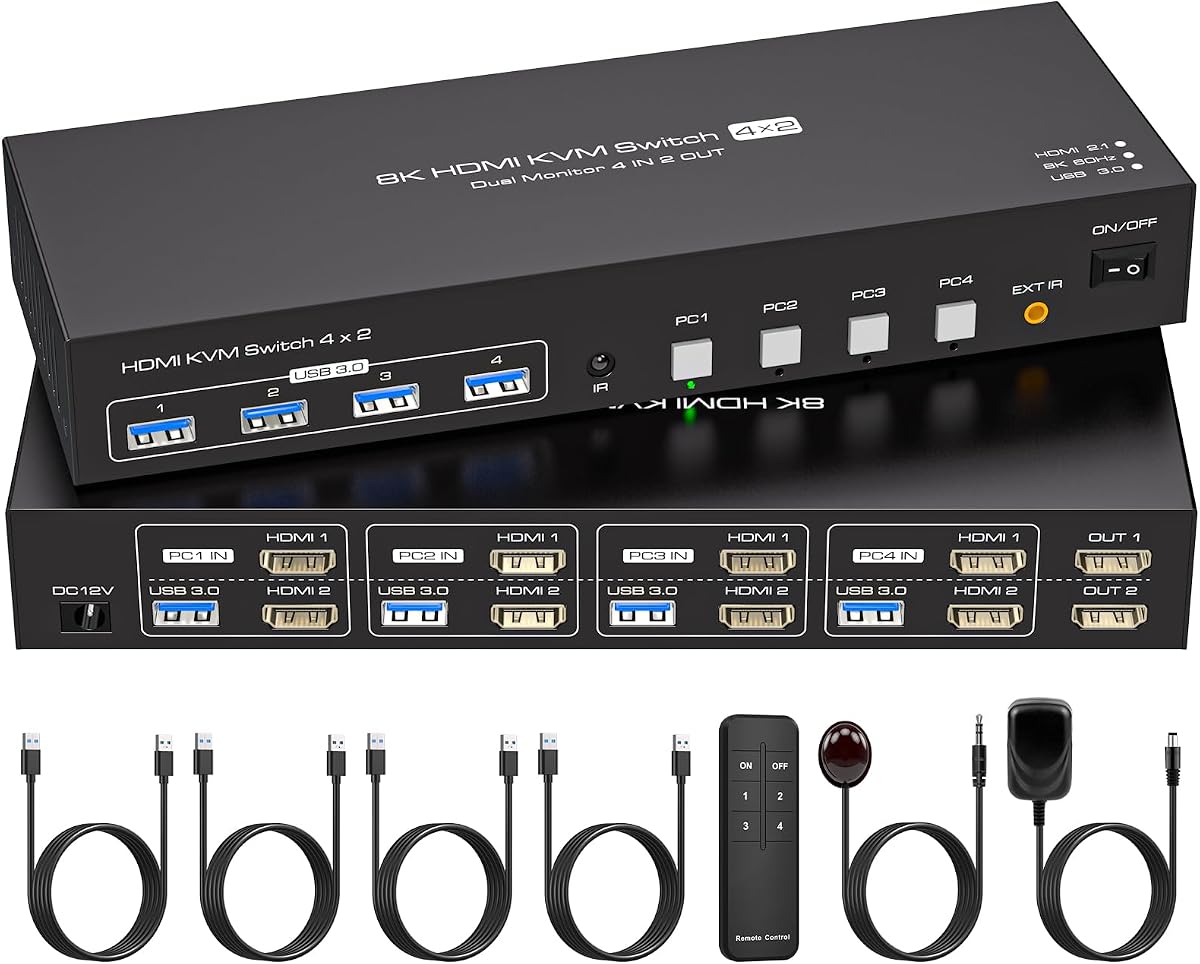
4 Port Dual Monitor HDMI KVM Switch 4 Computers 2 Monitors 8K 60Hz 4K 120Hz KVM Switches for Four PC Share Four USB 3.0 Devices Support Copy and Extend Mode 23CM Longth
4 Computers 2 Monitors
8K@60Hz Resolution
EDID Emulation
Remote Control Included
This KVM switch supports four computers sharing two monitors and four USB devices. It has a high rating for performance and reliability in complex setups. EDID emulation ensures the system recognizes monitors correctly when switching computers.
Pros
Supports four computers
High 8K resolution
EDID emulation stable
Remote control included
Cons
Requires multiple HDMI ports
External power needed
We may earn a commission when you buy through this link, at no additional cost to you.
It supports up to 8K@60Hz and 4K@120Hz for high-definition visuals. The package includes an infrared remote control for easy switching without touching the unit. An external 12V 1A power supply is required for operation.
Each computer needs two HDMI ports to connect to the switch. This requirement might limit compatibility with some standard systems. However it is ideal for workstations with multiple PCs sharing two screens.
Buy this for a multi-PC setup where you need to switch between four systems. The EDID emulation prevents window rearrangements on the shared monitors. Check your PCs have enough HDMI outputs before purchasing.
Multi-PC Access
Supports four computers switching to two shared monitors efficiently. Ideal for test benches or multi-system workstations.
EDID Stability
Built-in EDID emulation keeps window layouts consistent on switching. This prevents disruption when moving between PC sources.
GL.iNet GL-RM10 Comet Pro Remote KVM Over Wi-Fi 6 Dual Band 4K Passthrough
Remote Access via Wi-Fi
4K Video Passthrough
Built-in Touchscreen
Two-Way Audio
The GL.iNet GL-RM10 Comet Pro redefines KVM usage with remote access via Wi-Fi 6. It offers 4K@30FPS video passthrough and two-way audio for detailed interactions. A built-in touchscreen makes managing functions easy without extra software.
Pros
Wi-Fi 6 connectivity
Remote BIOS access
Touchscreen interface
Two-way audio support
Cons
High price point
Requires setup
We may earn a commission when you buy through this link, at no additional cost to you.
It supports secure cloud control and self-hosted options for privacy. You can access the device remotely to perform tasks like BIOS access or OS reinstallation. This is ideal for IT support and home lab scenarios where physical presence is not possible.
The device connects via wired or wireless options to ensure stability. It supports Windows macOS and Linux systems without additional software. The high price reflects its advanced remote capabilities and unique features.
Consider this for professional or advanced users needing remote recovery tools. It provides flexibility for managing servers or PCs from anywhere. Ensure your network supports Wi-Fi 6 for best performance.
Remote Capabilities
Allows remote access for BIOS and OS reinstallation via web or app. This is vital for IT administrators managing distant systems.
Video and Audio
Delivers 4K video passthrough with two-way audio for clear communication. Ideal for remote meetings or IT support sessions.
UGREEN HDMI KVM Switch 2 Monitors 2 Computers 4K@60Hz, with 4 USB 3.0 Ports
2 Monitors 2 Computers
4K@60Hz Resolution
HDMI 2.0 Support
Desktop Controller Included
The UGREEN HDMI KVM Switch lets you manage two computers with one set of peripherals across two monitors. It supports 4K@60Hz resolution and HDR10+ for vibrant visuals. A desktop controller helps keep your workspace tidy by moving the switch away.
Pros
Dual HDMI output
4 USB 3.0 ports
Desktop controller included
Supports gaming consoles
Cons
Requires power adapter
No hotkey support
We may earn a commission when you buy through this link, at no additional cost to you.
It includes four USB 3.0 ports for sharing devices like drives and webcams. The switch works with PCs consoles and TV boxes without requiring drivers. Ensure HDMI cables are within three meters for proper signal transmission.
This model requires an external power adapter for stable USB device usage. Each computer must connect two HDMI cables to the switch for proper operation. It is not supported for hotkey toggling which some users may prefer.
Buy this for a dual monitor setup using HDMI exclusively. It is suitable for gaming or content work on shared displays. Verify your computers support dual screen display for best results.
Gaming Compatibility
Compatible with gaming consoles like Xbox and PlayStation via HDMI. This allows shared displays for entertainment and work.
Monitor Control
Supports extend and mirror modes for flexible display arrangements. Ensure your computers support dual-screen display simultaneously.
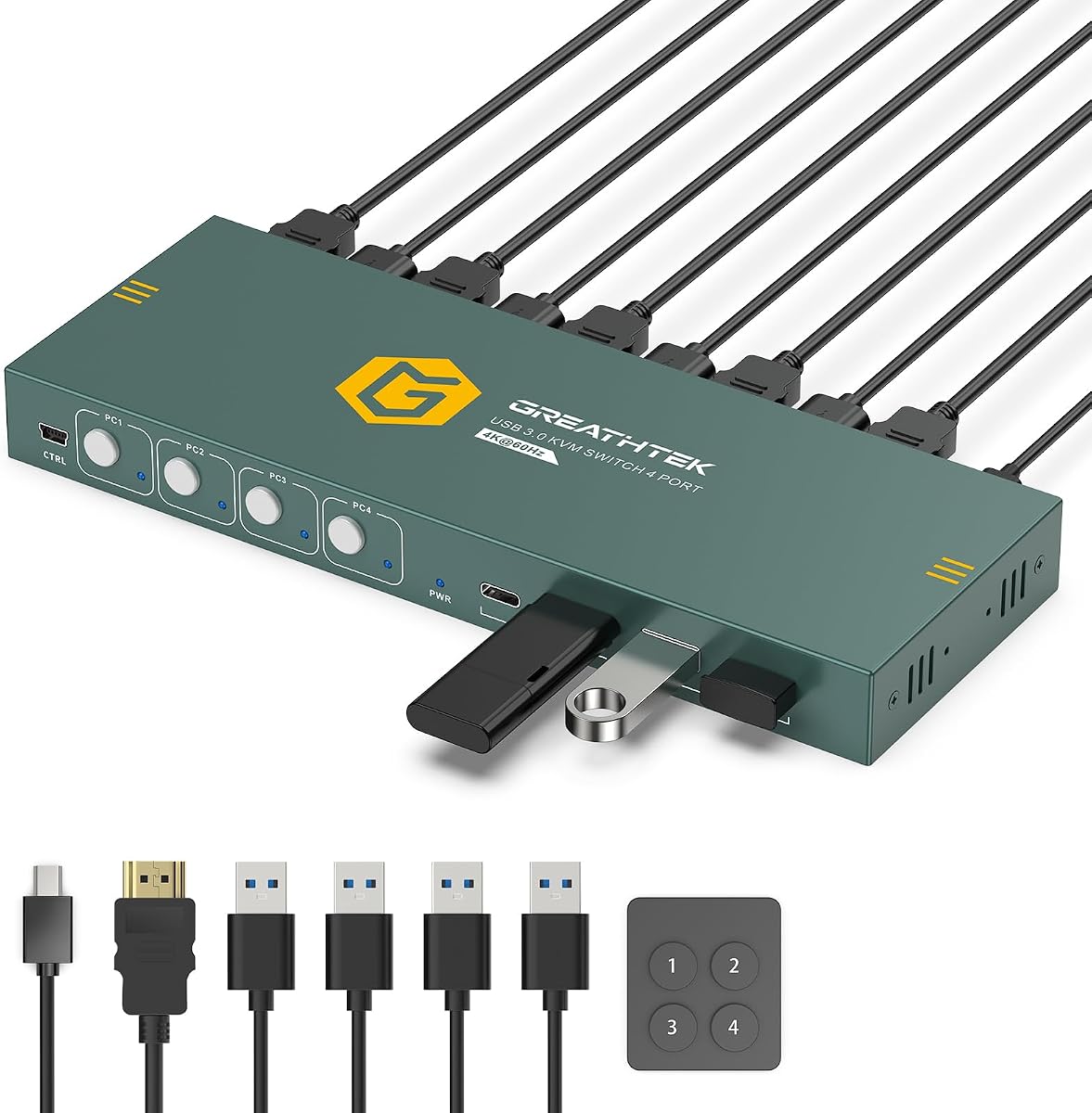
HDMI KVM Switch for 4 Computers 1 Monitor,4K@60HZ 4 Port KVM Switch
4 Computers 1 Monitor
4K@60Hz Output
4 USB 3.0 Ports
Wired Remote
This KVM switch allows control of four computers using one monitor keyboard and mouse. It has a high rating for efficiency in multi-PC workspaces. A wired desktop remote with numbered buttons provides one-touch access to each computer.
Pros
Supports four computers
High rating reliability
Wired remote included
Mounting brackets included
Cons
Single monitor only
No hotkey toggles
We may earn a commission when you buy through this link, at no additional cost to you.
It supports 4K@60Hz via HDMI 2.0 and includes EDID Adaptive for stable resolution matching. Four USB 3.0 ports enable sharing of keyboards and drives across systems. Under-desk mounting brackets and screws are included for setup.
Hotkey switching is not supported so you must use the physical buttons or remote. Each computer connects via one HDMI and one USB cable for simplicity. It is ideal for IT benches or offices with multiple PCs.
Consider this for a high-density PC setup where one monitor is shared. It reduces cable clutter and simplifies switching between machines. Verify your computers support HDMI output for proper connectivity.
IT Workstation Use
Designed for test benches or offices with multiple PCs sharing one screen. Under-desk mounting keeps the setup organized.
Remote Control
Includes a wired remote with numbered buttons for easy access. LED indicators show which PC is currently active.
HDMI KVM Switch 1 Monitors 2 Computers 4K@60Hz USB KVM Switches 2 Ports for 2 PC Sharing Single Monitor and Keyboard Mouse with Wired Extend Controller Plug and Play
1 Monitor 2 Computers
4K@60Hz Output
USB 2.0 Ports
No External Power
The HDMI KVM Switch is a simple and affordable way to share one monitor between two computers. It supports 4K@60Hz for standard quality visuals and comes with a wired controller. The package includes necessary cables to get started quickly.
Pros
Affordable price point
No external power needed
Wired controller included
Plug and play
Cons
USB 2.0 speeds
Not recommended for Mac
We may earn a commission when you buy through this link, at no additional cost to you.
It uses USB 2.0 ports for mouse and keyboard sharing which is sufficient for basic tasks. The device is compact and does not require an external power supply. Hot-swapping allows connecting devices without rebooting.
Note that this model is not recommended for Mac devices due to compatibility reasons. High-quality HDMI 2.0 cables are required for stable transmission. LED indicators show which PC is active for easy identification.
Choose this for a budget-friendly solution for a basic dual PC setup. It eliminates cable swapping and saves space on your desk. Verify your computers have HDMI ports before purchasing.
Affordability
Offers a cost-effective way to manage two computers with one set of peripherals. Ideal for home users or light office tasks.
Plug and Play
Requires no drivers and includes necessary cables for immediate use. A desktop remote allows flexible switch placement.
We may earn a commission when you buy through this link, at no additional cost to you.
Buying Guide – How to Choose the Best KVM Switch
Choosing a KVM switch depends on your specific monitor count and port needs. This guide outlines key factors to consider before buying.
Monitor Count and Resolution
Determine how many monitors you need to share and their resolution. Some switches support dual or triple outputs while others are single. Ensure the switch supports your target resolution like 4K or 8K.
Check your computer graphics cards can support the required number of displays simultaneously. Mismatched capabilities can lead to unused monitors.
Video Port Types
Identify whether your PCs and monitors use HDMI or DisplayPort. Some switches offer mixed inputs while others are dedicated to one type. Match the ports to avoid needing additional adapters.
HDMI is more common but DisplayPort can support higher refresh rates. Choose the switch that aligns with your hardware.
USB Port Requirements
Count the USB devices you need to share like printers and webcams. KVM switches come with 2 to 4 USB ports mostly. Ensure the speed is 3.0 for faster data transfer.
USB-C support can be a plus for modern peripherals. Check if extra ports are needed for future expansion.
Switching Methods
Look for convenient switching options like buttons remotes or hotkeys. Wired remotes allow placing the switch out of sight easily. Hotkeys can speed up switching but not all switches support them.
Consider your workflow to decide if a remote is worth the cost. Some users prefer simple panel buttons for reliability.
Power Supply Needs
Some switches require external power adapters while others draw from USB. Power adapters ensure stable performance with high-power devices. Check the package for included adapters before buying.
If you need to power hard drives external power is essential. USB-only switches may be limited to low-power peripherals.
EDID Support
EDID emulation helps the monitor remember settings when switching PCs. Without it the screen may rearrange windows every time. Look for Adaptive EDID or Emulation features.
This feature improves user experience by reducing setup changes. It is a key factor for multi-monitor workflows.
Operating System Compatibility
Most switches support Windows macOS and Linux without drivers. Check the product page for specific OS notes like Mac restrictions. Some models may not work well with certain systems.
Plug and play support ensures easy setup. Review user feedback for your specific OS version.
Build Quality and Warranties
Metal housings provide better heat dissipation and durability. Check customer ratings for build quality insights. Look for products with protection plans or warranties.
A longer warranty period gives peace of mind for electronics. Consider the return policy if compatibility issues arise.
How to Use and Care for Your KVM Switch
Connect the KVM switch to your computers using video and USB cables. Ensure each computer has the required ports for all monitors. Plug in the power adapter if needed for stability.
Connect your shared monitor and USB devices to the switch outputs. Press the switch button or use the remote to toggle between computers. The active LED will show which system is currently selected.
Keep the switch in a cool dry place to ensure longevity. Avoid bending cables sharply as this can cause signal loss. Update your graphics drivers if you face display issues.
Frequently Asked Questions
Can a KVM switch support 4K at 60Hz?
Yes many modern KVM switches support 4K@60Hz depending on their HDMI or DisplayPort version. Ensure your monitors and computers also support this resolution. Check the cable length limits to maintain signal quality.
Do KVM switches support three monitors?
Some specialized KVM switches support three monitors for two computers. Both computers must have enough ports to drive all displays. Verify the specific model supports triple output before buying.
Do I need extra power for a KVM switch?
Some switches require an external power adapter for stable operation especially when sharing USB drives. Others work solely on USB power. Check the product description to see if an adapter is included or required.
Can I use a KVM switch with a MacBook?
Most KVM switches support macOS but some models may have compatibility issues. Check the product details for Mac support notes. Use a USB-C to USB-A adapter if needed for USB connections.
What happens if I use HDMI to DP adapters?
Using HDMI to DP adapters may cause signal issues or unstable connections. Direct HDMI or DisplayPort cables are recommended for best results. Converters may limit resolution or cause flickering.
How do I switch between computers on a KVM?
You can switch using a physical button on the switch or a wired remote. Some models support hotkeys via keyboard shortcuts. Follow the setup guide for the correct method.
Why does my screen flicker when switching?
Flickering may be due to insufficient power or low-quality cables. Ensure you use the recommended power adapter and HDMI cables. Check that your graphics drivers are up to date for stability.
Is EDID emulation important for KVMs?
EDID emulation helps maintain display settings when switching between PCs. Without it the screen may rearrange windows or change resolution. It improves workflow consistency on multi-monitor setups.
Final Thoughts on Choosing the Best KVM Switch
We reviewed ten top KVM switches to help you find the right model for your setup. Options range from budget friendly HDMI units to high-end DisplayPort solutions with multi-monitor support. Choose based on your port needs and desired resolution.
Prioritize switches with adequate USB ports and reliable switching methods for daily use. EDID support and power requirements are key factors for stability. Consider remote options if you manage systems from afar.
Always check current product availability and reviews before buying. Prices and specifications can vary so verify details on the retailer site. A well-chosen KVM switch can streamline your multi-PC workflow efficiently.