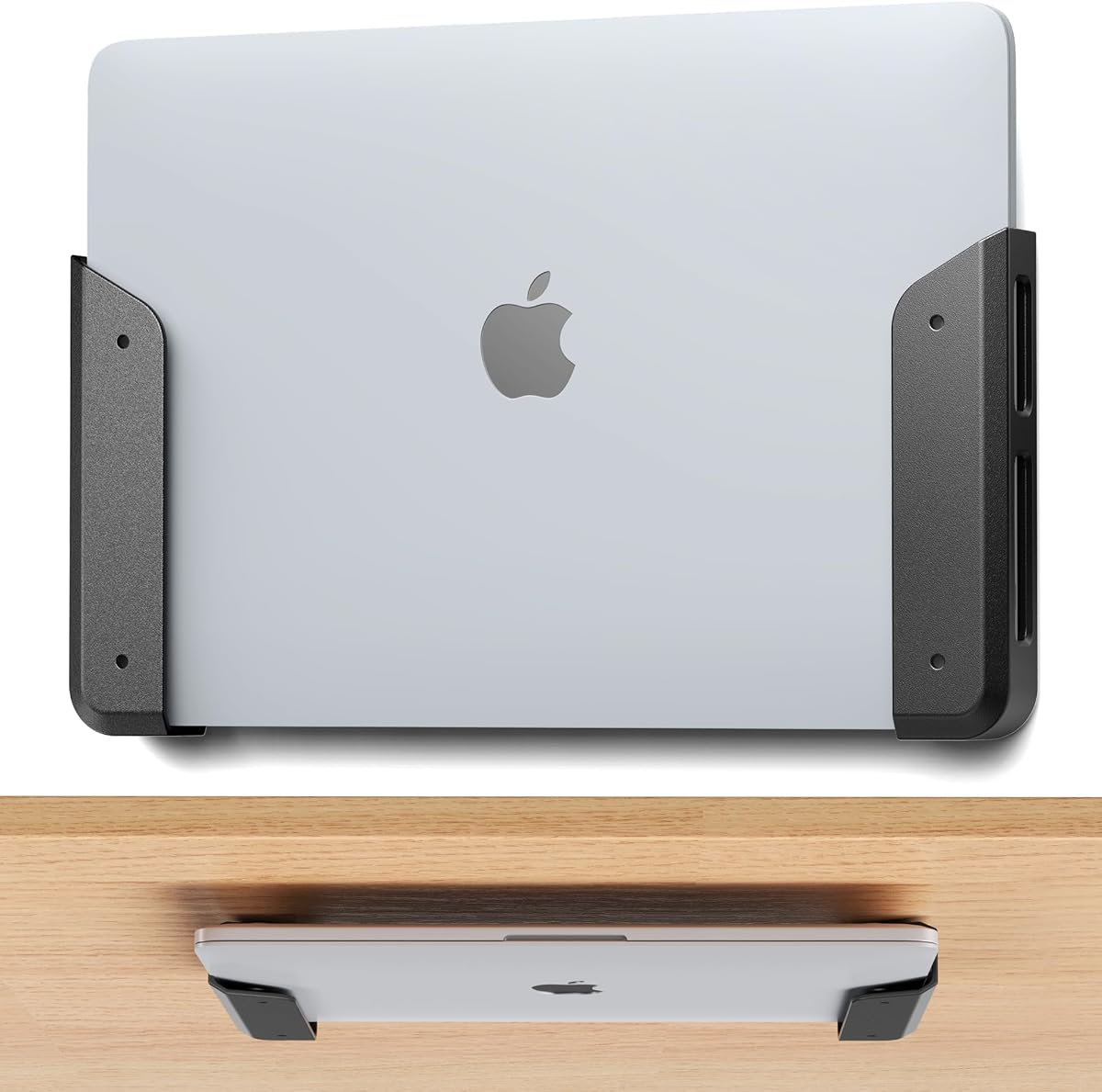
ELETIUO Wall & Under Desk Mount
4.2Editor score
Dual mounting options
Universal device fit
Anti-scratch protection
Transform your workspace with a laptop wall mount that saves desk space and improves ergonomics. These mounts allow you to float your device at eye level for better posture.
We analyzed ten highly rated products focusing on stability, adjustability, and compatibility. Our list includes versatile 2-in-1 options and specialized holders for various device types.
Each pick highlights key features and real-world use cases. Prices fluctuate daily so check current listings before purchasing to ensure you get the best deal available today.
4.2Editor score

4.6Editor score

4.5Editor score
As an Amazon Associate we earn from qualifying purchases.
Compare all ten top-rated laptop wall mounts side-by-side to see how they stack up on weight capacity, adjustability, and unique features for your specific needs.


The MOUNT PRO Laptop Wall Mount leads our list with exceptional versatility and solid build quality. Rated 4.6 stars it handles both laptops and monitors with equal ease.
We may earn a commission when you buy through this link, at no additional cost to you.
Its 2-in-1 design lets you convert from laptop tray to monitor arm using the included VESA plate. The smooth articulating arms allow full tilt swivel and rotation for perfect positioning.
While the design is robust drywall installation alone isn't recommended for stability. Using wood studs or concrete ensures the mount stays secure under load.
Best for users wanting a premium floating workstation that adapts to different devices. Its cable management keeps things tidy while the vented tray protects your laptop from overheating.
Easily switch between holding your laptop or a larger monitor using the included VESA plate for maximum workspace flexibility.
Enjoy 11.8 inches of height adjustment and full motion articulation to reduce neck strain during long work sessions.
We may earn a commission when you buy through this link, at no additional cost to you.
The ELETIUO Wall & Under Desk Mount offers incredible value for budget-conscious buyers needing a simple hold. With a 4.2 rating it fits many devices including laptops and tablets up to 26mm thick.
We may earn a commission when you buy through this link, at no additional cost to you.
It provides dual mounting options so you can choose adhesive strips for quick temporary installs or screws for permanent stability. Anti-scratch pads protect your device during insertion and removal.
The lack of motion articulation limits positioning compared to arms but it works well for fixed viewing angles. Installation is straightforward with all necessary hardware provided in the box.
Ideal for dorms or temporary setups where flexibility isn't critical. It effectively saves desk space without breaking the bank making it accessible for students and casual users.
Choose between adhesive strips for easy temporary mounting or screws for a permanent secure setup depending on your needs.
Anti-scratch pads ensure your device stays protected while being inserted or removed from the holder.
We may earn a commission when you buy through this link, at no additional cost to you.
The Laptop Wall Mount 2-in-1 stands out with a higher weight capacity of up to 22 lbs. This makes it suitable for heavier gaming laptops or robust professional machines.
We may earn a commission when you buy through this link, at no additional cost to you.
The innovative locking mechanism and dual-adjustable clamps ensure your device stays secure even when moved. The open frame design maximizes airflow keeping devices cool during intense sessions.
While the reach is impressive the installation requires solid wall anchors. Drywall alone won't support the weight so stud or concrete mounting is essential for safety.
Best for professionals handling heavy equipment. It offers stability and flexibility ensuring your device remains safe while freeing up significant desk space.
Dual adjustable clamps and an innovative locking mechanism keep your laptop firmly in place during movement.
Open frame design with ventilation slots prevents overheating during extended use or high-performance tasks.
We may earn a commission when you buy through this link, at no additional cost to you.
The MOUNTUP Laptop Wall Mount offers a smart 2-in-1 solution perfect for users switching between notebooks and monitors. Rated 4.5 stars it supports up to 22 lbs with a ventilated tray.
We may earn a commission when you buy through this link, at no additional cost to you.
The clever latch locks your laptop in place preventing slips during work. Its open design maximizes airflow ensuring efficient cooling even during heavy gaming or video editing.
Installation is straightforward with clear instructions but requires sturdy wall support. Mounting on studs or concrete is necessary to prevent sagging over time.
Ideal for hybrid workers needing flexibility. It maximizes desk space and provides ergonomic viewing angles to improve posture and productivity.
An all-new tray features a latch that locks your laptop securely preventing slips during use.
20.7 inch extended reach and 11 inch height adjustment allow perfect positioning for any setup.
We may earn a commission when you buy through this link, at no additional cost to you.
The WALI Laptop Wall Mount is designed for compact setups without sacrificing functionality. With a 4.4 rating it handles notebooks up to 17 inches and supports VESA patterns.
We may earn a commission when you buy through this link, at no additional cost to you.
Its ventilated cooling platform dissipates heat effectively during heavy loads. The ergonomic adjustability reduces strain allowing you to set devices at eye level comfortably.
The design prioritizes space-saving making it ideal for dorms or small home offices. While weight capacity is moderate it suits most standard ultrabooks and business laptops.
Best for users in tight living spaces. It declutters your desk and improves organization without requiring complex installation or heavy wall reinforcement.
Lift your laptop off the desk to reclaim valuable surface area in small rooms or offices.
Adjust viewing angles to reduce neck and eye strain during long daily work sessions.
We may earn a commission when you buy through this link, at no additional cost to you.
The 2-in-1 Laptop Wall Mount offers unique flexibility with a detachable tray. Rated 4.5 stars it fits laptops and monitors with an adjustable width platform for precise positioning.
We may earn a commission when you buy through this link, at no additional cost to you.
The concealed cable management system keeps cords organized aesthetically pleasing. Full rotation and tilting help maintain correct neck posture for extended use.
Anti-scratch pads ensure your device stays safe while being inserted or removed. Installation requires tools but results in a secure stable setup.
Best for users needing precise tray positioning. It simplifies setup for various screen sizes while maintaining a sleek professional look.
Concealed system helps organize cables neatly on the hanging arm for a tidy look.
Adjustable width platform ensures a snug fit for different device sizes securely.
We may earn a commission when you buy through this link, at no additional cost to you.
The VIVO Black Laptop Wall Mount features a pneumatic arm for effortless movement. With a 4.4 rating it offers tool-less height adjustment for perfect ergonomic positioning.
We may earn a commission when you buy through this link, at no additional cost to you.
Rubber tabs keep the device secure and scratch-free while ventilation slots prevent overheating. The sturdy steel design is backed by a three-year warranty for peace of mind.
The counterbalance arm requires a minimum weight of 4.4 lbs to work properly which excludes very light tablets. This ensures stability for standard laptops.
Ideal for professional environments requiring smooth transitions. It balances style and function ensuring your device stays visible without obstructing desk access.
Tool-less instant height adjustment allows you to find perfect viewing angles instantly.
A three-year manufacturer warranty and friendly tech support ensure long-term reliability.
We may earn a commission when you buy through this link, at no additional cost to you.
The Mount-It! Ergonomic Laptop Arm stands out with its dual wall or pole mounting capability. Rated 4.4 stars it offers unique flexibility for clinics, workshops, or reception desks.
We may earn a commission when you buy through this link, at no additional cost to you.
The spring arm keeps your laptop planted without sagging with adjustable tension bolts. It accommodates standard laptops securely with hold-down supports to prevent slipping.
Note the pole is sold separately requiring extra budget. However this feature opens creative mounting options where walls are not feasible.
Best for specialized workspaces needing vertical mounting. It provides robust support and smooth motion to enhance accessibility and ergonomics anywhere.
Install on a round pole for flexible placement in clinics or studios without wall access.
Adjustable bolts let you fine-tune the arm tension to match your device weight.
We may earn a commission when you buy through this link, at no additional cost to you.
The Universal Wall Mount Black offers a shelf-style solution for multi-device storage. Rated 4.7 stars it uses a two-tier design to hold laptops keyboards and tablets securely.
We may earn a commission when you buy through this link, at no additional cost to you.
Made of high-quality metal with eight EVA pads to protect devices. The simple structure eliminates moving parts ensuring durability without mechanical complexity.
It functions more as storage than a workstation mount since it lacks motion adjustment. This makes it perfect for keeping devices off counters rather than active use.
Best for storage-focused setups. It maximizes vertical space keeping multiple devices organized and accessible without consuming desk surface.
Store a laptop and keyboard simultaneously or multiple smaller devices with the versatile shelf design.
Eight EVA pads included prevent scratches and protect your electronics during storage.
We may earn a commission when you buy through this link, at no additional cost to you.
The Long Arm 2-in-1 Laptop Mount leads in reach with a three-section gas spring arm. Rated 4.5 stars it extends to nearly 28 inches providing unmatched flexibility.
We may earn a commission when you buy through this link, at no additional cost to you.
The detachable tray allows easy switching between laptops and monitors. Full motion adjustments reduce strain ensuring comfort during long work hours.
Premium pricing reflects superior engineering and robust support. It requires a sturdy wall mount to handle the extended leverage safely.
Best for large desks needing extreme reach. It offers premium performance and versatility making it ideal for demanding professional environments.
Equipped with 3-section gas spring arm delivering 27.83 inch extended reach for flexibility.
Durable gas spring system holds devices firmly without sagging or drifting over time.
We may earn a commission when you buy through this link, at no additional cost to you.
Selecting the right laptop wall mount depends on your device specs, wall type, and desired movement. Use these key factors to narrow down your choices effectively.
Check weight and size limits before buying. Most mounts fit laptops up to 17 inches and weights between 10 to 22 lbs. Ensure your device falls within these parameters to avoid structural failure.
Always verify your laptop's weight and dimensions match the manufacturer's specifications for safe installation.
Solid walls like wood studs, brick, or concrete offer the best support. Drywall alone usually requires anchors and may not support heavier loads safely over time.
Prioritize mounting on studs or solid surfaces to ensure long-term stability and safety.
Full motion mounts allow tilt, swivel, and rotation for ergonomic flexibility. Fixed shelves offer storage but no movement. Choose based on whether you need active workspace positioning.
Select articulating arms if you need to adjust viewing angles throughout the day.
Most kits come with screws anchors and instructions. Verify if drywall anchors are included or if you need to purchase them separately for your specific wall type.
Ensure all necessary hardware is in the box before installation to avoid delays.
Ventilated trays improve airflow and prevent overheating during intensive tasks. This feature is crucial for gaming or editing where thermal management is essential.
Look for open frames or slots to keep your laptop cool during long sessions.
Hidden cable systems keep your workspace tidy and reduce clutter. Some arms include clips or channels to route power cords neatly along the structure.
Choose mounts with integrated cable management to maintain a professional clean appearance.
Reliable brands offer warranties ranging from one to three years. This protects against defects and ensures long-term performance without additional costs.
Prioritize brands with clear warranty terms to safeguard your investment.
Floating designs free up desk surface for other items. Measure your available wall space to ensure the arm doesn't obstruct doors or walkways.
Opt for compact designs in small rooms to maximize usable area.
Install the wall bracket on a solid surface using the provided hardware. Ensure it is level to prevent uneven weight distribution during movement.
Place your laptop securely in the tray or attach monitor VESA plate before adjusting. Check all clamps are tightened to avoid accidental drops.
Clean the mount with a dry cloth to prevent dust buildup. Periodically check screws and joints to maintain stability over time.
Most mounts require anchoring into studs or solid walls. If using drywall, ensure you use appropriate toggle bolts rated for the weight limit. Never rely solely on drywall for heavy loads.
Capacity varies by model ranging from 9 lbs to 22 lbs. Always check specific product limits. Exceeding weight limits can cause structural failure or damage.
Yes if weight and size fit the specifications. Ventilated trays are especially helpful for thermal management during gaming. Verify dimensions before purchasing for larger devices.
Many models offer 2-in-1 versatility using included adapters. Ensure the mount supports VESA standards for monitor use. Check if trays are removable for this conversion.
Measure wall clearance for full extension. Most mounts need at least 20 inches vertically. Consider reach to ensure it doesn't block pathways or furniture.
Most premium models include cable clips or channels. Lower-end fixed mounts may lack this feature. Check product details for built-in management solutions.
We found the MOUNT PRO Laptop Wall Mount to be the overall best pick. It combines versatility with sturdy build quality for any workspace setup.
Prioritize wall compatibility and weight capacity to ensure safety. Consider how much adjustment you need for ergonomic comfort during long work days.
Prices fluctuate frequently so verify current listings before buying. A good mount transforms your desk into a clean efficient floating workstation.