
Thermalright Trofeo Vision LCD
4.3Editor score
Compact slim build
USB-C connection
TRCC software included
Adding an LCD screen to your PC case transforms how you interact with your system. These displays offer real-time monitoring of temperatures and usage while adding a unique visual element to your setup.
We analyzed ten leading models based on resolution, compatibility, software features, and mounting options. Each product was evaluated for ease of setup and performance in typical gaming and workstation environments.
Each pick highlights specific strengths like touch support or magnetic mounting. Prices fluctuate frequently so please check current listings before purchasing to ensure you get the best deal available today.
4.3Editor score

4.5Editor score

4.4Editor score
As an Amazon Associate we earn from qualifying purchases.
This side-by-side comparison highlights key specifications across all ten models to help you find the perfect fit for your specific case and monitoring needs.




The WOWNOVA 8 Inch LCD screen stands out as a top choice for PC enthusiasts looking for versatility and ease of use. With a strong rating and innovative features like desktop mode, it offers more than typical sensor panels.
We may earn a commission when you buy through this link, at no additional cost to you.
Its ability to function as an extended screen via software adds significant utility for multitasking or secondary monitoring without consuming GPU ports. The single cable connection simplifies installation inside tight cases where routing multiple wires is difficult.
While it lacks support for macOS or Linux systems, the free updates and extensive theme library make it a long-term valuable addition. The aluminum housing ensures durability while keeping the overall weight low for internal mounting.
This display is ideal for users who want a blend of hardware monitoring and creative expression through dynamic videos. We recommend it for those prioritizing quick setup and flexible display options in their custom PC builds.
The software allows one-click setup enabling users to start monitoring temperatures and usage immediately after installation.
Users can switch to desktop mode to extend their main desktop providing extra space for tools or widgets.
We may earn a commission when you buy through this link, at no additional cost to you.
The Lian Li SM088X delivers a premium experience with its universal design and integrated ARGB lighting that syncs with other components. It is designed to fit various case panels and fan frames easily.
We may earn a commission when you buy through this link, at no additional cost to you.
The software suite offers robust customization for both visuals and system metrics allowing users to upload their own videos or select preset themes. The USB-powered design means it can work as a secondary monitor without using GPU outputs.
Care must be taken during installation to use the correct screws as using wrong ones can damage the unit. The build quality justifies the cost for those seeking a cohesive aesthetic match with Lian Li cases.
We suggest this for users who want a polished look and deep customization options. It is perfect for building a unified lighting theme across your entire gaming setup without additional hardware.
The versatile bracket supports height and tilt adjustments ensuring optimal visibility from any viewing angle in your room.
L-Connect 3 allows upload of custom videos and photos creating a personalized display that suits your unique style.
We may earn a commission when you buy through this link, at no additional cost to you.
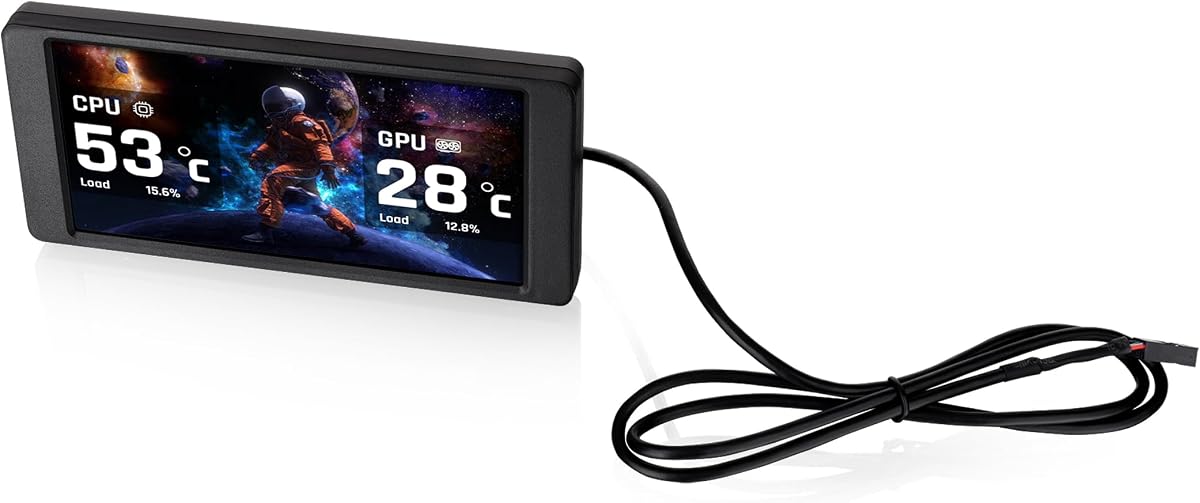
The Thermalright Trofeo Vision offers excellent value by providing a large screen size at a very competitive price point. It is an ideal choice for first-time buyers looking to add a display to their build.
We may earn a commission when you buy through this link, at no additional cost to you.
The USB-C connection makes installation straightforward with most systems requiring no extra drivers for basic functionality. The TRCC software enables real-time monitoring of critical system health parameters like temperatures and fan speeds.
While the build is slim and stylish it does lack the advanced mounting features of higher-end models. The software supports multiple themes allowing users to customize the look to match their desktop setup.
We recommend this for those on a budget who still want a crisp and responsive display. It is a solid entry-level option that performs well for monitoring tasks in any standard PC case.
Simple Type-C interface ensures quick setup and compatibility with most Windows systems without complicated drivers required.
Easily track CPU and GPU temps and memory usage giving you complete control of your system health at a glance.
We may earn a commission when you buy through this link, at no additional cost to you.
The darkFlash V92 provides a dedicated sensor panel solution with a high-resolution IPS screen that delivers sharp visuals through tempered glass. It is tailored for those who want detailed system metrics without external dependencies.
We may earn a commission when you buy through this link, at no additional cost to you.
The included Station Space software allows monitoring of various widgets like weather and stock prices in addition to hardware stats. It uses either USB-C or internal headers to maintain GPU outputs for gaming performance.
Users must note that the software must remain running for the display to function properly which can slightly impact system resources. The slim aluminum body ensures it fits well inside most cases without obstructing airflow.
This screen is a good choice for users who prefer a dedicated app over browser-based solutions. We suggest checking clearance dimensions before purchase to ensure a perfect fit for your specific case type.
Install horizontally or vertically using the included bracket and rear threaded holes for a secure custom fit.
Connect through an external USB port or internal 9-pin header keeping GPU video outputs free for other devices.
We may earn a commission when you buy through this link, at no additional cost to you.
The wisecoco 12.6 Inch bar screen offers an expansive viewing area that transforms a PC case into a true multimedia hub. It is designed specifically to fit the Hyte Y60 panel perfectly with included mounting tools.
We may earn a commission when you buy through this link, at no additional cost to you.
With built-in speakers and HDMI compatibility it can function as a standalone monitor for other devices like laptops or gaming consoles. The wide aspect ratio allows for detailed visualization of system stats and custom graphics.
Installation is straightforward but requires an HDMI output which may not be available on all setups. The package includes necessary cables making it a complete kit for immediate use in supported cases.
We recommend this for users with compatible cases who want audio and video in one unit. It is excellent for those who prioritize screen real estate and a clean integrated look without extra wires.
Features a screen bracket that fits the Y60 case panel perfectly mounted easily with included screws and driver.
Works with PCs and laptops in landscape mode making it an extra display on your desk or anywhere you want.
We may earn a commission when you buy through this link, at no additional cost to you.
The Hosyond 8.8 Inch Touchscreen brings interactivity to your PC build with a responsive capacitive panel for smooth control. It supports multiple systems including Raspberry Pi making it versatile for various projects.
We may earn a commission when you buy through this link, at no additional cost to you.
Plug and play functionality ensures instant setup without complex driver installations on most supported operating systems. The brightness and color accuracy deliver crisp visuals suitable for gaming or monitoring tasks.
Users must provide their own HDMI connection and software for monitoring like AIDA64 which adds minor steps to the process. The low power consumption makes it energy-efficient for long periods of use inside a case.
This display is best for tinkerers who want touch control in their rig. We suggest it for those with available HDMI ports who need a compact interactive screen for specific system monitoring needs.
Featuring a responsive capacitive touchscreen for smooth control sets up instantly with no complicated installation.
Consumes just 3.8W via 5V USB Type-C offering energy-efficient performance for any standard PC case setup.
We may earn a commission when you buy through this link, at no additional cost to you.
The Thermaltake 6.0 Inch kit is designed for users with Thermaltake View 370 and 390 series cases to ensure a seamless physical fit. It allows you to accent your chassis with a larger viewing surface than previous models.
We may earn a commission when you buy through this link, at no additional cost to you.
The TTRGBPlus 3.0 software offers upgraded features with improved system monitoring and control options for a better experience. You can upload various media formats to create a unique background or animated display.
While the resolution is lower than some competitors the software customization is robust for enthusiasts who want total control. The standalone nature means it does not require additional external accessories to function properly.
We suggest this for owners of compatible Thermaltake cases who want a branded integration. It is a solid choice for those who prioritize software features over raw pixel density in their display setup.
Get real-time information on key system components like CPU and GPU and RAM all customizable with different options.
Choose between default graphics or upload up to twenty custom graphics in various supported formats easily.
We may earn a commission when you buy through this link, at no additional cost to you.
The GeeekPi 12.6 Inch screen is a premium option for the Hyte Y60 case with a large touch panel for interactive control. It features up to 10-point multi-touch accuracy making it sensitive and responsive to input.
We may earn a commission when you buy through this link, at no additional cost to you.
With built-in speakers and high contrast visuals you get both audio and video capabilities without external cables. The plug and play design works out of the box on supported systems requiring no additional software installation.
Be sure to remove the protective film before use to ensure maximum clarity and responsiveness on the tempered glass. The adjustable display settings allow you to switch between horizontal and vertical orientations easily.
This model is ideal for users seeking a large interactive display specifically for the Y60 chassis. We recommend it for those who want a complete multimedia solution including touch input and audio in one package.
Enjoy a crisp detailed image with Ultra-HD resolution and high contrast ensuring colors remain consistent from any angle.
Equipped with a touch screen and tempered glass providing an excellent touch experience with up to ten-point multi-touch.
We may earn a commission when you buy through this link, at no additional cost to you.
The Thermalright TV 9.16 LCD features a unique magnetic design that allows for easy installation without screws. This makes it simple to move or remove the screen when accessing internal components of your PC.
We may earn a commission when you buy through this link, at no additional cost to you.
The TRCC software provides full control over the display monitoring and functions which run automatically when your computer starts. You can freely monitor system parameters and switch between static or dynamic image layouts.
Before installing software ensure that the wiring is complete to avoid connection issues. The full color IPS panel ensures good viewing angle stability and accurate color reproduction for your custom themes.
This screen is great for modders who want a clean look and flexibility. We suggest it for users who value ease of access and want a screw-free mounting solution for their custom PC.
The screen adopts metal frame technology and the magnetic design does not require screws making it easy to install and remove.
All monitoring and power functions are controlled by software allowing it to start automatically with your computer.
We may earn a commission when you buy through this link, at no additional cost to you.
The Thermalright Trofeo 6.86-inch display is a compact solution for smaller cases or specific radiator mounts. It offers a magnetic panel that can move freely in various positions of the chassis without a fixed location.
We may earn a commission when you buy through this link, at no additional cost to you.
Using TRCC software you can monitor various system parameters and support a variety of static or dynamic image switching for DIY themes. The full-color IPS panel restores true delicacy of colors with good stability.
Ensure wiring is complete before software installation to ensure proper communication and power data flow. The small size makes it an ideal secondary display for tight spaces where larger screens will not fit.
We recommend this for users needing a very small display for basic monitoring. It is perfect for those who want to save space while still having a touch of visual customization in their build.
Support magnetic chassis fixed screen panel or paired with cooling radiator with no position limited.
Downloaded from official website installation allows monitoring and opening closing functions to be controlled by software.
We may earn a commission when you buy through this link, at no additional cost to you.
Choosing the right display involves balancing screen size, mounting, software, and power options to ensure seamless integration.
The physical dimensions and pixel count determine how much data you can see clearly. Larger screens like 12.6 inches offer more detail but require significant internal or external case space. Resolution impacts clarity with options ranging from 1280×480 to 1920×515 for wider displays. Consider your case clearance before purchasing to avoid fit issues with the panel.
Prioritize a size that matches your visual goals without obstructing components. A higher resolution ensures sharper text for system stats even at smaller angles.
Mounting style determines how securely the screen attaches to your case. Some models offer flexible brackets for fan frames while others use magnetic suction for tool-free adjustments. Specific cases like Hyte Y60 may have dedicated brackets for a perfect fit. Ensure the mounting kit includes necessary screws or adhesive pads for stability.
Check if the mounting method allows access to internal ports for maintenance. Magnetic mounts are ideal for frequent access while brackets provide a more permanent secure look.
Software capabilities vary widely with some offering free plugins and others requiring specific subscriptions or standalone apps. Look for support for dynamic videos and custom widgets to personalize your display. Check if the software runs automatically at boot or needs manual launching for functionality. Cross-platform support like Linux or macOS may be essential depending on your OS.
Choose software that is user-friendly and regularly updated. A dedicated app provides more control over themes than a basic driver interface.
Connections typically use USB Type-A or internal 9-pin headers to power the screen without GPU load. Some models support HDMI input for external video signals making them more versatile as secondary monitors. Ensure your motherboard has available headers or USB ports for plug and play functionality. Power consumption is usually low but verify it matches your supply capabilities.
Internal headers save external ports for other peripherals like drives or peripherals. HDMI adds versatility but requires an available output on your graphics card.
Touchscreen panels offer interactive control for changing settings directly on the display without a mouse. Capacitive screens provide smooth input and work well for adjusting brightness or selecting themes instantly. Ensure your OS supports touch drivers if you choose this feature. Touch capability adds significant usability especially for complex software interfaces.
Consider if you need touch control or a standard monitor is sufficient. Touchscreens add cost but simplify navigation in a compact PC environment.
Aluminum housings offer better durability and heat dissipation compared to plastic. Slim profiles ensure the screen does not interfere with airflow or case components inside. Check if the design includes diffused lighting strips or tempered glass for aesthetic appeal. The color of the frame should match the rest of your build components.
Opt for metal construction if you prioritize long-term reliability. A sleek profile keeps the PC looking clean and professional.
Reputable brands often provide better customer support and warranty terms for hardware failures. Some screens are tailored for specific case brands ensuring better compatibility and ease of installation. Check reviews for common issues related to software crashes or panel defects. A warranty protects your investment against early defects in the display panel.
Choose a brand with active community support for troubleshooting. A longer warranty period indicates manufacturer confidence in product quality.
Prices vary significantly based on features like touch support and resolution. Higher-end models offer more customization but entry-level screens often provide all basic monitoring needs. Determine your must-have features before comparing prices across different vendors. Value includes long-term software updates not just initial hardware cost.
Balance cost against the utility you will gain from the display. A slightly higher investment may be worth it for better software support and durability.
Begin by connecting the data cable to an available USB header or port on your motherboard. Install the provided software from the official website and run it to detect the display. Configure your desired widgets and themes within the application settings to customize the look.
Mount the screen securely using the included bracket or magnetic panel ensuring it does not touch moving parts like fans. Secure the cable management to prevent it from interfering with case airflow or components. This maintains a clean build and reduces risk of physical damage.
Regularly update the software to access new themes and bug fixes that improve performance. Avoid using abrasive cleaners on the screen surface to prevent scratching the coating. Use a soft microfiber cloth for dusting and ensure the display is powered off before cleaning.
Most screens require specific software to display system metrics and custom images. Some models offer free apps while others may integrate with third party tools. Check the product data to confirm what software is needed for full functionality before buying.
Compatibility varies significantly between models with some supporting Windows only and others offering broader OS support. Check the product details for supported systems as Linux support often requires specific drivers or configurations. macOS support is rare and usually limited to basic USB connection.
Most displays use a USB Type-C or Type-A cable for data and power. Some internal models require a motherboard USB 2.0 header cable. Ensure your case has the necessary ports available before starting the installation process.
Most case LCD screens use USB or motherboard headers which do not use GPU video outputs. This leaves your graphics card free for gaming or rendering tasks without adding load to the GPU. HDMI based displays will utilize a GPU port however.
Mounting methods vary from brackets for fan frames to magnetic suction for panel attachment. Check the included manual for specific steps to avoid damaging the display during installation. Ensure there is enough clearance to prevent interference with other components inside.
Many models support custom static or dynamic images for personalized themes. You can typically upload JPG or MP4 files through the provided software. Check the specific software features to confirm supported file formats and sizes.
We reviewed ten diverse models that offer unique benefits for system monitoring and aesthetic enhancement. The WOWNOVA 8 Inch stands out for versatility while the Lian Li SM088X offers premium features.
Prioritize software features and mounting options that align with your specific case setup. A good screen should be easy to install and provide reliable real-time data without affecting system performance.
Prices fluctuate regularly so check current listings before buying to ensure you secure the best deal. Always verify compatibility with your motherboard and OS to avoid installation issues.