
ASUS Vivobook Go 15
4.3Editor score
AMD Ryzen 3 7320U Processor
8GB DDR5 RAM and 128GB SSD
15.6 inch NANOEDGE Display
Finding a lightweight ASUS laptop means balancing power with portability for daily tasks. These devices excel at commuting, travel, and office work without weighing you down.
We evaluated ten models based on processor speed, display quality, and build durability. Each selection offers unique strengths for students, professionals, and casual users seeking mobility.
Every pick highlights key specs and real-world usage scenarios. Remember that prices fluctuate often, so check current listings before making your final purchasing decision today.
4.3Editor score

4.8Editor score
3.7Editor score
As an Amazon Associate we earn from qualifying purchases.
This side-by-side comparison outlines the core specifications of all ten featured ASUS laptops. Review weight, dimensions, processor types, and screen sizes to find the perfect fit for your needs.





The ASUS Vivobook Go 15 stands out as an accessible entry point for those seeking a lightweight machine. With a 4.3 star rating from users, it delivers reliable daily performance for browsing and document editing without breaking the bank.
We may earn a commission when you buy through this link, at no additional cost to you.
Its AMD Ryzen 3 7320U processor provides essential power for multitasking while keeping heat low. The 15.6-inch NanoEdge display offers a smooth viewing experience with slim bezels, making it ideal for media consumption in transit.
While the storage is limited to 128GB, cloud integration helps compensate. The chassis passes military grade durability tests, ensuring it can withstand bumps during travel. The ErgoSense keyboard offers comfortable typing for long sessions.
This laptop is perfect for students or casual users prioritizing portability and budget. It handles everyday tasks well and charges quickly via USB-C. For heavy storage needs, consider external drives to maximize its utility.
Weighing just 3.59 lbs with a slim profile, this device fits easily into backpacks. The military grade construction ensures it survives daily wear and tear better than standard plastic laptops.
Equipped with Wi-Fi 5 and Bluetooth 5.1, connection options are solid. The integrated Radeon graphics handle basic video playback smoothly while the DDR5 RAM keeps apps running efficiently.
We may earn a commission when you buy through this link, at no additional cost to you.
This silver variant upgrades the previous model with a stronger Ryzen 5 processor and ample 512GB storage. Users praise its balance of speed and cost, making it a practical choice for professionals needing more space.
We may earn a commission when you buy through this link, at no additional cost to you.
The Ryzen 5 7520U offers faster performance for light tasks like spreadsheets or video calls. The 512GB SSD eliminates the need for external drives, storing documents and media directly on the drive securely.
Build quality remains consistent with the previous review, featuring military grade protection. The slim bezel display looks modern. The only drawback is the standard color gamut, but text work remains crisp.
Ideal for users needing extra storage without jumping to premium tiers. It handles everyday computing well and looks sleek in office settings. The USB-C charging ensures convenience on the go for busy schedules.
The Ryzen 5 processor provides noticeable speed gains over the Ryzen 3 variant. This extra power helps when switching between browser tabs and productivity apps simultaneously.
With 512GB of SSD space, you can store large files locally. This removes dependency on cloud storage for important documents and reduces load times significantly.
We may earn a commission when you buy through this link, at no additional cost to you.
This Vivobook 14 earns top marks with a 4.8 star rating for its efficiency and AI features. The Snapdragon X processor brings Copilot+ capabilities, offering advanced AI tools and long battery life for remote work.
We may earn a commission when you buy through this link, at no additional cost to you.
The 14-inch form factor is ideal for travelers who need more screen real estate than a 12-inch but less weight than a 15-inch. The 16GB RAM ensures smooth multitasking even with multiple browser windows open.
Windows 11 Home runs seamlessly with integrated security. The Adreno GPU handles visuals well enough for streaming. While some legacy apps might need emulation, modern web apps work flawlessly on this ARM architecture.
Highly recommended for professionals prioritizing battery and AI tools. It delivers performance without the bulk of traditional x86 laptops. Users will appreciate the cool blue finish and responsive touchpad for productivity.
As a Copilot+ PC, this device supports advanced AI search and text generation. This boosts productivity by automating tasks and finding files instantly across the system.
The ARM-based Snapdragon chip consumes less power than Intel alternatives. Expect all-day battery life during typical use, reducing reliance on power outlets during commutes.
We may earn a commission when you buy through this link, at no additional cost to you.
For those needing screen space without extreme weight, this 16-inch Vivobook is the choice. The WUXGA display provides sharp visuals for work, while the Snapdragon X maintains portability and battery efficiency on the go.
We may earn a commission when you buy through this link, at no additional cost to you.
The 1920×1200 resolution offers more vertical space for documents. With 16GB RAM, you can edit photos or run VMs smoothly. The 300-nit brightness ensures visibility even in well-lit offices or outdoors.
Qualcomm's AI chip enhances productivity through faster processing. The Adreno GPU is sufficient for casual media. While slightly larger than 14-inch options, it remains lighter than standard 16-inch laptops using Intel chips.
Perfect for analysts or creators needing a big display on a budget. It balances screen real estate with mobility effectively. Choose this if you want more workspace without sacrificing battery life significantly.
The 16-inch screen offers 16:10 aspect ratio for better document viewing. This extra vertical space is crucial for coding or spreadsheet work on a single screen.
Using the Snapdragon X processor means better power efficiency. It handles AI tasks well and keeps the laptop cool during extended work sessions without loud fans.
We may earn a commission when you buy through this link, at no additional cost to you.
This basic model targets students needing a simple machine for reading and typing. While performance is modest, the low cost makes it accessible for elementary school tasks or basic home office use.
We may earn a commission when you buy through this link, at no additional cost to you.
The Celeron N4500 handles web browsing adequately. The 4GB RAM means closing unused apps is necessary. The display offers decent brightness for indoor use, and the backlit keyboard helps in dim classrooms.
Battery life is rated for a school day, and fast charging helps top up quickly. Storage is limited, so cloud storage is essential. It is a utilitarian tool rather than a powerhouse.
Best for families or students on a tight budget. It covers essential writing and browsing needs well. If you need more speed for software, consider upgrading to a higher tier model in this lineup.
Designed specifically for student study, the interface is simple. It supports web-based learning platforms and typing tasks efficiently without complex features that might distract learners.
Wi-Fi 5 and Bluetooth 5.1 keep you connected. The USB-C port allows for charging and data transfer, making peripherals easy to attach when needed for projects.
We may earn a commission when you buy through this link, at no additional cost to you.
This Vivobook offers a robust i3 processor and 16GB RAM at a competitive price. It is a strong contender for users needing reliability for work without the cost of an i7 or Ryzen 7 model.
We may earn a commission when you buy through this link, at no additional cost to you.
The 12th Gen i3 is surprisingly capable for office work. The 512GB SSD ensures quick boot times and ample space. Wi-Fi 6 provides stable connections for video conferences. The HDMI port connects easily to projectors.
While the build feels standard, performance is reliable. The 14-inch screen offers a good balance. It handles spreadsheets and multitasking better than the lower end models. Great value for small business owners.
Recommend for professionals needing speed without high cost. It is stable for daily tasks and connects well to external displays. If you need a second monitor at the office, this laptop supports it seamlessly.
The i3-1215U includes 6 cores and 8 threads. This architecture allows efficient background tasks while keeping the laptop responsive for active applications during heavy use.
With 16GB RAM, you can keep many tabs open without slowdown. The NVMe SSD ensures that launching apps is near instant, saving time during busy mornings.
We may earn a commission when you buy through this link, at no additional cost to you.
Similar to the blue version, this silver model offers powerful AI features. The Snapdragon X chip is designed for Copilot+ PCs, providing AI acceleration for text and image generation tasks in Windows 11.
We may earn a commission when you buy through this link, at no additional cost to you.
The 14-inch WUXGA display provides crisp visuals. The 16GB RAM ensures smooth operation. Battery life is strong due to the ARM architecture. The cool silver finish looks premium and resists fingerprints well.
Software compatibility is improving but check your specific apps. For web and Office work, it is excellent. It runs cool and silent, which is great for quiet environments. This is a modern approach to laptops.
Ideal for tech-savvy users wanting AI features now. It offers a unique alternative to Intel chips. Choose this if you want future-proofing and battery longevity over legacy x86 gaming support.
The Hexagon NPU delivers up to 45 TOPS for local AI tasks. This enables features like live captions and background noise removal without cloud dependency.
The WUXGA resolution offers 1920×1200 pixels. This provides more vertical space for reading and writing documents efficiently on a portable device.
We may earn a commission when you buy through this link, at no additional cost to you.
This 2026 edition features the latest 13th Gen Intel chips for strong single-threaded performance. It offers a good mix of speed and portability for business users needing reliable connectivity and fast app loads.
We may earn a commission when you buy through this link, at no additional cost to you.
The 13th Gen i3 handles multitasking well. The 16GB RAM keeps performance smooth. Wi-Fi 6E ensures fast internet speeds. The 256GB SSD is fast though smaller than others. The Quiet Blue color looks professional.
It is a solid choice for office work. The webcam with privacy shutter adds security. Battery life is decent for a standard Intel chip. If you need Windows without bloatware, check current specs.
Great for corporate environments needing 13th Gen support. It connects well to modern networks. Keep external storage handy if you need more space. It balances performance and cost for daily office use.
The 13th Gen processor boosts clock speeds to 4.5GHz. This ensures that single-threaded applications like web browsers run quickly without lag.
Wi-Fi 6E adds 6GHz band support for faster speeds. This reduces interference in crowded offices and ensures stable video calls for remote teams.
We may earn a commission when you buy through this link, at no additional cost to you.
This model balances performance and storage better than the base Go series. The 256GB SSD ensures faster access to files. It is a reliable workhorse for students and office workers needing a durable, simple machine.
We may earn a commission when you buy through this link, at no additional cost to you.
The 8GB DDR5 RAM keeps it responsive. The keyboard includes a numeric keypad which helps with data entry. Military grade testing ensures it survives drops. The webcam shutter protects privacy when not in use.
Battery life is decent for light work. The display is bright enough for indoor use. It runs quiet and keeps cool. While not powerful for heavy gaming, it handles all daily tasks reliably and quickly.
Perfect for users wanting storage without premium price. It is great for spreadsheets and typing. The numeric keypad is a bonus for accountants. Choose this for reliable, long term daily use at home or office.
The full sized keyboard includes a numeric keypad. This makes entering financial data or long numbers much faster than on smaller layouts.
The physical camera shutter ensures privacy. You can slide it open when needed for calls and close it to block access completely during sensitive meetings.
We may earn a commission when you buy through this link, at no additional cost to you.
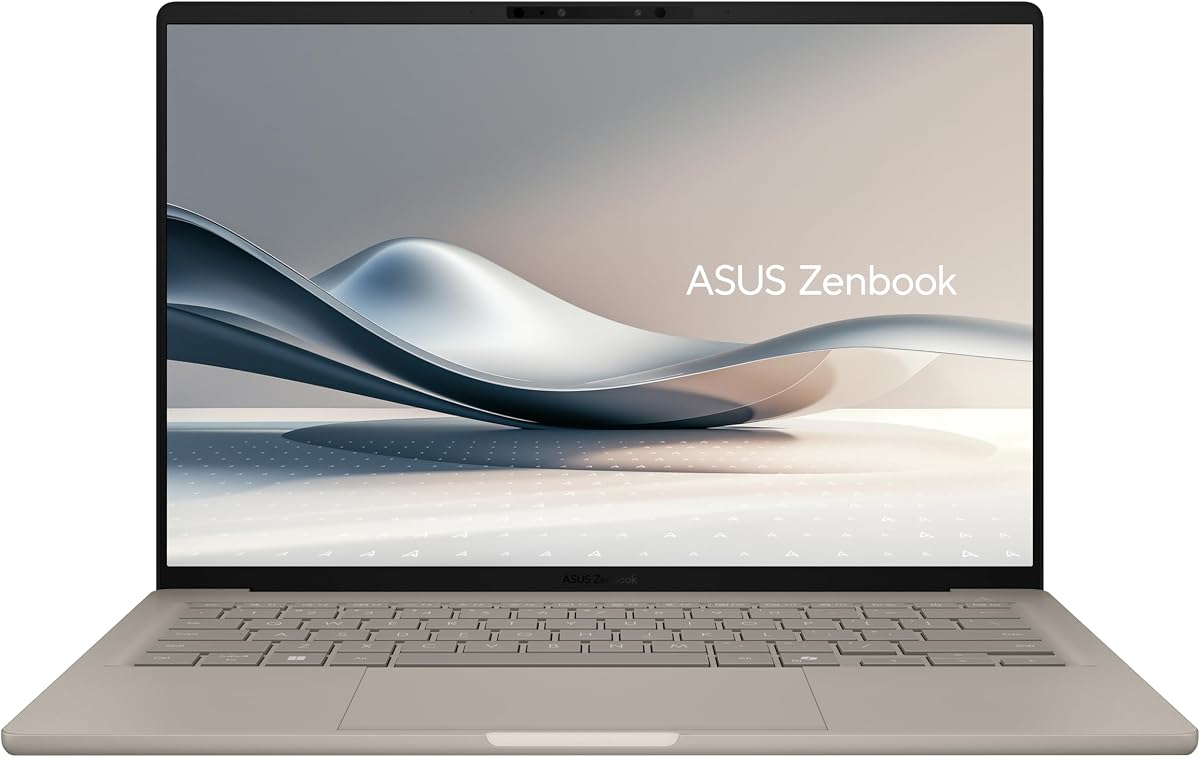
The Zenbook A14 is the lightest 14-inch Copilot+ laptop available. It features a stunning OLED display and Ceraluminum body for durability. While early adopter issues lowered the rating, the hardware is top tier.
We may earn a commission when you buy through this link, at no additional cost to you.
Weighing only 980g, it is barely noticeable in a bag. The OLED screen offers perfect blacks and vibrant colors. Battery life can reach up to 32 hours offline. The beige finish is unique and stylish.
It handles AI tasks smoothly. The Wi-Fi 6E ensures fast connections. The LPDDR5X RAM is ultra fast. If you want the absolute lightest premium experience, this is the choice. Check reviews for software updates.
Best for executives or creatives wanting high-end style. It is the peak of portability. Pay the premium for the OLED and build quality. It is a statement piece that performs well for daily needs.
Ceraluminum is 30% lighter and 3x stronger than aluminum. This material resists scratches and feels smooth to the touch while adding elegance to the design.
The OLED panel delivers true blacks and infinite contrast. This makes photo editing and movie watching significantly better than standard LCD screens.
We may earn a commission when you buy through this link, at no additional cost to you.
Selecting the right lightweight ASUS laptop requires analyzing processor efficiency, screen quality, and battery life.
Modern ASUS laptops use Snapdragon X or Intel Core processors. Snapdragon chips offer better battery life and AI features. Intel chips offer broader app compatibility for specialized legacy software.
Choose the processor that matches your daily tasks to ensure longevity and speed.
Minimum 8GB is required for smooth Windows 11 performance. 16GB is recommended for multitasking and future proofing your investment effectively.
Prioritize 16GB RAM if you open many browser tabs or apps at once.
SSDs are faster than eMMC storage. PCIe NVMe drives provide quick boot times and app launches. Aim for at least 512GB for sufficient file storage space.
Avoid eMMC models unless you rely heavily on cloud storage only.
WUXGA (1920×1200) offers more vertical space than FHD. OLED screens provide better color but cost more. Matte finishes reduce glare in bright offices.
Select a display based on your visual needs and budget constraints.
ARM based Snapdragon chips offer longer battery life. Check Wh ratings for endurance. Efficient management extends work time away from outlets.
Opt for models rated over 8 hours for true all-day usage.
Lightweight means under 3.5 lbs. 14-inch models balance portability and screen. 15-inch models are heavier but easier to use without external accessories.
Keep weight under 3 lbs for frequent travel comfort.
Military grade (MIL-STD) testing ensures survival of drops. Ceraluminum bodies resist scratches better than standard plastics. Hinges should open 180 degrees for sharing screens.
Look for military standards if you carry your laptop daily.
USB-C for charging is essential. HDMI allows external monitors. Wi-Fi 6 or 6E ensures fast internet. Check ports before buying to avoid dongles.
Ensure you have the required ports for your peripherals.
Always keep your laptop in a protective sleeve when transporting to prevent scratches and impact damage.
Clean the screen with a microfiber cloth to avoid streaks and ensure clear visibility during use.
Update Windows regularly to keep security patches current and maintain optimal performance.
No, these lightweight models focus on portability and battery life. They have integrated graphics suitable for casual tasks. For AAA gaming, consider a dedicated gaming laptop with a discrete GPU.
Most models support HDMI or USB-C video output. You can connect one or two external screens for productivity. Check the specific ports for the model you choose to verify video support.
Brightness ranges from 220 to 300 nits. They are usable indoors and in shade. In direct sunlight, reflections may affect visibility so shade or a hood helps improve clarity.
Battery life varies by usage. ARM models last up to 12 hours. Intel models typically last 6 to 8 hours. Real time performance depends on brightness and active applications.
Most lightweight ASUS laptops have soldered RAM. You should buy the version with the memory you need initially. Upgrading later is usually not possible on these models.
Copilot+ PC is a Windows certification for devices with AI hardware. It enables features like live captions and advanced search. It requires a Snapdragon X or compatible processor for full functionality.
The ASUS Zenbook A14 and Vivobook 14 are top choices for portability and performance.
Prioritize 16GB RAM and an SSD to ensure your device remains fast for years.
Always check current prices and availability before finalizing your purchase decision.